
Start here
A few places to begin, from the aircraft’s story to the people who fly it.
Meet the aircraft
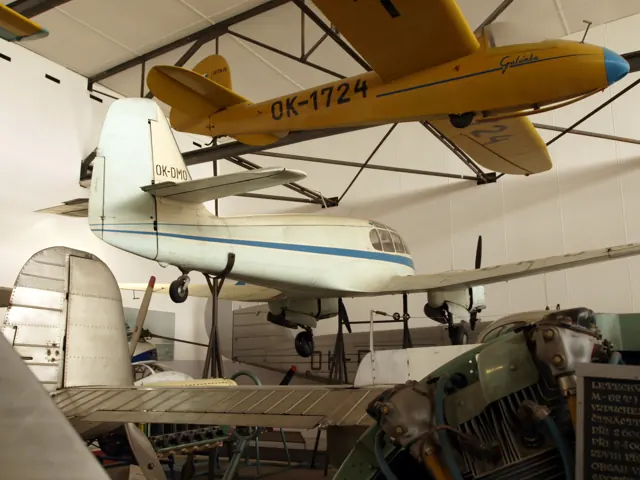
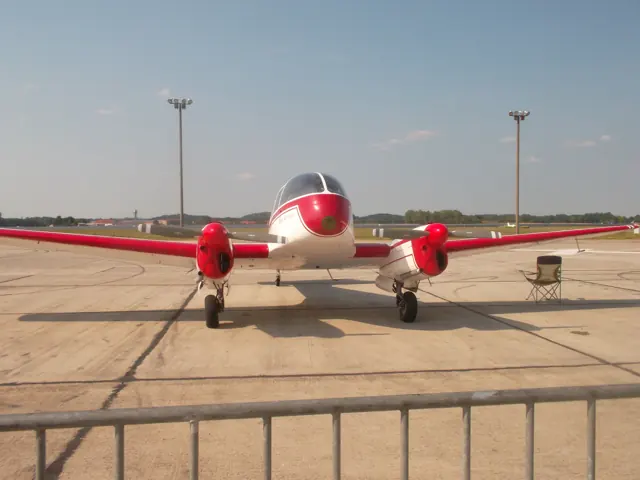
The Aero 45 helped restart Czechoslovak aircraft production after the Second World War. Its twin piston engines and enclosed cabin made it a practical small transport for civilian operators. Production began at Aero and subsequently moved to Let at Kunovice. The Ae 45, improved Ae 45S and later Ae 145 are related developments rather than three names for an identical aeroplane.
Aircraft background
Wikipedia contributors · Read more ↗An invitation after the last planned flight of the day
At a Cascade Warbirds flying day in Arlington, Bill Shepherd had enough fuel remaining for one more outing in his restored Super Aero 45. Kasprzyk accepted an introduction from the right seat, with Dan Shoemaker joining them behind. Settling into the tapering cockpit required care after a knee replacement.
FlightLog — Stan Kasprzyk, June 2024. Right-seat introduction in Bill Shepherd’s modified 1955 Super Aero 45 N145SA; later engines and instruments identified.
FlightLog — Stan Kasprzyk · Read more ↗The original MSFS 2020 release
The July 2023 Local Legend 11 release includes both the Ae-45 and Ae-145. Microsoft lists four liveries for the Ae-145 and offers the two aircraft together as a Marketplace package.
Ae-45 / Ae-145 · Microsoft Flight Simulator · MSFS 2020
Microsoft Flight Simulator Team · Read more ↗Into the cockpit
 YouTube
 Microsoft Flight Simulator · 2 min ·
Microsoft Flight Simulator | Local Legend 11: Aero Vodochody Ae-45 and Ae-145
Microsoft introduces the two Czech twins in its Local Legend release film.
Simulator · Microsoft Ae-45/Ae-145 · MSFS
Watch on YouTube ↗Preview images are served by AirframeDB. Videos open on YouTube only when you choose to watch.
Meet Aero Vodochody Ae-45 / Ae-145
The Aero 45 helped restart Czechoslovak aircraft production after the Second World War. Its twin piston engines and enclosed cabin made it a practical small transport for civilian operators. Production began at Aero and subsequently moved to Let at Kunovice.
The simulator package follows this development through the Ae 45, improved Ae 45S and later Ae 145.
Aero Vodochody Ae-45 / Ae-145
Aircraft type designators
Use the code for the model you are flying. The linked authority lists the applicable aircraft.
History & design
A post-war civil twin
The four-seat Ae-45 first flew in 1947. Aero built two hundred of the initial version between 1948 and 1951, making the civil twin an early product of the company’s return to its own aircraft development after wartime production.
Aero Vodochody · Aero company history: post-war aircraft ↗Aero company chronology: post-war production
Production moves to Kunovice
LET built the improved Aero 45S Super at Kunovice from 1954 to 1959. Aero’s chronology records 228 of that version, followed by 162 re-engined aircraft produced between 1959 and 1962. These successive versions explain why a family page must keep engine details tied to the selected model.
Aero Vodochody · Aero company history: post-war aircraft ↗Aero company chronology: post-war production
Pilot accounts
An invitation after the last planned flight of the day
At a Cascade Warbirds flying day in Arlington, Bill Shepherd had enough fuel remaining for one more outing in his restored Super Aero 45. Kasprzyk accepted an introduction from the right seat, with Dan Shoemaker joining them behind. Settling into the tapering cockpit required care after a knee replacement. He also had to learn an unfamiliar throttle range and propeller-control panel, while recognising that the right seat had no brakes.
Shepherd taxied and lined up before handing over. Kasprzyk found surprisingly light aileron forces and needed a little time to establish the correct sight picture over the sloping nose. The extensive glass gave a wonderful view but also admitted plenty of heat. Two circuits followed, with Shepherd handling configuration and coaching the flare. Kasprzyk candidly records several bounces before Shepherd took over braking during the final rollout. N145SA was a restored aircraft with later engines and updated instruments.
FlightLog — Stan Kasprzyk, June 2024. Right-seat introduction in Bill Shepherd’s modified 1955 Super Aero 45 N145SA; later engines and instruments identified.
Read the full account · FlightLog — Stan Kasprzyk ↗Bringing an Aero 145 home across the world
Santus bought a 1960 Aero 145 from an Australian collection and decided to fly it back to his museum in eastern Bohemia. Knowing that the aircraft had originally reached Australia under its own power helped persuade him to make the return journey. He had hoped to arrive before Christmas, but the trip extended to almost two months. In his interview, permits, border procedures and detention were the hardest parts, alongside an engine problem that required attention in Singapore.
He describes the aircraft itself as efficient and pleasant for long legs, while explaining that he planned reserves around sea crossings and mountainous terrain. The relief of reaching Czechia included a stop at Kunovice, where the aircraft had been built. People connected with its production came to welcome it and brought original documents. Santus wanted the Aero to remain airworthy within his collection.
Radio Prague International, Interview following the January 2024 arrival. Named owner interview about the Australia-to-Czechia delivery; historical superlatives and speculative survival percentages are excluded.
Read the full account · Radio Prague International ↗In your simulator
Systems, equipment and documentation for each developer’s aircraft.
Compare simulator versions →MSFS 2024Ae-45 / Ae-145
Microsoft Flight Simulator · Released
Ae-45 / Ae-145
Microsoft Flight Simulator · Released
MSFS 2020Ae-45 / Ae-145
Microsoft Flight Simulator · Released
Ae-45 / Ae-145
Microsoft Flight Simulator · Released
Manuals & resources
Find your next read
Choose a topic for a short introduction and a link to the original source. Simulator references identify the developer and edition they cover.
Simulator documentation
The original MSFS 2020 releaseAe-45 / Ae-145 · Microsoft Flight Simulator · MSFS 2020
The July 2023 Local Legend 11 release includes both the Ae-45 and Ae-145. Microsoft lists four liveries for the Ae-145 and offers the two aircraft together as a Marketplace package.
2023-07-25 · release and package scope
Microsoft Flight Simulator Team · Read the source ↗Pilot account
An invitation after the last planned flight of the dayFlightLog — Stan Kasprzyk, June 2024. Right-seat introduction in Bill Shepherd’s modified 1955 Super Aero 45 N145SA; later engines and instruments identified.
At a Cascade Warbirds flying day in Arlington, Bill Shepherd had enough fuel remaining for one more outing in his restored Super Aero 45. Kasprzyk accepted an introduction from the right seat, with Dan Shoemaker joining them behind. Settling into the tapering cockpit required care after a knee replacement. He also had to learn an unfamiliar throttle range and propeller-control panel, while recognising that the right seat had no brakes. Shepherd taxied and lined up before handing over.
Stan Kasprzyk
FlightLog — Stan Kasprzyk · Read the source ↗Bringing an Aero 145 home across the worldRadio Prague International, Interview following the January 2024 arrival. Named owner interview about the Australia-to-Czechia delivery; historical superlatives and speculative survival percentages are excluded.
Santus bought a 1960 Aero 145 from an Australian collection and decided to fly it back to his museum in eastern Bohemia. Knowing that the aircraft had originally reached Australia under its own power helped persuade him to make the return journey. He had hoped to arrive before Christmas, but the trip extended to almost two months. In his interview, permits, border procedures and detention were the hardest parts, alongside an engine problem that required attention in Singapore.
Richard Santus, interviewed by Ruth Fraňková
Radio Prague International · Read the source ↗Read the original documentation from the people who created it. Manuals open on their publisher’s website.
Manual
Microsoft Flight Simulator aircraft manualsMicrosoft / aircraft developersAircraft background
Aero Ae-45Wikipedia contributors · Research background · Wikipedia revision 203851157 · retrieved 2026-09-12Resource
MSFS 2024 FAQ and edition aircraft inventoryMicrosoftDeveloper documentation
Microsoft Flight Simulator Unveils Local Legend 11: The Aero Vodochody Ae-45 and Ae-145Microsoft Flight Simulator Team · 2023-07-25 · release and package scopeType designator
ICAO Doc 8643 — aircraft type designatorsInternational Civil Aviation Organization · Public search data retrieved 2026-09-14; authority update 2026-09-03Aircraft history
Aero company history: post-war aircraftAero Vodochody · Aero company chronology: post-war productionBuilt-in force-feedback profiles
Read the documentary basis, editable starting settings and remaining questions for the aircraft you fly. Each explanation refers to the exact profile revision shown.
Catalogue programme-20261022-v1 · 2 profile choices
Aero Vodochody Ae-45
Free and Pro · Revision 3 · Partial review
MSFS 2020 · MSFS 2024
Aero Vodochody Ae-45: The compact piston twin uses the profile's reversible-control resistance.
Aero Vodochody Ae-145
Free and Pro · Revision 1 · Partial review
MSFS 2020 · MSFS 2024
Aero Vodochody Ae-145: The compact piston twin uses the profile's reversible-control resistance.
Aero Vodochody Ae-145
Aero Vodochody Ae-145: The compact piston twin uses the profile's reversible-control resistance.
Aircraft and simulator scope
- Aero Vodochody Ae-145 · MSFS 2020 · Variant starting point
- Aero Vodochody Ae-145 · MSFS 2024 · Variant starting point
Microsoft Local Legend 11 describes the Ae-45 and Ae-145 package; restored examples and simulator editions can differ. · Selected choice: Aero Vodochody Ae-145. Documentary scope does not establish every variant, add-on revision or simulator binding.
The simulator model and controls
The Aero 45 helped restart Czechoslovak aircraft production after the Second World War. Its twin piston engines and enclosed cabin made it a practical small transport for civilian operators. Production began at Aero and subsequently moved to Let at Kunovice.
This starting point selects Aero Vodochody Ae-145. Its aircraft-level settings do not select a particular developer’s custom systems.
How this profile feels
Spring resistance builds with the selected airspeed response. A separate aerodynamic term adds speed-dependent control load.
Valid trim provides the configured pressure relief. Autopilot following is off.
Controls and trim
The Ae-45 and supercharged Ae-145 are compact piston twins. The package describes electric propeller-pitch, flap and landing-gear systems. Each model has its own starting profile and retains its engine configuration.
About the values
The gains are normalized profile settings. They describe the chosen effect balance; hand force depends on the device and its output limits. IAS references are tuning values rather than operating limits. Physical acceptance of this revision remains pending.
What the documentation establishes
The Ae-45 and Ae-145 are distinct twin-engine aircraft in the same package; the Ae-145 adds supercharging and revised controls.
Electric propeller-pitch, flap and landing-gear systems are described for the package; their force-cue amplitudes are not.
The stated cruise and maximum speeds are in mph; they do not establish the preset's indicated-airspeed force reference.
Documentary review and sources
These decisions describe the documentary basis and remaining gaps for this revision. Aircraft documentation and a starting setting describe different kinds of evidence.
Aircraft and variant
ReviewedThis starting point selects Aero Vodochody Ae-145. Its aircraft-level settings do not select a particular developer’s custom systems.
Flight controls
Not yet reviewedThe Ae-45 and supercharged Ae-145 are compact piston twins. The package describes electric propeller-pitch, flap and landing-gear systems. Each model has its own starting profile and retains its engine configuration.
Trim
Not yet reviewedPitch relief is a selected response to valid elevator-trim input; the package's electrical configuration systems do not define its authority. Pitch authority 0.3 provides load relief and permitted centre movement; roll authority is 0.
Autopilot and stability
Not yet reviewedAutopilot following is off; the configured spring and load retain the hardware feel.
Equipment
ReviewedGear, flap and ground cues follow the selected settings and available simulator-reported states.
Speeds and limits
ReviewedThe indicated-speed references set the profile response scale; they are separate from aircraft operating limits.
Simulator integration
Not yet reviewedThe profile targets msfs2020, msfs2024. Add-on-specific controls use only the supported references configured by this profile.
Force-feedback settings
Not yet reviewedThe settings define the profile’s effect balance. Device output limits affect physical hand force.
Starting settings and their rationale
These configured values are starting estimates. The explanations describe what each setting controls; physical validation appears separately below.
| Setting | Starting value | What it controls and why |
|---|---|---|
| Spring strength | Starting value0.74 | What it controls and whyThe compact piston twin uses the profile's reversible-control resistance. The baseline spring is 0.74. Its low-speed blend reaches baseline strength at 72.5 KIAS. |
| Master force gain | Starting value0.85 | What it controls and whyScales overall profile strength while preserving effect balance, subject to device and output limits. |
| Profile force gain | Starting value0.8 | What it controls and whyThe aerodynamic-load gain is 0.8 with an indicated-speed reference of 145 KIAS. This supplies speed-dependent loading alongside the spring. |
| Force tuning speed/reference | Starting value145.0 kt | What it controls and whySets the IAS reference for aerodynamic loading. It is an estimate, not published cruise TAS or a flight limit. |
| Spring response reference speed | Starting value72.5 kt | What it controls and whySets the IAS where the low-speed blend reaches baseline strength; high-speed stiffening also uses it. |
| Aileron force scale | Starting value0.72 | What it controls and whyRoll and pitch aerodynamic scales are 0.72 and 1, respectively. They set the aerodynamic axis balance. No custom spring-travel curve is enabled. |
| Elevator force scale | Starting value1.0 | What it controls and whyScales pitch aerodynamic loading; pitch spring travel and trim responses are separate settings. |
| Trim feel | Starting valueEnabled | What it controls and whyRetained for compatibility and group membership. Trim relief, rather than this flag, controls centre movement. |
| Trim relief | Starting valueEnabled | What it controls and whyAllows trim relief with supported control law and valid telemetry. Axis authorities set its amount. |
| Autopilot follow | Starting valueDisabled | What it controls and whyAutopilot following is off; the configured spring and load retain the hardware feel. |
| Autopilot neutral hold | Starting valueDisabled | What it controls and whyPermits centering hold during a supported AP state, separate from following a moving target. |
| Output force limit | Starting value0.55 | What it controls and whyCaps directed-force output. Native spring effects and device limits remain separate. |
All 44 starting settings and their rationale
The settings define the profile’s effect balance. Device output limits affect physical hand force.
| Setting | Starting value | What it controls and why |
|---|---|---|
| Spring strength | Starting value0.74 | What it controls and whyThe compact piston twin uses the profile's reversible-control resistance. The baseline spring is 0.74. Its low-speed blend reaches baseline strength at 72.5 KIAS. |
| Spring deadband | Starting value0.045 | What it controls and whySets travel around the centre before the baseline spring resists. Smaller values engage it sooner. |
| Profile force gain | Starting value0.8 | What it controls and whyThe aerodynamic-load gain is 0.8 with an indicated-speed reference of 145 KIAS. This supplies speed-dependent loading alongside the spring. |
| Master force gain | Starting value0.85 | What it controls and whyScales overall profile strength while preserving effect balance, subject to device and output limits. |
| QBlend Enabled | Starting valueEnabled | What it controls and whyAllows baseline spring strength to rise with indicated airspeed where the control law permits it. |
| QSpring Minimum Factor | Starting value0.5 | What it controls and whySets low-speed spring strength as a fraction of baseline when blending is enabled. One keeps full strength. |
| QSpring Start Knots | Starting value20 kt | What it controls and whySets the IAS where the low-speed spring blend starts rising. This is a feel threshold, not a flight limit. |
| Spring response reference speed | Starting value72.5 kt | What it controls and whySets the IAS where the low-speed blend reaches baseline strength; high-speed stiffening also uses it. |
| Force tuning speed/reference | Starting value145.0 kt | What it controls and whySets the IAS reference for aerodynamic loading. It is an estimate, not published cruise TAS or a flight limit. |
| Airspeed spring stiffening gain | Starting value0.15 | What it controls and whyThe high-speed spring-stiffening gain is 0.15. It strengthens the permitted spring response above 72.5 KIAS, with the squared-speed ratio capped at 5. |
| Airspeed spring stiffening limit | Starting value5 | What it controls and whyLimits the squared airspeed ratio used for high-speed spring stiffening; it is not a device-force cap. |
| Aileron force scale | Starting value0.72 | What it controls and whyRoll and pitch aerodynamic scales are 0.72 and 1, respectively. They set the aerodynamic axis balance. No custom spring-travel curve is enabled. |
| Elevator force scale | Starting value1.0 | What it controls and whyScales pitch aerodynamic loading; pitch spring travel and trim responses are separate settings. |
| Output force limit | Starting value0.55 | What it controls and whyCaps directed-force output. Native spring effects and device limits remain separate. |
| Trim feel | Starting valueEnabled | What it controls and whyRetained for compatibility and group membership. Trim relief, rather than this flag, controls centre movement. |
| Trim relief | Starting valueEnabled | What it controls and whyAllows trim relief with supported control law and valid telemetry. Axis authorities set its amount. |
| Elevator Authority | Starting value0.3 | What it controls and whyPitch relief is a selected response to valid elevator-trim input; the package's electrical configuration systems do not define its authority. Pitch authority 0.3 provides load relief and permitted centre movement; roll authority is 0. |
| Aileron Authority | Starting value0 | What it controls and whyScales supported roll-trim relief and permitted centre movement. Zero removes roll response. |
| Force Trim Enabled | Starting valueDisabled | What it controls and whyEnables local force trim, separate from aircraft-owned trim and add-on integration qualification. |
| GLoad Enabled | Starting valueEnabled | What it controls and whyAllows load-factor changes to modify permitted spring laws. Passive fly-by-wire feel can suppress it. |
| Rate Damping Enabled | Starting valueEnabled | What it controls and whyEnables rate damping with the configured coefficients and control law. |
| Autopilot follow | Starting valueDisabled | What it controls and whyAutopilot following is off; the configured spring and load retain the hardware feel. |
| Autopilot follow authority | Starting value0.1 | What it controls and whySets admitted AP-follow gain, not a percentage of travel. Runtime ownership and input limits still apply. |
| Autopilot neutral hold | Starting valueDisabled | What it controls and whyPermits centering hold during a supported AP state, separate from following a moving target. |
| Autopilot neutral hold strength | Starting value0.6 | What it controls and whySets admitted AP neutral-hold strength; inactive while neutral hold is disabled. |
| Enabled | Starting valueEnabled | What it controls and whyEnables aerodynamic cues; each still needs nonzero strength and its simulator conditions. |
| Gain | Starting value0.35 | What it controls and whySets stall-buffet strength. Zero removes the cue without changing simulator stalls or warnings. |
| Gain | Starting value0 | What it controls and whySets high-Mach buffet strength; onset and full-strength thresholds are separate. |
| Gain | Starting value0.14 | What it controls and whySets flap buffet at the configured position and speed gates. Flap movement texture is separate. |
| Maximum flap index | Starting value3 | What it controls and whySets the final flap index for detent normalization. UP plus three detents uses maximum index3. |
| Minimum flap index | Starting value2 | What it controls and whySets the first flap detent that admits buffet; this is a handle index, not degrees. |
| Gain | Starting value0.1 | What it controls and whySets gear aerodynamic buffet; movement and ground-contact cues are separate. |
| Shaker Enabled | Starting valueDisabled | What it controls and whyPermits shaker at supported warning conditions; the switch does not establish aircraft equipment. |
| Stick shaker amplitude | Starting value0.5 | What it controls and whySets triggered shaker strength; inactive while the shaker feature is disabled. |
| Enabled | Starting valueEnabled | What it controls and whyEnables ground effects; each still needs its own strength and contact or motion telemetry. |
| Gain | Starting value0.4 | What it controls and whySets rolling texture strength, modified by speed, surface and undercarriage configuration. |
| Gain | Starting value0.25 | What it controls and whySets gear-bump texture during ground motion, separate from touchdown impact. |
| Gain | Starting value0.65 | What it controls and whySets landing-impact strength; landing telemetry and response shape determine the pulse. |
| Gain | Starting value0 | What it controls and whySets reverse-thrust vibration with valid reverser and engine conditions. Zero removes the cue. |
| Enabled | Starting valueEnabled | What it controls and whyEnables engine cues with nonzero settings and valid running-engine telemetry. |
| Gain | Starting value0.12 | What it controls and whySets estimated engine vibration using configured telemetry and response, not measured cockpit vibration. |
| Enabled | Starting valueEnabled | What it controls and whyEnables accessory cues with configured strengths and observed accessory movement. |
| Gain | Starting value0.12 | What it controls and whySets texture from observed flap movement; a command without movement does not establish the cue. |
| Gain | Starting value0.12 | What it controls and whySets texture from observed gear movement, separate from aerodynamic and touchdown effects. |
Limits and open questions
- The announcement does not describe the Ae-45 or Ae-145 elevator and aileron transmission or cockpit force source.
- No trim mechanism, travel or sign is documented for either Aero twin in this announcement.
- The Aero package announcement supplies no autopilot model or servo interface; following remains an unqualified preset choice.
- Package inclusion establishes simulator identity, but no control-output variables or force-feedback binding contract is published here.
- Revised Ae-145 controls and published performance do not quantify either aircraft's stick forces or pitch-to-roll ratio.
Physical validation
No physical force validation is recorded in this public catalogue for this revision. Documentary review and software checks do not establish how a particular device feels.
Discuss this aircraft (0)
Questions, observations and useful sources from the community.
No published discussions yet. Bring a question or share a useful source.
Open aircraft discussions →Content expanded · What’s new
Something missing or a source that needs attention?
Suggest a correction ↗