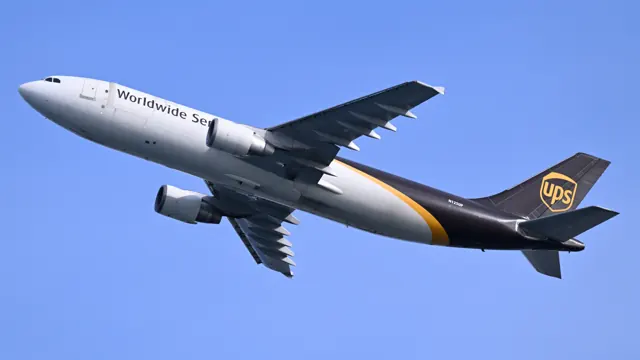

Start here
A few places to begin, from the aircraft’s story to the people who fly it.
Meet the aircraft
The A300 established Airbus in the airline market during the 1970s. Its broad fuselage and two underwing engines offered a new alternative among large transports. Later developments changed the cockpit, wing details and systems, with the A300-600 becoming a major branch. Early A300s had a three-person flight deck; later versions used two pilots. The family also became important in freight service.
Aircraft background
Wikipedia contributors · Read more ↗The satisfaction of a carefully flown parabola
Delesalle became involved with the A300 Zero G while leading flight testing at Sogerma, which converted the former Airbus prototype for its new research role. Familiarity with the aircraft brought him and flight-test engineer Serge Granereau into the operating crews. He continued flying it after moving to ATR.
December 2012 interview by Stéphane Sebile; modified A300B Zero G, not an airline A300-600. Full interview read.
Space Quotes / Souvenirs d’espace · Read more ↗Trim and hydraulics in the A300 cockpit
The iniBuilds A300 guide identifies paired pitch-trim wheels, rudder-trim controls and hydraulic controls, and describes the flight-phase use of the autopilot.
Airbus A300-600R · iniBuilds · iniBuilds · MSFS 2024 · MSFS 2020
iniBuilds · Read more ↗Into the cockpit
 YouTube
 Mehrad Watson · 1 min ·
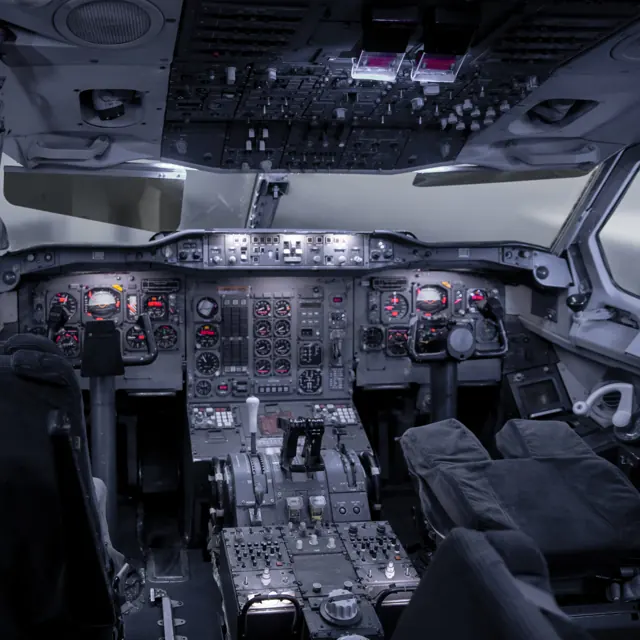
A Day on Iran Air Airbus A300-600R Cockpit
Flight-deck footage from an Iran Air A300-600R journey to Vienna.
Real aircraft · A300-600R
Watch on YouTube ↗Preview images are served by AirframeDB. Videos open on YouTube only when you choose to watch.
Meet Airbus A300-600R
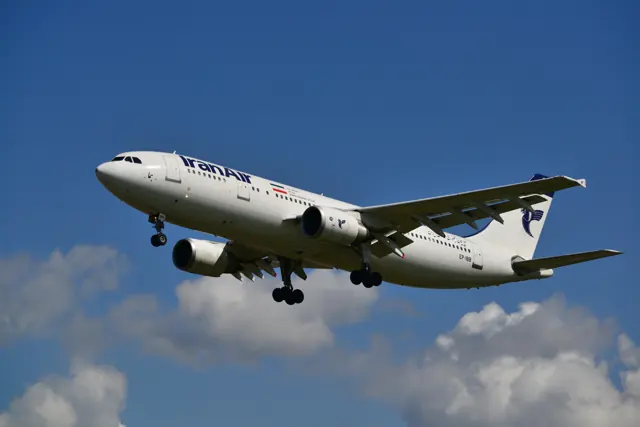
The A300 established Airbus in the airline market during the 1970s. Its broad fuselage and two underwing engines offered a new alternative among large transports. Later developments changed the cockpit, wing details and systems, with the A300-600 becoming a major branch.
Early A300s had a three-person flight deck; later versions used two pilots. The family also became important in freight service. Simulator manuals describe the flight deck and systems of their named A300 variant.
Airbus A300-600R
Airbus → · Explore the family →
Airbus A300-600R
Wikipedia contributors · Airbus A300 ↗iniBuilds · MSFS 2024 · MSFS 2020 →Aircraft type designators
Use the code for the model you are flying. The linked authority lists the applicable aircraft.
A300-600 passenger and freighter models
ICAO Doc 8643 — aircraft type designators ↗Checked 2026-09-14History & design
The aircraft that brought the Airbus partners together
The A300 grew from European studies for a shared short-to-medium-haul airliner. Its design changed as prospective customers shaped the requirement: the A300B became smaller than the original proposal, with an eight-abreast cabin and space for two LD3 containers side by side below the floor. The project also required manufacturers in different countries to agree how to divide design, equipment and production responsibilities.
On 28 October 1972, the first A300B1 flew from Toulouse, a day later than planned because of fog. Max Fischl and Bernard Ziegler were at the controls, supported by the flight-test team. The return brought gusty winds and a crosswind landing. Airbus's anniversary history traces the later family development into the A310, A300-600 and freighters, while the original fuselage concept also contributed to the A330 and A340.
Airbus · 50th anniversary of the first flight of the Airbus A300 ↗Airbus retrospective, 28 October 2022
Development milestones
First flight: 28 October 1972 ( 1972-10-28 )
Wikipedia contributors · Airbus A300 ↗Airbus A300 · family/variant named by the source · Wikipedia revision 1372527615
Pilot accounts
The satisfaction of a carefully flown parabola
Delesalle became involved with the A300 Zero G while leading flight testing at Sogerma, which converted the former Airbus prototype for its new research role. Familiarity with the aircraft brought him and flight-test engineer Serge Granereau into the operating crews. He continued flying it after moving to ATR. In his December 2012 interview, he describes the attraction of a task in which attitude and speed continually change and the crew must work with exceptional precision.
The specialised manoeuvre divides pitch, lateral control and thrust among crew members. Delesalle says the pleasure comes from holding the acceleration indication close to zero, even while tightly strapped into his seat. Time off duty in the cabin lets him share the passengers' weightlessness and understand what the scientists need. In particular, he values those visits for showing why smooth transitions matter to the people conducting experiments.
December 2012 interview by Stéphane Sebile; modified A300B Zero G, not an airline A300-600. Full interview read.
Read the full account · Space Quotes / Souvenirs d’espace ↗Every parabola is a fresh challenge
Le Barzic tells DLR how parabolic flying followed a long career testing military aircraft. As demanding fighter trials became less appealing, the French flight-test centre needed an experienced pilot for its weightlessness programme. He became captain of the A300 Zero G in 2000. His broad experience made conversion manageable, but he emphasises that each parabola remained difficult and different, even after thousands of repetitions.
Much of his account concerns the work surrounding the manoeuvres. Before flying, the crew reviews weather, agrees the route and manoeuvre periods with air traffic control, and determines the fuel requirement. A familiar, well-established team helps. Afterwards, he debriefs with engineers, discusses the quality of the weightlessness with scientists and prepares the next day's flight. The unusual aircraft still requires an ordinary pilot's planning discipline, followed by a demanding day of flying and coordination.
DLR brochure, August 2009 imprint; PDF pp.16–17 / printed pp.30–33. A300 Zero G research operations; complete interview read.
Read the full account · German Aerospace Center (DLR) ↗Straight from flight school to a classic freight cockpit
Brown describes joining a European parcel carrier on the A300 after completing flight training in the United States and converting his qualifications in Europe. Speaking in 2023, he says the widebody was his first airline type, so his personal handling comparisons were limited to training aircraft. The opportunity to begin his airline career on it still felt special as he approached five years with the company.
He enjoyed the A300's conventional control column and the visible cables, rods and pulleys in its avionics compartment. His aircraft was the A300-600, with two pilots rather than the earlier three-person flight deck. He describes nights carrying parcels across Europe and Africa, with fewer annual flying hours than many passenger operations. Despite other fleets at his company, he was in no hurry to change aircraft. This is a working pilot's affectionate account of his own freight operation.
2023 AvTalk 222 transcript; 37:35–41:26, PDF pp.19–21. A300-600 freight pilot; relevant interview segment read in full.
Read the full account · Flightradar24 / AvTalk ↗In your simulator
Systems, equipment and documentation for each developer’s aircraft.
MSFS 2024 · MSFS 2020Airbus A300-600R · iniBuilds
iniBuilds · Released
Airbus A300-600R · iniBuilds
iniBuilds · Released
Manuals & resources
Find your next read
Choose a topic for a short introduction and a link to the original source. Simulator references identify the developer and edition they cover.
Simulator documentation
Trim and hydraulics in the A300 cockpitAirbus A300-600R · iniBuilds · iniBuilds · MSFS 2024 · MSFS 2020
The iniBuilds A300 guide identifies paired pitch-trim wheels, rudder-trim controls and hydraulic controls, and describes the flight-phase use of the autopilot.
document snapshot; exact installed package not observed · PDF pp14-15,39; pedestal, overhead, climb checklist
iniBuilds · Read the source ↗Pilot account
The satisfaction of a carefully flown parabolaDecember 2012 interview by Stéphane Sebile; modified A300B Zero G, not an airline A300-600. Full interview read.
Delesalle became involved with the A300 Zero G while leading flight testing at Sogerma, which converted the former Airbus prototype for its new research role. Familiarity with the aircraft brought him and flight-test engineer Serge Granereau into the operating crews. He continued flying it after moving to ATR. In his December 2012 interview, he describes the attraction of a task in which attitude and speed continually change and the crew must work with exceptional precision.
Eric Delesalle
Space Quotes / Souvenirs d’espace · Read the source ↗Every parabola is a fresh challengeDLR brochure, August 2009 imprint; PDF pp.16–17 / printed pp.30–33. A300 Zero G research operations; complete interview read.
Le Barzic tells DLR how parabolic flying followed a long career testing military aircraft. As demanding fighter trials became less appealing, the French flight-test centre needed an experienced pilot for its weightlessness programme. He became captain of the A300 Zero G in 2000. His broad experience made conversion manageable, but he emphasises that each parabola remained difficult and different, even after thousands of repetitions.
Gilles Le Barzic
German Aerospace Center (DLR) · Read the source ↗Read the original documentation from the people who created it. Manuals open on their publisher’s website.
Manual
A300 aircraft manualiniBuilds A300 aircraft manual postiniBuilds Microsoft Flight Simulator aircraft manualsMicrosoft / aircraft developersAircraft background
Airbus A300Wikipedia contributors · Research background · Wikipedia revision 1372527615 · retrieved 2026-09-12Product
A300-600R Airliner for MSFS-2024iniBuilds · Official developer / designated store catalogue · checked 2026-09-12 A300-600R Airliner for MSFSiniBuilds · Official developer / designated store catalogue · checked 2026-09-12 A300B4 ProfessionalJust Flight · Official developer / designated store catalogue · checked 2026-09-12History
50th anniversary of the first flight of the Airbus A300Airbus · 28 October 2022 · programme historyType designator
ICAO Doc 8643 — aircraft type designatorsInternational Civil Aviation Organization · Public search data retrieved 2026-09-14; authority update 2026-09-03Built-in force-feedback profiles
Read the documentary basis, editable starting settings and remaining questions for the aircraft you fly. Each explanation refers to the exact profile revision shown.
Catalogue programme-20261022-v1 · 3 profile choices
iniBuilds A300-600R
iniBuilds · Free and Pro · Revision 4 · Inherited starting point
MSFS 2020 · MSFS 2024
iniBuilds A300-600R: The conventional yoke uses a powered-control approximation with artificial centering; A320-style passive sidestick assumptions are not applied.
iniBuilds A300-600RF
iniBuilds · Free and Pro · Revision 3 · Inherited starting point
MSFS 2020 · MSFS 2024
iniBuilds A300-600RF: The conventional yoke uses a powered-control approximation with artificial centering; A320-style passive sidestick assumptions are not applied.
Airbus A300-600R
Free and Pro · Revision 2 · Partial review
MSFS 2024 · MSFS 2020
Airbus A300-600R: The conventional yoke uses a powered-control approximation with artificial centering; A320-style passive sidestick assumptions are not applied.
iniBuilds A300-600R
iniBuilds A300-600R: The conventional yoke uses a powered-control approximation with artificial centering; A320-style passive sidestick assumptions are not applied.
Aircraft and simulator scope
- iniBuilds A300-600R · iniBuilds · MSFS 2020 · Add-on starting point
- iniBuilds A300-600R · iniBuilds · MSFS 2024 · Add-on starting point
The simulator model and controls
The A300 established Airbus in the airline market during the 1970s. Its broad fuselage and two underwing engines offered a new alternative among large transports. Later developments changed the cockpit, wing details and systems, with the A300-600 becoming a major branch.
This profile selects iniBuilds A300-600R for MSFS 2020, MSFS 2024.
How this profile feels
The spring stays independent of airspeed. Directed aerodynamic loading is omitted.
Pitch-trim relief is off. Autopilot following is off.
Controls and trim
The iniBuilds A300 cockpit manual shows a conventional yoke, pitch-trim wheels and rudder-trim controls. This is the A300-600R generation, distinct from the later Airbus passive-sidestick family. Passenger and freighter packages offer GE and Pratt & Whitney engine choices. The original package's MSFS 2024 compatibility path and the separate native Premium edition have different software scope.
The selected implementation
iniBuilds separates passenger/freighter and GE/PW fits. Original-package 2024 beta compatibility is distinct from native Premium and its feature scope.
About the values
The gains are normalized profile settings. They describe the chosen effect balance; hand force depends on the device and its output limits. IAS references are tuning values rather than operating limits. Physical acceptance of this revision remains pending.
Documentary review and sources
These decisions describe the documentary basis and remaining gaps for this revision. Aircraft documentation and a starting setting describe different kinds of evidence.
Aircraft and variant
InheritedThis profile selects iniBuilds A300-600R for MSFS 2020, MSFS 2024.
Flight controls
InheritedThe iniBuilds A300 cockpit manual shows a conventional yoke, pitch-trim wheels and rudder-trim controls. This is the A300-600R generation, distinct from the later Airbus passive-sidestick family. Passenger and freighter packages offer GE and Pratt & Whitney engine choices. The original package's MSFS 2024 compatibility path and the separate native Premium edition have different software scope.
Trim
InheritedThe manual's stabilizer-trim controls support a pitch-trim context, but their presence alone does not calibrate the profile's trim-centre response. Pitch relief is off, with stored authority 0; roll authority is 0.
Autopilot and stability
InheritedAutopilot following is off; the configured spring and load retain the hardware feel.
Equipment
InheritediniBuilds separates passenger/freighter and GE/PW fits. Original-package 2024 beta compatibility is distinct from native Premium and its feature scope.
Speeds and limits
InheritedThe indicated-speed references set the profile response scale; they are separate from aircraft operating limits.
Simulator integration
InheritedThe profile targets msfs2020, msfs2024. Add-on-specific controls use only the supported references configured by this profile.
Force-feedback settings
InheritedThe settings define the profile’s effect balance. Device output limits affect physical hand force.
Starting settings and their rationale
These configured values are starting estimates. The explanations describe what each setting controls; physical validation appears separately below.
| Setting | Starting value | What it controls and why |
|---|---|---|
| Spring strength | Starting value0.8 | What it controls and whyThe conventional yoke uses a powered-control approximation with artificial centering; A320-style passive sidestick assumptions are not applied. The baseline spring is 0.8. Low-speed spring blending is off. |
| Master force gain | Starting value0.85 | What it controls and whyScales overall profile strength while preserving effect balance, subject to device and output limits. |
| Profile force gain | Starting value0 | What it controls and whyThe stored 0 aerodynamic-load gain is inactive under the zero hydraulic-load factor. |
| Force tuning speed/reference | Starting value250 kt | What it controls and whySets the IAS reference for aerodynamic loading. It is an estimate, not published cruise TAS or a flight limit. |
| Spring response reference speed | Starting value65 kt | What it controls and whySets the IAS where the low-speed blend reaches baseline strength; high-speed stiffening also uses it. |
| Aileron force scale | Starting value0.78 | What it controls and whyRoll and pitch aerodynamic scales are 0.78 and 1, respectively. These stored weights do not create directed aerodynamic loading while that term is inactive. No custom spring-travel curve is enabled. |
| Elevator force scale | Starting value1 | What it controls and whyScales pitch aerodynamic loading; pitch spring travel and trim responses are separate settings. |
| Trim feel | Starting valueDisabled | What it controls and whyRetained for compatibility and group membership. Trim relief, rather than this flag, controls centre movement. |
| Trim relief | Starting valueDisabled | What it controls and whyAllows trim relief with supported control law and valid telemetry. Axis authorities set its amount. |
| Autopilot follow | Starting valueDisabled | What it controls and whyAutopilot following is off; the configured spring and load retain the hardware feel. |
| Autopilot neutral hold | Starting valueDisabled | What it controls and whyPermits centering hold during a supported AP state, separate from following a moving target. |
| Output force limit | Starting value0.55 | What it controls and whyCaps directed-force output. Native spring effects and device limits remain separate. |
All 44 starting settings and their rationale
The settings define the profile’s effect balance. Device output limits affect physical hand force.
| Setting | Starting value | What it controls and why |
|---|---|---|
| Spring strength | Starting value0.8 | What it controls and whyThe conventional yoke uses a powered-control approximation with artificial centering; A320-style passive sidestick assumptions are not applied. The baseline spring is 0.8. Low-speed spring blending is off. |
| Spring deadband | Starting value0.035 | What it controls and whySets travel around the centre before the baseline spring resists. Smaller values engage it sooner. |
| Profile force gain | Starting value0 | What it controls and whyThe stored 0 aerodynamic-load gain is inactive under the zero hydraulic-load factor. |
| Master force gain | Starting value0.85 | What it controls and whyScales overall profile strength while preserving effect balance, subject to device and output limits. |
| QBlend Enabled | Starting valueDisabled | What it controls and whyAllows baseline spring strength to rise with indicated airspeed where the control law permits it. |
| QSpring Minimum Factor | Starting value0.55 | What it controls and whySets low-speed spring strength as a fraction of baseline when blending is enabled. One keeps full strength. |
| QSpring Start Knots | Starting value8 kt | What it controls and whySets the IAS where the low-speed spring blend starts rising. This is a feel threshold, not a flight limit. |
| Spring response reference speed | Starting value65 kt | What it controls and whySets the IAS where the low-speed blend reaches baseline strength; high-speed stiffening also uses it. |
| Force tuning speed/reference | Starting value250 kt | What it controls and whySets the IAS reference for aerodynamic loading. It is an estimate, not published cruise TAS or a flight limit. |
| Airspeed spring stiffening gain | Starting value0 | What it controls and whyThe high-speed spring-stiffening gain is 0. No additional speed-driven stiffening is added; this does not disable independent aerodynamic loading. |
| Airspeed spring stiffening limit | Starting value5 | What it controls and whyLimits the squared airspeed ratio used for high-speed spring stiffening; it is not a device-force cap. |
| Aileron force scale | Starting value0.78 | What it controls and whyRoll and pitch aerodynamic scales are 0.78 and 1, respectively. These stored weights do not create directed aerodynamic loading while that term is inactive. No custom spring-travel curve is enabled. |
| Elevator force scale | Starting value1 | What it controls and whyScales pitch aerodynamic loading; pitch spring travel and trim responses are separate settings. |
| Output force limit | Starting value0.55 | What it controls and whyCaps directed-force output. Native spring effects and device limits remain separate. |
| Trim feel | Starting valueDisabled | What it controls and whyRetained for compatibility and group membership. Trim relief, rather than this flag, controls centre movement. |
| Trim relief | Starting valueDisabled | What it controls and whyAllows trim relief with supported control law and valid telemetry. Axis authorities set its amount. |
| Elevator Authority | Starting value0 | What it controls and whyThe manual's stabilizer-trim controls support a pitch-trim context, but their presence alone does not calibrate the profile's trim-centre response. Pitch relief is off, with stored authority 0; roll authority is 0. |
| Aileron Authority | Starting value0 | What it controls and whyScales supported roll-trim relief and permitted centre movement. Zero removes roll response. |
| Force Trim Enabled | Starting valueDisabled | What it controls and whyEnables local force trim, separate from aircraft-owned trim and add-on integration qualification. |
| GLoad Enabled | Starting valueEnabled | What it controls and whyAllows load-factor changes to modify permitted spring laws. Passive fly-by-wire feel can suppress it. |
| Rate Damping Enabled | Starting valueEnabled | What it controls and whyEnables rate damping with the configured coefficients and control law. |
| Autopilot follow | Starting valueDisabled | What it controls and whyAutopilot following is off; the configured spring and load retain the hardware feel. |
| Autopilot follow authority | Starting value0.1 | What it controls and whySets admitted AP-follow gain, not a percentage of travel. Runtime ownership and input limits still apply. |
| Autopilot neutral hold | Starting valueDisabled | What it controls and whyPermits centering hold during a supported AP state, separate from following a moving target. |
| Autopilot neutral hold strength | Starting value0.6 | What it controls and whySets admitted AP neutral-hold strength; inactive while neutral hold is disabled. |
| Enabled | Starting valueEnabled | What it controls and whyEnables aerodynamic cues; each still needs nonzero strength and its simulator conditions. |
| Gain | Starting value0 | What it controls and whySets stall-buffet strength. Zero removes the cue without changing simulator stalls or warnings. |
| Gain | Starting value0 | What it controls and whySets high-Mach buffet strength; onset and full-strength thresholds are separate. |
| Gain | Starting value0 | What it controls and whySets flap buffet at the configured position and speed gates. Flap movement texture is separate. |
| Maximum flap index | Starting value3 | What it controls and whySets the final flap index for detent normalization. UP plus three detents uses maximum index3. |
| Minimum flap index | Starting value2 | What it controls and whySets the first flap detent that admits buffet; this is a handle index, not degrees. |
| Gain | Starting value0 | What it controls and whySets gear aerodynamic buffet; movement and ground-contact cues are separate. |
| Shaker Enabled | Starting valueDisabled | What it controls and whyPermits shaker at supported warning conditions; the switch does not establish aircraft equipment. |
| Stick shaker amplitude | Starting value0.9 | What it controls and whySets triggered shaker strength; inactive while the shaker feature is disabled. |
| Enabled | Starting valueEnabled | What it controls and whyEnables ground effects; each still needs its own strength and contact or motion telemetry. |
| Gain | Starting value0.4 | What it controls and whySets rolling texture strength, modified by speed, surface and undercarriage configuration. |
| Gain | Starting value0.32 | What it controls and whySets gear-bump texture during ground motion, separate from touchdown impact. |
| Gain | Starting value0.9 | What it controls and whySets landing-impact strength; landing telemetry and response shape determine the pulse. |
| Gain | Starting value0 | What it controls and whySets reverse-thrust vibration with valid reverser and engine conditions. Zero removes the cue. |
| Enabled | Starting valueEnabled | What it controls and whyEnables engine cues with nonzero settings and valid running-engine telemetry. |
| Gain | Starting value0.06 | What it controls and whySets estimated engine vibration using configured telemetry and response, not measured cockpit vibration. |
| Enabled | Starting valueEnabled | What it controls and whyEnables accessory cues with configured strengths and observed accessory movement. |
| Gain | Starting value0.12 | What it controls and whySets texture from observed flap movement; a command without movement does not establish the cue. |
| Gain | Starting value0.12 | What it controls and whySets texture from observed gear movement, separate from aerodynamic and touchdown effects. |
Limits and open questions
- iniBuilds A300-600R; msfs2020, msfs2024. Previously observed titles and implementation identifiers are retained; installed matching remains deferred.
- Hydraulically powered conventional yoke with nominal artificial feel. No A350/A340 passive-sidestick inheritance or aerodynamic hinge-load feedback.
- Stabilizer trim indication does not establish physical yoke neutral. No unverified pitch/roll centring or automatic trim writes.
- The existing INI_ap1_on/INI_ap2_on engagement observations do not enable unqualified physical following. Mode annunciations are not calibrated yoke targets. AP servo-follow and neutral hold remain disabled; engagement indicators are not force-demand signals.
- Twin jets, retractable wheels, flaps/slats and spoilers. GE/PW options and passenger/cargo payload stay in the aircraft model. A300-600R passenger. Legacy2024 beta and native Premium share nominal architecture; their exact custom interfaces remain separate acceptance work.
- 250 KIAS is an estimated feel reference, not cruise TAS or a certified limit. No invented Mach, VNE or weight scheduling.
- Read-only native telemetry for aircraft motion and accessory positions. Custom switches, display animations and mode lamps are not calibrated servo targets. No unverified LVars/datarefs or simulator writes.
- Spring 0.8; lateral scale 0.78; trim authorities 0/0; per-axis output cap 0.55. Editable engineering estimates, not measured hand forces. No body-rate torque, surface following or fabricated hydraulic-failure loads.
- New physical and installed-product checks deferred by owner. Existing separately recorded acceptance retains its original device, simulator, add-on and version limits. Source review does not broaden custom telemetry acceptance.
- Only actual accessory position changes drive movement texture; static drag and command-triggered kicks are disabled. Select and save an aircraft default when telemetry lacks a discriminating developer/configuration identity.
Physical validation
No physical force validation is recorded in this public catalogue for this revision. Documentary review and software checks do not establish how a particular device feels.
Discuss this aircraft (0)
Questions, observations and useful sources from the community.
No published discussions yet. Bring a question or share a useful source.
Open aircraft discussions →Content expanded · What’s new
Something missing or a source that needs attention?
Suggest a correction ↗