

Start here
A few places to begin, from the aircraft’s story to the people who fly it.
Meet the aircraft
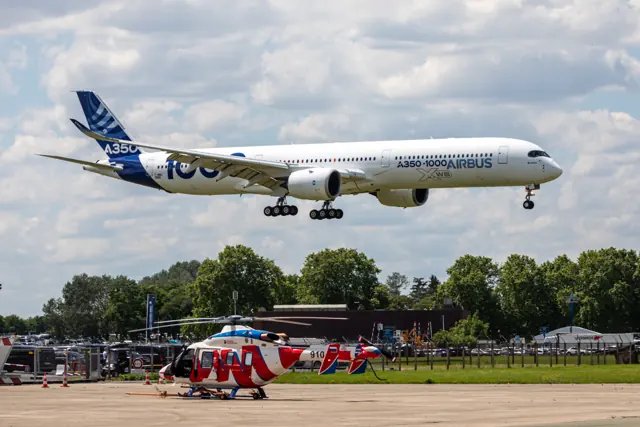
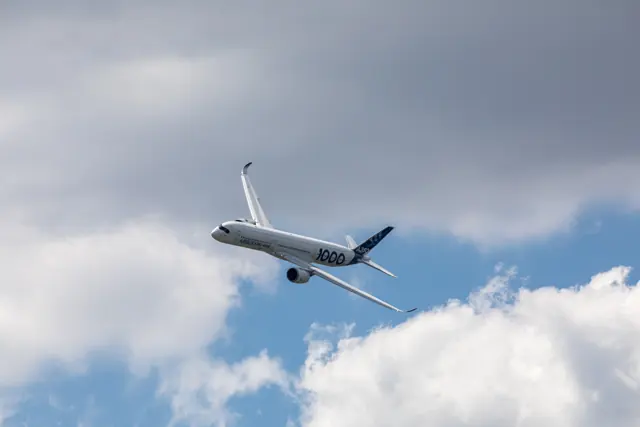
The A350 evolved from an early proposal related to the A330 into the clean-sheet A350 XWB programme. Its first flight took place in 2013. Rolls-Royce Trent XWB engines power the production family, with the A350-900 and longer A350-1000 serving different capacity needs. The swept wings, curved wingtips and dark cockpit-window surround make the type readily recognisable.
Aircraft background
Wikipedia contributors · Read more ↗A new cockpit that still rewards attention to the basics
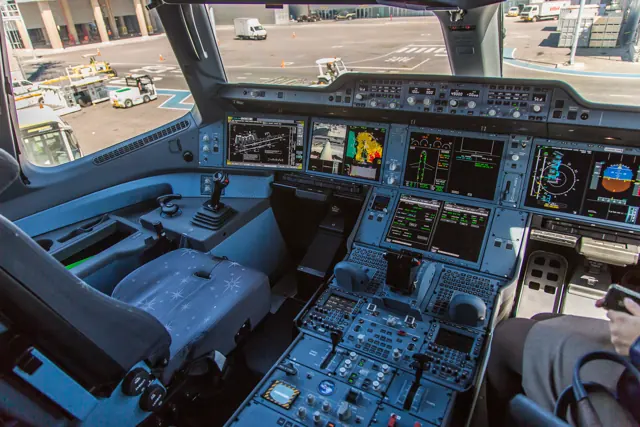
Wuerfel flew the first A350-1000 prototype from the left seat with Airbus test pilot Peter Chandler in command. He liked the wide cockpit view and the ability to share information on the displays without turning away from the other pilot. Hand flying felt precise and responsive for such a large aircraft.
Aviation Week, public reprint at Grams luftfartsblogg, 6 July 2018. Tim Wuerfel’s firsthand evaluation; full narrative read in a public reprint of the Aviation Week report.
Aviation Week, public reprint at Grams luftfartsblogg · Read more ↗Into the cockpit
 YouTube
 Flightradar24 · 41 min ·
A350 longhaul behind the scenes (in the cockpit with SAS!)
A SAS A350 journey to Bangkok, including the crew's experience of navigation interference.
Real aircraft · Airbus A350
Watch on YouTube ↗Preview images are served by AirframeDB. Videos open on YouTube only when you choose to watch.
Meet Airbus A350
The A350 evolved from an early proposal related to the A330 into the clean-sheet A350 XWB programme. Its first flight took place in 2013. Rolls-Royce Trent XWB engines power the production family, with the A350-900 and longer A350-1000 serving different capacity needs.
The swept wings, curved wingtips and dark cockpit-window surround make the type readily recognisable. Inside, it belongs to Airbus's fly-by-wire wide-body lineage. The simulator manuals identify the included variants, flight-management features and equipment.
Airbus A350
Aircraft type designators
Use the code for the model you are flying. The linked authority lists the applicable aircraft.
History & design
Preparing a production aircraft for Project Sunrise
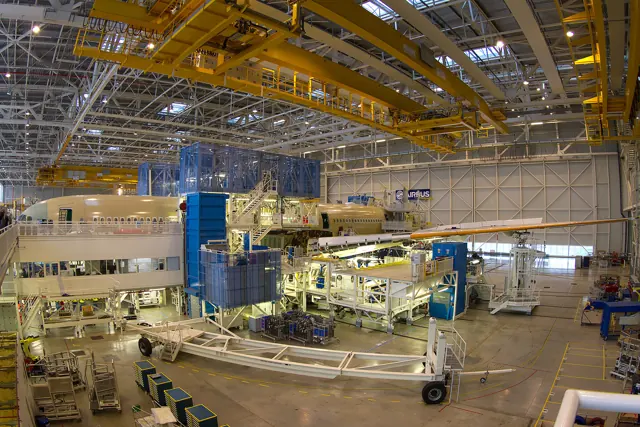
The A350-1000ULR programme responds to Qantas's Project Sunrise proposal for direct flights from eastern Australia to London and New York. Airbus's June 2026 account describes a distinctive challenge: the instrumented test aircraft, MSN707, was also intended for eventual airline service. Engineers had to install monitoring equipment while preserving its cabin and avoiding the invasive modifications possible on a permanent prototype.
The work brought together production mechanics, flight-test specialists and the airline. Sensors monitored the additional rear fuel tank, while heated passenger dummies helped the team study the cabin environment. Test flight engineer Laurent Rossignol described the responsibility of testing the customer's future aircraft. These were development and certification preparations at the time of the report, not an account of passenger service.
Airbus · Flight testing the A350-1000ULR ↗Airbus, June 2026 · A350-1000ULR development
Development milestones
First flight: 14 June 2013 ( 2013-06-14 )
Wikipedia contributors · Airbus A350 ↗Airbus A350 · family/variant named by the source · Wikipedia revision 1374281088
Pilot accounts
A new cockpit that still rewards attention to the basics
Wuerfel flew the first A350-1000 prototype from the left seat with Airbus test pilot Peter Chandler in command. He liked the wide cockpit view and the ability to share information on the displays without turning away from the other pilot. Hand flying felt precise and responsive for such a large aircraft. The demonstration also let him observe an automated emergency descent in reserved airspace, with air traffic control informed in advance.
Returning to Toulouse, he flew the final approach with manual thrust and found himself working to settle on the right power setting in gusts. The touchdown was smooth, and the braking system brought the aircraft towards the selected exit. Taxiing provided a small reminder that size still mattered: Chandler prompted him to slow for a sharp turn, and Wuerfel checked the groundspeed more carefully after underestimating it from the high cockpit. These are impressions of that lightly loaded prototype flight in 2018.
Aviation Week, public reprint at Grams luftfartsblogg, 6 July 2018. Tim Wuerfel’s firsthand evaluation; full narrative read in a public reprint of the Aviation Week report.
Read the full account · Aviation Week, public reprint at Grams luftfartsblogg ↗Accepting a new aircraft takes more than a delivery flight
Hazzard describes accepting Cathay Pacific's A350s at Toulouse as a sequence of preparation, ground checks, flight work and reporting. The acceptance team rehearsed the profile in a simulator when it had been some time since its previous test. Before the flying began, a conference with Airbus engineers covered the build and remaining defects. The first day of system checks could be long, while the pilots were still contending with jet lag after travelling from Hong Kong.
In the air, the crew followed a planned programme with dedicated air traffic control support, while cabin engineers checked the interior. Hazzard particularly notes the A350's responsive handling during low-speed protection checks. Returning to Toulouse usually included an autoland to check that function, followed by data collation and further reports. A different crew brought the aircraft home after technical acceptance and transfer of ownership.
Air Pilot, Honourable Company of Air Pilots, June 2023, pages 12–13. Firsthand account by Cathay Pacific acceptance pilot Chris Hazzard; A350-900/-1000 family, published June 2023.
Read the full account · Air Pilot, Honourable Company of Air Pilots ↗Sharing the flight deck on an exceptionally long test mission
Pepin describes the July 2026 development flights of A350-1000ULR MSN707 between Toulouse and Melbourne, including his role as captain on the return journey. Fuel-system and cabin-temperature measurements filled the long hours: the outward flight completed much of the programme, leaving additional test points for the return. Two Qantas pilots joined for that leg to gain experience in the ULR variant alongside the Airbus crew.
Managing fatigue was part of organising the work. Pepin explains that four-hour pilot shifts overlapped, with a change every two hours to support handovers. The crew slept in the rear cabin-crew rest area because instrumentation occupied the new pilot-rest compartments. At least one Airbus test pilot remained in a pilot seat when a Qantas pilot was at the controls. Pepin valued the chance to exchange knowledge during the mission. This manufacturer interview concerns an instrumented development flight, with no airline passengers aboard.
Airbus, July 2026. Manufacturer interview with the captain of the Melbourne–Toulouse return flight; A350-1000ULR development programme, July 2026.
Read the full account · Airbus ↗In your simulator
Systems, equipment and documentation for each developer’s aircraft.
Compare simulator versions →MSFS 2020 · MSFS 2024A350 Airliner
iniBuilds · Released
A350 Airliner
iniBuilds · Released
X-Plane 11 · X-Plane 12Airbus A350
FlightFactor · Released
Airbus A350
FlightFactor · Released
Aircraft specifications
Published figures for the named real-aircraft variant. Simulator equipment and performance can differ.
| Specification | Published value |
|---|---|
| Length | 66.80 m (219 ft 1.9 in) |
| Wingspan | 64.75 m (212 ft 5.2 in) |
| Wing area | 442 m² (4,760 sq ft) |
| Empty weight | 115,700 kg (255,075 lb) |
| Max takeoff weight | 283,000 kg (623,908 lb) |
| Powerplant | 2 × Rolls-Royce Trent XWB-84 high-bypass turbofan , 374.5 kN (84,200 lbf) thrust each |
| Maximum speed | 950 km/h (591 mph, 513 kn) |
| Cruise speed | 903 km/h (561 mph, 488 kn) |
| Range | 15,750 km (9,600 mi, 8,500 nmi) |
| Service ceiling | 13,100 m (43,100 ft) |
Manuals & resources
Find your next read
Choose a topic for a short introduction and a link to the original source. Simulator references identify the developer and edition they cover.
Pilot account
A new cockpit that still rewards attention to the basicsAviation Week, public reprint at Grams luftfartsblogg, 6 July 2018. Tim Wuerfel’s firsthand evaluation; full narrative read in a public reprint of the Aviation Week report.
Wuerfel flew the first A350-1000 prototype from the left seat with Airbus test pilot Peter Chandler in command. He liked the wide cockpit view and the ability to share information on the displays without turning away from the other pilot. Hand flying felt precise and responsive for such a large aircraft. The demonstration also let him observe an automated emergency descent in reserved airspace, with air traffic control informed in advance.
Tim Wuerfel
Aviation Week, public reprint at Grams luftfartsblogg · Read the source ↗Accepting a new aircraft takes more than a delivery flightAir Pilot, Honourable Company of Air Pilots, June 2023, pages 12–13. Firsthand account by Cathay Pacific acceptance pilot Chris Hazzard; A350-900/-1000 family, published June 2023.
Hazzard describes accepting Cathay Pacific's A350s at Toulouse as a sequence of preparation, ground checks, flight work and reporting. The acceptance team rehearsed the profile in a simulator when it had been some time since its previous test. Before the flying began, a conference with Airbus engineers covered the build and remaining defects. The first day of system checks could be long, while the pilots were still contending with jet lag after travelling from Hong Kong.
Chris Hazzard
Air Pilot, Honourable Company of Air Pilots · Read the source ↗Read the original documentation from the people who created it. Manuals open on their publisher’s website.
Manual
A350 aircraft manualiniBuilds A350 aircraft manual postiniBuilds Microsoft Flight Simulator aircraft manualsMicrosoft / aircraft developersAircraft background
Airbus A350Wikipedia contributors · Research background · Wikipedia revision 1374281088 · retrieved 2026-09-12Product
A350 XWB AdvancedFlightFactor · Official developer / designated store catalogue · checked 2026-09-12 A350 Airliner for MSFS-2024iniBuilds · Official developer / designated store catalogue · checked 2026-09-12History
Flight testing the A350-1000ULRAirbus · June 2026 · production-aircraft instrumentation and test preparationType designator
ICAO Doc 8643 — aircraft type designatorsInternational Civil Aviation Organization · Public search data retrieved 2026-09-14; authority update 2026-09-03Built-in force-feedback profiles
Read the documentary basis, editable starting settings and remaining questions for the aircraft you fly. Each explanation refers to the exact profile revision shown.
Catalogue programme-20261022-v1 · 7 profile choices
FlightFactor A350-900 XWB Advanced
FlightFactor · Free and Pro · Revision 2 · Inherited starting point
X-Plane 12
FlightFactor A350-900 XWB Advanced: Fixed centering follows the A350's passive sidestick arrangement instead of interpreting load-factor demand as aerodynamic hand force.
iniBuilds A350-900
iniBuilds · Free and Pro · Revision 4 · Inherited starting point
MSFS 2020 · MSFS 2024
iniBuilds A350-900: Fixed centering follows the A350's passive sidestick arrangement instead of interpreting load-factor demand as aerodynamic hand force.
iniBuilds A350-1000
iniBuilds · Free and Pro · Revision 3 · Inherited starting point
MSFS 2020 · MSFS 2024
iniBuilds A350-1000: Fixed centering follows the A350's passive sidestick arrangement instead of interpreting load-factor demand as aerodynamic hand force.
iniBuilds A350-900ULR
iniBuilds · Free and Pro · Revision 3 · Inherited starting point
MSFS 2020 · MSFS 2024
iniBuilds A350-900ULR: Fixed centering follows the A350's passive sidestick arrangement instead of interpreting load-factor demand as aerodynamic hand force.
Airbus A350-900
Free and Pro · Revision 4 · Partial review
MSFS 2020 · MSFS 2024 · X-Plane 11 · X-Plane 12
Airbus A350-900: Fixed centering follows the A350's passive sidestick arrangement instead of interpreting load-factor demand as aerodynamic hand force.
Airbus A350-1000
Free and Pro · Revision 2 · Partial review
MSFS 2020 · MSFS 2024 · X-Plane 11 · X-Plane 12
Airbus A350-1000: Fixed centering follows the A350's passive sidestick arrangement instead of interpreting load-factor demand as aerodynamic hand force.
Airbus A350-900ULR
Free and Pro · Revision 2 · Inherited starting point
MSFS 2020 · MSFS 2024 · X-Plane 11 · X-Plane 12
Airbus A350-900ULR: Fixed centering follows the A350's passive sidestick arrangement instead of interpreting load-factor demand as aerodynamic hand force.
iniBuilds A350-900
iniBuilds A350-900: Fixed centering follows the A350's passive sidestick arrangement instead of interpreting load-factor demand as aerodynamic hand force.
Aircraft and simulator scope
- iniBuilds A350-900 · iniBuilds · MSFS 2020 · Add-on starting point
- iniBuilds A350-900 · iniBuilds · MSFS 2024 · Add-on starting point
The simulator model and controls
The A350 evolved from an early proposal related to the A330 into the clean-sheet A350 XWB programme. Its first flight took place in 2013. Rolls-Royce Trent XWB engines power the production family, with the A350-900 and longer A350-1000 serving different capacity needs.
This profile selects iniBuilds A350-900 for MSFS 2020, MSFS 2024.
How this profile feels
The spring stays independent of airspeed. Directed aerodynamic loading is omitted.
Pitch-trim relief is off. Autopilot following is off.
Controls and trim
The iniBuilds A350 manual describes load-factor sidestick demand, one-g automatic trim and sidestick priority. The -900, -1000 and -900ULR are separate configurations. FlightFactor's implementation has its own normal-law, autopilot and hydraulic systems. Annunciated autopilot or flight-director modes identify guidance state; they do not supply a moving sidestick reference.
The selected implementation
iniBuilds separates -900/-1000/-900ULR for MSFS 2020/2024. The selected airframe/fuel model stays explicit while hardware centre remains independent of autotrim.
About the values
The gains are normalized profile settings. They describe the chosen effect balance; hand force depends on the device and its output limits. IAS references are tuning values rather than operating limits. Physical acceptance of this revision remains pending.
Documentary review and sources
These decisions describe the documentary basis and remaining gaps for this revision. Aircraft documentation and a starting setting describe different kinds of evidence.
Aircraft and variant
InheritedThis profile selects iniBuilds A350-900 for MSFS 2020, MSFS 2024.
Flight controls
InheritedThe iniBuilds A350 manual describes load-factor sidestick demand, one-g automatic trim and sidestick priority. The -900, -1000 and -900ULR are separate configurations. FlightFactor's implementation has its own normal-law, autopilot and hydraulic systems. Annunciated autopilot or flight-director modes identify guidance state; they do not supply a moving sidestick reference.
Trim
InheritedThe documented automatic pitch trim belongs to the aircraft's fly-by-wire response and leaves this profile's hardware centre independent. Pitch relief is off, with stored authority 0; roll authority is 0.
Autopilot and stability
InheritedAutopilot following is off; the configured spring and load retain the hardware feel. Separate neutral hold is on at strength 0.28, when a supported autopilot state admits it.
Equipment
InheritediniBuilds separates -900/-1000/-900ULR for MSFS 2020/2024. The selected airframe/fuel model stays explicit while hardware centre remains independent of autotrim.
Speeds and limits
InheritedThe indicated-speed references set the profile response scale; they are separate from aircraft operating limits.
Simulator integration
InheritedThe profile targets msfs2020, msfs2024. Add-on-specific controls use only the supported references configured by this profile.
Force-feedback settings
InheritedThe settings define the profile’s effect balance. Device output limits affect physical hand force.
Starting settings and their rationale
These configured values are starting estimates. The explanations describe what each setting controls; physical validation appears separately below.
| Setting | Starting value | What it controls and why |
|---|---|---|
| Spring strength | Starting value0.55 | What it controls and whyFixed centering follows the A350's passive sidestick arrangement instead of interpreting load-factor demand as aerodynamic hand force. The baseline spring is 0.55. Low-speed spring blending is off. |
| Master force gain | Starting value0.85 | What it controls and whyScales overall profile strength while preserving effect balance, subject to device and output limits. |
| Profile force gain | Starting value0 | What it controls and whyThe stored 0 aerodynamic-load gain is inactive under the fixed-centre control law. |
| Force tuning speed/reference | Starting value250 kt | What it controls and whySets the IAS reference for aerodynamic loading. It is an estimate, not published cruise TAS or a flight limit. |
| Spring response reference speed | Starting value65 kt | What it controls and whySets the IAS where the low-speed blend reaches baseline strength; high-speed stiffening also uses it. |
| Aileron force scale | Starting value0.78 | What it controls and whyRoll and pitch aerodynamic scales are 0.78 and 1, respectively. These stored weights do not create directed aerodynamic loading while that term is inactive. The pitch spring-travel curve reaches output 1 at input 1. The roll spring-travel curve reaches output 0.3 at input 1. Spring-travel response contributes separately to axis balance. |
| Elevator force scale | Starting value1 | What it controls and whyScales pitch aerodynamic loading; pitch spring travel and trim responses are separate settings. |
| Trim feel | Starting valueDisabled | What it controls and whyRetained for compatibility and group membership. Trim relief, rather than this flag, controls centre movement. |
| Trim relief | Starting valueDisabled | What it controls and whyAllows trim relief with supported control law and valid telemetry. Axis authorities set its amount. |
| Autopilot follow | Starting valueDisabled | What it controls and whyAutopilot following is off; the configured spring and load retain the hardware feel. Separate neutral hold is on at strength 0.28, when a supported autopilot state admits it. |
| Autopilot neutral hold | Starting valueEnabled | What it controls and whyPermits centering hold during a supported AP state, separate from following a moving target. |
| Output force limit | Starting value0.55 | What it controls and whyCaps directed-force output. Native spring effects and device limits remain separate. |
All 49 starting settings and their rationale
The settings define the profile’s effect balance. Device output limits affect physical hand force.
| Setting | Starting value | What it controls and why |
|---|---|---|
| Spring strength | Starting value0.55 | What it controls and whyFixed centering follows the A350's passive sidestick arrangement instead of interpreting load-factor demand as aerodynamic hand force. The baseline spring is 0.55. Low-speed spring blending is off. |
| Spring deadband | Starting value0.01 | What it controls and whySets travel around the centre before the baseline spring resists. Smaller values engage it sooner. |
| Starting centering force | Starting value0.03 | What it controls and whyThe centre preload is 0.03. It ramps outside the 0.01 deadband across 0.05 travel, shaping the passive centre independently of aircraft autotrim. |
| Center Starting Force Transition | Starting value0.05 | What it controls and whySets the travel used to ramp in centre preload. Wider intervals make its onset more gradual. |
| Profile force gain | Starting value0 | What it controls and whyThe stored 0 aerodynamic-load gain is inactive under the fixed-centre control law. |
| Master force gain | Starting value0.85 | What it controls and whyScales overall profile strength while preserving effect balance, subject to device and output limits. |
| QBlend Enabled | Starting valueDisabled | What it controls and whyAllows baseline spring strength to rise with indicated airspeed where the control law permits it. |
| QSpring Minimum Factor | Starting value0.5 | What it controls and whySets low-speed spring strength as a fraction of baseline when blending is enabled. One keeps full strength. |
| QSpring Start Knots | Starting value8 kt | What it controls and whySets the IAS where the low-speed spring blend starts rising. This is a feel threshold, not a flight limit. |
| Spring response reference speed | Starting value65 kt | What it controls and whySets the IAS where the low-speed blend reaches baseline strength; high-speed stiffening also uses it. |
| Force tuning speed/reference | Starting value250 kt | What it controls and whySets the IAS reference for aerodynamic loading. It is an estimate, not published cruise TAS or a flight limit. |
| Airspeed spring stiffening gain | Starting value0 | What it controls and whyAdds permitted spring resistance above the full-blend speed. Zero removes this high-speed increase. |
| Airspeed spring stiffening limit | Starting value5 | What it controls and whyLimits the squared airspeed ratio used for high-speed spring stiffening; it is not a device-force cap. |
| Aileron force scale | Starting value0.78 | What it controls and whyRoll and pitch aerodynamic scales are 0.78 and 1, respectively. These stored weights do not create directed aerodynamic loading while that term is inactive. The pitch spring-travel curve reaches output 1 at input 1. The roll spring-travel curve reaches output 0.3 at input 1. Spring-travel response contributes separately to axis balance. |
| Elevator force scale | Starting value1 | What it controls and whyScales pitch aerodynamic loading; pitch spring travel and trim responses are separate settings. |
| Output force limit | Starting value0.55 | What it controls and whyCaps directed-force output. Native spring effects and device limits remain separate. |
| Travel Enabled | Starting valueEnabled | What it controls and whyApplies the configured pitch and roll spring travel curves. |
| Output | Starting value1 | What it controls and whySets response at the second pitch-curve point; it is an endpoint only if its input position is full travel. |
| Output | Starting value0.3 | What it controls and whySets response at the second roll-curve point; its input position and other points determine the travel law. |
| Trim feel | Starting valueDisabled | What it controls and whyRetained for compatibility and group membership. Trim relief, rather than this flag, controls centre movement. |
| Trim relief | Starting valueDisabled | What it controls and whyAllows trim relief with supported control law and valid telemetry. Axis authorities set its amount. |
| Elevator Authority | Starting value0 | What it controls and whyThe documented automatic pitch trim belongs to the aircraft's fly-by-wire response and leaves this profile's hardware centre independent. Pitch relief is off, with stored authority 0; roll authority is 0. |
| Aileron Authority | Starting value0 | What it controls and whyScales supported roll-trim relief and permitted centre movement. Zero removes roll response. |
| Force Trim Enabled | Starting valueDisabled | What it controls and whyEnables local force trim, separate from aircraft-owned trim and add-on integration qualification. |
| GLoad Enabled | Starting valueDisabled | What it controls and whyAllows load-factor changes to modify permitted spring laws. Passive fly-by-wire feel can suppress it. |
| Rate Damping Enabled | Starting valueDisabled | What it controls and whyEnables rate damping with the configured coefficients and control law. |
| Autopilot follow | Starting valueDisabled | What it controls and whyAutopilot following is off; the configured spring and load retain the hardware feel. Separate neutral hold is on at strength 0.28, when a supported autopilot state admits it. |
| Autopilot follow authority | Starting value0.05 | What it controls and whySets admitted AP-follow gain, not a percentage of travel. Runtime ownership and input limits still apply. |
| Autopilot neutral hold | Starting valueEnabled | What it controls and whyPermits centering hold during a supported AP state, separate from following a moving target. |
| Autopilot neutral hold strength | Starting value0.28 | What it controls and whySets admitted AP neutral-hold strength; inactive while neutral hold is disabled. |
| Enabled | Starting valueEnabled | What it controls and whyEnables aerodynamic cues; each still needs nonzero strength and its simulator conditions. |
| Gain | Starting value0.06 | What it controls and whySets stall-buffet strength. Zero removes the cue without changing simulator stalls or warnings. |
| Gain | Starting value0.06 | What it controls and whySets high-Mach buffet strength; onset and full-strength thresholds are separate. |
| Gain | Starting value0 | What it controls and whySets flap buffet at the configured position and speed gates. Flap movement texture is separate. |
| Maximum flap index | Starting value4 | What it controls and whySets the final flap index for detent normalization. UP plus three detents uses maximum index3. |
| Minimum flap index | Starting value2 | What it controls and whySets the first flap detent that admits buffet; this is a handle index, not degrees. |
| Gain | Starting value0 | What it controls and whySets gear aerodynamic buffet; movement and ground-contact cues are separate. |
| Shaker Enabled | Starting valueDisabled | What it controls and whyPermits shaker at supported warning conditions; the switch does not establish aircraft equipment. |
| Stick shaker amplitude | Starting value0.5 | What it controls and whySets triggered shaker strength; inactive while the shaker feature is disabled. |
| Enabled | Starting valueDisabled | What it controls and whyEnables ground effects; each still needs its own strength and contact or motion telemetry. |
| Gain | Starting value0 | What it controls and whySets rolling texture strength, modified by speed, surface and undercarriage configuration. |
| Gain | Starting value0 | What it controls and whySets gear-bump texture during ground motion, separate from touchdown impact. |
| Gain | Starting value0 | What it controls and whySets landing-impact strength; landing telemetry and response shape determine the pulse. |
| Gain | Starting value0 | What it controls and whySets reverse-thrust vibration with valid reverser and engine conditions. Zero removes the cue. |
| Enabled | Starting valueDisabled | What it controls and whyEnables engine cues with nonzero settings and valid running-engine telemetry. |
| Gain | Starting value0 | What it controls and whySets estimated engine vibration using configured telemetry and response, not measured cockpit vibration. |
| Enabled | Starting valueEnabled | What it controls and whyEnables accessory cues with configured strengths and observed accessory movement. |
| Gain | Starting value0 | What it controls and whySets texture from observed flap movement; a command without movement does not establish the cue. |
| Gain | Starting value0 | What it controls and whySets texture from observed gear movement, separate from aerodynamic and touchdown effects. |
Limits and open questions
- iniBuilds A350-900; msfs2020, msfs2024. Previously observed titles and implementation identifiers are retained; installed matching remains deferred.
- Passive FBW sidestick with fixed mechanical centring. No airspeed, hinge-load, engine, flap, gear or ground texture applied to the hand control.
- Automatic stabilizer trim remains aircraft-owned; trim does not move the passive stick neutral.
- Autopilot and flight-control laws command aircraft motion without moving the passive sidestick. No physical AP following or inferred law-change torque. AP servo-follow remains disabled; engagement indicators are not force-demand signals.
- Twin jets and retractable gear. 900,1000 and ULR fuel/landing-gear differences stay in the aircraft simulation; common passive force architecture. A350-900 baseline passenger identity.
- 250 KIAS is an estimated feel reference, not cruise TAS or a certified limit. No invented Mach, VNE or weight scheduling.
- Read-only native telemetry for aircraft motion and accessory positions. Custom switches, display animations and mode lamps are not calibrated servo targets. No unverified LVars/datarefs or simulator writes.
- Spring 0.55; lateral scale 0.78; trim authorities 0/0; per-axis output cap .55. Editable engineering estimates, not measured hand forces. No body-rate torque, surface following or fabricated hydraulic-failure loads.
- New physical and installed-product checks deferred by owner. Existing separately recorded acceptance retains its original device, simulator, add-on and version limits. Source review does not broaden custom telemetry acceptance.
- Only actual accessory position changes drive movement texture; static drag and command-triggered kicks are disabled. Select and save an aircraft default when telemetry lacks a discriminating developer/configuration identity.
- 2026-10-01, Airbus passive sidestick law (docs/poh/a320neo-feel-spec.md, SAE 861801, BEA AF447 3.2): pitch spring 0.55 at master gain 0.85, constant with airspeed, G and trim; roll at 30 % of pitch (published pitch:roll 3-4:1, 10 daN at 16 deg pitch, 2-3.5 daN at 20 deg roll); a 0.03 centre starting force over a 0.01 deadband for the 0.5 daN breakout (5 % of full pitch force); autopilot neutral hold 0.28 for the 5 daN override of the neutral lock; weak stall and Mach buffet (0.06), which the BEA describes as weakly transmitted to the sidestick; no turbulence, overspeed, spoiler, flap, gear, ground, engine, mechanical or drag cues.
Physical validation
No physical force validation is recorded in this public catalogue for this revision. Documentary review and software checks do not establish how a particular device feels.
Discuss this aircraft (0)
Questions, observations and useful sources from the community.
No published discussions yet. Bring a question or share a useful source.
Open aircraft discussions →Content expanded · What’s new
Something missing or a source that needs attention?
Suggest a correction ↗