

Start here
A few places to begin, from the aircraft’s story to the people who fly it.
Meet the aircraft
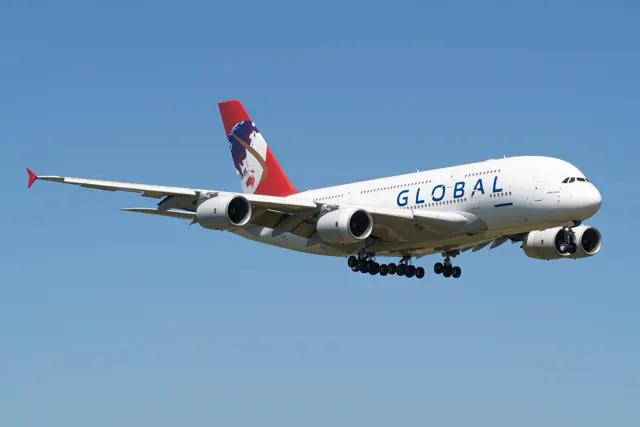
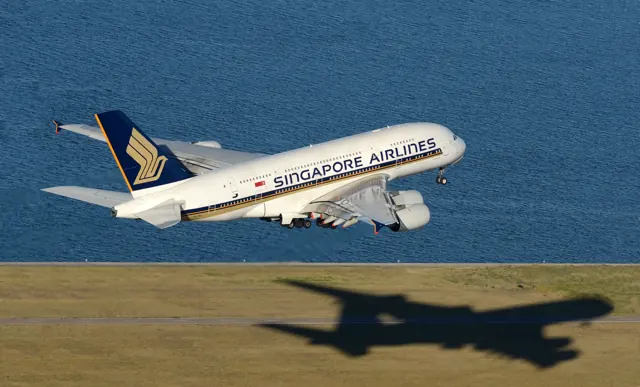
The A380 arranged two passenger decks within a very large four-engine airframe. Its programme targeted heavily travelled routes and major hub airports. The aircraft's wide wing and extensive landing gear reflect the scale of the design. Airline interiors vary substantially, so a single seating figure does not describe every A380. Its simulator implementations likewise have their own cockpit and systems scope.
Aircraft background
Wikipedia contributors · Read more ↗A huge aircraft, a surprisingly light touch
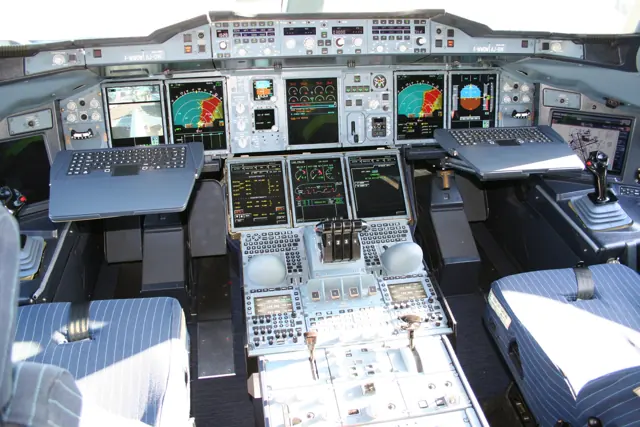
Mark flew an A380 from Toulouse before the 2009 Paris Air Show, joining a demonstration of new braking and traffic-avoidance functions. The cockpit was unusually spacious and quiet, and taxi cameras made keeping the aircraft on the centreline easier than he expected. Takeoff brought an odd mismatch between the speed indicated on the instruments and his muted visual sense of acceleration.
AIN, public reprint at English4aviation, June 2009. Firsthand demonstration flight. Original AIN publication: 17 June 2009; the full report is available in this public reprint.
AIN, public reprint at English4aviation · Read more ↗Fuel trim and flight controls are different systems
FlyByWire's A380X documentation separates trim-tank fuel management from the flight-control checks performed with the sidestick. It also identifies autopilot engagement and hydraulic shutdown procedures. Fuel transfer manages balance, while the sidestick checks concern the flight controls.
A380X · FlyByWire · MSFS 2020 · MSFS 2024
FlyByWire · Read more ↗Into the cockpit
 YouTube
 Just Planes · 18 min ·
Piloting AIRBUS A380 from Kuala Lumpur | Cockpit Views
Preparation, walkaround and departure from Kuala Lumpur aboard a Malaysia Airlines A380.
Real aircraft · Airbus A380
Watch on YouTube ↗Preview images are served by AirframeDB. Videos open on YouTube only when you choose to watch.
Meet Airbus A380
The A380 arranged two passenger decks within a very large four-engine airframe. Its programme targeted heavily travelled routes and major hub airports. The aircraft's wide wing and extensive landing gear reflect the scale of the design.
Airline interiors vary substantially, so a single seating figure does not describe every A380. The simulator products also differ in the cockpit functions and systems they model.
Airbus A380
Aircraft type designators
Use the code for the model you are flying. The linked authority lists the applicable aircraft.
History & design
Development milestones
First flight: 27 April 2005 ( 2005-04-27 )
Wikipedia contributors · Airbus A380 ↗Airbus A380 · family/variant named by the source · Wikipedia revision 1374387538
Pilot accounts
A huge aircraft, a surprisingly light touch
Mark flew an A380 from Toulouse before the 2009 Paris Air Show, joining a demonstration of new braking and traffic-avoidance functions. The cockpit was unusually spacious and quiet, and taxi cameras made keeping the aircraft on the centreline easier than he expected. Takeoff brought an odd mismatch between the speed indicated on the instruments and his muted visual sense of acceleration. Once airborne, small movements of his wrist were enough to guide the large aircraft through banked turns.
On his landing, he kept off the brake pedals while the brake-to-vacate system slowed the aircraft for the selected exit. He also watched demonstrations using artificial traffic targets and an artificially shortened runway entry. These were planned tests, not encounters with real conflicting traffic or an actual runway emergency.
AIN, public reprint at English4aviation, June 2009. Firsthand demonstration flight. Original AIN publication: 17 June 2009; the full report is available in this public reprint.
Read the full account · AIN, public reprint at English4aviation ↗An approachable giant, with room to improve the cockpit
After flying the first A380 test aircraft from Toulouse, Gerzanics told Max Kingsley-Jones that its handling felt closer to an A320 than an A340. Taxi cameras helped him position the nose gear accurately, and the cockpit height and landing-gear geometry made ground manoeuvring less daunting than its enormous wingspan suggested. The aircraft was well below its maximum takeoff weight on this particular evaluation flight.
He found the low-speed handling agile around the airport and the touchdown and lowering of the nose notably smooth. He welcomed larger displays and graphical changes to the flight plan, but his assessment was not unqualified praise: separate controls for the flight-management system, aircraft monitoring and information terminal made the integration less satisfactory than in contemporary business jets.
Flight International, 18 September 2006. Interview following Gerzanics’s 14 September 2006 evaluation in MSN001/F-WWOW; early test-aircraft configuration.
Read the full account · Flight International ↗A dream aircraft, and the work behind every departure
Kashwani had wanted to fly the A380 from its launch, and his opportunity arrived in 2008. On his first walk-around, the scale of its wings and engines left a lasting impression. In Airbus's interview, the Emirates captain describes a responsive aircraft that he considered especially stable among the jetliners he had flown. Seeing people photograph it at takeoff or landing continued to bring back that initial sense of occasion.
His working day was more methodical than the spectacle outside suggested. He liked to reach the aircraft an hour before departure so the large crew had time to prepare, check the systems and receive the passengers. Automation provided support in cruise, while the pilots still had to identify and navigate around thunderstorms. Airbus published the interview with Kashwani.
Airbus, April 2019. Manufacturer-published interview with an Emirates A380 captain; individual preferences and impressions are attributed.
Read the full account · Airbus ↗The emergency continued after the landing
Evans was the supervising check captain in an observer seat when QF32 suffered an uncontained engine failure after departing Singapore on 4 November 2010. He describes a flood of warnings that required the five pilots to establish what still worked, discuss conflicting indications and judge which actions were appropriate. While Richard de Crespigny flew the aircraft and the operating crew worked through the problems, Evans also helped keep passengers informed. The assessment took nearly two hours before the crew returned to land.
For Evans, the period after stopping was particularly worrying. One engine continued running, fuel was leaking and the brakes were hot. The crew weighed an immediate slide evacuation against keeping passengers aboard with the cabin crew ready to act. They eventually disembarked through stairs. He emphasises shared judgement, communication and cabin-crew work during the emergency.
Royal Aeronautical Society, 8 December 2010. Firsthand interview with the supervising check captain; Tim Robinson, Royal Aeronautical Society. Evans was not the pilot flying.
Read the full account · Royal Aeronautical Society ↗In your simulator
Systems, equipment and documentation for each developer’s aircraft.
Compare simulator versions →MSFS 2020 · MSFS 2024A380X
FlyByWire · Early Access
A380X
FlyByWire · Early Access
MSFS 2024A380-800
iniBuilds · Released
A380-800
iniBuilds · Released
Manuals & resources
Find your next read
Choose a topic for a short introduction and a link to the original source. Simulator references identify the developer and edition they cover.
Simulator documentation
Fuel trim and flight controls are different systemsA380X · FlyByWire · MSFS 2020 · MSFS 2024
FlyByWire's A380X documentation separates trim-tank fuel management from the flight-control checks performed with the sidestick. It also identifies autopilot engagement and hydraulic shutdown procedures. Fuel transfer manages balance, while the sidestick checks concern the flight controls.
SOP snapshot; dated pages; installed aircraft build not observed · PDF pp13,29,40,83; after-start control check and climb
FlyByWire · Read the source ↗Released product and variantsA380X · FlyByWire · MSFS 2020 · MSFS 2024
The free A380X is publicly available through the FlyByWire installer for both MSFS generations, including a native 2024 version. FlyByWire still describes it as an open alpha and maintains a list of unimplemented systems; several systems remain unimplemented.
Official developer / designated-store reference · checked 2026-09-14
FlyByWire Simulations · Read the source ↗Pilot account
A huge aircraft, a surprisingly light touchAIN, public reprint at English4aviation, June 2009. Firsthand demonstration flight. Original AIN publication: 17 June 2009; the full report is available in this public reprint.
Mark flew an A380 from Toulouse before the 2009 Paris Air Show, joining a demonstration of new braking and traffic-avoidance functions. The cockpit was unusually spacious and quiet, and taxi cameras made keeping the aircraft on the centreline easier than he expected. Takeoff brought an odd mismatch between the speed indicated on the instruments and his muted visual sense of acceleration. Once airborne, small movements of his wrist were enough to guide the large aircraft through banked turns.
Robert P. Mark
AIN, public reprint at English4aviation · Read the source ↗An approachable giant, with room to improve the cockpitFlight International, 18 September 2006. Interview following Gerzanics’s 14 September 2006 evaluation in MSN001/F-WWOW; early test-aircraft configuration.
After flying the first A380 test aircraft from Toulouse, Gerzanics told Max Kingsley-Jones that its handling felt closer to an A320 than an A340. Taxi cameras helped him position the nose gear accurately, and the cockpit height and landing-gear geometry made ground manoeuvring less daunting than its enormous wingspan suggested. The aircraft was well below its maximum takeoff weight on this particular evaluation flight.
Mike Gerzanics
Flight International · Read the source ↗Developer documentation
A380-800 — product listingA380-800 · MSFS 2024
Product listing captured 2026-09-30; edition scope from the reviewed catalogue
iniBuilds Store · Read the source ↗Read the original documentation from the people who created it. Manuals open on their publisher’s website.
Manual
A380X SOPFlyByWire Microsoft Flight Simulator aircraft manualsMicrosoft / aircraft developersAircraft background
Airbus A380Wikipedia contributors · Research background · Wikipedia revision 1374387538 · retrieved 2026-09-12Product
A380 Airliner for MSFS-2024iniBuilds · Official developer / designated store catalogue · checked 2026-09-12 iniBuilds A380 Airliner for MSFS – iniBuilds StoreiniBuilds Store · Product listing captured 2026-09-30; edition scope from the reviewed catalogueDeveloper documentation
Installer Guide - FlyByWire Simulations DocumentationFlyByWire Simulations · Official developer / designated-store reference · checked 2026-09-14 INOP System - FlyByWire Simulations DocumentationFlyByWire Simulations · Official developer / designated-store reference · checked 2026-09-14Type designator
ICAO Doc 8643 — aircraft type designatorsInternational Civil Aviation Organization · Public search data retrieved 2026-09-14; authority update 2026-09-03Built-in force-feedback profiles
Read the documentary basis, editable starting settings and remaining questions for the aircraft you fly. Each explanation refers to the exact profile revision shown.
Catalogue programme-20261022-v1 · 3 profile choices
FlyByWire A380X
FlyByWire · Free and Pro · Revision 3 · Inherited starting point
MSFS 2020 · MSFS 2024
FlyByWire A380X: Fixed spring centering represents the passive A380 sidestick; hydraulic/electric surface redundancy does not imply stick backdrive.
iniBuilds A380-800
iniBuilds · Free and Pro · Revision 2 · Inherited starting point
MSFS 2024
iniBuilds A380-800: Fixed spring centering represents the passive A380 sidestick; hydraulic/electric surface redundancy does not imply stick backdrive.
Airbus A380
Free and Pro · Revision 3 · Partial review
MSFS 2024 · MSFS 2020
Airbus A380: Fixed spring centering represents the passive A380 sidestick; hydraulic/electric surface redundancy does not imply stick backdrive.
FlyByWire A380X
FlyByWire A380X: Fixed spring centering represents the passive A380 sidestick; hydraulic/electric surface redundancy does not imply stick backdrive.
Aircraft and simulator scope
- FlyByWire A380X · FlyByWire · MSFS 2020 · Add-on starting point
- FlyByWire A380X · FlyByWire · MSFS 2024 · Add-on starting point
The simulator model and controls
The A380 arranged two passenger decks within a very large four-engine airframe. Its programme targeted heavily travelled routes and major hub airports. The aircraft's wide wing and extensive landing gear reflect the scale of the design.
This profile selects FlyByWire A380X for MSFS 2020, MSFS 2024.
How this profile feels
The spring stays independent of airspeed. Directed aerodynamic loading is omitted.
Pitch-trim relief is off. Autopilot following is off.
Controls and trim
Airbus describes fully electric pitch trim, including its backup, for the A380; normal-law trim is automatic. Its hydraulic and electric actuator redundancy and gust/load alleviation act on surfaces independently of the sidesticks. iniBuilds distinguishes Trent 900 and GP7200 engines and early/modern software batches. FlyByWire's A380X operating procedures have separate scope from the A32NX systems API.
The selected implementation
The A380X SOP belongs to the A380 implementation. A32NX API identifiers are not assigned to A380X despite related operating philosophy.
About the values
The gains are normalized profile settings. They describe the chosen effect balance; hand force depends on the device and its output limits. IAS references are tuning values rather than operating limits. Physical acceptance of this revision remains pending.
Documentary review and sources
These decisions describe the documentary basis and remaining gaps for this revision. Aircraft documentation and a starting setting describe different kinds of evidence.
Aircraft and variant
InheritedThis profile selects FlyByWire A380X for MSFS 2020, MSFS 2024.
Flight controls
InheritedAirbus describes fully electric pitch trim, including its backup, for the A380; normal-law trim is automatic. Its hydraulic and electric actuator redundancy and gust/load alleviation act on surfaces independently of the sidesticks. iniBuilds distinguishes Trent 900 and GP7200 engines and early/modern software batches. FlyByWire's A380X operating procedures have separate scope from the A32NX systems API.
Trim
InheritedAutomatic aircraft trim and the absence of a mechanical trim wheel keep hardware-centre movement separate from stabilizer operation. Pitch relief is off, with stored authority 0; roll authority is 0.
Autopilot and stability
InheritedAutopilot following is off; the configured spring and load retain the hardware feel. Separate neutral hold is on at strength 0.28, when a supported autopilot state admits it.
Equipment
InheritedThe A380X SOP belongs to the A380 implementation. A32NX API identifiers are not assigned to A380X despite related operating philosophy.
Speeds and limits
InheritedThe indicated-speed references set the profile response scale; they are separate from aircraft operating limits.
Simulator integration
InheritedThe profile targets msfs2020, msfs2024. Add-on-specific controls use only the supported references configured by this profile.
Force-feedback settings
InheritedThe settings define the profile’s effect balance. Device output limits affect physical hand force.
Starting settings and their rationale
These configured values are starting estimates. The explanations describe what each setting controls; physical validation appears separately below.
| Setting | Starting value | What it controls and why |
|---|---|---|
| Spring strength | Starting value0.55 | What it controls and whyFixed spring centering represents the passive A380 sidestick; hydraulic/electric surface redundancy does not imply stick backdrive. The baseline spring is 0.55. Low-speed spring blending is off. |
| Master force gain | Starting value0.85 | What it controls and whyScales overall profile strength while preserving effect balance, subject to device and output limits. |
| Profile force gain | Starting value0 | What it controls and whyThe stored 0 aerodynamic-load gain is inactive under the fixed-centre control law. |
| Force tuning speed/reference | Starting value250 kt | What it controls and whySets the IAS reference for aerodynamic loading. It is an estimate, not published cruise TAS or a flight limit. |
| Spring response reference speed | Starting value65 kt | What it controls and whySets the IAS where the low-speed blend reaches baseline strength; high-speed stiffening also uses it. |
| Aileron force scale | Starting value0.72 | What it controls and whyRoll and pitch aerodynamic scales are 0.72 and 1, respectively. These stored weights do not create directed aerodynamic loading while that term is inactive. The pitch spring-travel curve reaches output 1 at input 1. The roll spring-travel curve reaches output 0.3 at input 1. Spring-travel response contributes separately to axis balance. |
| Elevator force scale | Starting value1 | What it controls and whyScales pitch aerodynamic loading; pitch spring travel and trim responses are separate settings. |
| Trim feel | Starting valueDisabled | What it controls and whyRetained for compatibility and group membership. Trim relief, rather than this flag, controls centre movement. |
| Trim relief | Starting valueDisabled | What it controls and whyAllows trim relief with supported control law and valid telemetry. Axis authorities set its amount. |
| Autopilot follow | Starting valueDisabled | What it controls and whyAutopilot following is off; the configured spring and load retain the hardware feel. Separate neutral hold is on at strength 0.28, when a supported autopilot state admits it. |
| Autopilot neutral hold | Starting valueEnabled | What it controls and whyPermits centering hold during a supported AP state, separate from following a moving target. |
| Output force limit | Starting value0.55 | What it controls and whyCaps directed-force output. Native spring effects and device limits remain separate. |
All 49 starting settings and their rationale
The settings define the profile’s effect balance. Device output limits affect physical hand force.
| Setting | Starting value | What it controls and why |
|---|---|---|
| Spring strength | Starting value0.55 | What it controls and whyFixed spring centering represents the passive A380 sidestick; hydraulic/electric surface redundancy does not imply stick backdrive. The baseline spring is 0.55. Low-speed spring blending is off. |
| Spring deadband | Starting value0.01 | What it controls and whySets travel around the centre before the baseline spring resists. Smaller values engage it sooner. |
| Starting centering force | Starting value0.03 | What it controls and whyThe centre preload is 0.03. It ramps outside the 0.01 deadband across 0.05 travel, shaping the passive centre independently of aircraft autotrim. |
| Center Starting Force Transition | Starting value0.05 | What it controls and whySets the travel used to ramp in centre preload. Wider intervals make its onset more gradual. |
| Profile force gain | Starting value0 | What it controls and whyThe stored 0 aerodynamic-load gain is inactive under the fixed-centre control law. |
| Master force gain | Starting value0.85 | What it controls and whyScales overall profile strength while preserving effect balance, subject to device and output limits. |
| QBlend Enabled | Starting valueDisabled | What it controls and whyAllows baseline spring strength to rise with indicated airspeed where the control law permits it. |
| QSpring Minimum Factor | Starting value0.5 | What it controls and whySets low-speed spring strength as a fraction of baseline when blending is enabled. One keeps full strength. |
| QSpring Start Knots | Starting value8 kt | What it controls and whySets the IAS where the low-speed spring blend starts rising. This is a feel threshold, not a flight limit. |
| Spring response reference speed | Starting value65 kt | What it controls and whySets the IAS where the low-speed blend reaches baseline strength; high-speed stiffening also uses it. |
| Force tuning speed/reference | Starting value250 kt | What it controls and whySets the IAS reference for aerodynamic loading. It is an estimate, not published cruise TAS or a flight limit. |
| Airspeed spring stiffening gain | Starting value0 | What it controls and whyAdds permitted spring resistance above the full-blend speed. Zero removes this high-speed increase. |
| Airspeed spring stiffening limit | Starting value5 | What it controls and whyLimits the squared airspeed ratio used for high-speed spring stiffening; it is not a device-force cap. |
| Aileron force scale | Starting value0.72 | What it controls and whyRoll and pitch aerodynamic scales are 0.72 and 1, respectively. These stored weights do not create directed aerodynamic loading while that term is inactive. The pitch spring-travel curve reaches output 1 at input 1. The roll spring-travel curve reaches output 0.3 at input 1. Spring-travel response contributes separately to axis balance. |
| Elevator force scale | Starting value1 | What it controls and whyScales pitch aerodynamic loading; pitch spring travel and trim responses are separate settings. |
| Output force limit | Starting value0.55 | What it controls and whyCaps directed-force output. Native spring effects and device limits remain separate. |
| Travel Enabled | Starting valueEnabled | What it controls and whyApplies the configured pitch and roll spring travel curves. |
| Output | Starting value1 | What it controls and whySets response at the second pitch-curve point; it is an endpoint only if its input position is full travel. |
| Output | Starting value0.3 | What it controls and whySets response at the second roll-curve point; its input position and other points determine the travel law. |
| Trim feel | Starting valueDisabled | What it controls and whyRetained for compatibility and group membership. Trim relief, rather than this flag, controls centre movement. |
| Trim relief | Starting valueDisabled | What it controls and whyAllows trim relief with supported control law and valid telemetry. Axis authorities set its amount. |
| Elevator Authority | Starting value0 | What it controls and whyAutomatic aircraft trim and the absence of a mechanical trim wheel keep hardware-centre movement separate from stabilizer operation. Pitch relief is off, with stored authority 0; roll authority is 0. |
| Aileron Authority | Starting value0 | What it controls and whyScales supported roll-trim relief and permitted centre movement. Zero removes roll response. |
| Force Trim Enabled | Starting valueDisabled | What it controls and whyEnables local force trim, separate from aircraft-owned trim and add-on integration qualification. |
| GLoad Enabled | Starting valueDisabled | What it controls and whyAllows load-factor changes to modify permitted spring laws. Passive fly-by-wire feel can suppress it. |
| Rate Damping Enabled | Starting valueDisabled | What it controls and whyEnables rate damping with the configured coefficients and control law. |
| Autopilot follow | Starting valueDisabled | What it controls and whyAutopilot following is off; the configured spring and load retain the hardware feel. Separate neutral hold is on at strength 0.28, when a supported autopilot state admits it. |
| Autopilot follow authority | Starting value0.05 | What it controls and whySets admitted AP-follow gain, not a percentage of travel. Runtime ownership and input limits still apply. |
| Autopilot neutral hold | Starting valueEnabled | What it controls and whyPermits centering hold during a supported AP state, separate from following a moving target. |
| Autopilot neutral hold strength | Starting value0.28 | What it controls and whySets admitted AP neutral-hold strength; inactive while neutral hold is disabled. |
| Enabled | Starting valueEnabled | What it controls and whyEnables aerodynamic cues; each still needs nonzero strength and its simulator conditions. |
| Gain | Starting value0.06 | What it controls and whySets stall-buffet strength. Zero removes the cue without changing simulator stalls or warnings. |
| Gain | Starting value0.06 | What it controls and whySets high-Mach buffet strength; onset and full-strength thresholds are separate. |
| Gain | Starting value0 | What it controls and whySets flap buffet at the configured position and speed gates. Flap movement texture is separate. |
| Maximum flap index | Starting value4 | What it controls and whySets the final flap index for detent normalization. UP plus three detents uses maximum index3. |
| Minimum flap index | Starting value2 | What it controls and whySets the first flap detent that admits buffet; this is a handle index, not degrees. |
| Gain | Starting value0 | What it controls and whySets gear aerodynamic buffet; movement and ground-contact cues are separate. |
| Shaker Enabled | Starting valueDisabled | What it controls and whyPermits shaker at supported warning conditions; the switch does not establish aircraft equipment. |
| Stick shaker amplitude | Starting value0.5 | What it controls and whySets triggered shaker strength; inactive while the shaker feature is disabled. |
| Enabled | Starting valueDisabled | What it controls and whyEnables ground effects; each still needs its own strength and contact or motion telemetry. |
| Gain | Starting value0 | What it controls and whySets rolling texture strength, modified by speed, surface and undercarriage configuration. |
| Gain | Starting value0 | What it controls and whySets gear-bump texture during ground motion, separate from touchdown impact. |
| Gain | Starting value0 | What it controls and whySets landing-impact strength; landing telemetry and response shape determine the pulse. |
| Gain | Starting value0 | What it controls and whySets reverse-thrust vibration with valid reverser and engine conditions. Zero removes the cue. |
| Enabled | Starting valueDisabled | What it controls and whyEnables engine cues with nonzero settings and valid running-engine telemetry. |
| Gain | Starting value0 | What it controls and whySets estimated engine vibration using configured telemetry and response, not measured cockpit vibration. |
| Enabled | Starting valueEnabled | What it controls and whyEnables accessory cues with configured strengths and observed accessory movement. |
| Gain | Starting value0 | What it controls and whySets texture from observed flap movement; a command without movement does not establish the cue. |
| Gain | Starting value0 | What it controls and whySets texture from observed gear movement, separate from aerodynamic and touchdown effects. |
Limits and open questions
- FlyByWire A380X; msfs2020, msfs2024. Previously observed titles and implementation identifiers are retained; installed matching remains deferred.
- Passive spring-centred sidestick. No aerodynamic hinge torque, body-rate loading, surface following, stick shaker or hydraulic-failure force increase. Changes of control law do not create a mechanical linkage.
- Automatic or manual stabilizer trim changes the aircraft balance, not the physical sidestick neutral. Both trim-relief authorities stay zero, including in degraded/direct law.
- The sidestick does not backdrive with the autopilot. With the autopilot engaged the sidestick is held at neutral (neutral hold), as the real sidestick is locked there. AP servo-follow remains disabled; engagement indicators are not force-demand signals.
- Aircraft-owned fly-by-wire and auto-trim; passive spring support only. A380X four-engine widebody, not A32NX; no false increase in hand force based on aircraft mass.
- 250 KIAS is an estimated feel reference, not cruise TAS or a certified limit. No invented Mach, VNE or weight scheduling.
- Read-only native telemetry for aircraft motion and accessory positions. Custom switches, display animations and mode lamps are not calibrated servo targets. No unverified LVars/datarefs or simulator writes.
- Spring 0.55; lateral scale 0.72; trim authorities 0/0; per-axis output cap .55. Editable engineering estimates, not measured hand forces. No body-rate torque, surface following or fabricated hydraulic-failure loads.
- New physical and installed-product checks deferred by owner. Existing separately recorded acceptance retains its original device, simulator, add-on and version limits. Source review does not broaden custom telemetry acceptance.
- Only actual accessory position changes drive movement texture; static drag and command-triggered kicks are disabled. Select and save an aircraft default when telemetry lacks a discriminating developer/configuration identity.
- 2026-10-01, Airbus passive sidestick law (docs/poh/a320neo-feel-spec.md, SAE 861801, BEA AF447 3.2): pitch spring 0.55 at master gain 0.85, constant with airspeed, G and trim; roll at 30 % of pitch (published pitch:roll 3-4:1, 10 daN at 16 deg pitch, 2-3.5 daN at 20 deg roll); a 0.03 centre starting force over a 0.01 deadband for the 0.5 daN breakout (5 % of full pitch force); autopilot neutral hold 0.28 for the 5 daN override of the neutral lock; weak stall and Mach buffet (0.06), which the BEA describes as weakly transmitted to the sidestick; no turbulence, overspeed, spoiler, flap, gear, ground, engine, mechanical or drag cues.
Physical validation
No physical force validation is recorded in this public catalogue for this revision. Documentary review and software checks do not establish how a particular device feels.
Discuss this aircraft (0)
Questions, observations and useful sources from the community.
No published discussions yet. Bring a question or share a useful source.
Open aircraft discussions →Content expanded · What’s new
Something missing or a source that needs attention?
Suggest a correction ↗