
Start here
A few places to begin, from the aircraft’s story to the people who fly it.
Meet the aircraft
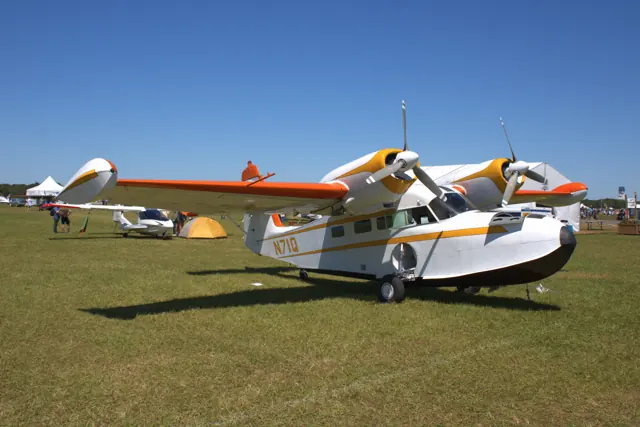
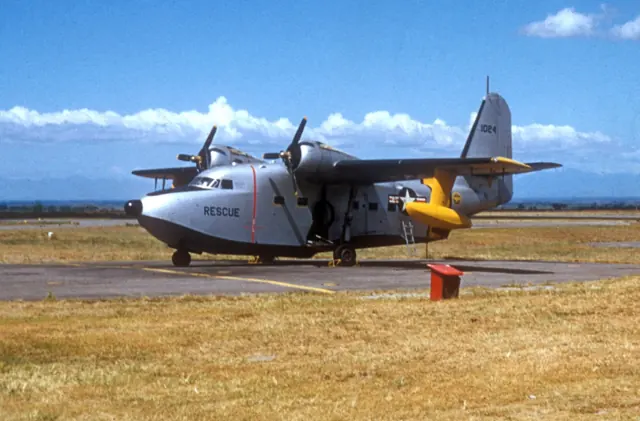
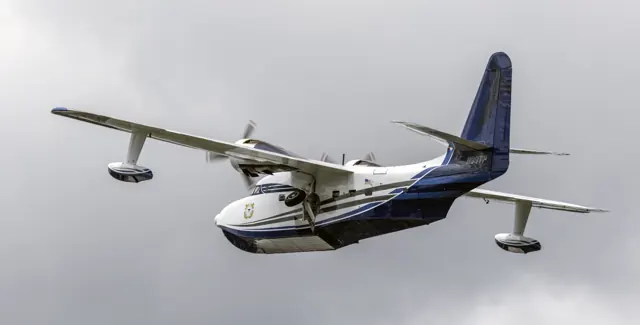
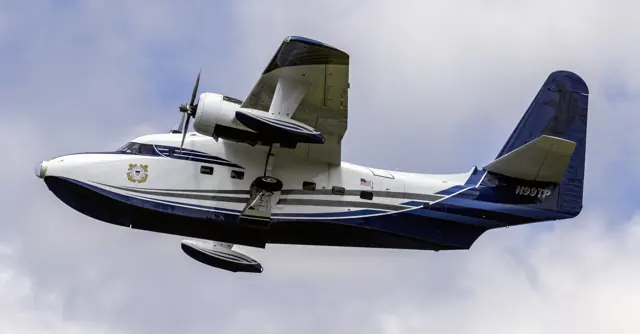
The Albatross combines a flying-boat hull with retractable landing gear for operations from water and runways. Its two radial engines sit high on the wing, clear of much of the spray. Military versions served under several designations before the HU-16 name was standardised.
Aircraft background
Wikipedia contributors · Read more ↗A childhood memory becomes a flight over Lake Mead
Lee had watched Albatrosses around San Diego as a child. Decades later, an early alarm signalled the chance to enter one himself, turning a distant memory into a day at Boulder City. The old cockpit and the people preparing the aircraft made the outing feel special before it reached the water landscapes he had come to see.
Plane & Pilot · December 2013. G-111 outing with owner Joe Duke and pilot Paul LeVeque from Boulder City; Lee later handled the aircraft from the right seat.
Plane & Pilot · Read more ↗The MSFS 2024 hydraulic model separates two systems
The guide describes an engine-pump-powered main system for gear and flaps, plus an accumulator-equipped brake subsystem. Falling main pressure can slow or stop gear and flap movement.
Albatross G111/HU16 · Microsoft Flight Simulator · MSFS 2024
Microsoft / aircraft developers · Read more ↗Into the cockpit
 YouTube
 Sporty's Pilot Shop · 1 min ·
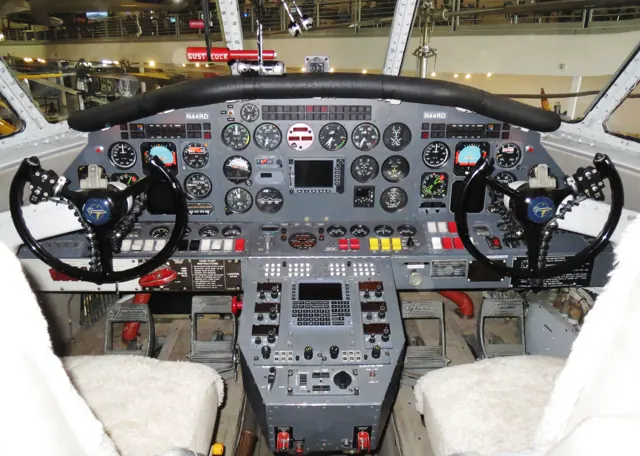
HU-16 Albatross Cockpit Takeoff | Tri-State Warbird Museum
A cockpit takeoff in the Tri-State Warbird Museum's HU-16 Albatross.
Real aircraft · Grumman Albatross HU-16 / G-111
Watch on YouTube ↗Preview images are served by AirframeDB. Videos open on YouTube only when you choose to watch.
Meet Grumman Albatross HU-16 / G-111
The Albatross combines a flying-boat hull with retractable landing gear for operations from water and runways. Its two radial engines sit high on the wing, clear of much of the spray. Military versions served under several designations before the HU-16 name was standardised.
The G-111 is a civilian development with its own cabin arrangement and equipment. The simulator package includes both military and civilian aircraft, with water operation and wheeled ground handling among its features.
Grumman Albatross HU-16 / G-111
Grumman → · Explore the family →
Grumman Albatross HU-16
Wikipedia contributors · Grumman HU-16 Albatross ↗G-111
Wikipedia contributors · Grumman HU-16 Albatross ↗Aircraft type designators
Use the code for the model you are flying. The linked authority lists the applicable aircraft.
History & design
Former airline aircraft find a new workshop and home
Stagnito describes the seven G-111s as former Chalk’s aircraft stored in Arizona. Barron’s recovery programme used component work in Missouri and repeated transport between sites, giving retired passenger amphibians another stage of life.
AOPA · A field of Albatrosses ↗Restoration project reported in March 2025
Development milestones
First flight: 24 October 1947
Developed from: Grumman Mallard
Wikipedia contributors · Grumman HU-16 Albatross ↗Grumman HU-16 Albatross · family/variant named by the source · Wikipedia revision 1370970348
Pilot accounts
A childhood memory becomes a flight over Lake Mead
Lee had watched Albatrosses around San Diego as a child. Decades later, an early alarm signalled the chance to enter one himself, turning a distant memory into a day at Boulder City. The old cockpit and the people preparing the aircraft made the outing feel special before it reached the water landscapes he had come to see.
When he took the right seat and handled the aircraft, the controls felt heavy but balanced, and its movements seemed deliberately unhurried. Paul LeVeque performed the water landing, with Joe Duke helping bring it ashore. Lee and photographer Jessica Ambats then watched from the bank.
Plane & Pilot · December 2013. G-111 outing with owner Joe Duke and pilot Paul LeVeque from Boulder City; Lee later handled the aircraft from the right seat.
Read the full account · Plane & Pilot ↗A first Coast Guard posting leaves a short but vivid chapter
Burns arrived at his first Coast Guard air station as a new fixed-wing pilot and soon found himself learning the Albatross. Many of the pilots available to fly it were also helicopter qualified, making for a crew setting he remembered distinctly. The aircraft accumulated about seventy-five hours of his flying before its retirement from Elizabeth City that October.
His recollection emphasises the change from a loud radial-engine takeoff to a much calmer cruise, and the aircraft’s stability during an instrument check. The station had already stopped water operations, so his experience concerned land-based patrol and search flying. That brief posting remained memorable enough for him to describe it in a letter four decades later.
AOPA reader letter · February 2014. Burns arrived at Elizabeth City on 4 August 1974 and began HU-16E checkout two days later; tail number 7243 is recalled.
Read the full account · AOPA ↗A surprising early call leads to a family restoration programme
Barron was tired enough after a late flight that an early telephone call about seven Albatrosses initially seemed like a dream. Checking his call history convinced him it had happened. The aircraft fitted an ambition to travel and dive in search of wartime wrecks, but first they needed extensive work after years in the desert.
The resulting programme involved rebuilding components in Missouri and transporting them to Arizona, then moving engines and propellers between airframes. His son Dillon handled the main ferry flying, with Mike managing engineering and making the final landings at their grass airfield.
Interview reported by Kollin Stagnito · March 2025. Seven former Chalk’s G-111s moved from Arizona towards Barron’s Missouri airfield; son Dillon flew the main ferry legs and Mike made the final grass-strip landings.
Read the full account · AOPA ↗In your simulator
Systems, equipment and documentation for each developer’s aircraft.
MSFS 2024Albatross G111/HU16
Microsoft Flight Simulator · Released
Albatross G111/HU16
Microsoft Flight Simulator · Released
Aircraft specifications
Published figures for the named real-aircraft variant. Simulator equipment and performance can differ.
| Specification | Published value |
|---|---|
| Length | 62 ft 10 in (19.15 m) |
| Wingspan | 96 ft 8 in (29.46 m) |
| Height | 25 ft 10 in (7.87 m) |
| Wing area | 1,035 sq ft (96.2 m² ) |
| Empty weight | 22,883 lb (10,380 kg) |
| Gross weight | 30,353 lb (13,768 kg) |
| Max takeoff weight | 37,500 lb (17,010 kg) |
| Powerplant | 2 × Wright R-1820-76A Cyclone 9 nine-cylinder air-cooled radial piston engines, 1,425 hp (1,063 kW) each for take-off |
| Propellers | 3-bladed Hamilton Standard constant-speed fully-feathering reversible-pitch propellers |
| Maximum speed | 236 mph (380 km/h, 205 kn) |
| Cruise speed | 124 mph (200 km/h, 108 kn) |
| Stall speed | 74 mph (119 km/h, 64 kn) |
| Range | 2,850 mi (4,590 km, 2,480 nmi) |
| Service ceiling | 21,500 ft (6,600 m) |
| Rate of climb | 1,450 ft/min (7.4 m/s) |
Manuals & resources
Find your next read
Choose a topic for a short introduction and a link to the original source. Simulator references identify the developer and edition they cover.
Simulator documentation
The MSFS 2024 hydraulic model separates two systemsAlbatross G111/HU16 · Microsoft Flight Simulator · MSFS 2024
The guide describes an engine-pump-powered main system for gear and flaps, plus an accumulator-equipped brake subsystem. Falling main pressure can slow or stop gear and flap movement.
Albatross guide v2.3.6, PDF pages 34–35; MSFS 2024-specific behaviour
Microsoft / aircraft developers · Read the source ↗Runway equipment and water equipment in one aircraftAlbatross G111/HU16 · Microsoft Flight Simulator · MSFS 2024
The Albatross guide covers hydraulic and landing-gear instruments, nosewheel steering choices, chocks and a sea anchor. It also identifies trim and autopilot controls. HU-16E and G-111 options differ, so the military and civilian configurations retain separate context even within the same package.
Albatross manual v2.3.6.1 · PDF pp.6,8-9,23
Microsoft / aircraft developers · Read the source ↗Fuel gauges show the main tanks onlyAlbatross G111/HU16 · Microsoft Flight Simulator · MSFS 2024
The main-panel gauges display the left and right main tanks. Float and optional drop-tank fuel has no separate quantity indication there; overhead pumps transfer it into the corresponding main tank.
Albatross guide v2.3.6, PDF pages 28–29
Microsoft / aircraft developers · Read the source ↗Propeller switches set governor limitsAlbatross G111/HU16 · Microsoft Flight Simulator · MSFS 2024
Momentary overhead switches adjust the governors’ RPM limits, rather than blade pitch directly. The manual allows clicking between the switches to operate both together.
Albatross guide v2.3.6, PDF page 30
Microsoft / aircraft developers · Read the source ↗The clipboard offers its own pushback functionAlbatross G111/HU16 · Microsoft Flight Simulator · MSFS 2024
A bespoke pushback option works on land and water. The manual says it replaces native tug connection and does not respond to radio requests for a tug.
Albatross guide v2.3.6, PDF page 27
Microsoft / aircraft developers · Read the source ↗Pilot account
A childhood memory becomes a flight over Lake MeadPlane & Pilot · December 2013. G-111 outing with owner Joe Duke and pilot Paul LeVeque from Boulder City; Lee later handled the aircraft from the right seat.
Lee had watched Albatrosses around San Diego as a child. Decades later, an early alarm signalled the chance to enter one himself, turning a distant memory into a day at Boulder City. The old cockpit and the people preparing the aircraft made the outing feel special before it reached the water landscapes he had come to see. When he took the right seat and handled the aircraft, the controls felt heavy but balanced, and its movements seemed deliberately unhurried.
Marc C. Lee
Plane & Pilot · Read the source ↗A first Coast Guard posting leaves a short but vivid chapterAOPA reader letter · February 2014. Burns arrived at Elizabeth City on 4 August 1974 and began HU-16E checkout two days later; tail number 7243 is recalled.
Burns arrived at his first Coast Guard air station as a new fixed-wing pilot and soon found himself learning the Albatross. Many of the pilots available to fly it were also helicopter qualified, making for a crew setting he remembered distinctly. The aircraft accumulated about seventy-five hours of his flying before its retirement from Elizabeth City that October.
Chris Burns
AOPA · Read the source ↗Read the original documentation from the people who created it. Manuals open on their publisher’s website.
Manual
Microsoft Flight Simulator aircraft manualsMicrosoft / aircraft developers [MSFS 2024] v2.3.6, [MSFS (2020)] v1.3.5 ManualMicrosoft / aircraft developersAircraft background
Grumman HU-16 AlbatrossWikipedia contributors · Research background · Wikipedia revision 1370970348 · retrieved 2026-09-12Resource
MSFS 2024 FAQ and edition aircraft inventoryMicrosoftType designator
ICAO Doc 8643 — aircraft type designatorsInternational Civil Aviation Organization · Public search data retrieved 2026-09-14; authority update 2026-09-03Built-in force-feedback profiles
Read the documentary basis, editable starting settings and remaining questions for the aircraft you fly. Each explanation refers to the exact profile revision shown.
Catalogue programme-20261022-v1 · 2 profile choices
Grumman Albatross G-111
Free and Pro · Revision 3 · Partial review
MSFS 2024
Grumman Albatross G-111: The mechanical-control starting response accompanies the selected amphibious model; radial engines and hull geometry do not calibrate yoke resistance.
Grumman Albatross HU-16
Free and Pro · Revision 1 · Partial review
MSFS 2024
Grumman Albatross HU-16: The mechanical-control starting response accompanies the selected amphibious model; radial engines and hull geometry do not calibrate yoke resistance.
Grumman Albatross G-111
Grumman Albatross G-111: The mechanical-control starting response accompanies the selected amphibious model; radial engines and hull geometry do not calibrate yoke resistance.
Aircraft and simulator scope
- Grumman Albatross G-111 · MSFS 2024 · Variant starting point
Microsoft HU-16/G-111 Albatross manual version 2.3.6; the variants and avionics configurations are not identical. · Selected choice: Grumman Albatross G-111. Documentary scope does not establish every variant, add-on revision or simulator binding.
The simulator model and controls
The Albatross combines a boat-shaped hull with retractable landing gear, allowing operations from water and runways. Two radial engines sit high on the wing, clear of much of the spray. Military versions served under several designations before the HU-16 name was standardised.
This starting point selects Grumman Albatross G-111. Its aircraft-level settings do not select a particular developer’s custom systems.
How this profile feels
Spring resistance builds with the selected airspeed response. A separate aerodynamic term adds speed-dependent control load.
Valid trim provides the configured pressure relief. Autopilot following is enabled for supported control references.
Controls and trim
The package manual separates HU-16 and civil G-111 configurations and documents elevator, aileron and rudder trim controls. Its amphibious hull and retractable gear support water and runway operation. The radial-engine installation and a Garmin autopilot control head belong to the configurations described by the manual; the civil and military models should not silently share every equipment assumption.
About the values
The gains are normalized profile settings. They describe the chosen effect balance; hand force depends on the device and its output limits. IAS references are tuning values rather than operating limits. Physical acceptance of this revision remains pending.
What the documentation establishes
The manual distinguishes the amphibious Albatross configurations and describes the HU-16 radial-engine installation.
Elevator, aileron and rudder trim controls/indications are documented; zero roll-trim response is a preset omission, not proof of absent aileron trim.
The manual shows autopilot controls, including a Garmin control head in one configuration; servo-following behavior is not established.
Twin radial engines and flap/gear indications are documented for the described configuration; G-111 differences retain their own scope.
The stated 145-knot cruise is true airspeed, not a direct calibration of an indicated-speed force reference.
Documentary review and sources
These decisions describe the documentary basis and remaining gaps for this revision. Aircraft documentation and a starting setting describe different kinds of evidence.
Aircraft and variant
ReviewedThis starting point selects Grumman Albatross G-111. Its aircraft-level settings do not select a particular developer’s custom systems.
Flight controls
Not yet reviewedThe package manual separates HU-16 and civil G-111 configurations and documents elevator, aileron and rudder trim controls. Its amphibious hull and retractable gear support water and runway operation. The radial-engine installation and a Garmin autopilot control head belong to the configurations described by the manual; the civil and military models should not silently share every equipment assumption.
Trim
ReviewedElevator trim supports pitch relief. The documented aileron trim remains distinct even where a profile chooses zero roll-trim response. Pitch authority 0.3 provides load relief and permitted centre movement; roll authority is 0.
Autopilot and stability
ReviewedFollowing is on at 0.1 authority when a supported, valid autopilot control reference is available.
Equipment
ReviewedGear, flap and ground cues follow the selected settings and available simulator-reported states.
Speeds and limits
ReviewedThe indicated-speed references set the profile response scale; they are separate from aircraft operating limits.
Simulator integration
Not yet reviewedThe profile targets msfs2024. Add-on-specific controls use only the supported references configured by this profile.
Force-feedback settings
Not yet reviewedThe settings define the profile’s effect balance. Device output limits affect physical hand force.
Starting settings and their rationale
These configured values are starting estimates. The explanations describe what each setting controls; physical validation appears separately below.
| Setting | Starting value | What it controls and why |
|---|---|---|
| Spring strength | Starting value0.74 | What it controls and whyThe mechanical-control starting response accompanies the selected amphibious model; radial engines and hull geometry do not calibrate yoke resistance. The baseline spring is 0.74. Its low-speed blend reaches baseline strength at 75 KIAS. |
| Master force gain | Starting value0.85 | What it controls and whyScales overall profile strength while preserving effect balance, subject to device and output limits. |
| Profile force gain | Starting value0.8 | What it controls and whyThe aerodynamic-load gain is 0.8 with an indicated-speed reference of 150 KIAS. This supplies speed-dependent loading alongside the spring. |
| Force tuning speed/reference | Starting value150.0 kt | What it controls and whySets the IAS reference for aerodynamic loading. It is an estimate, not published cruise TAS or a flight limit. |
| Spring response reference speed | Starting value75.0 kt | What it controls and whySets the IAS where the low-speed blend reaches baseline strength; high-speed stiffening also uses it. |
| Aileron force scale | Starting value0.72 | What it controls and whyRoll and pitch aerodynamic scales are 0.72 and 1, respectively. They set the aerodynamic axis balance. No custom spring-travel curve is enabled. |
| Elevator force scale | Starting value1.0 | What it controls and whyScales pitch aerodynamic loading; pitch spring travel and trim responses are separate settings. |
| Trim feel | Starting valueEnabled | What it controls and whyRetained for compatibility and group membership. Trim relief, rather than this flag, controls centre movement. |
| Trim relief | Starting valueEnabled | What it controls and whyAllows trim relief with supported control law and valid telemetry. Axis authorities set its amount. |
| Autopilot follow | Starting valueEnabled | What it controls and whyFollowing is on at 0.1 authority when a supported, valid autopilot control reference is available. |
| Autopilot neutral hold | Starting valueDisabled | What it controls and whyPermits centering hold during a supported AP state, separate from following a moving target. |
| Output force limit | Starting value0.55 | What it controls and whyCaps directed-force output. Native spring effects and device limits remain separate. |
All 44 starting settings and their rationale
The settings define the profile’s effect balance. Device output limits affect physical hand force.
| Setting | Starting value | What it controls and why |
|---|---|---|
| Spring strength | Starting value0.74 | What it controls and whyThe mechanical-control starting response accompanies the selected amphibious model; radial engines and hull geometry do not calibrate yoke resistance. The baseline spring is 0.74. Its low-speed blend reaches baseline strength at 75 KIAS. |
| Spring deadband | Starting value0.045 | What it controls and whySets travel around the centre before the baseline spring resists. Smaller values engage it sooner. |
| Profile force gain | Starting value0.8 | What it controls and whyThe aerodynamic-load gain is 0.8 with an indicated-speed reference of 150 KIAS. This supplies speed-dependent loading alongside the spring. |
| Master force gain | Starting value0.85 | What it controls and whyScales overall profile strength while preserving effect balance, subject to device and output limits. |
| QBlend Enabled | Starting valueEnabled | What it controls and whyAllows baseline spring strength to rise with indicated airspeed where the control law permits it. |
| QSpring Minimum Factor | Starting value0.5 | What it controls and whySets low-speed spring strength as a fraction of baseline when blending is enabled. One keeps full strength. |
| QSpring Start Knots | Starting value20 kt | What it controls and whySets the IAS where the low-speed spring blend starts rising. This is a feel threshold, not a flight limit. |
| Spring response reference speed | Starting value75.0 kt | What it controls and whySets the IAS where the low-speed blend reaches baseline strength; high-speed stiffening also uses it. |
| Force tuning speed/reference | Starting value150.0 kt | What it controls and whySets the IAS reference for aerodynamic loading. It is an estimate, not published cruise TAS or a flight limit. |
| Airspeed spring stiffening gain | Starting value0.15 | What it controls and whyThe high-speed spring-stiffening gain is 0.15. It strengthens the permitted spring response above 75 KIAS, with the squared-speed ratio capped at 5. |
| Airspeed spring stiffening limit | Starting value5 | What it controls and whyLimits the squared airspeed ratio used for high-speed spring stiffening; it is not a device-force cap. |
| Aileron force scale | Starting value0.72 | What it controls and whyRoll and pitch aerodynamic scales are 0.72 and 1, respectively. They set the aerodynamic axis balance. No custom spring-travel curve is enabled. |
| Elevator force scale | Starting value1.0 | What it controls and whyScales pitch aerodynamic loading; pitch spring travel and trim responses are separate settings. |
| Output force limit | Starting value0.55 | What it controls and whyCaps directed-force output. Native spring effects and device limits remain separate. |
| Trim feel | Starting valueEnabled | What it controls and whyRetained for compatibility and group membership. Trim relief, rather than this flag, controls centre movement. |
| Trim relief | Starting valueEnabled | What it controls and whyAllows trim relief with supported control law and valid telemetry. Axis authorities set its amount. |
| Elevator Authority | Starting value0.3 | What it controls and whyElevator trim supports pitch relief. The documented aileron trim remains distinct even where a profile chooses zero roll-trim response. Pitch authority 0.3 provides load relief and permitted centre movement; roll authority is 0. |
| Aileron Authority | Starting value0 | What it controls and whyScales supported roll-trim relief and permitted centre movement. Zero removes roll response. |
| Force Trim Enabled | Starting valueDisabled | What it controls and whyEnables local force trim, separate from aircraft-owned trim and add-on integration qualification. |
| GLoad Enabled | Starting valueEnabled | What it controls and whyAllows load-factor changes to modify permitted spring laws. Passive fly-by-wire feel can suppress it. |
| Rate Damping Enabled | Starting valueEnabled | What it controls and whyEnables rate damping with the configured coefficients and control law. |
| Autopilot follow | Starting valueEnabled | What it controls and whyFollowing is on at 0.1 authority when a supported, valid autopilot control reference is available. |
| Autopilot follow authority | Starting value0.1 | What it controls and whySets admitted AP-follow gain, not a percentage of travel. Runtime ownership and input limits still apply. |
| Autopilot neutral hold | Starting valueDisabled | What it controls and whyPermits centering hold during a supported AP state, separate from following a moving target. |
| Autopilot neutral hold strength | Starting value0.6 | What it controls and whySets admitted AP neutral-hold strength; inactive while neutral hold is disabled. |
| Enabled | Starting valueEnabled | What it controls and whyEnables aerodynamic cues; each still needs nonzero strength and its simulator conditions. |
| Gain | Starting value0.35 | What it controls and whySets stall-buffet strength. Zero removes the cue without changing simulator stalls or warnings. |
| Gain | Starting value0 | What it controls and whySets high-Mach buffet strength; onset and full-strength thresholds are separate. |
| Gain | Starting value0.14 | What it controls and whySets flap buffet at the configured position and speed gates. Flap movement texture is separate. |
| Maximum flap index | Starting value3 | What it controls and whySets the final flap index for detent normalization. UP plus three detents uses maximum index3. |
| Minimum flap index | Starting value2 | What it controls and whySets the first flap detent that admits buffet; this is a handle index, not degrees. |
| Gain | Starting value0.1 | What it controls and whySets gear aerodynamic buffet; movement and ground-contact cues are separate. |
| Shaker Enabled | Starting valueDisabled | What it controls and whyPermits shaker at supported warning conditions; the switch does not establish aircraft equipment. |
| Stick shaker amplitude | Starting value0.5 | What it controls and whySets triggered shaker strength; inactive while the shaker feature is disabled. |
| Enabled | Starting valueEnabled | What it controls and whyEnables ground effects; each still needs its own strength and contact or motion telemetry. |
| Gain | Starting value0.4 | What it controls and whySets rolling texture strength, modified by speed, surface and undercarriage configuration. |
| Gain | Starting value0.25 | What it controls and whySets gear-bump texture during ground motion, separate from touchdown impact. |
| Gain | Starting value0.65 | What it controls and whySets landing-impact strength; landing telemetry and response shape determine the pulse. |
| Gain | Starting value0 | What it controls and whySets reverse-thrust vibration with valid reverser and engine conditions. Zero removes the cue. |
| Enabled | Starting valueEnabled | What it controls and whyEnables engine cues with nonzero settings and valid running-engine telemetry. |
| Gain | Starting value0.12 | What it controls and whySets estimated engine vibration using configured telemetry and response, not measured cockpit vibration. |
| Enabled | Starting valueEnabled | What it controls and whyEnables accessory cues with configured strengths and observed accessory movement. |
| Gain | Starting value0.12 | What it controls and whySets texture from observed flap movement; a command without movement does not establish the cue. |
| Gain | Starting value0.12 | What it controls and whySets texture from observed gear movement, separate from aerodynamic and touchdown effects. |
Limits and open questions
- A free-and-clear control check does not explain Albatross primary-control linkage or cockpit load transmission.
- Different cockpit autopilot configurations do not establish one generic simulator force-output interface.
- Control checks and cruise performance do not quantify Albatross stick loads or preset axis scaling.
Physical validation
No physical force validation is recorded in this public catalogue for this revision. Documentary review and software checks do not establish how a particular device feels.
Discuss this aircraft (0)
Questions, observations and useful sources from the community.
No published discussions yet. Bring a question or share a useful source.
Open aircraft discussions →Content expanded · What’s new
Something missing or a source that needs attention?
Suggest a correction ↗