




Start here
A few places to begin, from the aircraft’s story to the people who fly it.
Meet the aircraft
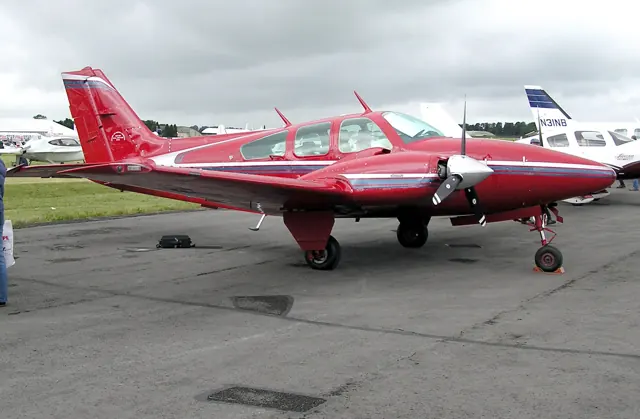
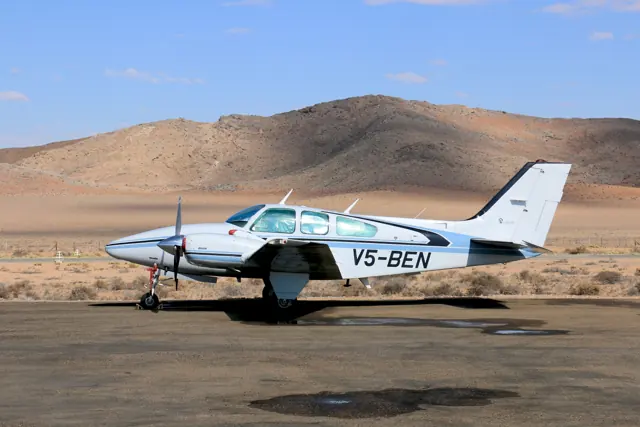
The Baron entered the Beechcraft range in 1961, developing from the earlier Travel Air. Its retractable landing gear and two wing-mounted piston engines provide the familiar outline of a light touring twin. Several fuselage and engine combinations appeared over the family's long history. The Model 58 and glass-cockpit G58 share a recognisable shape while representing different equipment generations.
Aircraft background
Wikipedia contributors · Read more ↗Smooth airwork in a fast, well-equipped twin
Twombly's G58 demonstration began near sea level and close to maximum weight, yet the initial climb reached about 1,800 feet per minute. At 11,000 feet, he recorded roughly 200 knots true airspeed before exploring reduced fuel-flow settings. The pace reinforced his view that a Baron transition deserves substantial preparation.
AOPA Pilot, 1 February 2009. G58 demonstration flight; measured performance belongs to the reported loading and cold conditions.
AOPA Pilot · Read more ↗Trim and simulator control assignment
Laminar's Baron guide describes rudder trim and the electrical availability of the represented trim system. It also covers simulator peripheral assignment. The conventional-panel Baron is documented separately from glass-cockpit G58 implementations in other simulators.
Beechcraft Baron 58 · Laminar Research · X-Plane 12 / X-Plane 11
Laminar Research · Read more ↗Into the cockpit
 YouTube
 Chief Flying Officer · 28 min ·
How to Fly a BeechCraft Baron G58 | General Aviation Flying Video | Chief Flying Officer
A pilot introduces a G58 with G1000 NXi avionics through a flight demonstration.
Real aircraft · Beechcraft Baron 58 / G58
Watch on YouTube ↗Preview images are served by AirframeDB. Videos open on YouTube only when you choose to watch.
Meet Beechcraft Baron 58 / G58
The Baron entered the Beechcraft range in 1961, developing from the earlier Travel Air. Its retractable landing gear and two wing-mounted piston engines provide the familiar outline of a light touring twin. Several fuselage and engine combinations appeared over the family's long history.
The Model 58 and glass-cockpit G58 share a recognisable shape while representing different equipment generations. The simulator products span conventional-instrument aircraft and modern G58s, with avionics and systems described for each.
Beechcraft Baron 58 / G58
Beechcraft → · Explore the family →
Beechcraft Baron 58
Wikipedia contributors · Beechcraft Baron ↗Laminar Research · X-Plane 12 →Laminar Research · X-Plane 11 →Black Square · MSFS 2020 · MSFS 2024 →SimCoders · X-Plane 11 · X-Plane 12 →G58
Wikipedia contributors · Beechcraft Baron ↗Microsoft Flight Simulator · MSFS 2024 →Microsoft Flight Simulator · MSFS 2020 →Black Square · MSFS 2020 · MSFS 2024 →SimCoders · X-Plane 11 · X-Plane 12 →Aircraft type designators
Use the code for the model you are flying. The linked authority lists the applicable aircraft.
Baron 58; the authority separately lists 58P and 58TC under B58T
ICAO Doc 8643 — aircraft type designators ↗Checked 2026-09-14History & design
Development milestones
First flight: February 29, 1960
Developed from: Beechcraft Travel Air
Wikipedia contributors · Beechcraft Baron ↗Beechcraft Baron · family/variant named by the source · Wikipedia revision 1370279143
Pilot accounts
Smooth airwork in a fast, well-equipped twin
Twombly's G58 demonstration began near sea level and close to maximum weight, yet the initial climb reached about 1,800 feet per minute. At 11,000 feet, he recorded roughly 200 knots true airspeed before exploring reduced fuel-flow settings. The pace reinforced his view that a Baron transition deserves substantial preparation. Once settled into airwork, however, he particularly enjoyed the smooth response during steep turns and the familiar Beechcraft cockpit around the modern Garmin displays.
The evaluation also included flight on one engine. In the cold conditions of that particular demonstration, he reported a continuing climb at 11,000 feet, with rudder and aileron trim helping reduce the workload. That observation should not be read as performance available at every temperature or loading. Returning to land required firm back pressure, followed by the satisfying touchdown he associated with the type. His report combines enthusiasm for the handling with a clear sense of how quickly a powerful twin can keep its pilot occupied.
AOPA Pilot, 1 February 2009. G58 demonstration flight; measured performance belongs to the reported loading and cold conditions.
Read the full account · AOPA Pilot ↗A contractor puts an early glass-cockpit Baron to work
Hill had operated one of the first Garmin-equipped G58s for nearly five months when Cox interviewed him. His construction business took him around Arizona, Nevada and California several times a week, usually with bankers, investors or employees aboard. Moving from a Bonanza made the cabin and panel layout familiar, while the twin's rear double doors proved popular with his passengers. He expected to fly about 500 hours annually if that early pattern continued.
He praised the climb and tightly coordinated controls, saying the aircraft's weight was less apparent in flight than he had expected. Learning the G1000 brought a clearer picture of his position in instrument conditions. His equipment choices reflected the work: relatively short trips and infrequent use of every seat allowed him to choose the smaller standard fuel capacity and preserve payload. For Hill, the appeal was how well the Baron fitted recurring business journeys, with enough speed and accommodation to meet the needs he actually had.
Plane + Pilot, 1 July 2006. Owner interview about an early G1000-equipped G58 used for construction-business travel.
Read the full account · Plane + Pilot ↗Eight years sharing a Baron for travel and relief flights
Lincoln had shared his 1984 Baron 58 with a partner for eight years when Courtney spoke with him. Their flying included journeys from Connecticut along the American East Coast, trips through the Bahamas and humanitarian work connected with Haiti's 2010 earthquake. He remembered feeling comfortable in the aeroplane from the first flight. The yoke felt substantial, but the response was precise, giving him a strong sense of connection with the aircraft.
He was preparing to sell because his own flying needs had changed and he expected fewer long journeys. That decision did not diminish his affection for the Baron. He regarded it as especially attractive when carrying a small number of passengers and valuing performance over maximum accommodation. He cautioned against treating every nominal seat as equally spacious, suggesting a larger aircraft for a larger family.
High Sierra Pilots, 27 March 2017. Named owner interview concerning a 1984 Baron 58; surrounding historical claims and copied magazine passages are not used.
Read the full account · High Sierra Pilots ↗In your simulator
Systems, equipment and documentation for each developer’s aircraft.
Compare simulator versions →MSFS 2024Baron G58
Microsoft Flight Simulator · Released
Baron G58
Microsoft Flight Simulator · Released
MSFS 2020Beechcraft Baron G58
Microsoft Flight Simulator · Released
Beechcraft Baron G58
Microsoft Flight Simulator · Released
X-Plane 12Beechcraft Baron 58
Laminar Research · Released
Beechcraft Baron 58
Laminar Research · Released
X-Plane 11Beechcraft Baron 58
Laminar Research · Released
Beechcraft Baron 58
Laminar Research · Released
MSFS 2020 · MSFS 2024Beechcraft Baron 58 / G58 · Black Square
Black Square · Released
Beechcraft Baron 58 / G58 · Black Square
Black Square · Released
X-Plane 11 · X-Plane 12 Enhancement Beechcraft Baron 58 / G58
SimCoders · Released
Beechcraft Baron 58 / G58
SimCoders · Released
X-Plane 11 · X-Plane 12 Enhancement REP for Carenado B58 Baron
SimCoders · Released
REP for Carenado B58 Baron
SimCoders · Released
X-Plane 12 Enhancement Beechcraft B58 Enhanced Flight Models
X-Aerodynamics · Released
Beechcraft B58 Enhanced Flight Models
X-Aerodynamics · Released
Aircraft specifications
Published figures for the named real-aircraft variant. Simulator equipment and performance can differ.
| Specification | Published value |
|---|---|
| Length | 28 ft 0 in (8.53 m) |
| Wingspan | 37 ft 10 in (11.53 m) |
| Height | 9 ft 7 in (2.92 m) |
| Wing area | 199.2 sq ft (18.51 m² ) |
| Empty weight | 3,156 lb (1,432 kg) |
| Max takeoff weight | 5,100 lb (2,313 kg) |
| Powerplant | 2 × Continental IO-470-L air-cooled six-cylinder horizontally opposed engines, 260 hp (190 kW) each |
| Maximum speed | 205 kn (236 mph, 380 km/h) at sea level |
| Cruise speed | 180 kn (210 mph, 330 km/h) at 12,000 ft (3,700 m) (55% power) |
| Stall speed | 73 kn (84 mph, 135 km/h) IAS , power off, wheels and flaps lowered |
| Range | 942 nmi (1,084 mi, 1,745 km) at 10,500 ft (3,200 m), 65% power, 45 min reserves |
| Service ceiling | 19,700 ft (6,000 m) |
| Rate of climb | 1,670 ft/min (8.5 m/s) |
Manuals & resources
Find your next read
Choose a topic for a short introduction and a link to the original source. Simulator references identify the developer and edition they cover.
Simulator documentation
Trim and simulator control assignmentBeechcraft Baron 58 · Laminar Research · X-Plane 12 / X-Plane 11
Laminar's Baron guide describes rudder trim and the electrical availability of the represented trim system. It also covers simulator peripheral assignment. The conventional-panel Baron is documented separately from glass-cockpit G58 implementations in other simulators.
Archived simulator manual; installed package revision not observed · PDF pp.6,31
Laminar Research · Read the source ↗Released product and variantsREP for Carenado B58 Baron · SimCoders · X-Plane 11 · X-Plane 12
A separate Reality Expansion Pack for Carenado’s B58 Baron. The Carenado aircraft is required; this pack does not apply to Laminar’s default Baron. The store documents X-Plane 12 compatibility from REP 4.7.0.
Official developer / designated-store reference · checked 2026-09-14
SimCoders · Read the source ↗Pilot account
Smooth airwork in a fast, well-equipped twinAOPA Pilot, 1 February 2009. G58 demonstration flight; measured performance belongs to the reported loading and cold conditions.
Twombly's G58 demonstration began near sea level and close to maximum weight, yet the initial climb reached about 1,800 feet per minute. At 11,000 feet, he recorded roughly 200 knots true airspeed before exploring reduced fuel-flow settings. The pace reinforced his view that a Baron transition deserves substantial preparation. Once settled into airwork, however, he particularly enjoyed the smooth response during steep turns and the familiar Beechcraft cockpit around the modern Garmin displays.
Ian J. Twombly
AOPA Pilot · Read the source ↗A contractor puts an early glass-cockpit Baron to workPlane + Pilot, 1 July 2006. Owner interview about an early G1000-equipped G58 used for construction-business travel.
Hill had operated one of the first Garmin-equipped G58s for nearly five months when Cox interviewed him. His construction business took him around Arizona, Nevada and California several times a week, usually with bankers, investors or employees aboard. Moving from a Bonanza made the cabin and panel layout familiar, while the twin's rear double doors proved popular with his passengers. He expected to fly about 500 hours annually if that early pattern continued.
Jim Hill, interviewed by Bill Cox
Plane + Pilot · Read the source ↗Developer documentation
Beechcraft B58 Enhanced Flight Models — product listingBeechcraft B58 Enhanced Flight Models · X-Plane 12
Product listing captured 2026-09-24; edition scope from the reviewed catalogue
X-Aerodynamics · Read the source ↗Read the original documentation from the people who created it. Manuals open on their publisher’s website.
Manual
Microsoft Flight Simulator aircraft manualsMicrosoft / aircraft developers Beechcraft Baron 58 POHLaminar Research X-Plane 12 Desktop ManualLaminar Research X-Plane aircraft and avionics manualsLaminar Research X-Plane 11 Desktop ManualLaminar ResearchAircraft background
Beechcraft BaronWikipedia contributors · Research background · Wikipedia revision 1370279143 · retrieved 2026-09-12Resource
MSFS 2024 FAQ and edition aircraft inventoryMicrosoft MSFS 2020 FAQ and edition aircraft inventoryMicrosoftProduct
Baron ProfessionalBlack Square · Official developer / designated store catalogue · checked 2026-09-12 Steam Gauge Overhaul - Analog BaronBlack Square · Official developer / designated store catalogue · checked 2026-09-12 Reality Expansion Pack · default Baron B58SimCoders · Official developer / designated store catalogue · checked 2026-09-12 Beechcraft B58 Enhanced Flight ModelsX-Aerodynamics · Product listing captured 2026-09-24; edition scope from the reviewed catalogueDeveloper documentation
Reality Expansion Pack for Carenado B58 Baron-Simcoders-REP-SimCoders · Official developer / designated-store reference · checked 2026-09-14Type designator
ICAO Doc 8643 — aircraft type designatorsInternational Civil Aviation Organization · Public search data retrieved 2026-09-14; authority update 2026-09-03Built-in force-feedback profiles
Read the documentary basis, editable starting settings and remaining questions for the aircraft you fly. Each explanation refers to the exact profile revision shown.
Catalogue programme-20261022-v1 · 15 profile choices
Black Square Analog Baron 58
Black Square · Free and Pro · Revision 1 · Inherited starting point
MSFS 2020
Black Square Analog Baron 58: The piston twin's selected aerodynamic yoke loading is independent of whether its engines are normally aspirated or turbocharged and its cabin is pressurized.
Black Square Analog Baron 58P
Black Square · Free and Pro · Revision 1 · Inherited starting point
MSFS 2020
Black Square Analog Baron 58P: The piston twin's selected aerodynamic yoke loading is independent of whether its engines are normally aspirated or turbocharged and its cabin is pressurized.
Black Square Baron B58
Black Square · Free and Pro · Revision 6 · Inherited starting point
MSFS 2020 · MSFS 2024
Black Square Baron B58: The piston twin's selected aerodynamic yoke loading is independent of whether its engines are normally aspirated or turbocharged and its cabin is pressurized.
Black Square Baron B58P
Black Square · Free and Pro · Revision 5 · Inherited starting point
MSFS 2020 · MSFS 2024
Black Square Baron B58P: The piston twin's selected aerodynamic yoke loading is independent of whether its engines are normally aspirated or turbocharged and its cabin is pressurized.
Black Square Baron B58TC
Black Square · Free and Pro · Revision 5 · Inherited starting point
MSFS 2020 · MSFS 2024
Black Square Baron B58TC: The piston twin's selected aerodynamic yoke loading is independent of whether its engines are normally aspirated or turbocharged and its cabin is pressurized.
Carenado B58 Baron
Carenado · Free and Pro · Revision 1 · Partial review
X-Plane 11
Carenado B58 Baron: The piston twin's selected aerodynamic yoke loading is independent of whether its engines are normally aspirated or turbocharged and its cabin is pressurized.
SimCoders REP Baron B58
SimCoders · Free and Pro · Revision 3 · Inherited starting point
X-Plane 12
SimCoders REP Baron B58: The piston twin's selected aerodynamic yoke loading is independent of whether its engines are normally aspirated or turbocharged and its cabin is pressurized.
X-Aerodynamics Beechcraft B58 EFM 285 hp
X-Aerodynamics · Free and Pro · Revision 3 · Inherited starting point
X-Plane 12
X-Aerodynamics Beechcraft B58 EFM 285 hp: The piston twin's selected aerodynamic yoke loading is independent of whether its engines are normally aspirated or turbocharged and its cabin is pressurized.
X-Aerodynamics Beechcraft B58 EFM 300 hp
X-Aerodynamics · Free and Pro · Revision 3 · Inherited starting point
X-Plane 12
X-Aerodynamics Beechcraft B58 EFM 300 hp: The piston twin's selected aerodynamic yoke loading is independent of whether its engines are normally aspirated or turbocharged and its cabin is pressurized.
X-Aerodynamics Beechcraft B58 EFM 325 Turbo hp
X-Aerodynamics · Free and Pro · Revision 3 · Inherited starting point
X-Plane 12
X-Aerodynamics Beechcraft B58 EFM 325 Turbo hp: The piston twin's selected aerodynamic yoke loading is independent of whether its engines are normally aspirated or turbocharged and its cabin is pressurized.
Beechcraft Baron G58
Free and Pro · Revision 3 · Inherited starting point
MSFS 2020 · MSFS 2024 · X-Plane 11 · X-Plane 12
Beechcraft Baron G58: The piston twin's selected aerodynamic yoke loading is independent of whether its engines are normally aspirated or turbocharged and its cabin is pressurized.
Beechcraft Baron 58
Free and Pro · Revision 1 · Partial review
MSFS 2020 · MSFS 2024 · X-Plane 11 · X-Plane 12
Beechcraft Baron 58: The piston twin's selected aerodynamic yoke loading is independent of whether its engines are normally aspirated or turbocharged and its cabin is pressurized.
Beechcraft Baron 58P
Free and Pro · Revision 1 · Inherited starting point
MSFS 2020 · MSFS 2024 · X-Plane 11 · X-Plane 12
Beechcraft Baron 58P: The piston twin's selected aerodynamic yoke loading is independent of whether its engines are normally aspirated or turbocharged and its cabin is pressurized.
Beechcraft Baron 58TC
Free and Pro · Revision 1 · Inherited starting point
MSFS 2020 · MSFS 2024 · X-Plane 11 · X-Plane 12
Beechcraft Baron 58TC: The piston twin's selected aerodynamic yoke loading is independent of whether its engines are normally aspirated or turbocharged and its cabin is pressurized.
Carenado B55 Baron
Carenado · Free and Pro · Revision 3 · Inherited starting point
MSFS 2020 · MSFS 2024
A low-wing piston twin that carries the Beechcraft touring-aircraft lineage into two-engine flying.
Black Square Baron B58P
Black Square Baron B58P: The piston twin's selected aerodynamic yoke loading is independent of whether its engines are normally aspirated or turbocharged and its cabin is pressurized.
Aircraft and simulator scope
- Black Square Baron B58P · Black Square · MSFS 2020 · Add-on starting point
- Black Square Baron B58P · Black Square · MSFS 2024 · Add-on starting point
The simulator model and controls
The Baron entered the Beechcraft range in 1961, developing from the earlier Travel Air. Its retractable landing gear and two wing-mounted piston engines provide the familiar outline of a light touring twin. Several fuselage and engine combinations appeared over the family's long history.
This profile selects Black Square Baron B58P for MSFS 2020, MSFS 2024.
How this profile feels
Spring resistance builds with the selected airspeed response. A separate aerodynamic term adds speed-dependent control load.
Valid trim provides the configured pressure relief. Autopilot following is off.
Controls and trim
Baron products distinguish normally aspirated B58 aircraft, turbocharged B58TCs and pressurized B58Ps. Black Square documents three-axis trim and separate KFC150 autopilot and flight-director cancellation. Carenado's B58 uses its own KFC225 implementation. Engine boost and cabin pressure distinguish equipment and performance; they do not by themselves prescribe a different yoke force.
The selected implementation
Baron Professional separates B58, B58TC and B58P. Its KFC150 distinguishes autopilot disengagement from flight-director cancellation; mistrim indication is not force output.
About the values
The gains are normalized profile settings. They describe the chosen effect balance; hand force depends on the device and its output limits. IAS references are tuning values rather than operating limits. Physical acceptance of this revision remains pending.
Documentary review and sources
These decisions describe the documentary basis and remaining gaps for this revision. Aircraft documentation and a starting setting describe different kinds of evidence.
Aircraft and variant
InheritedThis profile selects Black Square Baron B58P for MSFS 2020, MSFS 2024.
Flight controls
InheritedBaron products distinguish normally aspirated B58 aircraft, turbocharged B58TCs and pressurized B58Ps. Black Square documents three-axis trim and separate KFC150 autopilot and flight-director cancellation. Carenado's B58 uses its own KFC225 implementation. Engine boost and cabin pressure distinguish equipment and performance; they do not by themselves prescribe a different yoke force.
Trim
InheritedDocumented elevator trim supports pitch relief. Aileron and rudder trim serve separate axes, and a trim-tab animation is not a hardware-neutral calibration. Pitch authority 0.3 provides load relief and permitted centre movement; roll authority is 0.12.
Autopilot and stability
InheritedAutopilot following is off; the configured spring and load retain the hardware feel.
Equipment
InheritedBaron Professional separates B58, B58TC and B58P. Its KFC150 distinguishes autopilot disengagement from flight-director cancellation; mistrim indication is not force output.
Speeds and limits
InheritedThe indicated-speed references set the profile response scale; they are separate from aircraft operating limits.
Simulator integration
InheritedThe profile targets msfs2020, msfs2024. Add-on-specific controls use only the supported references configured by this profile.
Force-feedback settings
InheritedThe settings define the profile’s effect balance. Device output limits affect physical hand force.
Starting settings and their rationale
These configured values are starting estimates. The explanations describe what each setting controls; physical validation appears separately below.
| Setting | Starting value | What it controls and why |
|---|---|---|
| Spring strength | Starting value0.74 | What it controls and whyThe piston twin's selected aerodynamic yoke loading is independent of whether its engines are normally aspirated or turbocharged and its cabin is pressurized. The baseline spring is 0.74. Its low-speed blend reaches baseline strength at 65 KIAS. |
| Master force gain | Starting value0.85 | What it controls and whyScales overall profile strength while preserving effect balance, subject to device and output limits. |
| Profile force gain | Starting value0.8 | What it controls and whyThe aerodynamic-load gain is 0.8 with an indicated-speed reference of 170 KIAS. This supplies speed-dependent loading alongside the spring. |
| Force tuning speed/reference | Starting value170 kt | What it controls and whySets the IAS reference for aerodynamic loading. It is an estimate, not published cruise TAS or a flight limit. |
| Spring response reference speed | Starting value65 kt | What it controls and whySets the IAS where the low-speed blend reaches baseline strength; high-speed stiffening also uses it. |
| Aileron force scale | Starting value0.72 | What it controls and whyRoll and pitch aerodynamic scales are 0.72 and 1, respectively. They set the aerodynamic axis balance. No custom spring-travel curve is enabled. |
| Elevator force scale | Starting value1 | What it controls and whyScales pitch aerodynamic loading; pitch spring travel and trim responses are separate settings. |
| Trim feel | Starting valueDisabled | What it controls and whyRetained for compatibility and group membership. Trim relief, rather than this flag, controls centre movement. |
| Trim relief | Starting valueEnabled | What it controls and whyAllows trim relief with supported control law and valid telemetry. Axis authorities set its amount. |
| Autopilot follow | Starting valueDisabled | What it controls and whyAutopilot following is off; the configured spring and load retain the hardware feel. |
| Autopilot neutral hold | Starting valueDisabled | What it controls and whyPermits centering hold during a supported AP state, separate from following a moving target. |
| Output force limit | Starting value0.55 | What it controls and whyCaps directed-force output. Native spring effects and device limits remain separate. |
All 44 starting settings and their rationale
The settings define the profile’s effect balance. Device output limits affect physical hand force.
| Setting | Starting value | What it controls and why |
|---|---|---|
| Spring strength | Starting value0.74 | What it controls and whyThe piston twin's selected aerodynamic yoke loading is independent of whether its engines are normally aspirated or turbocharged and its cabin is pressurized. The baseline spring is 0.74. Its low-speed blend reaches baseline strength at 65 KIAS. |
| Spring deadband | Starting value0.045 | What it controls and whySets travel around the centre before the baseline spring resists. Smaller values engage it sooner. |
| Profile force gain | Starting value0.8 | What it controls and whyThe aerodynamic-load gain is 0.8 with an indicated-speed reference of 170 KIAS. This supplies speed-dependent loading alongside the spring. |
| Master force gain | Starting value0.85 | What it controls and whyScales overall profile strength while preserving effect balance, subject to device and output limits. |
| QBlend Enabled | Starting valueEnabled | What it controls and whyAllows baseline spring strength to rise with indicated airspeed where the control law permits it. |
| QSpring Minimum Factor | Starting value0.5 | What it controls and whySets low-speed spring strength as a fraction of baseline when blending is enabled. One keeps full strength. |
| QSpring Start Knots | Starting value8 kt | What it controls and whySets the IAS where the low-speed spring blend starts rising. This is a feel threshold, not a flight limit. |
| Spring response reference speed | Starting value65 kt | What it controls and whySets the IAS where the low-speed blend reaches baseline strength; high-speed stiffening also uses it. |
| Force tuning speed/reference | Starting value170 kt | What it controls and whySets the IAS reference for aerodynamic loading. It is an estimate, not published cruise TAS or a flight limit. |
| Airspeed spring stiffening gain | Starting value0.15 | What it controls and whyThe high-speed spring-stiffening gain is 0.15. It strengthens the permitted spring response above 65 KIAS, with the squared-speed ratio capped at 5. |
| Airspeed spring stiffening limit | Starting value5 | What it controls and whyLimits the squared airspeed ratio used for high-speed spring stiffening; it is not a device-force cap. |
| Aileron force scale | Starting value0.72 | What it controls and whyRoll and pitch aerodynamic scales are 0.72 and 1, respectively. They set the aerodynamic axis balance. No custom spring-travel curve is enabled. |
| Elevator force scale | Starting value1 | What it controls and whyScales pitch aerodynamic loading; pitch spring travel and trim responses are separate settings. |
| Output force limit | Starting value0.55 | What it controls and whyCaps directed-force output. Native spring effects and device limits remain separate. |
| Trim feel | Starting valueDisabled | What it controls and whyRetained for compatibility and group membership. Trim relief, rather than this flag, controls centre movement. |
| Trim relief | Starting valueEnabled | What it controls and whyAllows trim relief with supported control law and valid telemetry. Axis authorities set its amount. |
| Elevator Authority | Starting value0.3 | What it controls and whyDocumented elevator trim supports pitch relief. Aileron and rudder trim serve separate axes, and a trim-tab animation is not a hardware-neutral calibration. Pitch authority 0.3 provides load relief and permitted centre movement; roll authority is 0.12. |
| Aileron Authority | Starting value0.12 | What it controls and whyScales supported roll-trim relief and permitted centre movement. Zero removes roll response. |
| Force Trim Enabled | Starting valueDisabled | What it controls and whyEnables local force trim, separate from aircraft-owned trim and add-on integration qualification. |
| GLoad Enabled | Starting valueEnabled | What it controls and whyAllows load-factor changes to modify permitted spring laws. Passive fly-by-wire feel can suppress it. |
| Rate Damping Enabled | Starting valueEnabled | What it controls and whyEnables rate damping with the configured coefficients and control law. |
| Autopilot follow | Starting valueDisabled | What it controls and whyAutopilot following is off; the configured spring and load retain the hardware feel. |
| Autopilot follow authority | Starting value0.1 | What it controls and whySets admitted AP-follow gain, not a percentage of travel. Runtime ownership and input limits still apply. |
| Autopilot neutral hold | Starting valueDisabled | What it controls and whyPermits centering hold during a supported AP state, separate from following a moving target. |
| Autopilot neutral hold strength | Starting value0.6 | What it controls and whySets admitted AP neutral-hold strength; inactive while neutral hold is disabled. |
| Enabled | Starting valueEnabled | What it controls and whyEnables aerodynamic cues; each still needs nonzero strength and its simulator conditions. |
| Gain | Starting value0.35 | What it controls and whySets stall-buffet strength. Zero removes the cue without changing simulator stalls or warnings. |
| Gain | Starting value0 | What it controls and whySets high-Mach buffet strength; onset and full-strength thresholds are separate. |
| Gain | Starting value0 | What it controls and whySets flap buffet at the configured position and speed gates. Flap movement texture is separate. |
| Maximum flap index | Starting value2 | What it controls and whySets the final flap index for detent normalization. UP plus three detents uses maximum index3. |
| Minimum flap index | Starting value2 | What it controls and whySets the first flap detent that admits buffet; this is a handle index, not degrees. |
| Gain | Starting value0 | What it controls and whySets gear aerodynamic buffet; movement and ground-contact cues are separate. |
| Shaker Enabled | Starting valueDisabled | What it controls and whyPermits shaker at supported warning conditions; the switch does not establish aircraft equipment. |
| Stick shaker amplitude | Starting value0.5 | What it controls and whySets triggered shaker strength; inactive while the shaker feature is disabled. |
| Enabled | Starting valueEnabled | What it controls and whyEnables ground effects; each still needs its own strength and contact or motion telemetry. |
| Gain | Starting value0.4 | What it controls and whySets rolling texture strength, modified by speed, surface and undercarriage configuration. |
| Gain | Starting value0.25 | What it controls and whySets gear-bump texture during ground motion, separate from touchdown impact. |
| Gain | Starting value0.65 | What it controls and whySets landing-impact strength; landing telemetry and response shape determine the pulse. |
| Gain | Starting value0 | What it controls and whySets reverse-thrust vibration with valid reverser and engine conditions. Zero removes the cue. |
| Enabled | Starting valueEnabled | What it controls and whyEnables engine cues with nonzero settings and valid running-engine telemetry. |
| Gain | Starting value0.12 | What it controls and whySets estimated engine vibration using configured telemetry and response, not measured cockpit vibration. |
| Enabled | Starting valueEnabled | What it controls and whyEnables accessory cues with configured strengths and observed accessory movement. |
| Gain | Starting value0.12 | What it controls and whySets texture from observed flap movement; a command without movement does not establish the cue. |
| Gain | Starting value0.12 | What it controls and whySets texture from observed gear movement, separate from aerodynamic and touchdown effects. |
Limits and open questions
- Black Square Baron B58P; msfs2020, msfs2024. Previously observed titles and implementation identifiers are retained; installed matching remains deferred.
- Conventional manual-yoke aircraft model retained with aerodynamic loading. Engine turbocharging, pressurization and electrically operated accessories do not imply powered primary controls.
- This profile uses estimated pitch/roll trim relief for the conventional trim controls. The animation fixes are not measured linkage geometry; no electrical failure or AP-driven trim force is added.
- KFC150 with KAS297B altitude/vertical-speed selection. Flight-director modes can remain active with AP servos disconnected, so mode lamps alone are not engagement. AP servo-follow and neutral hold remain disabled; engagement indicators are not force-demand signals.
- Professional airframes, retractable wheels, flaps and twin piston vibration; optional radio/GPS installations do not change the nominal manual-control profile. 1985 B58P pressurized variant; cabin pressure does not command yoke stiffness.
- 170 KIAS is an estimated feel reference, not cruise TAS or a certified limit. No invented Mach, VNE or weight scheduling.
- Read-only native telemetry for aircraft motion and accessory positions. Custom switches, display animations and mode lamps are not calibrated servo targets. No unverified LVars/datarefs or simulator writes.
- Spring 0.74; lateral scale 0.72; trim authorities 0.3/0.12; per-axis output cap 0.55. Editable engineering estimates, not measured hand forces. No body-rate torque, surface following or fabricated hydraulic-failure loads.
- New physical and installed-product checks deferred by owner. Existing separately recorded acceptance retains its original device, simulator, add-on and version limits. Source review does not broaden custom telemetry acceptance.
- Only actual accessory position changes drive movement texture; static drag and command-triggered kicks are disabled. Select and save an aircraft default when telemetry lacks a discriminating developer/configuration identity.
Physical validation
No physical force validation is recorded in this public catalogue for this revision. Documentary review and software checks do not establish how a particular device feels.
Discuss this aircraft (0)
Questions, observations and useful sources from the community.
No published discussions yet. Bring a question or share a useful source.
Open aircraft discussions →Content expanded · What’s new
Something missing or a source that needs attention?
Suggest a correction ↗