
Start here
A few places to begin, from the aircraft’s story to the people who fly it.
Meet the aircraft
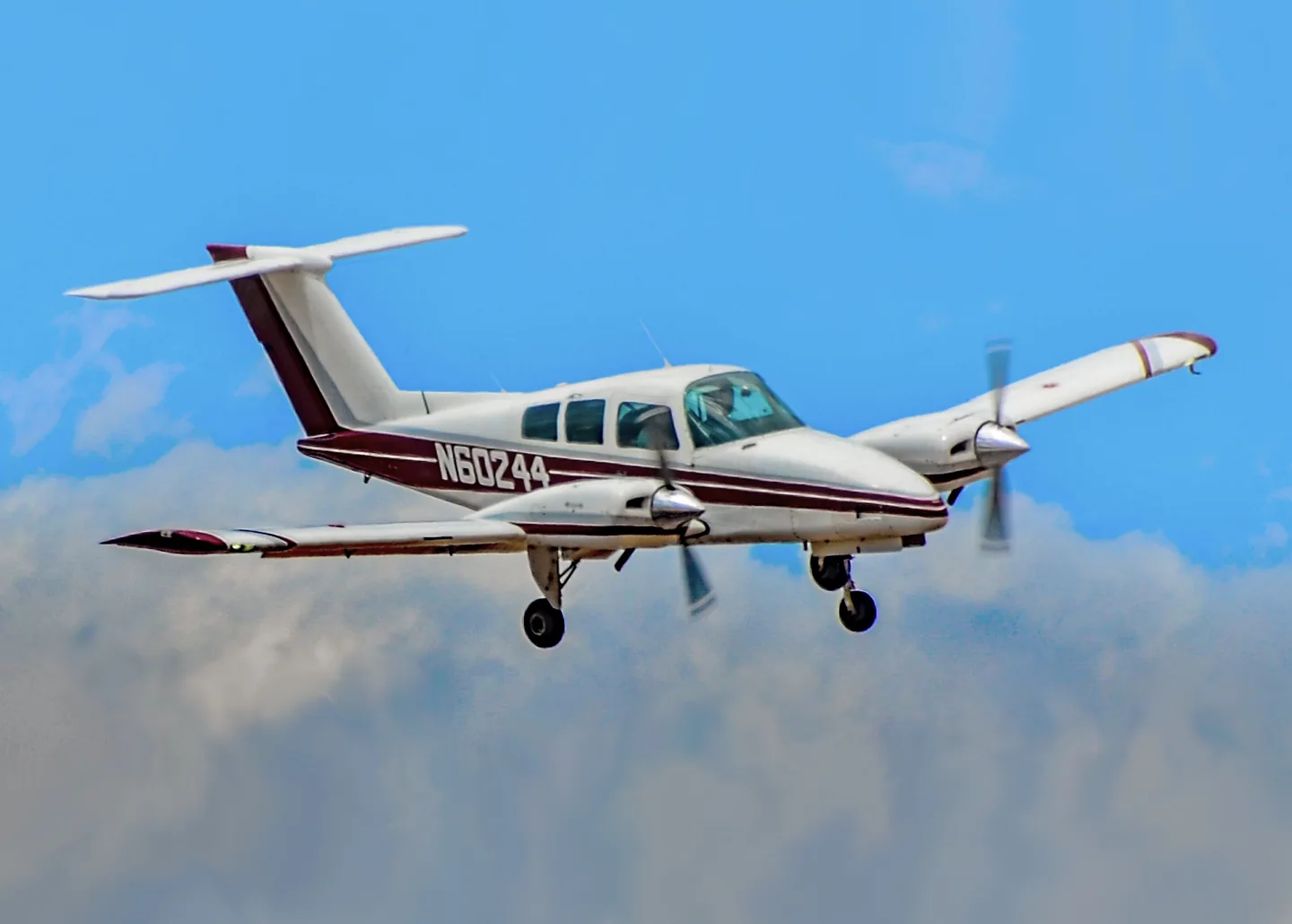
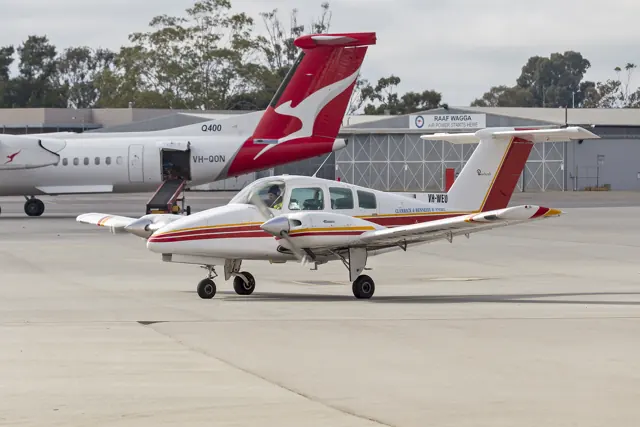
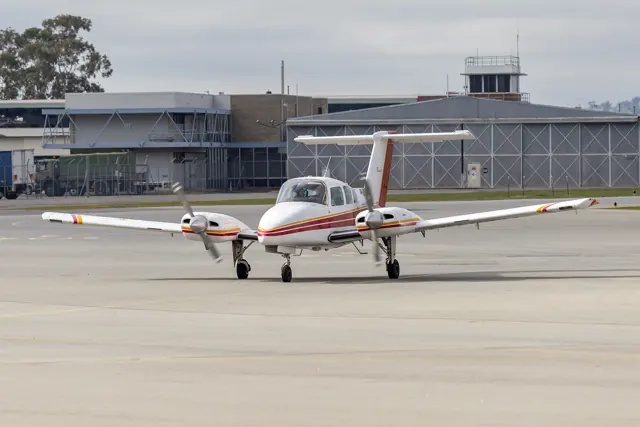
The Duchess occupies the training end of Beechcraft's piston-twin range. Beechcraft designated it the Model 76. It was intended in part to provide an affordable introduction to multi-engine flying.
Aircraft background
Wikipedia contributors · Read more ↗Relearning the twin with an exacting instructor
Marsh arrived with a multiengine rating and skills that needed refreshing. Instructor Charlie Wentz repeatedly simulated engine failures, making him recognise how much of the response remained familiar and how much needed practice. Wentz’s demanding sessions also had room for humour: after one particularly good landing, he produced a handkerchief and pretended to wipe away tears of appreciation.
AOPA Pilot · September 2003. Refresher training with Charlie Wentz in a 1982 Duchess at Cleveland’s Burke Lakefront Airport.
AOPA Pilot · Read more ↗A tablet for cockpit setup and aircraft condition
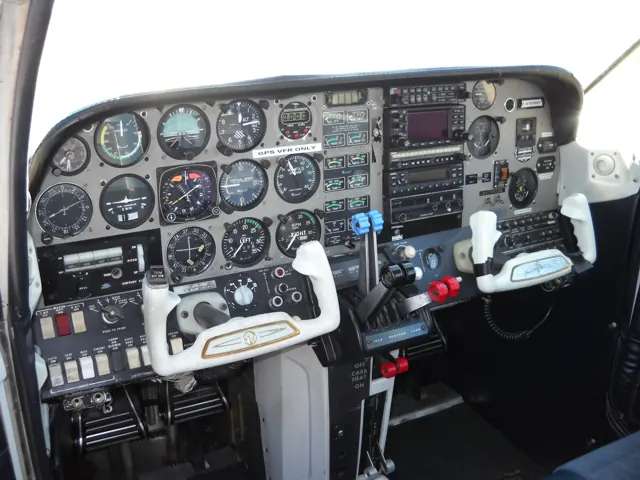
The X-Plane 12 edition adds an EFB for loading and centre of gravity, interactive checklists, instrument pop-outs and aircraft options. Its engine page exposes condition information and options for spark-plug fouling and vapour lock. Static and recolourable dynamic liveries can be changed from within the aircraft.
Beechcraft Duchess · Just Flight · Just Flight · X-Plane 12 · X-Plane 11
Just Flight · Read more ↗Into the cockpit
 YouTube
 aviafilmsproduction · 5 min ·
Beechcraft (BE-76) Duchess cockpit takeoff, touch & go, landing
Takeoff, a circuit and landing filmed aboard a Duchess; the publisher notes that instruments are not shown.
Real aircraft · Beechcraft Duchess
Watch on YouTube ↗ YouTube
 ECGadget · 34 min ·
X Plane 11 | Just Flight Duchess 76 Review | Introduction and Cockpit Tour (1)
An introduction and cockpit tour of Just Flight's Duchess for X-Plane 11.
Simulator · Just Flight Duchess · X-Plane 11
Watch on YouTube ↗Preview images are served by AirframeDB. Videos open on YouTube only when you choose to watch.
Meet Beechcraft Duchess
The Duchess occupies the training end of Beechcraft's piston-twin range. Beechcraft designated it the Model 76. It was intended in part to provide an affordable introduction to multi-engine flying.
Beechcraft Duchess
Beechcraft → · Explore the family →
Beechcraft Duchess
Wikipedia contributors · Beechcraft Duchess ↗Just Flight · X-Plane 12 · X-Plane 11 →Aircraft type designators
Use the code for the model you are flying. The linked authority lists the applicable aircraft.
History & design
A twin for the Beech training network
Silitch’s contemporary report describes the Duchess as the missing multiengine step in the Beech Aero Club training and rental fleet. It was intended to introduce twin-engine systems without overwhelming a student, while also offering owners an aircraft for business and personal travel.
AOPA Pilot · Duchess ↗AOPA Pilot · April 1981 · design and training context
Development milestones
First flight: September 1974
Developed from: Beechcraft Sierra
Wikipedia contributors · Beechcraft Duchess ↗Beechcraft Duchess · family/variant named by the source · Wikipedia revision 1368403217
Pilot accounts
Relearning the twin with an exacting instructor
Marsh arrived with a multiengine rating and skills that needed refreshing. Instructor Charlie Wentz repeatedly simulated engine failures, making him recognise how much of the response remained familiar and how much needed practice. Wentz’s demanding sessions also had room for humour: after one particularly good landing, he produced a handkerchief and pretended to wipe away tears of appreciation.
The Duchess gave Marsh plenty to relearn even with both engines running. Its low nose and broad view made the correct cruising attitude feel unfamiliar, while the sensitive elevator and quick electric trim initially led him to overcorrect. By the second flight he was making much smaller trim inputs. He appreciated the separate cabin doors on cold days and the visibility in busy airspace. His enthusiasm comes from this particular return to proficiency, with an instructor deliberately testing his responses.
AOPA Pilot · September 2003. Refresher training with Charlie Wentz in a 1982 Duchess at Cleveland’s Burke Lakefront Airport.
Read the full account · AOPA Pilot ↗A Pacific delivery from a very cramped cockpit
Selling his Duchess to a California buyer gave Gray an opportunity to accompany an experienced ferry pilot across the Pacific. Extra fuel tanks and their plumbing crowded the cabin, leaving little room to move his legs. He remembers the physical discomfort almost as vividly as the weather: long periods of hand flying, repeated fuel checks and the relief of finding a runway after a day over open water.
At Christmas Island, delayed communication left them waiting for runway lights, and fuel supply problems complicated the next departure. After reaching Hawaii, Gray chose to fly the final leg alone to carry more fuel. He describes considerable fear before that flight and arriving in California with very little fuel remaining. The account ends with gratitude for the experience and a dedication to a friend who later died attempting the same crossing.
Air Facts Journal · September 2012. Retrospective New Zealand–California ferry in a specially tanked Duchess; the flight date is not stated. Unusual ferry configuration and personal decisions, not ordinary operating guidance.
Read the full account · Air Facts Journal ↗A year of training flights and business trips
Silitch’s familiarity with the Duchess extended beyond a brief demonstration. She had flown the same aircraft for nearly a year, using it for business travel as well as multiengine practice. She liked the clear panel markings, simple fuel selections and comfortable front cabin, while finding the rear seating less generous on longer journeys.
Repeated flights exposed the small irritations too. Some controls were awkward to reach, night lighting could be improved, and a heater shutdown made one winter return to Washington distinctly cold. A hot-day exercise also showed her how limited the remaining climb could be with one engine stopped. Having flown it in varied weather and lighting, she expected to return to the Duchess, particularly to maintain her proficiency.
AOPA Pilot · April 1981. Nearly a year flying N6627D, including proficiency work and a Washington–Maine trip.
Read the full account · AOPA Pilot ↗In your simulator
Systems, equipment and documentation for each developer’s aircraft.
X-Plane 12 · X-Plane 11Beechcraft Duchess · Just Flight
Just Flight · Released
Beechcraft Duchess · Just Flight
Just Flight · Released
Aircraft specifications
Published figures for the named real-aircraft variant. Simulator equipment and performance can differ.
| Specification | Published value |
|---|---|
| Length | 29 ft 0 + 1 ⁄ 2 in (8.85 m) |
| Wingspan | 38 ft 0 in (11.58 m) |
| Height | 9 ft 6 in (2.90 m) |
| Wing area | 181 sq ft (16.8 m² ) |
| Empty weight | 2,460 lb (1,116 kg) |
| Max takeoff weight | 3,900 lb (1,769 kg) |
| Powerplant | 2 × Lycoming O-360 -A1G6D air-cooled flat-four engines, 180 hp (130 kW) each |
| Propellers | 2-bladed Hartzell HC-M2YR-2C(L)EUF/F(J)C 7666A constant speed propellers |
| Cruise speed | 158 kn (182 mph, 293 km/h) at 10,000 ft (3,000 m) |
| Stall speed | 60 kn (69 mph, 110 km/h) power off, flaps down, IAS |
| Range | 780 nmi (900 mi, 1,440 km) at 12,000 ft (3,700 m), econ cruise |
| Service ceiling | 19,650 ft (5,990 m) |
| Rate of climb | 1,248 ft/min (6.34 m/s) |
Manuals & resources
Find your next read
Choose a topic for a short introduction and a link to the original source. Simulator references identify the developer and edition they cover.
Simulator documentation
A tablet for cockpit setup and aircraft conditionBeechcraft Duchess · Just Flight · Just Flight · X-Plane 12 · X-Plane 11
The X-Plane 12 edition adds an EFB for loading and centre of gravity, interactive checklists, instrument pop-outs and aircraft options. Its engine page exposes condition information and options for spark-plug fouling and vapour lock. Static and recolourable dynamic liveries can be changed from within the aircraft.
Just Flight / Thranda · X-Plane 12 product description · EFB and Engine Configuration
Just Flight · Read the source ↗Electrical failures and a custom fuel systemBeechcraft Duchess · Just Flight · Just Flight · X-Plane 12 · X-Plane 11
Just Flight describes a custom crossfeed fuel system and functional circuit breakers connected to X-Plane failure logic. The add-on also provides emergency landing-gear extension, carburettor and cowl-flap controls, electric trim, and a fan system linked to its electrical simulation.
X-Plane 12 product description · Aircraft Systems
Just Flight · Read the source ↗Avionics and adjustable virtual control effortBeechcraft Duchess · Just Flight · Just Flight · X-Plane 12 · X-Plane 11
The documented cockpit includes X-Plane’s GNS 430, KX 155 radio, KR 87 ADF and Century IV autopilot. DynaFeel adjusts the simulated pilot strength used to overcome control-surface aerodynamic forces. This is a flight-model option; the description does not establish force-feedback hardware output.
X-Plane 12 product description · Cockpit; Other Features. These features are not automatically assigned to the separate X-Plane 11 edition.
Just Flight · Read the source ↗Pilot account
Relearning the twin with an exacting instructorAOPA Pilot · September 2003. Refresher training with Charlie Wentz in a 1982 Duchess at Cleveland’s Burke Lakefront Airport.
Marsh arrived with a multiengine rating and skills that needed refreshing. Instructor Charlie Wentz repeatedly simulated engine failures, making him recognise how much of the response remained familiar and how much needed practice. Wentz’s demanding sessions also had room for humour: after one particularly good landing, he produced a handkerchief and pretended to wipe away tears of appreciation. The Duchess gave Marsh plenty to relearn even with both engines running.
Alton K. Marsh
AOPA Pilot · Read the source ↗A Pacific delivery from a very cramped cockpitAir Facts Journal · September 2012. Retrospective New Zealand–California ferry in a specially tanked Duchess; the flight date is not stated. Unusual ferry configuration and personal decisions, not ordinary operating guidance.
Selling his Duchess to a California buyer gave Gray an opportunity to accompany an experienced ferry pilot across the Pacific. Extra fuel tanks and their plumbing crowded the cabin, leaving little room to move his legs. He remembers the physical discomfort almost as vividly as the weather: long periods of hand flying, repeated fuel checks and the relief of finding a runway after a day over open water.
Stephen Gray
Air Facts Journal · Read the source ↗Read the original documentation from the people who created it. Manuals open on their publisher’s website.
Aircraft background
Beechcraft DuchessWikipedia contributors · Research background · retrieved 2026-09-12Product
Duchess Model 76 (X-Plane 12)Just Flight · Official developer / designated store catalogue · checked 2026-09-12 Duchess Model 76 (X-Plane 11)Just Flight · Official developer / designated store catalogue · checked 2026-09-12Type designator
ICAO Doc 8643 — aircraft type designatorsInternational Civil Aviation Organization · Public search data retrieved 2026-09-14; authority update 2026-09-03Built-in force-feedback profiles
Read the documentary basis, editable starting settings and remaining questions for the aircraft you fly. Each explanation refers to the exact profile revision shown.
Catalogue programme-20261022-v1 · 2 profile choices
Just Flight Duchess Model 76
Just Flight · Free and Pro · Revision 3 · Inherited starting point
X-Plane 12
Just Flight Duchess Model 76: Cable-operated primary controls motivate airspeed-dependent yoke loading; counterrotating propellers do not remove that aerodynamic control resistance.
Beechcraft Duchess
Free and Pro · Revision 2 · Partial review
X-Plane 12 · X-Plane 11
Beechcraft Duchess: Cable-operated primary controls motivate airspeed-dependent yoke loading; counterrotating propellers do not remove that aerodynamic control resistance.
Beechcraft Duchess
Beechcraft Duchess: Cable-operated primary controls motivate airspeed-dependent yoke loading; counterrotating propellers do not remove that aerodynamic control resistance.
Aircraft and simulator scope
- Beechcraft Duchess · X-Plane 12 · family starting point
- Beechcraft Duchess · X-Plane 11 · family starting point
Just Flight Duchess XP11 and XP12 product pages; DynaFeel is advertised simulation behavior, not measured force-feedback output. · Selected choice: Beechcraft Duchess. Documentary scope does not establish every variant, add-on revision or simulator binding.
The simulator model and controls
The Duchess occupies the training end of Beechcraft's piston-twin range. Its Model 76 designation identifies a different aircraft from the Baron, despite their shared manufacturer. The design was intended in part to provide an affordable introduction to multi-engine aircraft, a role that gives its cockpit and systems a clear teaching focus.
This starting point selects Beechcraft Duchess. Its aircraft-level settings do not select a particular developer’s custom systems.
How this profile feels
Spring resistance builds with the selected airspeed response. A separate aerodynamic term adds speed-dependent control load.
Valid trim provides the configured pressure relief. Autopilot following is enabled for supported control references.
Controls and trim
Just Flight's Duchess guide describes cable-operated elevators and ailerons. Elevator trim can be operated manually or electrically, with separate console aileron trim and rudder trim. Its counterrotating constant-speed propellers and electrohydraulic landing gear define a training-twin configuration. Century IV guidance operates independently of the profile's assumed hand-force balance.
About the values
The gains are normalized profile settings. They describe the chosen effect balance; hand force depends on the device and its output limits. IAS references are tuning values rather than operating limits. Physical acceptance of this revision remains pending.
What the documentation establishes
The Duchess is described as a retractable tricycle twin with counterrotating constant-speed propellers.
Electric elevator-trim switches on the yoke are listed; numerical preset trim authority remains a choice.
Century IV autopilot equipment is advertised; enabled following has no published force-output contract here.
Two 180-hp engines, counterrotating constant-speed propellers and retractable tricycle gear are documented.
Documentary review and sources
These decisions describe the documentary basis and remaining gaps for this revision. Aircraft documentation and a starting setting describe different kinds of evidence.
Aircraft and variant
ReviewedThis starting point selects Beechcraft Duchess. Its aircraft-level settings do not select a particular developer’s custom systems.
Flight controls
Not yet reviewedJust Flight's Duchess guide describes cable-operated elevators and ailerons. Elevator trim can be operated manually or electrically, with separate console aileron trim and rudder trim. Its counterrotating constant-speed propellers and electrohydraulic landing gear define a training-twin configuration. Century IV guidance operates independently of the profile's assumed hand-force balance.
Trim
ReviewedManual/electric elevator trim supports pitch relief and the console aileron trim supports a distinct roll response. Pitch authority 0.3 provides load relief and permitted centre movement; roll authority is 0.
Autopilot and stability
ReviewedFollowing is on at 0.1 authority when a supported, valid autopilot control reference is available.
Equipment
ReviewedGear, flap and ground cues follow the selected settings and available simulator-reported states.
Speeds and limits
Not yet reviewedThe indicated-speed references set the profile response scale; they are separate from aircraft operating limits.
Simulator integration
Not yet reviewedThe profile targets xplane12, xplane11. Add-on-specific controls use only the supported references configured by this profile.
Force-feedback settings
Not yet reviewedThe settings define the profile’s effect balance. Device output limits affect physical hand force.
Starting settings and their rationale
These configured values are starting estimates. The explanations describe what each setting controls; physical validation appears separately below.
| Setting | Starting value | What it controls and why |
|---|---|---|
| Spring strength | Starting value0.74 | What it controls and whyCable-operated primary controls motivate airspeed-dependent yoke loading; counterrotating propellers do not remove that aerodynamic control resistance. The baseline spring is 0.74. Its low-speed blend reaches baseline strength at 70 KIAS. |
| Master force gain | Starting value0.85 | What it controls and whyScales overall profile strength while preserving effect balance, subject to device and output limits. |
| Profile force gain | Starting value0.8 | What it controls and whyThe aerodynamic-load gain is 0.8 with an indicated-speed reference of 140 KIAS. This supplies speed-dependent loading alongside the spring. |
| Force tuning speed/reference | Starting value140.0 kt | What it controls and whySets the IAS reference for aerodynamic loading. It is an estimate, not published cruise TAS or a flight limit. |
| Spring response reference speed | Starting value70.0 kt | What it controls and whySets the IAS where the low-speed blend reaches baseline strength; high-speed stiffening also uses it. |
| Aileron force scale | Starting value0.72 | What it controls and whyRoll and pitch aerodynamic scales are 0.72 and 1, respectively. They set the aerodynamic axis balance. No custom spring-travel curve is enabled. |
| Elevator force scale | Starting value1.0 | What it controls and whyScales pitch aerodynamic loading; pitch spring travel and trim responses are separate settings. |
| Trim feel | Starting valueEnabled | What it controls and whyRetained for compatibility and group membership. Trim relief, rather than this flag, controls centre movement. |
| Trim relief | Starting valueEnabled | What it controls and whyAllows trim relief with supported control law and valid telemetry. Axis authorities set its amount. |
| Autopilot follow | Starting valueEnabled | What it controls and whyFollowing is on at 0.1 authority when a supported, valid autopilot control reference is available. |
| Autopilot neutral hold | Starting valueDisabled | What it controls and whyPermits centering hold during a supported AP state, separate from following a moving target. |
| Output force limit | Starting value0.55 | What it controls and whyCaps directed-force output. Native spring effects and device limits remain separate. |
All 44 starting settings and their rationale
The settings define the profile’s effect balance. Device output limits affect physical hand force.
| Setting | Starting value | What it controls and why |
|---|---|---|
| Spring strength | Starting value0.74 | What it controls and whyCable-operated primary controls motivate airspeed-dependent yoke loading; counterrotating propellers do not remove that aerodynamic control resistance. The baseline spring is 0.74. Its low-speed blend reaches baseline strength at 70 KIAS. |
| Spring deadband | Starting value0.045 | What it controls and whySets travel around the centre before the baseline spring resists. Smaller values engage it sooner. |
| Profile force gain | Starting value0.8 | What it controls and whyThe aerodynamic-load gain is 0.8 with an indicated-speed reference of 140 KIAS. This supplies speed-dependent loading alongside the spring. |
| Master force gain | Starting value0.85 | What it controls and whyScales overall profile strength while preserving effect balance, subject to device and output limits. |
| QBlend Enabled | Starting valueEnabled | What it controls and whyAllows baseline spring strength to rise with indicated airspeed where the control law permits it. |
| QSpring Minimum Factor | Starting value0.5 | What it controls and whySets low-speed spring strength as a fraction of baseline when blending is enabled. One keeps full strength. |
| QSpring Start Knots | Starting value19.6 kt | What it controls and whySets the IAS where the low-speed spring blend starts rising. This is a feel threshold, not a flight limit. |
| Spring response reference speed | Starting value70.0 kt | What it controls and whySets the IAS where the low-speed blend reaches baseline strength; high-speed stiffening also uses it. |
| Force tuning speed/reference | Starting value140.0 kt | What it controls and whySets the IAS reference for aerodynamic loading. It is an estimate, not published cruise TAS or a flight limit. |
| Airspeed spring stiffening gain | Starting value0.15 | What it controls and whyThe high-speed spring-stiffening gain is 0.15. It strengthens the permitted spring response above 70 KIAS, with the squared-speed ratio capped at 5. |
| Airspeed spring stiffening limit | Starting value5 | What it controls and whyLimits the squared airspeed ratio used for high-speed spring stiffening; it is not a device-force cap. |
| Aileron force scale | Starting value0.72 | What it controls and whyRoll and pitch aerodynamic scales are 0.72 and 1, respectively. They set the aerodynamic axis balance. No custom spring-travel curve is enabled. |
| Elevator force scale | Starting value1.0 | What it controls and whyScales pitch aerodynamic loading; pitch spring travel and trim responses are separate settings. |
| Output force limit | Starting value0.55 | What it controls and whyCaps directed-force output. Native spring effects and device limits remain separate. |
| Trim feel | Starting valueEnabled | What it controls and whyRetained for compatibility and group membership. Trim relief, rather than this flag, controls centre movement. |
| Trim relief | Starting valueEnabled | What it controls and whyAllows trim relief with supported control law and valid telemetry. Axis authorities set its amount. |
| Elevator Authority | Starting value0.3 | What it controls and whyManual/electric elevator trim supports pitch relief and the console aileron trim supports a distinct roll response. Pitch authority 0.3 provides load relief and permitted centre movement; roll authority is 0. |
| Aileron Authority | Starting value0 | What it controls and whyScales supported roll-trim relief and permitted centre movement. Zero removes roll response. |
| Force Trim Enabled | Starting valueDisabled | What it controls and whyEnables local force trim, separate from aircraft-owned trim and add-on integration qualification. |
| GLoad Enabled | Starting valueEnabled | What it controls and whyAllows load-factor changes to modify permitted spring laws. Passive fly-by-wire feel can suppress it. |
| Rate Damping Enabled | Starting valueEnabled | What it controls and whyEnables rate damping with the configured coefficients and control law. |
| Autopilot follow | Starting valueEnabled | What it controls and whyFollowing is on at 0.1 authority when a supported, valid autopilot control reference is available. |
| Autopilot follow authority | Starting value0.1 | What it controls and whySets admitted AP-follow gain, not a percentage of travel. Runtime ownership and input limits still apply. |
| Autopilot neutral hold | Starting valueDisabled | What it controls and whyPermits centering hold during a supported AP state, separate from following a moving target. |
| Autopilot neutral hold strength | Starting value0.6 | What it controls and whySets admitted AP neutral-hold strength; inactive while neutral hold is disabled. |
| Enabled | Starting valueEnabled | What it controls and whyEnables aerodynamic cues; each still needs nonzero strength and its simulator conditions. |
| Gain | Starting value0.35 | What it controls and whySets stall-buffet strength. Zero removes the cue without changing simulator stalls or warnings. |
| Gain | Starting value0 | What it controls and whySets high-Mach buffet strength; onset and full-strength thresholds are separate. |
| Gain | Starting value0.14 | What it controls and whySets flap buffet at the configured position and speed gates. Flap movement texture is separate. |
| Maximum flap index | Starting value3 | What it controls and whySets the final flap index for detent normalization. UP plus three detents uses maximum index3. |
| Minimum flap index | Starting value2 | What it controls and whySets the first flap detent that admits buffet; this is a handle index, not degrees. |
| Gain | Starting value0.1 | What it controls and whySets gear aerodynamic buffet; movement and ground-contact cues are separate. |
| Shaker Enabled | Starting valueDisabled | What it controls and whyPermits shaker at supported warning conditions; the switch does not establish aircraft equipment. |
| Stick shaker amplitude | Starting value0.5 | What it controls and whySets triggered shaker strength; inactive while the shaker feature is disabled. |
| Enabled | Starting valueEnabled | What it controls and whyEnables ground effects; each still needs its own strength and contact or motion telemetry. |
| Gain | Starting value0.4 | What it controls and whySets rolling texture strength, modified by speed, surface and undercarriage configuration. |
| Gain | Starting value0.25 | What it controls and whySets gear-bump texture during ground motion, separate from touchdown impact. |
| Gain | Starting value0.65 | What it controls and whySets landing-impact strength; landing telemetry and response shape determine the pulse. |
| Gain | Starting value0 | What it controls and whySets reverse-thrust vibration with valid reverser and engine conditions. Zero removes the cue. |
| Enabled | Starting valueEnabled | What it controls and whyEnables engine cues with nonzero settings and valid running-engine telemetry. |
| Gain | Starting value0.12 | What it controls and whySets estimated engine vibration using configured telemetry and response, not measured cockpit vibration. |
| Enabled | Starting valueEnabled | What it controls and whyEnables accessory cues with configured strengths and observed accessory movement. |
| Gain | Starting value0.12 | What it controls and whySets texture from observed flap movement; a command without movement does not establish the cue. |
| Gain | Starting value0.12 | What it controls and whySets texture from observed gear movement, separate from aerodynamic and touchdown effects. |
Limits and open questions
- DynaFeel adjusts simulated surface-force response and pilot strength; the product page does not identify the physical linkage or an external FFB schedule.
- The examined feature list does not derive the preset's indicated-speed force reference.
- DynaFeel and Century IV features do not establish external telemetry or trim/servo ownership.
- User-adjustable pilot strength is a simulator parameter, not a calibration of real Duchess forces or preset axis ratio.
Physical validation
No physical force validation is recorded in this public catalogue for this revision. Documentary review and software checks do not establish how a particular device feels.
Discuss this aircraft (0)
Questions, observations and useful sources from the community.
No published discussions yet. Bring a question or share a useful source.
Open aircraft discussions →Content expanded · What’s new
Something missing or a source that needs attention?
Suggest a correction ↗