
Start here
A few places to begin, from the aircraft’s story to the people who fly it.
Meet the aircraft
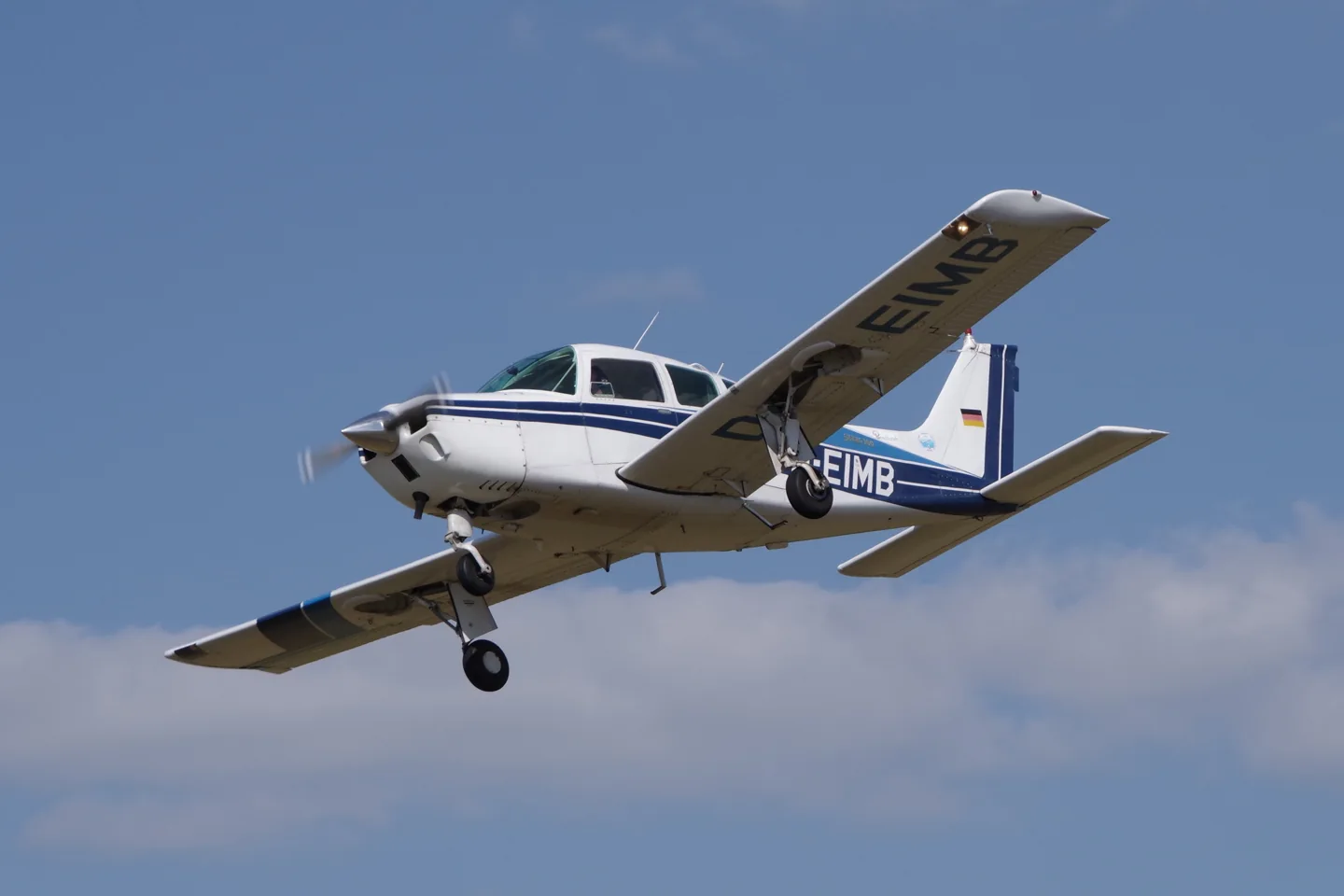
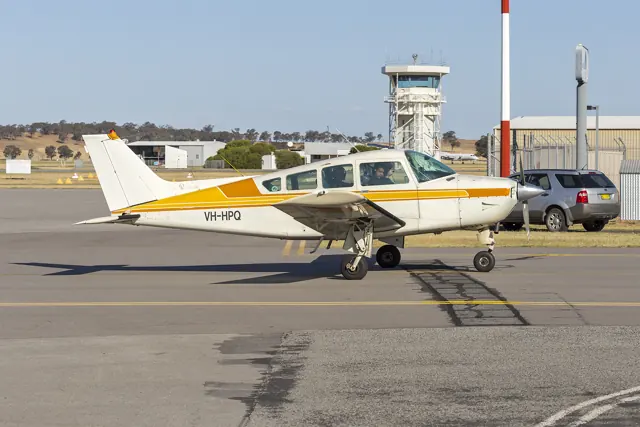
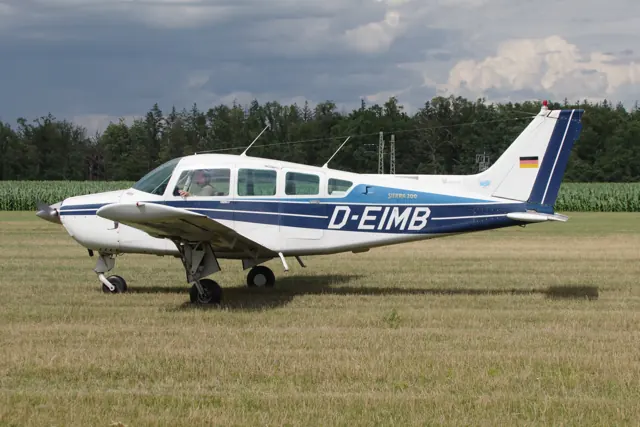
The Sierra brought retractable landing gear and a constant-speed propeller to Beechcraft’s Musketeer line. Its broad cabin and low wing made it a practical personal aircraft and complex trainer. A24R, B24R and C24R identify successive versions, with differences in doors, equipment and detail refinements. Flysimware represents the C24R.
Aircraft background
Wikipedia contributors · Read more ↗A Sierra used as a flying utility vehicle
Marsh’s flight in Paul Werbin’s modified 1981 Sierra focuses on what the aircraft lets its owner carry. Werbin removed one or both rear bucket seats to make room for bicycles, then used the aeroplane for trips ranging from nearby dinners to longer coastal journeys. The wide rear door and easily removable seats mattered as much as cruise speed.
Real C24R; modified 1981 example. AOPA Pilot, July 2005.
AOPA · Read more ↗Panels and avionics
Flysimware’s product page describes G5 and G3X panel options, with GNS 530, PMS50 GTN 750 and TDS GTN 750Xi integrations. The third-party navigators require their corresponding products. The tablet provides checklists, loading, fuel, weather and configuration pages.
Sierra C24R · Flysimware · MSFS 2020 · MSFS 2024
Flysimware · Read more ↗Into the cockpit
 YouTube
 TEAL Flight · 4 min ·
Beech Sierra Flight
A Sierra C24R trip across Michigan, including startup, a panel tour and landing.
Real aircraft · Beechcraft Sierra
Watch on YouTube ↗Preview images are served by AirframeDB. Videos open on YouTube only when you choose to watch.
Meet Beechcraft Sierra
The Sierra brought retractable landing gear and a constant-speed propeller to Beechcraft’s Musketeer line. Its broad cabin and low wing made it a practical personal aircraft and complex trainer. A24R, B24R and C24R identify successive versions, with differences in doors, equipment and detail refinements.
Flysimware represents the C24R. The accounts below describe particular real Sierras, including modified aircraft; their reported speeds and equipment are specific to those examples.
Beechcraft Sierra
Beechcraft → · Explore the family →
Beechcraft Sierra
Wikipedia contributors · Beechcraft Sierra background ↗Flysimware · MSFS 2020 · MSFS 2024 →Aircraft type designators
Use the code for the model you are flying. The linked authority lists the applicable aircraft.
History & design
From Musketeer to Sierra
Beechcraft developed the Sierra from its Model 23 Musketeer. The retractable model joined a range that also included fixed-gear training and touring aircraft. Later Sierras gained improved cabin access and the large rear door that owners value for loading baggage.
Wikipedia contributors · Beechcraft Sierra background ↗Real-aircraft family history
Pilot accounts
A Sierra used as a flying utility vehicle
Marsh’s flight in Paul Werbin’s modified 1981 Sierra focuses on what the aircraft lets its owner carry. Werbin removed one or both rear bucket seats to make room for bicycles, then used the aeroplane for trips ranging from nearby dinners to longer coastal journeys. The wide rear door and easily removable seats mattered as much as cruise speed. Marsh recorded a faster cruise in this modified example than the Sierra’s reputation might suggest.
The report also describes the landing gear’s unusual retraction sequence and the care needed to avoid a nosewheel-first touchdown.
Real C24R; modified 1981 example. AOPA Pilot, July 2005.
Read the full account · AOPA ↗Room, visibility and a little familiarisation
Silitch found the Sierra comfortable and enjoyable during a trip in a nearly new example. The broad cabin accommodated different-sized pilots, while the wing’s position behind the front seats gave an unusually good downward view for a low-wing aircraft. Her enthusiasm had qualifications: the control wheel sat low enough to interfere with knees, and the aircraft’s handling was not simply a smaller version of a Bonanza’s.
She described slightly firm aileron forces, responsive handling and a gentle stall break. Landing took some adjustment to the Sierra’s sight picture and flare.
Real Sierra flight report; September 1982 article reproduced on AOPA’s fact sheet.
Read the full account · AOPA ↗Learning and travelling in the same aircraft
Salyer bought a 1976 B24R while still a very new student pilot, choosing an aircraft he hoped to keep after training. By the time of his account he had completed both his private certificate and instrument rating in it, accumulated hundreds of hours, and was working towards a commercial certificate. Cabin space, baggage access and a useful travelling role were central to his choice.
His description connects ownership with familiarity. He discusses avionics upgrades, the Sierra’s relatively firm but responsive controls, and the value of advice from other owners through the Beech Aero Club.
Owner’s 1976 B24R; Aviation Consumer, November 2016, printed/PDF pp. 31–32. Historical costs omitted.
Read the full account · Aviation Consumer / American Bonanza Society archive ↗In your simulator
Systems, equipment and documentation for each developer’s aircraft.
MSFS 2020 · MSFS 2024Sierra C24R
Flysimware · Released
Sierra C24R
Flysimware · Released
Aircraft specifications
Published figures for the named real-aircraft variant. Simulator equipment and performance can differ.
| Specification | Published value |
|---|---|
| Wingspan | 32 ft 9 in Flysimware manual v1.4, PDF p. 3; simulator reference figures |
| Length | 25 ft 9 in Flysimware manual v1.4, PDF p. 3; simulator reference figures |
| Engine | Lycoming IO-360-A1B6 Flysimware manual v1.4, PDF p. 3; simulator reference figures |
| Rated power | 200 hp Flysimware manual v1.4, PDF p. 3; simulator reference figures |
Manuals & resources
Find your next read
Choose a topic for a short introduction and a link to the original source. Simulator references identify the developer and edition they cover.
Simulator documentation
Panels and avionicsSierra C24R · Flysimware · MSFS 2020 · MSFS 2024
Flysimware’s product page describes G5 and G3X panel options, with GNS 530, PMS50 GTN 750 and TDS GTN 750Xi integrations. The third-party navigators require their corresponding products. The tablet provides checklists, loading, fuel, weather and configuration pages.
Official Sierra product description; panel options are version dependent
Flysimware · Read the source ↗Pilot account
A Sierra used as a flying utility vehicleReal C24R; modified 1981 example. AOPA Pilot, July 2005.
Marsh’s flight in Paul Werbin’s modified 1981 Sierra focuses on what the aircraft lets its owner carry. Werbin removed one or both rear bucket seats to make room for bicycles, then used the aeroplane for trips ranging from nearby dinners to longer coastal journeys. The wide rear door and easily removable seats mattered as much as cruise speed. Marsh recorded a faster cruise in this modified example than the Sierra’s reputation might suggest.
Alton K. Marsh
AOPA · Read the source ↗Room, visibility and a little familiarisationReal Sierra flight report; September 1982 article reproduced on AOPA’s fact sheet.
Silitch found the Sierra comfortable and enjoyable during a trip in a nearly new example. The broad cabin accommodated different-sized pilots, while the wing’s position behind the front seats gave an unusually good downward view for a low-wing aircraft. Her enthusiasm had qualifications: the control wheel sat low enough to interfere with knees, and the aircraft’s handling was not simply a smaller version of a Bonanza’s.
Mary F. Silitch
AOPA · Read the source ↗Read the original documentation from the people who created it. Manuals open on their publisher’s website.
Manual
Sierra C24R manual v1.4Flysimware · Flysimware manual v1.4, PDF p. 3; simulator reference figuresAircraft background
Beechcraft Sierra backgroundWikipedia contributors · Family background; article retrieved 13 September 2026Product page
Sierra C24RFlysimware · Official product page; checked 13 September 2026Type designator
ICAO Doc 8643 — aircraft type designatorsInternational Civil Aviation Organization · Public search data retrieved 2026-09-14; authority update 2026-09-03Built-in force-feedback profiles
Read the documentary basis, editable starting settings and remaining questions for the aircraft you fly. Each explanation refers to the exact profile revision shown.
Catalogue programme-20261022-v1 · 2 profile choices
Flysimware Sierra C24R
Flysimware · Free and Pro · Revision 5 · Inherited starting point
MSFS 2020 · MSFS 2024
Flysimware Sierra C24R: The selected yoke load belongs to the piston Sierra approximation; its hydraulic gear valve does not establish hydraulic primary controls.
Beechcraft Sierra
Free and Pro · Revision 2 · Partial review
MSFS 2024 · MSFS 2020
Beechcraft Sierra: The selected yoke load belongs to the piston Sierra approximation; its hydraulic gear valve does not establish hydraulic primary controls.
Flysimware Sierra C24R
Flysimware Sierra C24R: The selected yoke load belongs to the piston Sierra approximation; its hydraulic gear valve does not establish hydraulic primary controls.
Aircraft and simulator scope
- Flysimware Sierra C24R · Flysimware · MSFS 2020 · Add-on starting point
- Flysimware Sierra C24R · Flysimware · MSFS 2024 · Add-on starting point
The simulator model and controls
The Sierra brought retractable landing gear and a constant-speed propeller to Beechcraft’s Musketeer line. Its broad cabin and low wing made it a practical personal aircraft and complex trainer. A24R, B24R and C24R identify successive versions, with differences in doors, equipment and detail refinements.
This profile selects Flysimware Sierra C24R for MSFS 2020, MSFS 2024.
How this profile feels
Spring resistance builds with the selected airspeed response. A separate aerodynamic term adds speed-dependent control load.
Valid trim provides the configured pressure relief. Autopilot following is off.
Controls and trim
Flysimware's Sierra guide identifies a pitch-trim wheel between the seats and electric trim on the yoke. It separately describes a Century 2000 autopilot and hydraulic landing-gear valve. A yoke lock or function marked not simulated is not a live control-force mechanism. The retractable piston-single configuration remains separate from aircraft with fixed gear or turbine conversions.
The selected implementation
Flysimware's Sierra C24R retains electric/manual pitch trim, Century 2000 and retractable gear; yoke-lock functions marked not simulated remain outside its live feel mechanism.
About the values
The gains are normalized profile settings. They describe the chosen effect balance; hand force depends on the device and its output limits. IAS references are tuning values rather than operating limits. Physical acceptance of this revision remains pending.
Documentary review and sources
These decisions describe the documentary basis and remaining gaps for this revision. Aircraft documentation and a starting setting describe different kinds of evidence.
Aircraft and variant
InheritedThis profile selects Flysimware Sierra C24R for MSFS 2020, MSFS 2024.
Flight controls
InheritedFlysimware's Sierra guide identifies a pitch-trim wheel between the seats and electric trim on the yoke. It separately describes a Century 2000 autopilot and hydraulic landing-gear valve. A yoke lock or function marked not simulated is not a live control-force mechanism. The retractable piston-single configuration remains separate from aircraft with fixed gear or turbine conversions.
Trim
InheritedManual and electric pitch trim provide the mechanism for pressure relief, while Century 2000 guidance is a separate function. Pitch authority 0.3 provides load relief and permitted centre movement; roll authority is 0.
Autopilot and stability
InheritedAutopilot following is off; the configured spring and load retain the hardware feel.
Equipment
InheritedFlysimware's Sierra C24R retains electric/manual pitch trim, Century 2000 and retractable gear; yoke-lock functions marked not simulated remain outside its live feel mechanism.
Speeds and limits
InheritedThe indicated-speed references set the profile response scale; they are separate from aircraft operating limits.
Simulator integration
InheritedThe profile targets msfs2020, msfs2024. Add-on-specific controls use only the supported references configured by this profile.
Force-feedback settings
InheritedThe settings define the profile’s effect balance. Device output limits affect physical hand force.
Starting settings and their rationale
These configured values are starting estimates. The explanations describe what each setting controls; physical validation appears separately below.
| Setting | Starting value | What it controls and why |
|---|---|---|
| Spring strength | Starting value0.74 | What it controls and whyThe selected yoke load belongs to the piston Sierra approximation; its hydraulic gear valve does not establish hydraulic primary controls. The baseline spring is 0.74. Its low-speed blend reaches baseline strength at 62.5 KIAS. |
| Master force gain | Starting value0.85 | What it controls and whyScales overall profile strength while preserving effect balance, subject to device and output limits. |
| Profile force gain | Starting value0.8 | What it controls and whyThe aerodynamic-load gain is 0.8 with an indicated-speed reference of 125 KIAS. This supplies speed-dependent loading alongside the spring. |
| Force tuning speed/reference | Starting value125 kt | What it controls and whySets the IAS reference for aerodynamic loading. It is an estimate, not published cruise TAS or a flight limit. |
| Spring response reference speed | Starting value62.5 kt | What it controls and whySets the IAS where the low-speed blend reaches baseline strength; high-speed stiffening also uses it. |
| Aileron force scale | Starting value0.72 | What it controls and whyRoll and pitch aerodynamic scales are 0.72 and 1, respectively. They set the aerodynamic axis balance. No custom spring-travel curve is enabled. |
| Elevator force scale | Starting value1 | What it controls and whyScales pitch aerodynamic loading; pitch spring travel and trim responses are separate settings. |
| Trim feel | Starting valueDisabled | What it controls and whyRetained for compatibility and group membership. Trim relief, rather than this flag, controls centre movement. |
| Trim relief | Starting valueEnabled | What it controls and whyAllows trim relief with supported control law and valid telemetry. Axis authorities set its amount. |
| Autopilot follow | Starting valueDisabled | What it controls and whyAutopilot following is off; the configured spring and load retain the hardware feel. |
| Autopilot neutral hold | Starting valueDisabled | What it controls and whyPermits centering hold during a supported AP state, separate from following a moving target. |
| Output force limit | Starting value0.55 | What it controls and whyCaps directed-force output. Native spring effects and device limits remain separate. |
All 44 starting settings and their rationale
The settings define the profile’s effect balance. Device output limits affect physical hand force.
| Setting | Starting value | What it controls and why |
|---|---|---|
| Spring strength | Starting value0.74 | What it controls and whyThe selected yoke load belongs to the piston Sierra approximation; its hydraulic gear valve does not establish hydraulic primary controls. The baseline spring is 0.74. Its low-speed blend reaches baseline strength at 62.5 KIAS. |
| Spring deadband | Starting value0.045 | What it controls and whySets travel around the centre before the baseline spring resists. Smaller values engage it sooner. |
| Profile force gain | Starting value0.8 | What it controls and whyThe aerodynamic-load gain is 0.8 with an indicated-speed reference of 125 KIAS. This supplies speed-dependent loading alongside the spring. |
| Master force gain | Starting value0.85 | What it controls and whyScales overall profile strength while preserving effect balance, subject to device and output limits. |
| QBlend Enabled | Starting valueEnabled | What it controls and whyAllows baseline spring strength to rise with indicated airspeed where the control law permits it. |
| QSpring Minimum Factor | Starting value0.5 | What it controls and whySets low-speed spring strength as a fraction of baseline when blending is enabled. One keeps full strength. |
| QSpring Start Knots | Starting value8 kt | What it controls and whySets the IAS where the low-speed spring blend starts rising. This is a feel threshold, not a flight limit. |
| Spring response reference speed | Starting value62.5 kt | What it controls and whySets the IAS where the low-speed blend reaches baseline strength; high-speed stiffening also uses it. |
| Force tuning speed/reference | Starting value125 kt | What it controls and whySets the IAS reference for aerodynamic loading. It is an estimate, not published cruise TAS or a flight limit. |
| Airspeed spring stiffening gain | Starting value0.15 | What it controls and whyThe high-speed spring-stiffening gain is 0.15. It strengthens the permitted spring response above 62.5 KIAS, with the squared-speed ratio capped at 5. |
| Airspeed spring stiffening limit | Starting value5 | What it controls and whyLimits the squared airspeed ratio used for high-speed spring stiffening; it is not a device-force cap. |
| Aileron force scale | Starting value0.72 | What it controls and whyRoll and pitch aerodynamic scales are 0.72 and 1, respectively. They set the aerodynamic axis balance. No custom spring-travel curve is enabled. |
| Elevator force scale | Starting value1 | What it controls and whyScales pitch aerodynamic loading; pitch spring travel and trim responses are separate settings. |
| Output force limit | Starting value0.55 | What it controls and whyCaps directed-force output. Native spring effects and device limits remain separate. |
| Trim feel | Starting valueDisabled | What it controls and whyRetained for compatibility and group membership. Trim relief, rather than this flag, controls centre movement. |
| Trim relief | Starting valueEnabled | What it controls and whyAllows trim relief with supported control law and valid telemetry. Axis authorities set its amount. |
| Elevator Authority | Starting value0.3 | What it controls and whyManual and electric pitch trim provide the mechanism for pressure relief, while Century 2000 guidance is a separate function. Pitch authority 0.3 provides load relief and permitted centre movement; roll authority is 0. |
| Aileron Authority | Starting value0 | What it controls and whyScales supported roll-trim relief and permitted centre movement. Zero removes roll response. |
| Force Trim Enabled | Starting valueDisabled | What it controls and whyEnables local force trim, separate from aircraft-owned trim and add-on integration qualification. |
| GLoad Enabled | Starting valueEnabled | What it controls and whyAllows load-factor changes to modify permitted spring laws. Passive fly-by-wire feel can suppress it. |
| Rate Damping Enabled | Starting valueEnabled | What it controls and whyEnables rate damping with the configured coefficients and control law. |
| Autopilot follow | Starting valueDisabled | What it controls and whyAutopilot following is off; the configured spring and load retain the hardware feel. |
| Autopilot follow authority | Starting value0.1 | What it controls and whySets admitted AP-follow gain, not a percentage of travel. Runtime ownership and input limits still apply. |
| Autopilot neutral hold | Starting valueDisabled | What it controls and whyPermits centering hold during a supported AP state, separate from following a moving target. |
| Autopilot neutral hold strength | Starting value0.6 | What it controls and whySets admitted AP neutral-hold strength; inactive while neutral hold is disabled. |
| Enabled | Starting valueEnabled | What it controls and whyEnables aerodynamic cues; each still needs nonzero strength and its simulator conditions. |
| Gain | Starting value0.35 | What it controls and whySets stall-buffet strength. Zero removes the cue without changing simulator stalls or warnings. |
| Gain | Starting value0 | What it controls and whySets high-Mach buffet strength; onset and full-strength thresholds are separate. |
| Gain | Starting value0 | What it controls and whySets flap buffet at the configured position and speed gates. Flap movement texture is separate. |
| Maximum flap index | Starting value3 | What it controls and whySets the final flap index for detent normalization. UP plus three detents uses maximum index3. |
| Minimum flap index | Starting value2 | What it controls and whySets the first flap detent that admits buffet; this is a handle index, not degrees. |
| Gain | Starting value0 | What it controls and whySets gear aerodynamic buffet; movement and ground-contact cues are separate. |
| Shaker Enabled | Starting valueDisabled | What it controls and whyPermits shaker at supported warning conditions; the switch does not establish aircraft equipment. |
| Stick shaker amplitude | Starting value0.5 | What it controls and whySets triggered shaker strength; inactive while the shaker feature is disabled. |
| Enabled | Starting valueEnabled | What it controls and whyEnables ground effects; each still needs its own strength and contact or motion telemetry. |
| Gain | Starting value0.4 | What it controls and whySets rolling texture strength, modified by speed, surface and undercarriage configuration. |
| Gain | Starting value0.25 | What it controls and whySets gear-bump texture during ground motion, separate from touchdown impact. |
| Gain | Starting value0.65 | What it controls and whySets landing-impact strength; landing telemetry and response shape determine the pulse. |
| Gain | Starting value0 | What it controls and whySets reverse-thrust vibration with valid reverser and engine conditions. Zero removes the cue. |
| Enabled | Starting valueEnabled | What it controls and whyEnables engine cues with nonzero settings and valid running-engine telemetry. |
| Gain | Starting value0.12 | What it controls and whySets estimated engine vibration using configured telemetry and response, not measured cockpit vibration. |
| Enabled | Starting valueEnabled | What it controls and whyEnables accessory cues with configured strengths and observed accessory movement. |
| Gain | Starting value0.12 | What it controls and whySets texture from observed flap movement; a command without movement does not establish the cue. |
| Gain | Starting value0.12 | What it controls and whySets texture from observed gear movement, separate from aerodynamic and touchdown effects. |
Limits and open questions
- Flysimware Sierra C24R; msfs2020, msfs2024. Previously observed titles and implementation identifiers are retained; installed matching remains deferred.
- Manual light-aircraft yoke with estimated IAS-dependent feel; no primary-control hydraulic boost inferred from retractable gear.
- Pitch relief only. Manual documents pitch control but not an in-flight aileron trim control; lateral authority zero.
- Century 2000 panel is documented, but selected modes and a depicted yoke switch do not establish servo position. AP servo-follow and neutral hold remain disabled; engagement indicators are not force-demand signals.
- C24R retractable tricycle piston single. No gear texture at rest, no stick shaker and no hard yoke-lock emulation.
- 125 KIAS is an estimated feel reference, not cruise TAS or a certified limit. No invented Mach, VNE or weight scheduling.
- Read-only native telemetry for aircraft motion and accessory positions. Custom switches, display animations and mode lamps are not calibrated servo targets. No unverified LVars/datarefs or simulator writes.
- Spring 0.74; lateral scale 0.72; trim authorities 0.3/0; per-axis output cap 0.55. Editable engineering estimates, not measured hand forces. No body-rate torque, surface following or fabricated hydraulic-failure loads.
- New physical and installed-product checks deferred by owner. Existing separately recorded acceptance retains its original device, simulator, add-on and version limits. Source review does not broaden custom telemetry acceptance.
- Only actual accessory position changes drive movement texture; static drag and command-triggered kicks are disabled. Select and save an aircraft default when telemetry lacks a discriminating developer/configuration identity.
Physical validation
No physical force validation is recorded in this public catalogue for this revision. Documentary review and software checks do not establish how a particular device feels.
Discuss this aircraft (0)
Questions, observations and useful sources from the community.
No published discussions yet. Bring a question or share a useful source.
Open aircraft discussions →Content expanded · What’s new
Something missing or a source that needs attention?
Suggest a correction ↗