
Start here
A few places to begin, from the aircraft’s story to the people who fly it.
Meet the aircraft
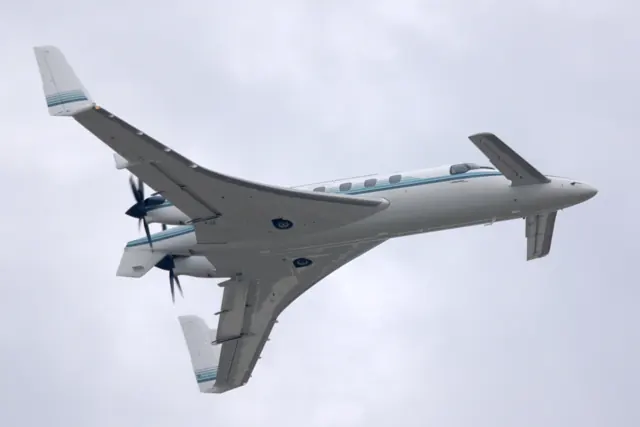
Beechcraft's Starship departed sharply from the conventional King Air outline. The main wing sits aft, a small forward wing provides the canard arrangement, and two pusher propellers turn behind the cabin. Extensive carbon-fibre construction was another defining part of the programme. Its avionics were equally ambitious for the period.
Aircraft background
Wikipedia contributors · Read more ↗Living with NC-51
Scherer describes flying his own Starship as a surprisingly familiar activity despite the aircraft's unusual outline. In his owner-written FAQ, he says the control inputs work as they do in a conventional aeroplane and praises the spacious flight deck. His strongest impressions concern the ride and sound: he recalls a gentle rocking motion in turbulence and a cabin quiet enough for ordinary conversation.
Owner-written FAQ, undated; site footer 2008. Retrospective experience operating Starship NC-51.
Robert Scherer · Read more ↗A period electronic flight deck with supporting systems
The Starship centres on the AMS-850 avionics suite, including display reversion, cooling and temperature-related instrument behaviour. Black Square also documents the pressurisation and environmental model and optional navigation integrations.
Starship · Black Square · MSFS 2020 · MSFS 2024
Black Square / Just Flight · Read more ↗Into the cockpit
 YouTube
 Erik Johnston · 40 min ·
Beechcraft Starship Walkaround Tour
An owner gives a detailed walkaround of his Beechcraft Starship.
Real aircraft · Beechcraft Starship
Watch on YouTube ↗Preview images are served by AirframeDB. Videos open on YouTube only when you choose to watch.
Meet Beechcraft Starship
Beechcraft's Starship departed sharply from the conventional King Air outline. The main wing sits aft, a small forward wing provides the canard arrangement, and two pusher propellers turn behind the cabin. Extensive carbon-fibre construction was another defining part of the programme.
Its avionics were equally ambitious for the period. Black Square's simulation centres on the AMS-850 flight deck, including display reversion and supporting systems such as avionics cooling.
Beechcraft Starship
Beechcraft → · Explore the family →
Beechcraft Starship
Wikipedia contributors · Beechcraft Starship ↗Black Square · MSFS 2020 · MSFS 2024 →Aircraft type designators
Use the code for the model you are flying. The linked authority lists the applicable aircraft.
History & design
The smaller aircraft that tested the idea
Before Beech committed to the production Starship, Scaled Composites built a smaller demonstrator to provide performance and handling information quickly. Model 115 was an 85-percent-scale version of the proposed full-size aircraft, with registration N2000S. Scaled dates its first flight to 29 August 1983.
The company describes a nine-month fabrication effort followed by the first 100 flight-test hours in 35 days. That compressed programme explains the purpose of the smaller aircraft: it was a flying development tool used to inform Beech’s production decision. Photographs and accounts of Model 115 therefore concern a different airframe from the later full-size production Starships.
Scaled Composites · Starship: Model 115 ↗Scaled Composites programme history · Model 115, 85-percent demonstrator
An ambitious successor
Beech explored the Starship as a successor to its King Air turboprops. Scaled Composites built a smaller proof-of-concept aircraft before the full-size prototypes flew. Composite construction, forward lifting surfaces and rear-facing propellers made the production aircraft unmistakable. The development aircraft and production Model 2000 were materially different, so their dates and specifications should not be treated as interchangeable.
Wikipedia contributors · Beechcraft Starship ↗Research-based history of the real aircraft family; see the linked source.
Development milestones
First flight: February 15, 1986
Wikipedia contributors · Beechcraft Starship ↗Beechcraft Starship · family/variant named by the source · Wikipedia revision 1373917801
Spot the design
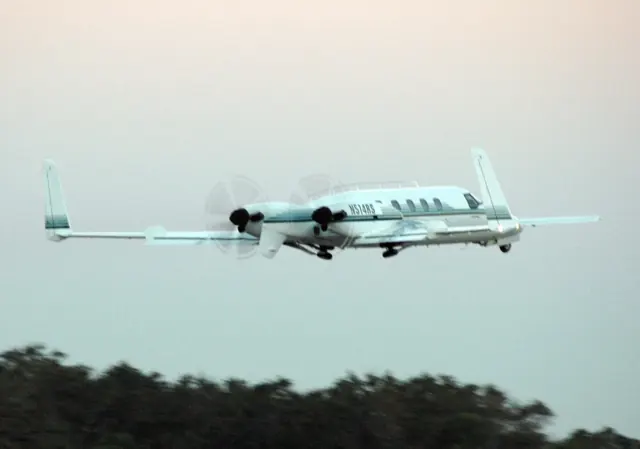
- Forward lifting surface. The canard sits ahead of the main wing. The Starship varies its sweep with flap configuration. Source ↗
- Tipsail. Vertical surfaces at the wing tips carry the rudders, giving this aircraft its distinctive outline. Source ↗
- Pusher propellers. The propellers sit behind the engines. Their blurred discs are visible behind the main wing in this photograph. Source ↗
Pilot accounts
Living with NC-51
Scherer describes flying his own Starship as a surprisingly familiar activity despite the aircraft's unusual outline. In his owner-written FAQ, he says the control inputs work as they do in a conventional aeroplane and praises the spacious flight deck. His strongest impressions concern the ride and sound: he recalls a gentle rocking motion in turbulence and a cabin quiet enough for ordinary conversation. Up front, he notices cooling fans and airflow more than the propeller noise a visitor might expect.
The attachment is personal as well as practical. Checking in with air traffic control brings interested responses, and the aircraft attracts a crowd on the ramp. Scherer also reports exceptionally reliable dispatch during his own years operating NC-51. That is his experience with one maintained aircraft, expressed by an enthusiastic owner. His account conveys why somebody would keep flying a rare type after its manufacturer had withdrawn from supporting the fleet.
Owner-written FAQ, undated; site footer 2008. Retrospective experience operating Starship NC-51.
Read the full account · Robert Scherer ↗A test pilot remembers the difficult early years
Carr's recollections come from unusually broad experience of the Starship programme. In Huber's 2004 report, the Beech test pilot says he flew 30 of the 53 airframes and spent hundreds of hours training customers. He remembers the first full-scale aircraft's February 1986 flight with Bud Francis, including a Valentine's decoration intended for Olive Ann Beech. Those memories place the aircraft alongside the people trying to bring it into service.
His assessment of the programme is candid. Early reliability problems damaged the Starship's reputation, while later examples benefited from improvements that customers did not necessarily recognise. Looking back, he thought another year spent reducing weight and resolving reliability and handling issues might have changed its prospects. He regarded the announcement that production would stop at NC-53 as particularly damaging. These are a participant's retrospective judgments about a troubled introduction, alongside his extensive direct experience flying the aircraft.
Air & Space, September 2004. Interview with Beech test pilot Tom Carr; recollections of development and customer training.
Read the full account · Air & Space / Smithsonian ↗Burt Rutan finally flies the production aircraft
Hansen recounts an unexpected visit to Mojave in July 2003. Robert Scherer arrived in NC-51 and offered Burt Rutan a flight in a production Starship. Rutan had flown the smaller proof-of-concept aircraft but, according to Hansen, had not yet flown the full-size production version. A meeting ended as engineers and pilots went outside to see it, reconnecting with a design on which some had worked years earlier.
Rutan flew with Scherer, and members of the White Knight and SpaceShipOne pilot team also went along. Hansen describes their delighted return and records Rutan's later enthusiastic assessment of how the aircraft flew. The visit led to Scherer's invitation to fly Starship chase missions for SpaceShipOne. This is a reported recollection of a particular encounter, with the appeal of the aircraft expressed through its designer and the people who flew it that day.
The Loop, 13 April 2019. Cathy Hansen recalls the July 2003 visit to Mojave; reported pilot experience.
Read the full account · The Loop ↗In your simulator
Systems, equipment and documentation for each developer’s aircraft.
MSFS 2020 · MSFS 2024Starship
Black Square · Released
Starship
Black Square · Released
Aircraft specifications
Published figures for the named real-aircraft variant. Simulator equipment and performance can differ.
| Specification | Published value |
|---|---|
| Length | 46 ft 1 in (14.05 m) |
| Wingspan | 54 ft 5.70 in (16.6 m) |
| Height | 12 ft 1.3 in (3.94 m) |
| Wing area | 281 sq ft (26.1 m² ) |
| Empty weight | 10,085 lb (4,574 kg) standard empty weight |
| Gross weight | 15,010 lb (6,808 kg) max ramp weight |
| Max takeoff weight | 14,900 lb (6,759 kg) |
| Powerplant | 2 × Pratt & Whitney Canada PT6A-67A turboprop, 1,200 shp (890 kW) each |
| Propellers | 5-bladed McCauley, 8 ft 8 in (2.64 m) diameter |
| Maximum speed | 385 mph (620 km/h, 335 kn) |
| Cruise speed | 353 mph (568 km/h, 307 kn) |
| Stall speed | 112 mph (180 km/h, 97 kn) max weight with flaps retracted & idle power |
| Range | 1,742 mi (2,804 km, 1,514 nmi) |
| Service ceiling | 41,000 ft (12,500 m) |
| Rate of climb | 2,748 ft/min (13.96 m/s) |
Manuals & resources
Find your next read
Choose a topic for a short introduction and a link to the original source. Simulator references identify the developer and edition they cover.
Simulator documentation
A period electronic flight deck with supporting systemsStarship · Black Square · MSFS 2020 · MSFS 2024
The Starship centres on the AMS-850 avionics suite, including display reversion, cooling and temperature-related instrument behaviour. Black Square also documents the pressurisation and environmental model and optional navigation integrations.
Black Square Starship · PDF p.9; introduction and avionics overview
Black Square / Just Flight · Read the source ↗An electronic cockpit from before routine GPS navigationStarship · Black Square · MSFS 2020 · MSFS 2024
Black Square's AMS-850 implementation can estimate position from its initial location, VOR/DME reception and VLF/Omega sources. GNSS augmentation is selectable, so the simulation can also represent navigation using the original equipment. The moving map can therefore use the original navigation sources as well as GNSS. The manual explains initialization and position updates separately from importing a route.
Black Square Starship User Guide (2025) · PDF p.122 · No GPS navigation and position estimation
Black Square / Just Flight · Read the source ↗The displays are part of the thermal simulationStarship · Black Square · MSFS 2020 · MSFS 2024
The simulated avionics occupy cooled equipment spaces, with airflow and blower operation affecting temperature. The manual describes overheating and equipment failures when cooling becomes inadequate, with an avionics-status view on the multifunction display. It also models the behaviour of the period CRT displays: cold displays can take time to brighten, while excessive heat can make the image fade. A blank or dim display can therefore have a simulated system explanation beyond its brightness control.
Black Square Starship User Guide (2025) · PDF pp.108,110 · Avionics cooling and CRT displays
Black Square / Just Flight · Read the source ↗What persists between flightsStarship · Black Square · MSFS 2020 · MSFS 2024
State saving is selective. The guide identifies radio settings, stored routes and user waypoints, engine health and oxygen pressure among the items retained. Some primary operating switches are instead initialized from the flight's starting position. Fuel restoration also has a condition: it applies when the next flight loads with the default fuel levels. The guide records a payload-restoration limitation and notes that the simulator must shut down normally for its native saving mechanism to retain changes. The tablet adds system visualizers and failure management.
Black Square Starship User Guide (2025) · PDF pp.87,128,151 · State saving, tablet and failures
Black Square / Just Flight · Read the source ↗Pilot account
Living with NC-51Owner-written FAQ, undated; site footer 2008. Retrospective experience operating Starship NC-51.
Scherer describes flying his own Starship as a surprisingly familiar activity despite the aircraft's unusual outline. In his owner-written FAQ, he says the control inputs work as they do in a conventional aeroplane and praises the spacious flight deck. His strongest impressions concern the ride and sound: he recalls a gentle rocking motion in turbulence and a cabin quiet enough for ordinary conversation.
Robert Scherer
Robert Scherer · Read the source ↗A test pilot remembers the difficult early yearsAir & Space, September 2004. Interview with Beech test pilot Tom Carr; recollections of development and customer training.
Carr's recollections come from unusually broad experience of the Starship programme. In Huber's 2004 report, the Beech test pilot says he flew 30 of the 53 airframes and spent hundreds of hours training customers. He remembers the first full-scale aircraft's February 1986 flight with Bud Francis, including a Valentine's decoration intended for Olive Ann Beech. Those memories place the aircraft alongside the people trying to bring it into service. His assessment of the programme is candid.
Tom Carr, interviewed by Mark Huber
Air & Space / Smithsonian · Read the source ↗Read the original documentation from the people who created it. Manuals open on their publisher’s website.
Manual
Microsoft Flight Simulator aircraft manualsMicrosoft / aircraft developers Starship operations manualBlack Square / Just FlightAircraft background
Beechcraft StarshipWikipedia contributors · Research background · Wikipedia revision 1373917801 · retrieved 2026-09-12 Starship: Model 115Scaled Composites · Manufacturer programme history · Model 115 demonstratorProduct
StarshipBlack Square · Official developer / designated store catalogue · checked 2026-09-12Type designator
ICAO Doc 8643 — aircraft type designatorsInternational Civil Aviation Organization · Public search data retrieved 2026-09-14; authority update 2026-09-03Built-in force-feedback profiles
Read the documentary basis, editable starting settings and remaining questions for the aircraft you fly. Each explanation refers to the exact profile revision shown.
Catalogue programme-20261022-v1 · 2 profile choices
Black Square Starship
Black Square · Free and Pro · Revision 5 · Inherited starting point
MSFS 2020 · MSFS 2024
Black Square Starship: The selected canard-aircraft yoke response remains a force approximation; attitude/bank selections and mistrim annunciations are not physical hand-force measurements.
Beechcraft Starship
Free and Pro · Revision 2 · Partial review
MSFS 2024 · MSFS 2020
Beechcraft Starship: The selected canard-aircraft yoke response remains a force approximation; attitude/bank selections and mistrim annunciations are not physical hand-force measurements.
Beechcraft Starship
Beechcraft Starship: The selected canard-aircraft yoke response remains a force approximation; attitude/bank selections and mistrim annunciations are not physical hand-force measurements.
Aircraft and simulator scope
- Beechcraft Starship · MSFS 2024 · family starting point
- Beechcraft Starship · MSFS 2020 · family starting point
Black Square Starship user guide 2025 and product page; shaker/pusher behavior is distinct from ordinary buffet effects. · Selected choice: Beechcraft Starship. Documentary scope does not establish every variant, add-on revision or simulator binding.
The simulator model and controls
Beechcraft's Starship departed sharply from the conventional King Air outline. The main wing sits aft, a small forward wing provides the canard arrangement, and two pusher propellers turn behind the cabin. Extensive carbon-fibre construction was another defining part of the programme.
This starting point selects Beechcraft Starship. Its aircraft-level settings do not select a particular developer’s custom systems.
How this profile feels
Spring resistance builds with the selected airspeed response. A separate aerodynamic term adds speed-dependent control load.
Valid trim provides the configured pressure relief. Autopilot following is enabled for supported control references.
Controls and trim
The Starship combines a canard layout with twin pusher turboprops. Black Square documents separate trim arming and mode circuits and dual flight-control computers. Its mistrim flags approximate opposition because ordinary desktop torque cannot be measured; input displacement can prevent autopilot engagement. Autopilot pitch and roll knobs select attitude and bank. Shaker and column-pusher functions are distinct from an ordinary stall-buffet cue.
About the values
The gains are normalized profile settings. They describe the chosen effect balance; hand force depends on the device and its output limits. IAS references are tuning values rather than operating limits. Physical acceptance of this revision remains pending.
What the documentation establishes
The guide identifies the Starship's autopilot/yaw-damper controls and pitch/roll operation.
Pitch, roll and rudder trim setup is documented; preset trim authority is not a measured Starship value.
Autopilot and yaw-damper controls are documented; generic following has no proven external servo contract here.
The guide describes shaker and column-pusher testing; an ordinary stall-buffet cue is not equivalent to those devices.
Documentary review and sources
These decisions describe the documentary basis and remaining gaps for this revision. Aircraft documentation and a starting setting describe different kinds of evidence.
Aircraft and variant
ReviewedThis starting point selects Beechcraft Starship. Its aircraft-level settings do not select a particular developer’s custom systems.
Flight controls
Not yet reviewedThe Starship combines a canard layout with twin pusher turboprops. Black Square documents separate trim arming and mode circuits and dual flight-control computers. Its mistrim flags approximate opposition because ordinary desktop torque cannot be measured; input displacement can prevent autopilot engagement. Autopilot pitch and roll knobs select attitude and bank. Shaker and column-pusher functions are distinct from an ordinary stall-buffet cue.
Trim
ReviewedTrim setup is documented on pitch, roll and yaw, but the profile's trim relief does not reproduce dual-FCC trim arming or simulated mistrim logic. Pitch authority 0.3 provides load relief and permitted centre movement; roll authority is 0.14.
Autopilot and stability
ReviewedFollowing is on at 0.1 authority when a supported, valid autopilot control reference is available.
Equipment
ReviewedGear, flap and ground cues follow the selected settings and available simulator-reported states.
Speeds and limits
Not yet reviewedThe indicated-speed references set the profile response scale; they are separate from aircraft operating limits.
Simulator integration
Not yet reviewedThe profile targets msfs2024, msfs2020. Add-on-specific controls use only the supported references configured by this profile.
Force-feedback settings
Not yet reviewedThe settings define the profile’s effect balance. Device output limits affect physical hand force.
Starting settings and their rationale
These configured values are starting estimates. The explanations describe what each setting controls; physical validation appears separately below.
| Setting | Starting value | What it controls and why |
|---|---|---|
| Spring strength | Starting value0.74 | What it controls and whyThe selected canard-aircraft yoke response remains a force approximation; attitude/bank selections and mistrim annunciations are not physical hand-force measurements. The baseline spring is 0.74. Its low-speed blend reaches baseline strength at 90 KIAS. |
| Master force gain | Starting value0.85 | What it controls and whyScales overall profile strength while preserving effect balance, subject to device and output limits. |
| Profile force gain | Starting value0.68 | What it controls and whyThe aerodynamic-load gain is 0.68 with an indicated-speed reference of 220 KIAS. This supplies speed-dependent loading alongside the spring. |
| Force tuning speed/reference | Starting value220.0 kt | What it controls and whySets the IAS reference for aerodynamic loading. It is an estimate, not published cruise TAS or a flight limit. |
| Spring response reference speed | Starting value90 kt | What it controls and whySets the IAS where the low-speed blend reaches baseline strength; high-speed stiffening also uses it. |
| Aileron force scale | Starting value0.72 | What it controls and whyRoll and pitch aerodynamic scales are 0.72 and 1, respectively. They set the aerodynamic axis balance. No custom spring-travel curve is enabled. |
| Elevator force scale | Starting value1.0 | What it controls and whyScales pitch aerodynamic loading; pitch spring travel and trim responses are separate settings. |
| Trim feel | Starting valueEnabled | What it controls and whyRetained for compatibility and group membership. Trim relief, rather than this flag, controls centre movement. |
| Trim relief | Starting valueEnabled | What it controls and whyAllows trim relief with supported control law and valid telemetry. Axis authorities set its amount. |
| Autopilot follow | Starting valueEnabled | What it controls and whyFollowing is on at 0.1 authority when a supported, valid autopilot control reference is available. |
| Autopilot neutral hold | Starting valueDisabled | What it controls and whyPermits centering hold during a supported AP state, separate from following a moving target. |
| Output force limit | Starting value0.55 | What it controls and whyCaps directed-force output. Native spring effects and device limits remain separate. |
All 44 starting settings and their rationale
The settings define the profile’s effect balance. Device output limits affect physical hand force.
| Setting | Starting value | What it controls and why |
|---|---|---|
| Spring strength | Starting value0.74 | What it controls and whyThe selected canard-aircraft yoke response remains a force approximation; attitude/bank selections and mistrim annunciations are not physical hand-force measurements. The baseline spring is 0.74. Its low-speed blend reaches baseline strength at 90 KIAS. |
| Spring deadband | Starting value0.05 | What it controls and whySets travel around the centre before the baseline spring resists. Smaller values engage it sooner. |
| Profile force gain | Starting value0.68 | What it controls and whyThe aerodynamic-load gain is 0.68 with an indicated-speed reference of 220 KIAS. This supplies speed-dependent loading alongside the spring. |
| Master force gain | Starting value0.85 | What it controls and whyScales overall profile strength while preserving effect balance, subject to device and output limits. |
| QBlend Enabled | Starting valueEnabled | What it controls and whyAllows baseline spring strength to rise with indicated airspeed where the control law permits it. |
| QSpring Minimum Factor | Starting value0.55 | What it controls and whySets low-speed spring strength as a fraction of baseline when blending is enabled. One keeps full strength. |
| QSpring Start Knots | Starting value20 kt | What it controls and whySets the IAS where the low-speed spring blend starts rising. This is a feel threshold, not a flight limit. |
| Spring response reference speed | Starting value90 kt | What it controls and whySets the IAS where the low-speed blend reaches baseline strength; high-speed stiffening also uses it. |
| Force tuning speed/reference | Starting value220.0 kt | What it controls and whySets the IAS reference for aerodynamic loading. It is an estimate, not published cruise TAS or a flight limit. |
| Airspeed spring stiffening gain | Starting value0.1 | What it controls and whyThe high-speed spring-stiffening gain is 0.1. It strengthens the permitted spring response above 90 KIAS, with the squared-speed ratio capped at 5. |
| Airspeed spring stiffening limit | Starting value5 | What it controls and whyLimits the squared airspeed ratio used for high-speed spring stiffening; it is not a device-force cap. |
| Aileron force scale | Starting value0.72 | What it controls and whyRoll and pitch aerodynamic scales are 0.72 and 1, respectively. They set the aerodynamic axis balance. No custom spring-travel curve is enabled. |
| Elevator force scale | Starting value1.0 | What it controls and whyScales pitch aerodynamic loading; pitch spring travel and trim responses are separate settings. |
| Output force limit | Starting value0.55 | What it controls and whyCaps directed-force output. Native spring effects and device limits remain separate. |
| Trim feel | Starting valueEnabled | What it controls and whyRetained for compatibility and group membership. Trim relief, rather than this flag, controls centre movement. |
| Trim relief | Starting valueEnabled | What it controls and whyAllows trim relief with supported control law and valid telemetry. Axis authorities set its amount. |
| Elevator Authority | Starting value0.3 | What it controls and whyTrim setup is documented on pitch, roll and yaw, but the profile's trim relief does not reproduce dual-FCC trim arming or simulated mistrim logic. Pitch authority 0.3 provides load relief and permitted centre movement; roll authority is 0.14. |
| Aileron Authority | Starting value0.14 | What it controls and whyScales supported roll-trim relief and permitted centre movement. Zero removes roll response. |
| Force Trim Enabled | Starting valueDisabled | What it controls and whyEnables local force trim, separate from aircraft-owned trim and add-on integration qualification. |
| GLoad Enabled | Starting valueEnabled | What it controls and whyAllows load-factor changes to modify permitted spring laws. Passive fly-by-wire feel can suppress it. |
| Rate Damping Enabled | Starting valueEnabled | What it controls and whyEnables rate damping with the configured coefficients and control law. |
| Autopilot follow | Starting valueEnabled | What it controls and whyFollowing is on at 0.1 authority when a supported, valid autopilot control reference is available. |
| Autopilot follow authority | Starting value0.1 | What it controls and whySets admitted AP-follow gain, not a percentage of travel. Runtime ownership and input limits still apply. |
| Autopilot neutral hold | Starting valueDisabled | What it controls and whyPermits centering hold during a supported AP state, separate from following a moving target. |
| Autopilot neutral hold strength | Starting value0.6 | What it controls and whySets admitted AP neutral-hold strength; inactive while neutral hold is disabled. |
| Enabled | Starting valueEnabled | What it controls and whyEnables aerodynamic cues; each still needs nonzero strength and its simulator conditions. |
| Gain | Starting value0.28 | What it controls and whySets stall-buffet strength. Zero removes the cue without changing simulator stalls or warnings. |
| Gain | Starting value0 | What it controls and whySets high-Mach buffet strength; onset and full-strength thresholds are separate. |
| Gain | Starting value0.14 | What it controls and whySets flap buffet at the configured position and speed gates. Flap movement texture is separate. |
| Maximum flap index | Starting value3 | What it controls and whySets the final flap index for detent normalization. UP plus three detents uses maximum index3. |
| Minimum flap index | Starting value2 | What it controls and whySets the first flap detent that admits buffet; this is a handle index, not degrees. |
| Gain | Starting value0.1 | What it controls and whySets gear aerodynamic buffet; movement and ground-contact cues are separate. |
| Shaker Enabled | Starting valueDisabled | What it controls and whyPermits shaker at supported warning conditions; the switch does not establish aircraft equipment. |
| Stick shaker amplitude | Starting value0.5 | What it controls and whySets triggered shaker strength; inactive while the shaker feature is disabled. |
| Enabled | Starting valueEnabled | What it controls and whyEnables ground effects; each still needs its own strength and contact or motion telemetry. |
| Gain | Starting value0.42 | What it controls and whySets rolling texture strength, modified by speed, surface and undercarriage configuration. |
| Gain | Starting value0.32 | What it controls and whySets gear-bump texture during ground motion, separate from touchdown impact. |
| Gain | Starting value0.82 | What it controls and whySets landing-impact strength; landing telemetry and response shape determine the pulse. |
| Gain | Starting value0.48 | What it controls and whySets reverse-thrust vibration with valid reverser and engine conditions. Zero removes the cue. |
| Enabled | Starting valueEnabled | What it controls and whyEnables engine cues with nonzero settings and valid running-engine telemetry. |
| Gain | Starting value0.06 | What it controls and whySets estimated engine vibration using configured telemetry and response, not measured cockpit vibration. |
| Enabled | Starting valueEnabled | What it controls and whyEnables accessory cues with configured strengths and observed accessory movement. |
| Gain | Starting value0.12 | What it controls and whySets texture from observed flap movement; a command without movement does not establish the cue. |
| Gain | Starting value0.12 | What it controls and whySets texture from observed gear movement, separate from aerodynamic and touchdown effects. |
Limits and open questions
- A free-and-correct flight-control checklist does not establish the physical force source or linkage.
- The shaker/pusher test condition does not derive an indicated-speed force reference or a complete stall envelope.
- Autopilot and shaker/pusher descriptions do not publish externally usable force-output or axis-ownership semantics.
- Documented shaker/pusher behavior does not calibrate generic buffet strength or authorize claiming physical reproduction.
Physical validation
No physical force validation is recorded in this public catalogue for this revision. Documentary review and software checks do not establish how a particular device feels.
Documented interfaces
Source-documented identifiers. Documentation does not prove that every add-on populates a value correctly.
L:var_PilotCws
Pilot CWS button; aircraft-specific behavior.
- Units
- Boolean
- Access
- hardware control input; explicit readback contract unknown
Archived manual revision
Black Square / Just Flight · PDF page 172 ↗Discuss this aircraft (0)
Questions, observations and useful sources from the community.
No published discussions yet. Bring a question or share a useful source.
Open aircraft discussions →Content expanded · What’s new
Something missing or a source that needs attention?
Suggest a correction ↗