


Start here
A few places to begin, from the aircraft’s story to the people who fly it.
Meet the aircraft
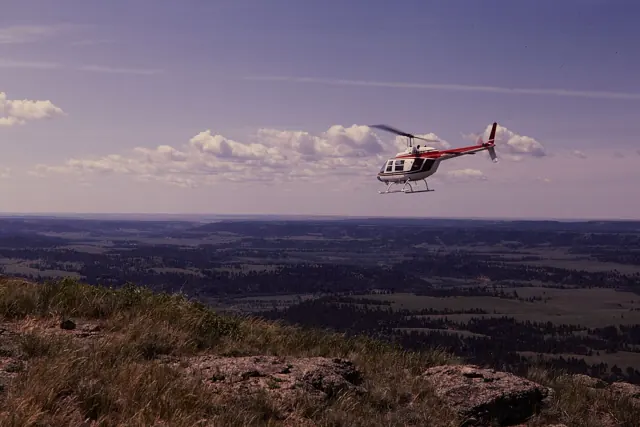
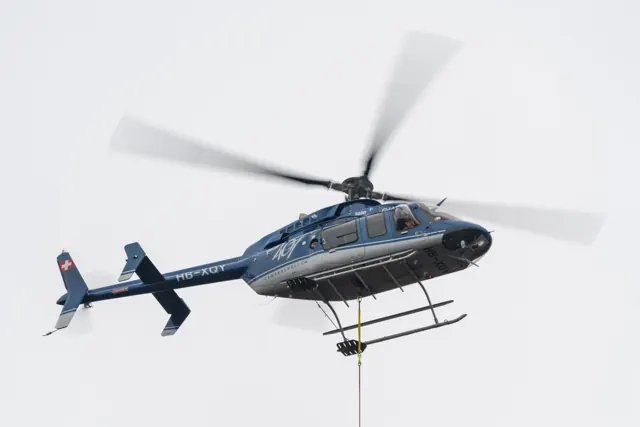
The Bell 407 retained a family resemblance to the 206L while adopting a four-bladed main rotor and associated structural changes. It is a single-engine helicopter used for passenger, emergency-service and utility missions. The rotor is an immediate visual clue when comparing a 407 with the two-bladed JetRanger and LongRanger. Cockpit equipment has also evolved through the programme.
Aircraft background
Wikipedia contributors · Read more ↗A glass cockpit becomes familiar over the Kent coast
Malone arrived with reservations about learning a glass cockpit, despite considerable experience in older helicopters. Gary Slater introduced him to the 407GXP at Manston on a hot day, when the aircraft’s air conditioning was particularly welcome. Once airborne, the smooth ride and the view along the Kent coast helped him relax into the flight. Some cockpit details still required effort.
Pilot · January 2017. G-TOPI 407GXP demonstration with Gary Slater from Manston, including formation with a JetRanger photography aircraft.
Pilot · Read more ↗The update record includes passengers and the flight bag
The December 2025 release notes identify a correction to passenger navigation and career behaviour, together with a helicopter outline added to the EFB. These details concern the bundled MSFS 2024 Bell 407 and its integration with the simulator’s activities.
407 · Microsoft Flight Simulator · MSFS 2024
Microsoft Flight Simulator · Read more ↗Into the cockpit
 YouTube
 Animagraffs · 56 min ·
How a Helicopter Works (Bell 407)
An animated explanation of helicopter mechanisms using the Bell 407 as its subject.
Real aircraft · Bell 407
Watch on YouTube ↗ YouTube
 Aviation Station Media · 3 min ·
HEMS Bell 407 Departure, cockpit view
Cockpit footage of a Bell 407 air-ambulance departure.
Real aircraft · Bell 407
Watch on YouTube ↗Preview images are served by AirframeDB. Videos open on YouTube only when you choose to watch.
Meet Bell 407
The Bell 407 retained a family resemblance to the 206L while adopting a four-bladed main rotor and associated structural changes. It is a single-engine helicopter used for passenger, emergency-service and utility missions.
The rotor is an immediate visual clue when comparing a 407 with the two-bladed JetRanger and LongRanger. Cockpit equipment has also evolved through the programme. Simulator implementations can therefore share the 407 name while representing different avionics and assistance systems.
Bell 407
Aircraft type designators
Use the code for the model you are flying. The linked authority lists the applicable aircraft.
History & design
The 407 develops beyond the LongRanger shape
Malone’s report traces the 407’s lineage through the LongRanger while identifying its four-blade main rotor and later GX and GXP developments. The familiar outline therefore spans meaningful changes in rotor system, engine control and cockpit equipment.
Pilot · Flight Test: Bell 407GXP ↗Contemporary GXP review
The GXi introduces the NXi flight deck
Rexroth’s 2018 report identifies the G1000H NXi and Rolls-Royce 250-C47E/4 engine as distinguishing the GXi from the preceding GXP. Her demonstration aircraft was an early production example, placing the flight at the start of that configuration’s service.
Business Jet Traveler · Pilot Report: Bell 407GXi ↗Contemporary configuration description; optional equipment remains aircraft-specific
Development milestones
First flight: 29 June 1995
Developed from: Bell 206L LongRanger
Wikipedia contributors · Bell 407 ↗Bell 407 · family/variant named by the source · Wikipedia revision 1365980603
Pilot accounts
A glass cockpit becomes familiar over the Kent coast
Malone arrived with reservations about learning a glass cockpit, despite considerable experience in older helicopters. Gary Slater introduced him to the 407GXP at Manston on a hot day, when the aircraft’s air conditioning was particularly welcome. Once airborne, the smooth ride and the view along the Kent coast helped him relax into the flight.
Some cockpit details still required effort. The slip indication was harder to pick out from his seat in strong sunlight, and the boosted pedals needed familiarisation. He found himself using a mixture of traditional and electronic instruments as his scan developed. By the return to Manston, the unfamiliar displays seemed less daunting.
Pilot · January 2017. G-TOPI 407GXP demonstration with Gary Slater from Manston, including formation with a JetRanger photography aircraft.
Read the full account · Pilot ↗Sharing a long journey with his mother
An invitation from his friend and instructor Lars Gange helped inspire Nai Nan Ko Jr. to consider flying to Alaska. He took his 82-year-old mother on the journey, making it a shared family experience as well as an ambitious use of his helicopter. Weather and the availability of stops shaped their progress across the continent.
The memories included wildlife, glaciers and unexpected hospitality along the route. At Prince Rupert, the Coast Guard helped them find a place to land; other operators offered local knowledge and welcome. Small practical details mattered too, including keeping the windshield clear of insects. He particularly valued sharing the changing views and encounters with his mother over many hours of flying.
Owner account published by Bell · August 2025. Boston–Alaska journey in a 407GXi acquired in July 2023; the article does not specify the journey’s date.
Read the full account · Bell ↗Learning the new panel in unfamiliar local airspace
Rexroth’s introduction began with a close look at the new displays and a briefing from Tim Otteson. The aircraft was an early production GXi with little time in service. After adjusting the pedals, she joined an hour-long local flight that included Fort Worth and Bell’s training area, concentrating on how the revised avionics fitted into her scan.
Fast map redraws and clear airport diagrams helped as she flew in unfamiliar surroundings. Otteson demonstrated manoeuvres and then handed over the controls, allowing her confidence with both the helicopter and the panel to grow. They also explored autopilot modes towards the end of the flight. By shutdown, Rexroth had a more practical understanding of the changes than the initial screen comparison alone had supplied, alongside an enjoyable first experience of the GXi.
Business Jet Traveler · August 2018. Early production 407GXi flight at Fort Worth with Bell demonstration pilot Tim Otteson; G1000H NXi configuration.
Read the full account · Business Jet Traveler ↗In your simulator
Systems, equipment and documentation for each developer’s aircraft.
Compare simulator versions →MSFS 2024407
Microsoft Flight Simulator · Released
407
Microsoft Flight Simulator · Released
MSFS 2020Bell 407
Microsoft Flight Simulator · Released
Bell 407
Microsoft Flight Simulator · Released
X-Plane 12Bell 407
JRX · Released
Bell 407
JRX · Released
Aircraft specifications
Published figures for the named real-aircraft variant. Simulator equipment and performance can differ.
| Specification | Published value |
|---|---|
| Length | 41 ft 8 in (12.70 m) |
| Height | 11 ft 8 in (3.56 m) |
| Max takeoff weight | 6,000 lb (2,722 kg) |
| Powerplant | 1 × Allison 250-C47B turboshaft engine, 813 shp (606 kW) |
| Main rotor diameter | 35 ft 0 in (10.67 m) |
| Main rotor area | 962 sq ft (89.4 m² ) |
| Maximum speed | 140 kn (160 mph, 260 km/h) |
| Cruise speed | 133 kn (153 mph, 246 km/h) |
| Range | 324 nmi (373 mi, 600 km) |
| Service ceiling | 18,690 ft (5,700 m) |
Manuals & resources
Find your next read
Choose a topic for a short introduction and a link to the original source. Simulator references identify the developer and edition they cover.
Simulator documentation
The update record includes passengers and the flight bag407 · Microsoft Flight Simulator · MSFS 2024
The December 2025 release notes identify a correction to passenger navigation and career behaviour, together with a helicopter outline added to the EFB. These details concern the bundled MSFS 2024 Bell 407 and its integration with the simulator’s activities.
MSFS 2024 Sim Update 4 · 1.6.32.0, 8 December 2025
Microsoft Flight Simulator · Read the source ↗Part of MSFS 2020’s introduction of helicoptersBell 407 · Microsoft Flight Simulator · MSFS 2020
Microsoft named the Cabri G2 and Bell 407 in its 40th Anniversary Edition announcement, alongside the new helicopter fluid-dynamics simulation. These bundled aircraft share that platform introduction, while retaining different cockpits and aircraft configurations.
Microsoft announcement · June 2022; published fleet confirms their subsequent inclusion
Microsoft Flight Simulator · Read the source ↗Pilot account
A glass cockpit becomes familiar over the Kent coastPilot · January 2017. G-TOPI 407GXP demonstration with Gary Slater from Manston, including formation with a JetRanger photography aircraft.
Malone arrived with reservations about learning a glass cockpit, despite considerable experience in older helicopters. Gary Slater introduced him to the 407GXP at Manston on a hot day, when the aircraft’s air conditioning was particularly welcome. Once airborne, the smooth ride and the view along the Kent coast helped him relax into the flight. Some cockpit details still required effort.
Pat Malone
Pilot · Read the source ↗Sharing a long journey with his motherOwner account published by Bell · August 2025. Boston–Alaska journey in a 407GXi acquired in July 2023; the article does not specify the journey’s date.
An invitation from his friend and instructor Lars Gange helped inspire Nai Nan Ko Jr. to consider flying to Alaska. He took his 82-year-old mother on the journey, making it a shared family experience as well as an ambitious use of his helicopter. Weather and the availability of stops shaped their progress across the continent. The memories included wildlife, glaciers and unexpected hospitality along the route.
Nai Nan Ko Jr.
Bell · Read the source ↗Developer documentation
Bell 407 — product listingBell 407 · X-Plane 12
Product listing captured 2026-09-24; edition scope from the reviewed catalogue
JRX · Read the source ↗Read the original documentation from the people who created it. Manuals open on their publisher’s website.
Manual
Microsoft Flight Simulator aircraft manualsMicrosoft / aircraft developersAircraft background
Bell 407Wikipedia contributors · Research background · Wikipedia revision 1365980603 · retrieved 2026-09-12Resource
MSFS 2024 FAQ and edition aircraft inventoryMicrosoft MSFS 2020 FAQ and edition aircraft inventoryMicrosoftType designator
ICAO Doc 8643 — aircraft type designatorsInternational Civil Aviation Organization · Public search data retrieved 2026-09-14; authority update 2026-09-03Developer documentation
MSFS 2024 Sim Update 4 release notesMicrosoft Flight Simulator · Publisher announcement or release notes Microsoft Flight Simulator’s 40th Anniversary EditionMicrosoft Flight Simulator · Publisher announcement or release notesProduct
store.x-plane.orgJRX · Product listing captured 2026-09-24; edition scope from the reviewed catalogueBuilt-in force-feedback profiles
Read the documentary basis, editable starting settings and remaining questions for the aircraft you fly. Each explanation refers to the exact profile revision shown.
Catalogue programme-20261022-v1 · 2 profile choices
JRX Bell 407
JRX Design · Free and Pro · Revision 2 · Inherited starting point
X-Plane 12
JRX Bell 407: The four-bladed rotor establishes configuration, while cyclic spring resistance remains the selected control-feel approximation.
Bell 407
Free and Pro · Revision 1 · Partial review
MSFS 2024 · MSFS 2020
Bell 407: The four-bladed rotor establishes configuration, while cyclic spring resistance remains the selected control-feel approximation.
JRX Bell 407
JRX Bell 407: The four-bladed rotor establishes configuration, while cyclic spring resistance remains the selected control-feel approximation.
Aircraft and simulator scope
- JRX Bell 407 · JRX Design · X-Plane 12 · Add-on starting point
The simulator model and controls
The Bell 407 retained a family resemblance to the 206L while adopting a four-bladed main rotor and associated structural changes. It is a single-engine helicopter used for passenger, emergency-service and utility missions.
This profile selects JRX Bell 407 for X-Plane 12.
How this profile feels
The spring stays independent of airspeed. Directed aerodynamic loading is omitted.
Local force trim is off. Autopilot following is off.
Cyclic damping is on. Its configured gain is 0.35; it resists hardware motion separately from the spring and aircraft stabilization.
Controls and trim
The Bell 407 has a four-blade main rotor. JRX's X-Plane 12 implementation lists optional autopilot and IFR equipment alongside its AAPS, vibration and engine-exceedance modeling. Those are developer-documented aircraft behaviors. The separate Microsoft default aircraft and an acoustic rotor study do not establish the same interfaces or physical cyclic-vibration amplitudes.
The selected implementation
JRX Bell 407 v1.41 targets XP12.3+ with revised AAPS/vibration/exceedance behavior and optional AP/IFR, separate from default MSFS 407.
About the values
The gains are normalized profile settings. They describe the chosen effect balance; hand force depends on the device and its output limits. IAS references are tuning values rather than operating limits. Physical acceptance of this revision remains pending.
Documentary review and sources
These decisions describe the documentary basis and remaining gaps for this revision. Aircraft documentation and a starting setting describe different kinds of evidence.
Aircraft and variant
InheritedThis profile selects JRX Bell 407 for X-Plane 12.
Flight controls
InheritedThe Bell 407 has a four-blade main rotor. JRX's X-Plane 12 implementation lists optional autopilot and IFR equipment alongside its AAPS, vibration and engine-exceedance modeling. Those are developer-documented aircraft behaviors. The separate Microsoft default aircraft and an acoustic rotor study do not establish the same interfaces or physical cyclic-vibration amplitudes.
Trim
InheritedCyclic damping is on. Its configured gain is 0.35; it resists hardware motion separately from the spring and aircraft stabilization.
Autopilot and stability
InheritedAutopilot following is off; the configured spring and load retain the hardware feel.
Equipment
InheritedJRX Bell 407 v1.41 targets XP12.3+ with revised AAPS/vibration/exceedance behavior and optional AP/IFR, separate from default MSFS 407.
Speeds and limits
InheritedThe indicated-speed references set the profile response scale; they are separate from aircraft operating limits.
Simulator integration
InheritedThe profile targets xplane12. Add-on-specific controls use only the supported references configured by this profile.
Force-feedback settings
InheritedThe settings define the profile’s effect balance. Device output limits affect physical hand force.
Starting settings and their rationale
These configured values are starting estimates. The explanations describe what each setting controls; physical validation appears separately below.
| Setting | Starting value | What it controls and why |
|---|---|---|
| Spring strength | Starting value0.14 | What it controls and whyThe four-bladed rotor establishes configuration, while cyclic spring resistance remains the selected control-feel approximation. The baseline spring is 0.14. Low-speed spring blending is off. |
| Master force gain | Starting value0.65 | What it controls and whyScales overall profile strength while preserving effect balance, subject to device and output limits. |
| Profile force gain | Starting value0 | What it controls and whyThe 0 gain omits sustained directed airspeed loading. Spring resistance remains independent. |
| Force tuning speed/reference | Starting value120 kt | What it controls and whySets the IAS reference for aerodynamic loading. It is an estimate, not published cruise TAS or a flight limit. |
| Spring response reference speed | Starting value60.0 kt | What it controls and whySets the IAS where the low-speed blend reaches baseline strength; high-speed stiffening also uses it. |
| Aileron force scale | Starting value0.72 | What it controls and whyRoll and pitch aerodynamic scales are 0.72 and 1, respectively. These stored weights do not create directed aerodynamic loading while that term is inactive. No custom spring-travel curve is enabled. |
| Elevator force scale | Starting value1 | What it controls and whyScales pitch aerodynamic loading; pitch spring travel and trim responses are separate settings. |
| Trim feel | Starting valueDisabled | What it controls and whyRetained for compatibility and group membership. Trim relief, rather than this flag, controls centre movement. |
| Trim relief | Starting valueDisabled | What it controls and whyAllows trim relief with supported control law and valid telemetry. Axis authorities set its amount. |
| Autopilot follow | Starting valueDisabled | What it controls and whyAutopilot following is off; the configured spring and load retain the hardware feel. |
| Autopilot neutral hold | Starting valueDisabled | What it controls and whyPermits centering hold during a supported AP state, separate from following a moving target. |
| Output force limit | Starting value0.55 | What it controls and whyCaps directed-force output. Native spring effects and device limits remain separate. |
All 44 starting settings and their rationale
The settings define the profile’s effect balance. Device output limits affect physical hand force.
| Setting | Starting value | What it controls and why |
|---|---|---|
| Spring strength | Starting value0.14 | What it controls and whyThe four-bladed rotor establishes configuration, while cyclic spring resistance remains the selected control-feel approximation. The baseline spring is 0.14. Low-speed spring blending is off. |
| Spring deadband | Starting value0.02 | What it controls and whySets travel around the centre before the baseline spring resists. Smaller values engage it sooner. |
| Profile force gain | Starting value0 | What it controls and whyThe 0 gain omits sustained directed airspeed loading. Spring resistance remains independent. |
| Master force gain | Starting value0.65 | What it controls and whyScales overall profile strength while preserving effect balance, subject to device and output limits. |
| QBlend Enabled | Starting valueDisabled | What it controls and whyAllows baseline spring strength to rise with indicated airspeed where the control law permits it. |
| QSpring Minimum Factor | Starting value1 | What it controls and whySets low-speed spring strength as a fraction of baseline when blending is enabled. One keeps full strength. |
| QSpring Start Knots | Starting value8 kt | What it controls and whySets the IAS where the low-speed spring blend starts rising. This is a feel threshold, not a flight limit. |
| Spring response reference speed | Starting value60.0 kt | What it controls and whySets the IAS where the low-speed blend reaches baseline strength; high-speed stiffening also uses it. |
| Force tuning speed/reference | Starting value120 kt | What it controls and whySets the IAS reference for aerodynamic loading. It is an estimate, not published cruise TAS or a flight limit. |
| Airspeed spring stiffening gain | Starting value0 | What it controls and whyAdds permitted spring resistance above the full-blend speed. Zero removes this high-speed increase. |
| Airspeed spring stiffening limit | Starting value5 | What it controls and whyLimits the squared airspeed ratio used for high-speed spring stiffening; it is not a device-force cap. |
| Aileron force scale | Starting value0.72 | What it controls and whyRoll and pitch aerodynamic scales are 0.72 and 1, respectively. These stored weights do not create directed aerodynamic loading while that term is inactive. No custom spring-travel curve is enabled. |
| Elevator force scale | Starting value1 | What it controls and whyScales pitch aerodynamic loading; pitch spring travel and trim responses are separate settings. |
| Output force limit | Starting value0.55 | What it controls and whyCaps directed-force output. Native spring effects and device limits remain separate. |
| Trim feel | Starting valueDisabled | What it controls and whyRetained for compatibility and group membership. Trim relief, rather than this flag, controls centre movement. |
| Trim relief | Starting valueDisabled | What it controls and whyAllows trim relief with supported control law and valid telemetry. Axis authorities set its amount. |
| Elevator Authority | Starting value0 | What it controls and whyScales supported pitch-trim relief and permitted centre movement. Zero removes pitch response. |
| Aileron Authority | Starting value0 | What it controls and whyScales supported roll-trim relief and permitted centre movement. Zero removes roll response. |
| Force Trim Enabled | Starting valueDisabled | What it controls and whyLocal trim is separate from JRX's optional autopilot and aircraft-specific augmentation; the selected documentation does not supply a calibrated cyclic-neutral signal. Local force trim is off. The stored latch parameters are inactive; the profile does not supply a local hold-where-left neutral. |
| GLoad Enabled | Starting valueDisabled | What it controls and whyAllows load-factor changes to modify permitted spring laws. Passive fly-by-wire feel can suppress it. |
| Rate Damping Enabled | Starting valueDisabled | What it controls and whyEnables rate damping with the configured coefficients and control law. |
| Autopilot follow | Starting valueDisabled | What it controls and whyAutopilot following is off; the configured spring and load retain the hardware feel. |
| Autopilot follow authority | Starting value0.05 | What it controls and whySets admitted AP-follow gain, not a percentage of travel. Runtime ownership and input limits still apply. |
| Autopilot neutral hold | Starting valueDisabled | What it controls and whyPermits centering hold during a supported AP state, separate from following a moving target. |
| Autopilot neutral hold strength | Starting value0.6 | What it controls and whySets admitted AP neutral-hold strength; inactive while neutral hold is disabled. |
| Enabled | Starting valueEnabled | What it controls and whyEnables aerodynamic cues; each still needs nonzero strength and its simulator conditions. |
| Gain | Starting value0 | What it controls and whySets stall-buffet strength. Zero removes the cue without changing simulator stalls or warnings. |
| Gain | Starting value0 | What it controls and whySets high-Mach buffet strength; onset and full-strength thresholds are separate. |
| Gain | Starting value0 | What it controls and whySets flap buffet at the configured position and speed gates. Flap movement texture is separate. |
| Maximum flap index | Starting value1 | What it controls and whySets the final flap index for detent normalization. UP plus three detents uses maximum index3. |
| Minimum flap index | Starting value1 | What it controls and whySets the first flap detent that admits buffet; this is a handle index, not degrees. |
| Gain | Starting value0 | What it controls and whySets gear aerodynamic buffet; movement and ground-contact cues are separate. |
| Shaker Enabled | Starting valueDisabled | What it controls and whyPermits shaker at supported warning conditions; the switch does not establish aircraft equipment. |
| Stick shaker amplitude | Starting value0.5 | What it controls and whySets triggered shaker strength; inactive while the shaker feature is disabled. |
| Enabled | Starting valueEnabled | What it controls and whyEnables ground effects; each still needs its own strength and contact or motion telemetry. |
| Gain | Starting value0 | What it controls and whySets rolling texture strength, modified by speed, surface and undercarriage configuration. |
| Gain | Starting value0 | What it controls and whySets gear-bump texture during ground motion, separate from touchdown impact. |
| Gain | Starting value0.5 | What it controls and whySets landing-impact strength; landing telemetry and response shape determine the pulse. |
| Gain | Starting value0 | What it controls and whySets reverse-thrust vibration with valid reverser and engine conditions. Zero removes the cue. |
| Enabled | Starting valueEnabled | What it controls and whyEnables engine cues with nonzero settings and valid running-engine telemetry. |
| Gain | Starting value0 | What it controls and whySets estimated engine vibration using configured telemetry and response, not measured cockpit vibration. |
| Enabled | Starting valueEnabled | What it controls and whyEnables accessory cues with configured strengths and observed accessory movement. |
| Gain | Starting value0 | What it controls and whySets texture from observed flap movement; a command without movement does not establish the cue. |
| Gain | Starting value0 | What it controls and whySets texture from observed gear movement, separate from aerodynamic and touchdown effects. |
Limits and open questions
- JRX Bell 407; xplane12. Previously observed titles and implementation identifiers are retained; installed matching remains deferred.
- Rotorcraft cyclic; developer visual vibration amplitudes and AAPS aerodynamic assistance are not an FFB waveform contract.
- No exact add-on neutral-position contract established by the cited product source. Retain native aircraft trim handling and keep independent Bridge FTR/fixed-wing relief disabled by default; no cross-developer coefficient reuse.
- Optional AP/IFR instrumentation. No unverified custom servo or neutral datarefs; real aircraft and default MSFS407 are separate evidence. AP servo-follow and neutral hold remain disabled; engagement indicators are not force-demand signals.
- JRX Bell407v1.41, requires XP12.3+. Four-blade turbine/skids. Updated AAPS, dynamic vibration and engine-exceedance behavior. Actual rotor speed/frequency mapping remains unqualified; periodic gains stay off.
- 120 KIAS is an estimated feel reference, not cruise TAS or a certified limit. No invented Mach, VNE or weight scheduling.
- Read-only native telemetry for aircraft motion and accessory positions. Custom switches, display animations and mode lamps are not calibrated servo targets. No unverified LVars/datarefs or simulator writes.
- Spring 0.14; lateral scale 0.72; trim authorities 0/0; per-axis output cap .55. Editable engineering estimates, not measured hand forces. No body-rate torque, surface following or fabricated hydraulic-failure loads.
- New physical and installed-product checks deferred by owner. Existing separately recorded acceptance retains its original device, simulator, add-on and version limits. Source review does not broaden custom telemetry acceptance.
- Only actual accessory position changes drive movement texture; static drag and command-triggered kicks are disabled. Select and save an aircraft default when telemetry lacks a discriminating developer/configuration identity.
Physical validation
No physical force validation is recorded in this public catalogue for this revision. Documentary review and software checks do not establish how a particular device feels.
Discuss this aircraft (0)
Questions, observations and useful sources from the community.
No published discussions yet. Bring a question or share a useful source.
Open aircraft discussions →Content expanded · What’s new
Something missing or a source that needs attention?
Suggest a correction ↗