

Start here
A few places to begin, from the aircraft’s story to the people who fly it.
Meet the aircraft
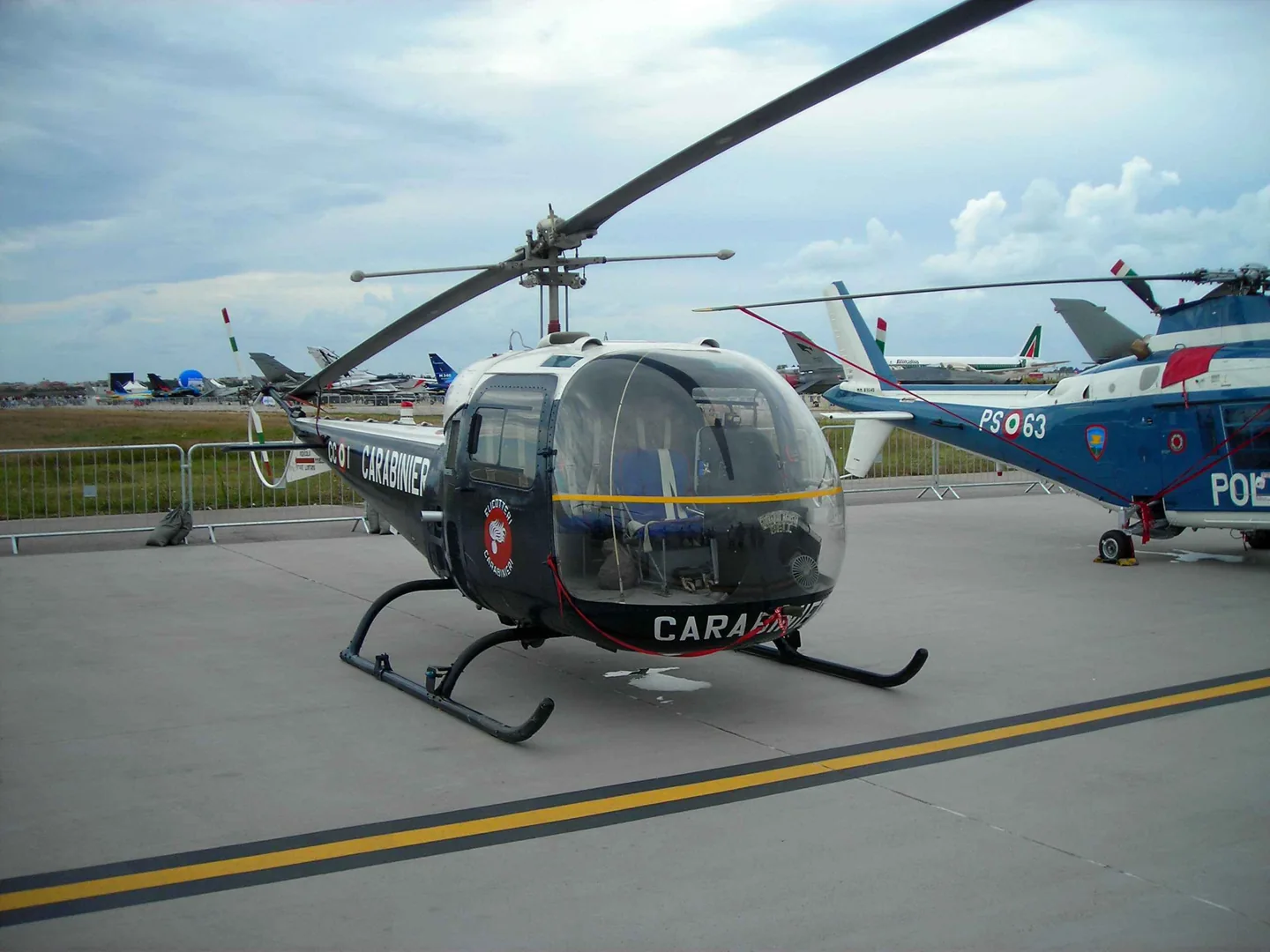
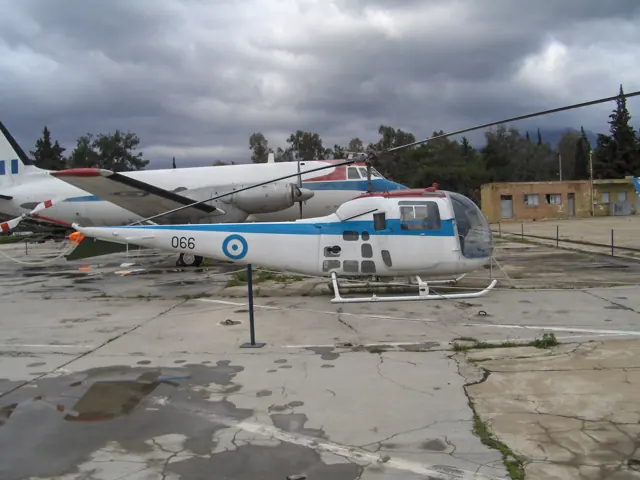
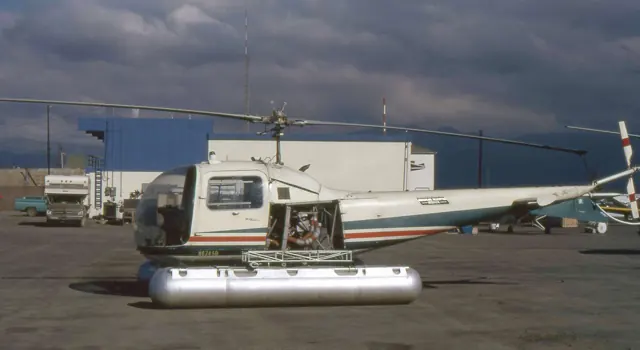
The Ranger brought a different appearance to the Bell 47 lineage. Its enclosed cabin and covered tail boom distinguish it from the exposed structure associated with the familiar 47G. It retained a single piston engine and a conventional main-rotor and tail-rotor arrangement. Its history includes presidential transport, but its scale remains that of a light helicopter.
Aircraft background
Wikipedia contributors · Read more ↗A commercial flying job brings a favourite helicopter
MacFarlane had been selling chewing gum while flying whenever his reserve duties allowed. He recalled being ready to leave that work as soon as someone offered him a flying job. The opportunity came in Boston, where he became chief pilot of a small helicopter operation with two other pilots. Of the three helicopter types he flew there, the Bell Ranger J-2 was his favourite.
His 2002 oral history recalls New England Helicopter Airlines in 1962. He explicitly identifies the Bell Ranger J-2; experiences in the Cessna Skyhook and Brantley remain separate.
The Vietnam Archive at Texas Tech University · Read more ↗Choose the simulator’s optional governor
iniBuilds added a governor for convenience; its EFB Auto and Manual modes determine how the cockpit switch operates.
47J Ranger · Microsoft Flight Simulator · MSFS 2020
Microsoft / aircraft developers · Read more ↗Into the cockpit
 YouTube
 Microsoft Flight Simulator · 2 min ·
Microsoft Flight Simulator | Local Legend 14: Bell 47J Ranger
Microsoft introduces the Bell 47J Ranger and its skid and float configurations.
Simulator · Microsoft Bell 47J · MSFS
Watch on YouTube ↗Preview images are served by AirframeDB. Videos open on YouTube only when you choose to watch.
Meet Bell Helicopter 47J Ranger
The Ranger brought a different appearance to the Bell 47 lineage. Its enclosed cabin and covered tail boom distinguish it from the exposed structure associated with the familiar 47G. It retained a single piston engine and a conventional main-rotor and tail-rotor arrangement.
Its history includes presidential transport, but its scale remains that of a light helicopter. The MSFS add-on includes a convenience governor, identified as a simulator feature in its manual.
Bell 47
Bell Helicopter 47J Ranger
Wikipedia contributors · Bell 47J Ranger ↗Microsoft Flight Simulator · MSFS 2024 →Microsoft Flight Simulator · MSFS 2020 →Aircraft type designators
Use the code for the model you are flying. The linked authority lists the applicable aircraft.
History & design
The first presidential helicopter was quickly outgrown
Eisenhower’s first helicopter flights used the small H-13J, but he later preferred the more spacious Sikorsky transport. Connor’s history records complaints about heat and the Bell arriving after the faster supporting helicopters. Presidential transport soon developed into a larger operation involving several military services.
White House Historical Association / Roger Connor · Gettysburg and Golf Courses: Ike and the First Presidential Helicopters ↗Historical account of the 1957 transition, not a general comparison of all Bell and Sikorsky models
Forest protection expands beyond carrying firefighters
Alberta’s Ranger fleet also supported lookout construction, timber work and wildlife surveys. The first aircraft was followed by the more powerful 47J-2, and the service continued expanding its helicopter use. These aircraft linked remote worksites with the people and supplies needed to keep them operating.
Vertical / Bob Petite · Green Tails ↗Vertical’s history of the Alberta Forest Service fleet
Development milestones
Developed from: Bell 47
Wikipedia contributors · Bell 47J Ranger ↗Bell 47J Ranger · family/variant named by the source · Wikipedia revision 1360217524
Pilot accounts
A commercial flying job brings a favourite helicopter
MacFarlane had been selling chewing gum while flying whenever his reserve duties allowed. He recalled being ready to leave that work as soon as someone offered him a flying job. The opportunity came in Boston, where he became chief pilot of a small helicopter operation with two other pilots.
Of the three helicopter types he flew there, the Bell Ranger J-2 was his favourite. He remembered it as easy to fly and contrasted that comfort with his dislike of the Cessna and Brantley. A colleague also introduced him to the possibilities of flying for Air America. His short period with the Ranger became part of a much longer flying career, with a clear affection for that particular machine.
His 2002 oral history recalls New England Helicopter Airlines in 1962. He explicitly identifies the Bell Ranger J-2; experiences in the Cessna Skyhook and Brantley remain separate.
Read the full account · The Vietnam Archive at Texas Tech University ↗Preparing a small helicopter for a presidential passenger
Before carrying Eisenhower, Barrett studied the proposed routes from the ground, looking for places where he could land if necessary. The White House Historical Association describes the care he put into the short airport shuttle route and the repeated power-off landing practice he undertook with alternate pilot Lawrence Cummings.
Trial landings at the White House preceded the president’s flight in July 1957. Barrett carried Eisenhower and Secret Service chief James Rowley, while Cummings followed in the second helicopter with the physician and another agent. The assignment combined an unusually prominent passenger with the practical limitations of a small, single-pilot aircraft. Its preparation mattered as much as the few minutes of flight that attracted public attention.
Reported pilot experience in the Bell H-13J presidential variant. Roger Connor’s history cites contemporary reporting and Barrett’s later correspondence; it is not a newly recorded pilot interview.
Read the full account · White House Historical Association / Roger Connor ↗Evaluating the Ranger for work in Alberta’s forests
When Alberta’s forest service wanted to assess the Bell 47J, Vassjo went to the manufacturer in Texas to evaluate it against the work firefighters needed done. He later recalled reaching a favourable conclusion. The decision led to a short trial contract and his company buying an aircraft for that work.
The relationship soon included operating a helicopter owned by the forest service itself. Vassjo and Lloyd Anderson flew CF-KEY during its first season, which began with opening fire towers and developed into a demanding summer of fire work.
Chief pilot of Associated Helicopters, quoted in a later letter to the Alberta Forest Service. The publication spells his surname Vassjo; other historical sources use Vaasjo.
Read the full account · Vertical / Bob Petite ↗In your simulator
Systems, equipment and documentation for each developer’s aircraft.
Compare simulator versions →MSFS 202447J Ranger
Microsoft Flight Simulator · Released
47J Ranger
Microsoft Flight Simulator · Released
MSFS 202047J Ranger
Microsoft Flight Simulator · Released
47J Ranger
Microsoft Flight Simulator · Released
Aircraft specifications
Published figures for the named real-aircraft variant. Simulator equipment and performance can differ.
| Specification | Published value |
|---|---|
| Length | 32 ft 5 in (9.87 m) |
| Height | 9 ft 3 in (2.83 m) |
| Empty weight | 1,833 lb (831 kg) |
| Max takeoff weight | 2,950 lb (1,338 kg) |
| Powerplant | 1 × Lycoming VO-540-B1B vertically mounted air-cooled flat-six , 260 hp (190 kW) |
| Main rotor diameter | 37 ft 2 in (11.33 m) |
| Main rotor area | 1,085 sq ft (100.8 m² ) |
| Maximum speed | 105 mph (169 km/h, 91 kn) at sea level |
| Cruise speed | 91 mph (146 km/h, 79 kn) |
| Range | 258 mi (415 km, 224 nmi) (no reserves) |
| Service ceiling | 11,000 ft (3,400 m) |
| Rate of climb | 870 ft/min (4.4 m/s) |
Manuals & resources
Find your next read
Choose a topic for a short introduction and a link to the original source. Simulator references identify the developer and edition they cover.
Simulator documentation
Choose the simulator’s optional governor47J Ranger · Microsoft Flight Simulator · MSFS 2020
iniBuilds added a governor for convenience; its EFB Auto and Manual modes determine how the cockpit switch operates.
Guide 1.0.2, 23 January 2024 · MSFS 2020 · PDF pages 11–13
Microsoft / aircraft developers · Read the source ↗Change between classic and modern radios47J Ranger · Microsoft Flight Simulator · MSFS 2020
Classic Cockpit hides GPS and transponder units and enables the older VHF panel.
MSFS 2020 guide · PDF page 19
Microsoft / aircraft developers · Read the source ↗Enable the modern transponder installation47J Ranger · Microsoft Flight Simulator · MSFS 2020
The guide requires Modern Cockpit for transponder use.
MSFS 2020 guide · PDF page 20
Microsoft / aircraft developers · Read the source ↗Browse the cockpit checklist47J Ranger · Microsoft Flight Simulator · MSFS 2020
A backlit checklist sits left of the instrument panel, with adjacent scrolling controls.
MSFS 2020 guide · PDF pages 8–9
Microsoft / aircraft developers · Read the source ↗Use the checklist’s cockpit locator47J Ranger · Microsoft Flight Simulator · MSFS 2020
The simulator checklist’s blue eye moves the view to the relevant control.
MSFS 2020 guide · PDF page 8
Microsoft / aircraft developers · Read the source ↗Show the cover or float access stairs47J Ranger · Microsoft Flight Simulator · MSFS 2020
EFB options display them; both disappear when the rotor begins turning.
MSFS 2020 guide · PDF pages 24–25
Microsoft / aircraft developers · Read the source ↗Pilot account
A commercial flying job brings a favourite helicopterHis 2002 oral history recalls New England Helicopter Airlines in 1962. He explicitly identifies the Bell Ranger J-2; experiences in the Cessna Skyhook and Brantley remain separate.
MacFarlane had been selling chewing gum while flying whenever his reserve duties allowed. He recalled being ready to leave that work as soon as someone offered him a flying job. The opportunity came in Boston, where he became chief pilot of a small helicopter operation with two other pilots. Of the three helicopter types he flew there, the Bell Ranger J-2 was his favourite. He remembered it as easy to fly and contrasted that comfort with his dislike of the Cessna and Brantley.
James MacFarlane
The Vietnam Archive at Texas Tech University · Read the source ↗Preparing a small helicopter for a presidential passengerReported pilot experience in the Bell H-13J presidential variant. Roger Connor’s history cites contemporary reporting and Barrett’s later correspondence; it is not a newly recorded pilot interview.
Before carrying Eisenhower, Barrett studied the proposed routes from the ground, looking for places where he could land if necessary. The White House Historical Association describes the care he put into the short airport shuttle route and the repeated power-off landing practice he undertook with alternate pilot Lawrence Cummings. Trial landings at the White House preceded the president’s flight in July 1957.
Joseph E. Barrett
White House Historical Association / Roger Connor · Read the source ↗Read the original documentation from the people who created it. Manuals open on their publisher’s website.
Manual
Bell47_MSFS_Manual_V1Microsoft / aircraft developers Microsoft Flight Simulator aircraft manualsMicrosoft / aircraft developersAircraft background
Bell 47J RangerWikipedia contributors · Research background · Wikipedia revision 1360217524 · retrieved 2026-09-12Resource
MSFS 2024 FAQ and edition aircraft inventoryMicrosoftDeveloper documentation
Microsoft Flight Simulator Releases Local Legend 14: The Bell 47J RangerMicrosoft Flight Simulator Team · 2024-01-30 · release and package scopeType designator
ICAO Doc 8643 — aircraft type designatorsInternational Civil Aviation Organization · Public search data retrieved 2026-09-14; authority update 2026-09-03Built-in force-feedback profiles
Read the documentary basis, editable starting settings and remaining questions for the aircraft you fly. Each explanation refers to the exact profile revision shown.
Catalogue programme-20261022-v1 · 1 profile choice
Bell Helicopter 47J Ranger
Free and Pro · Revision 1 · Partial review
MSFS 2024 · MSFS 2020
Bell Helicopter 47J Ranger: The selected cyclic centre supplies nominal resistance for the Ranger; piston-engine speed is not a substitute for rotor speed.
Bell Helicopter 47J Ranger
Bell Helicopter 47J Ranger: The selected cyclic centre supplies nominal resistance for the Ranger; piston-engine speed is not a substitute for rotor speed.
Aircraft and simulator scope
- Bell Helicopter 47J Ranger · MSFS 2024 · family starting point
- Bell Helicopter 47J Ranger · MSFS 2020 · family starting point
Microsoft Bell 47J manual and quick-reference card; a general helicopter trim mechanism is not implied. · Selected choice: Bell Helicopter 47J Ranger. Documentary scope does not establish every variant, add-on revision or simulator binding.
The simulator model and controls
The Ranger brought a different appearance to the Bell 47 lineage. Its enclosed cabin and covered tail boom distinguish it from the exposed structure associated with the familiar 47G. It retained a single piston engine and a conventional main-rotor and tail-rotor arrangement.
This starting point selects Bell Helicopter 47J Ranger. Its aircraft-level settings do not select a particular developer’s custom systems.
How this profile feels
Spring resistance builds with the selected airspeed response. A separate aerodynamic term adds speed-dependent control load.
Local force trim is off. Autopilot following is off.
Cyclic damping is on. Its configured gain is 0.35; it resists hardware motion separately from the spring and aircraft stabilization.
Controls and trim
The Bell 47J manual describes a two-blade rotor, Lycoming piston engine and standard skids, with optional floats. Procedure-specific indicated speeds belong to the quick-reference card's conditions. The Ranger's enclosed-cabin configuration is distinct from a 47G, and its engine and rotor speeds retain different physical meanings.
About the values
The gains are normalized profile settings. They describe the chosen effect balance; hand force depends on the device and its output limits. IAS references are tuning values rather than operating limits. Physical acceptance of this revision remains pending.
What the documentation establishes
The manual identifies the Bell 47J rotor, surface-kit and piston-engine configuration.
A two-blade rotor, standard skids/optional floats and Lycoming piston engine are documented.
The quick-reference card provides procedure-specific indicated speeds; these are not a controller-force calibration.
Documentary review and sources
These decisions describe the documentary basis and remaining gaps for this revision. Aircraft documentation and a starting setting describe different kinds of evidence.
Aircraft and variant
ReviewedThis starting point selects Bell Helicopter 47J Ranger. Its aircraft-level settings do not select a particular developer’s custom systems.
Flight controls
Not yet reviewedThe Bell 47J manual describes a two-blade rotor, Lycoming piston engine and standard skids, with optional floats. Procedure-specific indicated speeds belong to the quick-reference card's conditions. The Ranger's enclosed-cabin configuration is distinct from a 47G, and its engine and rotor speeds retain different physical meanings.
Trim
Not yet reviewedCyclic damping is on. Its configured gain is 0.35; it resists hardware motion separately from the spring and aircraft stabilization.
Autopilot and stability
Not yet reviewedAutopilot following is off; the configured spring and load retain the hardware feel.
Equipment
ReviewedGear, flap and ground cues follow the selected settings and available simulator-reported states.
Speeds and limits
ReviewedThe indicated-speed references set the profile response scale; they are separate from aircraft operating limits.
Simulator integration
Not yet reviewedThe profile targets msfs2024, msfs2020. Add-on-specific controls use only the supported references configured by this profile.
Force-feedback settings
Not yet reviewedThe settings define the profile’s effect balance. Device output limits affect physical hand force.
Starting settings and their rationale
These configured values are starting estimates. The explanations describe what each setting controls; physical validation appears separately below.
| Setting | Starting value | What it controls and why |
|---|---|---|
| Spring strength | Starting value0 | What it controls and whyThe selected cyclic centre supplies nominal resistance for the Ranger; piston-engine speed is not a substitute for rotor speed. The baseline spring is 0. Its low-speed blend reaches baseline strength at 40 KIAS. |
| Master force gain | Starting value0.85 | What it controls and whyScales overall profile strength while preserving effect balance, subject to device and output limits. |
| Profile force gain | Starting value0.35 | What it controls and whyThe aerodynamic-load gain is 0.35 with an indicated-speed reference of 80 KIAS. This supplies speed-dependent loading alongside the spring. |
| Force tuning speed/reference | Starting value80.0 kt | What it controls and whySets the IAS reference for aerodynamic loading. It is an estimate, not published cruise TAS or a flight limit. |
| Spring response reference speed | Starting value40.0 kt | What it controls and whySets the IAS where the low-speed blend reaches baseline strength; high-speed stiffening also uses it. |
| Aileron force scale | Starting value1 | What it controls and whyRoll and pitch aerodynamic scales are 1 and 1, respectively. They set the aerodynamic axis balance. No custom spring-travel curve is enabled. |
| Elevator force scale | Starting value1 | What it controls and whyScales pitch aerodynamic loading; pitch spring travel and trim responses are separate settings. |
| Trim feel | Starting valueDisabled | What it controls and whyRetained for compatibility and group membership. Trim relief, rather than this flag, controls centre movement. |
| Trim relief | Starting valueDisabled | What it controls and whyAllows trim relief with supported control law and valid telemetry. Axis authorities set its amount. |
| Autopilot follow | Starting valueDisabled | What it controls and whyAutopilot following is off; the configured spring and load retain the hardware feel. |
| Autopilot neutral hold | Starting valueDisabled | What it controls and whyPermits centering hold during a supported AP state, separate from following a moving target. |
| Output force limit | Starting value0.55 | What it controls and whyCaps directed-force output. Native spring effects and device limits remain separate. |
All 44 starting settings and their rationale
The settings define the profile’s effect balance. Device output limits affect physical hand force.
| Setting | Starting value | What it controls and why |
|---|---|---|
| Spring strength | Starting value0 | What it controls and whyThe selected cyclic centre supplies nominal resistance for the Ranger; piston-engine speed is not a substitute for rotor speed. The baseline spring is 0. Its low-speed blend reaches baseline strength at 40 KIAS. |
| Spring deadband | Starting value0.02 | What it controls and whySets travel around the centre before the baseline spring resists. Smaller values engage it sooner. |
| Profile force gain | Starting value0.35 | What it controls and whyThe aerodynamic-load gain is 0.35 with an indicated-speed reference of 80 KIAS. This supplies speed-dependent loading alongside the spring. |
| Master force gain | Starting value0.85 | What it controls and whyScales overall profile strength while preserving effect balance, subject to device and output limits. |
| QBlend Enabled | Starting valueEnabled | What it controls and whyAllows baseline spring strength to rise with indicated airspeed where the control law permits it. |
| QSpring Minimum Factor | Starting value1 | What it controls and whySets low-speed spring strength as a fraction of baseline when blending is enabled. One keeps full strength. |
| QSpring Start Knots | Starting value11.2 kt | What it controls and whySets the IAS where the low-speed spring blend starts rising. This is a feel threshold, not a flight limit. |
| Spring response reference speed | Starting value40.0 kt | What it controls and whySets the IAS where the low-speed blend reaches baseline strength; high-speed stiffening also uses it. |
| Force tuning speed/reference | Starting value80.0 kt | What it controls and whySets the IAS reference for aerodynamic loading. It is an estimate, not published cruise TAS or a flight limit. |
| Airspeed spring stiffening gain | Starting value0 | What it controls and whyAdds permitted spring resistance above the full-blend speed. Zero removes this high-speed increase. |
| Airspeed spring stiffening limit | Starting value5 | What it controls and whyLimits the squared airspeed ratio used for high-speed spring stiffening; it is not a device-force cap. |
| Aileron force scale | Starting value1 | What it controls and whyRoll and pitch aerodynamic scales are 1 and 1, respectively. They set the aerodynamic axis balance. No custom spring-travel curve is enabled. |
| Elevator force scale | Starting value1 | What it controls and whyScales pitch aerodynamic loading; pitch spring travel and trim responses are separate settings. |
| Output force limit | Starting value0.55 | What it controls and whyCaps directed-force output. Native spring effects and device limits remain separate. |
| Trim feel | Starting valueDisabled | What it controls and whyRetained for compatibility and group membership. Trim relief, rather than this flag, controls centre movement. |
| Trim relief | Starting valueDisabled | What it controls and whyAllows trim relief with supported control law and valid telemetry. Axis authorities set its amount. |
| Elevator Authority | Starting value0.3 | What it controls and whyScales supported pitch-trim relief and permitted centre movement. Zero removes pitch response. |
| Aileron Authority | Starting value0.3 | What it controls and whyScales supported roll-trim relief and permitted centre movement. Zero removes roll response. |
| Force Trim Enabled | Starting valueDisabled | What it controls and whyLocal force trim, where enabled, is a hardware-neutral approximation rather than a measured trim-brake implementation from this manual. Local force trim is off. The stored latch parameters are inactive; the profile does not supply a local hold-where-left neutral. |
| GLoad Enabled | Starting valueDisabled | What it controls and whyAllows load-factor changes to modify permitted spring laws. Passive fly-by-wire feel can suppress it. |
| Rate Damping Enabled | Starting valueEnabled | What it controls and whyEnables rate damping with the configured coefficients and control law. |
| Autopilot follow | Starting valueDisabled | What it controls and whyAutopilot following is off; the configured spring and load retain the hardware feel. |
| Autopilot follow authority | Starting value0.05 | What it controls and whySets admitted AP-follow gain, not a percentage of travel. Runtime ownership and input limits still apply. |
| Autopilot neutral hold | Starting valueDisabled | What it controls and whyPermits centering hold during a supported AP state, separate from following a moving target. |
| Autopilot neutral hold strength | Starting value0.6 | What it controls and whySets admitted AP neutral-hold strength; inactive while neutral hold is disabled. |
| Enabled | Starting valueEnabled | What it controls and whyEnables aerodynamic cues; each still needs nonzero strength and its simulator conditions. |
| Gain | Starting value0 | What it controls and whySets stall-buffet strength. Zero removes the cue without changing simulator stalls or warnings. |
| Gain | Starting value0 | What it controls and whySets high-Mach buffet strength; onset and full-strength thresholds are separate. |
| Gain | Starting value0 | What it controls and whySets flap buffet at the configured position and speed gates. Flap movement texture is separate. |
| Maximum flap index | Starting value1 | What it controls and whySets the final flap index for detent normalization. UP plus three detents uses maximum index3. |
| Minimum flap index | Starting value1 | What it controls and whySets the first flap detent that admits buffet; this is a handle index, not degrees. |
| Gain | Starting value0 | What it controls and whySets gear aerodynamic buffet; movement and ground-contact cues are separate. |
| Shaker Enabled | Starting valueDisabled | What it controls and whyPermits shaker at supported warning conditions; the switch does not establish aircraft equipment. |
| Stick shaker amplitude | Starting value0.5 | What it controls and whySets triggered shaker strength; inactive while the shaker feature is disabled. |
| Enabled | Starting valueEnabled | What it controls and whyEnables ground effects; each still needs its own strength and contact or motion telemetry. |
| Gain | Starting value0 | What it controls and whySets rolling texture strength, modified by speed, surface and undercarriage configuration. |
| Gain | Starting value0 | What it controls and whySets gear-bump texture during ground motion, separate from touchdown impact. |
| Gain | Starting value0.5 | What it controls and whySets landing-impact strength; landing telemetry and response shape determine the pulse. |
| Gain | Starting value0 | What it controls and whySets reverse-thrust vibration with valid reverser and engine conditions. Zero removes the cue. |
| Enabled | Starting valueEnabled | What it controls and whyEnables engine cues with nonzero settings and valid running-engine telemetry. |
| Gain | Starting value0.12 | What it controls and whySets estimated engine vibration using configured telemetry and response, not measured cockpit vibration. |
| Enabled | Starting valueEnabled | What it controls and whyEnables accessory cues with configured strengths and observed accessory movement. |
| Gain | Starting value0 | What it controls and whySets texture from observed flap movement; a command without movement does not establish the cue. |
| Gain | Starting value0 | What it controls and whySets texture from observed gear movement, separate from aerodynamic and touchdown effects. |
Limits and open questions
- The rotor/engine description does not establish cyclic mechanical feel or control-force gradients.
- No magnetic trim brake or force-trim release is established by the examined Bell 47J material.
- The quick-reference card does not specify a flight autopilot or externally usable cyclic servo interface.
- Procedure guidance does not publish simulator trim ownership or force-output semantics.
- Rotor construction and engine power do not quantify Bell 47J cyclic effort or preset vibration amplitude.
Physical validation
No physical force validation is recorded in this public catalogue for this revision. Documentary review and software checks do not establish how a particular device feels.
Discuss this aircraft (0)
Questions, observations and useful sources from the community.
No published discussions yet. Bring a question or share a useful source.
Open aircraft discussions →Content expanded · What’s new
Something missing or a source that needs attention?
Suggest a correction ↗