
Start here
A few places to begin, from the aircraft’s story to the people who fly it.
Meet the aircraft
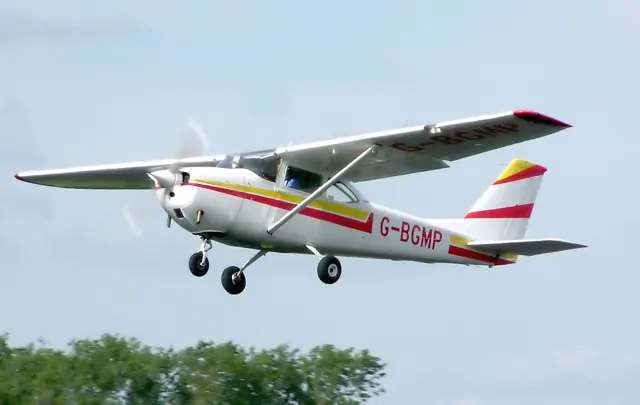
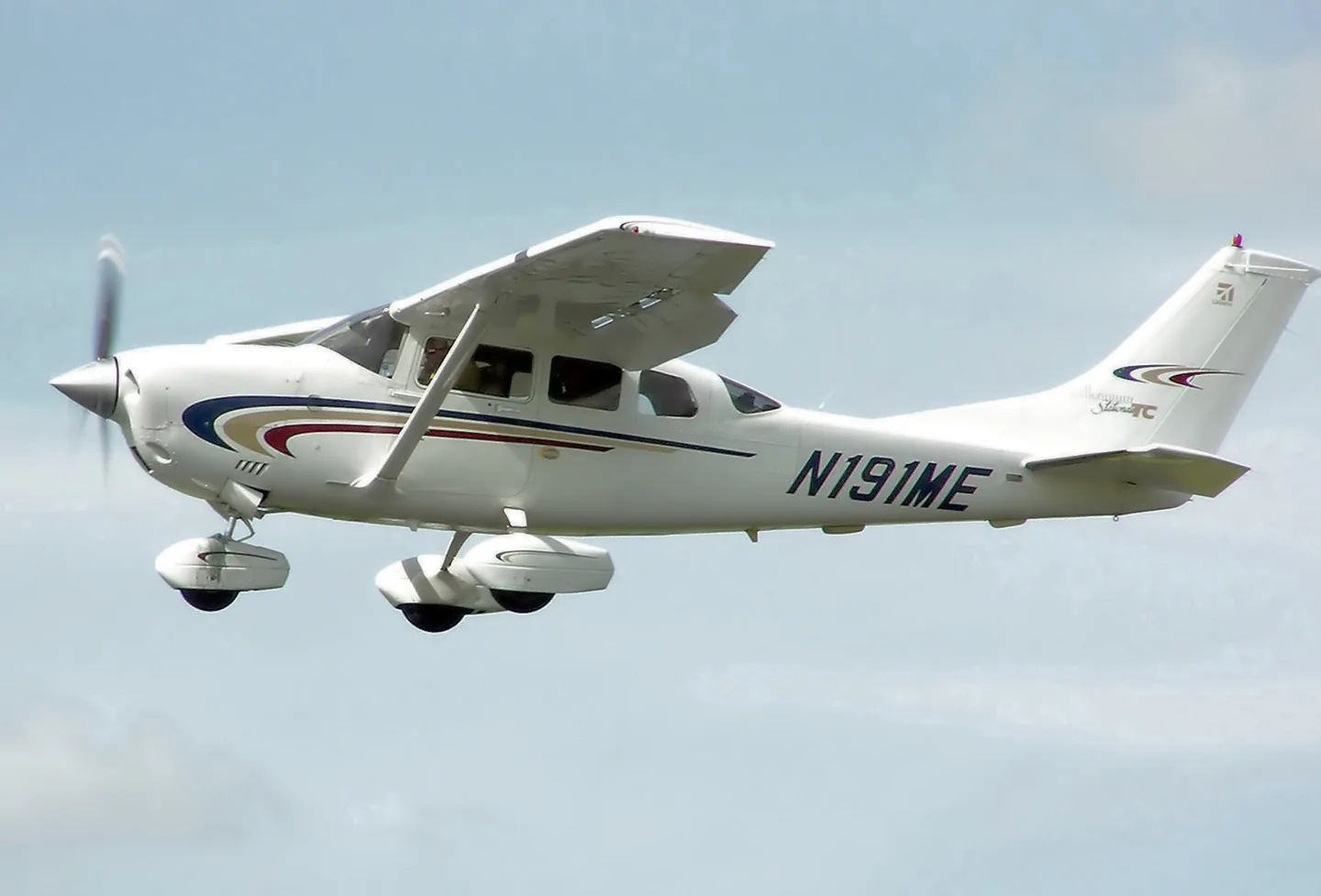
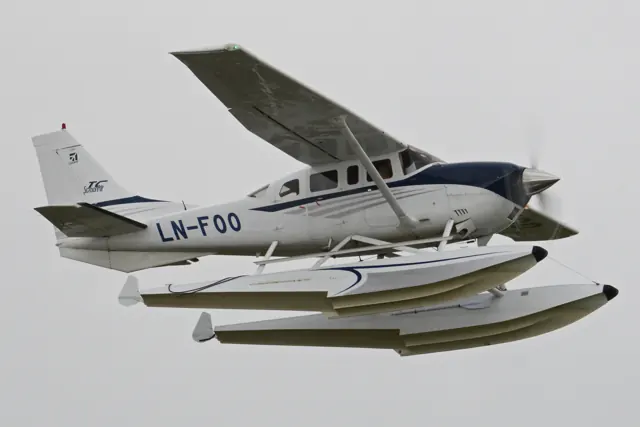
The 205, 206 and 207 family developed from Cessna's retractable-gear 210. Fixed landing gear and a utility role distinguish these aircraft from that ancestor. They have been used for commercial transport and private flying. The simulator entries represent the 206, with specification tables labelled for the Stationair version they describe.
Aircraft background
Wikipedia contributors · Read more ↗Trying the new turbocharged Stationair
Bedell took the T206H flying with three adults and equipment aboard, then added fuel for another departure close to its maximum weight. He was impressed by the climb and the speed available at altitude, particularly from a fixed-gear utility single. Heavy rain the previous day kept this demonstration on pavement; the article does not describe a backcountry trial.
AOPA Pilot · June 2000. Demonstration of the then-new Lycoming-powered T206H, including near-maximum-weight takeoffs on paved runways.
AOPA Pilot · Read more ↗Build a panel around the way you fly
Thranda’s DGS package lets instruments move around the three-dimensional panel, with presets that can be saved and shared. Many instruments also open as separate windows for other monitors. The listing includes Aspen equipment and support for optional RealityXP units; the exact navigation choices depend on the selected setup.
Cessna 206 Stationair · Thranda · X-Plane 11 · X-Plane 12
Thranda · Read more ↗Into the cockpit
 YouTube
 Cessna · 5 min ·
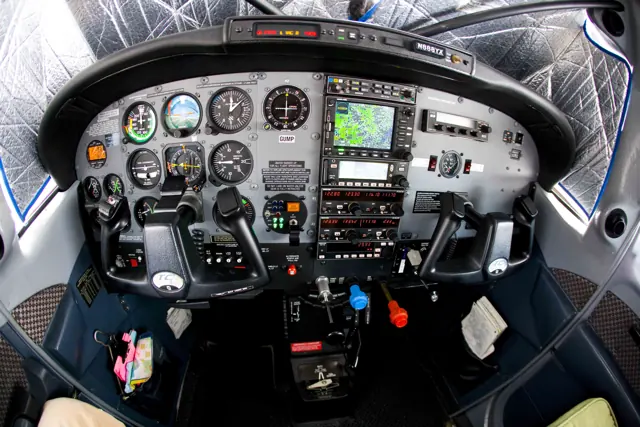
Cessna Turbo Stationair HD 206 Demonstration – Interior & Cockpit
Cessna demonstrates the interior and cockpit of the Turbo Stationair HD.
Real aircraft · Cessna 206 Stationair
Watch on YouTube ↗Preview images are served by AirframeDB. Videos open on YouTube only when you choose to watch.
Meet Cessna 206 Stationair
The 205, 206 and 207 family developed from Cessna's retractable-gear 210. Fixed landing gear and a utility role distinguish these aircraft from that ancestor. They have been used for commercial transport and private flying. The simulator entries represent the 206, with specification tables labelled for the Stationair version they describe.
Cessna 206 Stationair
Cessna → · Explore the family →
Cessna 206 Stationair
Wikipedia contributors · Cessna 206 ↗Thranda · X-Plane 11 · X-Plane 12 →Aircraft type designators
Use the code for the model you are flying. The linked authority lists the applicable aircraft.
Normally aspirated Cessna 206 / U206
ICAO Doc 8643 — aircraft type designators ↗Checked 2026-09-14History & design
A family hauler with a working-aircraft layout
The Stationair’s six-seat cabin and separate rear loading doors have made it useful for family transport as well as hauling work. Cox’s owner interview illustrates the appeal: access to the children’s seats and space for their luggage mattered as much as cruise speed. Payload still depended on fuel and installed equipment.
Plane & Pilot · 170-Knot SUV ↗Plane & Pilot · October 2009 · aircraft role and one owner’s selection
Development milestones
Developed from: Cessna 210
Wikipedia contributors · Cessna 206 ↗Cessna 206 · family/variant named by the source · Wikipedia revision 1373146920
Pilot accounts
Trying the new turbocharged Stationair
Bedell took the T206H flying with three adults and equipment aboard, then added fuel for another departure close to its maximum weight. He was impressed by the climb and the speed available at altitude, particularly from a fixed-gear utility single. Heavy rain the previous day kept this demonstration on pavement; the article does not describe a backcountry trial.
The controls felt substantial, with less tidy yaw behaviour at low speed and useful relief from the rudder trim. On the return to Frederick, the large flaps made a steep approach possible, though keeping enough power in remained part of the job. Bedell also found that the prominent new cowling had less effect on his forward view than he expected. His enthusiasm centres on the aircraft’s ability to carry a load and still make useful cross-country progress.
AOPA Pilot · June 2000. Demonstration of the then-new Lycoming-powered T206H, including near-maximum-weight takeoffs on paved runways.
Read the full account · AOPA Pilot ↗Taking a family aircraft across the Atlantic
Cope wanted seats for his wife and four children, useful luggage space and an aircraft suited to travel from his island home. He bought a Turbo Stationair in the United States and hired Cox to bring it across the Atlantic. Their aircraft had TKS equipment and an extra ferry tank, giving this delivery flight a configuration beyond a standard family trip.
Weather still shaped the journey. The planned Greenland stop changed when conditions at Narsarsuaq were poor, and the flight continued through Iceland and Scotland with another detour for business in Copenhagen. Cox recalls mostly clear conditions, some ice over the Denmark Strait and reassuringly steady instrument flying into Reykjavik. His account follows a working ferry mission with its owner aboard, connecting the aircraft’s family purpose with the practical decisions required to get it home.
Plane & Pilot · October 2009. Delivery of Chris Cope’s near-new Turbo Stationair from St. Louis to the Isle of Man, with Cope aboard and an additional 50-gallon ferry tank.
Read the full account · Plane & Pilot ↗Photography first, then getting comfortable
Bloom began by adjusting his seat to see comfortably over the deep instrument panel. The photo session then made him work: flying in formation with a Yak-52 required attention to the Stationair’s momentum, sight lines and changing power. Getting useful photographs was a more demanding introduction than simply settling into cruise.
Afterwards, he could appreciate the roomy cabin and the steadier work of ordinary cross-country flying. Ortega demonstrated the avionics while Bloom explored the controls, which felt consistently moderate once he became accustomed to the aircraft. His circuit work also included a candid mistake: fumbling the flap handling during a touch-and-go brought an early liftoff followed by contact with the runway again. The account conveys both the pleasure of flying a capable utility aircraft and the awkward moments that can accompany an unfamiliar cockpit.
Cessna Flyer · July 2012. T206H demonstration with Cessna chief piston pilot Kirby Ortega; the account describes a 2009 aircraft.
Read the full account · Cessna Flyer ↗In your simulator
Systems, equipment and documentation for each developer’s aircraft.
X-Plane 11 · X-Plane 12Cessna 206 Stationair
Thranda · Released
Cessna 206 Stationair
Thranda · Released
Aircraft specifications
Published figures for the named real-aircraft variant. Simulator equipment and performance can differ.
| Specification | Published value |
|---|---|
| Length | 28 ft 3 in (8.61 m) |
| Wingspan | 36 ft 0 in (10.97 m) |
| Height | 9 ft 3 + 1 ⁄ 2 in (2.832 m) |
| Wing area | 175.5 sq ft (16.30 m² ) |
| Empty weight | 2,176 lb (987 kg) |
| Max takeoff weight | 3,600 lb (1,633 kg) |
| Powerplant | 1 × Lycoming IO-540-AC1A naturally aspirated air-cooled flat-six engine , 300 hp (220 kW) |
| Propellers | 3-bladed McCauley metal constant-speed propeller |
| Maximum speed | 174 mph (280 km/h, 151 kn) at sea level |
| Cruise speed | 163 mph (262 km/h, 142 kn) at 6,200 ft (1,900 m) (75% power) |
| Stall speed | 63 mph (101 km/h, 55 kn) (flaps down) |
| Range | 840 mi (1,350 km, 730 nmi) at 6,500 ft (2,000 m) (max fuel, 45 min reserves) |
| Service ceiling | 15,700 ft (4,800 m) |
| Rate of climb | 988 ft/min (5.02 m/s) |
Manuals & resources
Find your next read
Choose a topic for a short introduction and a link to the original source. Simulator references identify the developer and edition they cover.
Simulator documentation
Build a panel around the way you flyCessna 206 Stationair · Thranda · X-Plane 11 · X-Plane 12
Thranda’s DGS package lets instruments move around the three-dimensional panel, with presets that can be saved and shared. Many instruments also open as separate windows for other monitors. The listing includes Aspen equipment and support for optional RealityXP units; the exact navigation choices depend on the selected setup.
Designated X-Plane.org store · gathered 12 September 2026
Thranda · Read the source ↗Passenger, cargo, float and ski configurationsCessna 206 Stationair · Thranda · X-Plane 11 · X-Plane 12
Seats can be repositioned or hidden, with cargo appearing when weight is added to the cleared space. The menu provides individual loading, a centre-of-gravity display and an optional cargo pod. Version 1.1 added plain and amphibious floats plus skis for the landplane; the gathered listing records version 1.2 and X-Plane 11/12 support.
Designated store · v1.1 November 2022; v1.2 February 2023
Thranda · Read the source ↗Pilot account
Trying the new turbocharged StationairAOPA Pilot · June 2000. Demonstration of the then-new Lycoming-powered T206H, including near-maximum-weight takeoffs on paved runways.
Bedell took the T206H flying with three adults and equipment aboard, then added fuel for another departure close to its maximum weight. He was impressed by the climb and the speed available at altitude, particularly from a fixed-gear utility single. Heavy rain the previous day kept this demonstration on pavement; the article does not describe a backcountry trial. The controls felt substantial, with less tidy yaw behaviour at low speed and useful relief from the rudder trim.
Peter A. Bedell
AOPA Pilot · Read the source ↗Taking a family aircraft across the AtlanticPlane & Pilot · October 2009. Delivery of Chris Cope’s near-new Turbo Stationair from St. Louis to the Isle of Man, with Cope aboard and an additional 50-gallon ferry tank.
Cope wanted seats for his wife and four children, useful luggage space and an aircraft suited to travel from his island home. He bought a Turbo Stationair in the United States and hired Cox to bring it across the Atlantic. Their aircraft had TKS equipment and an extra ferry tank, giving this delivery flight a configuration beyond a standard family trip. Weather still shaped the journey.
Bill Cox
Plane & Pilot · Read the source ↗Read the original documentation from the people who created it. Manuals open on their publisher’s website.
Aircraft background
Cessna 206Wikipedia contributors · Research background · retrieved 2026-09-12Product
Cessna U206G Stationair DGS series XP12 / 11Thranda · Official developer / designated store catalogue · checked 2026-09-12Type designator
ICAO Doc 8643 — aircraft type designatorsInternational Civil Aviation Organization · Public search data retrieved 2026-09-14; authority update 2026-09-03Built-in force-feedback profiles
Read the documentary basis, editable starting settings and remaining questions for the aircraft you fly. Each explanation refers to the exact profile revision shown.
Catalogue programme-20261022-v1 · 10 profile choices
Carenado CT206H Stationair (GNS / G1000)
Carenado · Free and Pro · Revision 3 · Partial review
X-Plane 11
Carenado CT206H Stationair (GNS / G1000): Nominal manual yoke loading accompanies the selected Stationair.
sal1800 T206H
sal1800 · Free and Pro · Revision 3 · Inherited starting point
MSFS 2020
sal1800 T206H: Nominal manual yoke loading accompanies the selected Stationair.
Thranda U206G Stationair
Thranda · Free and Pro · Revision 3 · Inherited starting point
X-Plane 12
Thranda U206G Stationair: Nominal manual yoke loading accompanies the selected Stationair.
Thranda U206G Stationair Amphibian Water Operations
Thranda · Free and Pro · Revision 2 · Inherited starting point
X-Plane 12
Thranda U206G Stationair Amphibian Water Operations: Nominal manual yoke loading accompanies the selected Stationair.
Thranda U206G Stationair Straight Floats
Thranda · Free and Pro · Revision 2 · Inherited starting point
X-Plane 12
Thranda U206G Stationair Straight Floats: Nominal manual yoke loading accompanies the selected Stationair.
Thranda U206G Stationair Skis
Thranda · Free and Pro · Revision 2 · Inherited starting point
X-Plane 12
Thranda U206G Stationair Skis: Nominal manual yoke loading accompanies the selected Stationair.
Cessna 206 Stationair
Free and Pro · Revision 2 · Partial review
X-Plane 12 · X-Plane 11
Cessna 206 Stationair: Nominal manual yoke loading accompanies the selected Stationair.
Cessna U206G Stationair Amphibian
Free and Pro · Revision 1 · Partial review
MSFS 2020 · MSFS 2024 · X-Plane 12
The Stationair utility family, combining a high wing with fixed landing gear.
Cessna U206G Stationair Skis
Free and Pro · Revision 1 · Partial review
MSFS 2020 · MSFS 2024 · X-Plane 12
The Stationair utility family, combining a high wing with fixed landing gear.
Cessna U206G Stationair Straight Floats
Free and Pro · Revision 1 · Partial review
MSFS 2020 · MSFS 2024 · X-Plane 12
The Stationair utility family, combining a high wing with fixed landing gear.
Cessna 206 Stationair
Cessna 206 Stationair: Nominal manual yoke loading accompanies the selected Stationair.
Aircraft and simulator scope
- Cessna 206 Stationair · X-Plane 12 · family starting point
- Cessna 206 Stationair · X-Plane 11 · family starting point
Thranda U206G XP11/XP12 product/update page; amphibious/seaplane additions are distinct from the fixed-wheel generic choice. · Selected choice: Cessna 206 Stationair. Documentary scope does not establish every variant, add-on revision or simulator binding.
The simulator model and controls
The 205, 206 and 207 family developed from Cessna's retractable-gear 210. Fixed landing gear and a utility role distinguish these aircraft from that ancestor. They have been used for commercial transport and private flying. This page centres on the 206, while each source identifies the particular Stationair version behind its figures.
This starting point selects Cessna 206 Stationair. Its aircraft-level settings do not select a particular developer’s custom systems.
How this profile feels
Spring resistance builds with the selected airspeed response. A separate aerodynamic term adds speed-dependent control load.
Valid trim provides the configured pressure relief. Autopilot following is enabled for supported control references.
Controls and trim
The 206 products retain their model and engine identities: Carenado represents the turbocharged CT206H, sal1800 the T206H, and Thranda the IO-520-F-powered U206G. Thranda documents wheels, seaplane and amphibious configurations and a cargo-door/flap lockout. Its DynaFeel panel and adjustable cockpit affect simulator input and equipment; they do not publish a calibrated physical yoke load.
About the values
The gains are normalized profile settings. They describe the chosen effect balance; hand force depends on the device and its output limits. IAS references are tuning values rather than operating limits. Physical acceptance of this revision remains pending.
What the documentation establishes
The page identifies the U206G and documents later amphibious/seaplane package additions.
Autopilot-related trim behavior is documented; generic following still has no qualified external servo contract.
The IO-520-F, wheel options, amphibious variants and cargo-door/flap lockout are documented; the fixed-wheel preset has narrower equipment scope.
Documentary review and sources
These decisions describe the documentary basis and remaining gaps for this revision. Aircraft documentation and a starting setting describe different kinds of evidence.
Aircraft and variant
ReviewedThis starting point selects Cessna 206 Stationair. Its aircraft-level settings do not select a particular developer’s custom systems.
Flight controls
Not yet reviewedThe 206 products retain their model and engine identities: Carenado represents the turbocharged CT206H, sal1800 the T206H, and Thranda the IO-520-F-powered U206G. Thranda documents wheels, seaplane and amphibious configurations and a cargo-door/flap lockout. Its DynaFeel panel and adjustable cockpit affect simulator input and equipment; they do not publish a calibrated physical yoke load.
Trim
Not yet reviewedPitch trim and autopilot-related behavior are documented for specific products; the selected relief authority does not establish a universal 206 servo interface. Pitch authority 0.3 provides load relief and permitted centre movement; roll authority is 0.
Autopilot and stability
ReviewedFollowing is on at 0.1 authority when a supported, valid autopilot control reference is available.
Equipment
ReviewedGear, flap and ground cues follow the selected settings and available simulator-reported states.
Speeds and limits
Not yet reviewedThe indicated-speed references set the profile response scale; they are separate from aircraft operating limits.
Simulator integration
ReviewedThe profile targets xplane12, xplane11. Add-on-specific controls use only the supported references configured by this profile.
Force-feedback settings
Not yet reviewedThe settings define the profile’s effect balance. Device output limits affect physical hand force.
Starting settings and their rationale
These configured values are starting estimates. The explanations describe what each setting controls; physical validation appears separately below.
| Setting | Starting value | What it controls and why |
|---|---|---|
| Spring strength | Starting value0.74 | What it controls and whyNominal manual yoke loading accompanies the selected Stationair. Engine boost and water/land equipment remain distinct from primary-control resistance. The baseline spring is 0.74. Its low-speed blend reaches baseline strength at 67.5 KIAS. |
| Master force gain | Starting value0.85 | What it controls and whyScales overall profile strength while preserving effect balance, subject to device and output limits. |
| Profile force gain | Starting value0.8 | What it controls and whyThe aerodynamic-load gain is 0.8 with an indicated-speed reference of 135 KIAS. This supplies speed-dependent loading alongside the spring. |
| Force tuning speed/reference | Starting value135.0 kt | What it controls and whySets the IAS reference for aerodynamic loading. It is an estimate, not published cruise TAS or a flight limit. |
| Spring response reference speed | Starting value67.5 kt | What it controls and whySets the IAS where the low-speed blend reaches baseline strength; high-speed stiffening also uses it. |
| Aileron force scale | Starting value0.72 | What it controls and whyRoll and pitch aerodynamic scales are 0.72 and 1, respectively. They set the aerodynamic axis balance. No custom spring-travel curve is enabled. |
| Elevator force scale | Starting value1.0 | What it controls and whyScales pitch aerodynamic loading; pitch spring travel and trim responses are separate settings. |
| Trim feel | Starting valueEnabled | What it controls and whyRetained for compatibility and group membership. Trim relief, rather than this flag, controls centre movement. |
| Trim relief | Starting valueEnabled | What it controls and whyAllows trim relief with supported control law and valid telemetry. Axis authorities set its amount. |
| Autopilot follow | Starting valueEnabled | What it controls and whyFollowing is on at 0.1 authority when a supported, valid autopilot control reference is available. |
| Autopilot neutral hold | Starting valueDisabled | What it controls and whyPermits centering hold during a supported AP state, separate from following a moving target. |
| Output force limit | Starting value0.55 | What it controls and whyCaps directed-force output. Native spring effects and device limits remain separate. |
All 44 starting settings and their rationale
The settings define the profile’s effect balance. Device output limits affect physical hand force.
| Setting | Starting value | What it controls and why |
|---|---|---|
| Spring strength | Starting value0.74 | What it controls and whyNominal manual yoke loading accompanies the selected Stationair. Engine boost and water/land equipment remain distinct from primary-control resistance. The baseline spring is 0.74. Its low-speed blend reaches baseline strength at 67.5 KIAS. |
| Spring deadband | Starting value0.045 | What it controls and whySets travel around the centre before the baseline spring resists. Smaller values engage it sooner. |
| Profile force gain | Starting value0.8 | What it controls and whyThe aerodynamic-load gain is 0.8 with an indicated-speed reference of 135 KIAS. This supplies speed-dependent loading alongside the spring. |
| Master force gain | Starting value0.85 | What it controls and whyScales overall profile strength while preserving effect balance, subject to device and output limits. |
| QBlend Enabled | Starting valueEnabled | What it controls and whyAllows baseline spring strength to rise with indicated airspeed where the control law permits it. |
| QSpring Minimum Factor | Starting value0.5 | What it controls and whySets low-speed spring strength as a fraction of baseline when blending is enabled. One keeps full strength. |
| QSpring Start Knots | Starting value18.9 kt | What it controls and whySets the IAS where the low-speed spring blend starts rising. This is a feel threshold, not a flight limit. |
| Spring response reference speed | Starting value67.5 kt | What it controls and whySets the IAS where the low-speed blend reaches baseline strength; high-speed stiffening also uses it. |
| Force tuning speed/reference | Starting value135.0 kt | What it controls and whySets the IAS reference for aerodynamic loading. It is an estimate, not published cruise TAS or a flight limit. |
| Airspeed spring stiffening gain | Starting value0.15 | What it controls and whyThe high-speed spring-stiffening gain is 0.15. It strengthens the permitted spring response above 67.5 KIAS, with the squared-speed ratio capped at 5. |
| Airspeed spring stiffening limit | Starting value5 | What it controls and whyLimits the squared airspeed ratio used for high-speed spring stiffening; it is not a device-force cap. |
| Aileron force scale | Starting value0.72 | What it controls and whyRoll and pitch aerodynamic scales are 0.72 and 1, respectively. They set the aerodynamic axis balance. No custom spring-travel curve is enabled. |
| Elevator force scale | Starting value1.0 | What it controls and whyScales pitch aerodynamic loading; pitch spring travel and trim responses are separate settings. |
| Output force limit | Starting value0.55 | What it controls and whyCaps directed-force output. Native spring effects and device limits remain separate. |
| Trim feel | Starting valueEnabled | What it controls and whyRetained for compatibility and group membership. Trim relief, rather than this flag, controls centre movement. |
| Trim relief | Starting valueEnabled | What it controls and whyAllows trim relief with supported control law and valid telemetry. Axis authorities set its amount. |
| Elevator Authority | Starting value0.3 | What it controls and whyPitch trim and autopilot-related behavior are documented for specific products; the selected relief authority does not establish a universal 206 servo interface. Pitch authority 0.3 provides load relief and permitted centre movement; roll authority is 0. |
| Aileron Authority | Starting value0 | What it controls and whyScales supported roll-trim relief and permitted centre movement. Zero removes roll response. |
| Force Trim Enabled | Starting valueDisabled | What it controls and whyEnables local force trim, separate from aircraft-owned trim and add-on integration qualification. |
| GLoad Enabled | Starting valueEnabled | What it controls and whyAllows load-factor changes to modify permitted spring laws. Passive fly-by-wire feel can suppress it. |
| Rate Damping Enabled | Starting valueEnabled | What it controls and whyEnables rate damping with the configured coefficients and control law. |
| Autopilot follow | Starting valueEnabled | What it controls and whyFollowing is on at 0.1 authority when a supported, valid autopilot control reference is available. |
| Autopilot follow authority | Starting value0.1 | What it controls and whySets admitted AP-follow gain, not a percentage of travel. Runtime ownership and input limits still apply. |
| Autopilot neutral hold | Starting valueDisabled | What it controls and whyPermits centering hold during a supported AP state, separate from following a moving target. |
| Autopilot neutral hold strength | Starting value0.6 | What it controls and whySets admitted AP neutral-hold strength; inactive while neutral hold is disabled. |
| Enabled | Starting valueEnabled | What it controls and whyEnables aerodynamic cues; each still needs nonzero strength and its simulator conditions. |
| Gain | Starting value0.35 | What it controls and whySets stall-buffet strength. Zero removes the cue without changing simulator stalls or warnings. |
| Gain | Starting value0 | What it controls and whySets high-Mach buffet strength; onset and full-strength thresholds are separate. |
| Gain | Starting value0.14 | What it controls and whySets flap buffet at the configured position and speed gates. Flap movement texture is separate. |
| Maximum flap index | Starting value4 | What it controls and whySets the final flap index for detent normalization. UP plus three detents uses maximum index3. |
| Minimum flap index | Starting value2 | What it controls and whySets the first flap detent that admits buffet; this is a handle index, not degrees. |
| Gain | Starting value0 | What it controls and whySets gear aerodynamic buffet; movement and ground-contact cues are separate. |
| Shaker Enabled | Starting valueDisabled | What it controls and whyPermits shaker at supported warning conditions; the switch does not establish aircraft equipment. |
| Stick shaker amplitude | Starting value0.5 | What it controls and whySets triggered shaker strength; inactive while the shaker feature is disabled. |
| Enabled | Starting valueEnabled | What it controls and whyEnables ground effects; each still needs its own strength and contact or motion telemetry. |
| Gain | Starting value0.4 | What it controls and whySets rolling texture strength, modified by speed, surface and undercarriage configuration. |
| Gain | Starting value0.25 | What it controls and whySets gear-bump texture during ground motion, separate from touchdown impact. |
| Gain | Starting value0.65 | What it controls and whySets landing-impact strength; landing telemetry and response shape determine the pulse. |
| Gain | Starting value0 | What it controls and whySets reverse-thrust vibration with valid reverser and engine conditions. Zero removes the cue. |
| Enabled | Starting valueEnabled | What it controls and whyEnables engine cues with nonzero settings and valid running-engine telemetry. |
| Gain | Starting value0.12 | What it controls and whySets estimated engine vibration using configured telemetry and response, not measured cockpit vibration. |
| Enabled | Starting valueEnabled | What it controls and whyEnables accessory cues with configured strengths and observed accessory movement. |
| Gain | Starting value0.12 | What it controls and whySets texture from observed flap movement; a command without movement does not establish the cue. |
| Gain | Starting value0 | What it controls and whySets texture from observed gear movement, separate from aerodynamic and touchdown effects. |
Limits and open questions
- DynaFeel is a simulated feel feature, without an explicit physical control-linkage or external force schedule.
- The update notes mention trim activity during autopilot use; this is simulator behavior, not numerical trim-force calibration.
- The feature/update page does not derive the preset's indicated-speed force reference or all surface-kit envelopes.
- DynaFeel and update notes do not calibrate C206 stick force, propwash gain or cockpit vibration.
Physical validation
No physical force validation is recorded in this public catalogue for this revision. Documentary review and software checks do not establish how a particular device feels.
Discuss this aircraft (0)
Questions, observations and useful sources from the community.
No published discussions yet. Bring a question or share a useful source.
Open aircraft discussions →Content expanded · What’s new
Something missing or a source that needs attention?
Suggest a correction ↗