

Start here
A few places to begin, from the aircraft’s story to the people who fly it.
Meet the aircraft
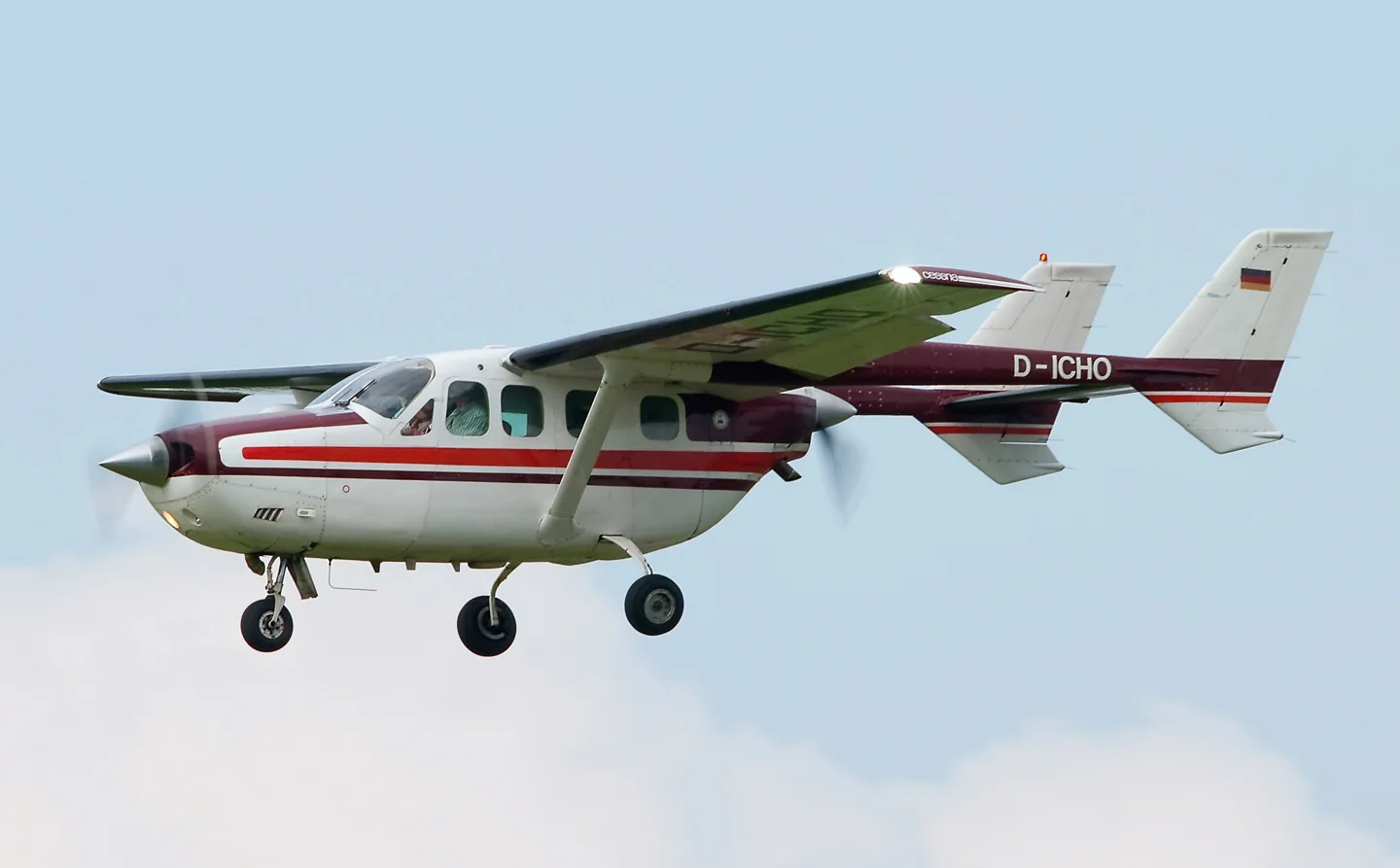
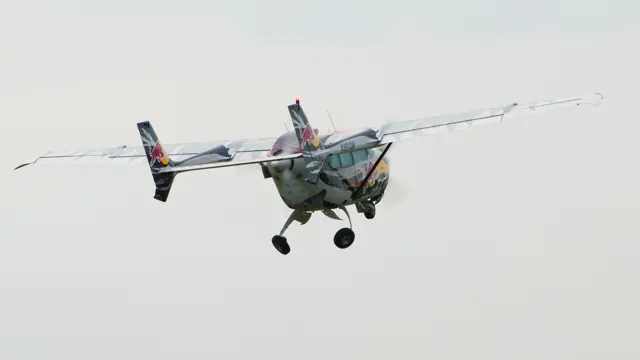
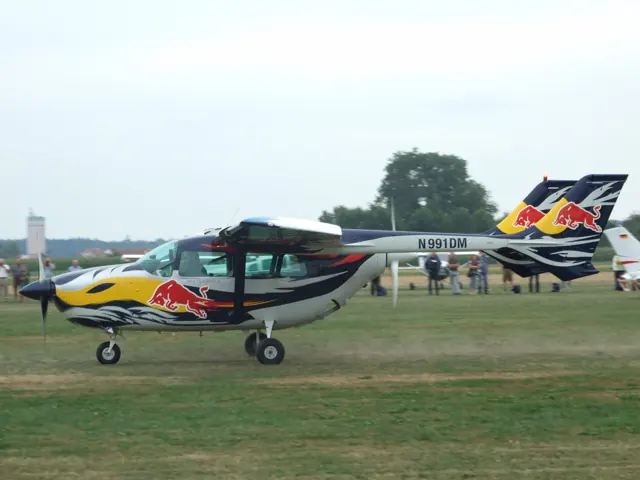
The Skymaster places its engines on the aircraft centreline, with the rear propeller between twin tail booms. That layout makes it immediately recognizable beside conventional twins with wing-mounted engines. The military O-2 developed from the 337. The simulator products represent the civil Skymaster, with photographed and documented variants identified separately.
Aircraft background
Wikipedia contributors · Read more ↗Long hours over the water, then a whale appears
Heikkila and Paul describe days that alternate between patient searching and concentrated activity. Their two-pilot crew follows survey lines over the ocean with two researchers in the cabin. When a possible sighting interrupts the routine, the pilots leave the track and hand-fly circles while the observers photograph and record what they see. Holding those turns accurately for extended periods is demanding work.
AOPA Pilot interviews · August 2026. Nimbus Aerial Solutions Skymaster survey flying with Center for Coastal Studies observers off Cape Cod.
AOPA Pilot · Read more ↗Arrange the panel and loading for your mission
Thranda’s DGS Skymaster includes movable instruments, saved panel presets, pop-out instrument windows and interchangeable yoke styles. Its loading menu can hide seats and replace occupied space with cargo, with a weight-and-balance chart and optional cargo pod. These choices let the simulator aircraft represent different working layouts.
Cessna 337 Skymaster · Thranda · X-Plane 11 · X-Plane 12
Thranda · Read more ↗Into the cockpit
 YouTube
 EdoStuff Aviation · 8 min ·
Flying Bulls - Cessna 337D Super Skymaster - Display with Cockpit View
A Red Bull Cessna 337D display, with cockpit footage of its rehearsal flight.
Real aircraft · Cessna 337D
Watch on YouTube ↗Preview images are served by AirframeDB. Videos open on YouTube only when you choose to watch.
Meet Cessna 337 Skymaster
The Skymaster places its engines on the aircraft centreline, with the rear propeller between twin tail booms. That layout makes it immediately recognizable beside conventional twins with wing-mounted engines. The military O-2 developed from the 337. The simulator products represent the civil Skymaster, with photographed and documented variants identified separately.
Cessna 337 Skymaster
Cessna → · Explore the family →
Cessna 337 Skymaster
Wikipedia contributors · Cessna Skymaster ↗Thranda · X-Plane 11 · X-Plane 12 →Aircraft type designators
Use the code for the model you are flying. The linked authority lists the applicable aircraft.
History & design
From fixed gear to the Super Skymaster
Cessna introduced the fixed-gear 336 in 1963, then announced the retractable-gear 337 Super Skymaster in late 1964. The turbocharged, pressurised P337 followed for the 1973 model year. These versions share the push-pull arrangement, but their engines, equipment and operating contexts differ.
Cessna Flyer · A Different Breed: Cessna’s Skymasters ↗Cessna Flyer · June 2014 · variant chronology
Development milestones
Skymaster family first flight: 28 February 1961. This is the family’s initial-flight milestone, including the earlier 336 generation; the retractable-gear 337 followed later.
Wikipedia contributors · Cessna Skymaster ↗Wikipedia revision 1360636797 · family date; 337 introduction distinguished in the variant chronology
Pilot accounts
Long hours over the water, then a whale appears
Heikkila and Paul describe days that alternate between patient searching and concentrated activity. Their two-pilot crew follows survey lines over the ocean with two researchers in the cabin. When a possible sighting interrupts the routine, the pilots leave the track and hand-fly circles while the observers photograph and record what they see. Holding those turns accurately for extended periods is demanding work.
The shared hours have also made the crew friends. The pilots learned the language of whale research, while the observers learned more about flying. Paul recalls the pleasure of seeing a huge animal emerge from what had seemed like an empty sea, and the quiet of looking out over sparkling water. Both pilots found meaning in work that helped local conservation efforts and occasionally supported a rescue from the air.
AOPA Pilot interviews · August 2026. Nimbus Aerial Solutions Skymaster survey flying with Center for Coastal Studies observers off Cape Cod.
Read the full account · AOPA Pilot ↗An aircraft he kept coming back to
Lillie had owned several Skymasters and kept returning to the type. His flying included trips between Salt Lake City and Lake Powell, business use and visits to his fishing boat in British Columbia. Crossing remote and mountainous country influenced his choice of aircraft, and an engine failure followed by a return landing strengthened his personal attachment to the Skymaster.
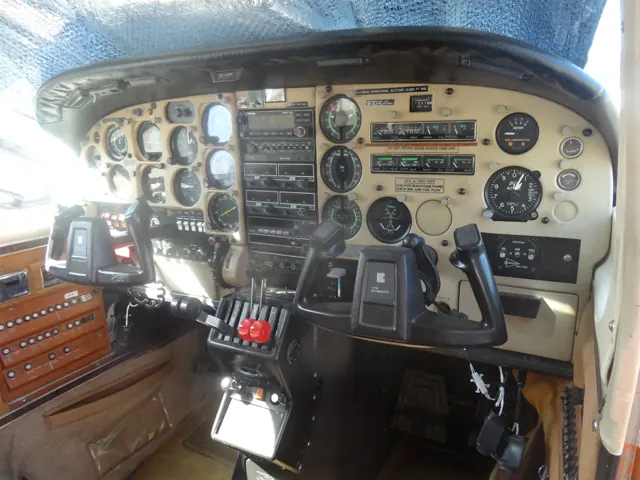
For his fifth example, he renewed the soundproofing, windows and interior but retained much of the existing radio equipment. He preferred a panel that suited his needs to an expensive transformation, adding portable-style electronic displays on the yokes. In the interview, he was already open to owning another. His enthusiasm belongs to an experienced owner’s particular missions and aircraft, including their modifications and maintenance history.
Cessna Flyer interview by Dale Smith · June 2014. Lillie’s fifth Skymaster was a refurbished 1973 pressurised model; his earlier aircraft had different configurations.
Read the full account · Cessna Flyer ↗Learning to question confident advice
Peasley was a young airline second officer grateful for charter work when he found the Skymaster’s battery dead before a passenger pickup. He accepted his chief pilot’s assurance that he could get going despite the problem. The resulting departure left him airborne with the rear engine repeatedly stopping and little ability to climb, turning an ordinary positioning flight into an alarming struggle.
He eventually restored power, reached the pickup airport and concealed the episode from the waiting passengers. By the end of the day, the chief pilot promised to replace the battery, but Peasley had learned a more lasting lesson about treating someone’s seniority as proof of sound judgment. Writing three decades later, he still remembered how close that decision had brought him to a forced landing.
AOPA Pilot · October 1996. Personal recollection of a 1966 charter assignment in a Cessna 337 while his airline employer was affected by a strike.
Read the full account · AOPA Pilot ↗In your simulator
Systems, equipment and documentation for each developer’s aircraft.
Compare simulator versions →X-Plane 11 · X-Plane 12Cessna 337 Skymaster
Thranda · Released
Cessna 337 Skymaster
Thranda · Released
MSFS 2020C337H
Carenado · Released
C337H
Carenado · Released
Aircraft specifications
Published figures for the named real-aircraft variant. Simulator equipment and performance can differ.
| Specification | Published value |
|---|---|
| Length | 29 ft 9 in (9.07 m) |
| Wingspan | 38 ft 09 in (11.81 m) |
| Height | 9 ft 4 in (2.84 m) |
| Wing area | 201 sq ft (18.7 m² ) |
| Empty weight | 2,655 lb (1,204 kg) |
| Max takeoff weight | 4,400 lb (1,996 kg) |
| Powerplant | 2 × Continental IO-360-C air-cooled flat-six piston engine, 210 hp (160 kW) each |
| Propellers | 2-bladed McCauley fully-feathering, constant-speed propeller, 6 ft 4 in (1.93 m) diameter |
| Maximum speed | 199 mph (320 km/h, 173 kn) at sea level |
| Cruise speed | 144 mph (232 km/h, 125 kn) at 10,000 ft (3,000 m) (econ cruise) |
| Stall speed | 69 mph (111 km/h, 60 kn) (flaps and undercarriage down) |
| Range | 965 mi (1,553 km, 839 nmi) (econ cruise, normal fuel) |
| Service ceiling | 19,500 ft (5,900 m) |
| Rate of climb | 1,200 ft/min (6.1 m/s) |
Manuals & resources
Find your next read
Choose a topic for a short introduction and a link to the original source. Simulator references identify the developer and edition they cover.
Simulator documentation
Arrange the panel and loading for your missionCessna 337 Skymaster · Thranda · X-Plane 11 · X-Plane 12
Thranda’s DGS Skymaster includes movable instruments, saved panel presets, pop-out instrument windows and interchangeable yoke styles. Its loading menu can hide seats and replace occupied space with cargo, with a weight-and-balance chart and optional cargo pod. These choices let the simulator aircraft represent different working layouts.
Designated X-Plane.org store · gathered 12 September 2026
Thranda · Read the source ↗Separate engine sounds and electrical dependenciesCessna 337 Skymaster · Thranda · X-Plane 11 · X-Plane 12
The listing describes distinct front- and rear-engine sounds, individual circuit breakers and weather effects on the windscreen. Its version history records fixes for cargo-pod persistence and cowl flaps moving without electrical power. The gathered release is version 1.0.5, dated February 2023, for X-Plane 11 and 12.
Designated store · product description and version history
Thranda · Read the source ↗Pilot account
Long hours over the water, then a whale appearsAOPA Pilot interviews · August 2026. Nimbus Aerial Solutions Skymaster survey flying with Center for Coastal Studies observers off Cape Cod.
Heikkila and Paul describe days that alternate between patient searching and concentrated activity. Their two-pilot crew follows survey lines over the ocean with two researchers in the cabin. When a possible sighting interrupts the routine, the pilots leave the track and hand-fly circles while the observers photograph and record what they see. Holding those turns accurately for extended periods is demanding work. The shared hours have also made the crew friends.
Donn Heikkila and Alice Paul
AOPA Pilot · Read the source ↗An aircraft he kept coming back toCessna Flyer interview by Dale Smith · June 2014. Lillie’s fifth Skymaster was a refurbished 1973 pressurised model; his earlier aircraft had different configurations.
Lillie had owned several Skymasters and kept returning to the type. His flying included trips between Salt Lake City and Lake Powell, business use and visits to his fishing boat in British Columbia. Crossing remote and mountainous country influenced his choice of aircraft, and an engine failure followed by a return landing strengthened his personal attachment to the Skymaster.
Ron Lillie
Cessna Flyer · Read the source ↗Developer documentation
C337H — product listingC337H · MSFS 2020
Product listing captured 2026-09-23; edition scope from the reviewed catalogue
www.carenado.com · Read the source ↗Read the original documentation from the people who created it. Manuals open on their publisher’s website.
Aircraft background
Cessna SkymasterWikipedia contributors · Research background · retrieved 2026-09-12Product
Cessna C337 Skymaster DGS series XP12 / 11Thranda · Official developer / designated store catalogue · checked 2026-09-12 C337H MSFS2020 – Carenadowww.carenado.com · Product listing captured 2026-09-23; edition scope from the reviewed catalogueType designator
ICAO Doc 8643 — aircraft type designatorsInternational Civil Aviation Organization · Public search data retrieved 2026-09-14; authority update 2026-09-03Built-in force-feedback profiles
Read the documentary basis, editable starting settings and remaining questions for the aircraft you fly. Each explanation refers to the exact profile revision shown.
Catalogue programme-20261022-v1 · 3 profile choices
Carenado C337H Skymaster II
Carenado · Free and Pro · Revision 4 · Inherited starting point
MSFS 2020
Carenado C337H Skymaster II: The selected reversible yoke response is independent of the push-pull engines; opposing propeller torque is not a control-force calibration.
Thranda C337 Skymaster
Thranda · Free and Pro · Revision 3 · Inherited starting point
X-Plane 12
Thranda C337 Skymaster: The selected reversible yoke response is independent of the push-pull engines; opposing propeller torque is not a control-force calibration.
Cessna 337 Skymaster
Free and Pro · Revision 2 · Partial review
X-Plane 12 · X-Plane 11
Cessna 337 Skymaster: The selected reversible yoke response is independent of the push-pull engines; opposing propeller torque is not a control-force calibration.
Cessna 337 Skymaster
Cessna 337 Skymaster: The selected reversible yoke response is independent of the push-pull engines; opposing propeller torque is not a control-force calibration.
Aircraft and simulator scope
- Cessna 337 Skymaster · X-Plane 12 · family starting point
- Cessna 337 Skymaster · X-Plane 11 · family starting point
Thranda C337 page; inline opposed engines are documented, while the current preset still includes a small propwash cue. · Selected choice: Cessna 337 Skymaster. Documentary scope does not establish every variant, add-on revision or simulator binding.
The simulator model and controls
The Skymaster places its engines on the aircraft centreline, with the rear propeller between twin tail booms. That layout makes it immediately recognizable beside conventional twins with wing-mounted engines. The military O-2 developed from the 337. This page keeps the civil Skymaster identity while retaining the scope of photographed and documented variants.
This starting point selects Cessna 337 Skymaster. Its aircraft-level settings do not select a particular developer’s custom systems.
How this profile feels
Spring resistance builds with the selected airspeed response. A separate aerodynamic term adds speed-dependent control load.
Valid trim provides the configured pressure relief. Autopilot following is enabled for supported control references.
Controls and trim
The Skymaster puts its piston engines on the centreline, one pulling and one pushing between the tail booms. Carenado's C337H documentation separates electric cowl-flap operation from wing flaps and identifies elevator and rudder trim wheels. Thranda supplies its own DGS/DynaFeel implementation. The opposing propellers' torque context does not require zero modeled propwash or identical engine cues.
About the values
The gains are normalized profile settings. They describe the chosen effect balance; hand force depends on the device and its output limits. IAS references are tuning values rather than operating limits. Physical acceptance of this revision remains pending.
What the documentation establishes
The source identifies the Skymaster's nose and rear-pod push-pull engine arrangement.
Inline opposed propellers and the developer's torque-cancellation description are documented; this does not require zero simulated propwash.
Documentary review and sources
These decisions describe the documentary basis and remaining gaps for this revision. Aircraft documentation and a starting setting describe different kinds of evidence.
Aircraft and variant
ReviewedThis starting point selects Cessna 337 Skymaster. Its aircraft-level settings do not select a particular developer’s custom systems.
Flight controls
Not yet reviewedThe Skymaster puts its piston engines on the centreline, one pulling and one pushing between the tail booms. Carenado's C337H documentation separates electric cowl-flap operation from wing flaps and identifies elevator and rudder trim wheels. Thranda supplies its own DGS/DynaFeel implementation. The opposing propellers' torque context does not require zero modeled propwash or identical engine cues.
Trim
Not yet reviewedElevator trim supports pitch relief, while the documented rudder trim remains a yaw function rather than an aileron-trim response. Pitch authority 0.3 provides load relief and permitted centre movement; roll authority is 0.
Autopilot and stability
Not yet reviewedFollowing is on at 0.1 authority when a supported, valid autopilot control reference is available.
Equipment
ReviewedGear, flap and ground cues follow the selected settings and available simulator-reported states.
Speeds and limits
Not yet reviewedThe indicated-speed references set the profile response scale; they are separate from aircraft operating limits.
Simulator integration
Not yet reviewedThe profile targets xplane12, xplane11. Add-on-specific controls use only the supported references configured by this profile.
Force-feedback settings
Not yet reviewedThe settings define the profile’s effect balance. Device output limits affect physical hand force.
Starting settings and their rationale
These configured values are starting estimates. The explanations describe what each setting controls; physical validation appears separately below.
| Setting | Starting value | What it controls and why |
|---|---|---|
| Spring strength | Starting value0.74 | What it controls and whyThe selected reversible yoke response is independent of the push-pull engines; opposing propeller torque is not a control-force calibration. The baseline spring is 0.74. Its low-speed blend reaches baseline strength at 70 KIAS. |
| Master force gain | Starting value0.85 | What it controls and whyScales overall profile strength while preserving effect balance, subject to device and output limits. |
| Profile force gain | Starting value0.8 | What it controls and whyThe aerodynamic-load gain is 0.8 with an indicated-speed reference of 140 KIAS. This supplies speed-dependent loading alongside the spring. |
| Force tuning speed/reference | Starting value140.0 kt | What it controls and whySets the IAS reference for aerodynamic loading. It is an estimate, not published cruise TAS or a flight limit. |
| Spring response reference speed | Starting value70.0 kt | What it controls and whySets the IAS where the low-speed blend reaches baseline strength; high-speed stiffening also uses it. |
| Aileron force scale | Starting value0.72 | What it controls and whyRoll and pitch aerodynamic scales are 0.72 and 1, respectively. They set the aerodynamic axis balance. No custom spring-travel curve is enabled. |
| Elevator force scale | Starting value1.0 | What it controls and whyScales pitch aerodynamic loading; pitch spring travel and trim responses are separate settings. |
| Trim feel | Starting valueEnabled | What it controls and whyRetained for compatibility and group membership. Trim relief, rather than this flag, controls centre movement. |
| Trim relief | Starting valueEnabled | What it controls and whyAllows trim relief with supported control law and valid telemetry. Axis authorities set its amount. |
| Autopilot follow | Starting valueEnabled | What it controls and whyFollowing is on at 0.1 authority when a supported, valid autopilot control reference is available. |
| Autopilot neutral hold | Starting valueDisabled | What it controls and whyPermits centering hold during a supported AP state, separate from following a moving target. |
| Output force limit | Starting value0.55 | What it controls and whyCaps directed-force output. Native spring effects and device limits remain separate. |
All 44 starting settings and their rationale
The settings define the profile’s effect balance. Device output limits affect physical hand force.
| Setting | Starting value | What it controls and why |
|---|---|---|
| Spring strength | Starting value0.74 | What it controls and whyThe selected reversible yoke response is independent of the push-pull engines; opposing propeller torque is not a control-force calibration. The baseline spring is 0.74. Its low-speed blend reaches baseline strength at 70 KIAS. |
| Spring deadband | Starting value0.045 | What it controls and whySets travel around the centre before the baseline spring resists. Smaller values engage it sooner. |
| Profile force gain | Starting value0.8 | What it controls and whyThe aerodynamic-load gain is 0.8 with an indicated-speed reference of 140 KIAS. This supplies speed-dependent loading alongside the spring. |
| Master force gain | Starting value0.85 | What it controls and whyScales overall profile strength while preserving effect balance, subject to device and output limits. |
| QBlend Enabled | Starting valueEnabled | What it controls and whyAllows baseline spring strength to rise with indicated airspeed where the control law permits it. |
| QSpring Minimum Factor | Starting value0.5 | What it controls and whySets low-speed spring strength as a fraction of baseline when blending is enabled. One keeps full strength. |
| QSpring Start Knots | Starting value19.6 kt | What it controls and whySets the IAS where the low-speed spring blend starts rising. This is a feel threshold, not a flight limit. |
| Spring response reference speed | Starting value70.0 kt | What it controls and whySets the IAS where the low-speed blend reaches baseline strength; high-speed stiffening also uses it. |
| Force tuning speed/reference | Starting value140.0 kt | What it controls and whySets the IAS reference for aerodynamic loading. It is an estimate, not published cruise TAS or a flight limit. |
| Airspeed spring stiffening gain | Starting value0.15 | What it controls and whyThe high-speed spring-stiffening gain is 0.15. It strengthens the permitted spring response above 70 KIAS, with the squared-speed ratio capped at 5. |
| Airspeed spring stiffening limit | Starting value5 | What it controls and whyLimits the squared airspeed ratio used for high-speed spring stiffening; it is not a device-force cap. |
| Aileron force scale | Starting value0.72 | What it controls and whyRoll and pitch aerodynamic scales are 0.72 and 1, respectively. They set the aerodynamic axis balance. No custom spring-travel curve is enabled. |
| Elevator force scale | Starting value1.0 | What it controls and whyScales pitch aerodynamic loading; pitch spring travel and trim responses are separate settings. |
| Output force limit | Starting value0.55 | What it controls and whyCaps directed-force output. Native spring effects and device limits remain separate. |
| Trim feel | Starting valueEnabled | What it controls and whyRetained for compatibility and group membership. Trim relief, rather than this flag, controls centre movement. |
| Trim relief | Starting valueEnabled | What it controls and whyAllows trim relief with supported control law and valid telemetry. Axis authorities set its amount. |
| Elevator Authority | Starting value0.3 | What it controls and whyElevator trim supports pitch relief, while the documented rudder trim remains a yaw function rather than an aileron-trim response. Pitch authority 0.3 provides load relief and permitted centre movement; roll authority is 0. |
| Aileron Authority | Starting value0 | What it controls and whyScales supported roll-trim relief and permitted centre movement. Zero removes roll response. |
| Force Trim Enabled | Starting valueDisabled | What it controls and whyEnables local force trim, separate from aircraft-owned trim and add-on integration qualification. |
| GLoad Enabled | Starting valueEnabled | What it controls and whyAllows load-factor changes to modify permitted spring laws. Passive fly-by-wire feel can suppress it. |
| Rate Damping Enabled | Starting valueEnabled | What it controls and whyEnables rate damping with the configured coefficients and control law. |
| Autopilot follow | Starting valueEnabled | What it controls and whyFollowing is on at 0.1 authority when a supported, valid autopilot control reference is available. |
| Autopilot follow authority | Starting value0.1 | What it controls and whySets admitted AP-follow gain, not a percentage of travel. Runtime ownership and input limits still apply. |
| Autopilot neutral hold | Starting valueDisabled | What it controls and whyPermits centering hold during a supported AP state, separate from following a moving target. |
| Autopilot neutral hold strength | Starting value0.6 | What it controls and whySets admitted AP neutral-hold strength; inactive while neutral hold is disabled. |
| Enabled | Starting valueEnabled | What it controls and whyEnables aerodynamic cues; each still needs nonzero strength and its simulator conditions. |
| Gain | Starting value0.35 | What it controls and whySets stall-buffet strength. Zero removes the cue without changing simulator stalls or warnings. |
| Gain | Starting value0 | What it controls and whySets high-Mach buffet strength; onset and full-strength thresholds are separate. |
| Gain | Starting value0.14 | What it controls and whySets flap buffet at the configured position and speed gates. Flap movement texture is separate. |
| Maximum flap index | Starting value3 | What it controls and whySets the final flap index for detent normalization. UP plus three detents uses maximum index3. |
| Minimum flap index | Starting value2 | What it controls and whySets the first flap detent that admits buffet; this is a handle index, not degrees. |
| Gain | Starting value0.1 | What it controls and whySets gear aerodynamic buffet; movement and ground-contact cues are separate. |
| Shaker Enabled | Starting valueDisabled | What it controls and whyPermits shaker at supported warning conditions; the switch does not establish aircraft equipment. |
| Stick shaker amplitude | Starting value0.5 | What it controls and whySets triggered shaker strength; inactive while the shaker feature is disabled. |
| Enabled | Starting valueEnabled | What it controls and whyEnables ground effects; each still needs its own strength and contact or motion telemetry. |
| Gain | Starting value0.4 | What it controls and whySets rolling texture strength, modified by speed, surface and undercarriage configuration. |
| Gain | Starting value0.25 | What it controls and whySets gear-bump texture during ground motion, separate from touchdown impact. |
| Gain | Starting value0.65 | What it controls and whySets landing-impact strength; landing telemetry and response shape determine the pulse. |
| Gain | Starting value0 | What it controls and whySets reverse-thrust vibration with valid reverser and engine conditions. Zero removes the cue. |
| Enabled | Starting valueEnabled | What it controls and whyEnables engine cues with nonzero settings and valid running-engine telemetry. |
| Gain | Starting value0.12 | What it controls and whySets estimated engine vibration using configured telemetry and response, not measured cockpit vibration. |
| Enabled | Starting valueEnabled | What it controls and whyEnables accessory cues with configured strengths and observed accessory movement. |
| Gain | Starting value0.12 | What it controls and whySets texture from observed flap movement; a command without movement does not establish the cue. |
| Gain | Starting value0.12 | What it controls and whySets texture from observed gear movement, separate from aerodynamic and touchdown effects. |
Limits and open questions
- DynaFeel is advertised, but the page does not establish an exact control-linkage or cockpit force schedule.
- The feature description does not establish C337 trim geometry, travel or force authority.
- The examined product passages do not publish an autopilot or external servo-following contract.
- The engine-arrangement discussion does not derive the preset's indicated-speed force reference.
- DynaFeel advertising does not establish external axis ownership or force telemetry.
- Torque-cancellation prose does not quantify control loads. The preset retains a modest propwash cue; older suppression wording needs correction, not an unsupported retune.
Physical validation
No physical force validation is recorded in this public catalogue for this revision. Documentary review and software checks do not establish how a particular device feels.
Discuss this aircraft (0)
Questions, observations and useful sources from the community.
No published discussions yet. Bring a question or share a useful source.
Open aircraft discussions →Content expanded · What’s new
Something missing or a source that needs attention?
Suggest a correction ↗