Start here
A few places to begin, from the aircraft’s story to the people who fly it.
Meet the aircraft
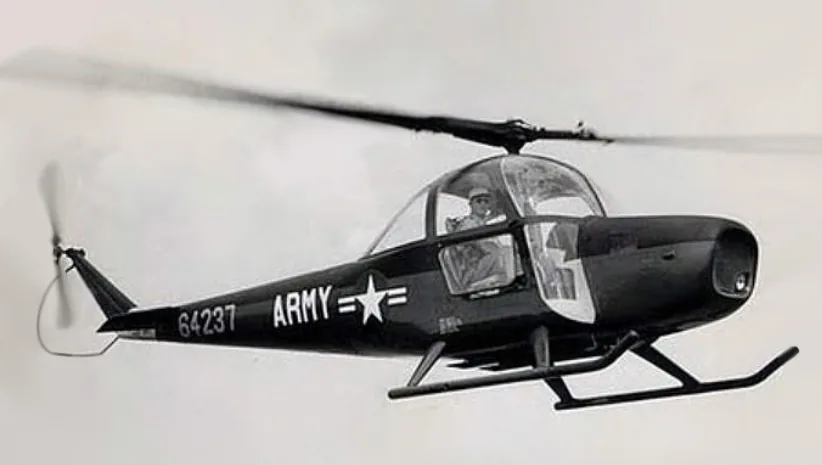
The CH-1 brought Cessna's familiar light-aircraft styling into a helicopter programme. It used a front-mounted piston engine and a two-blade main rotor; the Army evaluated the design as the YH-41 Seneca. Although the design achieved altitude milestones, it did not become a commercial or military success comparable with Cessna's fixed-wing range.
Aircraft background
Wikipedia contributors · Read more ↗Taking the Skyhook into Colorado’s high country
Zimmerman brought the CH-1 from Wichita to Colorado for altitude testing before the Pikes Peak demonstration. The programme included flights near Fort Carson and Camp Hale, with Army personnel aboard. The flights formed a sequence of practical trials.
Reported test-pilot experience during the 1955 CH-1 demonstrations. The source describes flights and passengers; it does not provide Zimmerman’s private thoughts or a complete flight-test report.
Army Aviation / Mark Albertson · Read more ↗Give collective and throttle separate controls
CowanSim requires separate axes; without a dedicated throttle axis, operate the throttle with the mouse.
Cessna CH-1 Skyhook · CowanSim · MSFS 2020 · MSFS 2024
CowanSim · Read more ↗Into the cockpit
 YouTube
 John Smith · 1 min ·
Cessna CH-1 "Skyhook" Helicopter: A rare film of the Skyhook in flight
Silent home-movie footage of the rare Cessna helicopter over Seattle in 1962.
Real aircraft · Cessna CH-1 Skyhook
Watch on YouTube ↗Preview images are served by AirframeDB. Videos open on YouTube only when you choose to watch.
Meet Cessna CH-1 Skyhook
The CH-1 brought Cessna's familiar light-aircraft styling into a helicopter programme. It used a front-mounted piston engine and a two-blade main rotor; the Army evaluated the design as the YH-41 Seneca. Although the design achieved altitude milestones, it did not become a commercial or military success comparable with Cessna's fixed-wing range.
Cessna CH-1 Skyhook
Cessna → · Explore the family →
Cessna CH-1 Skyhook
Wikipedia contributors · Cessna CH-1 Skyhook ↗CowanSim · MSFS 2020 · MSFS 2024 →Aircraft type designators
A model-specific ICAO or FAA designator has not been confirmed in the references reviewed for this aircraft.
History & design
Another pilot recalls discomfort without a technical explanation
MacFarlane explicitly says he flew the Cessna Skyhook but did not feel comfortable in it. Asked why, he could not give a clear explanation. His preference for the Bell is a personal memory, not evidence of a particular Skyhook defect.
The Vietnam Archive at Texas Tech University · Interview with James MacFarlane ↗Direct oral-history exchange, transcript pages 15–16
Cessna styling meets a helicopter design programme
Cessna combined Charles Seibel’s helicopter engineering with Richard Ten Eyck’s streamlined fuselage design. The result placed a piston engine ahead of the cabin. Development brought successive CH-1 variants, including changes to the stabiliser, seating and powerplant. The family’s similar appearance can obscure differences between development aircraft and later production versions.
Cessna Flyer / Jennifer Dellenbusch · The Ups and Downs of the Cessna Skyhook ↗Cessna Flyer retrospective; exact acquisition date and broad safety claims excluded
Development milestones
Designer: Richard Ten Eyck
First flight: July 1953
Developed from: Seibel S-4
Wikipedia contributors · Cessna CH-1 Skyhook ↗Cessna CH-1 Skyhook · family/variant named by the source · Wikipedia revision 1309484752
Pilot accounts
Taking the Skyhook into Colorado’s high country
Zimmerman brought the CH-1 from Wichita to Colorado for altitude testing before the Pikes Peak demonstration. The programme included flights near Fort Carson and Camp Hale, with Army personnel aboard. The flights formed a sequence of practical trials.
At Pikes Peak, Zimmerman demonstrated hovering with Captain Knowles as a passenger, then repeated the exercise with another person aboard. He also carried the Fort Carson commander above the summit before returning him to the post.
Reported test-pilot experience during the 1955 CH-1 demonstrations. The source describes flights and passengers; it does not provide Zimmerman’s private thoughts or a complete flight-test report.
Read the full account · Army Aviation / Mark Albertson ↗A record attempt ends with an unexpected problem on the ground
Remington recalls two altitude attempts by Bowman on a clear winter day in December 1957. Each flight used a different takeoff weight, with an official representative observing the weighing and a recording instrument aboard. The first ended with Bowman returning to the Wichita airport and landing the stripped-down helicopter on its dolly.
The second flight brought an unexpected ending. Wind carried Bowman east, and he landed at El Dorado. According to Remington, the shortened exhaust pipes damaged the asphalt and earned the pilot an angry response from the airport manager. That small aftermath sits beside the formal record-making effort in the engineer’s memory. The memoir also distinguishes the cockpit altitude indication from the lower official barograph result.
Experience reported by programme engineer Steve Remington. Bowman flew the specially modified CH-1B N5157; the ordinary YH-41 used in publicity photographs was not the record aircraft.
Read the full account · CollectAir / Steve Remington ↗A television cowboy remembers an uneasy helicopter investment
Trailer’s flying interests extended well beyond arriving at television appearances by helicopter. He recalled entering the passenger-transport business with a friend and buying the four-seat Cessna, an aircraft whose appearance struck him as unusually similar to an aeroplane. The investment gave the Skyhook a place in his working life.
His memory of ownership became dominated by alarming reports about the transmission. Trailer said he contacted the manufacturer and later received the purchase price back when Cessna bought the helicopters back. He then moved to Bell Rangers. His broader allegations about failures and deaths remain unverified.
Pilot and helicopter-company owner recalling the four-seat Cessna in a transport partnership. This is an ownership experience, not a detailed CH-1 handling report; his transmission allegations are not independently established here.
Read the full account · Boomtown Memories / Rex Trailer ↗In your simulator
Systems, equipment and documentation for each developer’s aircraft.
MSFS 2020 · MSFS 2024Cessna CH-1 Skyhook
CowanSim · Released
Cessna CH-1 Skyhook
CowanSim · Released
Aircraft specifications
Published figures for the named real-aircraft variant. Simulator equipment and performance can differ.
| Specification | Published value |
|---|---|
| Length | 29 ft 5 in (8.97 m) (fuselage length), 42 ft 6 in (12.95 m) (overall length) |
| Height | 8 ft 3 in (2.51 m) |
| Empty weight | 2,080 lb (943 kg) |
| Gross weight | 3,100 lb (1,406 kg) |
| Powerplant | 1 × Continental FSO-526-A air-cooled six-cylinder horizontally-opposed engine, 270 hp (200 kW) |
| Main rotor diameter | 35 ft 0 in (10.67 m) |
| Main rotor area | 962 sq ft (89.4 m² ) |
| Maximum speed | 108 mph (174 km/h, 94 kn) at sea level |
| Range | 260 mi (420 km, 230 nmi) |
| Rate of climb | 1,030 ft/min (5.2 m/s) at 8,000 ft (2,400 m) |
Manuals & resources
Find your next read
Choose a topic for a short introduction and a link to the original source. Simulator references identify the developer and edition they cover.
Simulator documentation
Give collective and throttle separate controlsCessna CH-1 Skyhook · CowanSim · MSFS 2020 · MSFS 2024
CowanSim requires separate axes; without a dedicated throttle axis, operate the throttle with the mouse.
Gathered MSFS guide · PDF pages 1–2; installed revision not observed
CowanSim · Read the source ↗Reset accumulated rotor trimCessna CH-1 Skyhook · CowanSim · MSFS 2020 · MSFS 2024
ROTOR TRIM RESET returns all trims to zero.
CowanSim MSFS guide · PDF page 5
CowanSim · Read the source ↗Operate the rotor clutch from hardwareCessna CH-1 Skyhook · CowanSim · MSFS 2020 · MSFS 2024
TOGGLE ROTOR CLUTCH SWITCH controls the centre-console idle/clutch switch.
CowanSim MSFS guide · PDF page 8
CowanSim · Read the source ↗Keep a separate control profileCessna CH-1 Skyhook · CowanSim · MSFS 2020 · MSFS 2024
The guide recommends an aircraft-specific profile to avoid conflicting or duplicate assignments.
CowanSim MSFS guide · PDF page 10
CowanSim · Read the source ↗Open doors while moving around the aircraftCessna CH-1 Skyhook · CowanSim · MSFS 2020 · MSFS 2024
The click spots work in cockpit view, including when moving outside from that view.
CowanSim MSFS guide · PDF page 13
CowanSim · Read the source ↗Change options after the helicopter loadsCessna CH-1 Skyhook · CowanSim · MSFS 2020 · MSFS 2024
Persistence restores the previous flight’s settings. Change passenger and object weights in the loaded flight’s Weight and Balance window.
CowanSim MSFS guide · PDF page 14
CowanSim · Read the source ↗Pilot account
Taking the Skyhook into Colorado’s high countryReported test-pilot experience during the 1955 CH-1 demonstrations. The source describes flights and passengers; it does not provide Zimmerman’s private thoughts or a complete flight-test report.
Zimmerman brought the CH-1 from Wichita to Colorado for altitude testing before the Pikes Peak demonstration. The programme included flights near Fort Carson and Camp Hale, with Army personnel aboard. The flights formed a sequence of practical trials. At Pikes Peak, Zimmerman demonstrated hovering with Captain Knowles as a passenger, then repeated the exercise with another person aboard.
Jack Zimmerman
Army Aviation / Mark Albertson · Read the source ↗A record attempt ends with an unexpected problem on the groundExperience reported by programme engineer Steve Remington. Bowman flew the specially modified CH-1B N5157; the ordinary YH-41 used in publicity photographs was not the record aircraft.
Remington recalls two altitude attempts by Bowman on a clear winter day in December 1957. Each flight used a different takeoff weight, with an official representative observing the weighing and a recording instrument aboard. The first ended with Bowman returning to the Wichita airport and landing the stripped-down helicopter on its dolly. The second flight brought an unexpected ending. Wind carried Bowman east, and he landed at El Dorado.
James E. Bowman
CollectAir / Steve Remington · Read the source ↗Read the original documentation from the people who created it. Manuals open on their publisher’s website.
Aircraft background
Cessna CH-1 SkyhookWikipedia contributors · Research background · retrieved 2026-09-12 Interview with James MacFarlaneThe Vietnam Archive at Texas Tech University · 4 February 2002 · direct recollection of Cessna Skyhook flying, transcript pages 15–16 The Ups and Downs of the Cessna SkyhookCessna Flyer / Jennifer Dellenbusch · May 2022 · printed pages 34–36; reproduces a 1955 Cessquire passageProduct
CH-1 for MSFSCowanSim · Official developer / designated store catalogue · checked 2026-09-12Developer documentation
User ManualCowanSim · Gathered developer documentationBuilt-in force-feedback profiles
Read the documentary basis, editable starting settings and remaining questions for the aircraft you fly. Each explanation refers to the exact profile revision shown.
Catalogue programme-20261022-v1 · 2 profile choices
CowanSim Cessna CH-1 Skyhook
CowanSim · Free and Pro · Revision 3 · Inherited starting point
MSFS 2020 · MSFS 2024
CowanSim Cessna CH-1 Skyhook: Nominal cyclic spring and damping accompany the piston CH-1, while engine and rotor cues retain their separate speed quantities.
Cessna CH-1 Skyhook
Free and Pro · Revision 1 · Partial review
MSFS 2024 · MSFS 2020
Cessna CH-1 Skyhook: Nominal cyclic spring and damping accompany the piston CH-1, while engine and rotor cues retain their separate speed quantities.
CowanSim Cessna CH-1 Skyhook
CowanSim Cessna CH-1 Skyhook: Nominal cyclic spring and damping accompany the piston CH-1, while engine and rotor cues retain their separate speed quantities.
Aircraft and simulator scope
- CowanSim Cessna CH-1 Skyhook · CowanSim · MSFS 2020 · Add-on starting point
- CowanSim Cessna CH-1 Skyhook · CowanSim · MSFS 2024 · Add-on starting point
The simulator model and controls
The CH-1 brought Cessna's familiar light-aircraft styling into a helicopter programme. It used a front-mounted piston engine and a two-blade main rotor; the Army evaluated the design as the YH-41 Seneca. Although the design achieved altitude milestones, it did not become a commercial or military success comparable with Cessna's fixed-wing range.
This profile selects CowanSim Cessna CH-1 Skyhook for MSFS 2020, MSFS 2024.
How this profile feels
The spring stays independent of airspeed. Directed aerodynamic loading is omitted.
Local force trim is off. Autopilot following is off.
Cyclic damping is on. Its configured gain is 0.12; it resists hardware motion separately from the spring and aircraft stabilization.
Controls and trim
CowanSim's CH-1 uses the native MSFS flight model and documents separate collective and throttle controls, a piston engine, rotor clutch and optional governor. Rotor trim and reset-to-zero are software controls rather than proof of a magnetic force-trim brake. A generic HeliSAS guide does not establish that the CH-1 has that autopilot installation.
The selected implementation
The CH-1 uses native MSFS dynamics, an optional governor and rotor trim reset-to-zero. A generic HeliSAS guide does not establish a CH-1 autopilot.
About the values
The gains are normalized profile settings. They describe the chosen effect balance; hand force depends on the device and its output limits. IAS references are tuning values rather than operating limits. Physical acceptance of this revision remains pending.
Documentary review and sources
These decisions describe the documentary basis and remaining gaps for this revision. Aircraft documentation and a starting setting describe different kinds of evidence.
Aircraft and variant
InheritedThis profile selects CowanSim Cessna CH-1 Skyhook for MSFS 2020, MSFS 2024.
Flight controls
InheritedCowanSim's CH-1 uses the native MSFS flight model and documents separate collective and throttle controls, a piston engine, rotor clutch and optional governor. Rotor trim and reset-to-zero are software controls rather than proof of a magnetic force-trim brake. A generic HeliSAS guide does not establish that the CH-1 has that autopilot installation.
Trim
InheritedCyclic damping is on. Its configured gain is 0.12; it resists hardware motion separately from the spring and aircraft stabilization.
Autopilot and stability
InheritedAutopilot following is off; the configured spring and load retain the hardware feel.
Equipment
InheritedThe CH-1 uses native MSFS dynamics, an optional governor and rotor trim reset-to-zero. A generic HeliSAS guide does not establish a CH-1 autopilot.
Speeds and limits
InheritedThe indicated-speed references set the profile response scale; they are separate from aircraft operating limits.
Simulator integration
InheritedThe profile targets msfs2020, msfs2024. Add-on-specific controls use only the supported references configured by this profile.
Force-feedback settings
InheritedThe settings define the profile’s effect balance. Device output limits affect physical hand force.
Starting settings and their rationale
These configured values are starting estimates. The explanations describe what each setting controls; physical validation appears separately below.
| Setting | Starting value | What it controls and why |
|---|---|---|
| Spring strength | Starting value0.08 | What it controls and whyNominal cyclic spring and damping accompany the piston CH-1, while engine and rotor cues retain their separate speed quantities. The baseline spring is 0.08. Low-speed spring blending is off. |
| Master force gain | Starting value0.65 | What it controls and whyScales overall profile strength while preserving effect balance, subject to device and output limits. |
| Profile force gain | Starting value0 | What it controls and whyThe 0 gain omits sustained directed airspeed loading. Spring resistance remains independent. |
| Force tuning speed/reference | Starting value90 kt | What it controls and whySets the IAS reference for aerodynamic loading. It is an estimate, not published cruise TAS or a flight limit. |
| Spring response reference speed | Starting value37.5 kt | What it controls and whySets the IAS where the low-speed blend reaches baseline strength; high-speed stiffening also uses it. |
| Aileron force scale | Starting value1 | What it controls and whyRoll and pitch aerodynamic scales are 1 and 1, respectively. These stored weights do not create directed aerodynamic loading while that term is inactive. No custom spring-travel curve is enabled. |
| Elevator force scale | Starting value1 | What it controls and whyScales pitch aerodynamic loading; pitch spring travel and trim responses are separate settings. |
| Trim feel | Starting valueDisabled | What it controls and whyRetained for compatibility and group membership. Trim relief, rather than this flag, controls centre movement. |
| Trim relief | Starting valueDisabled | What it controls and whyAllows trim relief with supported control law and valid telemetry. Axis authorities set its amount. |
| Autopilot follow | Starting valueDisabled | What it controls and whyAutopilot following is off; the configured spring and load retain the hardware feel. |
| Autopilot neutral hold | Starting valueDisabled | What it controls and whyPermits centering hold during a supported AP state, separate from following a moving target. |
| Output force limit | Starting value0.55 | What it controls and whyCaps directed-force output. Native spring effects and device limits remain separate. |
All 44 starting settings and their rationale
The settings define the profile’s effect balance. Device output limits affect physical hand force.
| Setting | Starting value | What it controls and why |
|---|---|---|
| Spring strength | Starting value0.08 | What it controls and whyNominal cyclic spring and damping accompany the piston CH-1, while engine and rotor cues retain their separate speed quantities. The baseline spring is 0.08. Low-speed spring blending is off. |
| Spring deadband | Starting value0.02 | What it controls and whySets travel around the centre before the baseline spring resists. Smaller values engage it sooner. |
| Profile force gain | Starting value0 | What it controls and whyThe 0 gain omits sustained directed airspeed loading. Spring resistance remains independent. |
| Master force gain | Starting value0.65 | What it controls and whyScales overall profile strength while preserving effect balance, subject to device and output limits. |
| QBlend Enabled | Starting valueDisabled | What it controls and whyAllows baseline spring strength to rise with indicated airspeed where the control law permits it. |
| QSpring Minimum Factor | Starting value1 | What it controls and whySets low-speed spring strength as a fraction of baseline when blending is enabled. One keeps full strength. |
| QSpring Start Knots | Starting value10.5 kt | What it controls and whySets the IAS where the low-speed spring blend starts rising. This is a feel threshold, not a flight limit. |
| Spring response reference speed | Starting value37.5 kt | What it controls and whySets the IAS where the low-speed blend reaches baseline strength; high-speed stiffening also uses it. |
| Force tuning speed/reference | Starting value90 kt | What it controls and whySets the IAS reference for aerodynamic loading. It is an estimate, not published cruise TAS or a flight limit. |
| Airspeed spring stiffening gain | Starting value0 | What it controls and whyAdds permitted spring resistance above the full-blend speed. Zero removes this high-speed increase. |
| Airspeed spring stiffening limit | Starting value5 | What it controls and whyLimits the squared airspeed ratio used for high-speed spring stiffening; it is not a device-force cap. |
| Aileron force scale | Starting value1 | What it controls and whyRoll and pitch aerodynamic scales are 1 and 1, respectively. These stored weights do not create directed aerodynamic loading while that term is inactive. No custom spring-travel curve is enabled. |
| Elevator force scale | Starting value1 | What it controls and whyScales pitch aerodynamic loading; pitch spring travel and trim responses are separate settings. |
| Output force limit | Starting value0.55 | What it controls and whyCaps directed-force output. Native spring effects and device limits remain separate. |
| Trim feel | Starting valueDisabled | What it controls and whyRetained for compatibility and group membership. Trim relief, rather than this flag, controls centre movement. |
| Trim relief | Starting valueDisabled | What it controls and whyAllows trim relief with supported control law and valid telemetry. Axis authorities set its amount. |
| Elevator Authority | Starting value0 | What it controls and whyScales supported pitch-trim relief and permitted centre movement. Zero removes pitch response. |
| Aileron Authority | Starting value0 | What it controls and whyScales supported roll-trim relief and permitted centre movement. Zero removes roll response. |
| Force Trim Enabled | Starting valueDisabled | What it controls and whyLocal force trim is distinct from the documented rotor-trim reset to zero; the reset is not a continuously readable hardware neutral. Local force trim is off. The stored latch parameters are inactive; the profile does not supply a local hold-where-left neutral. |
| GLoad Enabled | Starting valueEnabled | What it controls and whyAllows load-factor changes to modify permitted spring laws. Passive fly-by-wire feel can suppress it. |
| Rate Damping Enabled | Starting valueDisabled | What it controls and whyEnables rate damping with the configured coefficients and control law. |
| Autopilot follow | Starting valueDisabled | What it controls and whyAutopilot following is off; the configured spring and load retain the hardware feel. |
| Autopilot follow authority | Starting value0.05 | What it controls and whySets admitted AP-follow gain, not a percentage of travel. Runtime ownership and input limits still apply. |
| Autopilot neutral hold | Starting valueDisabled | What it controls and whyPermits centering hold during a supported AP state, separate from following a moving target. |
| Autopilot neutral hold strength | Starting value0.6 | What it controls and whySets admitted AP neutral-hold strength; inactive while neutral hold is disabled. |
| Enabled | Starting valueEnabled | What it controls and whyEnables aerodynamic cues; each still needs nonzero strength and its simulator conditions. |
| Gain | Starting value0 | What it controls and whySets stall-buffet strength. Zero removes the cue without changing simulator stalls or warnings. |
| Gain | Starting value0 | What it controls and whySets high-Mach buffet strength; onset and full-strength thresholds are separate. |
| Gain | Starting value0 | What it controls and whySets flap buffet at the configured position and speed gates. Flap movement texture is separate. |
| Maximum flap index | Starting value1 | What it controls and whySets the final flap index for detent normalization. UP plus three detents uses maximum index3. |
| Minimum flap index | Starting value1 | What it controls and whySets the first flap detent that admits buffet; this is a handle index, not degrees. |
| Gain | Starting value0 | What it controls and whySets gear aerodynamic buffet; movement and ground-contact cues are separate. |
| Shaker Enabled | Starting valueDisabled | What it controls and whyPermits shaker at supported warning conditions; the switch does not establish aircraft equipment. |
| Stick shaker amplitude | Starting value0.5 | What it controls and whySets triggered shaker strength; inactive while the shaker feature is disabled. |
| Enabled | Starting valueEnabled | What it controls and whyEnables ground effects; each still needs its own strength and contact or motion telemetry. |
| Gain | Starting value0 | What it controls and whySets rolling texture strength, modified by speed, surface and undercarriage configuration. |
| Gain | Starting value0 | What it controls and whySets gear-bump texture during ground motion, separate from touchdown impact. |
| Gain | Starting value0.2 | What it controls and whySets landing-impact strength; landing telemetry and response shape determine the pulse. |
| Gain | Starting value0 | What it controls and whySets reverse-thrust vibration with valid reverser and engine conditions. Zero removes the cue. |
| Enabled | Starting valueEnabled | What it controls and whyEnables engine cues with nonzero settings and valid running-engine telemetry. |
| Gain | Starting value0 | What it controls and whySets estimated engine vibration using configured telemetry and response, not measured cockpit vibration. |
| Enabled | Starting valueEnabled | What it controls and whyEnables accessory cues with configured strengths and observed accessory movement. |
| Gain | Starting value0 | What it controls and whySets texture from observed flap movement; a command without movement does not establish the cue. |
| Gain | Starting value0 | What it controls and whySets texture from observed gear movement, separate from aerodynamic and touchdown effects. |
Limits and open questions
- Cyclic resistance, damping and airframe textures are editable estimates, not measured grip forces. Installed-product and physical acceptance remain deferred.
- Fixed physical neutral is an approximation. Add-on trim, force-trim release, virtual centering, SAS and autopilot servo outputs are not synchronized with hardware. Local FTR, follow-up trim, both fixed-wing trim paths and AP follow/hold are disabled.
- No invented hydraulic-failure force, mast moment, collective-force axis, tail-rotor force, variable VNE or retreating-blade-stall warning. Reported custom sound or visual vibration does not establish a force telemetry contract.
- ETL and low-speed descent cues, where enabled, use generic heuristics and are not aircraft-specific warnings. All speed references are tuning choices, not operating limits.
- Documentary title patterns require a developer/configuration identifier. When identity is ambiguous or omitted, select the applicable profile and save it as the aircraft default.
- Only supplied MSFS rotor fraction drives restrained rotor rumble. Custom cockpit click spots and trim offsets are unmapped.
- 90KIAS tuning reference. Absolute main-rotor RPM remains unresolved; nominal0 disables XP-style absolute normalization and n/rev frequency is off.
- MSFS ROTOR RPM PCT:1 is a fraction, independent of engine RPM. Standard-variable existence does not prove this product populates it.
Physical validation
No physical force validation is recorded in this public catalogue for this revision. Documentary review and software checks do not establish how a particular device feels.
Discuss this aircraft (0)
Questions, observations and useful sources from the community.
No published discussions yet. Bring a question or share a useful source.
Open aircraft discussions →Content expanded · What’s new
Something missing or a source that needs attention?
Suggest a correction ↗