


Start here
A few places to begin, from the aircraft’s story to the people who fly it.
Meet the aircraft
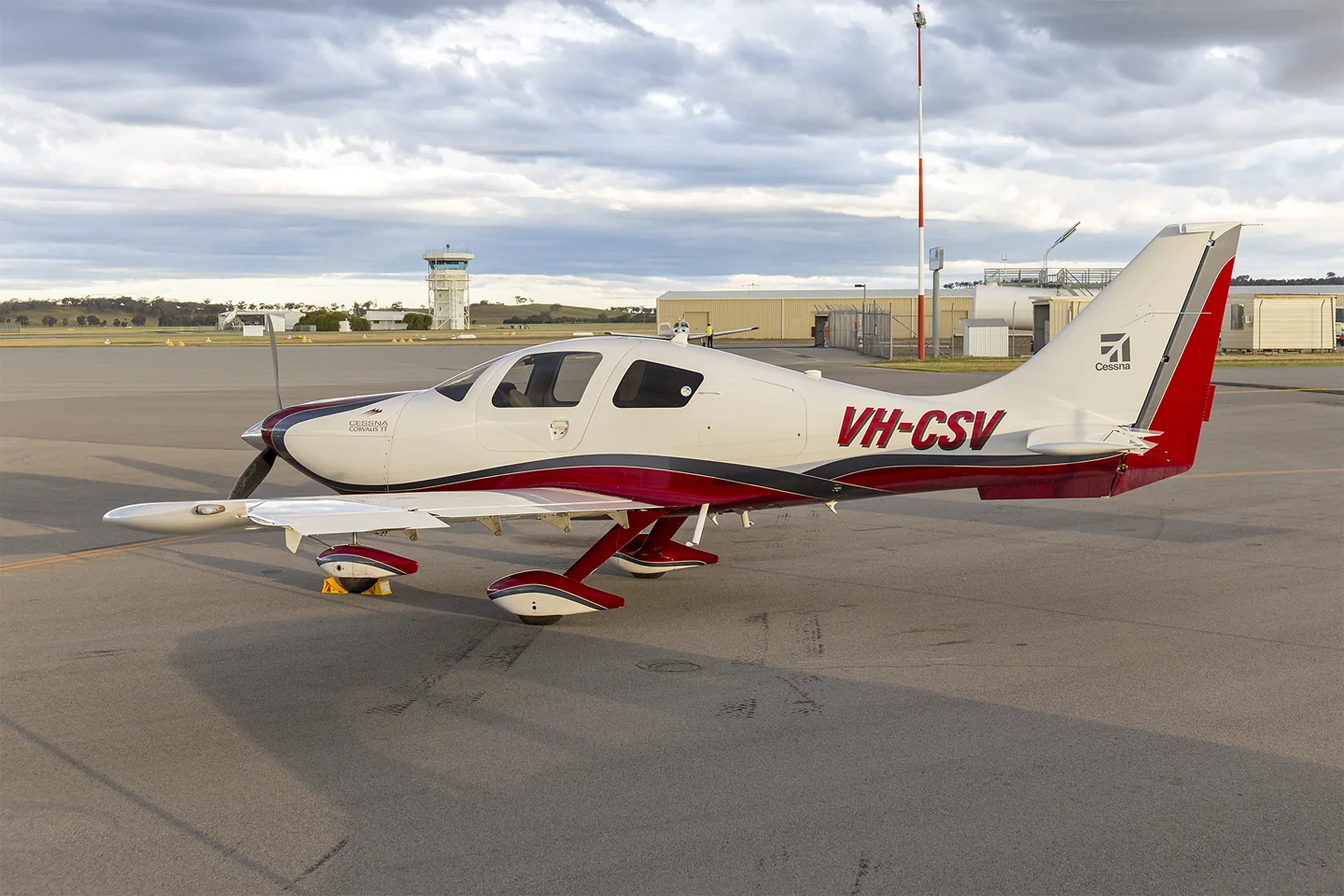
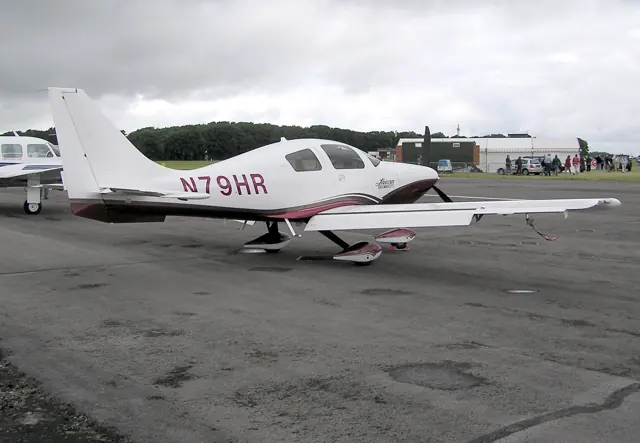
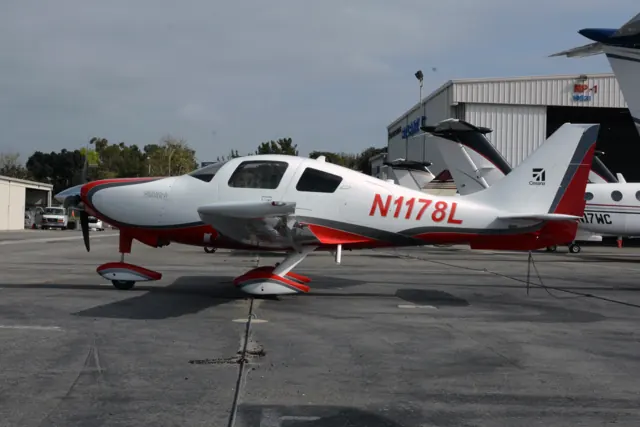
Originally the Columbia 400, the aircraft became part of Cessna's range after the Columbia acquisition. It was marketed as the Corvalis, with later development leading to the TTx. Its smooth composite airframe is visually distinct from Cessna's traditional metal high-wing singles. The fixed undercarriage is a useful reminder that a fast touring aeroplane does not necessarily need retractable gear.
Aircraft background
Wikipedia contributors · Read more ↗A fast aircraft with one awkward door handle
The reviewer had wanted a Columbia 400 flight since Sun ’n Fun, but the dealer struggled to keep a demonstrator available. An owner’s aircraft finally provided the opportunity. Settling into the left seat brought an immediate appreciation of the cabin layout and furnishings, alongside one personal difficulty: reaching the door handle with the seat positioned far forward.
August 2005 report published under Janice Wood’s byline. Avidyne-equipped owner’s Columbia 400 flown with dealer pilot Randy Schuette at St. Augustine.
General Aviation News · Read more ↗A documented Corvalis cockpit and checklist update
The May 2025 notes credit Carenado’s Corvalis TT version 1.0.7 with revised starting, takeoff and shutdown checklists, fuel-cap interaction and EFB performance-data fixes. They also list icing and acceleration corrections. The changes apply to the documented 1.0.7 revision.
400 Corvalis TT · Microsoft Flight Simulator · MSFS 2024
Microsoft Flight Simulator · Read more ↗Into the cockpit
 YouTube
 Skywagon University · 28 min ·
Flying the Columbia 400
A Columbia 400 flight with a Garmin-equipped instrument panel.
Real aircraft · Columbia 400 / Cessna Corvalis
Watch on YouTube ↗Preview images are served by AirframeDB. Videos open on YouTube only when you choose to watch.
Meet Columbia 400 / Cessna Corvalis
Originally the Columbia 400, the aircraft became part of Cessna's range after the Columbia acquisition. It was marketed as the Corvalis, with later development leading to the TTx. Its smooth composite airframe is visually distinct from Cessna's traditional metal high-wing singles.
The Columbia 400, Corvalis and TTx names mark equipment and production developments within the same lineage.
Columbia 400 / Cessna Corvalis
Columbia Aircraft → · Explore the family →
Columbia 400
Wikipedia contributors · Cessna 400 ↗Laminar Research · X-Plane 11 →Cessna Corvalis
Wikipedia contributors · Cessna 400 ↗Aircraft type designators
Use the code for the model you are flying. The linked authority lists the applicable aircraft.
History & design
The turbocharged member of the family
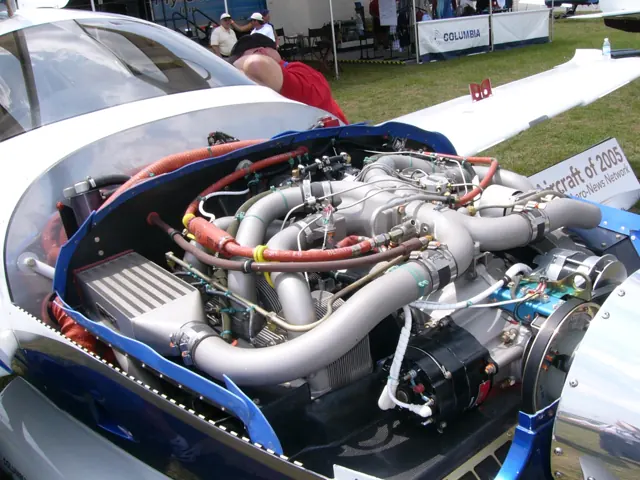
Columbia’s 400 paired its composite airframe with a turbocharged Continental engine, while the contemporary 350 was normally aspirated. The 400SLX in this report carried Garmin G1000 avionics; other 400 configurations used Avidyne equipment.
AOPA Pilot · Columbia 400: A Whole Lot of Get Up and Go ↗AOPA · October 2007 model and equipment comparison
Development milestones
First flight: June 2000
Developed from: Cessna 350
Wikipedia contributors · Cessna 400 ↗Cessna 400 · family/variant named by the source · Wikipedia revision 1359871649
Pilot accounts
A fast aircraft with one awkward door handle
The reviewer had wanted a Columbia 400 flight since Sun ’n Fun, but the dealer struggled to keep a demonstrator available. An owner’s aircraft finally provided the opportunity. Settling into the left seat brought an immediate appreciation of the cabin layout and furnishings, alongside one personal difficulty: reaching the door handle with the seat positioned far forward.
The flight combined a climb through broken cloud, a cruise-speed check and a demonstration of the speed brakes. Their deployment brought a little buffet and a pronounced change in the descent. Slow flight and landing left a favourable impression, and the reviewer returned to the hangar thinking about comfort as much as performance. The difficult-to-reach handle remained the humorous qualification to an otherwise enthusiastic report.
August 2005 report published under Janice Wood’s byline. Avidyne-equipped owner’s Columbia 400 flown with dealer pilot Randy Schuette at St. Augustine.
Read the full account · General Aviation News ↗Crossing the country in a nearly new 400SLX
Ells’s trip put a nearly new demonstrator to work over a long westbound journey. Headwinds influenced the choice of altitude, and he compared the aircraft’s progress with its fuel consumption instead of simply chasing its advertised maximum speed. The aeroplane he flew did not quite reach the published book speeds, a distinction he kept visible in his report.
The cockpit became more persuasive with use. The engine display helped him follow mixture adjustments, and a keypad near the armrest changed his mind about an option he had initially considered excessive. Over the hours and several landings, the cabin comfort and integrated avionics made a strong impression.
AOPA Pilot · October 2007. G1000-equipped Columbia 400SLX flown west from Lakeland to Paso Robles with sales associate Jon Dennis.
Read the full account · AOPA Pilot ↗A winter ferry changes destination
Cox began with a transatlantic delivery in mind, but severe cold in northeastern Canada exposed difficulties with cabin heating and oil temperature. Looking ahead to still colder conditions over Greenland, he decided the aircraft needed a winterisation kit. The immediate job became returning it from Maine to its dealer in North Carolina.
That southbound flight brought another weather problem, with widespread icing forecasts and strong winds aloft. His account describes choosing a coastal route below the weather, continually checking conditions and stopping at Atlantic City before continuing in improving skies. He finished the day back at the dealer rather than across the ocean. The episode records his decisions and their outcome; it should be read as a particular ferry experience, with the limitations of that aircraft’s preparation.
Plane + Pilot · May 2011. Recollection of a planned March delivery of a 2007 Columbia 400 to Geneva; the aircraft needed further winter preparation.
Read the full account · Plane + Pilot ↗In your simulator
Systems, equipment and documentation for each developer’s aircraft.
Compare simulator versions →MSFS 2024400 Corvalis TT
Microsoft Flight Simulator · Released
400 Corvalis TT
Microsoft Flight Simulator · Released
X-Plane 11Columbia 400
Laminar Research · Released
Columbia 400
Laminar Research · Released
Aircraft specifications
Published figures for the named real-aircraft variant. Simulator equipment and performance can differ.
| Specification | Published value |
|---|---|
| Length | 25 ft 2 in (7.67 m) |
| Wingspan | 36 ft 1 in (11.00 m) |
| Height | 9 ft 0 in (2.74 m) |
| Wing area | 141 sq ft (13.1 m² ) |
| Empty weight | 2,500 lb (1,134 kg) |
| Max takeoff weight | 3,600 lb (1,633 kg) |
| Powerplant | 1 × Teledyne Continental TSIO-550-C air-cooled flat-6 engine , 310 hp (230 kW) |
| Maximum speed | 235 kn (270 mph, 435 km/h) calibrated airspeed |
| Cruise speed | 235 kn (270 mph, 435 km/h) true airspeed at 25,000 ft (7,600 m) |
| Stall speed | 59 kn (68 mph, 109 km/h) |
| Range | 1,107 nmi (1,274 mi, 2,050 km) |
| Service ceiling | 25,000 ft (7,600 m) |
| Rate of climb | 1,500 ft/min (7.6 m/s) |
Manuals & resources
Find your next read
Choose a topic for a short introduction and a link to the original source. Simulator references identify the developer and edition they cover.
Simulator documentation
A documented Corvalis cockpit and checklist update400 Corvalis TT · Microsoft Flight Simulator · MSFS 2024
The May 2025 notes credit Carenado’s Corvalis TT version 1.0.7 with revised starting, takeoff and shutdown checklists, fuel-cap interaction and EFB performance-data fixes. They also list icing and acceleration corrections. The changes apply to the documented 1.0.7 revision.
Official MSFS 2024 SU2 notes · 1.4.20.0
Microsoft Flight Simulator · Read the source ↗Pilot account
A fast aircraft with one awkward door handleAugust 2005 report published under Janice Wood’s byline. Avidyne-equipped owner’s Columbia 400 flown with dealer pilot Randy Schuette at St. Augustine.
The reviewer had wanted a Columbia 400 flight since Sun ’n Fun, but the dealer struggled to keep a demonstrator available. An owner’s aircraft finally provided the opportunity. Settling into the left seat brought an immediate appreciation of the cabin layout and furnishings, alongside one personal difficulty: reaching the door handle with the seat positioned far forward. The flight combined a climb through broken cloud, a cruise-speed check and a demonstration of the speed brakes.
General Aviation News flight reviewer
General Aviation News · Read the source ↗Crossing the country in a nearly new 400SLXAOPA Pilot · October 2007. G1000-equipped Columbia 400SLX flown west from Lakeland to Paso Robles with sales associate Jon Dennis.
Ells’s trip put a nearly new demonstrator to work over a long westbound journey. Headwinds influenced the choice of altitude, and he compared the aircraft’s progress with its fuel consumption instead of simply chasing its advertised maximum speed. The aeroplane he flew did not quite reach the published book speeds, a distinction he kept visible in his report. The cockpit became more persuasive with use.
Steven W. Ells
AOPA Pilot · Read the source ↗Read the original documentation from the people who created it. Manuals open on their publisher’s website.
Manual
Microsoft Flight Simulator aircraft manualsMicrosoft / aircraft developers X-Plane 11 Desktop ManualLaminar Research X-Plane aircraft and avionics manualsLaminar ResearchAircraft background
Cessna 400Wikipedia contributors · Research background · Wikipedia revision 1359871649 · retrieved 2026-09-12Resource
MSFS 2024 FAQ and edition aircraft inventoryMicrosoftDeveloper documentation
Release Notes — Sim Update 2 [1.4.20.0]Microsoft Flight Simulator · 15 May 2025 · aircraft-specific package revisionsType designator
ICAO Doc 8643 — aircraft type designatorsInternational Civil Aviation Organization · Public search data retrieved 2026-09-14; authority update 2026-09-03Built-in force-feedback profiles
Read the documentary basis, editable starting settings and remaining questions for the aircraft you fly. Each explanation refers to the exact profile revision shown.
Catalogue programme-20261022-v1 · 1 profile choice
Columbia 400 / Cessna Corvalis
Free and Pro · Revision 2 · Partial review
MSFS 2024 · X-Plane 11
Columbia 400 / Cessna Corvalis: The selected mechanical-control response provides nominal resistance for the Columbia reference; optional speed brakes are separate equipment.
Columbia 400 / Cessna Corvalis
Columbia 400 / Cessna Corvalis: The selected mechanical-control response provides nominal resistance for the Columbia reference; optional speed brakes are separate equipment.
Aircraft and simulator scope
- Columbia 400 / Cessna Corvalis · MSFS 2024 · family starting point
- Columbia 400 / Cessna Corvalis · X-Plane 11 · family starting point
Preserved Columbia 400 POH revision 10100201 plus NTSB landing extract; optional equipment retains conditional applicability. · Selected choice: Columbia 400 / Cessna Corvalis. Documentary scope does not establish every variant, add-on revision or simulator binding.
The simulator model and controls
Originally the Columbia 400, the aircraft became part of Cessna's range after the Columbia acquisition. It was marketed as the Corvalis, with later development leading to the TTx. Its smooth composite airframe is visually distinct from Cessna's traditional metal high-wing singles.
This starting point selects Columbia 400 / Cessna Corvalis. Its aircraft-level settings do not select a particular developer’s custom systems.
How this profile feels
Spring resistance builds with the selected airspeed response. A separate aerodynamic term adds speed-dependent control load.
Valid trim provides the configured pressure relief. Autopilot following is enabled for supported control references.
Controls and trim
The Columbia 400 POH documents elevator trim tabs and checks involving autopilot trim. Speed-brake checks are conditional on installed equipment. Columbia, Corvalis and later TTx names retain their production and avionics scope rather than describing one interchangeable configuration. A normal-landing speed range supplies procedure context rather than the profile's general resistance reference.
About the values
The gains are normalized profile settings. They describe the chosen effect balance; hand force depends on the device and its output limits. IAS references are tuning values rather than operating limits. Physical acceptance of this revision remains pending.
What the documentation establishes
The POH identifies trim tabs and elevator-trim checks for the Columbia 400.
Elevator trim tabs and autopilot-trim checks are documented; exact numerical preset authority remains estimated.
Autopilot-trim operation is checked in the POH; following has no documented external servo-output contract here.
Speed-brake checks and conditional installed-equipment scope are documented; not every Columbia installation has identical equipment.
The normal-landing indicated-speed range is procedure-specific; it does not derive the preset's cruise-force reference.
Documentary review and sources
These decisions describe the documentary basis and remaining gaps for this revision. Aircraft documentation and a starting setting describe different kinds of evidence.
Aircraft and variant
ReviewedThis starting point selects Columbia 400 / Cessna Corvalis. Its aircraft-level settings do not select a particular developer’s custom systems.
Flight controls
Not yet reviewedThe Columbia 400 POH documents elevator trim tabs and checks involving autopilot trim. Speed-brake checks are conditional on installed equipment. Columbia, Corvalis and later TTx names retain their production and avionics scope rather than describing one interchangeable configuration. A normal-landing speed range supplies procedure context rather than the profile's general resistance reference.
Trim
ReviewedElevator trim tabs support pitch relief, while the profile's authority is an estimate independent of the POH's autopilot-trim check. Pitch authority 0.3 provides load relief and permitted centre movement; roll authority is 0.
Autopilot and stability
ReviewedFollowing is on at 0.1 authority when a supported, valid autopilot control reference is available.
Equipment
ReviewedGear, flap and ground cues follow the selected settings and available simulator-reported states.
Speeds and limits
ReviewedThe indicated-speed references set the profile response scale; they are separate from aircraft operating limits.
Simulator integration
Not yet reviewedThe profile targets msfs2024, xplane11. Add-on-specific controls use only the supported references configured by this profile.
Force-feedback settings
Not yet reviewedThe settings define the profile’s effect balance. Device output limits affect physical hand force.
Starting settings and their rationale
These configured values are starting estimates. The explanations describe what each setting controls; physical validation appears separately below.
| Setting | Starting value | What it controls and why |
|---|---|---|
| Spring strength | Starting value0.74 | What it controls and whyThe selected mechanical-control response provides nominal resistance for the Columbia reference; optional speed brakes are separate equipment. The baseline spring is 0.74. Its low-speed blend reaches baseline strength at 87.5 KIAS. |
| Master force gain | Starting value0.85 | What it controls and whyScales overall profile strength while preserving effect balance, subject to device and output limits. |
| Profile force gain | Starting value0.8 | What it controls and whyThe aerodynamic-load gain is 0.8 with an indicated-speed reference of 175 KIAS. This supplies speed-dependent loading alongside the spring. |
| Force tuning speed/reference | Starting value175.0 kt | What it controls and whySets the IAS reference for aerodynamic loading. It is an estimate, not published cruise TAS or a flight limit. |
| Spring response reference speed | Starting value87.5 kt | What it controls and whySets the IAS where the low-speed blend reaches baseline strength; high-speed stiffening also uses it. |
| Aileron force scale | Starting value0.72 | What it controls and whyRoll and pitch aerodynamic scales are 0.72 and 1, respectively. They set the aerodynamic axis balance. No custom spring-travel curve is enabled. |
| Elevator force scale | Starting value1.0 | What it controls and whyScales pitch aerodynamic loading; pitch spring travel and trim responses are separate settings. |
| Trim feel | Starting valueEnabled | What it controls and whyRetained for compatibility and group membership. Trim relief, rather than this flag, controls centre movement. |
| Trim relief | Starting valueEnabled | What it controls and whyAllows trim relief with supported control law and valid telemetry. Axis authorities set its amount. |
| Autopilot follow | Starting valueEnabled | What it controls and whyFollowing is on at 0.1 authority when a supported, valid autopilot control reference is available. |
| Autopilot neutral hold | Starting valueDisabled | What it controls and whyPermits centering hold during a supported AP state, separate from following a moving target. |
| Output force limit | Starting value0.55 | What it controls and whyCaps directed-force output. Native spring effects and device limits remain separate. |
All 44 starting settings and their rationale
The settings define the profile’s effect balance. Device output limits affect physical hand force.
| Setting | Starting value | What it controls and why |
|---|---|---|
| Spring strength | Starting value0.74 | What it controls and whyThe selected mechanical-control response provides nominal resistance for the Columbia reference; optional speed brakes are separate equipment. The baseline spring is 0.74. Its low-speed blend reaches baseline strength at 87.5 KIAS. |
| Spring deadband | Starting value0.045 | What it controls and whySets travel around the centre before the baseline spring resists. Smaller values engage it sooner. |
| Profile force gain | Starting value0.8 | What it controls and whyThe aerodynamic-load gain is 0.8 with an indicated-speed reference of 175 KIAS. This supplies speed-dependent loading alongside the spring. |
| Master force gain | Starting value0.85 | What it controls and whyScales overall profile strength while preserving effect balance, subject to device and output limits. |
| QBlend Enabled | Starting valueEnabled | What it controls and whyAllows baseline spring strength to rise with indicated airspeed where the control law permits it. |
| QSpring Minimum Factor | Starting value0.5 | What it controls and whySets low-speed spring strength as a fraction of baseline when blending is enabled. One keeps full strength. |
| QSpring Start Knots | Starting value20 kt | What it controls and whySets the IAS where the low-speed spring blend starts rising. This is a feel threshold, not a flight limit. |
| Spring response reference speed | Starting value87.5 kt | What it controls and whySets the IAS where the low-speed blend reaches baseline strength; high-speed stiffening also uses it. |
| Force tuning speed/reference | Starting value175.0 kt | What it controls and whySets the IAS reference for aerodynamic loading. It is an estimate, not published cruise TAS or a flight limit. |
| Airspeed spring stiffening gain | Starting value0.15 | What it controls and whyThe high-speed spring-stiffening gain is 0.15. It strengthens the permitted spring response above 87.5 KIAS, with the squared-speed ratio capped at 5. |
| Airspeed spring stiffening limit | Starting value5 | What it controls and whyLimits the squared airspeed ratio used for high-speed spring stiffening; it is not a device-force cap. |
| Aileron force scale | Starting value0.72 | What it controls and whyRoll and pitch aerodynamic scales are 0.72 and 1, respectively. They set the aerodynamic axis balance. No custom spring-travel curve is enabled. |
| Elevator force scale | Starting value1.0 | What it controls and whyScales pitch aerodynamic loading; pitch spring travel and trim responses are separate settings. |
| Output force limit | Starting value0.55 | What it controls and whyCaps directed-force output. Native spring effects and device limits remain separate. |
| Trim feel | Starting valueEnabled | What it controls and whyRetained for compatibility and group membership. Trim relief, rather than this flag, controls centre movement. |
| Trim relief | Starting valueEnabled | What it controls and whyAllows trim relief with supported control law and valid telemetry. Axis authorities set its amount. |
| Elevator Authority | Starting value0.3 | What it controls and whyElevator trim tabs support pitch relief, while the profile's authority is an estimate independent of the POH's autopilot-trim check. Pitch authority 0.3 provides load relief and permitted centre movement; roll authority is 0. |
| Aileron Authority | Starting value0 | What it controls and whyScales supported roll-trim relief and permitted centre movement. Zero removes roll response. |
| Force Trim Enabled | Starting valueDisabled | What it controls and whyEnables local force trim, separate from aircraft-owned trim and add-on integration qualification. |
| GLoad Enabled | Starting valueEnabled | What it controls and whyAllows load-factor changes to modify permitted spring laws. Passive fly-by-wire feel can suppress it. |
| Rate Damping Enabled | Starting valueEnabled | What it controls and whyEnables rate damping with the configured coefficients and control law. |
| Autopilot follow | Starting valueEnabled | What it controls and whyFollowing is on at 0.1 authority when a supported, valid autopilot control reference is available. |
| Autopilot follow authority | Starting value0.1 | What it controls and whySets admitted AP-follow gain, not a percentage of travel. Runtime ownership and input limits still apply. |
| Autopilot neutral hold | Starting valueDisabled | What it controls and whyPermits centering hold during a supported AP state, separate from following a moving target. |
| Autopilot neutral hold strength | Starting value0.6 | What it controls and whySets admitted AP neutral-hold strength; inactive while neutral hold is disabled. |
| Enabled | Starting valueEnabled | What it controls and whyEnables aerodynamic cues; each still needs nonzero strength and its simulator conditions. |
| Gain | Starting value0.35 | What it controls and whySets stall-buffet strength. Zero removes the cue without changing simulator stalls or warnings. |
| Gain | Starting value0 | What it controls and whySets high-Mach buffet strength; onset and full-strength thresholds are separate. |
| Gain | Starting value0.14 | What it controls and whySets flap buffet at the configured position and speed gates. Flap movement texture is separate. |
| Maximum flap index | Starting value2 | What it controls and whySets the final flap index for detent normalization. UP plus three detents uses maximum index3. |
| Minimum flap index | Starting value2 | What it controls and whySets the first flap detent that admits buffet; this is a handle index, not degrees. |
| Gain | Starting value0 | What it controls and whySets gear aerodynamic buffet; movement and ground-contact cues are separate. |
| Shaker Enabled | Starting valueDisabled | What it controls and whyPermits shaker at supported warning conditions; the switch does not establish aircraft equipment. |
| Stick shaker amplitude | Starting value0.5 | What it controls and whySets triggered shaker strength; inactive while the shaker feature is disabled. |
| Enabled | Starting valueEnabled | What it controls and whyEnables ground effects; each still needs its own strength and contact or motion telemetry. |
| Gain | Starting value0.4 | What it controls and whySets rolling texture strength, modified by speed, surface and undercarriage configuration. |
| Gain | Starting value0.25 | What it controls and whySets gear-bump texture during ground motion, separate from touchdown impact. |
| Gain | Starting value0.65 | What it controls and whySets landing-impact strength; landing telemetry and response shape determine the pulse. |
| Gain | Starting value0 | What it controls and whySets reverse-thrust vibration with valid reverser and engine conditions. Zero removes the cue. |
| Enabled | Starting valueEnabled | What it controls and whyEnables engine cues with nonzero settings and valid running-engine telemetry. |
| Gain | Starting value0.12 | What it controls and whySets estimated engine vibration using configured telemetry and response, not measured cockpit vibration. |
| Enabled | Starting valueEnabled | What it controls and whyEnables accessory cues with configured strengths and observed accessory movement. |
| Gain | Starting value0.12 | What it controls and whySets texture from observed flap movement; a command without movement does not establish the cue. |
| Gain | Starting value0 | What it controls and whySets texture from observed gear movement, separate from aerodynamic and touchdown effects. |
Limits and open questions
- Preflight trim-tab checks do not establish the complete primary-control linkage or physical force gradient.
- Real POH procedures and optional-equipment clauses do not establish simulator force telemetry or ownership.
- Trim-tab and landing procedures do not calibrate stick effort, propwash response or pitch-to-roll force ratio.
Physical validation
No physical force validation is recorded in this public catalogue for this revision. Documentary review and software checks do not establish how a particular device feels.
Discuss this aircraft (0)
Questions, observations and useful sources from the community.
No published discussions yet. Bring a question or share a useful source.
Open aircraft discussions →Content expanded · What’s new
Something missing or a source that needs attention?
Suggest a correction ↗