
Start here
A few places to begin, from the aircraft’s story to the people who fly it.
Meet the aircraft
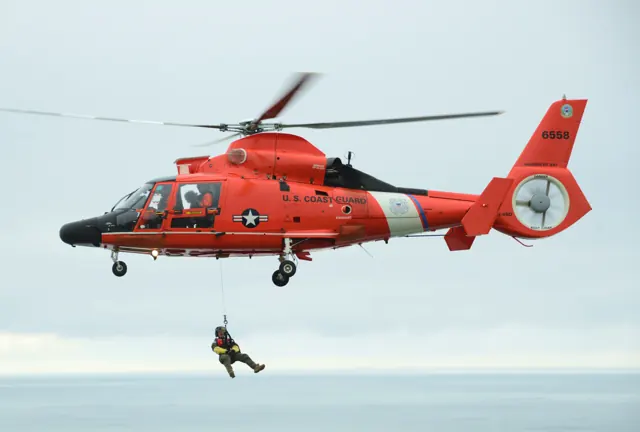
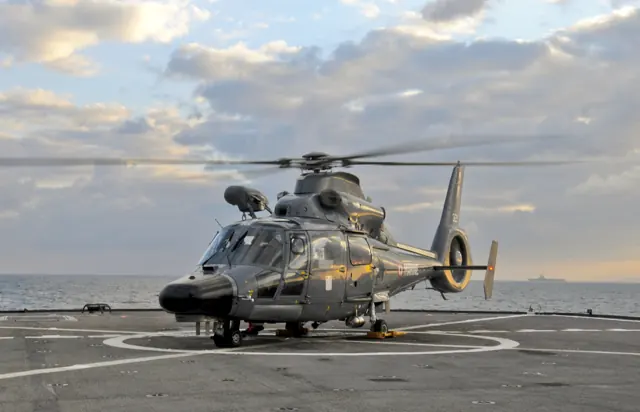
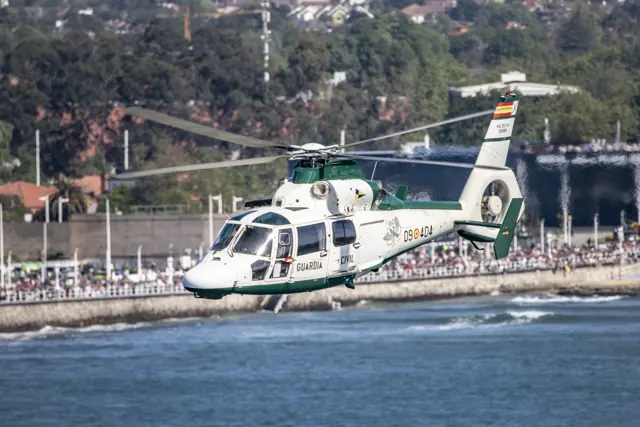
The Dauphin developed at Aérospatiale and continued through Eurocopter and Airbus. Its smooth fuselage and enclosed tail rotor became familiar in passenger, police, rescue and government roles. The family includes naval and coastguard derivatives with specialised equipment. The AS365N2 and HH-65A in Taog's package have distinct automatic flight-control installations.
Aircraft background
Wikipedia contributors · Read more ↗One Dolphin flight changes a career plan
While still in the Navy and considering a move from fixed-wing flying, Wetzler joined a Dolphin crew at Corpus Christi. The flight convinced him that helicopters were what he wanted to do. His first Coast Guard flying assignment then took him to Puerto Rico, where search and rescue shared the schedule with Caribbean patrol work. The HH-65 remained his favourite helicopter after thousands of hours in it.
ROTOR interview · March 2023. Retired Coast Guard pilot recalling his introduction at Corpus Christi and subsequent HH-65 career; no single later variant is specified.
ROTOR / Vertical Aviation International · Read more ↗Choose the variant to match the mission equipment
The manual assigns different hoists, cargo hooks and firefighting attachments to its nine variants. Career activities follow those configurations; the HH-65B HITRON fit is cosmetic and is listed as a display/free-flight variant.
AS365 N2 / HH-65A · Taog's Hangar · MSFS 2024
Taog's Hangar · Read more ↗Into the cockpit
 YouTube
 ForderLearnToFly · 128 min ·
Learn to Fly TaogsHangar HH-65 Helicopter
A long-form walkthrough of Taog's Hangar HH-65A/B simulator variants.
Simulator · Taog’s Hangar HH-65A/B · MSFS
Watch on YouTube ↗Preview images are served by AirframeDB. Videos open on YouTube only when you choose to watch.
Meet Dauphin AS365 / HH-65
The Dauphin developed at Aérospatiale and continued through Eurocopter and Airbus. Its smooth fuselage and enclosed tail rotor became familiar in passenger, police, rescue and government roles. The family includes naval and coastguard derivatives with specialised equipment.
The AS365N2 and HH-65A in Taog's package have distinct automatic flight-control installations. The package's documentation describes the flight-control system for each variant.
Dauphin AS365 / HH-65
Aircraft type designators
Use the code for the model you are flying. The linked authority lists the applicable aircraft.
History & design
A Coast Guard derivative grows beyond its original mission
Airbus’s retrospective traces the H-65 from search and rescue into cutter deployments, interception and armed interdiction. Its pilot interviews also describe successive equipment and engine changes, so later MH-65 accounts should not be read as descriptions of the original HH-65A.
Airbus · 40 years, 11 missions: one all-in-one airframe ↗Manufacturer retrospective published April 2024
Development milestones
First flight: 24 January 1975
Developed from: Aérospatiale SA 360 Dauphin
Wikipedia contributors · Eurocopter AS365 Dauphin ↗Eurocopter AS365 Dauphin · family/variant named by the source · Wikipedia revision 1374336555
Pilot accounts
One Dolphin flight changes a career plan
While still in the Navy and considering a move from fixed-wing flying, Wetzler joined a Dolphin crew at Corpus Christi. The flight convinced him that helicopters were what he wanted to do. His first Coast Guard flying assignment then took him to Puerto Rico, where search and rescue shared the schedule with Caribbean patrol work.
The HH-65 remained his favourite helicopter after thousands of hours in it. What stayed with him most was the sight of someone newly rescued looking back from the cabin, cold and wet but smiling at the prospect of going home. In retirement he continued speaking about aviation’s human side.
ROTOR interview · March 2023. Retired Coast Guard pilot recalling his introduction at Corpus Christi and subsequent HH-65 career; no single later variant is specified.
Read the full account · ROTOR / Vertical Aviation International ↗A rescue pilot understands the person in the fishing boat
Church described a night call after the fishing vessel Jamie K lost control near the shore and struck rocks. Ground rescuers could not reach the people aboard. His Dolphin crew delivered a rescue swimmer, who brought all four ashore, and Church gave the swimmer the credit for a demanding recovery.
His own time in a small boat shaped the way he viewed people needing help. The skipper later wanted to visit the station and speak with the crew; Church saw him as someone earning a living in an unforgiving environment. The interview also describes the constant training behind a four-person helicopter crew.
Boating interview · January 2017. MH-65D pilot recalling the 21 July 2015 rescue of the fishing vessel Jamie K’s crew in the Pacific Northwest.
Read the full account · Boating ↗A mountain rescue near the end of a flying assignment
Leary was approaching a transfer to a desk assignment when his crew received a call for an injured climber high in the Olympic Mountains. Sunset, clouds and snow showers made time near the peak a concern. The helicopter had received upgraded engines, a change the crew regarded as important to attempting this particular mission.
Rescue swimmer John Linnborn spent only a short time on the mountain before the climber was lifted away. On the flight back, the patient saw the mountains from above for the first time. He later remembered the crew’s happiness when they landed, and Leary confirmed how satisfying it was to put their training to use.
Peninsula Daily News · May 2007. Port Angeles H-65 crew rescue at The Brothers in the Olympic Mountains, with Christian Polyak, Mike Cook and John Linnborn; upgraded engines.
Read the full account · Peninsula Daily News ↗In your simulator
Systems, equipment and documentation for each developer’s aircraft.
MSFS 2024AS365 N2 / HH-65A
Taog's Hangar · Released
AS365 N2 / HH-65A
Taog's Hangar · Released
Aircraft specifications
Published figures for the named real-aircraft variant. Simulator equipment and performance can differ.
| Specification | Published value |
|---|---|
| Length | 13.73 m (45 ft 1 in) |
| Height | 4.06 m (13 ft 4 in) |
| Empty weight | 2,389 kg (5,267 lb) |
| Max takeoff weight | 4,300 kg (9,480 lb) |
| Powerplant | 2 × Turboméca Arriel 2C turboshaft, Take-off Power, 625 kW (838 hp) each |
| Main rotor diameter | 11.94 m (39 ft 2 in) |
| Main rotor area | 111.98 m² (1,205.3 sq ft) |
| Maximum speed | 306 km/h (190 mph, 165 kn) |
| Service ceiling | 5,865 m (19,240 ft) |
| Rate of climb | 8.9 m/s (1,750 ft/min) |
Manuals & resources
Find your next read
Choose a topic for a short introduction and a link to the original source. Simulator references identify the developer and edition they cover.
Simulator documentation
Choose the variant to match the mission equipmentAS365 N2 / HH-65A · Taog's Hangar · MSFS 2024
The manual assigns different hoists, cargo hooks and firefighting attachments to its nine variants. Career activities follow those configurations; the HH-65B HITRON fit is cosmetic and is listed as a display/free-flight variant.
MSFS 2024 manual V1 · PDF p.83
Taog's Hangar · Read the source ↗Mission Hub is an additional purchaseAS365 N2 / HH-65A · Taog's Hangar · MSFS 2024
The guide describes Miltech Mission Hub support for hoisting, firefighting and sling work, with the platform sold separately. Aircraft equipment and the appropriate variant still determine which activities are available.
MSFS 2024 manual V1 · PDF pp.83–85
Taog's Hangar · Read the source ↗Pilot account
One Dolphin flight changes a career planROTOR interview · March 2023. Retired Coast Guard pilot recalling his introduction at Corpus Christi and subsequent HH-65 career; no single later variant is specified.
While still in the Navy and considering a move from fixed-wing flying, Wetzler joined a Dolphin crew at Corpus Christi. The flight convinced him that helicopters were what he wanted to do. His first Coast Guard flying assignment then took him to Puerto Rico, where search and rescue shared the schedule with Caribbean patrol work. The HH-65 remained his favourite helicopter after thousands of hours in it.
Brian Wetzler
ROTOR / Vertical Aviation International · Read the source ↗A rescue pilot understands the person in the fishing boatBoating interview · January 2017. MH-65D pilot recalling the 21 July 2015 rescue of the fishing vessel Jamie K’s crew in the Pacific Northwest.
Church described a night call after the fishing vessel Jamie K lost control near the shore and struck rocks. Ground rescuers could not reach the people aboard. His Dolphin crew delivered a rescue swimmer, who brought all four ashore, and Church gave the swimmer the credit for a demanding recovery. His own time in a small boat shaped the way he viewed people needing help.
Justin Church
Boating · Read the source ↗Read the original documentation from the people who created it. Manuals open on their publisher’s website.
Manual
Download Key binding guideTaog's Hangar Download manualTaog's Hangar Microsoft Flight Simulator aircraft manualsMicrosoft / aircraft developers Taog aircraft manualsTaog's HangarAircraft background
Eurocopter AS365 DauphinWikipedia contributors · Research background · Wikipedia revision 1374336555 · retrieved 2026-09-12 40 years, 11 missions: one all-in-one airframeAirbus · Coast Guard pilot interviews · 18 April 2024Product
AS365 N2 / HH-65A DauphinTaog’s Hangar · Official developer / designated store catalogue · checked 2026-09-12Type designator
ICAO Doc 8643 — aircraft type designatorsInternational Civil Aviation Organization · Public search data retrieved 2026-09-14; authority update 2026-09-03Built-in force-feedback profiles
Read the documentary basis, editable starting settings and remaining questions for the aircraft you fly. Each explanation refers to the exact profile revision shown.
Catalogue programme-20261022-v1 · 4 profile choices
Taog's Hangar AS365 N2
Taog's Hangar · Free and Pro · Revision 3 · Inherited starting point
MSFS 2024
Taog's Hangar AS365 N2: The spring and damping approximate the servo-assisted cyclic.
Taog's Hangar HH-65A
Taog's Hangar · Free and Pro · Revision 2 · Inherited starting point
MSFS 2024
Taog's Hangar HH-65A: The spring and damping approximate the servo-assisted cyclic.
Aerospatiale AS365 N2 Dauphin
Free and Pro · Revision 2 · Partial review
MSFS 2024
Aerospatiale AS365 N2 Dauphin: The spring and damping approximate the servo-assisted cyclic.
Aerospatiale HH-65A Dolphin
Free and Pro · Revision 1 · Partial review
MSFS 2024
Aerospatiale HH-65A Dolphin: The spring and damping approximate the servo-assisted cyclic.
Taog's Hangar AS365 N2
Taog's Hangar AS365 N2: The spring and damping approximate the servo-assisted cyclic.
Aircraft and simulator scope
- Taog's Hangar AS365 N2 · Taog's Hangar · MSFS 2024 · Add-on starting point
The simulator model and controls
The Dauphin developed at Aérospatiale and continued through Eurocopter and Airbus. Its smooth fuselage and enclosed tail rotor became familiar in passenger, police, rescue and government roles. The family includes naval and coastguard derivatives with specialised equipment.
This profile selects Taog's Hangar AS365 N2 for MSFS 2024.
How this profile feels
The spring and damping approximate the servo-assisted cyclic. The spring stays independent of airspeed. Directed aerodynamic loading is omitted. Cyclic damping adds resistance to hardware motion.
Mode-dependent trim actuators have a wider role than a local spring-centre latch. Local force trim is off. Autopilot following is off.
Controls and trim
The AS365/HH-65 package describes hydraulic servos and trim actuators. Trim release removes control loads, while beep trim can alter attitude references. Fly-through and upper-mode disengagement are distinct behaviours, with coupler and collective controls described for each variant.
The selected implementation
Taog separates AS365N2 and HH65A with variant-specific trim/coupler and collective controls.
About the values
The gains are normalized profile settings. They describe the chosen effect balance; hand force depends on the device and its output limits. IAS references are tuning values rather than operating limits. Physical acceptance of this revision remains pending.
Documentary review and sources
These decisions describe the documentary basis and remaining gaps for this revision. Aircraft documentation and a starting setting describe different kinds of evidence.
Aircraft and variant
InheritedThis profile selects Taog's Hangar AS365 N2 for MSFS 2024.
Flight controls
InheritedThe AS365/HH-65 package describes hydraulic servos and trim actuators. Trim release removes control loads, while beep trim can alter attitude references. Fly-through and upper-mode disengagement are distinct behaviours, with coupler and collective controls described for each variant.
Trim
InheritedMode-dependent trim actuators have a wider role than a local spring-centre latch. Local force trim is off. Autopilot following is off.
Autopilot and stability
InheritedAutopilot following is off; the configured spring and load retain the hardware feel.
Equipment
InheritedTaog separates AS365N2 and HH65A with variant-specific trim/coupler and collective controls.
Speeds and limits
InheritedThe indicated-speed references set the profile response scale; they are separate from aircraft operating limits.
Simulator integration
InheritedThe profile targets msfs2024. Add-on-specific controls use only the supported references configured by this profile.
Force-feedback settings
InheritedThe settings define the profile’s effect balance. Device output limits affect physical hand force.
Starting settings and their rationale
These configured values are starting estimates. The explanations describe what each setting controls; physical validation appears separately below.
| Setting | Starting value | What it controls and why |
|---|---|---|
| Spring strength | Starting value0.16 | What it controls and whyThe spring and damping approximate the servo-assisted cyclic. The baseline spring is 0.16. Low-speed spring blending is off. |
| Master force gain | Starting value0.65 | What it controls and whyScales overall profile strength while preserving effect balance, subject to device and output limits. |
| Profile force gain | Starting value0 | What it controls and whyThe 0 gain omits sustained directed airspeed loading. Spring resistance remains independent. |
| Force tuning speed/reference | Starting value130 kt | What it controls and whySets the IAS reference for aerodynamic loading. It is an estimate, not published cruise TAS or a flight limit. |
| Spring response reference speed | Starting value65 kt | What it controls and whySets the IAS where the low-speed blend reaches baseline strength; high-speed stiffening also uses it. |
| Aileron force scale | Starting value0.72 | What it controls and whyRoll and pitch aerodynamic scales are 0.72 and 1, respectively. These stored weights do not create directed aerodynamic loading while that term is inactive. No custom spring-travel curve is enabled. |
| Elevator force scale | Starting value1 | What it controls and whyScales pitch aerodynamic loading; pitch spring travel and trim responses are separate settings. |
| Trim feel | Starting valueDisabled | What it controls and whyRetained for compatibility and group membership. Trim relief, rather than this flag, controls centre movement. |
| Trim relief | Starting valueDisabled | What it controls and whyAllows trim relief with supported control law and valid telemetry. Axis authorities set its amount. |
| Autopilot follow | Starting valueDisabled | What it controls and whyAutopilot following is off; the configured spring and load retain the hardware feel. |
| Autopilot neutral hold | Starting valueDisabled | What it controls and whyPermits centering hold during a supported AP state, separate from following a moving target. |
| Output force limit | Starting value0.55 | What it controls and whyCaps directed-force output. Native spring effects and device limits remain separate. |
All 44 starting settings and their rationale
The settings define the profile’s effect balance. Device output limits affect physical hand force.
| Setting | Starting value | What it controls and why |
|---|---|---|
| Spring strength | Starting value0.16 | What it controls and whyThe spring and damping approximate the servo-assisted cyclic. The baseline spring is 0.16. Low-speed spring blending is off. |
| Spring deadband | Starting value0.02 | What it controls and whySets travel around the centre before the baseline spring resists. Smaller values engage it sooner. |
| Profile force gain | Starting value0 | What it controls and whyThe 0 gain omits sustained directed airspeed loading. Spring resistance remains independent. |
| Master force gain | Starting value0.65 | What it controls and whyScales overall profile strength while preserving effect balance, subject to device and output limits. |
| QBlend Enabled | Starting valueDisabled | What it controls and whyAllows baseline spring strength to rise with indicated airspeed where the control law permits it. |
| QSpring Minimum Factor | Starting value1 | What it controls and whySets low-speed spring strength as a fraction of baseline when blending is enabled. One keeps full strength. |
| QSpring Start Knots | Starting value8 kt | What it controls and whySets the IAS where the low-speed spring blend starts rising. This is a feel threshold, not a flight limit. |
| Spring response reference speed | Starting value65 kt | What it controls and whySets the IAS where the low-speed blend reaches baseline strength; high-speed stiffening also uses it. |
| Force tuning speed/reference | Starting value130 kt | What it controls and whySets the IAS reference for aerodynamic loading. It is an estimate, not published cruise TAS or a flight limit. |
| Airspeed spring stiffening gain | Starting value0 | What it controls and whyAdds permitted spring resistance above the full-blend speed. Zero removes this high-speed increase. |
| Airspeed spring stiffening limit | Starting value5 | What it controls and whyLimits the squared airspeed ratio used for high-speed spring stiffening; it is not a device-force cap. |
| Aileron force scale | Starting value0.72 | What it controls and whyRoll and pitch aerodynamic scales are 0.72 and 1, respectively. These stored weights do not create directed aerodynamic loading while that term is inactive. No custom spring-travel curve is enabled. |
| Elevator force scale | Starting value1 | What it controls and whyScales pitch aerodynamic loading; pitch spring travel and trim responses are separate settings. |
| Output force limit | Starting value0.55 | What it controls and whyCaps directed-force output. Native spring effects and device limits remain separate. |
| Trim feel | Starting valueDisabled | What it controls and whyRetained for compatibility and group membership. Trim relief, rather than this flag, controls centre movement. |
| Trim relief | Starting valueDisabled | What it controls and whyAllows trim relief with supported control law and valid telemetry. Axis authorities set its amount. |
| Elevator Authority | Starting value0 | What it controls and whyScales supported pitch-trim relief and permitted centre movement. Zero removes pitch response. |
| Aileron Authority | Starting value0 | What it controls and whyScales supported roll-trim relief and permitted centre movement. Zero removes roll response. |
| Force Trim Enabled | Starting valueDisabled | What it controls and whyMode-dependent trim actuators have a wider role than a local spring-centre latch. Local force trim is off. The stored latch parameters are inactive; the profile does not supply a local hold-where-left neutral. |
| GLoad Enabled | Starting valueDisabled | What it controls and whyAllows load-factor changes to modify permitted spring laws. Passive fly-by-wire feel can suppress it. |
| Rate Damping Enabled | Starting valueDisabled | What it controls and whyEnables rate damping with the configured coefficients and control law. |
| Autopilot follow | Starting valueDisabled | What it controls and whyAutopilot following is off; the configured spring and load retain the hardware feel. |
| Autopilot follow authority | Starting value0.05 | What it controls and whySets admitted AP-follow gain, not a percentage of travel. Runtime ownership and input limits still apply. |
| Autopilot neutral hold | Starting valueDisabled | What it controls and whyPermits centering hold during a supported AP state, separate from following a moving target. |
| Autopilot neutral hold strength | Starting value0.6 | What it controls and whySets admitted AP neutral-hold strength; inactive while neutral hold is disabled. |
| Enabled | Starting valueEnabled | What it controls and whyEnables aerodynamic cues; each still needs nonzero strength and its simulator conditions. |
| Gain | Starting value0 | What it controls and whySets stall-buffet strength. Zero removes the cue without changing simulator stalls or warnings. |
| Gain | Starting value0 | What it controls and whySets high-Mach buffet strength; onset and full-strength thresholds are separate. |
| Gain | Starting value0 | What it controls and whySets flap buffet at the configured position and speed gates. Flap movement texture is separate. |
| Maximum flap index | Starting value1 | What it controls and whySets the final flap index for detent normalization. UP plus three detents uses maximum index3. |
| Minimum flap index | Starting value1 | What it controls and whySets the first flap detent that admits buffet; this is a handle index, not degrees. |
| Gain | Starting value0 | What it controls and whySets gear aerodynamic buffet; movement and ground-contact cues are separate. |
| Shaker Enabled | Starting valueDisabled | What it controls and whyPermits shaker at supported warning conditions; the switch does not establish aircraft equipment. |
| Stick shaker amplitude | Starting value0.5 | What it controls and whySets triggered shaker strength; inactive while the shaker feature is disabled. |
| Enabled | Starting valueEnabled | What it controls and whyEnables ground effects; each still needs its own strength and contact or motion telemetry. |
| Gain | Starting value0.15 | What it controls and whySets rolling texture strength, modified by speed, surface and undercarriage configuration. |
| Gain | Starting value0 | What it controls and whySets gear-bump texture during ground motion, separate from touchdown impact. |
| Gain | Starting value0.5 | What it controls and whySets landing-impact strength; landing telemetry and response shape determine the pulse. |
| Gain | Starting value0 | What it controls and whySets reverse-thrust vibration with valid reverser and engine conditions. Zero removes the cue. |
| Enabled | Starting valueEnabled | What it controls and whyEnables engine cues with nonzero settings and valid running-engine telemetry. |
| Gain | Starting value0 | What it controls and whySets estimated engine vibration using configured telemetry and response, not measured cockpit vibration. |
| Enabled | Starting valueEnabled | What it controls and whyEnables accessory cues with configured strengths and observed accessory movement. |
| Gain | Starting value0 | What it controls and whySets texture from observed flap movement; a command without movement does not establish the cue. |
| Gain | Starting value0.025 | What it controls and whySets texture from observed gear movement, separate from aerodynamic and touchdown effects. |
Limits and open questions
- Taog's Hangar AS365 N2; msfs2024. Previously observed titles and implementation identifiers are retained; installed matching remains deferred.
- Hydraulically assisted rotorcraft controls with trim-actuator feel. Estimated support does not reproduce servo failure or force-sensing thresholds.
- TR, beep trim and AFCS datum ownership are aircraft-specific. Fixed-wing trim relief and independent Bridge FTR are off; TR mode must not be inferred from a generic trim percentage.
- AS365 uses AP155/CDV85 and HH65 uses its own four-axis AFCS. Coupler release leaves base stabilization available; flight-director bars do not prove coupling. AP servo-follow and neutral hold remain disabled; engagement indicators are not force-demand signals.
- Four-blade Starflex main rotor, Fenestron, retractable wheels and emergency ditching floats. Floats are not normal amphibious landing gear. AS365N2: twin Arriel1C2 and AP155/CDV85. Beep trim updates attitude in ASE; coupler is not an autothrottle.
- 130 KIAS is an estimated feel reference, not cruise TAS or a certified limit. No invented Mach, VNE or weight scheduling.
- Read-only native telemetry for aircraft motion and accessory positions. Custom switches, display animations and mode lamps are not calibrated servo targets. No unverified LVars/datarefs or simulator writes.
- Spring 0.16; lateral scale 0.72; trim authorities 0/0; per-axis output cap .55. Editable engineering estimates, not measured hand forces. No body-rate torque, surface following or fabricated hydraulic-failure loads.
- New physical and installed-product checks deferred by owner. Existing separately recorded acceptance retains its original device, simulator, add-on and version limits. Source review does not broaden custom telemetry acceptance.
- Only actual accessory position changes drive movement texture; static drag and command-triggered kicks are disabled. Select and save an aircraft default when telemetry lacks a discriminating developer/configuration identity.
Physical validation
No physical force validation is recorded in this public catalogue for this revision. Documentary review and software checks do not establish how a particular device feels.
Documented interfaces
Source-documented identifiers. Documentation does not prove that every add-on populates a value correctly.
B:AS65_CYCLIC_LATERAL_AS365_Set
AS365 lateral cyclic demand. Command direction must follow the guide; this is not trim/servo telemetry.
- Units
- integer command scale
- Access
- write command; not readback
keybinding guide v1.0; AS365/HH65 variant-specific
Taog's Hangar · PDF p2 ↗B:AS65_CYCLIC_LONGITUDINAL_AS365_Set
AS365 longitudinal cyclic demand. Command direction must follow the guide; this is not trim/servo telemetry.
- Units
- integer command scale
- Access
- write command; not readback
keybinding guide v1.0; AS365/HH65 variant-specific
Taog's Hangar · PDF p2 ↗B:AS65_COLLECTIVE_AS365_Set
AS365 collective demand. Command direction must follow the guide; this is not trim/servo telemetry.
- Units
- integer command scale
- Access
- write command; not readback
keybinding guide v1.0; AS365/HH65 variant-specific
Taog's Hangar · PDF p2 ↗B:AS65_TAIL_ROTOR_AS365_Set
AS365 tail rotor demand. Command direction must follow the guide; this is not trim/servo telemetry.
- Units
- integer command scale
- Access
- write command; not readback
keybinding guide v1.0; AS365/HH65 variant-specific
Taog's Hangar · PDF p2 ↗B:AS65_CYCLIC_LATERAL_HH65_Set
HH65 lateral cyclic demand. Command direction must follow the guide; this is not trim/servo telemetry.
- Units
- integer command scale
- Access
- write command; not readback
keybinding guide v1.0; AS365/HH65 variant-specific
Taog's Hangar · PDF p2 ↗B:AS65_CYCLIC_LONGITUDINAL_HH65_Set
HH65 longitudinal cyclic demand. Command direction must follow the guide; this is not trim/servo telemetry.
- Units
- integer command scale
- Access
- write command; not readback
keybinding guide v1.0; AS365/HH65 variant-specific
Taog's Hangar · PDF p2 ↗B:AS65_COLLECTIVE_HH65_Set
HH65 collective demand. Command direction must follow the guide; this is not trim/servo telemetry.
- Units
- integer command scale
- Access
- write command; not readback
keybinding guide v1.0; AS365/HH65 variant-specific
Taog's Hangar · PDF p2 ↗B:AS65_TAIL_ROTOR_HH65_Set
HH65 tail rotor demand. Command direction must follow the guide; this is not trim/servo telemetry.
- Units
- integer command scale
- Access
- write command; not readback
keybinding guide v1.0; AS365/HH65 variant-specific
Taog's Hangar · PDF p2 ↗B:AS65_AFCS_C_TRIM_PRESET_Set
HH65 trim preset input for collective/pitch/roll/yaw respectively; not actual trim position.
- Units
- Boolean
- Access
- write command
keybinding guide v1.0; HH65 only
Taog's Hangar · PDF p3 ↗B:AS65_AFCS_P_TRIM_PRESET_Set
HH65 trim preset input for collective/pitch/roll/yaw respectively; not actual trim position.
- Units
- Boolean
- Access
- write command
keybinding guide v1.0; HH65 only
Taog's Hangar · PDF p3 ↗B:AS65_AFCS_R_TRIM_PRESET_Set
HH65 trim preset input for collective/pitch/roll/yaw respectively; not actual trim position.
- Units
- Boolean
- Access
- write command
keybinding guide v1.0; HH65 only
Taog's Hangar · PDF p3 ↗B:AS65_AFCS_Y_TRIM_PRESET_Set
HH65 trim preset input for collective/pitch/roll/yaw respectively; not actual trim position.
- Units
- Boolean
- Access
- write command
keybinding guide v1.0; HH65 only
Taog's Hangar · PDF p3 ↗B:AS65_AFCS_CUTOFF_PRESET_Set
Momentary AFCS cutoff input in both variants.
- Units
- Boolean
- Access
- write command
public documentation snapshot 2026-09-10
Taog's Hangar · PDF p3 ↗B:AS65_AFCS_SAS_ASE_PRESET_Set
AS365 SAS/ASE selector input.
- Units
- enum
- Access
- write command
keybinding guide v1.0; AS365 only
Taog's Hangar · PDF p3 ↗Discuss this aircraft (0)
Questions, observations and useful sources from the community.
No published discussions yet. Bring a question or share a useful source.
Open aircraft discussions →Content expanded · What’s new
Something missing or a source that needs attention?
Suggest a correction ↗