
Start here
A few places to begin, from the aircraft’s story to the people who fly it.
Meet the aircraft
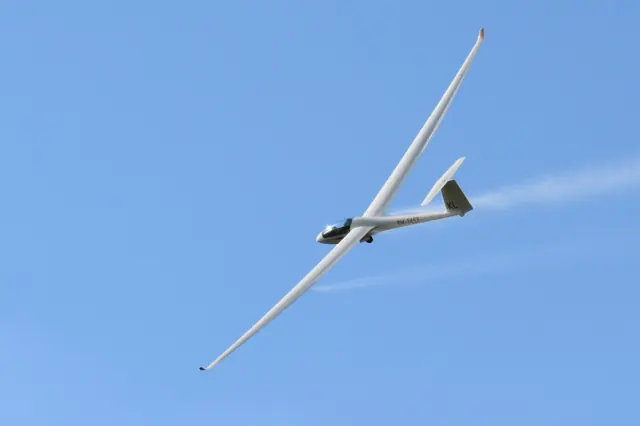
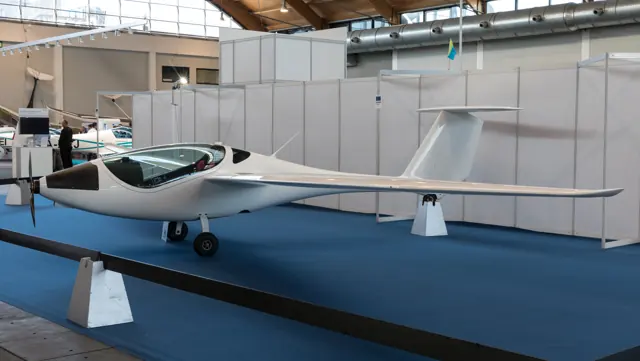
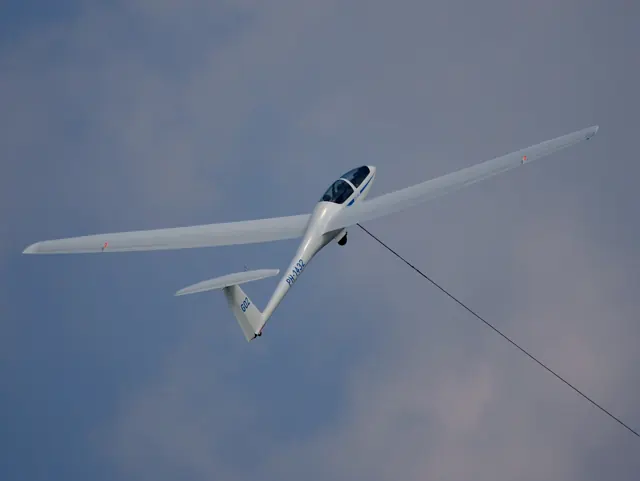
The DG-1000 first flew in 2000. Its long wings and T-tail surround a two-seat cockpit, with developments offering different spans and launch arrangements. The DG-1001 continued the line with further refinements. The DG-1001E adds a Front Electric Sustainer: a nose-mounted electric motor with folding propeller blades. DG describes it as a way to continue a soaring flight when lift becomes scarce.
Aircraft background
DG Aviation · Read more ↗Helping a new Academy fleet take its first steps
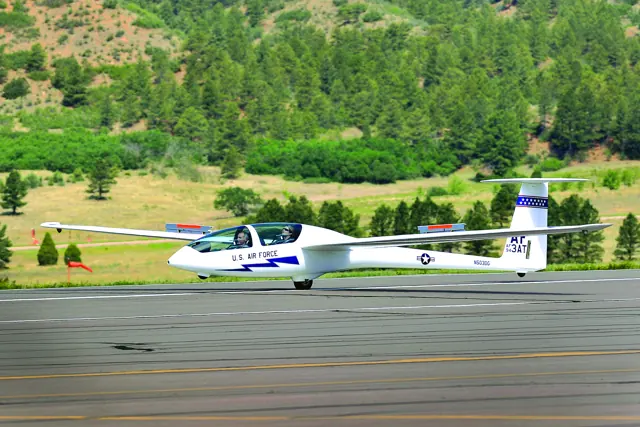
An invitation from Chris Klix brought Kasprzyk into the introduction of the Air Force Academy’s new gliders. At Edwards, he helped assemble the first aircraft and familiarise an experienced group of pilots with it. The acceptance flight with Jason Schott was followed by a busy programme of checkouts, fitted around increasingly gusty desert weather.
FlightLog · 2011. Unpowered DG-1001 Club military trainer at Edwards AFB, subsequently designated TG-16A; a family variant of the electric DG-1001E.
Stan Kasprzyk FlightLog · Read more ↗Into the cockpit
 YouTube
 CR GAMING · 4 min ·
Basics for using the glider engine DG1001E Neo MSFS
A simulator guide to operating the DG1001E Neo's propulsion system in MSFS.
Simulator · DG1001E Neo · MSFS
Watch on YouTube ↗Preview images are served by AirframeDB. Videos open on YouTube only when you choose to watch.
Meet DG Aviation DG-1001E
The DG-1000 first flew in 2000. Its long wings and T-tail surround a two-seat cockpit, with developments offering different spans and launch arrangements. The DG-1001 continued the line with further refinements.
The DG-1001E adds a Front Electric Sustainer: a nose-mounted electric motor with folding propeller blades. DG describes it as a way to continue a soaring flight when lift becomes scarce. The electric motor sustains flight but does not provide self-launching capability.
DG Aviation DG-1001E
Aircraft type designators
Use the code for the model you are flying. The linked authority lists the applicable aircraft.
DG Aviation DG-1001E — motorglider with a retractable engine or folding/retractable propeller; ICAO special designator
ICAO — special designators ↗Checked 2026-09-14History & design
Development milestones
First flight: July 2000
Wikipedia contributors · DG Flugzeugbau DG-1000 ↗DG Flugzeugbau DG-1000 · family/variant named by the source · Wikipedia revision 1366770132
Pilot accounts
Helping a new Academy fleet take its first steps
An invitation from Chris Klix brought Kasprzyk into the introduction of the Air Force Academy’s new gliders. At Edwards, he helped assemble the first aircraft and familiarise an experienced group of pilots with it. The acceptance flight with Jason Schott was followed by a busy programme of checkouts, fitted around increasingly gusty desert weather.
The final trainee’s flights left time to circle in thermals and enjoy the view over Edwards. For Kasprzyk, the work also offered the pleasure of flying in historic airspace and meeting the people who would teach in the new fleet. A later Academy visit with his wife Mary let him see more of those aircraft in their new home.
FlightLog · 2011. Unpowered DG-1001 Club military trainer at Edwards AFB, subsequently designated TG-16A; a family variant of the electric DG-1001E.
Read the full account · Stan Kasprzyk FlightLog ↗Finding a trainer that still makes a summer flight enjoyable
A hot, humid day at Bruchsal gave Marzinzik a practical introduction to the updated Club. Its low cockpit made getting aboard easy, and the large wheel softened the uneven grass during takeoff. In the air, he appreciated the quiet cockpit and ventilation as much as the aircraft’s response to a rising pocket of warm air.
Circling became an enjoyable exercise in following the lift through the wing’s feedback and small control adjustments. A second flight with shorter tips and a different balance explored a more demanding aerobatic configuration. His report describes a trainer with room to grow into cross-country and aerobatic work, while keeping those two tested configurations distinct.
aerokurier · August 2016. Two late-June flights at Bruchsal in the DG-1001 Club WL: 18 m winglets and 17.4 m aerobatic tips, rather than the electric E model.
Read the full account · aerokurier ↗A difficult thermal day within a welcoming week
At Narrogin’s Women in Gliding week, Becker flew the visiting DG1001 with coach Ailsa McMillan. They set out with a modest cross-country task in mind, but an hour of working weak, choppy thermals near the airfield persuaded them to abandon it and land. Becker still remembered the aircraft with affection.
That flight belonged to a week built around encouragement and shared goals. Visiting pilots helped others regain confidence, while volunteers prepared gliders, meals and accommodation. Even bright pink nail varnish became a way to break the ice on the opening evening.
Gliding Australia 34 · February–March 2017. Women in Gliding WA week beginning 30 October 2016; Thursday flight in GCWA’s DG1001 with Ailsa McMillan. Exact subtype not stated.
Read the full account · Gliding Australia ↗In your simulator
Systems, equipment and documentation for each developer’s aircraft.
Compare simulator versions →MSFS 2024DG-1001E
Microsoft Flight Simulator · Released
DG-1001E
Microsoft Flight Simulator · Released
MSFS 2020DG-1001E
Microsoft Flight Simulator · Released
DG-1001E
Microsoft Flight Simulator · Released
Aircraft specifications
Published figures for the named real-aircraft variant. Simulator equipment and performance can differ.
| Specification | Published value |
|---|---|
| Length | 8.57 m (28 ft 1 in) |
| Wingspan | 18 m (59 ft 1 in) with 20m option available |
| Height | 1.6 m (5 ft 3 in) |
| Wing area | 17.5 m² (188 sq ft) |
| Empty weight | 461 kg (1,016 lb) |
| Max takeoff weight | 750 kg (1,653 lb) |
| Propellers | 2-bladed DG fixed-pitch propeller |
| Maximum speed | 270 km/h (170 mph, 150 kn) |
| Cruise speed | 111 km/h (69 mph, 60 kn) |
| Stall speed | 68 km/h (42 mph, 37 kn) with 20m extension |
| Rate of climb | 1.3 m/s (260 ft/min) (engine on, still air) |
Manuals & resources
Find your next read
Choose a topic for a short introduction and a link to the original source. Simulator references identify the developer and edition they cover.
Pilot account
Helping a new Academy fleet take its first stepsFlightLog · 2011. Unpowered DG-1001 Club military trainer at Edwards AFB, subsequently designated TG-16A; a family variant of the electric DG-1001E.
An invitation from Chris Klix brought Kasprzyk into the introduction of the Air Force Academy’s new gliders. At Edwards, he helped assemble the first aircraft and familiarise an experienced group of pilots with it. The acceptance flight with Jason Schott was followed by a busy programme of checkouts, fitted around increasingly gusty desert weather. The final trainee’s flights left time to circle in thermals and enjoy the view over Edwards.
Stan Kasprzyk
Stan Kasprzyk FlightLog · Read the source ↗Finding a trainer that still makes a summer flight enjoyableaerokurier · August 2016. Two late-June flights at Bruchsal in the DG-1001 Club WL: 18 m winglets and 17.4 m aerobatic tips, rather than the electric E model.
A hot, humid day at Bruchsal gave Marzinzik a practical introduction to the updated Club. Its low cockpit made getting aboard easy, and the large wheel softened the uneven grass during takeoff. In the air, he appreciated the quiet cockpit and ventilation as much as the aircraft’s response to a rising pocket of warm air. Circling became an enjoyable exercise in following the lift through the wing’s feedback and small control adjustments.
Gerhard Marzinzik
aerokurier · Read the source ↗Read the original documentation from the people who created it. Manuals open on their publisher’s website.
Manual
Microsoft Flight Simulator aircraft manualsMicrosoft / aircraft developersAircraft background
DG Flugzeugbau DG-1000Wikipedia contributors · Research background · Wikipedia revision 1366770132 · retrieved 2026-09-12 DG1001E — The Smart Way HomeDG Aviation · Manufacturer description checked 2026-09-12; identifies the FES as a sustainer system.Resource
MSFS 2024 FAQ and edition aircraft inventoryMicrosoft MSFS 2020 FAQ and edition aircraft inventoryMicrosoftType designator
ICAO — special designatorsInternational Civil Aviation Organization · Glider and motorglider categories; checked 2026-09-14Built-in force-feedback profiles
Read the documentary basis, editable starting settings and remaining questions for the aircraft you fly. Each explanation refers to the exact profile revision shown.
Catalogue programme-20261022-v1 · 1 profile choice
DG Aviation DG-1001E
Free and Pro · Revision 2 · Partial review
MSFS 2024 · MSFS 2020
DG Aviation DG-1001E: The spring supplies the glider’s selected stick resistance.
DG Aviation DG-1001E
DG Aviation DG-1001E: The spring supplies the glider’s selected stick resistance.
Aircraft and simulator scope
- DG Aviation DG-1001E · MSFS 2024 · family starting point
- DG Aviation DG-1001E · MSFS 2020 · family starting point
DG Aviation DG-1001E · The manufacturer page identifies DG1001E and its optional 17.2-, 18- and 20-metre wings; standard equipment includes the 20-metre outer wing.
The simulator model and controls
The DG-1000 first flew in 2000. Its long wings and T-tail surround a two-seat cockpit, with developments offering different spans and launch arrangements. The DG-1001 continued the line with further refinements.
This starting point selects DG Aviation DG-1001E. Its aircraft-level settings do not select a particular developer’s custom systems.
How this profile feels
The spring supplies the glider’s selected stick resistance. Spring resistance builds with the selected airspeed response. A separate aerodynamic term adds speed-dependent control load.
Pitch relief is configured separately from electric-sustainer operation. Valid trim provides the configured pressure relief. Autopilot following is off.
Controls and trim
The two-seat DG-1001E adds a nose-mounted Front Electric Sustainer to the DG-1000/1001 glider line. Folding propeller blades, battery indications and motor controls extend a soaring flight when lift is scarce. The manufacturer distinguishes sustainer use from self-launching.
About the values
The gains are normalized profile settings. They describe the chosen effect balance; hand force depends on the device and its output limits. IAS references are tuning values rather than operating limits. Physical acceptance of this revision remains pending.
What the documentation establishes
The manufacturer page identifies DG1001E and its optional 17.2-, 18- and 20-metre wings; standard equipment includes the 20-metre outer wing.
Battery-powered brushless FES, folding propeller, double-height airbrakes and retractable gear are described; electric gear is an option.
The manufacturer's 270-km/h maximum-speed table is variant context without an IAS definition; it is not the starting point's 65-knot loading reference.
Documentary review and sources
These decisions describe the documentary basis and remaining gaps for this revision. Aircraft documentation and a starting setting describe different kinds of evidence.
Aircraft and variant
ReviewedThis starting point selects DG Aviation DG-1001E. Its aircraft-level settings do not select a particular developer’s custom systems.
Flight controls
Not yet reviewedThe two-seat DG-1001E adds a nose-mounted Front Electric Sustainer to the DG-1000/1001 glider line. Folding propeller blades, battery indications and motor controls extend a soaring flight when lift is scarce. The manufacturer distinguishes sustainer use from self-launching.
Trim
Not yet reviewedPitch relief is configured separately from electric-sustainer operation. Pitch authority 0.3 provides load relief and permitted centre movement; roll authority is 0.1.
Autopilot and stability
Not yet reviewedAutopilot following is off; the configured spring and load retain the hardware feel.
Equipment
ReviewedGear, flap and ground cues follow the selected settings and available simulator-reported states.
Speeds and limits
ReviewedThe indicated-speed references set the profile response scale; they are separate from aircraft operating limits.
Simulator integration
Not yet reviewedThe profile targets msfs2024, msfs2020. Add-on-specific controls use only the supported references configured by this profile.
Force-feedback settings
Not yet reviewedThe settings define the profile’s effect balance. Device output limits affect physical hand force.
Starting settings and their rationale
These configured values are starting estimates. The explanations describe what each setting controls; physical validation appears separately below.
| Setting | Starting value | What it controls and why |
|---|---|---|
| Spring strength | Starting value0.64 | What it controls and whyThe spring supplies the glider’s selected stick resistance. The baseline spring is 0.64. Its low-speed blend reaches baseline strength at 32.5 KIAS. |
| Master force gain | Starting value0.85 | What it controls and whyScales overall profile strength while preserving effect balance, subject to device and output limits. |
| Profile force gain | Starting value1 | What it controls and whyThe aerodynamic-load gain is 1 with an indicated-speed reference of 65 KIAS. This supplies speed-dependent loading alongside the spring. |
| Force tuning speed/reference | Starting value65.0 kt | What it controls and whySets the IAS reference for aerodynamic loading. It is an estimate, not published cruise TAS or a flight limit. |
| Spring response reference speed | Starting value32.5 kt | What it controls and whySets the IAS where the low-speed blend reaches baseline strength; high-speed stiffening also uses it. |
| Aileron force scale | Starting value0.6 | What it controls and whyRoll and pitch aerodynamic scales are 0.6 and 0.78, respectively. They set the aerodynamic axis balance. No custom spring-travel curve is enabled. |
| Elevator force scale | Starting value0.78 | What it controls and whyScales pitch aerodynamic loading; pitch spring travel and trim responses are separate settings. |
| Trim feel | Starting valueEnabled | What it controls and whyRetained for compatibility and group membership. Trim relief, rather than this flag, controls centre movement. |
| Trim relief | Starting valueEnabled | What it controls and whyAllows trim relief with supported control law and valid telemetry. Axis authorities set its amount. |
| Autopilot follow | Starting valueDisabled | What it controls and whyAutopilot following is off; the configured spring and load retain the hardware feel. |
| Autopilot neutral hold | Starting valueDisabled | What it controls and whyPermits centering hold during a supported AP state, separate from following a moving target. |
| Output force limit | Starting value0.55 | What it controls and whyCaps directed-force output. Native spring effects and device limits remain separate. |
All 44 starting settings and their rationale
The settings define the profile’s effect balance. Device output limits affect physical hand force.
| Setting | Starting value | What it controls and why |
|---|---|---|
| Spring strength | Starting value0.64 | What it controls and whyThe spring supplies the glider’s selected stick resistance. The baseline spring is 0.64. Its low-speed blend reaches baseline strength at 32.5 KIAS. |
| Spring deadband | Starting value0.04 | What it controls and whySets travel around the centre before the baseline spring resists. Smaller values engage it sooner. |
| Profile force gain | Starting value1 | What it controls and whyThe aerodynamic-load gain is 1 with an indicated-speed reference of 65 KIAS. This supplies speed-dependent loading alongside the spring. |
| Master force gain | Starting value0.85 | What it controls and whyScales overall profile strength while preserving effect balance, subject to device and output limits. |
| QBlend Enabled | Starting valueEnabled | What it controls and whyAllows baseline spring strength to rise with indicated airspeed where the control law permits it. |
| QSpring Minimum Factor | Starting value0.4 | What it controls and whySets low-speed spring strength as a fraction of baseline when blending is enabled. One keeps full strength. |
| QSpring Start Knots | Starting value9.1 kt | What it controls and whySets the IAS where the low-speed spring blend starts rising. This is a feel threshold, not a flight limit. |
| Spring response reference speed | Starting value32.5 kt | What it controls and whySets the IAS where the low-speed blend reaches baseline strength; high-speed stiffening also uses it. |
| Force tuning speed/reference | Starting value65.0 kt | What it controls and whySets the IAS reference for aerodynamic loading. It is an estimate, not published cruise TAS or a flight limit. |
| Airspeed spring stiffening gain | Starting value0.3 | What it controls and whyThe high-speed spring-stiffening gain is 0.3. It strengthens the permitted spring response above 32.5 KIAS, with the squared-speed ratio capped at 5. |
| Airspeed spring stiffening limit | Starting value5 | What it controls and whyLimits the squared airspeed ratio used for high-speed spring stiffening; it is not a device-force cap. |
| Aileron force scale | Starting value0.6 | What it controls and whyRoll and pitch aerodynamic scales are 0.6 and 0.78, respectively. They set the aerodynamic axis balance. No custom spring-travel curve is enabled. |
| Elevator force scale | Starting value0.78 | What it controls and whyScales pitch aerodynamic loading; pitch spring travel and trim responses are separate settings. |
| Output force limit | Starting value0.55 | What it controls and whyCaps directed-force output. Native spring effects and device limits remain separate. |
| Trim feel | Starting valueEnabled | What it controls and whyRetained for compatibility and group membership. Trim relief, rather than this flag, controls centre movement. |
| Trim relief | Starting valueEnabled | What it controls and whyAllows trim relief with supported control law and valid telemetry. Axis authorities set its amount. |
| Elevator Authority | Starting value0.3 | What it controls and whyPitch relief is configured separately from electric-sustainer operation. Pitch authority 0.3 provides load relief and permitted centre movement; roll authority is 0.1. |
| Aileron Authority | Starting value0.1 | What it controls and whyScales supported roll-trim relief and permitted centre movement. Zero removes roll response. |
| Force Trim Enabled | Starting valueDisabled | What it controls and whyEnables local force trim, separate from aircraft-owned trim and add-on integration qualification. |
| GLoad Enabled | Starting valueEnabled | What it controls and whyAllows load-factor changes to modify permitted spring laws. Passive fly-by-wire feel can suppress it. |
| Rate Damping Enabled | Starting valueEnabled | What it controls and whyEnables rate damping with the configured coefficients and control law. |
| Autopilot follow | Starting valueDisabled | What it controls and whyAutopilot following is off; the configured spring and load retain the hardware feel. |
| Autopilot follow authority | Starting value0.05 | What it controls and whySets admitted AP-follow gain, not a percentage of travel. Runtime ownership and input limits still apply. |
| Autopilot neutral hold | Starting valueDisabled | What it controls and whyPermits centering hold during a supported AP state, separate from following a moving target. |
| Autopilot neutral hold strength | Starting value0.6 | What it controls and whySets admitted AP neutral-hold strength; inactive while neutral hold is disabled. |
| Enabled | Starting valueEnabled | What it controls and whyEnables aerodynamic cues; each still needs nonzero strength and its simulator conditions. |
| Gain | Starting value0.4 | What it controls and whySets stall-buffet strength. Zero removes the cue without changing simulator stalls or warnings. |
| Gain | Starting value0 | What it controls and whySets high-Mach buffet strength; onset and full-strength thresholds are separate. |
| Gain | Starting value0 | What it controls and whySets flap buffet at the configured position and speed gates. Flap movement texture is separate. |
| Maximum flap index | Starting value1 | What it controls and whySets the final flap index for detent normalization. UP plus three detents uses maximum index3. |
| Minimum flap index | Starting value1 | What it controls and whySets the first flap detent that admits buffet; this is a handle index, not degrees. |
| Gain | Starting value0.1 | What it controls and whySets gear aerodynamic buffet; movement and ground-contact cues are separate. |
| Shaker Enabled | Starting valueDisabled | What it controls and whyPermits shaker at supported warning conditions; the switch does not establish aircraft equipment. |
| Stick shaker amplitude | Starting value0.5 | What it controls and whySets triggered shaker strength; inactive while the shaker feature is disabled. |
| Enabled | Starting valueEnabled | What it controls and whyEnables ground effects; each still needs its own strength and contact or motion telemetry. |
| Gain | Starting value0.3 | What it controls and whySets rolling texture strength, modified by speed, surface and undercarriage configuration. |
| Gain | Starting value0.3 | What it controls and whySets gear-bump texture during ground motion, separate from touchdown impact. |
| Gain | Starting value0.5 | What it controls and whySets landing-impact strength; landing telemetry and response shape determine the pulse. |
| Gain | Starting value0 | What it controls and whySets reverse-thrust vibration with valid reverser and engine conditions. Zero removes the cue. |
| Enabled | Starting valueEnabled | What it controls and whyEnables engine cues with nonzero settings and valid running-engine telemetry. |
| Gain | Starting value0 | What it controls and whySets estimated engine vibration using configured telemetry and response, not measured cockpit vibration. |
| Enabled | Starting valueEnabled | What it controls and whyEnables accessory cues with configured strengths and observed accessory movement. |
| Gain | Starting value0 | What it controls and whySets texture from observed flap movement; a command without movement does not establish the cue. |
| Gain | Starting value0.12 | What it controls and whySets texture from observed gear movement, separate from aerodynamic and touchdown effects. |
Limits and open questions
- Automatic control hook-ups and an accessibility rudder arrangement do not define the ordinary elevator and aileron force linkage.
- The listed trim-weight box concerns balance, not the cockpit elevator-trim mechanism.
- The page documents FES power controls but no automatic-flight system.
- The real-aircraft page does not establish simulator FES, trim or airbrake signals.
- Claims of improved thermal feedback are qualitative, with no measured stick or motor-vibration force.
- DG Aviation DG-1001E documentary evidence does not establish force-feedback hardware acceptance.
Physical validation
No physical force validation is recorded in this public catalogue for this revision. Documentary review and software checks do not establish how a particular device feels.
Discuss this aircraft (0)
Questions, observations and useful sources from the community.
No published discussions yet. Bring a question or share a useful source.
Open aircraft discussions →Content expanded · What’s new
Something missing or a source that needs attention?
Suggest a correction ↗