
Start here
A few places to begin, from the aircraft’s story to the people who fly it.
Meet the aircraft
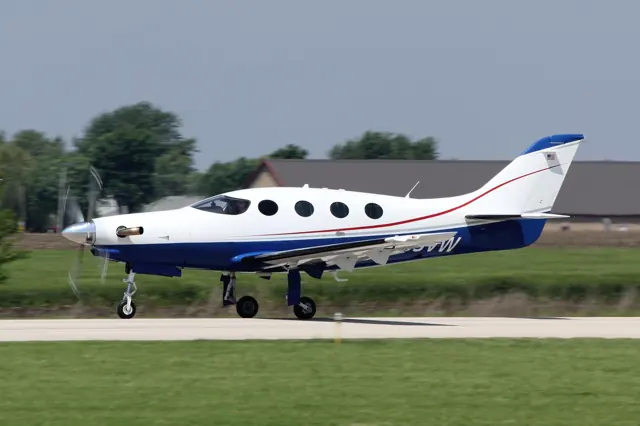
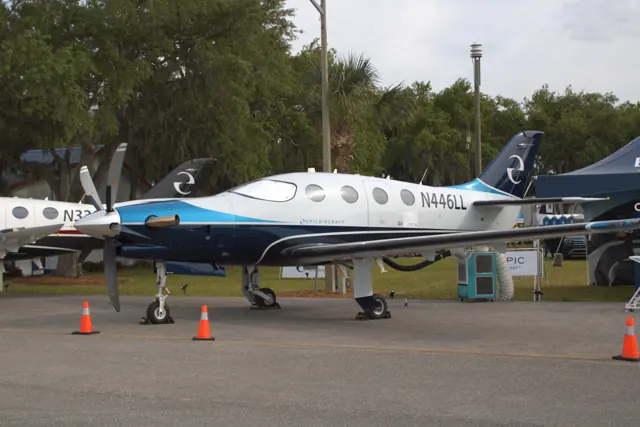
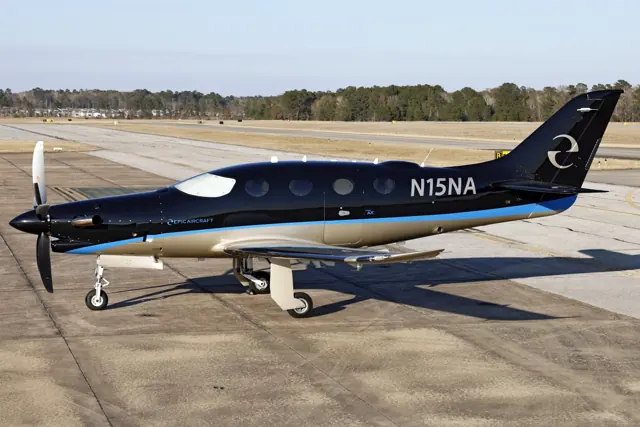
Epic developed the E1000 from its earlier kit-aircraft work into a certificated production aircraft. The low-wing composite airframe combines a compact cabin with a substantial nose-mounted turboprop. Later GX developments brought further equipment changes. Aerobask's X-Plane version pairs the aircraft with a G1000-based flight deck and developer-specific engine indications and systems.
Aircraft background
Wikipedia contributors · Read more ↗A coastal lunch stop and a high-altitude return
Bergqvist met King at Camarillo during the pandemic, when familiar greetings and restaurant plans had changed. She observed the outward flight to Half Moon Bay, where King fitted the E1000 into traffic behind a slower aircraft. A takeaway fish-and-chips lunch supplied the day’s social break before she took the controls for the journey home. At altitude she appreciated the cockpit layout and the aircraft’s travelling potential.
FLYING · August 2020. Early certified E1000 demonstration with Epic CEO Doug King; King flew the outward leg and Bergqvist flew the return.
FLYING / Epic Aircraft · Read more ↗Check the represented cockpit before comparing generations
The developer lists a GFC700-equipped G1000 implementation. Its published feature list does not establish the later AX autothrottle or Autoland features described in the real-aircraft accounts. The source also identifies configurable circuit-breaker reliability, emergency oxygen and simulated engine-start behaviour.
Epic E1000 G1000 · Aerobask · X-Plane 12
Aerobask · Read more ↗Into the cockpit
 YouTube
 Epic Aircraft · 7 min ·
Epic Aircraft E1000 AX Tour
Epic's CEO introduces the E1000 AX, a later member of the E1000 line.
Related variant · E1000 AX
Watch on YouTube ↗Preview images are served by AirframeDB. Videos open on YouTube only when you choose to watch.
Meet Epic E1000
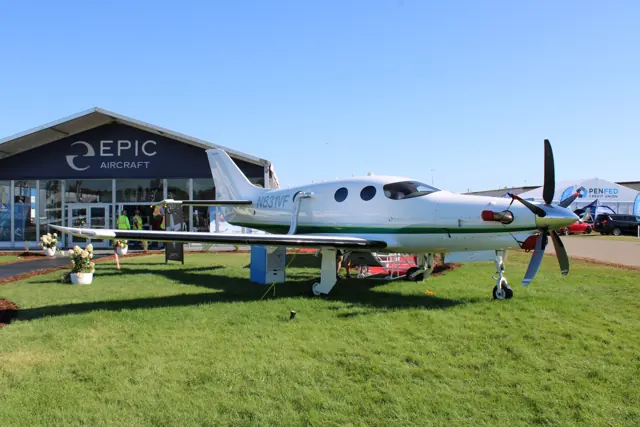
Epic developed the E1000 from its earlier kit-aircraft work into a certificated production aircraft. The low-wing composite airframe combines a compact cabin with a substantial nose-mounted turboprop. Later GX developments brought further equipment changes.
Aerobask's X-Plane version pairs the aircraft with a G1000-based flight deck and developer-specific engine indications and systems. The photograph depicts an E1000 GX. The add-on documentation identifies its simulated equipment.
Epic E1000
Epic Aircraft → · Explore the family →
Epic E1000
Wikipedia contributors · Epic E1000 ↗Aerobask · X-Plane 12 →Aircraft type designators
Use the code for the model you are flying. The linked authority lists the applicable aircraft.
History & design
Turning the LT into the certified E1000
Bergqvist’s 2020 report describes changes made during the transition from the kit-built LT, including more cabin headroom, an additional emergency exit and a revised engine inlet. The certified aircraft therefore involved changes to the airframe and cabin as well as the certification programme.
FLYING / Epic Aircraft · Epic E1000 ↗Contemporary comparison with the author’s earlier LT flight
The GX changes the flight-guidance installation
The GX introduced Garmin’s GFC 700 autopilot in place of the original E1000’s S-TEC 2100 installation, alongside a five-blade propeller. McDaniel’s review dates GX certification to July 2021. These changes identify the version he evaluated.
Twin & Turbine · Flight Review: Epic E1000 GX ↗Contemporary GX equipment and programme account
The AX adds another layer of automation
The 2026 AX report describes an autothrottle and Garmin Autoland within the G1000 NXi cockpit. Those later features belong to the AX configuration and should not be assumed from an E1000 or GX name alone.
AOPA Pilot · Epic E1000 AX ↗AOPA’s account of the later AX configuration
Development milestones
First flight: 19 December 2015
Developed from: Epic LT
Wikipedia contributors · Epic E1000 ↗Epic E1000 · family/variant named by the source · Wikipedia revision 1371429118
Pilot accounts
A coastal lunch stop and a high-altitude return
Bergqvist met King at Camarillo during the pandemic, when familiar greetings and restaurant plans had changed. She observed the outward flight to Half Moon Bay, where King fitted the E1000 into traffic behind a slower aircraft. A takeaway fish-and-chips lunch supplied the day’s social break before she took the controls for the journey home.
At altitude she appreciated the cockpit layout and the aircraft’s travelling potential. Some details still needed adjustment: the trim control took familiarisation, and her high seating position left the armrest too low. Handling work and a stick-pusher demonstration preceded a soft landing at Camarillo. Compared with the earlier Epic LT she had flown, the cabin also felt more accommodating.
FLYING · August 2020. Early certified E1000 demonstration with Epic CEO Doug King; King flew the outward leg and Bergqvist flew the return.
Read the full account · FLYING / Epic Aircraft ↗Two practice landings before the instrument arrival
Scheduling and pandemic disruption delayed McDaniel’s opportunity to fly the GX. Once at Bend, he found an easy working relationship with Peter King and appreciated the cockpit’s clear arrangement, particularly the way important information stayed within a comfortable line of sight. In flight, pitch and roll felt well balanced, although the rudder called for a more delicate touch.
The first landing was flatter than he intended. Further practice and King’s advice helped him adjust before the pair continued under instrument flight rules to Seattle. McDaniel hand-flew the final approach at Boeing Field and finished with a much more satisfactory touchdown.
Twin & Turbine · November 2022. E1000 GX flight from Bend to Seattle Boeing Field with training programme manager Peter King.
Read the full account · Twin & Turbine ↗From quiet Cedar Key to a busy approach
At Cedar Key, the view from the Epic’s high cockpit placed Hirschman above a quiet coastal scene of birds, marsh and water. The runway looked more demanding from that commanding position. Later in the flight, hand-flying during descent let him appreciate the aircraft’s balanced response and the amount of attention still required to manage power.
For the instrument approach, the autopilot helped with the changing trim as the undercarriage and flaps came out. Hirschman continued to manage the throttle himself, then took over for the last part of the arrival in choppy air. The landing gear softened the touchdown. The GX preceded the additional automation described in later AX reports.
AOPA Pilot · August 2024 issue, corrected online article. E1000 GX evaluation; this configuration predates the AX autothrottle installation.
Read the full account · AOPA Pilot ↗Holding formation and demonstrating a new autothrottle
Blackmer’s demonstration included formation with a Bonanza in turbulent air, where the AX’s autothrottle adjusted power as the aircraft stayed with the photography platform. The flight then moved to an instrument approach at Martinsburg near sunset. Hirschman watched the system manage speed while Blackmer demonstrated the approach and go-around, explaining how the added automation changed his workload.
By the return to Frederick it was dark, and the final landing included a crosswind. Blackmer hand-flew with the autothrottle still operating. Those events provide a specific account of the new system in use, alongside the pilot’s continuing control of the aircraft. Although the article also describes the AX’s Autoland equipment, the flight it recounts ends with Blackmer’s landing; it does not report an Autoland demonstration.
Demonstration flown by Blackmer and described by onboard reporter Dave Hirschman · AOPA Pilot, July 2026 issue. E1000 AX; Hirschman observed this flight.
Read the full account · AOPA Pilot ↗In your simulator
Systems, equipment and documentation for each developer’s aircraft.
X-Plane 12Epic E1000 G1000
Aerobask · Released
Epic E1000 G1000
Aerobask · Released
Aircraft specifications
Published figures for the named real-aircraft variant. Simulator equipment and performance can differ.
| Specification | Published value |
|---|---|
| Length | 35 ft 10 in (10.92 m) |
| Wingspan | 43 ft (13 m) |
| Height | 12 ft 6 in (3.81 m) |
| Wing area | 203 sq ft (18.9 m² ) |
| Empty weight | 4,600 lb (2,087 kg) |
| Gross weight | 8,000 lb (3,629 kg) |
| Powerplant | 1 × Pratt & Whitney Canada PT6A -67 turboprop , 1,200 hp (890 kW) |
| Propellers | 4-bladed Hartzell Propeller Full Reversing |
| Maximum speed | 333 kn (383 mph, 617 km/h) Max cruise |
| Cruise speed | 265 kn (305 mph, 491 km/h) Eco cruise |
| Range | 1,385–1,650 nmi (1,594–1,899 mi, 2,565–3,056 km) max cruise-eco cruise |
| Service ceiling | 34,000 ft (10,000 m) |
| Rate of climb | 4,000 ft/min (20 m/s) best |
Manuals & resources
Find your next read
Choose a topic for a short introduction and a link to the original source. Simulator references identify the developer and edition they cover.
Simulator documentation
Check the represented cockpit before comparing generationsEpic E1000 G1000 · Aerobask · X-Plane 12
The developer lists a GFC700-equipped G1000 implementation. Its published feature list does not establish the later AX autothrottle or Autoland features described in the real-aircraft accounts. The source also identifies configurable circuit-breaker reliability, emergency oxygen and simulated engine-start behaviour.
Developer-documented scope of this package
Aerobask · Read the source ↗A G1000 cockpit with turboprop-specific systemsEpic E1000 G1000 · Aerobask · X-Plane 12
The E1000 uses Laminar's GFC700 and G1000 as a base, with custom PT6 engine displays and an EIS500 standby instrument. Aerobask also documents de-icing systems and circuit breakers. These additions form Aerobask's E1000-specific cockpit.
Epic E1000 G1000 XP12 page · Enhanced Laminar G1000; other systems
Aerobask · Read the source ↗Interface options support different simulator setupsEpic E1000 G1000 · Aerobask · X-Plane 12
Aerobask provides optional mouse, scrollwheel and keyboard input aids for its G1000 installation, plus detachable displays. An AviTab tablet and separate options window expose preferences. Fuel, payload and settings are saved between flights, while the FMOD sound environment includes recordings from a real PT6 engine.
Gathered Aerobask XP12 product page; same work as the catalogue URL
Aerobask · Read the source ↗Pilot account
A coastal lunch stop and a high-altitude returnFLYING · August 2020. Early certified E1000 demonstration with Epic CEO Doug King; King flew the outward leg and Bergqvist flew the return.
Bergqvist met King at Camarillo during the pandemic, when familiar greetings and restaurant plans had changed. She observed the outward flight to Half Moon Bay, where King fitted the E1000 into traffic behind a slower aircraft. A takeaway fish-and-chips lunch supplied the day’s social break before she took the controls for the journey home. At altitude she appreciated the cockpit layout and the aircraft’s travelling potential.
Pia Bergqvist
FLYING / Epic Aircraft · Read the source ↗Two practice landings before the instrument arrivalTwin & Turbine · November 2022. E1000 GX flight from Bend to Seattle Boeing Field with training programme manager Peter King.
Scheduling and pandemic disruption delayed McDaniel’s opportunity to fly the GX. Once at Bend, he found an easy working relationship with Peter King and appreciated the cockpit’s clear arrangement, particularly the way important information stayed within a comfortable line of sight. In flight, pitch and roll felt well balanced, although the rudder called for a more delicate touch. The first landing was flatter than he intended.
Matthew McDaniel
Twin & Turbine · Read the source ↗Read the original documentation from the people who created it. Manuals open on their publisher’s website.
Manual
X-Plane aircraft and avionics manualsLaminar ResearchAircraft background
Epic E1000Wikipedia contributors · Research background · Wikipedia revision 1371429118 · retrieved 2026-09-12Resource
Epic E1000 G1000AerobaskType designator
ICAO Doc 8643 — aircraft type designatorsInternational Civil Aviation Organization · Public search data retrieved 2026-09-14; authority update 2026-09-03Built-in force-feedback profiles
Read the documentary basis, editable starting settings and remaining questions for the aircraft you fly. Each explanation refers to the exact profile revision shown.
Catalogue programme-20261022-v1 · 2 profile choices
Aerobask Epic E1000 G1000
Aerobask · Free and Pro · Revision 3 · Inherited starting point
X-Plane 12
Aerobask Epic E1000 G1000: The spring and sustained load supply the selected turboprop-aircraft resistance.
Epic E1000
Free and Pro · Revision 2 · Partial review
X-Plane 12
Epic E1000: The spring and sustained load supply the selected turboprop-aircraft resistance.
Epic E1000
Epic E1000: The spring and sustained load supply the selected turboprop-aircraft resistance.
Aircraft and simulator scope
- Epic E1000 · X-Plane 12 · family starting point
Epic E1000 · The source is Aerobask's E1000G product and claims certification-prototype performance, not every production E1000 revision.
The simulator model and controls
Epic developed the E1000 from its earlier kit-aircraft work into a certificated production aircraft. The low-wing composite airframe combines a compact cabin with a substantial nose-mounted turboprop. Later GX developments brought further equipment changes.
This starting point selects Epic E1000. Its aircraft-level settings do not select a particular developer’s custom systems.
How this profile feels
The spring and sustained load supply the selected turboprop-aircraft resistance. Spring resistance builds with the selected airspeed response. A separate aerodynamic term adds speed-dependent control load.
Pitch relief is configured separately from engine power and cabin pressure. Valid trim provides the configured pressure relief. Autopilot following is enabled for supported control references.
Controls and trim
The E1000 is a pressurized single-turboprop aircraft with a composite airframe and glass cockpit. The reviewed products separate engine and avionics fits while preserving the aircraft’s flight-control configuration.
About the values
The gains are normalized profile settings. They describe the chosen effect balance; hand force depends on the device and its output limits. IAS references are tuning values rather than operating limits. Physical acceptance of this revision remains pending.
What the documentation establishes
The source is Aerobask's E1000G product and claims certification-prototype performance, not every production E1000 revision.
A GFC700 autopilot is explicitly listed.
The page identifies a PT6-67A turboprop and engine-startup features; exact flap and gear schedules remain undocumented.
Documentary review and sources
These decisions describe the documentary basis and remaining gaps for this revision. Aircraft documentation and a starting setting describe different kinds of evidence.
Aircraft and variant
ReviewedThis starting point selects Epic E1000. Its aircraft-level settings do not select a particular developer’s custom systems.
Flight controls
Not yet reviewedThe E1000 is a pressurized single-turboprop aircraft with a composite airframe and glass cockpit. The reviewed products separate engine and avionics fits while preserving the aircraft’s flight-control configuration.
Trim
Not yet reviewedPitch relief is configured separately from engine power and cabin pressure. Pitch authority 0.3 provides load relief and permitted centre movement; roll authority is 0.14.
Autopilot and stability
ReviewedFollowing is on at 0.1 authority when a supported, valid autopilot control reference is available.
Equipment
ReviewedGear, flap and ground cues follow the selected settings and available simulator-reported states.
Speeds and limits
Not yet reviewedThe indicated-speed references set the profile response scale; they are separate from aircraft operating limits.
Simulator integration
Not yet reviewedThe profile targets xplane12. Add-on-specific controls use only the supported references configured by this profile.
Force-feedback settings
Not yet reviewedThe settings define the profile’s effect balance. Device output limits affect physical hand force.
Starting settings and their rationale
These configured values are starting estimates. The explanations describe what each setting controls; physical validation appears separately below.
| Setting | Starting value | What it controls and why |
|---|---|---|
| Spring strength | Starting value0.74 | What it controls and whyThe spring and sustained load supply the selected turboprop-aircraft resistance. The baseline spring is 0.74. Its low-speed blend reaches baseline strength at 90 KIAS. |
| Master force gain | Starting value0.85 | What it controls and whyScales overall profile strength while preserving effect balance, subject to device and output limits. |
| Profile force gain | Starting value0.68 | What it controls and whyThe aerodynamic-load gain is 0.68 with an indicated-speed reference of 220 KIAS. This supplies speed-dependent loading alongside the spring. |
| Force tuning speed/reference | Starting value220.0 kt | What it controls and whySets the IAS reference for aerodynamic loading. It is an estimate, not published cruise TAS or a flight limit. |
| Spring response reference speed | Starting value90 kt | What it controls and whySets the IAS where the low-speed blend reaches baseline strength; high-speed stiffening also uses it. |
| Aileron force scale | Starting value0.72 | What it controls and whyRoll and pitch aerodynamic scales are 0.72 and 1, respectively. They set the aerodynamic axis balance. No custom spring-travel curve is enabled. |
| Elevator force scale | Starting value1.0 | What it controls and whyScales pitch aerodynamic loading; pitch spring travel and trim responses are separate settings. |
| Trim feel | Starting valueEnabled | What it controls and whyRetained for compatibility and group membership. Trim relief, rather than this flag, controls centre movement. |
| Trim relief | Starting valueEnabled | What it controls and whyAllows trim relief with supported control law and valid telemetry. Axis authorities set its amount. |
| Autopilot follow | Starting valueEnabled | What it controls and whyFollowing is on at 0.1 authority when a supported, valid autopilot control reference is available. |
| Autopilot neutral hold | Starting valueDisabled | What it controls and whyPermits centering hold during a supported AP state, separate from following a moving target. |
| Output force limit | Starting value0.55 | What it controls and whyCaps directed-force output. Native spring effects and device limits remain separate. |
All 44 starting settings and their rationale
The settings define the profile’s effect balance. Device output limits affect physical hand force.
| Setting | Starting value | What it controls and why |
|---|---|---|
| Spring strength | Starting value0.74 | What it controls and whyThe spring and sustained load supply the selected turboprop-aircraft resistance. The baseline spring is 0.74. Its low-speed blend reaches baseline strength at 90 KIAS. |
| Spring deadband | Starting value0.05 | What it controls and whySets travel around the centre before the baseline spring resists. Smaller values engage it sooner. |
| Profile force gain | Starting value0.68 | What it controls and whyThe aerodynamic-load gain is 0.68 with an indicated-speed reference of 220 KIAS. This supplies speed-dependent loading alongside the spring. |
| Master force gain | Starting value0.85 | What it controls and whyScales overall profile strength while preserving effect balance, subject to device and output limits. |
| QBlend Enabled | Starting valueEnabled | What it controls and whyAllows baseline spring strength to rise with indicated airspeed where the control law permits it. |
| QSpring Minimum Factor | Starting value0.55 | What it controls and whySets low-speed spring strength as a fraction of baseline when blending is enabled. One keeps full strength. |
| QSpring Start Knots | Starting value20 kt | What it controls and whySets the IAS where the low-speed spring blend starts rising. This is a feel threshold, not a flight limit. |
| Spring response reference speed | Starting value90 kt | What it controls and whySets the IAS where the low-speed blend reaches baseline strength; high-speed stiffening also uses it. |
| Force tuning speed/reference | Starting value220.0 kt | What it controls and whySets the IAS reference for aerodynamic loading. It is an estimate, not published cruise TAS or a flight limit. |
| Airspeed spring stiffening gain | Starting value0.1 | What it controls and whyThe high-speed spring-stiffening gain is 0.1. It strengthens the permitted spring response above 90 KIAS, with the squared-speed ratio capped at 5. |
| Airspeed spring stiffening limit | Starting value5 | What it controls and whyLimits the squared airspeed ratio used for high-speed spring stiffening; it is not a device-force cap. |
| Aileron force scale | Starting value0.72 | What it controls and whyRoll and pitch aerodynamic scales are 0.72 and 1, respectively. They set the aerodynamic axis balance. No custom spring-travel curve is enabled. |
| Elevator force scale | Starting value1.0 | What it controls and whyScales pitch aerodynamic loading; pitch spring travel and trim responses are separate settings. |
| Output force limit | Starting value0.55 | What it controls and whyCaps directed-force output. Native spring effects and device limits remain separate. |
| Trim feel | Starting valueEnabled | What it controls and whyRetained for compatibility and group membership. Trim relief, rather than this flag, controls centre movement. |
| Trim relief | Starting valueEnabled | What it controls and whyAllows trim relief with supported control law and valid telemetry. Axis authorities set its amount. |
| Elevator Authority | Starting value0.3 | What it controls and whyPitch relief is configured separately from engine power and cabin pressure. Pitch authority 0.3 provides load relief and permitted centre movement; roll authority is 0.14. |
| Aileron Authority | Starting value0.14 | What it controls and whyScales supported roll-trim relief and permitted centre movement. Zero removes roll response. |
| Force Trim Enabled | Starting valueDisabled | What it controls and whyEnables local force trim, separate from aircraft-owned trim and add-on integration qualification. |
| GLoad Enabled | Starting valueEnabled | What it controls and whyAllows load-factor changes to modify permitted spring laws. Passive fly-by-wire feel can suppress it. |
| Rate Damping Enabled | Starting valueEnabled | What it controls and whyEnables rate damping with the configured coefficients and control law. |
| Autopilot follow | Starting valueEnabled | What it controls and whyFollowing is on at 0.1 authority when a supported, valid autopilot control reference is available. |
| Autopilot follow authority | Starting value0.1 | What it controls and whySets admitted AP-follow gain, not a percentage of travel. Runtime ownership and input limits still apply. |
| Autopilot neutral hold | Starting valueDisabled | What it controls and whyPermits centering hold during a supported AP state, separate from following a moving target. |
| Autopilot neutral hold strength | Starting value0.6 | What it controls and whySets admitted AP neutral-hold strength; inactive while neutral hold is disabled. |
| Enabled | Starting valueEnabled | What it controls and whyEnables aerodynamic cues; each still needs nonzero strength and its simulator conditions. |
| Gain | Starting value0.28 | What it controls and whySets stall-buffet strength. Zero removes the cue without changing simulator stalls or warnings. |
| Gain | Starting value0 | What it controls and whySets high-Mach buffet strength; onset and full-strength thresholds are separate. |
| Gain | Starting value0.14 | What it controls and whySets flap buffet at the configured position and speed gates. Flap movement texture is separate. |
| Maximum flap index | Starting value2 | What it controls and whySets the final flap index for detent normalization. UP plus three detents uses maximum index3. |
| Minimum flap index | Starting value2 | What it controls and whySets the first flap detent that admits buffet; this is a handle index, not degrees. |
| Gain | Starting value0.1 | What it controls and whySets gear aerodynamic buffet; movement and ground-contact cues are separate. |
| Shaker Enabled | Starting valueDisabled | What it controls and whyPermits shaker at supported warning conditions; the switch does not establish aircraft equipment. |
| Stick shaker amplitude | Starting value0.5 | What it controls and whySets triggered shaker strength; inactive while the shaker feature is disabled. |
| Enabled | Starting valueEnabled | What it controls and whyEnables ground effects; each still needs its own strength and contact or motion telemetry. |
| Gain | Starting value0.42 | What it controls and whySets rolling texture strength, modified by speed, surface and undercarriage configuration. |
| Gain | Starting value0.32 | What it controls and whySets gear-bump texture during ground motion, separate from touchdown impact. |
| Gain | Starting value0.82 | What it controls and whySets landing-impact strength; landing telemetry and response shape determine the pulse. |
| Gain | Starting value0.48 | What it controls and whySets reverse-thrust vibration with valid reverser and engine conditions. Zero removes the cue. |
| Enabled | Starting valueEnabled | What it controls and whyEnables engine cues with nonzero settings and valid running-engine telemetry. |
| Gain | Starting value0.06 | What it controls and whySets estimated engine vibration using configured telemetry and response, not measured cockpit vibration. |
| Enabled | Starting valueEnabled | What it controls and whyEnables accessory cues with configured strengths and observed accessory movement. |
| Gain | Starting value0.12 | What it controls and whySets texture from observed flap movement; a command without movement does not establish the cue. |
| Gain | Starting value0.12 | What it controls and whySets texture from observed gear movement, separate from aerodynamic and touchdown effects. |
Limits and open questions
- The Aerobask page does not describe E1000 control linkage.
- No trim mechanism is documented by this page.
- The claim above 325 knots has no IAS loading definition and cannot establish a220 knot control reference.
- Avionics features and XP12 availability do not define external autopilot or trim signal semantics.
- Real engine audio samples and flight-model tuning do not quantify yoke forces or vibration magnitudes.
- Epic E1000 documentary evidence does not establish force-feedback hardware acceptance.
Physical validation
No physical force validation is recorded in this public catalogue for this revision. Documentary review and software checks do not establish how a particular device feels.
Discuss this aircraft (0)
Questions, observations and useful sources from the community.
No published discussions yet. Bring a question or share a useful source.
Open aircraft discussions →Content expanded · What’s new
Something missing or a source that needs attention?
Suggest a correction ↗