

Start here
A few places to begin, from the aircraft’s story to the people who fly it.
Meet the aircraft
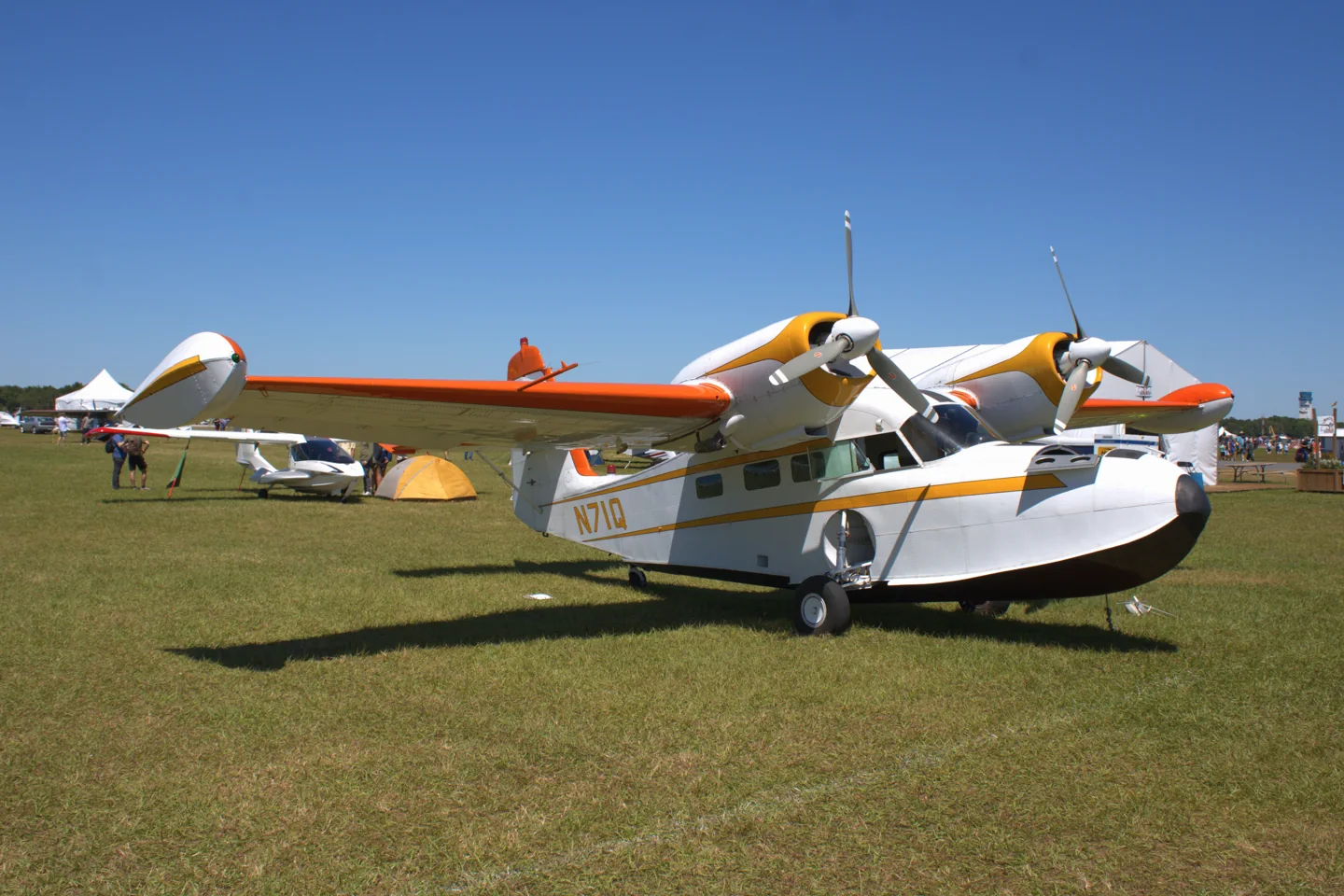
The Widgeon was Grumman's smaller counterpart to the Goose. High-mounted twin engines kept the propellers above the water, and retractable landing gear allowed it to use runways as well as sheltered waterways.
Aircraft background
Wikipedia contributors · Read more ↗Learning that a flying boat is also a boat
Schiff flew Merrill Wien’s Widgeon and received a water checkout at Lake Whatcom. He was struck by its substantial construction and by a cockpit whose overhead and rear controls needed deliberate familiarisation. On land the aircraft seemed a well-mannered taildragger; on water it demanded a different set of skills, including managing direction through unequal engine thrust.
Real G-44 with modified propellers; water checkout with Merrill Wien. AOPA Pilot, March 2000.
AOPA · Read more ↗Manual and ground handling information
The product page links its v1.2 pilot manual and a changelog, and gives separate advice about ground steering for users without toe brakes. That file-based adjustment is explicitly limited to non-Marketplace versions because Marketplace files are protected. Consult the developer’s current instructions for the installed version.
Grumman G-44A Widgeon · Flysimware · MSFS 2020 · MSFS 2024
Flysimware · Read more ↗Into the cockpit
 YouTube
 Iain Christie · 17 min ·
Grumman Widgeon First Impressions and Review
A first-impressions review of Flysimware's Widgeon in MSFS 2020.
Simulator · Flysimware Widgeon · MSFS 2020
Watch on YouTube ↗Preview images are served by AirframeDB. Videos open on YouTube only when you choose to watch.
Meet Grumman G-44 Widgeon
The Widgeon was Grumman's smaller counterpart to the Goose. High-mounted twin engines kept the propellers above the water, and retractable landing gear allowed it to use runways as well as sheltered waterways.
Military versions served as the J4F and Gosling. The postwar G-44A revised the hull. Many surviving aircraft have replacement engines or propellers, including Super Widgeon conversions that differ from the original Ranger-powered configuration.
Grumman G-44 Widgeon
Grumman → · Explore the family →
Grumman G-44 Widgeon
Wikipedia contributors · Grumman G-44 Widgeon background ↗Flysimware · MSFS 2020 · MSFS 2024 →Aircraft type designators
Use the code for the model you are flying. The linked authority lists the applicable aircraft.
History & design
A smaller Grumman amphibian
The G-44 first flew in 1940 and entered both American and British wartime service. Civil use continued after the war, alongside production of the revised G-44A. Later engine conversions helped keep the family useful long after original production ended.
Wikipedia contributors · Grumman G-44 Widgeon background ↗Real-aircraft family history
Pilot accounts
Learning that a flying boat is also a boat
Schiff flew Merrill Wien’s Widgeon and received a water checkout at Lake Whatcom. He was struck by its substantial construction and by a cockpit whose overhead and rear controls needed deliberate familiarisation. On land the aircraft seemed a well-mannered taildragger; on water it demanded a different set of skills, including managing direction through unequal engine thrust.
The account’s most vivid contrast is between pleasant airborne handling and the precision needed on the water. Schiff describes learning to control the Widgeon’s tendency to porpoise and watching Wien manage it with practised ease. The tested aircraft’s constant-speed, feathering propellers are an important qualification: its behaviour cannot be assumed to represent every original fixed-pitch Widgeon.
Real G-44 with modified propellers; water checkout with Merrill Wien. AOPA Pilot, March 2000.
Read the full account · AOPA ↗A Super Widgeon kept flying through generations
Van Wagnen’s Widgeon had already lived through commercial service, damage and rebuilding before he and his wife bought it. He had first flown it much earlier and had helped maintain it before becoming its owner. Their work turned it into a Super Widgeon with more powerful Lycoming engines, additional fuel capacity and plans for a modernised panel.
In Hirschman’s account of a friendly comparison with a Piaggio Gull, Van Wagnen values the Grumman’s light, responsive handling and the possibility of long trips. He is equally clear about its demanding water behaviour. Training and familiarity are central to his affection for it. This is a highly modified survivor, with a personal history and configuration that distinguish it from a stock Ranger-powered aircraft.
Owner/instructor’s converted Super Widgeon; AOPA Pilot, December 2021. Reported interview, not a stock G-44A flight test.
Read the full account · AOPA ↗Surprisingly light controls and an airpark welcome
Rankin’s hour in Chester Lawson’s Widgeon was part of his project to experience a different aircraft each week. He found it unexpectedly responsive, with light control inputs producing a clear reaction rather than the soft response he associated with some other aircraft. He also recognised that this sensitivity could invite overcorrection from someone unfamiliar with it.
The visit introduced him to life at Spruce Creek as well as to the aircraft. He had expected to drive from Lawson’s home to an airport, only to discover a neighbourhood where hangars and taxiways formed part of everyday life. His account combines a brief handling impression with the social world around seaplane flying; it does not identify a stock engine or propeller configuration.
One-hour real Widgeon flight with instructor Chester Lawson, reported by SRQ on 23 February 2017.
Read the full account · SRQ Magazine ↗In your simulator
Systems, equipment and documentation for each developer’s aircraft.
MSFS 2020 · MSFS 2024Grumman G-44A Widgeon
Flysimware · Released
Grumman G-44A Widgeon
Flysimware · Released
Aircraft specifications
Published figures for the named real-aircraft variant. Simulator equipment and performance can differ.
| Specification | Published value |
|---|---|
| Wingspan | 40 ft Original G-44; not a Super Widgeon conversion |
| Length | 31 ft 1 in Original G-44; not a Super Widgeon conversion |
| Original engines | 2 × Ranger L-440-5 Original G-44; not a Super Widgeon conversion |
| Rated power | 200 hp per engine Original G-44; not a Super Widgeon conversion |
Manuals & resources
Find your next read
Choose a topic for a short introduction and a link to the original source. Simulator references identify the developer and edition they cover.
Simulator documentation
Manual and ground handling informationGrumman G-44A Widgeon · Flysimware · MSFS 2020 · MSFS 2024
The product page links its v1.2 pilot manual and a changelog, and gives separate advice about ground steering for users without toe brakes. That file-based adjustment is explicitly limited to non-Marketplace versions because Marketplace files are protected. Consult the developer’s current instructions for the installed version.
Product page: User Manuals and Latest Info
Flysimware · Read the source ↗Hydraulic levers and hardware assignmentsGrumman G-44A Widgeon · Flysimware · MSFS 2020 · MSFS 2024
The manual describes an optional realistic hydraulic mode on the copilot-seat clipboard. In this mode, the gear and flap levers must be held while the mechanism moves; releasing a lever closes its valve. Flysimware warns that a persistent hardware gear assignment conflicts with this option and recommends a separate control profile. The documented manual pump and lever-lock tabs provide a simulated alternative when the left-engine hydraulic supply is unavailable.
Flysimware manual v1.2, MSFS 2020: clipboard settings and hydraulic operation; developer documentation, not a runtime hardware test.
Flysimware · Read the source ↗An amphibian with a conventional instrument panelGrumman G-44A Widgeon · Flysimware · MSFS 2020 · MSFS 2024
Flysimware represents the postwar G-44A. Its listed equipment includes a GNS 530, GTX327 transponder, GMA 340 audio panel, ADF and DME. The developer also describes an interactive copilot checklist, rain and icing effects, and parked-aircraft equipment such as chocks, tie-downs and engine plugs.
Official MSFS product description
Flysimware · Read the source ↗Pilot account
Learning that a flying boat is also a boatReal G-44 with modified propellers; water checkout with Merrill Wien. AOPA Pilot, March 2000.
Schiff flew Merrill Wien’s Widgeon and received a water checkout at Lake Whatcom. He was struck by its substantial construction and by a cockpit whose overhead and rear controls needed deliberate familiarisation. On land the aircraft seemed a well-mannered taildragger; on water it demanded a different set of skills, including managing direction through unequal engine thrust. The account’s most vivid contrast is between pleasant airborne handling and the precision needed on the water.
Barry Schiff
AOPA · Read the source ↗A Super Widgeon kept flying through generationsOwner/instructor’s converted Super Widgeon; AOPA Pilot, December 2021. Reported interview, not a stock G-44A flight test.
Van Wagnen’s Widgeon had already lived through commercial service, damage and rebuilding before he and his wife bought it. He had first flown it much earlier and had helped maintain it before becoming its owner. Their work turned it into a Super Widgeon with more powerful Lycoming engines, additional fuel capacity and plans for a modernised panel.
Brian Van Wagnen, interviewed by Dave Hirschman
AOPA · Read the source ↗Read the original documentation from the people who created it. Manuals open on their publisher’s website.
Manual
Grumman G-44A Widgeon MSFS 2020 manual v1.2 (ZIP)Flysimware · Official v1.2 manual, pages 6–8; checked 13 September 2026. Describes the MSFS 2020 product.Aircraft background
Grumman G-44 Widgeon backgroundWikipedia contributors · Family background; article retrieved 13 September 2026Product page
Grumman G-44A WidgeonFlysimware · Official product page; checked 13 September 2026Type designator
ICAO Doc 8643 — aircraft type designatorsInternational Civil Aviation Organization · Public search data retrieved 2026-09-14; authority update 2026-09-03Built-in force-feedback profiles
Read the documentary basis, editable starting settings and remaining questions for the aircraft you fly. Each explanation refers to the exact profile revision shown.
Catalogue programme-20261022-v1 · 3 profile choices
Flysimware G44A Widgeon
Flysimware · Free and Pro · Revision 5 · Inherited starting point
MSFS 2020 · MSFS 2024
Flysimware G44A Widgeon: The selected yoke resistance accompanies the smaller amphibious twin.
Flysimware G44A Widgeon Water Operations
Flysimware · Free and Pro · Revision 2 · Inherited starting point
MSFS 2020 · MSFS 2024
Flysimware G44A Widgeon Water Operations: The selected yoke resistance accompanies the smaller amphibious twin.
Grumman G-44 Widgeon
Free and Pro · Revision 2 · Partial review
MSFS 2024 · MSFS 2020
Grumman G-44 Widgeon: The selected yoke resistance accompanies the smaller amphibious twin.
Flysimware G44A Widgeon
Flysimware G44A Widgeon: The selected yoke resistance accompanies the smaller amphibious twin.
Aircraft and simulator scope
- Flysimware G44A Widgeon · Flysimware · MSFS 2020 · Add-on starting point
- Flysimware G44A Widgeon · Flysimware · MSFS 2024 · Add-on starting point
The simulator model and controls
The Widgeon was Grumman's smaller counterpart to the Goose. High-mounted twin engines kept the propellers above the water, and retractable landing gear allowed it to use runways as well as sheltered waterways.
This profile selects Flysimware G44A Widgeon for MSFS 2020, MSFS 2024.
How this profile feels
The selected yoke resistance accompanies the smaller amphibious twin. Spring resistance builds with the selected airspeed response. A separate aerodynamic term adds speed-dependent control load.
Elevator trim gives pitch relief; rudder trim remains a yaw-axis function. Valid trim provides the configured pressure relief. Autopilot following is off.
Controls and trim
The G-44A Widgeon is an amphibious piston twin. The reviewed cockpit manual identifies separate elevator/rudder trim levers, gear and flap controls and a hydraulic-pressure indication, with automatic-flight controls on the main panel.
The selected implementation
Flysimware’s G44A uses separately documented gear/flap and elevator/rudder trim levers; runway and water choices retain contact scope.
About the values
The gains are normalized profile settings. They describe the chosen effect balance; hand force depends on the device and its output limits. IAS references are tuning values rather than operating limits. Physical acceptance of this revision remains pending.
Documentary review and sources
These decisions describe the documentary basis and remaining gaps for this revision. Aircraft documentation and a starting setting describe different kinds of evidence.
Aircraft and variant
InheritedThis profile selects Flysimware G44A Widgeon for MSFS 2020, MSFS 2024.
Flight controls
InheritedThe G-44A Widgeon is an amphibious piston twin. The reviewed cockpit manual identifies separate elevator/rudder trim levers, gear and flap controls and a hydraulic-pressure indication, with automatic-flight controls on the main panel.
Trim
InheritedElevator trim gives pitch relief; rudder trim remains a yaw-axis function. Pitch authority 0.3 provides load relief and permitted centre movement; roll authority is 0.
Autopilot and stability
InheritedAutopilot following is off; the configured spring and load retain the hardware feel.
Equipment
InheritedFlysimware’s G44A uses separately documented gear/flap and elevator/rudder trim levers; runway and water choices retain contact scope.
Speeds and limits
InheritedThe indicated-speed references set the profile response scale; they are separate from aircraft operating limits.
Simulator integration
InheritedThe profile targets msfs2020, msfs2024. Add-on-specific controls use only the supported references configured by this profile.
Force-feedback settings
InheritedThe settings define the profile’s effect balance. Device output limits affect physical hand force.
Starting settings and their rationale
These configured values are starting estimates. The explanations describe what each setting controls; physical validation appears separately below.
| Setting | Starting value | What it controls and why |
|---|---|---|
| Spring strength | Starting value0.74 | What it controls and whyThe selected yoke resistance accompanies the smaller amphibious twin. The baseline spring is 0.74. Its low-speed blend reaches baseline strength at 57.5 KIAS. |
| Master force gain | Starting value0.85 | What it controls and whyScales overall profile strength while preserving effect balance, subject to device and output limits. |
| Profile force gain | Starting value0.8 | What it controls and whyThe aerodynamic-load gain is 0.8 with an indicated-speed reference of 115 KIAS. This supplies speed-dependent loading alongside the spring. |
| Force tuning speed/reference | Starting value115 kt | What it controls and whySets the IAS reference for aerodynamic loading. It is an estimate, not published cruise TAS or a flight limit. |
| Spring response reference speed | Starting value57.5 kt | What it controls and whySets the IAS where the low-speed blend reaches baseline strength; high-speed stiffening also uses it. |
| Aileron force scale | Starting value0.72 | What it controls and whyRoll and pitch aerodynamic scales are 0.72 and 1, respectively. They set the aerodynamic axis balance. No custom spring-travel curve is enabled. |
| Elevator force scale | Starting value1 | What it controls and whyScales pitch aerodynamic loading; pitch spring travel and trim responses are separate settings. |
| Trim feel | Starting valueDisabled | What it controls and whyRetained for compatibility and group membership. Trim relief, rather than this flag, controls centre movement. |
| Trim relief | Starting valueEnabled | What it controls and whyAllows trim relief with supported control law and valid telemetry. Axis authorities set its amount. |
| Autopilot follow | Starting valueDisabled | What it controls and whyAutopilot following is off; the configured spring and load retain the hardware feel. |
| Autopilot neutral hold | Starting valueDisabled | What it controls and whyPermits centering hold during a supported AP state, separate from following a moving target. |
| Output force limit | Starting value0.55 | What it controls and whyCaps directed-force output. Native spring effects and device limits remain separate. |
All 44 starting settings and their rationale
The settings define the profile’s effect balance. Device output limits affect physical hand force.
| Setting | Starting value | What it controls and why |
|---|---|---|
| Spring strength | Starting value0.74 | What it controls and whyThe selected yoke resistance accompanies the smaller amphibious twin. The baseline spring is 0.74. Its low-speed blend reaches baseline strength at 57.5 KIAS. |
| Spring deadband | Starting value0.045 | What it controls and whySets travel around the centre before the baseline spring resists. Smaller values engage it sooner. |
| Profile force gain | Starting value0.8 | What it controls and whyThe aerodynamic-load gain is 0.8 with an indicated-speed reference of 115 KIAS. This supplies speed-dependent loading alongside the spring. |
| Master force gain | Starting value0.85 | What it controls and whyScales overall profile strength while preserving effect balance, subject to device and output limits. |
| QBlend Enabled | Starting valueEnabled | What it controls and whyAllows baseline spring strength to rise with indicated airspeed where the control law permits it. |
| QSpring Minimum Factor | Starting value0.5 | What it controls and whySets low-speed spring strength as a fraction of baseline when blending is enabled. One keeps full strength. |
| QSpring Start Knots | Starting value8 kt | What it controls and whySets the IAS where the low-speed spring blend starts rising. This is a feel threshold, not a flight limit. |
| Spring response reference speed | Starting value57.5 kt | What it controls and whySets the IAS where the low-speed blend reaches baseline strength; high-speed stiffening also uses it. |
| Force tuning speed/reference | Starting value115 kt | What it controls and whySets the IAS reference for aerodynamic loading. It is an estimate, not published cruise TAS or a flight limit. |
| Airspeed spring stiffening gain | Starting value0.15 | What it controls and whyThe high-speed spring-stiffening gain is 0.15. It strengthens the permitted spring response above 57.5 KIAS, with the squared-speed ratio capped at 5. |
| Airspeed spring stiffening limit | Starting value5 | What it controls and whyLimits the squared airspeed ratio used for high-speed spring stiffening; it is not a device-force cap. |
| Aileron force scale | Starting value0.72 | What it controls and whyRoll and pitch aerodynamic scales are 0.72 and 1, respectively. They set the aerodynamic axis balance. No custom spring-travel curve is enabled. |
| Elevator force scale | Starting value1 | What it controls and whyScales pitch aerodynamic loading; pitch spring travel and trim responses are separate settings. |
| Output force limit | Starting value0.55 | What it controls and whyCaps directed-force output. Native spring effects and device limits remain separate. |
| Trim feel | Starting valueDisabled | What it controls and whyRetained for compatibility and group membership. Trim relief, rather than this flag, controls centre movement. |
| Trim relief | Starting valueEnabled | What it controls and whyAllows trim relief with supported control law and valid telemetry. Axis authorities set its amount. |
| Elevator Authority | Starting value0.3 | What it controls and whyElevator trim gives pitch relief; rudder trim remains a yaw-axis function. Pitch authority 0.3 provides load relief and permitted centre movement; roll authority is 0. |
| Aileron Authority | Starting value0 | What it controls and whyScales supported roll-trim relief and permitted centre movement. Zero removes roll response. |
| Force Trim Enabled | Starting valueDisabled | What it controls and whyEnables local force trim, separate from aircraft-owned trim and add-on integration qualification. |
| GLoad Enabled | Starting valueEnabled | What it controls and whyAllows load-factor changes to modify permitted spring laws. Passive fly-by-wire feel can suppress it. |
| Rate Damping Enabled | Starting valueEnabled | What it controls and whyEnables rate damping with the configured coefficients and control law. |
| Autopilot follow | Starting valueDisabled | What it controls and whyAutopilot following is off; the configured spring and load retain the hardware feel. |
| Autopilot follow authority | Starting value0.1 | What it controls and whySets admitted AP-follow gain, not a percentage of travel. Runtime ownership and input limits still apply. |
| Autopilot neutral hold | Starting valueDisabled | What it controls and whyPermits centering hold during a supported AP state, separate from following a moving target. |
| Autopilot neutral hold strength | Starting value0.6 | What it controls and whySets admitted AP neutral-hold strength; inactive while neutral hold is disabled. |
| Enabled | Starting valueEnabled | What it controls and whyEnables aerodynamic cues; each still needs nonzero strength and its simulator conditions. |
| Gain | Starting value0.35 | What it controls and whySets stall-buffet strength. Zero removes the cue without changing simulator stalls or warnings. |
| Gain | Starting value0 | What it controls and whySets high-Mach buffet strength; onset and full-strength thresholds are separate. |
| Gain | Starting value0 | What it controls and whySets flap buffet at the configured position and speed gates. Flap movement texture is separate. |
| Maximum flap index | Starting value3 | What it controls and whySets the final flap index for detent normalization. UP plus three detents uses maximum index3. |
| Minimum flap index | Starting value2 | What it controls and whySets the first flap detent that admits buffet; this is a handle index, not degrees. |
| Gain | Starting value0 | What it controls and whySets gear aerodynamic buffet; movement and ground-contact cues are separate. |
| Shaker Enabled | Starting valueDisabled | What it controls and whyPermits shaker at supported warning conditions; the switch does not establish aircraft equipment. |
| Stick shaker amplitude | Starting value0.5 | What it controls and whySets triggered shaker strength; inactive while the shaker feature is disabled. |
| Enabled | Starting valueEnabled | What it controls and whyEnables ground effects; each still needs its own strength and contact or motion telemetry. |
| Gain | Starting value0.4 | What it controls and whySets rolling texture strength, modified by speed, surface and undercarriage configuration. |
| Gain | Starting value0.25 | What it controls and whySets gear-bump texture during ground motion, separate from touchdown impact. |
| Gain | Starting value0.65 | What it controls and whySets landing-impact strength; landing telemetry and response shape determine the pulse. |
| Gain | Starting value0 | What it controls and whySets reverse-thrust vibration with valid reverser and engine conditions. Zero removes the cue. |
| Enabled | Starting valueEnabled | What it controls and whyEnables engine cues with nonzero settings and valid running-engine telemetry. |
| Gain | Starting value0.12 | What it controls and whySets estimated engine vibration using configured telemetry and response, not measured cockpit vibration. |
| Enabled | Starting valueEnabled | What it controls and whyEnables accessory cues with configured strengths and observed accessory movement. |
| Gain | Starting value0.12 | What it controls and whySets texture from observed flap movement; a command without movement does not establish the cue. |
| Gain | Starting value0.12 | What it controls and whySets texture from observed gear movement, separate from aerodynamic and touchdown effects. |
Limits and open questions
- Flysimware G44A Widgeon; msfs2020, msfs2024. Previously observed titles and implementation identifiers are retained; installed matching remains deferred.
- Manual amphibian yoke; nominal aerodynamic feel is an estimate rather than a measured linkage calibration.
- Pitch relief only; rudder trim is not lateral yoke trim.
- Depicted AP functions establish equipment, not a servo demand contract. AP servo-follow and neutral hold remain disabled; engagement indicators are not force-demand signals.
- G44A piston amphibian. This wheel-operation profile uses wheel ground cues; it does not automatically infer water contact from gear position. Select a water configuration for water operations.
- 115 KIAS is an estimated feel reference, not cruise TAS or a certified limit. No invented Mach, VNE or weight scheduling.
- Read-only native telemetry for aircraft motion and accessory positions. Custom switches, display animations and mode lamps are not calibrated servo targets. No unverified LVars/datarefs or simulator writes.
- Spring 0.74; lateral scale 0.72; trim authorities 0.3/0; per-axis output cap 0.55. Editable engineering estimates, not measured hand forces. No body-rate torque, surface following or fabricated hydraulic-failure loads.
- New physical and installed-product checks deferred by owner. Existing separately recorded acceptance retains its original device, simulator, add-on and version limits. Source review does not broaden custom telemetry acceptance.
- Only actual accessory position changes drive movement texture; static drag and command-triggered kicks are disabled. Select and save an aircraft default when telemetry lacks a discriminating developer/configuration identity.
Physical validation
No physical force validation is recorded in this public catalogue for this revision. Documentary review and software checks do not establish how a particular device feels.
Discuss this aircraft (0)
Questions, observations and useful sources from the community.
No published discussions yet. Bring a question or share a useful source.
Open aircraft discussions →Content expanded · What’s new
Something missing or a source that needs attention?
Suggest a correction ↗