

Start here
A few places to begin, from the aircraft’s story to the people who fly it.
Meet the aircraft
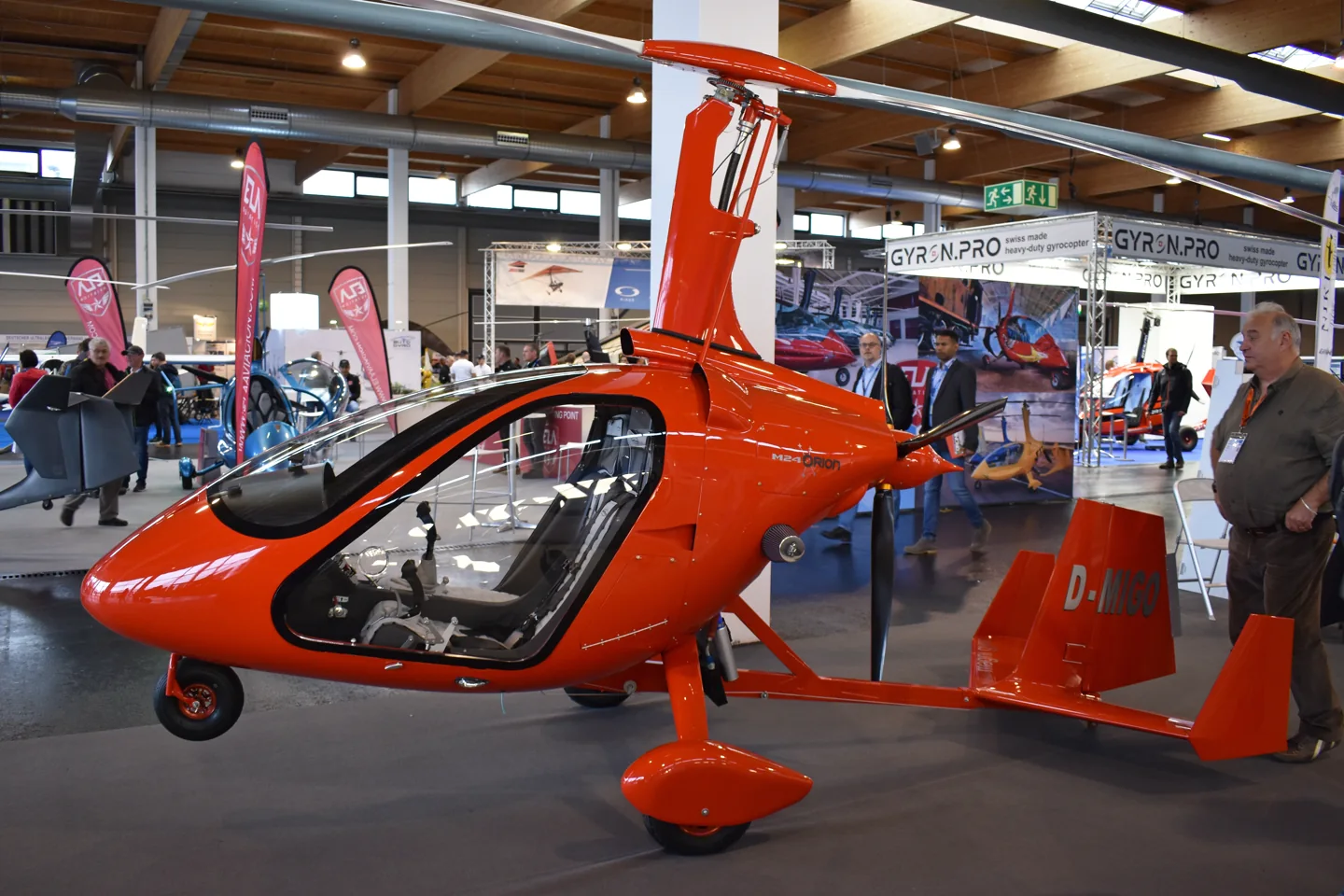
Magni Gyro developed the M-24 Orion in Italy with an enclosed side-by-side two-seat cabin and a pusher propeller. Its freely turning rotor produces lift through autorotation in flight; a separate engine-driven propeller provides forward thrust. The enclosed cabin differs from the open-frame layout of many recreational gyroplanes.
Aircraft background
Wikipedia contributors · Read more ↗A comfortable cabin still takes some getting used to
Schröder’s visit to Mona Hörig’s school began with a turn in its airline simulator before the real gyroplane flight. The new M24’s cabin impressed him with comfortable seating, ventilation and room between the occupants. Hörig’s demonstration then showed him an aircraft he found quiet, steady and enjoyable to look out from. Changing seats brought a less polished performance of his own.
fliegermagazin · December 2014. Rotax 914 M24 Orion VIP with Mona Hörig at Mannheim; the MSFS 2024 manual describes a different Rotax 915 installation.
fliegermagazin · Read more ↗Rotor preparation has dedicated controls
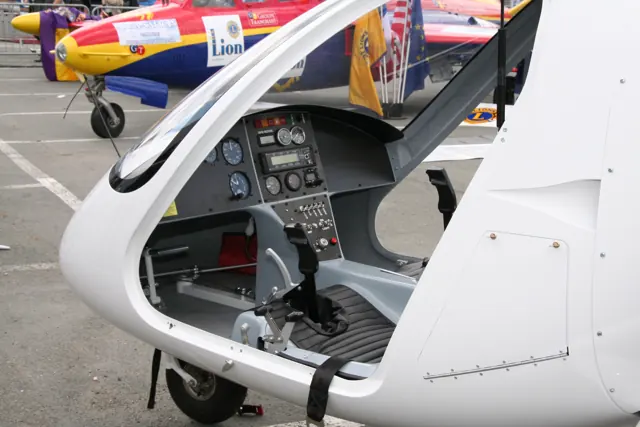
The cockpit guide identifies separate pre-rotator, rotor-brake and trim controls. Its checklist also calls out the cyclic-retaining cable.
M-24 Orion · Microsoft Flight Simulator · MSFS 2024
Microsoft / aircraft developers · Read more ↗Into the cockpit
 YouTube
 1st Gen Pilot · 27 min ·
Flying the Magni M24 Orion Gyroplane – Full Flight Experience!
A pilot shares a Magni M24 flight with cockpit and exterior views.
Real aircraft · Magni M-24 Orion
Watch on YouTube ↗Preview images are served by AirframeDB. Videos open on YouTube only when you choose to watch.
Meet Magni M-24 Orion
Magni Gyro developed the M-24 Orion in Italy with an enclosed side-by-side two-seat cabin and a pusher propeller. Its freely turning rotor produces lift through autorotation in flight; a separate engine-driven propeller provides forward thrust. The enclosed cabin differs from the open-frame layout of many recreational gyroplanes.
Magni M-24 Orion
Magni Gyro → · Explore the family →
Magni M-24 Orion
Wikipedia contributors · Magni M-24 Orion ↗Microsoft Flight Simulator · MSFS 2024 →Aircraft type designators
Use the code for the model you are flying. The linked authority lists the applicable aircraft.
History & design
Development milestones
First flight: 2008
Developed from: XM-23 Orion
Wikipedia contributors · Magni M-24 Orion ↗Magni M-24 Orion · family/variant named by the source · Wikipedia revision 1344662234
Pilot accounts
A comfortable cabin still takes some getting used to
Schröder’s visit to Mona Hörig’s school began with a turn in its airline simulator before the real gyroplane flight. The new M24’s cabin impressed him with comfortable seating, ventilation and room between the occupants. Hörig’s demonstration then showed him an aircraft he found quiet, steady and enjoyable to look out from.
Changing seats brought a less polished performance of his own. Used to sitting on the centreline of tandem aircraft, he struggled to judge his position from the Orion’s left seat. The unfamiliar view affected both departure and landing, though Hörig remained relaxed beside him. He left enthusiastic enough to joke about taking the gyroplane home instead of returning by train.
fliegermagazin · December 2014. Rotax 914 M24 Orion VIP with Mona Hörig at Mannheim; the MSFS 2024 manual describes a different Rotax 915 installation.
Read the full account · fliegermagazin ↗Side-by-side seating changes the conversation in flight
For Boxall, an enclosed cabin took some adjustment after years in open gyroplanes. Without the bulky flying clothes and wind around his head, he found himself looking outside more easily. The M24’s steady cruise also left him free to enjoy the surroundings, while its side-by-side seating made sharing that view much simpler.
The arrangement mattered to his teaching as well. Instead of describing a button from behind a student, he could point to it directly. Landing required a change in his own habits, because the sight picture differed from a tandem gyroplane.
Light Aviation · December 2010. Instructor’s M24 Orion report, including early flights in Italy; Rotax 914 configuration, separate from the later MSFS 2024 installation.
Read the full account · Light Aviation / Gyro Aviation ↗A helicopter pilot reconsiders the point of a gyroplane
Ramsay began the day wondering whether a gyroplane combined the disadvantages of both helicopters and aeroplanes. In the enclosed M24 with Steve Boxall, she discovered a kind of flying that challenged that view. The controls felt heavy compared with those of the helicopters she knew, but the outlook and freedom to explore soon became absorbing.
Slow flight, a steep descent and the short landing gave her a different appreciation of the aircraft’s purpose. She still preferred other types for particular journeys and off-airfield outings, especially within her own budget. Yet she ended the day ready to admit that her starting judgment had missed something: the gyroplane offered a distinctive way to enjoy simply being airborne.
FLYER · August 2023. Morning M24 flight at Popham with Steve Boxall; Rotax 914 aircraft. Her afternoon flight in an open M16 is a separate part of the article.
Read the full account · FLYER ↗In your simulator
Systems, equipment and documentation for each developer’s aircraft.
MSFS 2024M-24 Orion
Microsoft Flight Simulator · Released
M-24 Orion
Microsoft Flight Simulator · Released
Aircraft specifications
Published figures for the named real-aircraft variant. Simulator equipment and performance can differ.
| Specification | Published value |
|---|---|
| Length | 4.33 m (14 ft 2 in) overall |
| Height | 2.80 m (9 ft 2 in) |
| Empty weight | 285 kg (628 lb) |
| Max takeoff weight | 450 kg (992 lb) European ultralight limit (USA:550 kg) |
| Powerplant | 1 × Rotax 914ULS flat four, 85 kW (114 hp) |
| Main rotor diameter | 8.23 m (27 ft 0 in) |
| Main rotor area | 53.20 m² (572.6 sq ft) |
| Propellers | 3-bladed Arplast, ground adjustable pitch, 1.70 m (5 ft 7 in) diameter |
| Maximum speed | 194 km/h (121 mph, 105 kn) |
| Cruise speed | 145 km/h (90 mph, 78 kn) |
| Service ceiling | 4,000 m (13,000 ft) service |
| Rate of climb | 5.0 m/s (980 ft/min) at sea level |
Manuals & resources
Find your next read
Choose a topic for a short introduction and a link to the original source. Simulator references identify the developer and edition they cover.
Simulator documentation
Rotor preparation has dedicated controlsM-24 Orion · Microsoft Flight Simulator · MSFS 2024
The cockpit guide identifies separate pre-rotator, rotor-brake and trim controls. Its checklist also calls out the cyclic-retaining cable.
Manual PDF pages 5 and 7; documented cockpit
Microsoft / aircraft developers · Read the source ↗A compact panel retains a yaw stringM-24 Orion · Microsoft Flight Simulator · MSFS 2024
The illustrated panel includes an engine-information system, radio, transponder and conventional flight instruments, with a yaw string ahead of the cockpit.
Manual PDF page 5
Microsoft / aircraft developers · Read the source ↗Gyroplane controls rather than helicopter controlsM-24 Orion · Microsoft Flight Simulator · MSFS 2024
The M24 manual identifies dual centre sticks, a trim button, a mechanical pre-rotator and a rotor brake. The pre-rotator is used to spin up the rotor; it is not the same as a helicopter's continuously engine-driven rotor system. The cockpit diagram shows how these distinct controls are arranged.
Archived simulator manual; installed package revision not observed · PDF pp.3,5
Microsoft / aircraft developers · Read the source ↗This manual describes a Rotax 915 installationM-24 Orion · Microsoft Flight Simulator · MSFS 2024
The MSFS 2024 guide identifies a Rotax 915 iS engine. The older Rotax 914 aircraft in the pilot accounts are different configurations.
Official M24 manual · PDF page 6
Microsoft / aircraft developers · Read the source ↗Pilot account
A comfortable cabin still takes some getting used tofliegermagazin · December 2014. Rotax 914 M24 Orion VIP with Mona Hörig at Mannheim; the MSFS 2024 manual describes a different Rotax 915 installation.
Schröder’s visit to Mona Hörig’s school began with a turn in its airline simulator before the real gyroplane flight. The new M24’s cabin impressed him with comfortable seating, ventilation and room between the occupants. Hörig’s demonstration then showed him an aircraft he found quiet, steady and enjoyable to look out from. Changing seats brought a less polished performance of his own.
Axel Schröder
fliegermagazin · Read the source ↗Side-by-side seating changes the conversation in flightLight Aviation · December 2010. Instructor’s M24 Orion report, including early flights in Italy; Rotax 914 configuration, separate from the later MSFS 2024 installation.
For Boxall, an enclosed cabin took some adjustment after years in open gyroplanes. Without the bulky flying clothes and wind around his head, he found himself looking outside more easily. The M24’s steady cruise also left him free to enjoy the surroundings, while its side-by-side seating made sharing that view much simpler. The arrangement mattered to his teaching as well. Instead of describing a button from behind a student, he could point to it directly.
Steve Boxall
Light Aviation / Gyro Aviation · Read the source ↗Read the original documentation from the people who created it. Manuals open on their publisher’s website.
Manual
Magni M24Microsoft / aircraft developers Microsoft Flight Simulator aircraft manualsMicrosoft / aircraft developersAircraft background
Magni M-24 OrionWikipedia contributors · Research background · Wikipedia revision 1344662234 · retrieved 2026-09-12Resource
MSFS 2024 FAQ and edition aircraft inventoryMicrosoftType designator
ICAO Doc 8643 — aircraft type designatorsInternational Civil Aviation Organization · Public search data retrieved 2026-09-14; authority update 2026-09-03Built-in force-feedback profiles
Read the documentary basis, editable starting settings and remaining questions for the aircraft you fly. Each explanation refers to the exact profile revision shown.
Catalogue programme-20261022-v1 · 1 profile choice
Magni M-24 Orion
Free and Pro · Revision 1 · Partial review
MSFS 2024
Magni M-24 Orion: The spring supplies gyroplane cyclic resistance.
Magni M-24 Orion
Magni M-24 Orion: The spring supplies gyroplane cyclic resistance.
Aircraft and simulator scope
- Magni M-24 Orion · MSFS 2024 · family starting point
Magni M-24 Orion · The Microsoft/BlueMesh manual identifies the M24 Orion Plus simulator with a Rotax 915iS configuration.
The simulator model and controls
Magni Gyro developed the M-24 Orion in Italy with an enclosed side-by-side two-seat cabin and a pusher propeller. Its freely turning rotor produces lift through autorotation in flight; a separate engine-driven propeller provides forward thrust. The enclosed cabin differs from the open-frame layout of many recreational gyroplanes.
This starting point selects Magni M-24 Orion. Its aircraft-level settings do not select a particular developer’s custom systems.
How this profile feels
The spring supplies gyroplane cyclic resistance. The spring stays independent of airspeed. A separate aerodynamic term adds speed-dependent control load.
The selected neutral is separate from propulsion and autorotation. Pitch-trim relief is off. Autopilot following is off.
Controls and trim
The enclosed-cabin M-24 gyroplane has an autorotating lift rotor and a separate engine-driven propeller for forward thrust. Its rotor and engine describe different rotating systems.
About the values
The gains are normalized profile settings. They describe the chosen effect balance; hand force depends on the device and its output limits. IAS references are tuning values rather than operating limits. Physical acceptance of this revision remains pending.
What the documentation establishes
The Microsoft/BlueMesh manual identifies the M24 Orion Plus simulator with a Rotax 915iS configuration.
The guide describes aluminum-tube linkages between rotor actuators and cockpit controls, supporting direct rotor-head control rather than a conventional airplane elevator model.
A trim button is explicitly listed and the checklist references trim. The spring, actuator or force-neutral mechanism remains unspecified.
Fixed tricycle gear, a mechanical prerotator, rotor brake and four-blade pusher propeller are documented. The rotor and thrust propeller must remain distinct.
The manual lists 55–75 knots cruise and a VNE of 105 without a unit or airspeed basis in that entry. The retained 90-knot reference is not a directly sourced cruise IAS.
Documentary review and sources
These decisions describe the documentary basis and remaining gaps for this revision. Aircraft documentation and a starting setting describe different kinds of evidence.
Aircraft and variant
ReviewedThis starting point selects Magni M-24 Orion. Its aircraft-level settings do not select a particular developer’s custom systems.
Flight controls
ReviewedThe enclosed-cabin M-24 gyroplane has an autorotating lift rotor and a separate engine-driven propeller for forward thrust. Its rotor and engine describe different rotating systems.
Trim
ReviewedThe selected neutral is separate from propulsion and autorotation. Pitch relief is off, with stored authority 0.3; roll authority is 0.3.
Autopilot and stability
Not yet reviewedAutopilot following is off; the configured spring and load retain the hardware feel.
Equipment
ReviewedGear, flap and ground cues follow the selected settings and available simulator-reported states.
Speeds and limits
ReviewedThe indicated-speed references set the profile response scale; they are separate from aircraft operating limits.
Simulator integration
Not yet reviewedThe profile targets msfs2024. Add-on-specific controls use only the supported references configured by this profile.
Force-feedback settings
Not yet reviewedThe settings define the profile’s effect balance. Device output limits affect physical hand force.
Starting settings and their rationale
These configured values are starting estimates. The explanations describe what each setting controls; physical validation appears separately below.
| Setting | Starting value | What it controls and why |
|---|---|---|
| Spring strength | Starting value0.22 | What it controls and whyThe spring supplies gyroplane cyclic resistance. The baseline spring is 0.22. Low-speed spring blending is off. |
| Master force gain | Starting value0.85 | What it controls and whyScales overall profile strength while preserving effect balance, subject to device and output limits. |
| Profile force gain | Starting value0.35 | What it controls and whyThe aerodynamic-load gain is 0.35 with an indicated-speed reference of 90 KIAS. This supplies speed-dependent loading alongside the spring. |
| Force tuning speed/reference | Starting value90.0 kt | What it controls and whySets the IAS reference for aerodynamic loading. It is an estimate, not published cruise TAS or a flight limit. |
| Spring response reference speed | Starting value45.0 kt | What it controls and whySets the IAS where the low-speed blend reaches baseline strength; high-speed stiffening also uses it. |
| Aileron force scale | Starting value0.22 | What it controls and whyRoll and pitch aerodynamic scales are 0.22 and 0.22, respectively. They set the aerodynamic axis balance. No custom spring-travel curve is enabled. |
| Elevator force scale | Starting value0.22 | What it controls and whyScales pitch aerodynamic loading; pitch spring travel and trim responses are separate settings. |
| Trim feel | Starting valueDisabled | What it controls and whyRetained for compatibility and group membership. Trim relief, rather than this flag, controls centre movement. |
| Trim relief | Starting valueDisabled | What it controls and whyAllows trim relief with supported control law and valid telemetry. Axis authorities set its amount. |
| Autopilot follow | Starting valueDisabled | What it controls and whyAutopilot following is off; the configured spring and load retain the hardware feel. |
| Autopilot neutral hold | Starting valueDisabled | What it controls and whyPermits centering hold during a supported AP state, separate from following a moving target. |
| Output force limit | Starting value0.55 | What it controls and whyCaps directed-force output. Native spring effects and device limits remain separate. |
All 44 starting settings and their rationale
The settings define the profile’s effect balance. Device output limits affect physical hand force.
| Setting | Starting value | What it controls and why |
|---|---|---|
| Spring strength | Starting value0.22 | What it controls and whyThe spring supplies gyroplane cyclic resistance. The baseline spring is 0.22. Low-speed spring blending is off. |
| Spring deadband | Starting value0.02 | What it controls and whySets travel around the centre before the baseline spring resists. Smaller values engage it sooner. |
| Profile force gain | Starting value0.35 | What it controls and whyThe aerodynamic-load gain is 0.35 with an indicated-speed reference of 90 KIAS. This supplies speed-dependent loading alongside the spring. |
| Master force gain | Starting value0.85 | What it controls and whyScales overall profile strength while preserving effect balance, subject to device and output limits. |
| QBlend Enabled | Starting valueDisabled | What it controls and whyAllows baseline spring strength to rise with indicated airspeed where the control law permits it. |
| QSpring Minimum Factor | Starting value1 | What it controls and whySets low-speed spring strength as a fraction of baseline when blending is enabled. One keeps full strength. |
| QSpring Start Knots | Starting value12.6 kt | What it controls and whySets the IAS where the low-speed spring blend starts rising. This is a feel threshold, not a flight limit. |
| Spring response reference speed | Starting value45.0 kt | What it controls and whySets the IAS where the low-speed blend reaches baseline strength; high-speed stiffening also uses it. |
| Force tuning speed/reference | Starting value90.0 kt | What it controls and whySets the IAS reference for aerodynamic loading. It is an estimate, not published cruise TAS or a flight limit. |
| Airspeed spring stiffening gain | Starting value0 | What it controls and whyThe high-speed spring-stiffening gain is 0. No additional speed-driven stiffening is added; this does not disable independent aerodynamic loading. |
| Airspeed spring stiffening limit | Starting value5 | What it controls and whyLimits the squared airspeed ratio used for high-speed spring stiffening; it is not a device-force cap. |
| Aileron force scale | Starting value0.22 | What it controls and whyRoll and pitch aerodynamic scales are 0.22 and 0.22, respectively. They set the aerodynamic axis balance. No custom spring-travel curve is enabled. |
| Elevator force scale | Starting value0.22 | What it controls and whyScales pitch aerodynamic loading; pitch spring travel and trim responses are separate settings. |
| Output force limit | Starting value0.55 | What it controls and whyCaps directed-force output. Native spring effects and device limits remain separate. |
| Trim feel | Starting valueDisabled | What it controls and whyRetained for compatibility and group membership. Trim relief, rather than this flag, controls centre movement. |
| Trim relief | Starting valueDisabled | What it controls and whyAllows trim relief with supported control law and valid telemetry. Axis authorities set its amount. |
| Elevator Authority | Starting value0.3 | What it controls and whyThe selected neutral is separate from propulsion and autorotation. Pitch relief is off, with stored authority 0.3; roll authority is 0.3. |
| Aileron Authority | Starting value0.3 | What it controls and whyScales supported roll-trim relief and permitted centre movement. Zero removes roll response. |
| Force Trim Enabled | Starting valueDisabled | What it controls and whyEnables local force trim, separate from aircraft-owned trim and add-on integration qualification. |
| GLoad Enabled | Starting valueDisabled | What it controls and whyAllows load-factor changes to modify permitted spring laws. Passive fly-by-wire feel can suppress it. |
| Rate Damping Enabled | Starting valueEnabled | What it controls and whyEnables rate damping with the configured coefficients and control law. |
| Autopilot follow | Starting valueDisabled | What it controls and whyAutopilot following is off; the configured spring and load retain the hardware feel. |
| Autopilot follow authority | Starting value0.05 | What it controls and whySets admitted AP-follow gain, not a percentage of travel. Runtime ownership and input limits still apply. |
| Autopilot neutral hold | Starting valueDisabled | What it controls and whyPermits centering hold during a supported AP state, separate from following a moving target. |
| Autopilot neutral hold strength | Starting value0.6 | What it controls and whySets admitted AP neutral-hold strength; inactive while neutral hold is disabled. |
| Enabled | Starting valueEnabled | What it controls and whyEnables aerodynamic cues; each still needs nonzero strength and its simulator conditions. |
| Gain | Starting value0 | What it controls and whySets stall-buffet strength. Zero removes the cue without changing simulator stalls or warnings. |
| Gain | Starting value0 | What it controls and whySets high-Mach buffet strength; onset and full-strength thresholds are separate. |
| Gain | Starting value0 | What it controls and whySets flap buffet at the configured position and speed gates. Flap movement texture is separate. |
| Maximum flap index | Starting value1 | What it controls and whySets the final flap index for detent normalization. UP plus three detents uses maximum index3. |
| Minimum flap index | Starting value1 | What it controls and whySets the first flap detent that admits buffet; this is a handle index, not degrees. |
| Gain | Starting value0 | What it controls and whySets gear aerodynamic buffet; movement and ground-contact cues are separate. |
| Shaker Enabled | Starting valueDisabled | What it controls and whyPermits shaker at supported warning conditions; the switch does not establish aircraft equipment. |
| Stick shaker amplitude | Starting value0.5 | What it controls and whySets triggered shaker strength; inactive while the shaker feature is disabled. |
| Enabled | Starting valueEnabled | What it controls and whyEnables ground effects; each still needs its own strength and contact or motion telemetry. |
| Gain | Starting value0.15 | What it controls and whySets rolling texture strength, modified by speed, surface and undercarriage configuration. |
| Gain | Starting value0 | What it controls and whySets gear-bump texture during ground motion, separate from touchdown impact. |
| Gain | Starting value0.5 | What it controls and whySets landing-impact strength; landing telemetry and response shape determine the pulse. |
| Gain | Starting value0 | What it controls and whySets reverse-thrust vibration with valid reverser and engine conditions. Zero removes the cue. |
| Enabled | Starting valueEnabled | What it controls and whyEnables engine cues with nonzero settings and valid running-engine telemetry. |
| Gain | Starting value0.12 | What it controls and whySets estimated engine vibration using configured telemetry and response, not measured cockpit vibration. |
| Enabled | Starting valueEnabled | What it controls and whyEnables accessory cues with configured strengths and observed accessory movement. |
| Gain | Starting value0 | What it controls and whySets texture from observed flap movement; a command without movement does not establish the cue. |
| Gain | Starting value0 | What it controls and whySets texture from observed gear movement, separate from aerodynamic and touchdown effects. |
Limits and open questions
- No automatic-flight equipment is established in the brief manual.
- Cockpit labels do not define external trim or rotor-status signals.
- High-inertia rotor construction does not supply a hand-force curve or prerotation vibration amplitude.
- Magni M-24 Orion documentary evidence does not establish force-feedback hardware acceptance.
Physical validation
No physical force validation is recorded in this public catalogue for this revision. Documentary review and software checks do not establish how a particular device feels.
Discuss this aircraft (0)
Questions, observations and useful sources from the community.
No published discussions yet. Bring a question or share a useful source.
Open aircraft discussions →Content expanded · What’s new
Something missing or a source that needs attention?
Suggest a correction ↗