

Start here
A few places to begin, from the aircraft’s story to the people who fly it.
Meet the aircraft
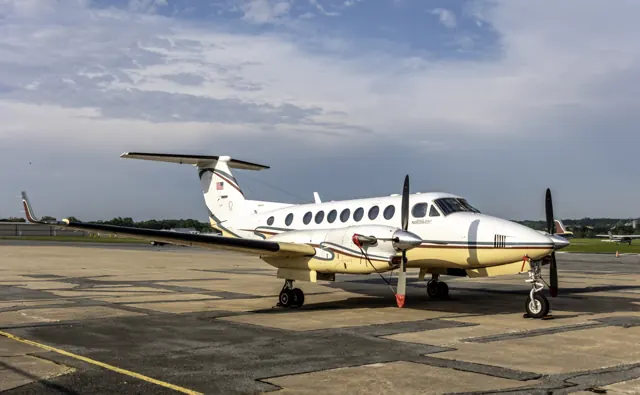
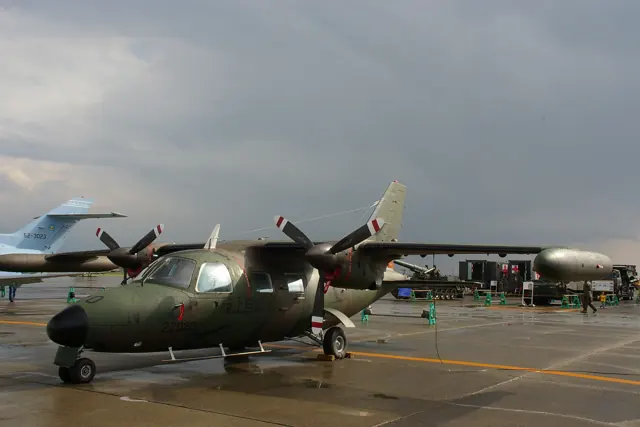
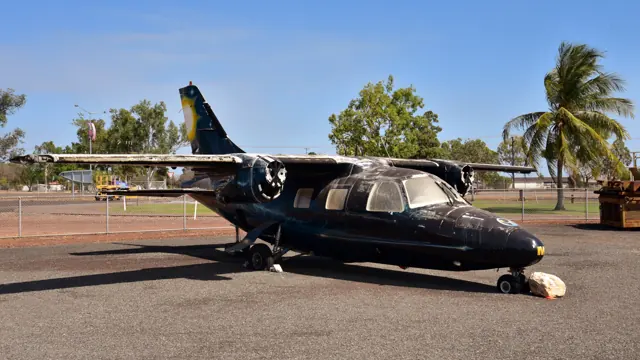
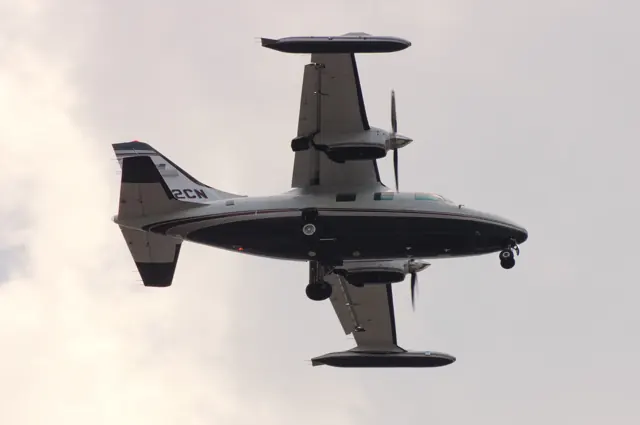
The MU-2 first flew in 1963 and became a major postwar Japanese civil-aircraft programme. Two turboprops power its compact high-wing airframe, built in short- and long-fuselage versions.
Aircraft background
Wikipedia contributors · Read more ↗Discovering the feel of a long-body MU-2
Flying with owner Jim Burton, Bedell found that the MU-2 rewarded the sort of disciplined handling he associated with jets. Properly balanced power and trim produced a steady aircraft, and its behaviour in turbulence made a favourable impression. Sitting close to the ground made the brisk takeoff feel particularly lively.
AOPA Pilot · May 2011. Demonstration in Jim Burton’s 1978 MU-2N, with its earlier engines; performance and handling impressions concern that aircraft and flight.
AOPA Pilot · Read more ↗An illustrated guide to the MU-2 cockpit
The MU-2's centre console carries an autopilot panel below the trim lever. The guide describes separate heading, localiser-capture, glideslope and altitude-hold modes. Selecting ALT holds the current altitude; a separate turn control commands bank, while the vertical-speed selector provides climb or descent control.
MU-2 · Microsoft Flight Simulator · MSFS 2024 / MSFS 2020
Microsoft / aircraft developers · Read more ↗Into the cockpit
 YouTube
 MU2B60 Marquise · 25 min ·
Mitsubishi MU-2 Flight home from Green Bay - In-cockpit
A pilot flies an MU-2 home from inspection, with cockpit views and ATC audio.
Real aircraft · MU-2B-60 Marquise
Watch on YouTube ↗Preview images are served by AirframeDB. Videos open on YouTube only when you choose to watch.
Meet Mitsubishi MU-2
The MU-2 first flew in 1963 and became a major postwar Japanese civil-aircraft programme. Two turboprops power its compact high-wing airframe, built in short- and long-fuselage versions.
Spoilers provide roll control, leaving extensive wing area available for flaps. The specification tables and simulator documentation identify the represented fuselage and equipment.
Mitsubishi MU-2
Aircraft type designators
Use the code for the model you are flying. The linked authority lists the applicable aircraft.
History & design
A wing designed around two different jobs
The MU-2 combines a relatively small wing for fast cruising with full-span Fowler flaps for slower flight. Those flaps occupy the space normally used by ailerons, so spoilers provide roll control. Pilot accounts cover both short- and long-body versions, identified with each account.
AOPA Pilot · Mitsubishi MU-2: Addictive performance ↗Design explanation in AOPA Pilot · May 2011; family context
Development milestones
First flight: 14 September 1963
Wikipedia contributors · Mitsubishi MU-2 ↗Mitsubishi MU-2 · family/variant named by the source · Wikipedia revision 1367072131
Pilot accounts
Discovering the feel of a long-body MU-2
Flying with owner Jim Burton, Bedell found that the MU-2 rewarded the sort of disciplined handling he associated with jets. Properly balanced power and trim produced a steady aircraft, and its behaviour in turbulence made a favourable impression. Sitting close to the ground made the brisk takeoff feel particularly lively.
The same low viewpoint took some getting used to on landing, where it encouraged the impression that a flare was needed earlier than it really was. Bedell distinguished this long-body aircraft from shorter MU-2s, whose landing-gear geometry could give them a different feel. Burton used the aircraft for business trips from Virginia, and his detailed knowledge of its systems was part of the experience of learning to appreciate it.
AOPA Pilot · May 2011. Demonstration in Jim Burton’s 1978 MU-2N, with its earlier engines; performance and handling impressions concern that aircraft and flight.
Read the full account · AOPA Pilot ↗Crossing the Atlantic as the world began closing
Renz’s delivery route led through Maine, Labrador, Greenland, Iceland and Scotland before reaching Germany. A clear arrival through a Greenland fjord became one of his most beautiful flights. Elsewhere, the practical work was less picturesque: covers protected the aircraft during a stormy overnight stop without hangar space.
In Iceland, a flap problem threatened the schedule. Renz was also a mechanic, and borrowed tools and telephone help from an MU-2 service centre got the aircraft moving again after a half-day delay. News of pandemic restrictions followed him across the route. After delivering the Marquise, he shortened his visit and caught the last nonstop United flight from Berlin to Newark before that service stopped.
AGC interview reproduced by AvBuyer · November 2020. March 2020 ferry of an MU-2B Marquise from South Carolina to Germany; this was a delivery flight for its new owner.
Read the full account · AvBuyer / Aircraft Guaranty Corporation ↗Making a familiar journey in a different kind of twin
Connolly compared his Solitaire with the Cessna 340 he had previously owned through a journey he knew well: New Hampshire to Florida. The MU-2 shortened the trip substantially. Although its hourly costs were higher in his figures, the shorter travelling time made the overall comparison much closer than that single number suggested.
He was equally pleased with the reliability he had experienced so far, while describing the inspections and repairs that had actually been needed. His enthusiasm came with a strong commitment to staying familiar with the aircraft. He reported flying it at least weekly and returning for recurrent training several times in a year. Ownership, for him, included both the enjoyment of travelling and the effort of remaining current.
Owner comments reproduced by AVweb in February 2001. Connolly describes a 1981 Solitaire bought in December 1994 and its first 183 hours in his ownership; this is a historical ownership report.
Read the full account · AVweb ↗In your simulator
Systems, equipment and documentation for each developer’s aircraft.
Compare simulator versions →MSFS 2024MU-2
Microsoft Flight Simulator · Released
MU-2
Microsoft Flight Simulator · Released
MSFS 2020MU-2
Microsoft Flight Simulator · Released
MU-2
Microsoft Flight Simulator · Released
X-Plane 12MU-2 Marquise v2
TOGA Simulations · Released
MU-2 Marquise v2
TOGA Simulations · Released
Aircraft specifications
Published figures for the named real-aircraft variant. Simulator equipment and performance can differ.
| Specification | Published value |
|---|---|
| Length | 12.01 m (39 ft 5 in) |
| Wingspan | 11.94 m (39 ft 2 in) including tip tanks |
| Height | 4.17 m (13 ft 8 in) |
| Wing area | 16.55 m² (178.1 sq ft) |
| Empty weight | 3,433 kg (7,568 lb) |
| Max takeoff weight | 5,250 kg (11,574 lb) |
| Powerplant | 2 × AiResearch TPE331 -6-251M turboprop engines, 579 kW (776 hp) each |
| Propellers | 3-bladed Hartzell HC-B3TN-5/T10178HB-11 fully feathering reversible constant-speed propellers, 2.29 m (7 ft 6 in) diameter |
| Cruise speed | 547 km/h (340 mph, 295 kn) at 4,175 kg (9,204 lb) at 4,575 m (15,010 ft) maximum |
| Stall speed | 185 km/h (115 mph, 100 kn) flaps down ( Calibrated airspeed ) |
| Range | 2,334 km (1,450 mi, 1,260 nmi) at 7,620 m (25,000 ft) with full wing and tip tanks including 30 minutes reserve |
| Service ceiling | 9,020 m (29,590 ft) |
| Rate of climb | 12.0 m/s (2,360 ft/min) at sea level |
Manuals & resources
Find your next read
Choose a topic for a short introduction and a link to the original source. Simulator references identify the developer and edition they cover.
Simulator documentation
An illustrated guide to the MU-2 cockpitMU-2 · Microsoft Flight Simulator · MSFS 2024 / MSFS 2020
The MU-2's centre console carries an autopilot panel below the trim lever. The guide describes separate heading, localiser-capture, glideslope and altitude-hold modes. Selecting ALT holds the current altitude; a separate turn control commands bank, while the vertical-speed selector provides climb or descent control.
iniBuilds MU-2 manual v1.0.1, 9 September 2023; documented simulator behaviour · PDF p.24
Microsoft / aircraft developers · Read the source ↗Find a control through the built-in checklistMU-2 · Microsoft Flight Simulator · MSFS 2020
The 2023 guide documents simulator checklists with a view shortcut beside each item, taking the camera to the relevant control. It also provides an auto-complete option for working through an item more quickly.
iniBuilds MU-2 v1.0.1 · PDF p.7; MSFS 2020 interface
Microsoft / aircraft developers · Read the source ↗Choosing classic or modern radio equipmentMU-2 · Microsoft Flight Simulator · MSFS 2024 / MSFS 2020
The tablet can exchange the classic radios and transponder for a modern panel. The guide notes an electrical prerequisite for the modern instruments: both radio switches and the inverter switch must be on. Those switches supply power to the instruments.
iniBuilds MU-2 manual v1.0.1, 9 September 2023; documented simulator behaviour · PDF p.12
Microsoft / aircraft developers · Read the source ↗The original MSFS 2020 releaseMU-2 · Microsoft Flight Simulator · MSFS 2020
The October 2023 Famous Flyer 7 release offers the MU-2 in five liveries. This record identifies the Microsoft-published MSFS 2020 package.
2023-10-31 · release and package scope
Microsoft Flight Simulator Team · Read the source ↗Pilot account
Discovering the feel of a long-body MU-2AOPA Pilot · May 2011. Demonstration in Jim Burton’s 1978 MU-2N, with its earlier engines; performance and handling impressions concern that aircraft and flight.
Flying with owner Jim Burton, Bedell found that the MU-2 rewarded the sort of disciplined handling he associated with jets. Properly balanced power and trim produced a steady aircraft, and its behaviour in turbulence made a favourable impression. Sitting close to the ground made the brisk takeoff feel particularly lively. The same low viewpoint took some getting used to on landing, where it encouraged the impression that a flare was needed earlier than it really was.
Peter A. Bedell
AOPA Pilot · Read the source ↗Crossing the Atlantic as the world began closingAGC interview reproduced by AvBuyer · November 2020. March 2020 ferry of an MU-2B Marquise from South Carolina to Germany; this was a delivery flight for its new owner.
Renz’s delivery route led through Maine, Labrador, Greenland, Iceland and Scotland before reaching Germany. A clear arrival through a Greenland fjord became one of his most beautiful flights. Elsewhere, the practical work was less picturesque: covers protected the aircraft during a stormy overnight stop without hangar space. In Iceland, a flap problem threatened the schedule.
Ron Renz
AvBuyer / Aircraft Guaranty Corporation · Read the source ↗Developer documentation
MU-2 Marquise v2 — product listingMU-2 Marquise v2 · X-Plane 12
Product listing captured 2026-09-24; edition scope from the reviewed catalogue
X-Aviation · Read the source ↗Read the original documentation from the people who created it. Manuals open on their publisher’s website.
Manual
MU-2_MSFS_ManualMicrosoft / aircraft developers Microsoft Flight Simulator aircraft manualsMicrosoft / aircraft developersAircraft background
Mitsubishi MU-2Wikipedia contributors · Research background · Wikipedia revision 1367072131 · retrieved 2026-09-12Resource
MSFS 2024 FAQ and edition aircraft inventoryMicrosoftDeveloper documentation
Microsoft Flight Simulator Releases Famous Flyer 7: The Mitsubishi Heavy Industries MU-2Microsoft Flight Simulator Team · 2023-10-31 · release and package scopeType designator
ICAO Doc 8643 — aircraft type designatorsInternational Civil Aviation Organization · Public search data retrieved 2026-09-14; authority update 2026-09-03Product
MU-2 current release and XP12 supportX-Aviation · Product listing captured 2026-09-24; edition scope from the reviewed catalogueBuilt-in force-feedback profiles
Read the documentary basis, editable starting settings and remaining questions for the aircraft you fly. Each explanation refers to the exact profile revision shown.
Catalogue programme-20261022-v1 · 7 profile choices
TOGA MU-2 Marquise 4-blade G600
TOGA Simulations · Free and Pro · Revision 1 · Inherited starting point
X-Plane 12
TOGA MU-2 Marquise 4-blade G600: The spoiler-based lateral system motivates its own axis balance.
TOGA MU-2 Marquise 4-blade GNS
TOGA Simulations · Free and Pro · Revision 1 · Inherited starting point
X-Plane 12
TOGA MU-2 Marquise 4-blade GNS: The spoiler-based lateral system motivates its own axis balance.
TOGA MU-2 Marquise 4-blade OEM
TOGA Simulations · Free and Pro · Revision 1 · Inherited starting point
X-Plane 12
TOGA MU-2 Marquise 4-blade OEM: The spoiler-based lateral system motivates its own axis balance.
TOGA MU-2 Marquise 5-blade G600
TOGA Simulations · Free and Pro · Revision 1 · Inherited starting point
X-Plane 12
TOGA MU-2 Marquise 5-blade G600: The spoiler-based lateral system motivates its own axis balance.
TOGA MU-2 Marquise 5-blade GNS
TOGA Simulations · Free and Pro · Revision 1 · Inherited starting point
X-Plane 12
TOGA MU-2 Marquise 5-blade GNS: The spoiler-based lateral system motivates its own axis balance.
TOGA MU-2 Marquise 5-blade OEM
TOGA Simulations · Free and Pro · Revision 1 · Inherited starting point
X-Plane 12
TOGA MU-2 Marquise 5-blade OEM: The spoiler-based lateral system motivates its own axis balance.
Mitsubishi MU-2
Free and Pro · Revision 1 · Partial review
MSFS 2024 · MSFS 2020
Mitsubishi MU-2: The spoiler-based lateral system motivates its own axis balance.
TOGA MU-2 Marquise 4-blade GNS
TOGA MU-2 Marquise 4-blade GNS: The spoiler-based lateral system motivates its own axis balance.
Aircraft and simulator scope
- TOGA MU-2 Marquise 4-blade GNS · TOGA Simulations · X-Plane 12 · Add-on starting point
The simulator model and controls
The MU-2 first flew in 1963 and became a major postwar Japanese civil-aircraft programme. Two turboprops power its compact high-wing airframe, built in short- and long-fuselage versions.
This profile selects TOGA MU-2 Marquise 4-blade GNS for X-Plane 12.
How this profile feels
The spoiler-based lateral system motivates its own axis balance. Spring resistance builds with the selected airspeed response. A separate aerodynamic term adds speed-dependent control load.
Electric trim ailerons and mechanical elevator trim are separate from AP pitch attitude. Valid trim provides the configured pressure relief. Autopilot following is off.
Controls and trim
The MU-2 uses mechanically commanded roll spoilers and separate electrically trimmed ailerons. Elevator trim is mechanical. The autopilot’s TCS releases servos and its pitch wheel commands attitude, distinct from the elevator trim control.
The selected implementation
TOGA separates four/five-blade propellers and OEM/GNS/G600 panels; G600 requires its own display package and retains the SPZ500.
About the values
The gains are normalized profile settings. They describe the chosen effect balance; hand force depends on the device and its output limits. IAS references are tuning values rather than operating limits. Physical acceptance of this revision remains pending.
Documentary review and sources
These decisions describe the documentary basis and remaining gaps for this revision. Aircraft documentation and a starting setting describe different kinds of evidence.
Aircraft and variant
InheritedThis profile selects TOGA MU-2 Marquise 4-blade GNS for X-Plane 12.
Flight controls
InheritedThe MU-2 uses mechanically commanded roll spoilers and separate electrically trimmed ailerons. Elevator trim is mechanical. The autopilot’s TCS releases servos and its pitch wheel commands attitude, distinct from the elevator trim control.
Trim
InheritedElectric trim ailerons and mechanical elevator trim are separate from AP pitch attitude. Pitch authority 0.25 provides load relief and permitted centre movement; roll authority is 0.1.
Autopilot and stability
InheritedAutopilot following is off; the configured spring and load retain the hardware feel.
Equipment
InheritedTOGA separates four/five-blade propellers and OEM/GNS/G600 panels; G600 requires its own display package and retains the SPZ500.
Speeds and limits
InheritedThe indicated-speed references set the profile response scale; they are separate from aircraft operating limits.
Simulator integration
InheritedThe profile targets xplane12. Add-on-specific controls use only the supported references configured by this profile.
Force-feedback settings
InheritedThe settings define the profile’s effect balance. Device output limits affect physical hand force.
Starting settings and their rationale
These configured values are starting estimates. The explanations describe what each setting controls; physical validation appears separately below.
| Setting | Starting value | What it controls and why |
|---|---|---|
| Spring strength | Starting value0.72 | What it controls and whyThe spoiler-based lateral system motivates its own axis balance. The baseline spring is 0.72. Its low-speed blend reaches baseline strength at 100 KIAS. |
| Master force gain | Starting value0.85 | What it controls and whyScales overall profile strength while preserving effect balance, subject to device and output limits. |
| Profile force gain | Starting value0.64 | What it controls and whyThe aerodynamic-load gain is 0.64 with an indicated-speed reference of 220 KIAS. This supplies speed-dependent loading alongside the spring. |
| Force tuning speed/reference | Starting value220 kt | What it controls and whySets the IAS reference for aerodynamic loading. It is an estimate, not published cruise TAS or a flight limit. |
| Spring response reference speed | Starting value100 kt | What it controls and whySets the IAS where the low-speed blend reaches baseline strength; high-speed stiffening also uses it. |
| Aileron force scale | Starting value0.85 | What it controls and whyRoll and pitch aerodynamic scales are 0.85 and 1, respectively. They set the aerodynamic axis balance. No custom spring-travel curve is enabled. |
| Elevator force scale | Starting value1 | What it controls and whyScales pitch aerodynamic loading; pitch spring travel and trim responses are separate settings. |
| Trim feel | Starting valueEnabled | What it controls and whyRetained for compatibility and group membership. Trim relief, rather than this flag, controls centre movement. |
| Trim relief | Starting valueEnabled | What it controls and whyAllows trim relief with supported control law and valid telemetry. Axis authorities set its amount. |
| Autopilot follow | Starting valueDisabled | What it controls and whyAutopilot following is off; the configured spring and load retain the hardware feel. |
| Autopilot neutral hold | Starting valueDisabled | What it controls and whyPermits centering hold during a supported AP state, separate from following a moving target. |
| Output force limit | Starting value0.55 | What it controls and whyCaps directed-force output. Native spring effects and device limits remain separate. |
All 44 starting settings and their rationale
The settings define the profile’s effect balance. Device output limits affect physical hand force.
| Setting | Starting value | What it controls and why |
|---|---|---|
| Spring strength | Starting value0.72 | What it controls and whyThe spoiler-based lateral system motivates its own axis balance. The baseline spring is 0.72. Its low-speed blend reaches baseline strength at 100 KIAS. |
| Spring deadband | Starting value0.05 | What it controls and whySets travel around the centre before the baseline spring resists. Smaller values engage it sooner. |
| Profile force gain | Starting value0.64 | What it controls and whyThe aerodynamic-load gain is 0.64 with an indicated-speed reference of 220 KIAS. This supplies speed-dependent loading alongside the spring. |
| Master force gain | Starting value0.85 | What it controls and whyScales overall profile strength while preserving effect balance, subject to device and output limits. |
| QBlend Enabled | Starting valueEnabled | What it controls and whyAllows baseline spring strength to rise with indicated airspeed where the control law permits it. |
| QSpring Minimum Factor | Starting value0.55 | What it controls and whySets low-speed spring strength as a fraction of baseline when blending is enabled. One keeps full strength. |
| QSpring Start Knots | Starting value25 kt | What it controls and whySets the IAS where the low-speed spring blend starts rising. This is a feel threshold, not a flight limit. |
| Spring response reference speed | Starting value100 kt | What it controls and whySets the IAS where the low-speed blend reaches baseline strength; high-speed stiffening also uses it. |
| Force tuning speed/reference | Starting value220 kt | What it controls and whySets the IAS reference for aerodynamic loading. It is an estimate, not published cruise TAS or a flight limit. |
| Airspeed spring stiffening gain | Starting value0.1 | What it controls and whyThe high-speed spring-stiffening gain is 0.1. It strengthens the permitted spring response above 100 KIAS, with the squared-speed ratio capped at 5. |
| Airspeed spring stiffening limit | Starting value5 | What it controls and whyLimits the squared airspeed ratio used for high-speed spring stiffening; it is not a device-force cap. |
| Aileron force scale | Starting value0.85 | What it controls and whyRoll and pitch aerodynamic scales are 0.85 and 1, respectively. They set the aerodynamic axis balance. No custom spring-travel curve is enabled. |
| Elevator force scale | Starting value1 | What it controls and whyScales pitch aerodynamic loading; pitch spring travel and trim responses are separate settings. |
| Output force limit | Starting value0.55 | What it controls and whyCaps directed-force output. Native spring effects and device limits remain separate. |
| Trim feel | Starting valueEnabled | What it controls and whyRetained for compatibility and group membership. Trim relief, rather than this flag, controls centre movement. |
| Trim relief | Starting valueEnabled | What it controls and whyAllows trim relief with supported control law and valid telemetry. Axis authorities set its amount. |
| Elevator Authority | Starting value0.25 | What it controls and whyElectric trim ailerons and mechanical elevator trim are separate from AP pitch attitude. Pitch authority 0.25 provides load relief and permitted centre movement; roll authority is 0.1. |
| Aileron Authority | Starting value0.1 | What it controls and whyScales supported roll-trim relief and permitted centre movement. Zero removes roll response. |
| Force Trim Enabled | Starting valueDisabled | What it controls and whyEnables local force trim, separate from aircraft-owned trim and add-on integration qualification. |
| GLoad Enabled | Starting valueEnabled | What it controls and whyAllows load-factor changes to modify permitted spring laws. Passive fly-by-wire feel can suppress it. |
| Rate Damping Enabled | Starting valueEnabled | What it controls and whyEnables rate damping with the configured coefficients and control law. |
| Autopilot follow | Starting valueDisabled | What it controls and whyAutopilot following is off; the configured spring and load retain the hardware feel. |
| Autopilot follow authority | Starting value0.1 | What it controls and whySets admitted AP-follow gain, not a percentage of travel. Runtime ownership and input limits still apply. |
| Autopilot neutral hold | Starting valueDisabled | What it controls and whyPermits centering hold during a supported AP state, separate from following a moving target. |
| Autopilot neutral hold strength | Starting value0.6 | What it controls and whySets admitted AP neutral-hold strength; inactive while neutral hold is disabled. |
| Enabled | Starting valueEnabled | What it controls and whyEnables aerodynamic cues; each still needs nonzero strength and its simulator conditions. |
| Gain | Starting value0.25 | What it controls and whySets stall-buffet strength. Zero removes the cue without changing simulator stalls or warnings. |
| Gain | Starting value0 | What it controls and whySets high-Mach buffet strength; onset and full-strength thresholds are separate. |
| Gain | Starting value0 | What it controls and whySets flap buffet at the configured position and speed gates. Flap movement texture is separate. |
| Maximum flap index | Starting value3 | What it controls and whySets the final flap index for detent normalization. UP plus three detents uses maximum index3. |
| Minimum flap index | Starting value2 | What it controls and whySets the first flap detent that admits buffet; this is a handle index, not degrees. |
| Gain | Starting value0.055 | What it controls and whySets gear aerodynamic buffet; movement and ground-contact cues are separate. |
| Shaker Enabled | Starting valueDisabled | What it controls and whyPermits shaker at supported warning conditions; the switch does not establish aircraft equipment. |
| Stick shaker amplitude | Starting value0.5 | What it controls and whySets triggered shaker strength; inactive while the shaker feature is disabled. |
| Enabled | Starting valueEnabled | What it controls and whyEnables ground effects; each still needs its own strength and contact or motion telemetry. |
| Gain | Starting value0.24 | What it controls and whySets rolling texture strength, modified by speed, surface and undercarriage configuration. |
| Gain | Starting value0.18 | What it controls and whySets gear-bump texture during ground motion, separate from touchdown impact. |
| Gain | Starting value0.4 | What it controls and whySets landing-impact strength; landing telemetry and response shape determine the pulse. |
| Gain | Starting value0.14 | What it controls and whySets reverse-thrust vibration with valid reverser and engine conditions. Zero removes the cue. |
| Enabled | Starting valueEnabled | What it controls and whyEnables engine cues with nonzero settings and valid running-engine telemetry. |
| Gain | Starting value0.07 | What it controls and whySets estimated engine vibration using configured telemetry and response, not measured cockpit vibration. |
| Enabled | Starting valueEnabled | What it controls and whyEnables accessory cues with configured strengths and observed accessory movement. |
| Gain | Starting value0.055 | What it controls and whySets texture from observed flap movement; a command without movement does not establish the cue. |
| Gain | Starting value0.06 | What it controls and whySets texture from observed gear movement, separate from aerodynamic and touchdown effects. |
Limits and open questions
- Force amplitudes, damping and response curves are editable estimates, not measured hand forces. Installed and physical checks remain deferred.
- No custom servo target, failure, control-lock or maintenance-state interface is inferred. AP follow and neutral hold are off; the simulator retains aircraft control authority.
- GNS430/530 panel with documented GPSS converter; optional RealityXP fit is not a new force model.
- Roll-spoiler hinge forces and independent left/right trim-aileron failures are not separately modelled; ordinary aileron-surface follow and generic speedbrake effects are disabled.
- Pulsed/delayed flaps use actual motion only. Sustained actual-only flap cues require a separately versioned policy; missing surface telemetry cannot be replaced with a claimed actuator state.
- Old overview prose discusses a future XP12 port, but current publisher and version2.1 notes confirm XP12 release. Linked2.2 notes return404; no2.2 release inferred.
- Overview table repeats MU2B60_4B_GNS.acf for the 5-blade GNS row; the described 5B naming convention is used provisionally. Matching needs explicit developer and variant or a saved aircraft-default binding.
Physical validation
No physical force validation is recorded in this public catalogue for this revision. Documentary review and software checks do not establish how a particular device feels.
Discuss this aircraft (0)
Questions, observations and useful sources from the community.
No published discussions yet. Bring a question or share a useful source.
Open aircraft discussions →Content expanded · What’s new
Something missing or a source that needs attention?
Suggest a correction ↗