

Start here
A few places to begin, from the aircraft’s story to the people who fly it.
Meet the aircraft
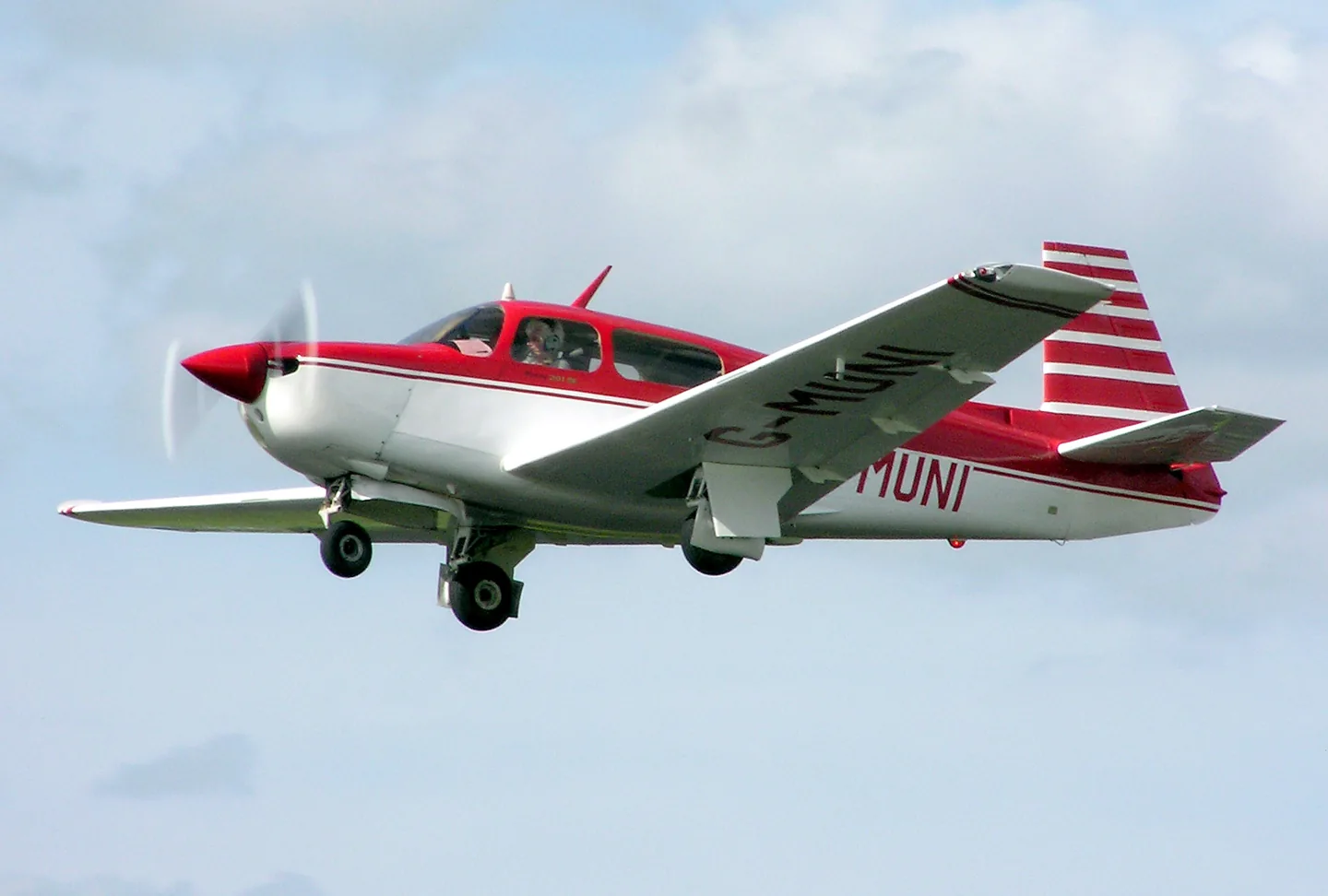
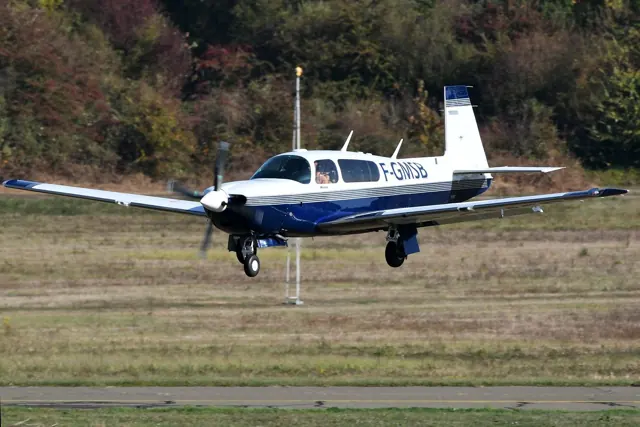
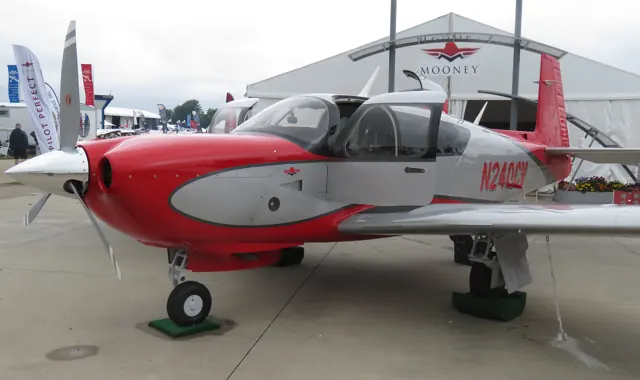
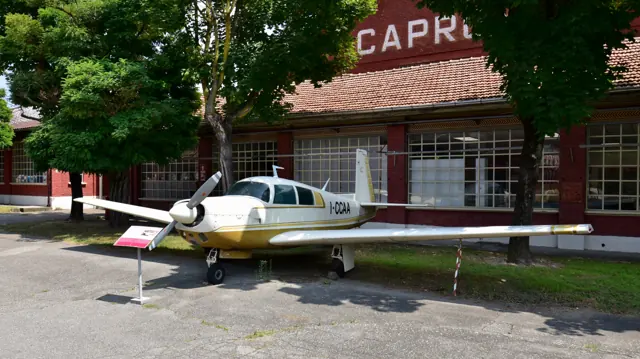
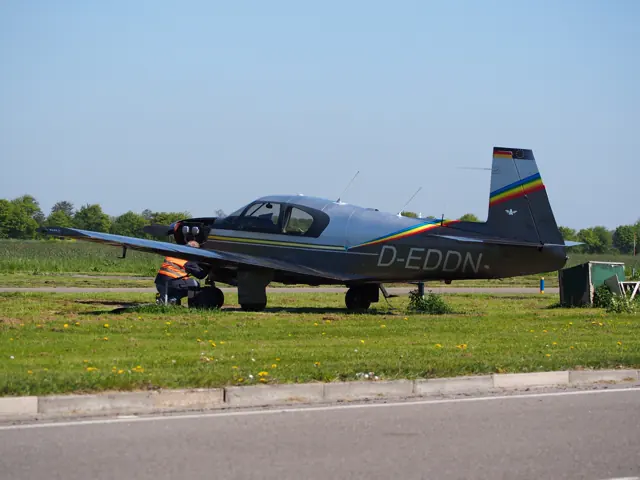
Mooney's M20 family developed through numerous low-wing, four-seat touring aircraft. Engines, equipment and fuselage dimensions changed between versions, including the later Ovations. The photographs and specification tables identify the family member described by their sources.
Aircraft background
Wikipedia contributors · Read more ↗Home across half a continent in an Ovation
The reviewer took a nearly new Ovation from the Texas factory to Frederick, Maryland, with a fuel stop in Tennessee. The comparison that stayed with the writer was door-to-door travel: despite an airliner’s greater speed, the Mooney journey came close to the time spent on a recent airline itinerary with a connection and longer ground transfers.
February 1996 report. New M20R N9163E, flown from Kerrville to Frederick in November 1995; named byline not established by the accessible article.
AOPA Pilot · Read more ↗Released product and variants
AFM Simulation’s released M20 Collection includes M20R Ovation II with analog instruments and GNS navigation, M20R Ovation III with G1000, and M20TN Acclaim Type S with G1000. TorqueSim identifies it as the predecessor catalogue from AFM, one of the teams that formed TorqueSim. Development is retired; the later TorqueSim M20R rebuild remains a separate unreleased project.
AFM M20 Collection · AFM Simulation · TorqueSim predecessor catalogue · X-Plane 11
TorqueSim · Read more ↗Into the cockpit
 YouTube
 P Gatcomb · 39 min ·
MSFS 2024 - Flying the Mooney M20 with real world experiences in the rain
P Gatcomb discusses an instrument flight in the MSFS 2024 Mooney, drawing on real-aircraft experience.
Simulator · Mooney M20 · MSFS 2024; developer not identified
Watch on YouTube ↗Preview images are served by AirframeDB. Videos open on YouTube only when you choose to watch.
Meet Mooney M20 family
Mooney's M20 family developed through numerous low-wing, four-seat touring aircraft. Engines, equipment and fuselage dimensions changed between versions, including the later Ovations. The photographs and specification tables identify the family member described by their sources.
Mooney M20
Mooney → · Explore the family →
Mooney M20 family
Wikipedia contributors · Mooney M20 ↗M20R Ovation II
TorqueSim · TorqueSim – Page 2 – TorqueSim Blog ↗AFM Simulation · TorqueSim predecessor catalogue · X-Plane 11 →M20R Ovation III
TorqueSim · TorqueSim – Page 2 – TorqueSim Blog ↗AFM Simulation · TorqueSim predecessor catalogue · X-Plane 11 →M20TN Acclaim Type S
TorqueSim · TorqueSim – Page 2 – TorqueSim Blog ↗AFM Simulation · TorqueSim predecessor catalogue · X-Plane 11 →Aircraft type designators
Use the code for the model you are flying. The linked authority lists the applicable aircraft.
Normally aspirated Mooney M20 models, including M20R Ovation
ICAO Doc 8643 — aircraft type designators ↗Checked 2026-09-14Turbocharged Mooney M20 models, including M20K, M20M and M20TN
ICAO Doc 8643 — aircraft type designators ↗Checked 2026-09-14History & design
The Ovation filled a gap in the range
Introduced in 1994, the Ovation combined the longer Mooney fuselage with a normally aspirated Continental IO-550-G rated at 280 hp. The contemporary range also included the shorter, 200 hp MSE and turbocharged TLS.
AOPA Pilot · The Mooney Ovation at Two ↗AOPA’s February 1996 comparison of then-current models
The DX update lowered the panel
For 2003, the Ovation2 DX added a Garmin navigation, traffic and datalink-weather package. Its instrument panel was also lowered by two inches to improve the forward view. These details belong to the DX configuration rather than every M20.
AOPA Pilot · Mooney M20R Ovation2 DX ↗AOPA · June 2003 configuration changes
Development milestones
Designer: Al Mooney
First flight: September 3, 1953
Developed from: Mooney M-18 Mite
Wikipedia contributors · Mooney M20 ↗Mooney M20 · family/variant named by the source · Wikipedia revision 1372283442
Pilot accounts
Home across half a continent in an Ovation
The reviewer took a nearly new Ovation from the Texas factory to Frederick, Maryland, with a fuel stop in Tennessee. The comparison that stayed with the writer was door-to-door travel: despite an airliner’s greater speed, the Mooney journey came close to the time spent on a recent airline itinerary with a connection and longer ground transfers.
The hours en route provided time to learn the avionics and appreciate the cabin’s improvements over older Mooneys. Near home, the speed brakes helped manage the descent, and gusts gave way to a satisfactory night landing. The report also noted that the aircraft needed its winterisation kit in the colder Northeast.
February 1996 report. New M20R N9163E, flown from Kerrville to Frederick in November 1995; named byline not established by the accessible article.
Read the full account · AOPA Pilot ↗Trying new traffic and weather displays over Texas
Horne flew the Ovation2 DX after a storm system had crossed the Texas hill country. The flight combined a look at performance with an opportunity to try the newer Garmin equipment. Requesting weather imagery brought the departing storm onto the display, while approaching San Antonio produced traffic symbols and spoken alerts from the transponder’s traffic service.
He found the weather picture useful despite its visible pixelation, and described how the traffic display presented nearby aircraft in relation to his own. The wider review kept practical compromises in view: desirable equipment added weight, and the sleek airframe still demanded careful speed management approaching a runway.
AOPA Pilot · June 2003. Ovation2 DX demonstration from Kerrville, including flight near San Antonio.
Read the full account · AOPA Pilot ↗An uncle’s Mooney introduces a faster cockpit routine
Wynn had ridden in the family Mooney before, but this evening was the first chance to log time at its controls. A visit with relatives became an introduction to a complex aeroplane, with uncle Sam talking through the unfamiliar tasks. Wynn joked about disliking its yellow paint while admitting how much he enjoyed the aircraft itself.
After manoeuvring over the countryside, they returned for landing practice. The Mooney’s greater speed made staying ahead of the cockpit workload the central challenge. Sam allowed mistakes and coached the sequence through three touch-and-goes and a final full-stop landing. Back at the hangar, the signed logbook marked a small but significant step towards the more advanced flying Wynn hoped to do.
Personal flight log · 11 July 2018. First logged flight in uncle Sam’s M20F Executive, N9716M, at St. Anthony, Idaho.
Read the full account · M. Wynn: Wild Card Aviation Photography & Images ↗In your simulator
Systems, equipment and documentation for each developer’s aircraft.
Compare simulator versions →X-Plane 11AFM M20 Collection
AFM Simulation · TorqueSim predecessor catalogue · Released
AFM M20 Collection
AFM Simulation · TorqueSim predecessor catalogue · Released
MSFS 2020M20R
Carenado · Released
M20R
Carenado · Released
Aircraft specifications
Published figures for the named real-aircraft variant. Simulator equipment and performance can differ.
| Specification | Published value |
|---|---|
| Length | 26 ft 8 in (8.13 m) |
| Wingspan | 36 ft 6 in (11.13 m) |
| Height | 8 ft 4 in (2.54 m) |
| Empty weight | 2,380 lb (1,080 kg) |
| Gross weight | 3,380 lb (1,533 kg) |
| Max takeoff weight | 3,368 lb (1,528 kg) |
| Powerplant | 1 × Continental TSIO-550-G air-cooled, 6-cylinder, horizontally opposed piston engine, 280 hp (209 kW) |
| Propellers | 3-bladed Hartzell Scimitar Three-Blade |
| Maximum speed | 242 kn (278 mph, 448 km/h) |
| Cruise speed | 175 kn (201 mph, 324 km/h) ( TAS ) |
| Stall speed | 53 kn (61 mph, 98 km/h) |
| Range | 1,100 nmi (1,300 mi, 2,000 km) (standard tanks) |
| Service ceiling | 25,000 ft (7,600 m) |
Manuals & resources
Find your next read
Choose a topic for a short introduction and a link to the original source. Simulator references identify the developer and edition they cover.
Simulator documentation
Released product and variantsAFM M20 Collection · AFM Simulation · TorqueSim predecessor catalogue · X-Plane 11
AFM Simulation’s released M20 Collection includes M20R Ovation II with analog instruments and GNS navigation, M20R Ovation III with G1000, and M20TN Acclaim Type S with G1000. TorqueSim identifies it as the predecessor catalogue from AFM, one of the teams that formed TorqueSim. Development is retired; the later TorqueSim M20R rebuild remains a separate unreleased project.
Official developer / designated-store reference · checked 2026-09-14
TorqueSim · Read the source ↗Pilot account
Home across half a continent in an OvationFebruary 1996 report. New M20R N9163E, flown from Kerrville to Frederick in November 1995; named byline not established by the accessible article.
The reviewer took a nearly new Ovation from the Texas factory to Frederick, Maryland, with a fuel stop in Tennessee. The comparison that stayed with the writer was door-to-door travel: despite an airliner’s greater speed, the Mooney journey came close to the time spent on a recent airline itinerary with a connection and longer ground transfers. The hours en route provided time to learn the avionics and appreciate the cabin’s improvements over older Mooneys.
AOPA Pilot flight reviewer
AOPA Pilot · Read the source ↗Trying new traffic and weather displays over TexasAOPA Pilot · June 2003. Ovation2 DX demonstration from Kerrville, including flight near San Antonio.
Horne flew the Ovation2 DX after a storm system had crossed the Texas hill country. The flight combined a look at performance with an opportunity to try the newer Garmin equipment. Requesting weather imagery brought the departing storm onto the display, while approaching San Antonio produced traffic symbols and spoken alerts from the transponder’s traffic service.
Thomas A. Horne
AOPA Pilot · Read the source ↗Developer documentation
M20R — product listingM20R · MSFS 2020
Product listing captured 2026-09-23; edition scope from the reviewed catalogue
www.carenado.com · Read the source ↗Read the original documentation from the people who created it. Manuals open on their publisher’s website.
Aircraft background
Mooney M20Wikipedia contributors · Research background · retrieved 2026-09-12Product
Mooney M20R Ovation II / IIITorqueSim · Official developer / designated store catalogue · checked 2026-09-12 M20R MSFS2020 – Carenadowww.carenado.com · Product listing captured 2026-09-23; edition scope from the reviewed catalogueDeveloper documentation
Mooney M20 Collection – AFM SimulationTorqueSim · Official developer / designated-store reference · checked 2026-09-14 TorqueSim – Page 2 – TorqueSim BlogTorqueSim · Official developer / designated-store reference · checked 2026-09-14Type designator
ICAO Doc 8643 — aircraft type designatorsInternational Civil Aviation Organization · Public search data retrieved 2026-09-14; authority update 2026-09-03Built-in force-feedback profiles
Read the documentary basis, editable starting settings and remaining questions for the aircraft you fly. Each explanation refers to the exact profile revision shown.
Catalogue programme-20261022-v1 · 5 profile choices
Carenado M20R Ovation (MSFS)
Carenado · Free and Pro · Revision 4 · Inherited starting point
MSFS 2020
Carenado M20R Ovation (MSFS): The selected resistance accompanies the touring aircraft’s manual controls.
Carenado M20R Ovation (X-Plane)
Carenado · Free and Pro · Revision 3 · Partial review
X-Plane 11
Carenado M20R Ovation (X-Plane): The selected resistance accompanies the touring aircraft’s manual controls.
Mooney M20R Ovation
Free and Pro · Revision 2 · Partial review
X-Plane 11
Mooney M20R Ovation: The selected resistance accompanies the touring aircraft’s manual controls.
Mooney M20J
Free and Pro · Revision 1 · Review pending
X-Plane 11
Mooney M20J: The selected resistance accompanies the touring aircraft’s manual controls.
Mooney M20TN Acclaim
Free and Pro · Revision 1 · Partial review
X-Plane 11
Mooney M20TN Acclaim: The selected resistance accompanies the touring aircraft’s manual controls.
Mooney M20J
Mooney M20J: The selected resistance accompanies the touring aircraft’s manual controls.
Aircraft and simulator scope
- Mooney M20J · X-Plane 11 · Variant starting point
Mooney M20J · Historical XP11 catalogue scope; compatibility is not transferred to XP12.
The simulator model and controls
Mooney's M20 family developed through numerous low-wing, four-seat touring aircraft. Engines, equipment and fuselage dimensions changed between versions, including the later Ovations. The photographs and specification tables identify the family member described by their sources.
This starting point selects Mooney M20J. Its aircraft-level settings do not select a particular developer’s custom systems.
How this profile feels
The selected resistance accompanies the touring aircraft’s manual controls. Spring resistance builds with the selected airspeed response. A separate aerodynamic term adds speed-dependent control load.
Pitch relief is configured separately from altitude preselection. Valid trim provides the configured pressure relief. Autopilot following is enabled for supported control references.
Controls and trim
Carenado’s M20R Ovation uses retractable gear and 0/10/33-degree flaps around a piston-powered touring airframe. Its altitude-preselect installation is part of the documented automatic-flight equipment.
About the values
The gains are normalized profile settings. They describe the chosen effect balance; hand force depends on the device and its output limits. IAS references are tuning values rather than operating limits. Physical acceptance of this revision remains pending.
Documentary review and sources
These decisions describe the documentary basis and remaining gaps for this revision. Aircraft documentation and a starting setting describe different kinds of evidence.
Aircraft and variant
Not yet reviewedThis starting point selects Mooney M20J. Its aircraft-level settings do not select a particular developer’s custom systems.
Flight controls
Not yet reviewedCarenado’s M20R Ovation uses retractable gear and 0/10/33-degree flaps around a piston-powered touring airframe. Its altitude-preselect installation is part of the documented automatic-flight equipment.
Trim
Not yet reviewedPitch relief is configured separately from altitude preselection. Pitch authority 0.3 provides load relief and permitted centre movement; roll authority is 0.
Autopilot and stability
Not yet reviewedFollowing is on at 0.1 authority when a supported, valid autopilot control reference is available.
Equipment
Not yet reviewedGear, flap and ground cues follow the selected settings and available simulator-reported states.
Speeds and limits
Not yet reviewedThe indicated-speed references set the profile response scale; they are separate from aircraft operating limits.
Simulator integration
Not yet reviewedThe profile targets xplane11. Add-on-specific controls use only the supported references configured by this profile.
Force-feedback settings
Not yet reviewedThe settings define the profile’s effect balance. Device output limits affect physical hand force.
Starting settings and their rationale
These configured values are starting estimates. The explanations describe what each setting controls; physical validation appears separately below.
| Setting | Starting value | What it controls and why |
|---|---|---|
| Spring strength | Starting value0.74 | What it controls and whyThe selected resistance accompanies the touring aircraft’s manual controls. The baseline spring is 0.74. Its low-speed blend reaches baseline strength at 85 KIAS. |
| Master force gain | Starting value0.85 | What it controls and whyScales overall profile strength while preserving effect balance, subject to device and output limits. |
| Profile force gain | Starting value0.8 | What it controls and whyThe aerodynamic-load gain is 0.8 with an indicated-speed reference of 170 KIAS. This supplies speed-dependent loading alongside the spring. |
| Force tuning speed/reference | Starting value170.0 kt | What it controls and whySets the IAS reference for aerodynamic loading. It is an estimate, not published cruise TAS or a flight limit. |
| Spring response reference speed | Starting value85.0 kt | What it controls and whySets the IAS where the low-speed blend reaches baseline strength; high-speed stiffening also uses it. |
| Aileron force scale | Starting value0.72 | What it controls and whyRoll and pitch aerodynamic scales are 0.72 and 1, respectively. They set the aerodynamic axis balance. No custom spring-travel curve is enabled. |
| Elevator force scale | Starting value1.0 | What it controls and whyScales pitch aerodynamic loading; pitch spring travel and trim responses are separate settings. |
| Trim feel | Starting valueEnabled | What it controls and whyRetained for compatibility and group membership. Trim relief, rather than this flag, controls centre movement. |
| Trim relief | Starting valueEnabled | What it controls and whyAllows trim relief with supported control law and valid telemetry. Axis authorities set its amount. |
| Autopilot follow | Starting valueEnabled | What it controls and whyFollowing is on at 0.1 authority when a supported, valid autopilot control reference is available. |
| Autopilot neutral hold | Starting valueDisabled | What it controls and whyPermits centering hold during a supported AP state, separate from following a moving target. |
| Output force limit | Starting value0.55 | What it controls and whyCaps directed-force output. Native spring effects and device limits remain separate. |
All 44 starting settings and their rationale
The settings define the profile’s effect balance. Device output limits affect physical hand force.
| Setting | Starting value | What it controls and why |
|---|---|---|
| Spring strength | Starting value0.74 | What it controls and whyThe selected resistance accompanies the touring aircraft’s manual controls. The baseline spring is 0.74. Its low-speed blend reaches baseline strength at 85 KIAS. |
| Spring deadband | Starting value0.045 | What it controls and whySets travel around the centre before the baseline spring resists. Smaller values engage it sooner. |
| Profile force gain | Starting value0.8 | What it controls and whyThe aerodynamic-load gain is 0.8 with an indicated-speed reference of 170 KIAS. This supplies speed-dependent loading alongside the spring. |
| Master force gain | Starting value0.85 | What it controls and whyScales overall profile strength while preserving effect balance, subject to device and output limits. |
| QBlend Enabled | Starting valueEnabled | What it controls and whyAllows baseline spring strength to rise with indicated airspeed where the control law permits it. |
| QSpring Minimum Factor | Starting value0.5 | What it controls and whySets low-speed spring strength as a fraction of baseline when blending is enabled. One keeps full strength. |
| QSpring Start Knots | Starting value20 kt | What it controls and whySets the IAS where the low-speed spring blend starts rising. This is a feel threshold, not a flight limit. |
| Spring response reference speed | Starting value85.0 kt | What it controls and whySets the IAS where the low-speed blend reaches baseline strength; high-speed stiffening also uses it. |
| Force tuning speed/reference | Starting value170.0 kt | What it controls and whySets the IAS reference for aerodynamic loading. It is an estimate, not published cruise TAS or a flight limit. |
| Airspeed spring stiffening gain | Starting value0.15 | What it controls and whyThe high-speed spring-stiffening gain is 0.15. It strengthens the permitted spring response above 85 KIAS, with the squared-speed ratio capped at 5. |
| Airspeed spring stiffening limit | Starting value5 | What it controls and whyLimits the squared airspeed ratio used for high-speed spring stiffening; it is not a device-force cap. |
| Aileron force scale | Starting value0.72 | What it controls and whyRoll and pitch aerodynamic scales are 0.72 and 1, respectively. They set the aerodynamic axis balance. No custom spring-travel curve is enabled. |
| Elevator force scale | Starting value1.0 | What it controls and whyScales pitch aerodynamic loading; pitch spring travel and trim responses are separate settings. |
| Output force limit | Starting value0.55 | What it controls and whyCaps directed-force output. Native spring effects and device limits remain separate. |
| Trim feel | Starting valueEnabled | What it controls and whyRetained for compatibility and group membership. Trim relief, rather than this flag, controls centre movement. |
| Trim relief | Starting valueEnabled | What it controls and whyAllows trim relief with supported control law and valid telemetry. Axis authorities set its amount. |
| Elevator Authority | Starting value0.3 | What it controls and whyPitch relief is configured separately from altitude preselection. Pitch authority 0.3 provides load relief and permitted centre movement; roll authority is 0. |
| Aileron Authority | Starting value0 | What it controls and whyScales supported roll-trim relief and permitted centre movement. Zero removes roll response. |
| Force Trim Enabled | Starting valueDisabled | What it controls and whyEnables local force trim, separate from aircraft-owned trim and add-on integration qualification. |
| GLoad Enabled | Starting valueEnabled | What it controls and whyAllows load-factor changes to modify permitted spring laws. Passive fly-by-wire feel can suppress it. |
| Rate Damping Enabled | Starting valueEnabled | What it controls and whyEnables rate damping with the configured coefficients and control law. |
| Autopilot follow | Starting valueEnabled | What it controls and whyFollowing is on at 0.1 authority when a supported, valid autopilot control reference is available. |
| Autopilot follow authority | Starting value0.1 | What it controls and whySets admitted AP-follow gain, not a percentage of travel. Runtime ownership and input limits still apply. |
| Autopilot neutral hold | Starting valueDisabled | What it controls and whyPermits centering hold during a supported AP state, separate from following a moving target. |
| Autopilot neutral hold strength | Starting value0.6 | What it controls and whySets admitted AP neutral-hold strength; inactive while neutral hold is disabled. |
| Enabled | Starting valueEnabled | What it controls and whyEnables aerodynamic cues; each still needs nonzero strength and its simulator conditions. |
| Gain | Starting value0.35 | What it controls and whySets stall-buffet strength. Zero removes the cue without changing simulator stalls or warnings. |
| Gain | Starting value0 | What it controls and whySets high-Mach buffet strength; onset and full-strength thresholds are separate. |
| Gain | Starting value0.14 | What it controls and whySets flap buffet at the configured position and speed gates. Flap movement texture is separate. |
| Maximum flap index | Starting value2 | What it controls and whySets the final flap index for detent normalization. UP plus three detents uses maximum index3. |
| Minimum flap index | Starting value2 | What it controls and whySets the first flap detent that admits buffet; this is a handle index, not degrees. |
| Gain | Starting value0.1 | What it controls and whySets gear aerodynamic buffet; movement and ground-contact cues are separate. |
| Shaker Enabled | Starting valueDisabled | What it controls and whyPermits shaker at supported warning conditions; the switch does not establish aircraft equipment. |
| Stick shaker amplitude | Starting value0.5 | What it controls and whySets triggered shaker strength; inactive while the shaker feature is disabled. |
| Enabled | Starting valueEnabled | What it controls and whyEnables ground effects; each still needs its own strength and contact or motion telemetry. |
| Gain | Starting value0.4 | What it controls and whySets rolling texture strength, modified by speed, surface and undercarriage configuration. |
| Gain | Starting value0.25 | What it controls and whySets gear-bump texture during ground motion, separate from touchdown impact. |
| Gain | Starting value0.65 | What it controls and whySets landing-impact strength; landing telemetry and response shape determine the pulse. |
| Gain | Starting value0 | What it controls and whySets reverse-thrust vibration with valid reverser and engine conditions. Zero removes the cue. |
| Enabled | Starting valueEnabled | What it controls and whyEnables engine cues with nonzero settings and valid running-engine telemetry. |
| Gain | Starting value0.12 | What it controls and whySets estimated engine vibration using configured telemetry and response, not measured cockpit vibration. |
| Enabled | Starting valueEnabled | What it controls and whyEnables accessory cues with configured strengths and observed accessory movement. |
| Gain | Starting value0.12 | What it controls and whySets texture from observed flap movement; a command without movement does not establish the cue. |
| Gain | Starting value0.12 | What it controls and whySets texture from observed gear movement, separate from aerodynamic and touchdown effects. |
Limits and open questions
- M20J applicability remains unreviewed. Its distinct engine and panel cannot be inferred from the Ovation/Acclaim collection.
- No simulator launch or physical force validation.
Physical validation
No physical force validation is recorded in this public catalogue for this revision. Documentary review and software checks do not establish how a particular device feels.
Discuss this aircraft (0)
Questions, observations and useful sources from the community.
No published discussions yet. Bring a question or share a useful source.
Open aircraft discussions →Content expanded · What’s new
Something missing or a source that needs attention?
Suggest a correction ↗