


Start here
A few places to begin, from the aircraft’s story to the people who fly it.
Meet the aircraft
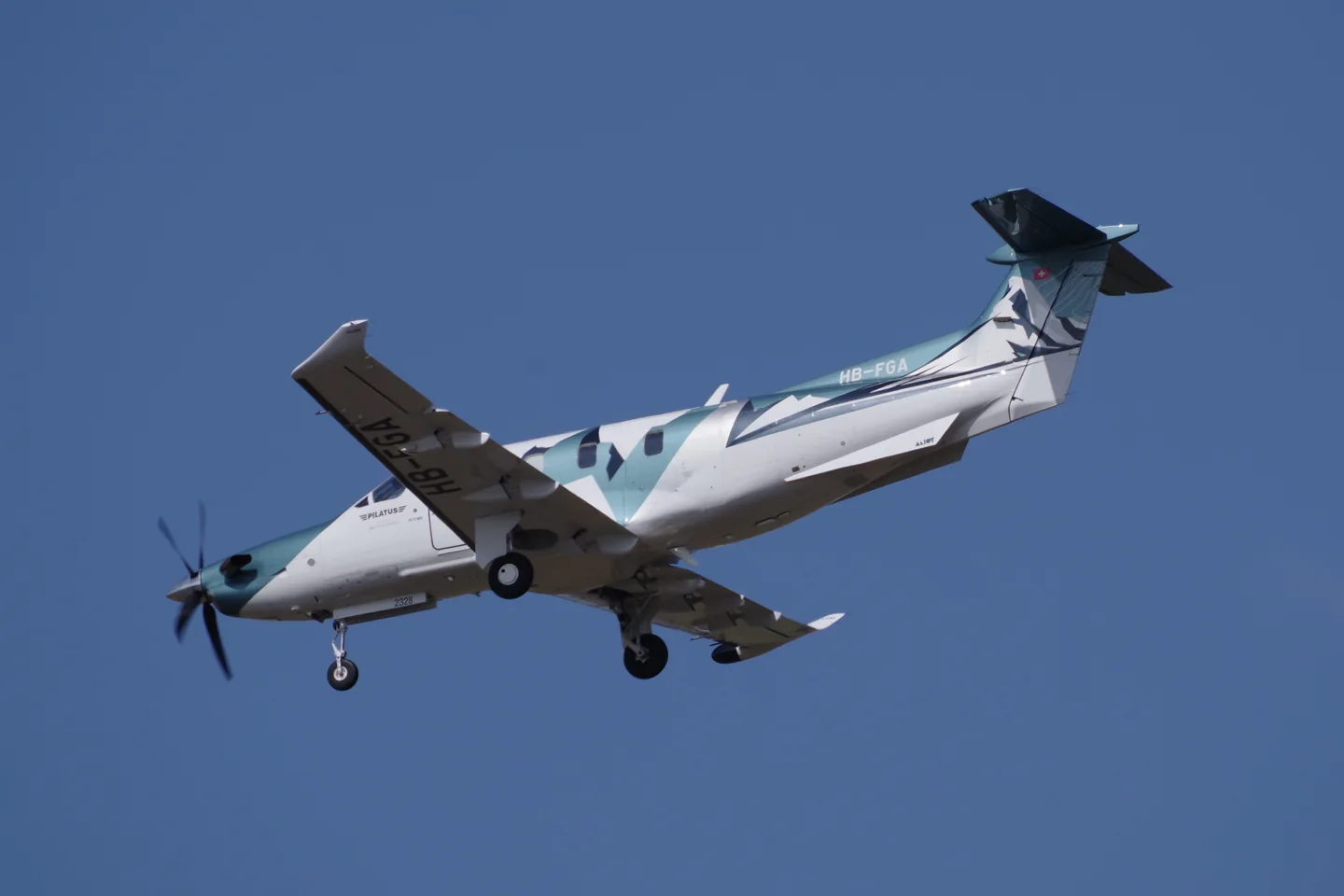
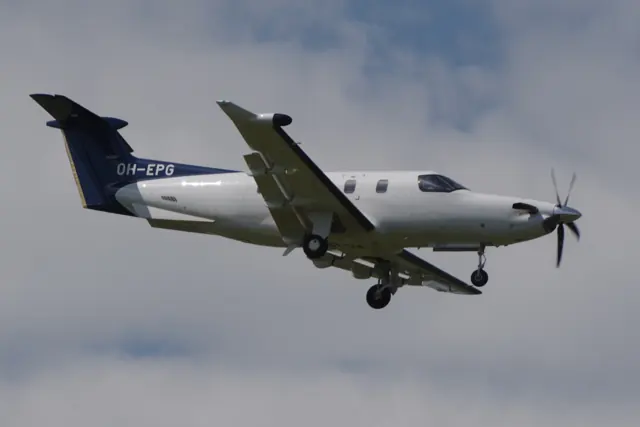
Pilatus designed the PC-12 for business and utility transport. A low wing, retractable gear, rear cargo door and single Pratt & Whitney Canada turboprop support executive, regional-service and air-ambulance roles.
Aircraft background
Wikipedia contributors · Read more ↗A quieter journey, with a surprising stick-pusher demonstration
Horne’s introduction to the NGX combined a travelling day with demonstrations of its new systems. The electronic engine controls simplified the start, while the lower propeller-speed setting made the cabin quieter without an observed speed change on that flight. At North Platte, a visual-approach display helped lay out the arrival before the group stopped for lunch.
AOPA Pilot · February 2020. PC-12 NGX demonstration from Denver to North Platte and back, with Jed Johnson and Tom Aniello.
AOPA Pilot · Read more ↗Build a cockpit for the earlier PC-12/47
Thranda’s X-Plane 12 package describes the PT6A-67B-powered PC-12/47, with a configurable instrument panel and support for separately supplied RealityXP navigators. Instruments can be moved between panel positions and saved as presets. This is a different represented configuration from the NGX in MSFS 2024.
Pilatus PC-12 NGX · Thranda · X-Plane 12
Thranda · Read more ↗Into the cockpit
 YouTube
 Levaero Aviation · 3 min ·
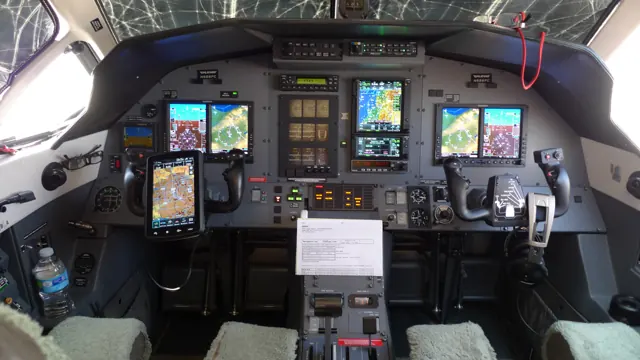
Pilatus PC-12 NGX Cockpit Tour
Levaero gives a tour of the PC-12 NGX cockpit.
Real aircraft · Pilatus PC-12 NGX
Watch on YouTube ↗Preview images are served by AirframeDB. Videos open on YouTube only when you choose to watch.
Meet Pilatus PC-12 NGX
Pilatus designed the PC-12 for business and utility transport. A low wing, retractable gear, rear cargo door and single Pratt & Whitney Canada turboprop support executive, regional-service and air-ambulance roles.
The NGX is a later development with updated engine management and cockpit equipment. Earlier PC-12 aircraft have different systems and performance specifications.
Pilatus PC-12 NGX
Aircraft type designators
Use the code for the model you are flying. The linked authority lists the applicable aircraft.
History & design
Development milestones
The 31 May 1991 first-flight date belongs to the original PC-12 family. The NGX is a much later development.
Wikipedia contributors · Pilatus PC-12 ↗Clarifies the family milestone in the linked PC-12 history
The NGX programme before its public unveiling
Pilatus’s programme account dates the NGX’s first flight to 21 December 2017, nearly two years before its public unveiling in Las Vegas on 21 October 2019. Project leader Corné Smith described a team of more than one hundred people working on the development.
Pilatus Aircraft · The next big thing: the new Pilatus PC-12 NGX ↗Manufacturer programme-team recollection
Changes inside and outside the cockpit
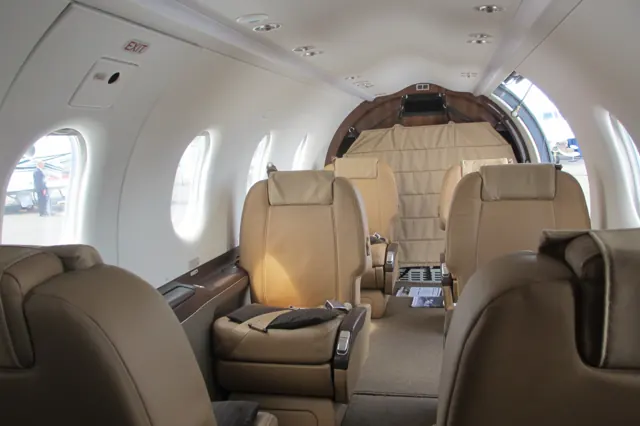
The NGX introduced electronic engine control, an autothrottle and a lower propeller-speed mode. Pilatus also described larger cabin windows and redesigned seats and headlining. The development therefore addressed both pilot workload and the passenger experience.
Pilatus Aircraft · The next big thing: the new Pilatus PC-12 NGX ↗Manufacturer description of the October 2019 NGX introduction
Pilot accounts
A quieter journey, with a surprising stick-pusher demonstration
Horne’s introduction to the NGX combined a travelling day with demonstrations of its new systems. The electronic engine controls simplified the start, while the lower propeller-speed setting made the cabin quieter without an observed speed change on that flight. At North Platte, a visual-approach display helped lay out the arrival before the group stopped for lunch.
On the return, Johnson demonstrated the aircraft’s protection systems. The stick pusher surprised Horne enough that he initially pulled against it, a revealing human reaction even for an experienced pilot. His subsequent landing went well despite several years away from the type.
AOPA Pilot · February 2020. PC-12 NGX demonstration from Denver to North Platte and back, with Jed Johnson and Tom Aniello.
Read the full account · AOPA Pilot ↗Learning the new NG among the Swiss mountains
Berendsen began with an evening cockpit briefing at Pilatus before taking the left seat the next morning. Experience with larger business jets made parts of the new avionics familiar, but the flight offered something different: hand-flying through the Swiss mountains, practising landings and visiting several airfields with Alb’s guidance. A stop in Lausanne supplied a welcome lunch break.
He appreciated the navigation display’s help in understanding terrain and changing conditions. The interface also exposed a small but memorable frustration: operating its cursor joystick in turbulence was awkward without somewhere to rest his hand.
Doppeldecker Design. Early PC-12 NG HB-FVC, serial 1001, flown with Pilatus test pilot Michael Alb; this is the 2008 NG, not the later NGX.
Read the full account · Doppeldecker Design ↗A military test pilot’s other cockpit
Rautio’s childhood ambition was to become an astronaut. Skydiving and military flying eventually led him into test work, with much of his career spent in Hornets and Hawks. The PC-12 entered that career when Finland acquired six NGs: he was one of three test pilots sent to Stans for training and acceptance work.
At the time of the interview he had accumulated about 300 hours in the type, fitting its flying around other projects. Later duties included acceptance flights after maintenance or repairs. He valued the aircraft’s handling and modern avionics, and hoped eventually to fly the PC-24 too. His account describes a continuing professional relationship with the NG, rather than a single factory demonstration or an NGX evaluation.
Finnish Air Force PC-12 NG pilot interviewed by Pilatus. Manufacturer-hosted account; the publication date is not established.
Read the full account · Pilatus Aircraft ↗In your simulator
Systems, equipment and documentation for each developer’s aircraft.
Compare simulator versions →MSFS 2024PC-12 NGX
Microsoft Flight Simulator · Released
PC-12 NGX
Microsoft Flight Simulator · Released
X-Plane 12Pilatus PC-12 NGX
Thranda · Released
Pilatus PC-12 NGX
Thranda · Released
X-Plane 11 Enhancement Pilatus PC-12 NGX
SimCoders · Released
Pilatus PC-12 NGX
SimCoders · Released
Aircraft specifications
Published figures for the named real-aircraft variant. Simulator equipment and performance can differ.
| Specification | Published value |
|---|---|
| Length | 14.4 m (47 ft 3 in) |
| Wingspan | 16.28 m (53 ft 5 in) |
| Height | 4.26 m (14 ft 0 in) |
| Wing area | 25.81 m² (277.8 sq ft) |
| Empty weight | 2,810 kg (6,195 lb) |
| Max takeoff weight | 4,740 kg (10,450 lb) |
| Powerplant | 1 × Pratt & Whitney Canada PT6A-67P turboprop engine, 890 kW (1,200 shp) |
| Propellers | 4-bladed Hartzell Propeller composite, 2.67 m (8 ft 9 in) diameter composite constant-speed fully-feathering reversible propeller |
| Cruise speed | 528 km/h (328 mph, 285 kn) |
| Stall speed | 124 km/h (77 mph, 67 kn) |
| Range | 3,417 km (2,123 mi, 1,845 nmi) (HSC, VFR Reserves) |
| Service ceiling | 9,144 m (30,000 ft) |
| Rate of climb | 9.75 m/s (1,919 ft/min) |
Manuals & resources
Find your next read
Choose a topic for a short introduction and a link to the original source. Simulator references identify the developer and edition they cover.
Simulator documentation
Build a cockpit for the earlier PC-12/47Pilatus PC-12 NGX · Thranda · X-Plane 12
Thranda’s X-Plane 12 package describes the PT6A-67B-powered PC-12/47, with a configurable instrument panel and support for separately supplied RealityXP navigators. Instruments can be moved between panel positions and saved as presets. This is a different represented configuration from the NGX in MSFS 2024.
Gathered developer listing and version 1.0.1 aircraft-description correction
Thranda · Read the source ↗The tablet connects loading, equipment and systemsPilatus PC-12 NGX · Thranda · X-Plane 12
The PC-12’s EFB includes individual-seat loading, centre-of-gravity plotting, paint customisation and engine-mode options. Thranda also documents an electrical model with bus-tie breakers, standby and non-essential buses, external power and failures, plus shaker/pusher logic. These are published simulator features, with their controls described in the package documentation.
Thranda’s documented X-Plane 12 feature scope
Thranda · Read the source ↗An expansion for Carenado’s X-Plane 11 PC-12Pilatus PC-12 NGX · SimCoders · X-Plane 11
SimCoders requires the Carenado X-Plane 11 PC-12 for this REP. Its engine additions include custom temperature evolution, throttle response, propeller-governor behaviour and hot starts. A maintenance interface, walkaround and saved battery and engine condition add continuity between flights. This listing does not establish compatibility with Thranda’s newer PC-12.
Gathered SimCoders product page · X-Plane 11 requirement
SimCoders · Read the source ↗Pilot account
A quieter journey, with a surprising stick-pusher demonstrationAOPA Pilot · February 2020. PC-12 NGX demonstration from Denver to North Platte and back, with Jed Johnson and Tom Aniello.
Horne’s introduction to the NGX combined a travelling day with demonstrations of its new systems. The electronic engine controls simplified the start, while the lower propeller-speed setting made the cabin quieter without an observed speed change on that flight. At North Platte, a visual-approach display helped lay out the arrival before the group stopped for lunch. On the return, Johnson demonstrated the aircraft’s protection systems.
Thomas A. Horne
AOPA Pilot · Read the source ↗Learning the new NG among the Swiss mountainsDoppeldecker Design. Early PC-12 NG HB-FVC, serial 1001, flown with Pilatus test pilot Michael Alb; this is the 2008 NG, not the later NGX.
Berendsen began with an evening cockpit briefing at Pilatus before taking the left seat the next morning. Experience with larger business jets made parts of the new avionics familiar, but the flight offered something different: hand-flying through the Swiss mountains, practising landings and visiting several airfields with Alb’s guidance. A stop in Lausanne supplied a welcome lunch break. He appreciated the navigation display’s help in understanding terrain and changing conditions.
J. Peter Berendsen
Doppeldecker Design · Read the source ↗Read the original documentation from the people who created it. Manuals open on their publisher’s website.
Manual
Microsoft Flight Simulator aircraft manualsMicrosoft / aircraft developersAircraft background
Pilatus PC-12Wikipedia contributors · Research background · Wikipedia revision 1369886263 · retrieved 2026-09-12 The next big thing: the new Pilatus PC-12 NGXPilatus Aircraft · Programme-team interviews following the October 2019 unveilingResource
MSFS 2024 FAQ and edition aircraft inventoryMicrosoftProduct
Pilatus PC-12 DGS SeriesThranda · Official developer / designated store catalogue · checked 2026-09-12 Reality Expansion Pack · Carenado Pilatus PC12SimCoders · Official developer / designated store catalogue · checked 2026-09-12Type designator
ICAO Doc 8643 — aircraft type designatorsInternational Civil Aviation Organization · Public search data retrieved 2026-09-14; authority update 2026-09-03Built-in force-feedback profiles
Read the documentary basis, editable starting settings and remaining questions for the aircraft you fly. Each explanation refers to the exact profile revision shown.
Catalogue programme-20261022-v1 · 8 profile choices
SimWorks Studios PC-12 Legacy
SimWorks Studios · Free and Pro · Revision 4 · Inherited starting point
MSFS 2020 · MSFS 2024
SimWorks Studios PC-12 Legacy: Mechanical primary controls motivate aerodynamic yoke loading.
Thranda PC-12
Thranda · Free and Pro · Revision 3 · Inherited starting point
X-Plane 12
Thranda PC-12: Mechanical primary controls motivate aerodynamic yoke loading.
Pilatus PC-12 NGX
Free and Pro · Revision 2 · Review pending
MSFS 2024 · X-Plane 12 · X-Plane 11
Pilatus PC-12 NGX: Mechanical primary controls motivate aerodynamic yoke loading.
Carenado PC12 (MSFS)
Carenado · Free and Pro · Revision 3 · Inherited starting point
MSFS 2020
A pressurised single turboprop with a large cargo door and a broad range of working roles.
Carenado PC12 (X-Plane)
Carenado · Free and Pro · Revision 1 · Partial review
X-Plane 11
A pressurised single turboprop with a large cargo door and a broad range of working roles.
Michael Sgier PC-12 classic
Michael Sgier · Free and Pro · Revision 2 · Inherited starting point
X-Plane 12
A pressurised single turboprop with a large cargo door and a broad range of working roles.
Michael Sgier PC-12 NG / G1000
Michael Sgier · Free and Pro · Revision 2 · Inherited starting point
X-Plane 12
A pressurised single turboprop with a large cargo door and a broad range of working roles.
Pilatus PC-12 Legacy
Free and Pro · Revision 1 · Partial review
MSFS 2020 · MSFS 2024 · X-Plane 12
A pressurised single turboprop with a large cargo door and a broad range of working roles.
Pilatus PC-12 NGX
Pilatus PC-12 NGX: Mechanical primary controls motivate aerodynamic yoke loading.
Aircraft and simulator scope
- Pilatus PC-12 NGX · MSFS 2024 · family starting point
- Pilatus PC-12 NGX · X-Plane 12 · family starting point
- Pilatus PC-12 NGX · X-Plane 11 · family starting point
Pilatus PC-12 NGX · Family sources identify only the variants and product versions described above.
The simulator model and controls
Pilatus designed the PC-12 for business and utility transport. A low wing, retractable gear, rear cargo door and single Pratt & Whitney Canada turboprop support executive, regional-service and air-ambulance roles.
This starting point selects Pilatus PC-12 NGX. Its aircraft-level settings do not select a particular developer’s custom systems.
How this profile feels
Mechanical primary controls motivate aerodynamic yoke loading. Spring resistance builds with the selected airspeed response. A separate aerodynamic term adds speed-dependent control load.
Stabilizer pitch trim and the left-aileron tab give trim separate axis mechanisms. Valid trim provides the configured pressure relief. Autopilot following is enabled for supported control references.
Controls and trim
The PC-12 has mechanical primary controls, a trimmable stabilizer, left-aileron trim tab and an aileron/rudder interconnect. Landing-gear hydraulics serve a separate system. SWS and Thranda document different cockpit and automatic-flight fits.
About the values
The gains are normalized profile settings. They describe the chosen effect balance; hand force depends on the device and its output limits. IAS references are tuning values rather than operating limits. Physical acceptance of this revision remains pending.
Documentary review and sources
These decisions describe the documentary basis and remaining gaps for this revision. Aircraft documentation and a starting setting describe different kinds of evidence.
Aircraft and variant
Not yet reviewedThis starting point selects Pilatus PC-12 NGX. Its aircraft-level settings do not select a particular developer’s custom systems.
Flight controls
Not yet reviewedThe PC-12 has mechanical primary controls, a trimmable stabilizer, left-aileron trim tab and an aileron/rudder interconnect. Landing-gear hydraulics serve a separate system. SWS and Thranda document different cockpit and automatic-flight fits.
Trim
Not yet reviewedStabilizer pitch trim and the left-aileron tab give trim separate axis mechanisms. Pitch authority 0.3 provides load relief and permitted centre movement; roll authority is 0.14.
Autopilot and stability
Not yet reviewedFollowing is on at 0.1 authority when a supported, valid autopilot control reference is available.
Equipment
Not yet reviewedGear, flap and ground cues follow the selected settings and available simulator-reported states.
Speeds and limits
Not yet reviewedThe indicated-speed references set the profile response scale; they are separate from aircraft operating limits.
Simulator integration
Not yet reviewedThe profile targets msfs2024, xplane12, xplane11. Add-on-specific controls use only the supported references configured by this profile.
Force-feedback settings
Not yet reviewedThe settings define the profile’s effect balance. Device output limits affect physical hand force.
Starting settings and their rationale
These configured values are starting estimates. The explanations describe what each setting controls; physical validation appears separately below.
| Setting | Starting value | What it controls and why |
|---|---|---|
| Spring strength | Starting value0.74 | What it controls and whyMechanical primary controls motivate aerodynamic yoke loading. The baseline spring is 0.74. Its low-speed blend reaches baseline strength at 90 KIAS. |
| Master force gain | Starting value0.85 | What it controls and whyScales overall profile strength while preserving effect balance, subject to device and output limits. |
| Profile force gain | Starting value0.68 | What it controls and whyThe aerodynamic-load gain is 0.68 with an indicated-speed reference of 210 KIAS. This supplies speed-dependent loading alongside the spring. |
| Force tuning speed/reference | Starting value210.0 kt | What it controls and whySets the IAS reference for aerodynamic loading. It is an estimate, not published cruise TAS or a flight limit. |
| Spring response reference speed | Starting value90 kt | What it controls and whySets the IAS where the low-speed blend reaches baseline strength; high-speed stiffening also uses it. |
| Aileron force scale | Starting value0.72 | What it controls and whyRoll and pitch aerodynamic scales are 0.72 and 1, respectively. They set the aerodynamic axis balance. No custom spring-travel curve is enabled. |
| Elevator force scale | Starting value1.0 | What it controls and whyScales pitch aerodynamic loading; pitch spring travel and trim responses are separate settings. |
| Trim feel | Starting valueEnabled | What it controls and whyRetained for compatibility and group membership. Trim relief, rather than this flag, controls centre movement. |
| Trim relief | Starting valueEnabled | What it controls and whyAllows trim relief with supported control law and valid telemetry. Axis authorities set its amount. |
| Autopilot follow | Starting valueEnabled | What it controls and whyFollowing is on at 0.1 authority when a supported, valid autopilot control reference is available. |
| Autopilot neutral hold | Starting valueDisabled | What it controls and whyPermits centering hold during a supported AP state, separate from following a moving target. |
| Output force limit | Starting value0.55 | What it controls and whyCaps directed-force output. Native spring effects and device limits remain separate. |
All 44 starting settings and their rationale
The settings define the profile’s effect balance. Device output limits affect physical hand force.
| Setting | Starting value | What it controls and why |
|---|---|---|
| Spring strength | Starting value0.74 | What it controls and whyMechanical primary controls motivate aerodynamic yoke loading. The baseline spring is 0.74. Its low-speed blend reaches baseline strength at 90 KIAS. |
| Spring deadband | Starting value0.05 | What it controls and whySets travel around the centre before the baseline spring resists. Smaller values engage it sooner. |
| Profile force gain | Starting value0.68 | What it controls and whyThe aerodynamic-load gain is 0.68 with an indicated-speed reference of 210 KIAS. This supplies speed-dependent loading alongside the spring. |
| Master force gain | Starting value0.85 | What it controls and whyScales overall profile strength while preserving effect balance, subject to device and output limits. |
| QBlend Enabled | Starting valueEnabled | What it controls and whyAllows baseline spring strength to rise with indicated airspeed where the control law permits it. |
| QSpring Minimum Factor | Starting value0.55 | What it controls and whySets low-speed spring strength as a fraction of baseline when blending is enabled. One keeps full strength. |
| QSpring Start Knots | Starting value20 kt | What it controls and whySets the IAS where the low-speed spring blend starts rising. This is a feel threshold, not a flight limit. |
| Spring response reference speed | Starting value90 kt | What it controls and whySets the IAS where the low-speed blend reaches baseline strength; high-speed stiffening also uses it. |
| Force tuning speed/reference | Starting value210.0 kt | What it controls and whySets the IAS reference for aerodynamic loading. It is an estimate, not published cruise TAS or a flight limit. |
| Airspeed spring stiffening gain | Starting value0.1 | What it controls and whyThe high-speed spring-stiffening gain is 0.1. It strengthens the permitted spring response above 90 KIAS, with the squared-speed ratio capped at 5. |
| Airspeed spring stiffening limit | Starting value5 | What it controls and whyLimits the squared airspeed ratio used for high-speed spring stiffening; it is not a device-force cap. |
| Aileron force scale | Starting value0.72 | What it controls and whyRoll and pitch aerodynamic scales are 0.72 and 1, respectively. They set the aerodynamic axis balance. No custom spring-travel curve is enabled. |
| Elevator force scale | Starting value1.0 | What it controls and whyScales pitch aerodynamic loading; pitch spring travel and trim responses are separate settings. |
| Output force limit | Starting value0.55 | What it controls and whyCaps directed-force output. Native spring effects and device limits remain separate. |
| Trim feel | Starting valueEnabled | What it controls and whyRetained for compatibility and group membership. Trim relief, rather than this flag, controls centre movement. |
| Trim relief | Starting valueEnabled | What it controls and whyAllows trim relief with supported control law and valid telemetry. Axis authorities set its amount. |
| Elevator Authority | Starting value0.3 | What it controls and whyStabilizer pitch trim and the left-aileron tab give trim separate axis mechanisms. Pitch authority 0.3 provides load relief and permitted centre movement; roll authority is 0.14. |
| Aileron Authority | Starting value0.14 | What it controls and whyScales supported roll-trim relief and permitted centre movement. Zero removes roll response. |
| Force Trim Enabled | Starting valueDisabled | What it controls and whyEnables local force trim, separate from aircraft-owned trim and add-on integration qualification. |
| GLoad Enabled | Starting valueEnabled | What it controls and whyAllows load-factor changes to modify permitted spring laws. Passive fly-by-wire feel can suppress it. |
| Rate Damping Enabled | Starting valueEnabled | What it controls and whyEnables rate damping with the configured coefficients and control law. |
| Autopilot follow | Starting valueEnabled | What it controls and whyFollowing is on at 0.1 authority when a supported, valid autopilot control reference is available. |
| Autopilot follow authority | Starting value0.1 | What it controls and whySets admitted AP-follow gain, not a percentage of travel. Runtime ownership and input limits still apply. |
| Autopilot neutral hold | Starting valueDisabled | What it controls and whyPermits centering hold during a supported AP state, separate from following a moving target. |
| Autopilot neutral hold strength | Starting value0.6 | What it controls and whySets admitted AP neutral-hold strength; inactive while neutral hold is disabled. |
| Enabled | Starting valueEnabled | What it controls and whyEnables aerodynamic cues; each still needs nonzero strength and its simulator conditions. |
| Gain | Starting value0.28 | What it controls and whySets stall-buffet strength. Zero removes the cue without changing simulator stalls or warnings. |
| Gain | Starting value0 | What it controls and whySets high-Mach buffet strength; onset and full-strength thresholds are separate. |
| Gain | Starting value0.14 | What it controls and whySets flap buffet at the configured position and speed gates. Flap movement texture is separate. |
| Maximum flap index | Starting value3 | What it controls and whySets the final flap index for detent normalization. UP plus three detents uses maximum index3. |
| Minimum flap index | Starting value2 | What it controls and whySets the first flap detent that admits buffet; this is a handle index, not degrees. |
| Gain | Starting value0.1 | What it controls and whySets gear aerodynamic buffet; movement and ground-contact cues are separate. |
| Shaker Enabled | Starting valueDisabled | What it controls and whyPermits shaker at supported warning conditions; the switch does not establish aircraft equipment. |
| Stick shaker amplitude | Starting value0.5 | What it controls and whySets triggered shaker strength; inactive while the shaker feature is disabled. |
| Enabled | Starting valueEnabled | What it controls and whyEnables ground effects; each still needs its own strength and contact or motion telemetry. |
| Gain | Starting value0.42 | What it controls and whySets rolling texture strength, modified by speed, surface and undercarriage configuration. |
| Gain | Starting value0.32 | What it controls and whySets gear-bump texture during ground motion, separate from touchdown impact. |
| Gain | Starting value0.82 | What it controls and whySets landing-impact strength; landing telemetry and response shape determine the pulse. |
| Gain | Starting value0.48 | What it controls and whySets reverse-thrust vibration with valid reverser and engine conditions. Zero removes the cue. |
| Enabled | Starting valueEnabled | What it controls and whyEnables engine cues with nonzero settings and valid running-engine telemetry. |
| Gain | Starting value0.06 | What it controls and whySets estimated engine vibration using configured telemetry and response, not measured cockpit vibration. |
| Enabled | Starting valueEnabled | What it controls and whyEnables accessory cues with configured strengths and observed accessory movement. |
| Gain | Starting value0.12 | What it controls and whySets texture from observed flap movement; a command without movement does not establish the cue. |
| Gain | Starting value0.12 | What it controls and whySets texture from observed gear movement, separate from aerodynamic and touchdown effects. |
Limits and open questions
- Choice says PC-12NGX; inspected REP/Thranda PC-12 references do not establish exact NGX identity.
- Legacy PC-12 background does not establish NGX gearing or feel.
- NGX trim authority remains unresolved.
- Legacy panel/AP options are not an NGX servo contract.
- Legacy engine/panel equipment cannot establish NGX installation.
- No NGX IAS anchor was derived from legacy product pages.
- REP requires Carenado XP11; the separate Thranda page supports XP12. Compatibility is not transferred.
- NGX forces remain family estimates, not relabelled legacy-product data.
Physical validation
No physical force validation is recorded in this public catalogue for this revision. Documentary review and software checks do not establish how a particular device feels.
Discuss this aircraft (0)
Questions, observations and useful sources from the community.
No published discussions yet. Bring a question or share a useful source.
Open aircraft discussions →Content expanded · What’s new
Something missing or a source that needs attention?
Suggest a correction ↗