
Start here
A few places to begin, from the aircraft’s story to the people who fly it.
Meet the aircraft
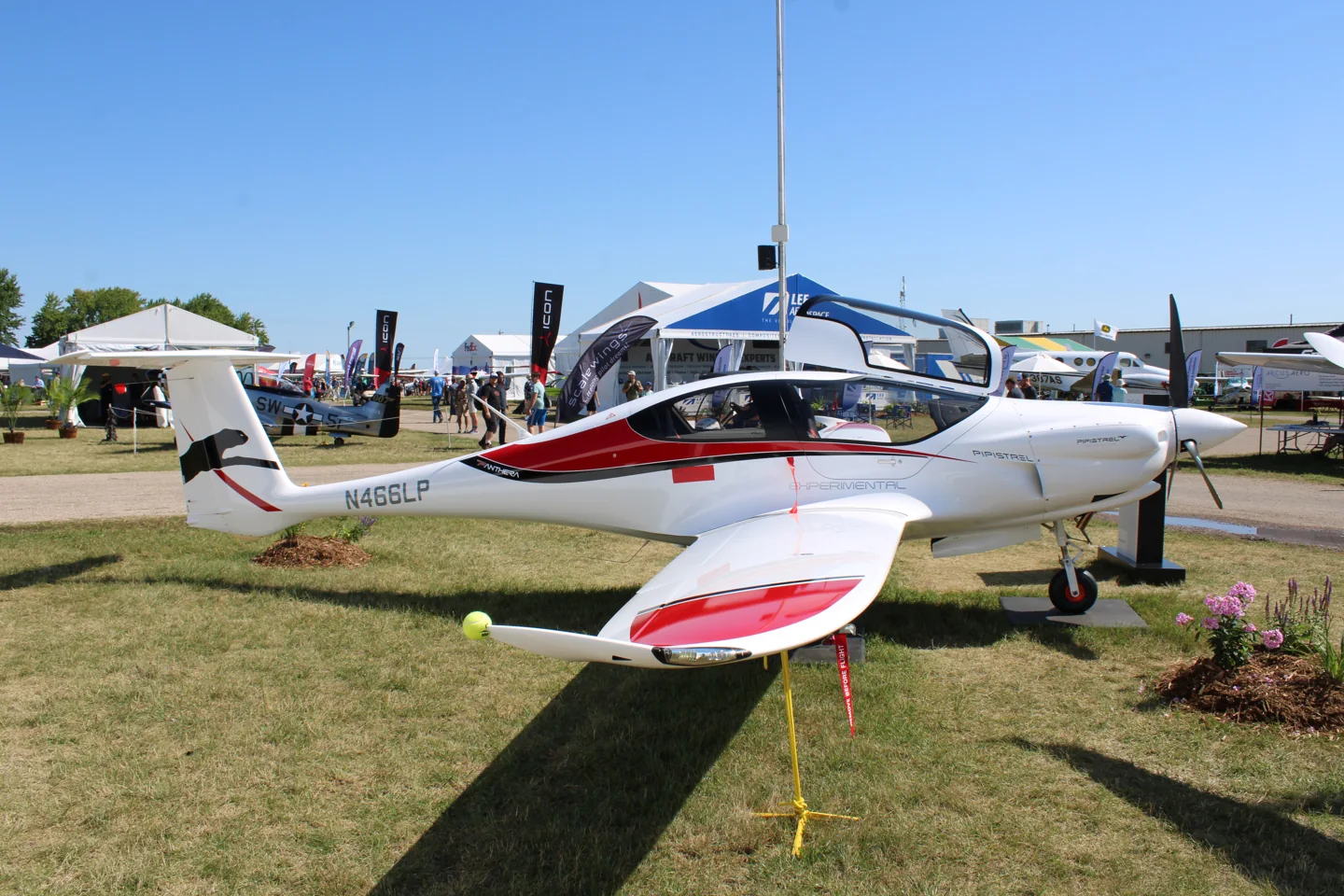
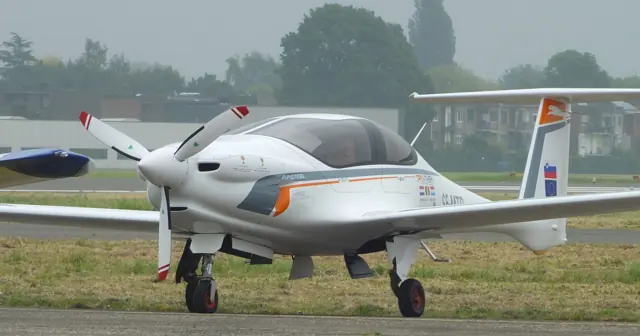
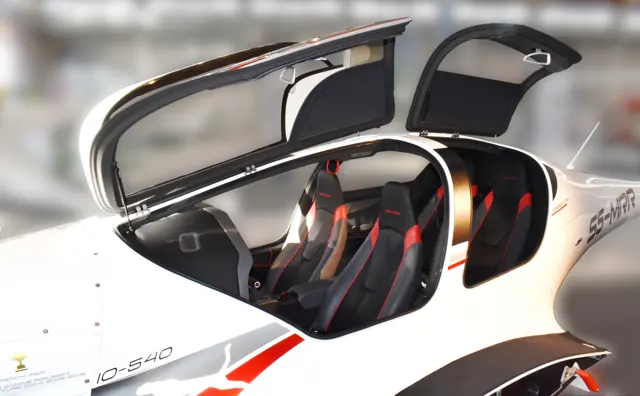
Pipistrel's Panthera pairs a four-seat cabin with an all-composite airframe. The collected background covers its development programme, including proposed powerplants and different stages of the design. Aerobask documents the equipment and simulator generation of its own implementation.
Aircraft background
Wikipedia contributors · Read more ↗Efficiency in cruise, with a modest prototype climb
Horne joined Robert Likar in the early Panthera prototype at Ajdovščina. The grass-field departure on a warm day produced a less impressive initial climb than the aircraft’s appearance might have suggested, with nearby trees attracting his attention. Once established in cruise, however, its combination of speed and modest fuel consumption made a much stronger impression. The clean airframe took time to slow down.
AOPA Pilot. Early 210 hp IO-390 prototype flown with Robert Likar at Ajdovščina. The page’s publication date conflicts with dates in its text.
AOPA Pilot · Read more ↗A custom Dynon and GTN cockpit for XP11
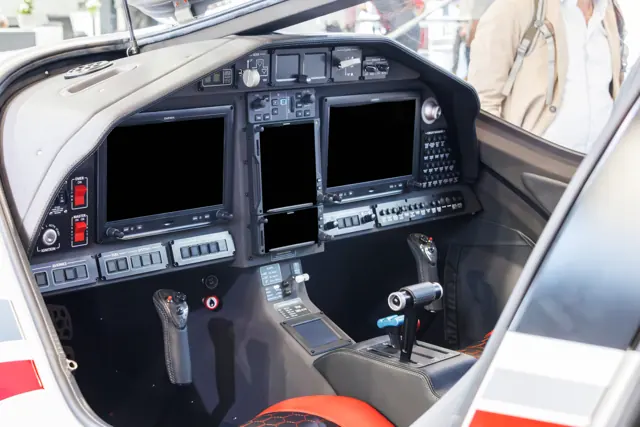
Aerobask’s Panthera uses custom Dynon SkyView and Garmin 750/650 instruments with touch and mouse-scroll interaction. The listing targets X-Plane 11, with aircraft, SkyView and GTN manuals included. Its panel therefore differs from the Garmin installation in the later real-aircraft demonstration described by Skies.
Pipistrel Panthera · Aerobask · X-Plane 11
Aerobask · Read more ↗Into the cockpit
 YouTube
 FloridaFlying · 17 min ·
The Panthera is FAST, Efficient, and BEAUTIFUL - Flight Demo
A flight demonstration explores the Panthera's cockpit and handling.
Real aircraft · Pipistrel Panthera
Watch on YouTube ↗Preview images are served by AirframeDB. Videos open on YouTube only when you choose to watch.
Meet Pipistrel Panthera
Pipistrel's Panthera pairs a four-seat cabin with an all-composite airframe. The collected background covers its development programme, including proposed powerplants and different stages of the design. Aerobask documents the equipment and simulator generation of its own implementation.
Pipistrel Panthera
Pipistrel → · Explore the family →
Pipistrel Panthera
Wikipedia contributors · Pipistrel Panthera ↗Aerobask · X-Plane 11 →Aircraft type designators
Use the code for the model you are flying. The linked authority lists the applicable aircraft.
History & design
A design shaped around efficient four-seat travel
Urlacher’s account traces the project to a 2007 challenge from Pipistrel founder Ivo Boscarol for a faster, longer-ranging four-seater. The early prototype used a 210 hp IO-390 while the team planned a change to the larger IO-540 for subsequent development.
Plane & Pilot · Pipistrel Panthera ↗Historical programme account; projected certification dates are not treated as completed milestones
A later demonstration aircraft uses the IO-540
The aircraft flown for Skies’s 2021 report had the 260 hp IO-540 and a Garmin-based panel. It was operating in the experimental exhibition category. This later configuration is distinct from the earlier IO-390 prototype and its Dynon installation.
Skies · Pipistrel Panthera: The perfect personal airplane? ↗Configuration documented in the 2021 flight report
Development milestones
First flight: April 4, 2013
Wikipedia contributors · Pipistrel Panthera ↗Pipistrel Panthera · family/variant named by the source · Wikipedia revision 1370443953
Pilot accounts
Efficiency in cruise, with a modest prototype climb
Horne joined Robert Likar in the early Panthera prototype at Ajdovščina. The grass-field departure on a warm day produced a less impressive initial climb than the aircraft’s appearance might have suggested, with nearby trees attracting his attention. Once established in cruise, however, its combination of speed and modest fuel consumption made a much stronger impression.
The clean airframe took time to slow down. As the undercarriage and flaps were extended for the return, the change in drag then required more power to maintain the approach. Horne found the landing straightforward and the cushioning gear helpful. His report makes the contrast within that particular flight useful: the economical cruise and friendly arrival did not erase the limited climb he had experienced in the lower-powered prototype.
AOPA Pilot. Early 210 hp IO-390 prototype flown with Robert Likar at Ajdovščina. The page’s publication date conflicts with dates in its text.
Read the full account · AOPA Pilot ↗A brief Colorado demonstration with lessons in pitch
Maya Charles had a short opportunity to fly the Panthera while other prospective customers waited. He liked the supportive seating, but the view forward over the nose and around the centre structure required adjustment. The first takeoff revealed sensitive pitch response, and a later attempt felt smoother as he became more familiar with it.
The aircraft’s low drag also demanded attention during descent, when Chan alerted him to the increasing speed. Configuring for landing changed the picture substantially. During the arrivals, unfamiliar sightlines and pitch attitude required coaching, including help with alignment when the nose restricted his view. He remained impressed by the aircraft’s appeal, while explicitly limiting his conclusions to a brief dealer demonstration conducted without a prior review of the operating handbook.
Skies · July 2021. A 260 hp IO-540 demonstration with Andrew Chan of Right Rudder Aviation; one nose-gear door had been removed for this flight.
Read the full account · Skies ↗Visiting Slovenia to fly the first prototype
Urlacher arrived in Slovenia with Christian Briand to see the Panthera at an early stage of development. Its appearance suggested a small, tightly packaged aircraft, so the room inside came as a pleasant surprise. The flight began from a grass runway still affected by recent rain, followed by handling and performance work over the surrounding countryside.
He liked the responsive controls and found the view useful during turns. Knez demonstrated how much speed the clean aircraft could gain when the undercarriage and flaps were retracted without changing power. Returning for landings, Urlacher found that the aircraft could be positioned precisely and that the undercarriage softened the arrival. His favourable report belongs to the original, lower-powered prototype; the more powerful version discussed in the article was still a development plan.
Plane & Pilot · February 2016 publication. Early 210 hp IO-390 prototype evaluation with test-pilot friend Christian Briand and Pipistrel’s Saso Knez.
Read the full account · Plane & Pilot ↗In your simulator
Systems, equipment and documentation for each developer’s aircraft.
X-Plane 11Pipistrel Panthera
Aerobask · Released
Pipistrel Panthera
Aerobask · Released
Aircraft specifications
Published figures for the named real-aircraft variant. Simulator equipment and performance can differ.
| Specification | Published value |
|---|---|
| Length | 8.07 m (26 ft 6 in) |
| Wingspan | 10.86 m (35 ft 8 in) |
| Height | 2.19 m (7 ft 2 in) |
| Wing area | 11.2 m² (121 sq ft) |
| Empty weight | 815 kg (1,797 lb) |
| Max takeoff weight | 1,315 kg (2,899 lb) |
| Powerplant | 1 × Lycoming IO-540-V4A5 six cylinder piston aircraft engine , 190 kW (260 hp) Variants will include a hybrid system and a pure electric option, each 150 kW (201 hp) continuous power. |
| Propellers | 3-bladed |
| Cruise speed | 359 km/h (223 mph, 194 kn) at 75% power, FL080 |
| Stall speed | 102 km/h (63 mph, 55 kn) flaps extended |
| Range | 2,800 km (1,700 mi, 1,500 nmi) at 190 KTAS, FL120, with 4 people aboard |
| Service ceiling | 7,600 m (25,000 ft) |
| Rate of climb | 6.6 m/s (1,300 ft/min) at MTOM and V Y |
Manuals & resources
Find your next read
Choose a topic for a short introduction and a link to the original source. Simulator references identify the developer and edition they cover.
Simulator documentation
A custom Dynon and GTN cockpit for XP11Pipistrel Panthera · Aerobask · X-Plane 11
Aerobask’s Panthera uses custom Dynon SkyView and Garmin 750/650 instruments with touch and mouse-scroll interaction. The listing targets X-Plane 11, with aircraft, SkyView and GTN manuals included. Its panel therefore differs from the Garmin installation in the later real-aircraft demonstration described by Skies.
Gathered Aerobask Panthera page
Aerobask · Read the source ↗Set the load and cabin before the flightPipistrel Panthera · Aerobask · X-Plane 11
A popup menu handles options, fuel and weight, including passengers and luggage. The developer describes interiors tied to the selected livery, windshield rain effects and an FMOD environment built using real Lycoming engine recordings. Switches, doors and other cockpit interactions have their own sounds.
Developer’s published simulator feature scope
Aerobask · Read the source ↗Pilot account
Efficiency in cruise, with a modest prototype climbAOPA Pilot. Early 210 hp IO-390 prototype flown with Robert Likar at Ajdovščina. The page’s publication date conflicts with dates in its text.
Horne joined Robert Likar in the early Panthera prototype at Ajdovščina. The grass-field departure on a warm day produced a less impressive initial climb than the aircraft’s appearance might have suggested, with nearby trees attracting his attention. Once established in cruise, however, its combination of speed and modest fuel consumption made a much stronger impression. The clean airframe took time to slow down.
Thomas A. Horne
AOPA Pilot · Read the source ↗A brief Colorado demonstration with lessons in pitchSkies · July 2021. A 260 hp IO-540 demonstration with Andrew Chan of Right Rudder Aviation; one nose-gear door had been removed for this flight.
Maya Charles had a short opportunity to fly the Panthera while other prospective customers waited. He liked the supportive seating, but the view forward over the nose and around the centre structure required adjustment. The first takeoff revealed sensitive pitch response, and a later attempt felt smoother as he became more familiar with it. The aircraft’s low drag also demanded attention during descent, when Chan alerted him to the increasing speed.
Michael Maya Charles
Skies · Read the source ↗Read the original documentation from the people who created it. Manuals open on their publisher’s website.
Aircraft background
Pipistrel PantheraWikipedia contributors · Research background · retrieved 2026-09-12Product
Pipistrel PantheraAerobask · Official developer / designated store catalogue · checked 2026-09-12Type designator
ICAO Doc 8643 — aircraft type designatorsInternational Civil Aviation Organization · Public search data retrieved 2026-09-14; authority update 2026-09-03Built-in force-feedback profiles
Read the documentary basis, editable starting settings and remaining questions for the aircraft you fly. Each explanation refers to the exact profile revision shown.
Catalogue programme-20261022-v1 · 1 profile choice
Pipistrel Panthera
Free and Pro · Revision 1 · Partial review
X-Plane 11
Pipistrel Panthera: The selected response supplies the represented light-aircraft control resistance.
Pipistrel Panthera
Pipistrel Panthera: The selected response supplies the represented light-aircraft control resistance.
Aircraft and simulator scope
- Pipistrel Panthera · X-Plane 11 · family starting point
Pipistrel Panthera · Historical XP11 catalogue scope; compatibility is not transferred to XP12.
The simulator model and controls
Pipistrel's Panthera pairs a four-seat cabin with an all-composite airframe. The collected background covers its development programme, including proposed powerplants and different stages of the design. Aerobask documents the equipment and simulator generation of its own implementation.
This starting point selects Pipistrel Panthera. Its aircraft-level settings do not select a particular developer’s custom systems.
How this profile feels
The selected response supplies the represented light-aircraft control resistance. Spring resistance builds with the selected airspeed response. A separate aerodynamic term adds speed-dependent control load.
Pitch relief follows the selected rendition’s configured trim. Valid trim provides the configured pressure relief. Autopilot following is enabled for supported control references.
Controls and trim
The Panthera combines a four-seat cabin and composite airframe in a developing personal-aircraft programme. Powerplant and production-stage proposals retain their own scope, while Aerobask documents a separate simulator equipment generation.
About the values
The gains are normalized profile settings. They describe the chosen effect balance; hand force depends on the device and its output limits. IAS references are tuning values rather than operating limits. Physical acceptance of this revision remains pending.
What the documentation establishes
Aerobask identifies its Panthera XP11 product with Dynon Skyview and custom GTN750/650.
Documentary review and sources
These decisions describe the documentary basis and remaining gaps for this revision. Aircraft documentation and a starting setting describe different kinds of evidence.
Aircraft and variant
ReviewedThis starting point selects Pipistrel Panthera. Its aircraft-level settings do not select a particular developer’s custom systems.
Flight controls
Not yet reviewedThe Panthera combines a four-seat cabin and composite airframe in a developing personal-aircraft programme. Powerplant and production-stage proposals retain their own scope, while Aerobask documents a separate simulator equipment generation.
Trim
Not yet reviewedPitch relief follows the selected rendition’s configured trim. Pitch authority 0.3 provides load relief and permitted centre movement; roll authority is 0.
Autopilot and stability
Not yet reviewedFollowing is on at 0.1 authority when a supported, valid autopilot control reference is available.
Equipment
Not yet reviewedGear, flap and ground cues follow the selected settings and available simulator-reported states.
Speeds and limits
Not yet reviewedThe indicated-speed references set the profile response scale; they are separate from aircraft operating limits.
Simulator integration
Not yet reviewedThe profile targets xplane11. Add-on-specific controls use only the supported references configured by this profile.
Force-feedback settings
Not yet reviewedThe settings define the profile’s effect balance. Device output limits affect physical hand force.
Starting settings and their rationale
These configured values are starting estimates. The explanations describe what each setting controls; physical validation appears separately below.
| Setting | Starting value | What it controls and why |
|---|---|---|
| Spring strength | Starting value0.74 | What it controls and whyThe selected response supplies the represented light-aircraft control resistance. The baseline spring is 0.74. Its low-speed blend reaches baseline strength at 82.5 KIAS. |
| Master force gain | Starting value0.85 | What it controls and whyScales overall profile strength while preserving effect balance, subject to device and output limits. |
| Profile force gain | Starting value0.8 | What it controls and whyThe aerodynamic-load gain is 0.8 with an indicated-speed reference of 165 KIAS. This supplies speed-dependent loading alongside the spring. |
| Force tuning speed/reference | Starting value165.0 kt | What it controls and whySets the IAS reference for aerodynamic loading. It is an estimate, not published cruise TAS or a flight limit. |
| Spring response reference speed | Starting value82.5 kt | What it controls and whySets the IAS where the low-speed blend reaches baseline strength; high-speed stiffening also uses it. |
| Aileron force scale | Starting value0.72 | What it controls and whyRoll and pitch aerodynamic scales are 0.72 and 1, respectively. They set the aerodynamic axis balance. No custom spring-travel curve is enabled. |
| Elevator force scale | Starting value1.0 | What it controls and whyScales pitch aerodynamic loading; pitch spring travel and trim responses are separate settings. |
| Trim feel | Starting valueEnabled | What it controls and whyRetained for compatibility and group membership. Trim relief, rather than this flag, controls centre movement. |
| Trim relief | Starting valueEnabled | What it controls and whyAllows trim relief with supported control law and valid telemetry. Axis authorities set its amount. |
| Autopilot follow | Starting valueEnabled | What it controls and whyFollowing is on at 0.1 authority when a supported, valid autopilot control reference is available. |
| Autopilot neutral hold | Starting valueDisabled | What it controls and whyPermits centering hold during a supported AP state, separate from following a moving target. |
| Output force limit | Starting value0.55 | What it controls and whyCaps directed-force output. Native spring effects and device limits remain separate. |
All 44 starting settings and their rationale
The settings define the profile’s effect balance. Device output limits affect physical hand force.
| Setting | Starting value | What it controls and why |
|---|---|---|
| Spring strength | Starting value0.74 | What it controls and whyThe selected response supplies the represented light-aircraft control resistance. The baseline spring is 0.74. Its low-speed blend reaches baseline strength at 82.5 KIAS. |
| Spring deadband | Starting value0.045 | What it controls and whySets travel around the centre before the baseline spring resists. Smaller values engage it sooner. |
| Profile force gain | Starting value0.8 | What it controls and whyThe aerodynamic-load gain is 0.8 with an indicated-speed reference of 165 KIAS. This supplies speed-dependent loading alongside the spring. |
| Master force gain | Starting value0.85 | What it controls and whyScales overall profile strength while preserving effect balance, subject to device and output limits. |
| QBlend Enabled | Starting valueEnabled | What it controls and whyAllows baseline spring strength to rise with indicated airspeed where the control law permits it. |
| QSpring Minimum Factor | Starting value0.5 | What it controls and whySets low-speed spring strength as a fraction of baseline when blending is enabled. One keeps full strength. |
| QSpring Start Knots | Starting value20 kt | What it controls and whySets the IAS where the low-speed spring blend starts rising. This is a feel threshold, not a flight limit. |
| Spring response reference speed | Starting value82.5 kt | What it controls and whySets the IAS where the low-speed blend reaches baseline strength; high-speed stiffening also uses it. |
| Force tuning speed/reference | Starting value165.0 kt | What it controls and whySets the IAS reference for aerodynamic loading. It is an estimate, not published cruise TAS or a flight limit. |
| Airspeed spring stiffening gain | Starting value0.15 | What it controls and whyThe high-speed spring-stiffening gain is 0.15. It strengthens the permitted spring response above 82.5 KIAS, with the squared-speed ratio capped at 5. |
| Airspeed spring stiffening limit | Starting value5 | What it controls and whyLimits the squared airspeed ratio used for high-speed spring stiffening; it is not a device-force cap. |
| Aileron force scale | Starting value0.72 | What it controls and whyRoll and pitch aerodynamic scales are 0.72 and 1, respectively. They set the aerodynamic axis balance. No custom spring-travel curve is enabled. |
| Elevator force scale | Starting value1.0 | What it controls and whyScales pitch aerodynamic loading; pitch spring travel and trim responses are separate settings. |
| Output force limit | Starting value0.55 | What it controls and whyCaps directed-force output. Native spring effects and device limits remain separate. |
| Trim feel | Starting valueEnabled | What it controls and whyRetained for compatibility and group membership. Trim relief, rather than this flag, controls centre movement. |
| Trim relief | Starting valueEnabled | What it controls and whyAllows trim relief with supported control law and valid telemetry. Axis authorities set its amount. |
| Elevator Authority | Starting value0.3 | What it controls and whyPitch relief follows the selected rendition’s configured trim. Pitch authority 0.3 provides load relief and permitted centre movement; roll authority is 0. |
| Aileron Authority | Starting value0 | What it controls and whyScales supported roll-trim relief and permitted centre movement. Zero removes roll response. |
| Force Trim Enabled | Starting valueDisabled | What it controls and whyEnables local force trim, separate from aircraft-owned trim and add-on integration qualification. |
| GLoad Enabled | Starting valueEnabled | What it controls and whyAllows load-factor changes to modify permitted spring laws. Passive fly-by-wire feel can suppress it. |
| Rate Damping Enabled | Starting valueEnabled | What it controls and whyEnables rate damping with the configured coefficients and control law. |
| Autopilot follow | Starting valueEnabled | What it controls and whyFollowing is on at 0.1 authority when a supported, valid autopilot control reference is available. |
| Autopilot follow authority | Starting value0.1 | What it controls and whySets admitted AP-follow gain, not a percentage of travel. Runtime ownership and input limits still apply. |
| Autopilot neutral hold | Starting valueDisabled | What it controls and whyPermits centering hold during a supported AP state, separate from following a moving target. |
| Autopilot neutral hold strength | Starting value0.6 | What it controls and whySets admitted AP neutral-hold strength; inactive while neutral hold is disabled. |
| Enabled | Starting valueEnabled | What it controls and whyEnables aerodynamic cues; each still needs nonzero strength and its simulator conditions. |
| Gain | Starting value0.35 | What it controls and whySets stall-buffet strength. Zero removes the cue without changing simulator stalls or warnings. |
| Gain | Starting value0 | What it controls and whySets high-Mach buffet strength; onset and full-strength thresholds are separate. |
| Gain | Starting value0.14 | What it controls and whySets flap buffet at the configured position and speed gates. Flap movement texture is separate. |
| Maximum flap index | Starting value2 | What it controls and whySets the final flap index for detent normalization. UP plus three detents uses maximum index3. |
| Minimum flap index | Starting value2 | What it controls and whySets the first flap detent that admits buffet; this is a handle index, not degrees. |
| Gain | Starting value0.1 | What it controls and whySets gear aerodynamic buffet; movement and ground-contact cues are separate. |
| Shaker Enabled | Starting valueDisabled | What it controls and whyPermits shaker at supported warning conditions; the switch does not establish aircraft equipment. |
| Stick shaker amplitude | Starting value0.5 | What it controls and whySets triggered shaker strength; inactive while the shaker feature is disabled. |
| Enabled | Starting valueEnabled | What it controls and whyEnables ground effects; each still needs its own strength and contact or motion telemetry. |
| Gain | Starting value0.4 | What it controls and whySets rolling texture strength, modified by speed, surface and undercarriage configuration. |
| Gain | Starting value0.25 | What it controls and whySets gear-bump texture during ground motion, separate from touchdown impact. |
| Gain | Starting value0.65 | What it controls and whySets landing-impact strength; landing telemetry and response shape determine the pulse. |
| Gain | Starting value0 | What it controls and whySets reverse-thrust vibration with valid reverser and engine conditions. Zero removes the cue. |
| Enabled | Starting valueEnabled | What it controls and whyEnables engine cues with nonzero settings and valid running-engine telemetry. |
| Gain | Starting value0.12 | What it controls and whySets estimated engine vibration using configured telemetry and response, not measured cockpit vibration. |
| Enabled | Starting valueEnabled | What it controls and whyEnables accessory cues with configured strengths and observed accessory movement. |
| Gain | Starting value0.12 | What it controls and whySets texture from observed flap movement; a command without movement does not establish the cue. |
| Gain | Starting value0.12 | What it controls and whySets texture from observed gear movement, separate from aerodynamic and touchdown effects. |
Limits and open questions
- The quoted 200-knot cruise is true airspeed, not indicated-airspeed force calibration. Custom avionics require separate interface checks.
- No simulator launch or physical force validation.
Physical validation
No physical force validation is recorded in this public catalogue for this revision. Documentary review and software checks do not establish how a particular device feels.
Discuss this aircraft (0)
Questions, observations and useful sources from the community.
No published discussions yet. Bring a question or share a useful source.
Open aircraft discussions →Content expanded · What’s new
Something missing or a source that needs attention?
Suggest a correction ↗