
Start here
A few places to begin, from the aircraft’s story to the people who fly it.
Meet the aircraft
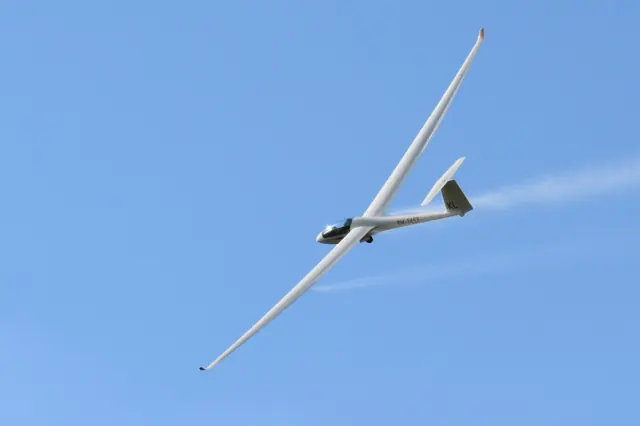
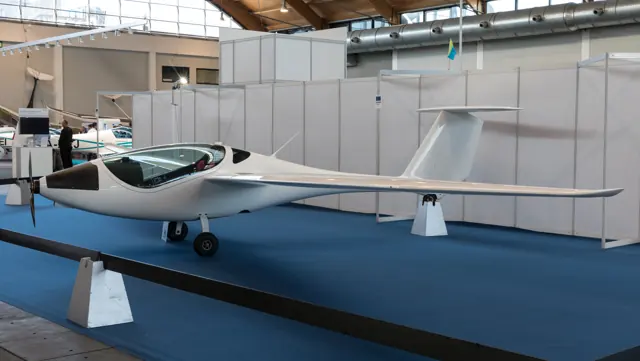
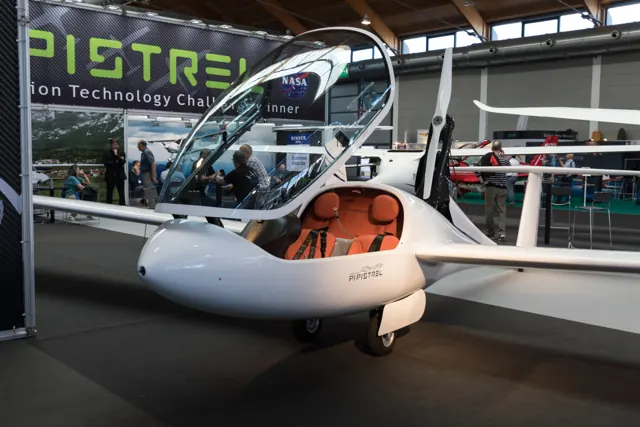
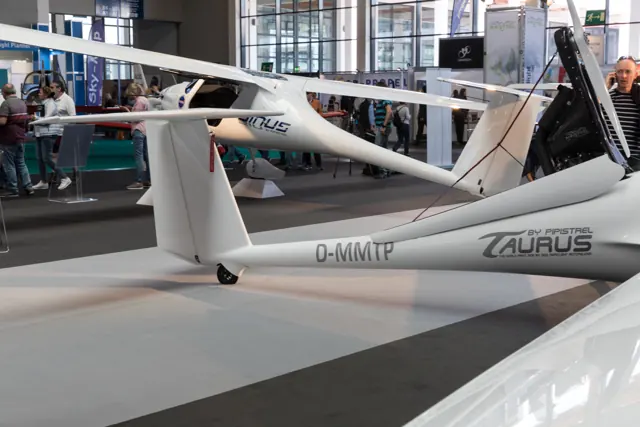
Pipistrel's two-seat Taurus combines self-launching with gliding flight. The powerplant retracts into the airframe when no longer needed, alongside a long wing and side-by-side cockpit. Several powerplant developments exist in the family.
Aircraft background
Wikipedia contributors · Read more ↗Early production flights bring encouraging feedback to the team
Writing during early production testing, Tomazic described a glider that felt steadier and lighter on the controls than the prototype. He particularly enjoyed its balance in turns and the quiet cockpit once the engine was stowed. His enthusiastic message gave the wider community an inside view of the team’s first experiences with the aircraft. The work was still in progress.
Factory test-pilot correspondence reproduced in Michael Coates’s newsletter. First production Taurus programme, including serial 002; date not established and development settings still provisional.
Michael Coates newsletter / Mike Muller archive · Read more ↗The engine installation has dedicated cockpit controls
The illustrated panel identifies an IBIS II engine controller, primer, ignition, starter and retraction switch. Priming uses a right-click interaction in the documented cockpit.
Taurus M · Microsoft Flight Simulator · MSFS 2024
Microsoft / aircraft developers · Read more ↗Into the cockpit
 YouTube
 Matjaz Klemencic · 2 min ·
Flying with Taurus from Pipistrel
A Pipistrel Taurus flight in the Julian Alps.
Real aircraft · Pipistrel Taurus M
Watch on YouTube ↗Preview images are served by AirframeDB. Videos open on YouTube only when you choose to watch.
Meet Pipistrel Taurus M
Pipistrel's two-seat Taurus combines self-launching with gliding flight. The powerplant retracts into the airframe when no longer needed, alongside a long wing and side-by-side cockpit. Several powerplant developments exist in the family.
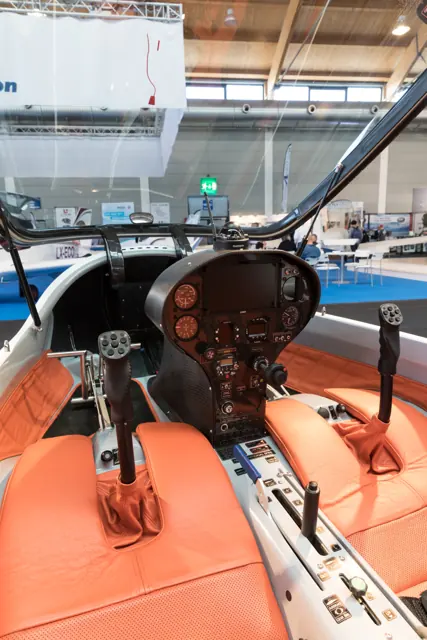
The Taurus M is the engine-powered version represented here. Its cockpit includes sailplane flap, airbrake and landing-gear controls.
Pipistrel Taurus M
Pipistrel → · Explore the family →
Pipistrel Taurus M
Wikipedia contributors · Pipistrel Taurus ↗Microsoft Flight Simulator · MSFS 2024 →Aircraft type designators
Use the code for the model you are flying. The linked authority lists the applicable aircraft.
Pipistrel Taurus M — motorglider with a retractable engine or folding/retractable propeller; ICAO special designator
ICAO — special designators ↗Checked 2026-09-14History & design
Development milestones
First flight: 2004
Wikipedia contributors · Pipistrel Taurus ↗Pipistrel Taurus · family/variant named by the source · Wikipedia revision 1371907239
Pilot accounts
Early production flights bring encouraging feedback to the team
Writing during early production testing, Tomazic described a glider that felt steadier and lighter on the controls than the prototype. He particularly enjoyed its balance in turns and the quiet cockpit once the engine was stowed. His enthusiastic message gave the wider community an inside view of the team’s first experiences with the aircraft.
The work was still in progress. The correspondence mentions adjustments after flights and further thought about propeller and flap settings, alongside encouraging results from the retractable systems. His satisfaction is valuable as a factory pilot’s contemporary account of development. The broad performance claims in that message remain the team’s assertions, rather than independent measurements or present-day operating guidance.
Factory test-pilot correspondence reproduced in Michael Coates’s newsletter. First production Taurus programme, including serial 002; date not established and development settings still provisional.
Read the full account · Michael Coates newsletter / Mike Muller archive ↗A maintenance course leaves time for flying between showers
Pipistrel’s distributor maintenance course gave Duchènes an excuse to escape a Canadian winter and spend more time in the Taurus. Rainy mornings suited ground school, while breaks in the weather left opportunities to fly. With a fellow visitor named Mike, he practised engine operations and landings and found the aircraft accommodating.
Another afternoon brought flights with Belgian distributor Philippe. As the wind increased, they stayed on the nearby ridge for an hour, enjoying the unusual experience of soaring in cool air and light rain. The chief pilot eventually called them back by radio.
Free Flight 4/2009 · page 24. February visit to Pipistrel in Slovenia, with earlier Taurus flights in 2007; the short-wing Virus demonstration in the same article is separate.
Read the full account · Free Flight, Soaring Association of Canada ↗Adapted controls open the way back to flying
Hercek wanted a self-launching glider that would give him independence, including room to carry his wheelchair. Pipistrel agreed to work with him on a Taurus with adapted controls and invited him to help develop the arrangement. The aircraft also carried a personal remembrance: yellow seats chosen for the flowers his wife Jane had loved.
His first flight showed that precise hand movements would take practice, but the controls proved easier than he had expected. Further training followed before he took the glider home in its trailer. By the time of the article, he had accumulated more than fifteen hours in it.
James Lawrence, Plane & Pilot · April 2012, drawing on Hercek’s story supplied through Pipistrel. Individually adapted Taurus G2 with hands-only controls, not the standard simulated cockpit.
Read the full account · Plane & Pilot ↗In your simulator
Systems, equipment and documentation for each developer’s aircraft.
MSFS 2024Taurus M
Microsoft Flight Simulator · Released
Taurus M
Microsoft Flight Simulator · Released
Aircraft specifications
Published figures for the named real-aircraft variant. Simulator equipment and performance can differ.
| Specification | Published value |
|---|---|
| Length | 7.30 m (23 ft 11 in) |
| Wingspan | 14.97 m (49 ft 1 in) |
| Height | 1.41 m (4 ft 8 in) (2.70 m, propeller extended) |
| Wing area | 12.33 m² (132.7 sq ft) |
| Empty weight | 285 kg (628 lb) |
| Max takeoff weight | 472.5 or 550 kg (1,042 or 1,213 lb) |
| Powerplant | 1 × Rotax 503 two-stroke, two-cylinder piston engine, 40 kW (53 hp) |
| Propellers | 2-bladed Pipistrel, 1.6 m (5 ft 3 in) diameter |
| Maximum speed | 130 km/h (81 mph, 70 kn) with flaps extended |
| Stall speed | 63 km/h (39 mph, 34 kn) with flaps |
| Service ceiling | 3,900 m (12,800 ft) |
| Rate of climb | 2.9 m/s (570 ft/min) |
Manuals & resources
Find your next read
Choose a topic for a short introduction and a link to the original source. Simulator references identify the developer and edition they cover.
Simulator documentation
The engine installation has dedicated cockpit controlsTaurus M · Microsoft Flight Simulator · MSFS 2024
The illustrated panel identifies an IBIS II engine controller, primer, ignition, starter and retraction switch. Priming uses a right-click interaction in the documented cockpit.
Manual PDF pages5 and8; controls, not an invented external interface
Microsoft / aircraft developers · Read the source ↗Soaring instruments and solar controls share the panelTaurus M · Microsoft Flight Simulator · MSFS 2024
The cockpit guide labels LX navigation and variometer equipment, a mechanical netto variometer, and separate solar-system power and battery-selector switches.
Manual PDF page8; developer-documented panel
Microsoft / aircraft developers · Read the source ↗Compact sailplane controlsTaurus M · Microsoft Flight Simulator · MSFS 2024
The Taurus M cockpit has an elevator-trim handle, flap controls and retractable landing gear. A combined lever serves the airbrake and parking-brake functions. The cockpit diagram locates these controls in the side-by-side cabin.
Archived simulator manual; installed package revision not observed · PDF p.7
Microsoft / aircraft developers · Read the source ↗A Rotax-powered self-launcherTaurus M · Microsoft Flight Simulator · MSFS 2024
The manual identifies this release as the classic Rotax 503 UL Taurus M. The electric Taurus Electro is a separate aircraft discussed as background.
Got Friends Taurus M manual v3 · MSFS2024
Microsoft / aircraft developers · Read the source ↗Follow the checklist through the EFBTaurus M · Microsoft Flight Simulator · MSFS 2024
The MSFS2024 chapter places interactive checklists in the Electronic Flight Bag, with item-location highlighting and progress tracking. Its MSFS2020 popup instructions are a separate chapter.
Manual PDF page10 · MSFS2024
Microsoft / aircraft developers · Read the source ↗Pilot account
Early production flights bring encouraging feedback to the teamFactory test-pilot correspondence reproduced in Michael Coates’s newsletter. First production Taurus programme, including serial 002; date not established and development settings still provisional.
Writing during early production testing, Tomazic described a glider that felt steadier and lighter on the controls than the prototype. He particularly enjoyed its balance in turns and the quiet cockpit once the engine was stowed. His enthusiastic message gave the wider community an inside view of the team’s first experiences with the aircraft. The work was still in progress.
Tine Tomazic
Michael Coates newsletter / Mike Muller archive · Read the source ↗A maintenance course leaves time for flying between showersFree Flight 4/2009 · page 24. February visit to Pipistrel in Slovenia, with earlier Taurus flights in 2007; the short-wing Virus demonstration in the same article is separate.
Pipistrel’s distributor maintenance course gave Duchènes an excuse to escape a Canadian winter and spend more time in the Taurus. Rainy mornings suited ground school, while breaks in the weather left opportunities to fly. With a fellow visitor named Mike, he practised engine operations and landings and found the aircraft accommodating. Another afternoon brought flights with Belgian distributor Philippe.
Guy Duchènes
Free Flight, Soaring Association of Canada · Read the source ↗Read the original documentation from the people who created it. Manuals open on their publisher’s website.
Manual
Microsoft Flight Simulator aircraft manualsMicrosoft / aircraft developers Pipistrek Taurus M ManualMicrosoft / aircraft developersAircraft background
Pipistrel TaurusWikipedia contributors · Research background · Wikipedia revision 1371907239 · retrieved 2026-09-12Resource
MSFS 2024 FAQ and edition aircraft inventoryMicrosoftType designator
ICAO — special designatorsInternational Civil Aviation Organization · Glider and motorglider categories; checked 2026-09-14Built-in force-feedback profiles
Read the documentary basis, editable starting settings and remaining questions for the aircraft you fly. Each explanation refers to the exact profile revision shown.
Catalogue programme-20261022-v1 · 1 profile choice
Pipistrel Taurus M
Free and Pro · Revision 1 · Partial review
MSFS 2024
Pipistrel Taurus M: The chosen response supplies sailplane stick loading.
Pipistrel Taurus M
Pipistrel Taurus M: The chosen response supplies sailplane stick loading.
Aircraft and simulator scope
- Pipistrel Taurus M · MSFS 2024 · family starting point
Pipistrel Taurus M · Family sources identify only the variants and product versions described above.
The simulator model and controls
Pipistrel's two-seat Taurus combines self-launching with gliding flight. The powerplant retracts into the airframe when no longer needed, alongside a long wing and side-by-side cockpit. Several powerplant developments exist in the family.
This starting point selects Pipistrel Taurus M. Its aircraft-level settings do not select a particular developer’s custom systems.
How this profile feels
The chosen response supplies sailplane stick loading. Spring resistance builds with the selected airspeed response. A separate aerodynamic term adds speed-dependent control load.
Pitch trim relief is separate from propulsion extension and airbrake movement. Valid trim provides the configured pressure relief. Autopilot following is off.
Controls and trim
The Taurus M combines engine-assisted launching with sailplane flight. Its propulsion installation can be stowed, while flaps, airbrakes and landing-gear controls form a glider cockpit. The M identifies the engine-powered branch.
About the values
The gains are normalized profile settings. They describe the chosen effect balance; hand force depends on the device and its output limits. IAS references are tuning values rather than operating limits. Physical acceptance of this revision remains pending.
What the documentation establishes
Microsoft Taurus M manual identifies Rotax 503 self-launcher, not electric Taurus.
Manual lists flaps at -5/0/5/9/18 degrees, top-wing airbrakes and stowable two-blade propeller.
Documentary review and sources
These decisions describe the documentary basis and remaining gaps for this revision. Aircraft documentation and a starting setting describe different kinds of evidence.
Aircraft and variant
ReviewedThis starting point selects Pipistrel Taurus M. Its aircraft-level settings do not select a particular developer’s custom systems.
Flight controls
Not yet reviewedThe Taurus M combines engine-assisted launching with sailplane flight. Its propulsion installation can be stowed, while flaps, airbrakes and landing-gear controls form a glider cockpit. The M identifies the engine-powered branch.
Trim
Not yet reviewedPitch trim relief is separate from propulsion extension and airbrake movement. Pitch authority 0.3 provides load relief and permitted centre movement; roll authority is 0.1.
Autopilot and stability
Not yet reviewedAutopilot following is off; the configured spring and load retain the hardware feel.
Equipment
ReviewedGear, flap and ground cues follow the selected settings and available simulator-reported states.
Speeds and limits
Not yet reviewedThe indicated-speed references set the profile response scale; they are separate from aircraft operating limits.
Simulator integration
Not yet reviewedThe profile targets msfs2024. Add-on-specific controls use only the supported references configured by this profile.
Force-feedback settings
Not yet reviewedThe settings define the profile’s effect balance. Device output limits affect physical hand force.
Starting settings and their rationale
These configured values are starting estimates. The explanations describe what each setting controls; physical validation appears separately below.
| Setting | Starting value | What it controls and why |
|---|---|---|
| Spring strength | Starting value0.64 | What it controls and whyThe chosen response supplies sailplane stick loading. The baseline spring is 0.64. Its low-speed blend reaches baseline strength at 32.5 KIAS. |
| Master force gain | Starting value0.85 | What it controls and whyScales overall profile strength while preserving effect balance, subject to device and output limits. |
| Profile force gain | Starting value1 | What it controls and whyThe aerodynamic-load gain is 1 with an indicated-speed reference of 65 KIAS. This supplies speed-dependent loading alongside the spring. |
| Force tuning speed/reference | Starting value65.0 kt | What it controls and whySets the IAS reference for aerodynamic loading. It is an estimate, not published cruise TAS or a flight limit. |
| Spring response reference speed | Starting value32.5 kt | What it controls and whySets the IAS where the low-speed blend reaches baseline strength; high-speed stiffening also uses it. |
| Aileron force scale | Starting value0.6 | What it controls and whyRoll and pitch aerodynamic scales are 0.6 and 0.78, respectively. They set the aerodynamic axis balance. No custom spring-travel curve is enabled. |
| Elevator force scale | Starting value0.78 | What it controls and whyScales pitch aerodynamic loading; pitch spring travel and trim responses are separate settings. |
| Trim feel | Starting valueEnabled | What it controls and whyRetained for compatibility and group membership. Trim relief, rather than this flag, controls centre movement. |
| Trim relief | Starting valueEnabled | What it controls and whyAllows trim relief with supported control law and valid telemetry. Axis authorities set its amount. |
| Autopilot follow | Starting valueDisabled | What it controls and whyAutopilot following is off; the configured spring and load retain the hardware feel. |
| Autopilot neutral hold | Starting valueDisabled | What it controls and whyPermits centering hold during a supported AP state, separate from following a moving target. |
| Output force limit | Starting value0.55 | What it controls and whyCaps directed-force output. Native spring effects and device limits remain separate. |
All 44 starting settings and their rationale
The settings define the profile’s effect balance. Device output limits affect physical hand force.
| Setting | Starting value | What it controls and why |
|---|---|---|
| Spring strength | Starting value0.64 | What it controls and whyThe chosen response supplies sailplane stick loading. The baseline spring is 0.64. Its low-speed blend reaches baseline strength at 32.5 KIAS. |
| Spring deadband | Starting value0.04 | What it controls and whySets travel around the centre before the baseline spring resists. Smaller values engage it sooner. |
| Profile force gain | Starting value1 | What it controls and whyThe aerodynamic-load gain is 1 with an indicated-speed reference of 65 KIAS. This supplies speed-dependent loading alongside the spring. |
| Master force gain | Starting value0.85 | What it controls and whyScales overall profile strength while preserving effect balance, subject to device and output limits. |
| QBlend Enabled | Starting valueEnabled | What it controls and whyAllows baseline spring strength to rise with indicated airspeed where the control law permits it. |
| QSpring Minimum Factor | Starting value0.4 | What it controls and whySets low-speed spring strength as a fraction of baseline when blending is enabled. One keeps full strength. |
| QSpring Start Knots | Starting value9.1 kt | What it controls and whySets the IAS where the low-speed spring blend starts rising. This is a feel threshold, not a flight limit. |
| Spring response reference speed | Starting value32.5 kt | What it controls and whySets the IAS where the low-speed blend reaches baseline strength; high-speed stiffening also uses it. |
| Force tuning speed/reference | Starting value65.0 kt | What it controls and whySets the IAS reference for aerodynamic loading. It is an estimate, not published cruise TAS or a flight limit. |
| Airspeed spring stiffening gain | Starting value0.3 | What it controls and whyThe high-speed spring-stiffening gain is 0.3. It strengthens the permitted spring response above 32.5 KIAS, with the squared-speed ratio capped at 5. |
| Airspeed spring stiffening limit | Starting value5 | What it controls and whyLimits the squared airspeed ratio used for high-speed spring stiffening; it is not a device-force cap. |
| Aileron force scale | Starting value0.6 | What it controls and whyRoll and pitch aerodynamic scales are 0.6 and 0.78, respectively. They set the aerodynamic axis balance. No custom spring-travel curve is enabled. |
| Elevator force scale | Starting value0.78 | What it controls and whyScales pitch aerodynamic loading; pitch spring travel and trim responses are separate settings. |
| Output force limit | Starting value0.55 | What it controls and whyCaps directed-force output. Native spring effects and device limits remain separate. |
| Trim feel | Starting valueEnabled | What it controls and whyRetained for compatibility and group membership. Trim relief, rather than this flag, controls centre movement. |
| Trim relief | Starting valueEnabled | What it controls and whyAllows trim relief with supported control law and valid telemetry. Axis authorities set its amount. |
| Elevator Authority | Starting value0.3 | What it controls and whyPitch trim relief is separate from propulsion extension and airbrake movement. Pitch authority 0.3 provides load relief and permitted centre movement; roll authority is 0.1. |
| Aileron Authority | Starting value0.1 | What it controls and whyScales supported roll-trim relief and permitted centre movement. Zero removes roll response. |
| Force Trim Enabled | Starting valueDisabled | What it controls and whyEnables local force trim, separate from aircraft-owned trim and add-on integration qualification. |
| GLoad Enabled | Starting valueEnabled | What it controls and whyAllows load-factor changes to modify permitted spring laws. Passive fly-by-wire feel can suppress it. |
| Rate Damping Enabled | Starting valueEnabled | What it controls and whyEnables rate damping with the configured coefficients and control law. |
| Autopilot follow | Starting valueDisabled | What it controls and whyAutopilot following is off; the configured spring and load retain the hardware feel. |
| Autopilot follow authority | Starting value0.05 | What it controls and whySets admitted AP-follow gain, not a percentage of travel. Runtime ownership and input limits still apply. |
| Autopilot neutral hold | Starting valueDisabled | What it controls and whyPermits centering hold during a supported AP state, separate from following a moving target. |
| Autopilot neutral hold strength | Starting value0.6 | What it controls and whySets admitted AP neutral-hold strength; inactive while neutral hold is disabled. |
| Enabled | Starting valueEnabled | What it controls and whyEnables aerodynamic cues; each still needs nonzero strength and its simulator conditions. |
| Gain | Starting value0.4 | What it controls and whySets stall-buffet strength. Zero removes the cue without changing simulator stalls or warnings. |
| Gain | Starting value0 | What it controls and whySets high-Mach buffet strength; onset and full-strength thresholds are separate. |
| Gain | Starting value0.14 | What it controls and whySets flap buffet at the configured position and speed gates. Flap movement texture is separate. |
| Maximum flap index | Starting value4 | What it controls and whySets the final flap index for detent normalization. UP plus three detents uses maximum index3. |
| Minimum flap index | Starting value2 | What it controls and whySets the first flap detent that admits buffet; this is a handle index, not degrees. |
| Gain | Starting value0.1 | What it controls and whySets gear aerodynamic buffet; movement and ground-contact cues are separate. |
| Shaker Enabled | Starting valueDisabled | What it controls and whyPermits shaker at supported warning conditions; the switch does not establish aircraft equipment. |
| Stick shaker amplitude | Starting value0.5 | What it controls and whySets triggered shaker strength; inactive while the shaker feature is disabled. |
| Enabled | Starting valueEnabled | What it controls and whyEnables ground effects; each still needs its own strength and contact or motion telemetry. |
| Gain | Starting value0.3 | What it controls and whySets rolling texture strength, modified by speed, surface and undercarriage configuration. |
| Gain | Starting value0.3 | What it controls and whySets gear-bump texture during ground motion, separate from touchdown impact. |
| Gain | Starting value0.5 | What it controls and whySets landing-impact strength; landing telemetry and response shape determine the pulse. |
| Gain | Starting value0 | What it controls and whySets reverse-thrust vibration with valid reverser and engine conditions. Zero removes the cue. |
| Enabled | Starting valueEnabled | What it controls and whyEnables engine cues with nonzero settings and valid running-engine telemetry. |
| Gain | Starting value0.12 | What it controls and whySets estimated engine vibration using configured telemetry and response, not measured cockpit vibration. |
| Enabled | Starting valueEnabled | What it controls and whyEnables accessory cues with configured strengths and observed accessory movement. |
| Gain | Starting value0.12 | What it controls and whySets texture from observed flap movement; a command without movement does not establish the cue. |
| Gain | Starting value0.12 | What it controls and whySets texture from observed gear movement, separate from aerodynamic and touchdown effects. |
Limits and open questions
- Specifications do not establish control gearing.
- Trim authority is not established by specifications.
- Follow is off; no installed system was established.
- Knot/kph/mph figures lack IAS/TAS scope; force anchor remains estimated.
- Negative flap indexing and engine/propeller state need actual deployment signals.
- Monotonic flap fraction cannot reproduce all negative-camber states; no retune is made.
Physical validation
No physical force validation is recorded in this public catalogue for this revision. Documentary review and software checks do not establish how a particular device feels.
Discuss this aircraft (0)
Questions, observations and useful sources from the community.
No published discussions yet. Bring a question or share a useful source.
Open aircraft discussions →Content expanded · What’s new
Something missing or a source that needs attention?
Suggest a correction ↗