

Start here
A few places to begin, from the aircraft’s story to the people who fly it.
Meet the aircraft
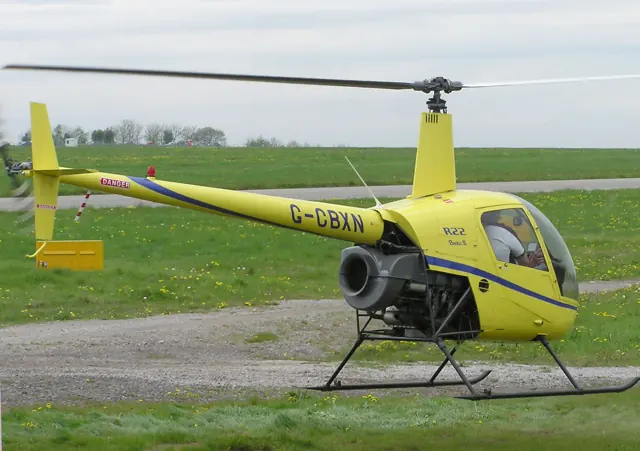
Frank Robinson developed the R22 as a light two-seat helicopter, with production beginning in 1979. Its compact cabin, exposed tail boom and two-bladed rotor became familiar in training and private use.
Aircraft background
Wikipedia contributors · Read more ↗The instructor steps out and the helicopter feels different
After a handshake, Twombly’s instructor Otto stepped out and walked away without looking back. The moment recalled his first aeroplane solos, but he felt better prepared for this one. Calling the tower as a student pilot, he set off to fly a series of circuits alone in the R22. The improved climb was expected; the change in control pressure was more surprising.
AOPA · March 2014. First R22 solo after 21.2 hours of helicopter training; exact R22 variant is not specified.
AOPA · Read more ↗Governor and rotor brake are separate cockpit systems
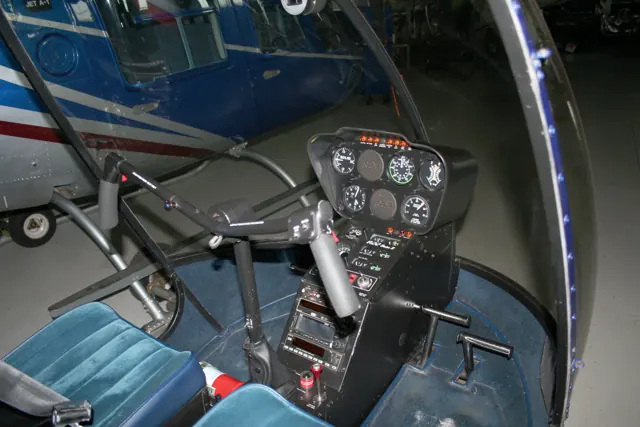
Laminar’s manual identifies a governor switch with an orange GOV indication when disabled, plus a separate overhead rotor brake. The illustrated controls distinguish engine-speed management from stopping the unpowered rotor after shutdown. The nearby landing-light switch operates the pair of lights in the nose.
Robinson R22 Beta II · Laminar Research · X-Plane 12
Laminar Research · Read more ↗Into the cockpit
 YouTube
 Helicopter Videos · 10 min ·
Robinson R22 Beta II Helicopter Landing & Takeoff, etc.
R22 Beta II operations at Gunma Heliport, with aircraft sound and exterior views.
Real aircraft · Robinson R22 Beta II
Watch on YouTube ↗Preview images are served by AirframeDB. Videos open on YouTube only when you choose to watch.
Meet Robinson R22 Beta II
Frank Robinson developed the R22 as a light two-seat helicopter, with production beginning in 1979. Its compact cabin, exposed tail boom and two-bladed rotor became familiar in training and private use.
The Beta II uses unboosted controls and trim arrangements described in its simulator manual. The cyclic trim cord relieves control force; it is not an autopilot.
Robinson R22 Beta II
Robinson → · Explore the family →
Robinson R22 Beta II
Wikipedia contributors · Robinson R22 ↗Laminar Research · X-Plane 12 →CowanSim · MSFS 2020 · MSFS 2024 →Aircraft type designators
Use the code for the model you are flying. The linked authority lists the applicable aircraft.
History & design
Production flying links the factory and the flight line
McAdams’s 1995 visit describes a new R22 moving repeatedly between pilots and mechanics for inspection, vibration measurement and adjustment. The account adds a practical view of manufacturing to the type’s better-known life in flight schools.
AOPA Pilot · Proving Grounds ↗Contemporary factory visit; no current production procedure inferred
Development milestones
Designer: Frank D. Robinson
First flight: 1975
Wikipedia contributors · Robinson R22 ↗Robinson R22 · family/variant named by the source · Wikipedia revision 1372986000
Pilot accounts
The instructor steps out and the helicopter feels different
After a handshake, Twombly’s instructor Otto stepped out and walked away without looking back. The moment recalled his first aeroplane solos, but he felt better prepared for this one. Calling the tower as a student pilot, he set off to fly a series of circuits alone in the R22.
The improved climb was expected; the change in control pressure was more surprising. With the instructor’s seat empty, the helicopter needed a different cyclic position. Twombly completed seven circuits and found the experience enjoyable rather than particularly frightening. He attributed that confidence to both his earlier flying experience and the time spent preparing before solo. The flight increased his enthusiasm for finishing the rating, while giving him a direct lesson in how differently the small helicopter felt with one person aboard.
AOPA · March 2014. First R22 solo after 21.2 hours of helicopter training; exact R22 variant is not specified.
Read the full account · AOPA ↗A birthday lesson turns into a new flying ambition
Ramsay had assumed helicopter lessons were beyond her budget until a birthday trial flight changed her mind. Drawing on her savings, she began learning at Wellesbourne and discovered how much an experienced aeroplane pilot still had to learn. Familiar instruments and radio work helped, but basic manoeuvres and hovering demanded new coordination and sustained concentration.
Progress came through small achievements, including placing the helicopter accurately near the hangar. Her first solo followed an intense period of emergency preparation, and the empty instructor’s seat initially changed how the R22 felt. The short circuit went well, with a landing she was particularly pleased with. Her instructor’s phone ran out of recording space before capturing it.
Personal training account · September 2017. R22 lessons with Heli Air at Wellesbourne; Ramsay already flew fixed-wing aircraft and motor gliders.
Read the full account · Cosy Life ↗Joining the first flights of a factory-new helicopter
McAdams visited Robinson to experience the work between assembly and delivery. After touring the factory with Doug Tompkins, he helped inspect a newly completed R22 and took part in its first flying. The initial hover was a little rough, providing the starting point for further work by the pilots and mechanics.
Much of the day involved measuring, adjusting and flying again. Vibration equipment helped the team refine the rotor installation, while further checks examined control rigging and autorotation behaviour. McAdams could not participate in every test: one loading condition could not be achieved with both seats occupied.
AOPA Pilot · February 1995. Production-flight visit with Robinson chief pilot Doug Tompkins in R22 serial 2475, with the earlier O-320 installation.
Read the full account · AOPA Pilot ↗In your simulator
Systems, equipment and documentation for each developer’s aircraft.
Compare simulator versions →X-Plane 12Robinson R22 Beta II
Laminar Research · Released
Robinson R22 Beta II
Laminar Research · Released
MSFS 2020 · MSFS 2024Robinson R22 Beta II
CowanSim · Released
Robinson R22 Beta II
CowanSim · Released
Aircraft specifications
Published figures for the named real-aircraft variant. Simulator equipment and performance can differ.
| Specification | Published value |
|---|---|
| Length | 28 ft 8 in (8.74 m) |
| Height | 8 ft 11 in (2.72 m) |
| Empty weight | 880 lb (399 kg) |
| Max takeoff weight | 1,370 lb (621 kg) |
| Powerplant | 1 × Lycoming O-320-A2B or -A2C 4-cylinder air-cooled horizontally-opposed piston engine, 124 hp (92 kW) |
| Main rotor diameter | 25 ft 2 in (7.67 m) |
| Main rotor area | 497 sq ft (46.2 m² ) |
| Cruise speed | 96 kn (110 mph, 178 km/h) |
| Range | 209 nmi (241 mi, 387 km) |
| Service ceiling | 14,000 ft (4,300 m) |
| Rate of climb | 1,200 ft/min (6.1 m/s) |
Manuals & resources
Find your next read
Choose a topic for a short introduction and a link to the original source. Simulator references identify the developer and edition they cover.
Simulator documentation
Governor and rotor brake are separate cockpit systemsRobinson R22 Beta II · Laminar Research · X-Plane 12
Laminar’s manual identifies a governor switch with an orange GOV indication when disabled, plus a separate overhead rotor brake. The illustrated controls distinguish engine-speed management from stopping the unpowered rotor after shutdown. The nearby landing-light switch operates the pair of lights in the nose.
Gathered Laminar manual · PDF pp.18–20
Laminar Research · Read the source ↗The cockpit includes Laminar’s GNS530Robinson R22 Beta II · Laminar Research · X-Plane 12
The guide describes Laminar’s interpretation of the Garmin 530 and a separate transponder. The centre console places cyclic friction, right trim, carburettor heat and fuel controls within another illustrated area. These diagrams help locate controls before using the manual’s simulator checklists.
Gathered Laminar manual · PDF pp.31–34; no autopilot inferred from generic GPS wording
Laminar Research · Read the source ↗Direct controls and a mechanical trim aidRobinson R22 Beta II · Laminar Research · X-Plane 12
The R22 overview describes direct, unboosted controls. Its right-trim system uses a pulley and spring arrangement to relieve cyclic load associated with faster flight. This is a mechanical trim aid, distinct from the autopilot or stability systems described for larger helicopters.
Laminar R22 guide · PDF pp.4,8,33
Laminar Research · Read the source ↗Cowan’s panel choices and assistance belong to its packageRobinson R22 Beta II · CowanSim · MSFS 2020 · MSFS 2024
The v2.3 product description lists analogue, G530 and GTN panel options, plus a custom SAS and autopilot with force-trim release. Those are Cowan’s chosen simulator features and differ from the basic mechanical trim described in the Laminar guide. Optional GTN integrations have their own dependencies.
Gathered Cowan product page · v2.3, February 2026
CowanSim · Read the source ↗Prepare the occupants, doors and load before flyingRobinson R22 Beta II · CowanSim · MSFS 2020 · MSFS 2024
The package offers removable doors, an animated passenger, a solo-control option and an interactive cockpit checklist. Its persistence system saves weight, balance and options between flights. Cowan describes MSFS 2020 design with MSFS 2024 compatibility, while a dedicated 2024 edition remained a future plan on the captured page.
Developer-described configuration and compatibility scope
CowanSim · Read the source ↗Pilot account
The instructor steps out and the helicopter feels differentAOPA · March 2014. First R22 solo after 21.2 hours of helicopter training; exact R22 variant is not specified.
After a handshake, Twombly’s instructor Otto stepped out and walked away without looking back. The moment recalled his first aeroplane solos, but he felt better prepared for this one. Calling the tower as a student pilot, he set off to fly a series of circuits alone in the R22. The improved climb was expected; the change in control pressure was more surprising. With the instructor’s seat empty, the helicopter needed a different cyclic position.
Ian J. Twombly
AOPA · Read the source ↗A birthday lesson turns into a new flying ambitionPersonal training account · September 2017. R22 lessons with Heli Air at Wellesbourne; Ramsay already flew fixed-wing aircraft and motor gliders.
Ramsay had assumed helicopter lessons were beyond her budget until a birthday trial flight changed her mind. Drawing on her savings, she began learning at Wellesbourne and discovered how much an experienced aeroplane pilot still had to learn. Familiar instruments and radio work helped, but basic manoeuvres and hovering demanded new coordination and sustained concentration. Progress came through small achievements, including placing the helicopter accurately near the hangar.
Rachel Ramsay
Cosy Life · Read the source ↗Read the original documentation from the people who created it. Manuals open on their publisher’s website.
Manual
Robinson R22 Beta II POHLaminar Research X-Plane 12 Desktop ManualLaminar Research X-Plane aircraft and avionics manualsLaminar ResearchAircraft background
Robinson R22Wikipedia contributors · Research background · Wikipedia revision 1372986000 · retrieved 2026-09-12Product
R22 for MSFSCowanSim · Official developer / designated store catalogue · checked 2026-09-12Type designator
ICAO Doc 8643 — aircraft type designatorsInternational Civil Aviation Organization · Public search data retrieved 2026-09-14; authority update 2026-09-03Built-in force-feedback profiles
Read the documentary basis, editable starting settings and remaining questions for the aircraft you fly. Each explanation refers to the exact profile revision shown.
Catalogue programme-20261022-v1 · 2 profile choices
CowanSim R22
CowanSim · Free and Pro · Revision 5 · Inherited starting point
MSFS 2020 · MSFS 2024
CowanSim R22: The selected spring and damping supply the R22 cyclic balance.
Robinson R22 Beta II
Free and Pro · Revision 2 · Partial review
X-Plane 12 · MSFS 2024 · MSFS 2020
Robinson R22 Beta II: The selected spring and damping supply the R22 cyclic balance.
Robinson R22 Beta II
Robinson R22 Beta II: The selected spring and damping supply the R22 cyclic balance.
Aircraft and simulator scope
- Robinson R22 Beta II · X-Plane 12 · family starting point
- Robinson R22 Beta II · MSFS 2024 · family starting point
- Robinson R22 Beta II · MSFS 2020 · family starting point
Robinson R22 Beta II · Family sources identify only the variants and product versions described above.
The simulator model and controls
Frank Robinson developed the R22 as a light two-seat helicopter, with production beginning in 1979. Its compact cabin, exposed tail boom and two-bladed rotor became familiar in training and private use.
This starting point selects Robinson R22 Beta II. Its aircraft-level settings do not select a particular developer’s custom systems.
How this profile feels
The selected spring and damping supply the R22 cyclic balance. Spring resistance builds with the selected airspeed response. A separate aerodynamic term adds speed-dependent control load. Cyclic damping adds resistance to hardware motion.
Software trim reset depends on the chosen controller/SAS strategy. Local force trim is off. Autopilot following is off.
Controls and trim
The R22 is a piston helicopter with skids and a two-blade rotor. CowanSim’s optional SAS and controller-dependent rotor-trim reset are simulator equipment, separately documented from the physical helicopter’s controls.
About the values
The gains are normalized profile settings. They describe the chosen effect balance; hand force depends on the device and its output limits. IAS references are tuning values rather than operating limits. Physical acceptance of this revision remains pending.
What the documentation establishes
Robinson limitations section identifies R22 series/Beta II scope.
Documentary review and sources
These decisions describe the documentary basis and remaining gaps for this revision. Aircraft documentation and a starting setting describe different kinds of evidence.
Aircraft and variant
ReviewedThis starting point selects Robinson R22 Beta II. Its aircraft-level settings do not select a particular developer’s custom systems.
Flight controls
Not yet reviewedThe R22 is a piston helicopter with skids and a two-blade rotor. CowanSim’s optional SAS and controller-dependent rotor-trim reset are simulator equipment, separately documented from the physical helicopter’s controls.
Trim
Not yet reviewedSoftware trim reset depends on the chosen controller/SAS strategy. Local force trim is off. Autopilot following is off.
Autopilot and stability
Not yet reviewedAutopilot following is off; the configured spring and load retain the hardware feel.
Equipment
Not yet reviewedGear, flap and ground cues follow the selected settings and available simulator-reported states.
Speeds and limits
Not yet reviewedThe indicated-speed references set the profile response scale; they are separate from aircraft operating limits.
Simulator integration
Not yet reviewedThe profile targets xplane12, msfs2024, msfs2020. Add-on-specific controls use only the supported references configured by this profile.
Force-feedback settings
Not yet reviewedThe settings define the profile’s effect balance. Device output limits affect physical hand force.
Starting settings and their rationale
These configured values are starting estimates. The explanations describe what each setting controls; physical validation appears separately below.
| Setting | Starting value | What it controls and why |
|---|---|---|
| Spring strength | Starting value0 | What it controls and whyThe selected spring and damping supply the R22 cyclic balance. The baseline spring is 0. Its low-speed blend reaches baseline strength at 45 KIAS. |
| Master force gain | Starting value0.85 | What it controls and whyScales overall profile strength while preserving effect balance, subject to device and output limits. |
| Profile force gain | Starting value0.35 | What it controls and whyThe aerodynamic-load gain is 0.35 with an indicated-speed reference of 90 KIAS. This supplies speed-dependent loading alongside the spring. |
| Force tuning speed/reference | Starting value90.0 kt | What it controls and whySets the IAS reference for aerodynamic loading. It is an estimate, not published cruise TAS or a flight limit. |
| Spring response reference speed | Starting value45.0 kt | What it controls and whySets the IAS where the low-speed blend reaches baseline strength; high-speed stiffening also uses it. |
| Aileron force scale | Starting value1 | What it controls and whyRoll and pitch aerodynamic scales are 1 and 1, respectively. They set the aerodynamic axis balance. No custom spring-travel curve is enabled. |
| Elevator force scale | Starting value1 | What it controls and whyScales pitch aerodynamic loading; pitch spring travel and trim responses are separate settings. |
| Trim feel | Starting valueDisabled | What it controls and whyRetained for compatibility and group membership. Trim relief, rather than this flag, controls centre movement. |
| Trim relief | Starting valueDisabled | What it controls and whyAllows trim relief with supported control law and valid telemetry. Axis authorities set its amount. |
| Autopilot follow | Starting valueDisabled | What it controls and whyAutopilot following is off; the configured spring and load retain the hardware feel. |
| Autopilot neutral hold | Starting valueDisabled | What it controls and whyPermits centering hold during a supported AP state, separate from following a moving target. |
| Output force limit | Starting value0.55 | What it controls and whyCaps directed-force output. Native spring effects and device limits remain separate. |
All 44 starting settings and their rationale
The settings define the profile’s effect balance. Device output limits affect physical hand force.
| Setting | Starting value | What it controls and why |
|---|---|---|
| Spring strength | Starting value0 | What it controls and whyThe selected spring and damping supply the R22 cyclic balance. The baseline spring is 0. Its low-speed blend reaches baseline strength at 45 KIAS. |
| Spring deadband | Starting value0.02 | What it controls and whySets travel around the centre before the baseline spring resists. Smaller values engage it sooner. |
| Profile force gain | Starting value0.35 | What it controls and whyThe aerodynamic-load gain is 0.35 with an indicated-speed reference of 90 KIAS. This supplies speed-dependent loading alongside the spring. |
| Master force gain | Starting value0.85 | What it controls and whyScales overall profile strength while preserving effect balance, subject to device and output limits. |
| QBlend Enabled | Starting valueEnabled | What it controls and whyAllows baseline spring strength to rise with indicated airspeed where the control law permits it. |
| QSpring Minimum Factor | Starting value1 | What it controls and whySets low-speed spring strength as a fraction of baseline when blending is enabled. One keeps full strength. |
| QSpring Start Knots | Starting value12.6 kt | What it controls and whySets the IAS where the low-speed spring blend starts rising. This is a feel threshold, not a flight limit. |
| Spring response reference speed | Starting value45.0 kt | What it controls and whySets the IAS where the low-speed blend reaches baseline strength; high-speed stiffening also uses it. |
| Force tuning speed/reference | Starting value90.0 kt | What it controls and whySets the IAS reference for aerodynamic loading. It is an estimate, not published cruise TAS or a flight limit. |
| Airspeed spring stiffening gain | Starting value0 | What it controls and whyAdds permitted spring resistance above the full-blend speed. Zero removes this high-speed increase. |
| Airspeed spring stiffening limit | Starting value5 | What it controls and whyLimits the squared airspeed ratio used for high-speed spring stiffening; it is not a device-force cap. |
| Aileron force scale | Starting value1 | What it controls and whyRoll and pitch aerodynamic scales are 1 and 1, respectively. They set the aerodynamic axis balance. No custom spring-travel curve is enabled. |
| Elevator force scale | Starting value1 | What it controls and whyScales pitch aerodynamic loading; pitch spring travel and trim responses are separate settings. |
| Output force limit | Starting value0.55 | What it controls and whyCaps directed-force output. Native spring effects and device limits remain separate. |
| Trim feel | Starting valueDisabled | What it controls and whyRetained for compatibility and group membership. Trim relief, rather than this flag, controls centre movement. |
| Trim relief | Starting valueDisabled | What it controls and whyAllows trim relief with supported control law and valid telemetry. Axis authorities set its amount. |
| Elevator Authority | Starting value0.3 | What it controls and whyScales supported pitch-trim relief and permitted centre movement. Zero removes pitch response. |
| Aileron Authority | Starting value0.3 | What it controls and whyScales supported roll-trim relief and permitted centre movement. Zero removes roll response. |
| Force Trim Enabled | Starting valueDisabled | What it controls and whySoftware trim reset depends on the chosen controller/SAS strategy. Local force trim is off. The stored latch parameters are inactive; the profile does not supply a local hold-where-left neutral. |
| GLoad Enabled | Starting valueDisabled | What it controls and whyAllows load-factor changes to modify permitted spring laws. Passive fly-by-wire feel can suppress it. |
| Rate Damping Enabled | Starting valueEnabled | What it controls and whyEnables rate damping with the configured coefficients and control law. |
| Autopilot follow | Starting valueDisabled | What it controls and whyAutopilot following is off; the configured spring and load retain the hardware feel. |
| Autopilot follow authority | Starting value0.05 | What it controls and whySets admitted AP-follow gain, not a percentage of travel. Runtime ownership and input limits still apply. |
| Autopilot neutral hold | Starting valueDisabled | What it controls and whyPermits centering hold during a supported AP state, separate from following a moving target. |
| Autopilot neutral hold strength | Starting value0.6 | What it controls and whySets admitted AP neutral-hold strength; inactive while neutral hold is disabled. |
| Enabled | Starting valueEnabled | What it controls and whyEnables aerodynamic cues; each still needs nonzero strength and its simulator conditions. |
| Gain | Starting value0 | What it controls and whySets stall-buffet strength. Zero removes the cue without changing simulator stalls or warnings. |
| Gain | Starting value0 | What it controls and whySets high-Mach buffet strength; onset and full-strength thresholds are separate. |
| Gain | Starting value0 | What it controls and whySets flap buffet at the configured position and speed gates. Flap movement texture is separate. |
| Maximum flap index | Starting value1 | What it controls and whySets the final flap index for detent normalization. UP plus three detents uses maximum index3. |
| Minimum flap index | Starting value1 | What it controls and whySets the first flap detent that admits buffet; this is a handle index, not degrees. |
| Gain | Starting value0 | What it controls and whySets gear aerodynamic buffet; movement and ground-contact cues are separate. |
| Shaker Enabled | Starting valueDisabled | What it controls and whyPermits shaker at supported warning conditions; the switch does not establish aircraft equipment. |
| Stick shaker amplitude | Starting value0.5 | What it controls and whySets triggered shaker strength; inactive while the shaker feature is disabled. |
| Enabled | Starting valueEnabled | What it controls and whyEnables ground effects; each still needs its own strength and contact or motion telemetry. |
| Gain | Starting value0 | What it controls and whySets rolling texture strength, modified by speed, surface and undercarriage configuration. |
| Gain | Starting value0 | What it controls and whySets gear-bump texture during ground motion, separate from touchdown impact. |
| Gain | Starting value0.5 | What it controls and whySets landing-impact strength; landing telemetry and response shape determine the pulse. |
| Gain | Starting value0 | What it controls and whySets reverse-thrust vibration with valid reverser and engine conditions. Zero removes the cue. |
| Enabled | Starting valueEnabled | What it controls and whyEnables engine cues with nonzero settings and valid running-engine telemetry. |
| Gain | Starting value0.12 | What it controls and whySets estimated engine vibration using configured telemetry and response, not measured cockpit vibration. |
| Enabled | Starting valueEnabled | What it controls and whyEnables accessory cues with configured strengths and observed accessory movement. |
| Gain | Starting value0 | What it controls and whySets texture from observed flap movement; a command without movement does not establish the cue. |
| Gain | Starting value0 | What it controls and whySets texture from observed gear movement, separate from aerodynamic and touchdown effects. |
Limits and open questions
- Limitations do not establish cyclic/friction/trim-spring mechanics.
- No magnetic-brake hold was established; force trim stays off.
- Follow is off; optional installation was not established.
- Limitations section is not a full equipment/control audit.
- 102KIAS VNE below 3000 ft density altitude and placard reductions are not the 90-knot anchor.
- Rotor/airspeed placards do not qualify simulator signals.
- Direct-cyclic and hydraulic differences need mechanism evidence; no fixed-wing trim law is inferred.
Physical validation
No physical force validation is recorded in this public catalogue for this revision. Documentary review and software checks do not establish how a particular device feels.
Discuss this aircraft (0)
Questions, observations and useful sources from the community.
No published discussions yet. Bring a question or share a useful source.
Open aircraft discussions →Content expanded · What’s new
Something missing or a source that needs attention?
Suggest a correction ↗