


Start here
A few places to begin, from the aircraft’s story to the people who fly it.
Meet the aircraft
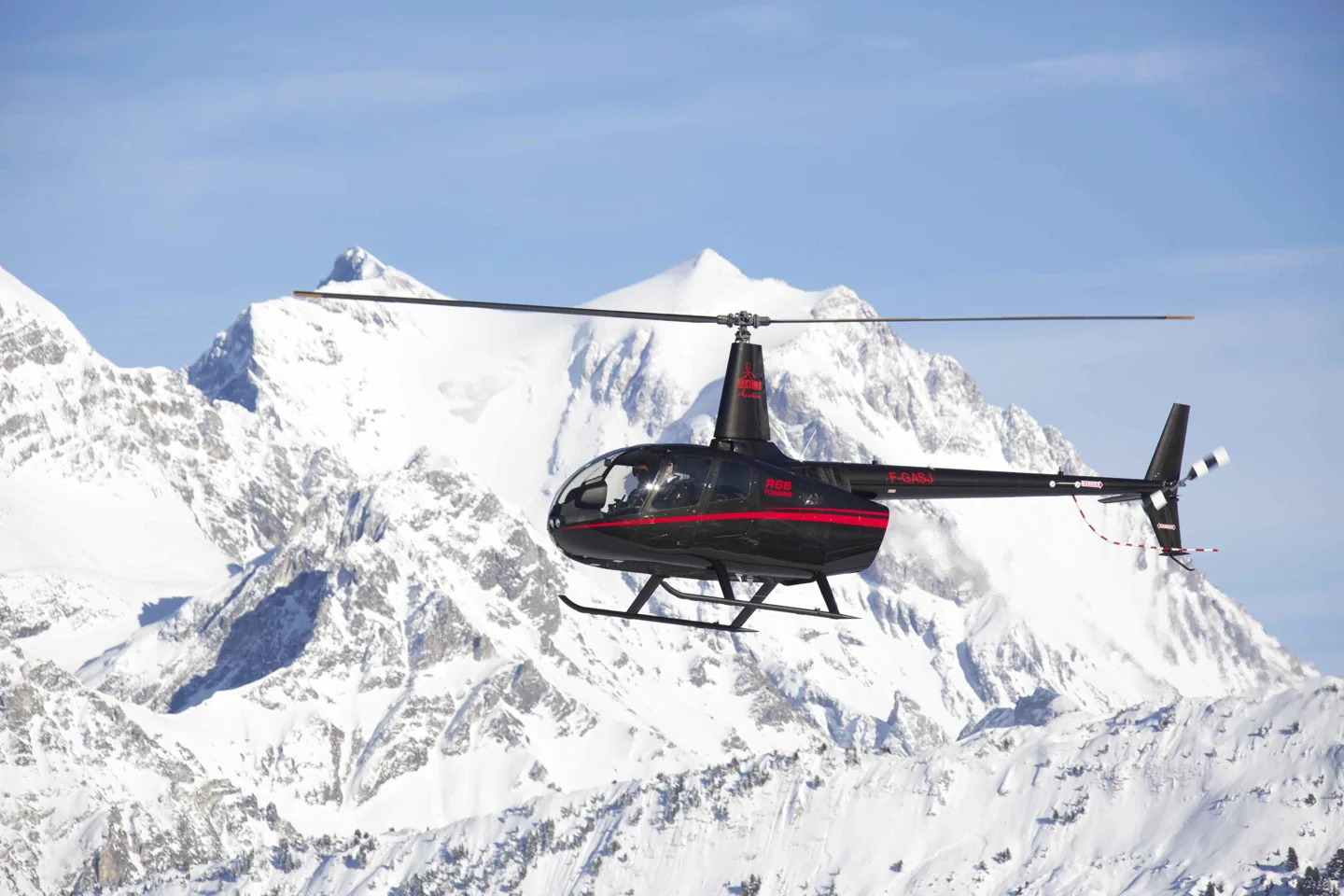
The five-seat R66 uses a Rolls-Royce RR300 turboshaft and has a separate baggage compartment. Its compact cabin and two-bladed main rotor retain the family outline of the smaller piston-powered R44. Certification was obtained in 2010.
Aircraft background
Wikipedia contributors · Read more ↗Taking a familiar brand into the Canadian Rockies
After many years flying Robinson helicopters, Alzetta wanted to try the turbine R66 where he most enjoyed flying: the mountains. He joined Luke Yanik and his friend Bill McMullen in the Canadian Rockies, choosing a load intended to resemble taking two friends on a hiking or fishing trip. That practical mission shaped what he wanted to learn.
Dealer-hosted pilot account · 10–25 September 2013, west of Calgary. Alzetta flew with Luke Yanik and observer Bill McMullen; this was a particular loading and weather case.
Aerial Recon · Read more ↗Career transitions and cockpit interactions received corrections
Microsoft’s December 2025 notes address torque and rotor-speed loss when skipping mission phases, an unexpected nose-down attitude after a skip, and gamepad autostart leaving the throttle closed. Door operation and cockpit-light adjustment also appear in the R66 corrections. These are dated changes to the bundled aircraft.
R66 · Microsoft Flight Simulator · MSFS 2024
Microsoft Flight Simulator · Read more ↗Into the cockpit
 YouTube
 AB Helicopters Ltd · 11 min ·
Robinson R66 Helicopter Flight | Cockpit View- Harwarden to Denham
An R66 evening flight from Hawarden to Denham, starting with cockpit preparation.
Real aircraft · Robinson R66
Watch on YouTube ↗Preview images are served by AirframeDB. Videos open on YouTube only when you choose to watch.
Meet Robinson R66
The five-seat R66 uses a Rolls-Royce RR300 turboshaft and has a separate baggage compartment. Its compact cabin and two-bladed main rotor retain the family outline of the smaller piston-powered R44. Certification was obtained in 2010.
Engine indications and management are specific to the R66's turbine system. Avionics and stabilisation equipment vary by installation and simulator model.
Robinson R66
Aircraft type designators
Use the code for the model you are flying. The linked authority lists the applicable aircraft.
History & design
The turbine Robinson gains equipment for different jobs
Head’s 2018 report traces the R66’s expansion after its 2010 certification, including police, float-equipped and news-gathering versions. Her visit focused on the later factory cargo-hook installation and touchscreen avionics, illustrating how the type developed beyond its original configuration.
Vertical · New tricks for the R66 ↗Contemporary report of delivered variants and newly announced equipment
A planned lifting role becomes part of the discussion
During Coyle’s 2013 visit, the cargo hook was still unavailable for his evaluation. He therefore left external-load capability untested. That earlier account provides useful context for Head’s later flight with the factory installation.
Vertical / Aerial Recon · Robinson R66 Turbine Pilot Evaluation ↗2013 programme status, not a current equipment limitation
Development milestones
Designer: Frank D. Robinson
First flight: 7 November 2007
Developed from: Robinson R44
Wikipedia contributors · Robinson R66 ↗Robinson R66 · family/variant named by the source · Wikipedia revision 1369076106
Pilot accounts
Taking a familiar brand into the Canadian Rockies
After many years flying Robinson helicopters, Alzetta wanted to try the turbine R66 where he most enjoyed flying: the mountains. He joined Luke Yanik and his friend Bill McMullen in the Canadian Rockies, choosing a load intended to resemble taking two friends on a hiking or fishing trip. That practical mission shaped what he wanted to learn.
The aircraft’s small ownership details also caught his attention, including accessible fluid indications, baggage space and the rear-seat arrangement. In the mountains he reported satisfying performance during the landings and hovering they tried, and finished the evaluation enthusiastic about the aircraft. The dealer published his account with his permission to use it for promotion. His experience remains a positive report of those flights, rather than a promise of the same performance at every weight or altitude.
Dealer-hosted pilot account · 10–25 September 2013, west of Calgary. Alzetta flew with Luke Yanik and observer Bill McMullen; this was a particular loading and weather case.
Read the full account · Aerial Recon ↗Bringing family along as the demonstration’s passengers
Coyle was intrigued when the invitation requested passengers and weather warm enough to make the flight demanding. He brought his brother and niece to Calgary, where the R66 was loaded close to its maximum weight. The initial hover and local flying gave him a favourable impression, although he also noticed a small vibration and the need to plan deceleration on return.
A later flight headed towards higher terrain. As turbulence increased, Coyle handed the controls to Marty Charbonneau, whose mountain experience was more extensive. Wind at the intended landing area prevented the clean performance comparison they had hoped to make. Back at the hangar, Coyle discussed improvements he would welcome, including a clearer indication of the takeoff torque limit.
Vertical, 2013, reproduced by Aerial Recon. Calgary evaluation with safety pilot Marty Charbonneau; the reprint’s heading credits Shawn, while its signature spells Sean.
Read the full account · Vertical / Aerial Recon ↗Changing seats changes the view of a suspended load
Head returned to the Robinson factory more than a decade after visiting as an instructor in training. Familiarisation with Doug Tompkins helped her settle into the R66 before trying its new cargo-hook installation. A busy airport postponed that part of the evaluation until the following morning, when they had more room to work.
From the left seat, she could see the suspended load well through the bubble window. Changing seats made the task less comfortable: from the right she struggled to lean out far enough, so chose to practise with the hook alone rather than the load. A separate flight explored new touchscreen avionics.
Vertical · August 2018. Robinson factory evaluation with Doug Tompkins, followed by a separate avionics flight with Dale Taft; cargo-hook and cockpit configurations are distinct.
Read the full account · Vertical ↗In your simulator
Systems, equipment and documentation for each developer’s aircraft.
Compare simulator versions →MSFS 2024R66
Microsoft Flight Simulator · Released
R66
Microsoft Flight Simulator · Released
MSFS 2020 · MSFS 2024Robinson R66
CowanSim · Released
Robinson R66
CowanSim · Released
X-Plane 11 · X-Plane 12R66 Turbine
VSKYLABS · Released
R66 Turbine
VSKYLABS · Released
Aircraft specifications
Published figures for the named real-aircraft variant. Simulator equipment and performance can differ.
| Specification | Published value |
|---|---|
| Length | 29 ft 6 in (8.99 m) |
| Height | 11 ft 5 in (3.48 m) |
| Empty weight | 1,290 lb (585 kg) |
| Gross weight | 2,700 lb (1,225 kg) |
| Powerplant | 1 × Rolls-Royce RR300 turboshaft , 224 shp (167 kW) continuous, 270 shp (200 kW) takeoff (5 minutes) |
| Main rotor diameter | 33 ft (10 m) |
| Cruise speed | 110 kn (130 mph, 200 km/h) |
| Range | 350 nmi (400 mi, 650 km) |
| Service ceiling | 14,000 ft (4,300 m) |
| Rate of climb | 1,000 ft/min (5.1 m/s) |
Manuals & resources
Find your next read
Choose a topic for a short introduction and a link to the original source. Simulator references identify the developer and edition they cover.
Simulator documentation
Career transitions and cockpit interactions received correctionsR66 · Microsoft Flight Simulator · MSFS 2024
Microsoft’s December 2025 notes address torque and rotor-speed loss when skipping mission phases, an unexpected nose-down attitude after a skip, and gamepad autostart leaving the throttle closed. Door operation and cockpit-light adjustment also appear in the R66 corrections. These are dated changes to the bundled aircraft.
MSFS 2024 Sim Update 4 · 1.6.32.0, 8 December 2025
Microsoft Flight Simulator · Read the source ↗Give the collective and twist throttle separate assignmentsRobinson R66 · CowanSim · MSFS 2020 · MSFS 2024
The R66 manual explicitly requires separate axes for collective and throttle. It identifies COLLECTIVE AXIS and SET HELICOPTER THROTTLE AXIS, and recommends using the mouse for the throttle when no dedicated axis is available. Engine-RPM trim is listed separately from cyclic trim.
Gathered Cowan R66 manual · PDF pp.1–4
CowanSim · Read the source ↗The add-on’s SAS and autopilot have their own scopeRobinson R66 · CowanSim · MSFS 2020 · MSFS 2024
Cowan describes force-trim release, attitude, heading, speed and altitude modes, plus navigation and vertical guidance. The product targets MSFS 2020 with stated MSFS 2024 compatibility. It is a separate package from the R66 bundled with MSFS 2024; a dedicated new edition was still described as forthcoming.
Developer feature and compatibility statement
CowanSim · Read the source ↗Released product and variantsR66 Turbine · VSKYLABS · X-Plane 11 · X-Plane 12
VSKYLABS models the R66 with its RR300 turbine, auxiliary fuel system and a cockpit combining analog instruments with G1000-based avionics. Its default livery was inspired by BC Helicopters’ around-the-world flight.
Official developer / designated-store reference · checked 2026-09-14
VSKYLABS · Read the source ↗Cowan’s R66 adds configurable equipment and saved loadingRobinson R66 · CowanSim · MSFS 2020 · MSFS 2024
The v3.5 listing includes a storage basket, emergency floats, removable doors, optional windows and cabin cooling. Loading, weight and balance, and options persist between flights. Analogue and GPS panel choices are listed, with separate PMS and TDS GTN integration options for suitable setups.
Gathered Cowan product page · v3.5, February 2026
CowanSim · Read the source ↗Pilot account
Taking a familiar brand into the Canadian RockiesDealer-hosted pilot account · 10–25 September 2013, west of Calgary. Alzetta flew with Luke Yanik and observer Bill McMullen; this was a particular loading and weather case.
After many years flying Robinson helicopters, Alzetta wanted to try the turbine R66 where he most enjoyed flying: the mountains. He joined Luke Yanik and his friend Bill McMullen in the Canadian Rockies, choosing a load intended to resemble taking two friends on a hiking or fishing trip. That practical mission shaped what he wanted to learn. The aircraft’s small ownership details also caught his attention, including accessible fluid indications, baggage space and the rear-seat arrangement.
Richard Alzetta
Aerial Recon · Read the source ↗Bringing family along as the demonstration’s passengersVertical, 2013, reproduced by Aerial Recon. Calgary evaluation with safety pilot Marty Charbonneau; the reprint’s heading credits Shawn, while its signature spells Sean.
Coyle was intrigued when the invitation requested passengers and weather warm enough to make the flight demanding. He brought his brother and niece to Calgary, where the R66 was loaded close to its maximum weight. The initial hover and local flying gave him a favourable impression, although he also noticed a small vibration and the need to plan deceleration on return. A later flight headed towards higher terrain.
Shawn Coyle
Vertical / Aerial Recon · Read the source ↗Read the original documentation from the people who created it. Manuals open on their publisher’s website.
Manual
Microsoft Flight Simulator aircraft manualsMicrosoft / aircraft developersAircraft background
Robinson R66Wikipedia contributors · Research background · Wikipedia revision 1369076106 · retrieved 2026-09-12Resource
MSFS 2024 FAQ and edition aircraft inventoryMicrosoftProduct
R66 for MSFSCowanSim · Official developer / designated store catalogue · checked 2026-09-12Developer documentation
VSKYLABS Robisnon R66 Turbine add-on for X-Plane Flight Simulator.VSKYLABS · Official developer / designated-store reference · checked 2026-09-14 VSKYLABS Aerospace Simulations Aircraft Center: VSKYLABS Robinson R66 TurbineVSKYLABS · Official developer / designated-store reference · checked 2026-09-14 MSFS 2024 Sim Update 4 release notesMicrosoft Flight Simulator · Publisher announcement or release notes User ManualCowanSim · Gathered developer documentationType designator
ICAO Doc 8643 — aircraft type designatorsInternational Civil Aviation Organization · Public search data retrieved 2026-09-14; authority update 2026-09-03Built-in force-feedback profiles
Read the documentary basis, editable starting settings and remaining questions for the aircraft you fly. Each explanation refers to the exact profile revision shown.
Catalogue programme-20261022-v1 · 3 profile choices
CowanSim R66
CowanSim · Free and Pro · Revision 4 · Inherited starting point
MSFS 2020 · MSFS 2024
CowanSim R66: Hydraulic assistance motivates supported cyclic centering.
VSKYLABS Robinson R66 Turbine
VSKYLABS · Free and Pro · Revision 3 · Inherited starting point
X-Plane 12
VSKYLABS Robinson R66 Turbine: Hydraulic assistance motivates supported cyclic centering.
Robinson R66
Free and Pro · Revision 1 · Partial review
MSFS 2024 · MSFS 2020 · X-Plane 12 · X-Plane 11
Robinson R66: Hydraulic assistance motivates supported cyclic centering.
CowanSim R66
CowanSim R66: Hydraulic assistance motivates supported cyclic centering.
Aircraft and simulator scope
- CowanSim R66 · CowanSim · MSFS 2020 · Add-on starting point
- CowanSim R66 · CowanSim · MSFS 2024 · Add-on starting point
The simulator model and controls
The five-seat R66 uses a Rolls-Royce RR300 turboshaft and has a separate baggage compartment. Its compact cabin and two-bladed main rotor retain the family outline of the smaller piston-powered R44. Certification was obtained in 2010.
This profile selects CowanSim R66 for MSFS 2020, MSFS 2024.
How this profile feels
Hydraulic assistance motivates supported cyclic centering. The spring stays independent of airspeed. Directed aerodynamic loading is omitted. Cyclic damping adds resistance to hardware motion.
Trim reset and the physical hydraulic controls retain separate system meanings. Local force trim is off. Autopilot following is off.
Controls and trim
The R66 has a turbine engine and hydraulically assisted cyclic and collective controls. Its main-rotor reference is separate from turbine spool speeds. CowanSim additionally documents SAS and controller-dependent trim reset for its own rendition.
The selected implementation
CowanSim’s software trim release/reset depends on centered or non-centering controllers and the selected SAS strategy in that aircraft’s edition.
About the values
The gains are normalized profile settings. They describe the chosen effect balance; hand force depends on the device and its output limits. IAS references are tuning values rather than operating limits. Physical acceptance of this revision remains pending.
Documentary review and sources
These decisions describe the documentary basis and remaining gaps for this revision. Aircraft documentation and a starting setting describe different kinds of evidence.
Aircraft and variant
InheritedThis profile selects CowanSim R66 for MSFS 2020, MSFS 2024.
Flight controls
InheritedThe R66 has a turbine engine and hydraulically assisted cyclic and collective controls. Its main-rotor reference is separate from turbine spool speeds. CowanSim additionally documents SAS and controller-dependent trim reset for its own rendition.
Trim
InheritedTrim reset and the physical hydraulic controls retain separate system meanings. Local force trim is off. Autopilot following is off.
Autopilot and stability
InheritedAutopilot following is off; the configured spring and load retain the hardware feel.
Equipment
InheritedCowanSim’s software trim release/reset depends on centered or non-centering controllers and the selected SAS strategy in that aircraft’s edition.
Speeds and limits
InheritedThe indicated-speed references set the profile response scale; they are separate from aircraft operating limits.
Simulator integration
InheritedThe profile targets msfs2020, msfs2024. Add-on-specific controls use only the supported references configured by this profile.
Force-feedback settings
InheritedThe settings define the profile’s effect balance. Device output limits affect physical hand force.
Starting settings and their rationale
These configured values are starting estimates. The explanations describe what each setting controls; physical validation appears separately below.
| Setting | Starting value | What it controls and why |
|---|---|---|
| Spring strength | Starting value0.14 | What it controls and whyHydraulic assistance motivates supported cyclic centering. The baseline spring is 0.14. Low-speed spring blending is off. |
| Master force gain | Starting value0.65 | What it controls and whyScales overall profile strength while preserving effect balance, subject to device and output limits. |
| Profile force gain | Starting value0 | What it controls and whyThe 0 gain omits sustained directed airspeed loading. Spring resistance remains independent. |
| Force tuning speed/reference | Starting value110 kt | What it controls and whySets the IAS reference for aerodynamic loading. It is an estimate, not published cruise TAS or a flight limit. |
| Spring response reference speed | Starting value55.0 kt | What it controls and whySets the IAS where the low-speed blend reaches baseline strength; high-speed stiffening also uses it. |
| Aileron force scale | Starting value0.72 | What it controls and whyRoll and pitch aerodynamic scales are 0.72 and 1, respectively. These stored weights do not create directed aerodynamic loading while that term is inactive. No custom spring-travel curve is enabled. |
| Elevator force scale | Starting value1 | What it controls and whyScales pitch aerodynamic loading; pitch spring travel and trim responses are separate settings. |
| Trim feel | Starting valueDisabled | What it controls and whyRetained for compatibility and group membership. Trim relief, rather than this flag, controls centre movement. |
| Trim relief | Starting valueDisabled | What it controls and whyAllows trim relief with supported control law and valid telemetry. Axis authorities set its amount. |
| Autopilot follow | Starting valueDisabled | What it controls and whyAutopilot following is off; the configured spring and load retain the hardware feel. |
| Autopilot neutral hold | Starting valueDisabled | What it controls and whyPermits centering hold during a supported AP state, separate from following a moving target. |
| Output force limit | Starting value0.55 | What it controls and whyCaps directed-force output. Native spring effects and device limits remain separate. |
All 44 starting settings and their rationale
The settings define the profile’s effect balance. Device output limits affect physical hand force.
| Setting | Starting value | What it controls and why |
|---|---|---|
| Spring strength | Starting value0.14 | What it controls and whyHydraulic assistance motivates supported cyclic centering. The baseline spring is 0.14. Low-speed spring blending is off. |
| Spring deadband | Starting value0.02 | What it controls and whySets travel around the centre before the baseline spring resists. Smaller values engage it sooner. |
| Profile force gain | Starting value0 | What it controls and whyThe 0 gain omits sustained directed airspeed loading. Spring resistance remains independent. |
| Master force gain | Starting value0.65 | What it controls and whyScales overall profile strength while preserving effect balance, subject to device and output limits. |
| QBlend Enabled | Starting valueDisabled | What it controls and whyAllows baseline spring strength to rise with indicated airspeed where the control law permits it. |
| QSpring Minimum Factor | Starting value1 | What it controls and whySets low-speed spring strength as a fraction of baseline when blending is enabled. One keeps full strength. |
| QSpring Start Knots | Starting value8 kt | What it controls and whySets the IAS where the low-speed spring blend starts rising. This is a feel threshold, not a flight limit. |
| Spring response reference speed | Starting value55.0 kt | What it controls and whySets the IAS where the low-speed blend reaches baseline strength; high-speed stiffening also uses it. |
| Force tuning speed/reference | Starting value110 kt | What it controls and whySets the IAS reference for aerodynamic loading. It is an estimate, not published cruise TAS or a flight limit. |
| Airspeed spring stiffening gain | Starting value0 | What it controls and whyAdds permitted spring resistance above the full-blend speed. Zero removes this high-speed increase. |
| Airspeed spring stiffening limit | Starting value5 | What it controls and whyLimits the squared airspeed ratio used for high-speed spring stiffening; it is not a device-force cap. |
| Aileron force scale | Starting value0.72 | What it controls and whyRoll and pitch aerodynamic scales are 0.72 and 1, respectively. These stored weights do not create directed aerodynamic loading while that term is inactive. No custom spring-travel curve is enabled. |
| Elevator force scale | Starting value1 | What it controls and whyScales pitch aerodynamic loading; pitch spring travel and trim responses are separate settings. |
| Output force limit | Starting value0.55 | What it controls and whyCaps directed-force output. Native spring effects and device limits remain separate. |
| Trim feel | Starting valueDisabled | What it controls and whyRetained for compatibility and group membership. Trim relief, rather than this flag, controls centre movement. |
| Trim relief | Starting valueDisabled | What it controls and whyAllows trim relief with supported control law and valid telemetry. Axis authorities set its amount. |
| Elevator Authority | Starting value0 | What it controls and whyScales supported pitch-trim relief and permitted centre movement. Zero removes pitch response. |
| Aileron Authority | Starting value0 | What it controls and whyScales supported roll-trim relief and permitted centre movement. Zero removes roll response. |
| Force Trim Enabled | Starting valueDisabled | What it controls and whyTrim reset and the physical hydraulic controls retain separate system meanings. Local force trim is off. The stored latch parameters are inactive; the profile does not supply a local hold-where-left neutral. |
| GLoad Enabled | Starting valueDisabled | What it controls and whyAllows load-factor changes to modify permitted spring laws. Passive fly-by-wire feel can suppress it. |
| Rate Damping Enabled | Starting valueDisabled | What it controls and whyEnables rate damping with the configured coefficients and control law. |
| Autopilot follow | Starting valueDisabled | What it controls and whyAutopilot following is off; the configured spring and load retain the hardware feel. |
| Autopilot follow authority | Starting value0.05 | What it controls and whySets admitted AP-follow gain, not a percentage of travel. Runtime ownership and input limits still apply. |
| Autopilot neutral hold | Starting valueDisabled | What it controls and whyPermits centering hold during a supported AP state, separate from following a moving target. |
| Autopilot neutral hold strength | Starting value0.6 | What it controls and whySets admitted AP neutral-hold strength; inactive while neutral hold is disabled. |
| Enabled | Starting valueEnabled | What it controls and whyEnables aerodynamic cues; each still needs nonzero strength and its simulator conditions. |
| Gain | Starting value0 | What it controls and whySets stall-buffet strength. Zero removes the cue without changing simulator stalls or warnings. |
| Gain | Starting value0 | What it controls and whySets high-Mach buffet strength; onset and full-strength thresholds are separate. |
| Gain | Starting value0 | What it controls and whySets flap buffet at the configured position and speed gates. Flap movement texture is separate. |
| Maximum flap index | Starting value1 | What it controls and whySets the final flap index for detent normalization. UP plus three detents uses maximum index3. |
| Minimum flap index | Starting value1 | What it controls and whySets the first flap detent that admits buffet; this is a handle index, not degrees. |
| Gain | Starting value0 | What it controls and whySets gear aerodynamic buffet; movement and ground-contact cues are separate. |
| Shaker Enabled | Starting valueDisabled | What it controls and whyPermits shaker at supported warning conditions; the switch does not establish aircraft equipment. |
| Stick shaker amplitude | Starting value0.5 | What it controls and whySets triggered shaker strength; inactive while the shaker feature is disabled. |
| Enabled | Starting valueEnabled | What it controls and whyEnables ground effects; each still needs its own strength and contact or motion telemetry. |
| Gain | Starting value0 | What it controls and whySets rolling texture strength, modified by speed, surface and undercarriage configuration. |
| Gain | Starting value0 | What it controls and whySets gear-bump texture during ground motion, separate from touchdown impact. |
| Gain | Starting value0.5 | What it controls and whySets landing-impact strength; landing telemetry and response shape determine the pulse. |
| Gain | Starting value0 | What it controls and whySets reverse-thrust vibration with valid reverser and engine conditions. Zero removes the cue. |
| Enabled | Starting valueEnabled | What it controls and whyEnables engine cues with nonzero settings and valid running-engine telemetry. |
| Gain | Starting value0 | What it controls and whySets estimated engine vibration using configured telemetry and response, not measured cockpit vibration. |
| Enabled | Starting valueEnabled | What it controls and whyEnables accessory cues with configured strengths and observed accessory movement. |
| Gain | Starting value0 | What it controls and whySets texture from observed flap movement; a command without movement does not establish the cue. |
| Gain | Starting value0 | What it controls and whySets texture from observed gear movement, separate from aerodynamic and touchdown effects. |
Limits and open questions
- CowanSim R66; msfs2020, msfs2024. Previously observed titles and implementation identifiers are retained; installed matching remains deferred.
- Rotorcraft cyclic with light estimated support; no fixed-wing IAS/Q loading, trim-tab model or body-rate torque. Hardware balance remains device-specific.
- Aircraft owns SAS/FTR software offsets. Bridge local FTR and fixed-wing trim relief remain off by default to avoid two independent centers. Command names do not establish a readable trim-position contract.
- Use the matching Cowan MSFS SAS/AP system; spring-centered and non-centering procedures differ. No AP servo target is inferred from an engagement flag. AP servo-follow and neutral hold remain disabled; engagement indicators are not force-demand signals.
- R66 turbine helicopter with fixed skids; manual p.5 maps FTR to ROTOR TRIM RESET. The collective and throttle remain different axes. Periodic rotor frequency stays off until the applicable telemetry/rpm scale is qualified; blade count is configuration metadata.
- 110 KIAS is an estimated feel reference, not cruise TAS or a certified limit. No invented Mach, VNE or weight scheduling.
- Read-only native telemetry for aircraft motion and accessory positions. Custom switches, display animations and mode lamps are not calibrated servo targets. No unverified LVars/datarefs or simulator writes.
- Spring 0.14; lateral scale 0.72; trim authorities 0/0; per-axis output cap .55. Editable engineering estimates, not measured hand forces. No body-rate torque, surface following or fabricated hydraulic-failure loads.
- New physical and installed-product checks deferred by owner. Existing separately recorded acceptance retains its original device, simulator, add-on and version limits. Source review does not broaden custom telemetry acceptance.
- Only actual accessory position changes drive movement texture; static drag and command-triggered kicks are disabled. Select and save an aircraft default when telemetry lacks a discriminating developer/configuration identity.
Physical validation
No physical force validation is recorded in this public catalogue for this revision. Documentary review and software checks do not establish how a particular device feels.
Discuss this aircraft (0)
Questions, observations and useful sources from the community.
No published discussions yet. Bring a question or share a useful source.
Open aircraft discussions →Content expanded · What’s new
Something missing or a source that needs attention?
Suggest a correction ↗