

Start here
A few places to begin, from the aircraft’s story to the people who fly it.
Meet the aircraft
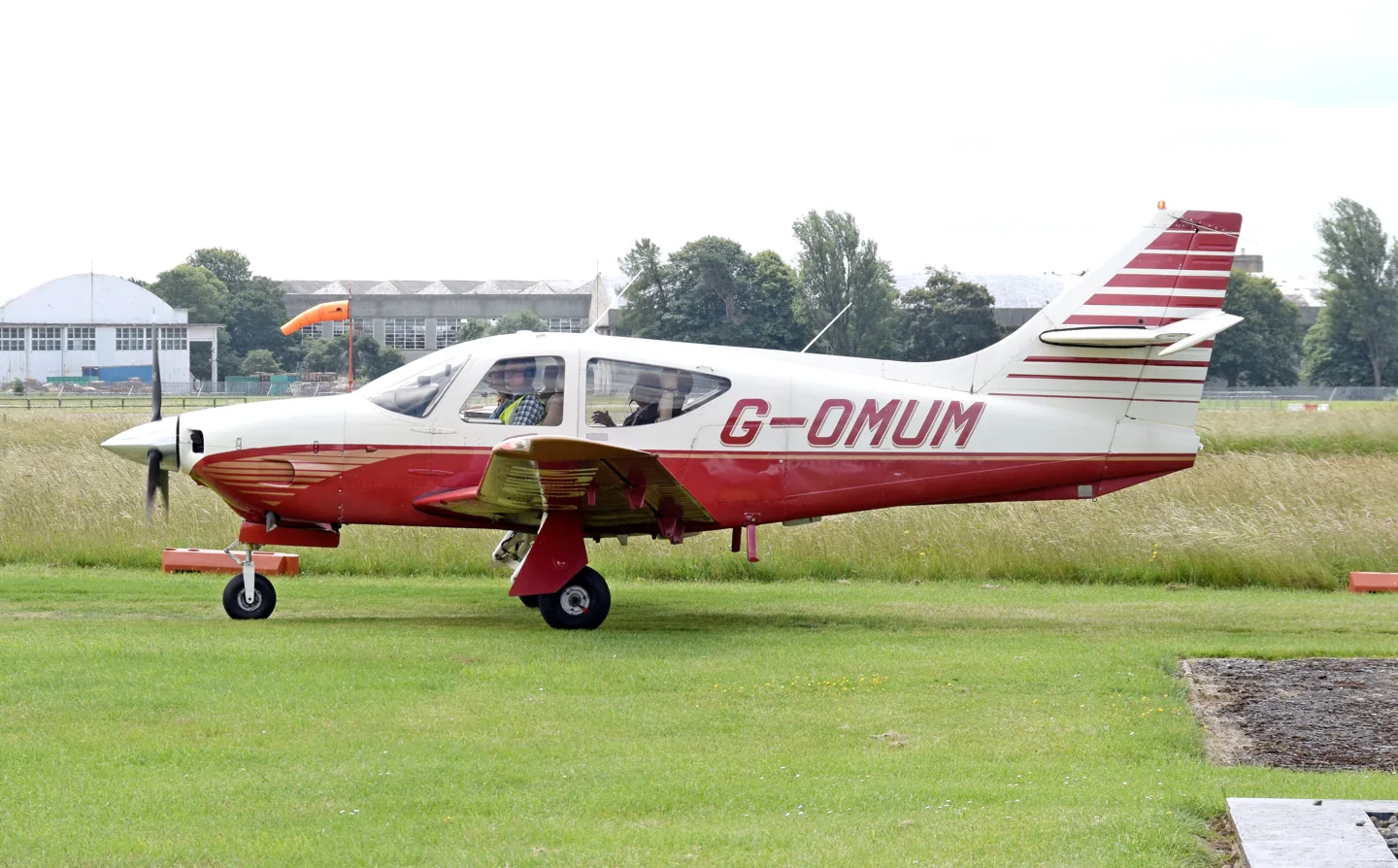
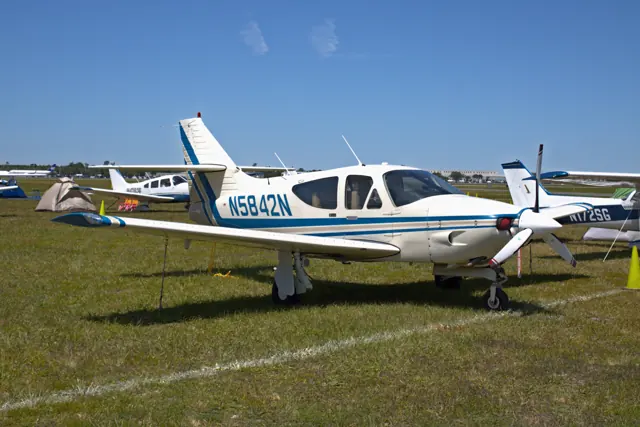
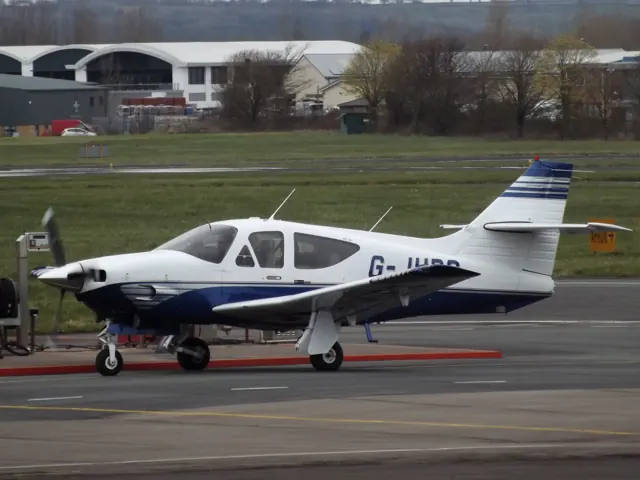
Rockwell introduced the four-seat 112 in the early 1970s and followed it with the Commander 114 in 1976. A roomy cabin, retractable landing gear and cruciform tail formed the layout. The 114 added a more powerful engine and other refinements.
Aircraft background
Wikipedia contributors · Read more ↗Trying the revived Commander from front and back
The reviewer flew N114BW twice and also took a short ride in the rear seats. That gave the report a passenger’s view of the redesigned cabin as well as the pilot’s. The broad doors, reclining rear seats and quieter interior made an impression, although door fit still needed attention on an early production aircraft. Flying the demonstrator showed familiar Commander handling beneath the updates.
July 1992 report. N114BW during the 114B’s development and certification period; named byline not established by the accessible article.
AOPA Pilot · Read more ↗The tablet makes systems visible
The Commander tablet includes an engine visualiser, a live electrical schematic and environmental-system displays, alongside payload, options and failures. The feature booklet describes hydraulic landing-gear behaviour and cabin heating, cooling and ventilation. These displays provide ways to explore what changes inside the simulated aircraft when equipment is operated or a fault is introduced.
Commander 114 · Black Square · MSFS 2020 · MSFS 2024
Black Square / Just Flight · Read more ↗Into the cockpit
 YouTube
 DXHUNTER · 9 min ·
Flight with Rockwell Commander 114
A guest shares a flight in a Commander 114.
Real aircraft · Rockwell Commander 114
Watch on YouTube ↗Preview images are served by AirframeDB. Videos open on YouTube only when you choose to watch.
Meet Rockwell Commander 114
Rockwell introduced the four-seat 112 in the early 1970s and followed it with the Commander 114 in 1976. A roomy cabin, retractable landing gear and cruciform tail formed the layout. The 114 added a more powerful engine and other refinements.
Black Square represents a 1977 Commander 114 and a turbonormalised, air-conditioned version, with several radio and navigation installations.
Rockwell Commander 114
Rockwell → · Explore the family →
Rockwell Commander 114
Wikipedia contributors · Rockwell Commander 112 ↗Black Square · MSFS 2020 · MSFS 2024 →Aircraft type designators
Use the code for the model you are flying. The linked authority lists the applicable aircraft.
History & design
Development milestones
The 4 December 1970 first-flight date in the linked history belongs to the Commander 112. The 114 followed as a more powerful member of the same family.
Wikipedia contributors · Rockwell Commander 112 ↗Clarifies the Commander 112 family milestone
From the original 114 to a revived 114B
The Commander 114 arrived in 1976 with a 260 hp six-cylinder engine. Following the end of Rockwell’s single-engine production, Commander Aircraft acquired the design and developed the 114B, updating the cabin and aerodynamic details before certification in 1992.
AOPA Pilot · Commander 114B: Plan B ↗Contemporary AOPA history of the 114B’s return
Pilot accounts
Trying the revived Commander from front and back
The reviewer flew N114BW twice and also took a short ride in the rear seats. That gave the report a passenger’s view of the redesigned cabin as well as the pilot’s. The broad doors, reclining rear seats and quieter interior made an impression, although door fit still needed attention on an early production aircraft.
Flying the demonstrator showed familiar Commander handling beneath the updates. One flight’s temperamental instruments made performance checking difficult; another climbed above thermal turbulence before the writer could assess the cruise. The aircraft’s substantial feel on the ground, heavier ailerons at speed and accommodating trailing-link landing gear all entered the report. This was an account of a design returning to production while its final details were still being refined.
July 1992 report. N114BW during the 114B’s development and certification period; named byline not established by the accessible article.
Read the full account · AOPA Pilot ↗Keeping the wide cabin while moving up in performance
The Williamses came to the Commander from a Tobago, seeking more performance while keeping the two doors and broad cabin they already enjoyed. Both were pilots, and their journeys often stretched from Virginia to Florida, Oklahoma or Texas. The aircraft served some business travel as well as their longer personal trips.
Daniel had additional flight instruments installed on the right side so either seat would be useful to a pilot. His joke that he kept the left seat by hiding the keys gave the interview a glimpse of their shared flying life. They described planning trips at moderate power rather than treating maximum advertised speed as the everyday objective. Their enthusiasm centred on an aircraft that preserved the comfort they valued while broadening its travelling role.
Owners interviewed by AOPA Pilot · April 1995. Their 1994 Commander 114B, based at Accomack County, Virginia.
Read the full account · AOPA Pilot ↗Comfortable cruising still meant watching the engine
Horne’s first leg brought smooth air between showers, with the autopilot and yaw damper holding the course while he used the built-in oxygen system. The generous cabin and easy access reinforced the Commander’s appeal for longer trips. On the ground before the next departure, a fuel leak through the vent supplied an unwelcome reminder about the aircraft’s fuel-selector arrangement.
Climbing higher to retain a direct clearance made engine monitoring more demanding. Rising cylinder temperatures led him to open the cowl flaps, accepting additional noise and drag; later, he reported resolving rough running with the boost pump. He descended through lively cloud into Cincinnati and finished with an acceptable landing. The journey illustrates both the comfort and the attention required by the particular turbocharged aircraft he flew.
AOPA Pilot · October 1998. Turbocharged 114TC N6121A, flown from Bethany through Olathe to Cincinnati.
Read the full account · AOPA Pilot ↗In your simulator
Systems, equipment and documentation for each developer’s aircraft.
MSFS 2020 · MSFS 2024Commander 114
Black Square · Released
Commander 114
Black Square · Released
Aircraft specifications
Published figures for the named real-aircraft variant. Simulator equipment and performance can differ.
| Specification | Published value |
|---|---|
| Length | 24 ft 11 in (7.59 m) |
| Wingspan | 32 ft 9 in (9.98 m) |
| Height | 8 ft 5 in (2.57 m) |
| Wing area | 152 sq ft (14.1 m² ) |
| Empty weight | 2,077 lb (942 kg) |
| Gross weight | 3,260 lb (1,479 kg) |
| Max takeoff weight | 3,250 lb (1,474 kg) |
| Powerplant | 1 × Textron Lycoming IO-540-T4B5, 260 hp (190 kW) |
| Propellers | 3-bladed McCauley B3O32C4 L 9/82NHA-5 |
| Maximum speed | 164 kn (189 mph, 304 km/h) |
| Cruise speed | 135–155 kn (155–178 mph, 250–287 km/h) |
| Stall speed | 60 kn (69 mph, 110 km/h) |
| Range | 600 nmi (690 mi, 1,100 km) at 75% Power |
| Service ceiling | 14,200 ft (4,300 m) at MTOM |
| Rate of climb | 1,070 ft/min (5.4 m/s) Initial Sea Level Rate |
Manuals & resources
Find your next read
Choose a topic for a short introduction and a link to the original source. Simulator references identify the developer and edition they cover.
Simulator documentation
The tablet makes systems visibleCommander 114 · Black Square · MSFS 2020 · MSFS 2024
The Commander tablet includes an engine visualiser, a live electrical schematic and environmental-system displays, alongside payload, options and failures. The feature booklet describes hydraulic landing-gear behaviour and cabin heating, cooling and ventilation. These displays provide ways to explore what changes inside the simulated aircraft when equipment is operated or a fault is introduced.
Black Square Commander feature booklet, June/July 2026 edition; developer feature description · PDF p.7
Black Square / Just Flight · Read the source ↗Two engine configurations and a choice of cockpit equipmentCommander 114 · Black Square · MSFS 2020 · MSFS 2024
Black Square represents a 1977 normally aspirated Commander 114 and a turbonormalised, air-conditioned version. The manual describes interchangeable radio equipment, a stormscope, hydraulic landing gear and the S-TEC System 60-2 autopilot. Mechanical effects include wheel shimmy.
Black Square Commander 114 · PDF p.9; introduction and variants
Black Square / Just Flight · Read the source ↗Choose what returns on the next flightCommander 114 · Black Square · MSFS 2020 · MSFS 2024
The tablet separates non-essential, flight-critical and avionics state-saving options. The manual says fuel and payload are always retained and explains how defaults adapt to the starting phase of flight. Saving is gradual, taking roughly a minute, and requires a proper simulator shutdown to preserve changes.
Black Square Commander manual · PDF pp.51–52
Black Square / Just Flight · Read the source ↗Starting reflects temperature and battery conditionCommander 114 · Black Square · MSFS 2020 · MSFS 2024
Black Square’s engine model includes cylinder compression and starter torque that depends on battery charge. Cold oil and reduced battery performance can make starting harder. A tablet-controlled preheater changes the simulated engine's condition before flight.
Black Square Commander manual · PDF pp.58–59
Black Square / Just Flight · Read the source ↗A stormscope with a documented simulation methodCommander 114 · Black Square · MSFS 2020 · MSFS 2024
Black Square describes its stormscope as a depiction of storm activity built from precipitation data and estimated electrical potential. That explains what produces the simulated indications. The feature booklet also presents a choice of period and GPS avionics, including the RNAV 511, with instrument friction and sticking among the modelled behaviours.
Black Square Commander feature booklet, June/July 2026 edition; developer feature description · PDF pp.4–5
Black Square / Just Flight · Read the source ↗Pilot account
Trying the revived Commander from front and backJuly 1992 report. N114BW during the 114B’s development and certification period; named byline not established by the accessible article.
The reviewer flew N114BW twice and also took a short ride in the rear seats. That gave the report a passenger’s view of the redesigned cabin as well as the pilot’s. The broad doors, reclining rear seats and quieter interior made an impression, although door fit still needed attention on an early production aircraft. Flying the demonstrator showed familiar Commander handling beneath the updates.
AOPA Pilot flight reviewer
AOPA Pilot · Read the source ↗Keeping the wide cabin while moving up in performanceOwners interviewed by AOPA Pilot · April 1995. Their 1994 Commander 114B, based at Accomack County, Virginia.
The Williamses came to the Commander from a Tobago, seeking more performance while keeping the two doors and broad cabin they already enjoyed. Both were pilots, and their journeys often stretched from Virginia to Florida, Oklahoma or Texas. The aircraft served some business travel as well as their longer personal trips. Daniel had additional flight instruments installed on the right side so either seat would be useful to a pilot.
Daniel and Bonnie Williams
AOPA Pilot · Read the source ↗Read the original documentation from the people who created it. Manuals open on their publisher’s website.
Manual
Black Square Commander 114 operating manualBlack Square / Just Flight Commander 114 product and manualsBlack Square / Just Flight Microsoft Flight Simulator aircraft manualsMicrosoft / aircraft developers Feature HighlightsBlack Square / Just Flight · Black Square Commander feature booklet, June/July 2026 edition; developer feature descriptionAircraft background
Rockwell Commander 112Wikipedia contributors · Research background · Wikipedia revision 1345185061 · retrieved 2026-09-12Type designator
ICAO Doc 8643 — aircraft type designatorsInternational Civil Aviation Organization · Public search data retrieved 2026-09-14; authority update 2026-09-03Built-in force-feedback profiles
Read the documentary basis, editable starting settings and remaining questions for the aircraft you fly. Each explanation refers to the exact profile revision shown.
Catalogue programme-20261022-v1 · 2 profile choices
Black Square Commander 114
Black Square · Free and Pro · Revision 1 · Inherited starting point
MSFS 2020 · MSFS 2024
Black Square Commander 114: The selected spring and load supply touring-aircraft yoke resistance.
Rockwell Commander 114
Free and Pro · Revision 1 · Partial review
MSFS 2024 · MSFS 2020
Rockwell Commander 114: The selected spring and load supply touring-aircraft yoke resistance.
Black Square Commander 114
Black Square Commander 114: The selected spring and load supply touring-aircraft yoke resistance.
Aircraft and simulator scope
- Black Square Commander 114 · Black Square · MSFS 2020 · Add-on starting point
- Black Square Commander 114 · Black Square · MSFS 2024 · Add-on starting point
The simulator model and controls
Rockwell introduced the four-seat 112 in the early 1970s and followed it with the Commander 114 in 1976. A roomy cabin, retractable landing gear and cruciform tail formed the layout. The 114 added a more powerful engine and other refinements.
This profile selects Black Square Commander 114 for MSFS 2020, MSFS 2024.
How this profile feels
The selected spring and load supply touring-aircraft yoke resistance. Spring resistance builds with the selected airspeed response. A separate aerodynamic term adds speed-dependent control load.
Elevator trim supports pitch relief; rudder trim is a separate yaw function. Valid trim provides the configured pressure relief. Autopilot following is off.
Controls and trim
The Commander documentation identifies elevator and rudder trim for both normally aspirated and turbonormalized fits. Landing-gear hydraulics serve the retractable undercarriage, separately from the primary controls.
The selected implementation
Black Square supplies normally aspirated and turbo-normalized Commander 114 configurations. The manual identifies elevator and rudder trim with a common control baseline.
About the values
The gains are normalized profile settings. They describe the chosen effect balance; hand force depends on the device and its output limits. IAS references are tuning values rather than operating limits. Physical acceptance of this revision remains pending.
Documentary review and sources
These decisions describe the documentary basis and remaining gaps for this revision. Aircraft documentation and a starting setting describe different kinds of evidence.
Aircraft and variant
InheritedThis profile selects Black Square Commander 114 for MSFS 2020, MSFS 2024.
Flight controls
InheritedThe Commander documentation identifies elevator and rudder trim for both normally aspirated and turbonormalized fits. Landing-gear hydraulics serve the retractable undercarriage, separately from the primary controls.
Trim
InheritedElevator trim supports pitch relief; rudder trim is a separate yaw function. Pitch authority 0.3 provides load relief and permitted centre movement; roll authority is 0.
Autopilot and stability
InheritedAutopilot following is off; the configured spring and load retain the hardware feel.
Equipment
InheritedBlack Square supplies normally aspirated and turbo-normalized Commander 114 configurations. The manual identifies elevator and rudder trim with a common control baseline.
Speeds and limits
InheritedThe indicated-speed references set the profile response scale; they are separate from aircraft operating limits.
Simulator integration
InheritedThe profile targets msfs2020, msfs2024. Add-on-specific controls use only the supported references configured by this profile.
Force-feedback settings
InheritedThe settings define the profile’s effect balance. Device output limits affect physical hand force.
Starting settings and their rationale
These configured values are starting estimates. The explanations describe what each setting controls; physical validation appears separately below.
| Setting | Starting value | What it controls and why |
|---|---|---|
| Spring strength | Starting value0.74 | What it controls and whyThe selected spring and load supply touring-aircraft yoke resistance. The baseline spring is 0.74. Its low-speed blend reaches baseline strength at 59 KIAS. |
| Master force gain | Starting value0.85 | What it controls and whyScales overall profile strength while preserving effect balance, subject to device and output limits. |
| Profile force gain | Starting value0.8 | What it controls and whyThe aerodynamic-load gain is 0.8 with an indicated-speed reference of 118 KIAS. This supplies speed-dependent loading alongside the spring. |
| Force tuning speed/reference | Starting value118 kt | What it controls and whySets the IAS reference for aerodynamic loading. It is an estimate, not published cruise TAS or a flight limit. |
| Spring response reference speed | Starting value59.0 kt | What it controls and whySets the IAS where the low-speed blend reaches baseline strength; high-speed stiffening also uses it. |
| Aileron force scale | Starting value0.72 | What it controls and whyRoll and pitch aerodynamic scales are 0.72 and 1, respectively. They set the aerodynamic axis balance. No custom spring-travel curve is enabled. |
| Elevator force scale | Starting value1.0 | What it controls and whyScales pitch aerodynamic loading; pitch spring travel and trim responses are separate settings. |
| Trim feel | Starting valueEnabled | What it controls and whyRetained for compatibility and group membership. Trim relief, rather than this flag, controls centre movement. |
| Trim relief | Starting valueEnabled | What it controls and whyAllows trim relief with supported control law and valid telemetry. Axis authorities set its amount. |
| Autopilot follow | Starting valueDisabled | What it controls and whyAutopilot following is off; the configured spring and load retain the hardware feel. |
| Autopilot neutral hold | Starting valueDisabled | What it controls and whyPermits centering hold during a supported AP state, separate from following a moving target. |
| Output force limit | Starting value0.55 | What it controls and whyCaps directed-force output. Native spring effects and device limits remain separate. |
All 44 starting settings and their rationale
The settings define the profile’s effect balance. Device output limits affect physical hand force.
| Setting | Starting value | What it controls and why |
|---|---|---|
| Spring strength | Starting value0.74 | What it controls and whyThe selected spring and load supply touring-aircraft yoke resistance. The baseline spring is 0.74. Its low-speed blend reaches baseline strength at 59 KIAS. |
| Spring deadband | Starting value0.045 | What it controls and whySets travel around the centre before the baseline spring resists. Smaller values engage it sooner. |
| Profile force gain | Starting value0.8 | What it controls and whyThe aerodynamic-load gain is 0.8 with an indicated-speed reference of 118 KIAS. This supplies speed-dependent loading alongside the spring. |
| Master force gain | Starting value0.85 | What it controls and whyScales overall profile strength while preserving effect balance, subject to device and output limits. |
| QBlend Enabled | Starting valueEnabled | What it controls and whyAllows baseline spring strength to rise with indicated airspeed where the control law permits it. |
| QSpring Minimum Factor | Starting value0.5 | What it controls and whySets low-speed spring strength as a fraction of baseline when blending is enabled. One keeps full strength. |
| QSpring Start Knots | Starting value16.5 kt | What it controls and whySets the IAS where the low-speed spring blend starts rising. This is a feel threshold, not a flight limit. |
| Spring response reference speed | Starting value59.0 kt | What it controls and whySets the IAS where the low-speed blend reaches baseline strength; high-speed stiffening also uses it. |
| Force tuning speed/reference | Starting value118 kt | What it controls and whySets the IAS reference for aerodynamic loading. It is an estimate, not published cruise TAS or a flight limit. |
| Airspeed spring stiffening gain | Starting value0.15 | What it controls and whyThe high-speed spring-stiffening gain is 0.15. It strengthens the permitted spring response above 59 KIAS, with the squared-speed ratio capped at 5. |
| Airspeed spring stiffening limit | Starting value5 | What it controls and whyLimits the squared airspeed ratio used for high-speed spring stiffening; it is not a device-force cap. |
| Aileron force scale | Starting value0.72 | What it controls and whyRoll and pitch aerodynamic scales are 0.72 and 1, respectively. They set the aerodynamic axis balance. No custom spring-travel curve is enabled. |
| Elevator force scale | Starting value1.0 | What it controls and whyScales pitch aerodynamic loading; pitch spring travel and trim responses are separate settings. |
| Output force limit | Starting value0.55 | What it controls and whyCaps directed-force output. Native spring effects and device limits remain separate. |
| Trim feel | Starting valueEnabled | What it controls and whyRetained for compatibility and group membership. Trim relief, rather than this flag, controls centre movement. |
| Trim relief | Starting valueEnabled | What it controls and whyAllows trim relief with supported control law and valid telemetry. Axis authorities set its amount. |
| Elevator Authority | Starting value0.3 | What it controls and whyElevator trim supports pitch relief; rudder trim is a separate yaw function. Pitch authority 0.3 provides load relief and permitted centre movement; roll authority is 0. |
| Aileron Authority | Starting value0 | What it controls and whyScales supported roll-trim relief and permitted centre movement. Zero removes roll response. |
| Force Trim Enabled | Starting valueDisabled | What it controls and whyEnables local force trim, separate from aircraft-owned trim and add-on integration qualification. |
| GLoad Enabled | Starting valueEnabled | What it controls and whyAllows load-factor changes to modify permitted spring laws. Passive fly-by-wire feel can suppress it. |
| Rate Damping Enabled | Starting valueEnabled | What it controls and whyEnables rate damping with the configured coefficients and control law. |
| Autopilot follow | Starting valueDisabled | What it controls and whyAutopilot following is off; the configured spring and load retain the hardware feel. |
| Autopilot follow authority | Starting value0.1 | What it controls and whySets admitted AP-follow gain, not a percentage of travel. Runtime ownership and input limits still apply. |
| Autopilot neutral hold | Starting valueDisabled | What it controls and whyPermits centering hold during a supported AP state, separate from following a moving target. |
| Autopilot neutral hold strength | Starting value0.6 | What it controls and whySets admitted AP neutral-hold strength; inactive while neutral hold is disabled. |
| Enabled | Starting valueEnabled | What it controls and whyEnables aerodynamic cues; each still needs nonzero strength and its simulator conditions. |
| Gain | Starting value0.35 | What it controls and whySets stall-buffet strength. Zero removes the cue without changing simulator stalls or warnings. |
| Gain | Starting value0 | What it controls and whySets high-Mach buffet strength; onset and full-strength thresholds are separate. |
| Gain | Starting value0.12 | What it controls and whySets flap buffet at the configured position and speed gates. Flap movement texture is separate. |
| Maximum flap index | Starting value2 | What it controls and whySets the final flap index for detent normalization. UP plus three detents uses maximum index3. |
| Minimum flap index | Starting value2 | What it controls and whySets the first flap detent that admits buffet; this is a handle index, not degrees. |
| Gain | Starting value0.1 | What it controls and whySets gear aerodynamic buffet; movement and ground-contact cues are separate. |
| Shaker Enabled | Starting valueDisabled | What it controls and whyPermits shaker at supported warning conditions; the switch does not establish aircraft equipment. |
| Stick shaker amplitude | Starting value0.5 | What it controls and whySets triggered shaker strength; inactive while the shaker feature is disabled. |
| Enabled | Starting valueEnabled | What it controls and whyEnables ground effects; each still needs its own strength and contact or motion telemetry. |
| Gain | Starting value0.4 | What it controls and whySets rolling texture strength, modified by speed, surface and undercarriage configuration. |
| Gain | Starting value0.25 | What it controls and whySets gear-bump texture during ground motion, separate from touchdown impact. |
| Gain | Starting value0.65 | What it controls and whySets landing-impact strength; landing telemetry and response shape determine the pulse. |
| Gain | Starting value0 | What it controls and whySets reverse-thrust vibration with valid reverser and engine conditions. Zero removes the cue. |
| Enabled | Starting valueEnabled | What it controls and whyEnables engine cues with nonzero settings and valid running-engine telemetry. |
| Gain | Starting value0.12 | What it controls and whySets estimated engine vibration using configured telemetry and response, not measured cockpit vibration. |
| Enabled | Starting valueEnabled | What it controls and whyEnables accessory cues with configured strengths and observed accessory movement. |
| Gain | Starting value0.1 | What it controls and whySets texture from observed flap movement; a command without movement does not establish the cue. |
| Gain | Starting value0.12 | What it controls and whySets texture from observed gear movement, separate from aerodynamic and touchdown effects. |
Limits and open questions
- Force values are engineering estimates; no installed-aircraft or physical force acceptance has been performed.
- Standard simulator telemetry only. Custom trim, autopilot and failure interfaces remain unqualified; AP follow starts disabled.
- The profile does not automatically select force-based input or authorize simulator-axis writes.
- Both supplied powerplant configurations use this control-feel profile. Pages 128-129 identify elevator/rudder trim, not pilot-adjustable aileron trim. Gear hydraulics do not establish powered primary controls.
Physical validation
No physical force validation is recorded in this public catalogue for this revision. Documentary review and software checks do not establish how a particular device feels.
Discuss this aircraft (0)
Questions, observations and useful sources from the community.
No published discussions yet. Bring a question or share a useful source.
Open aircraft discussions →Content expanded · What’s new
Something missing or a source that needs attention?
Suggest a correction ↗