
Start here
A few places to begin, from the aircraft’s story to the people who fly it.
Meet the aircraft
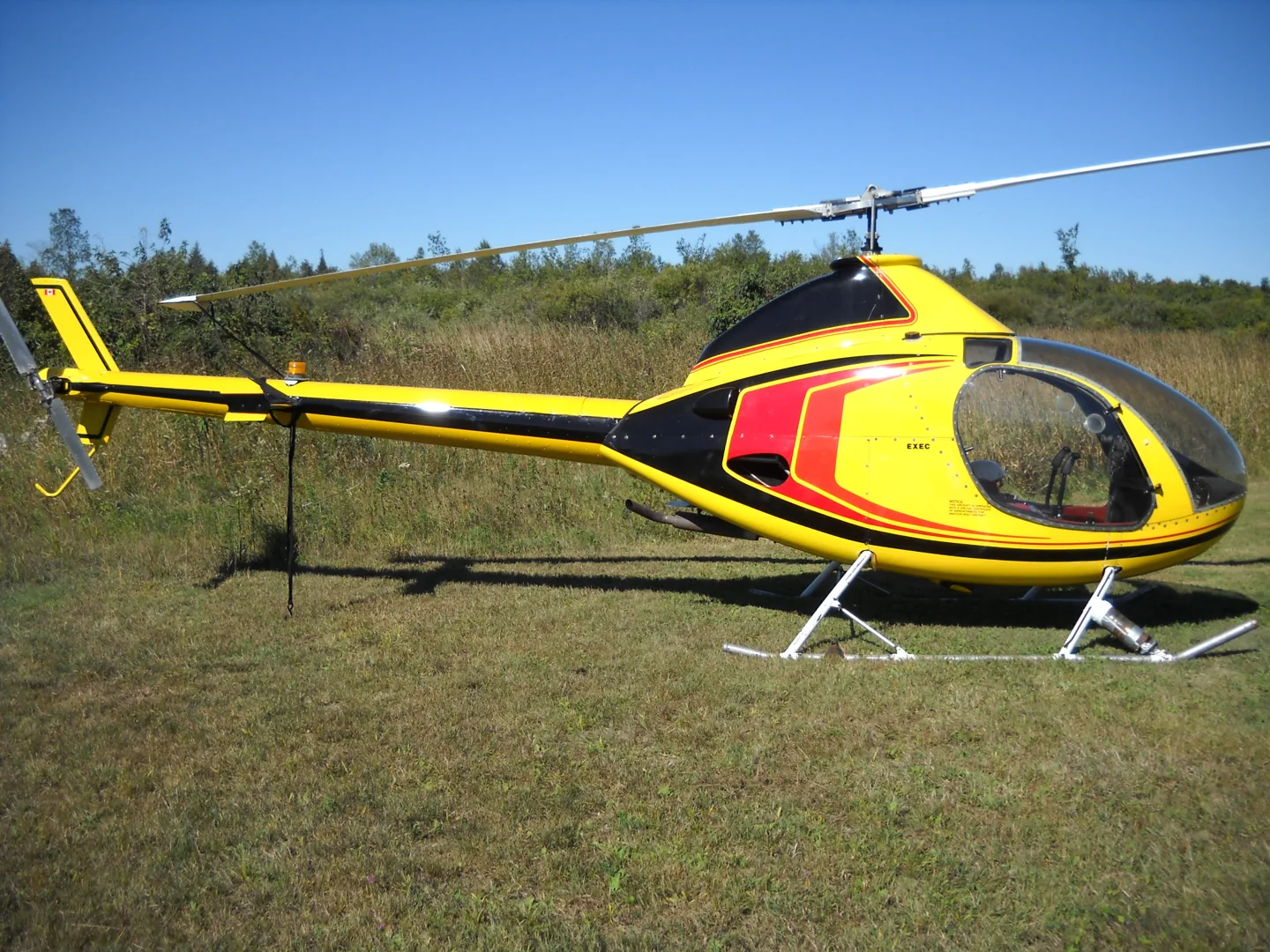
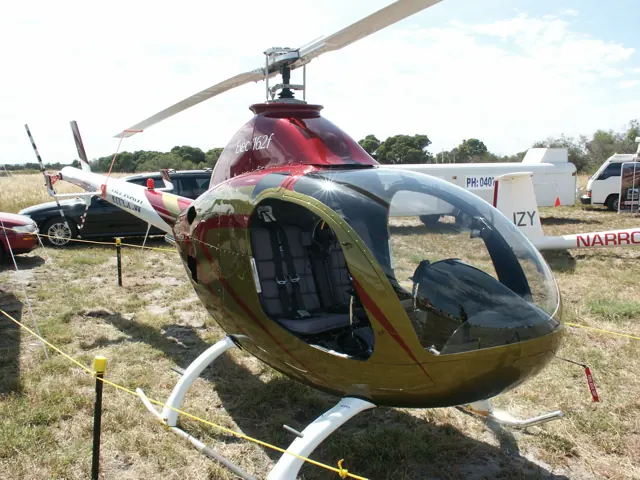
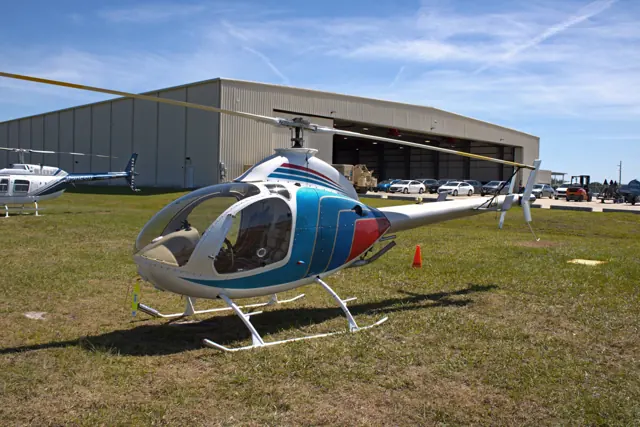
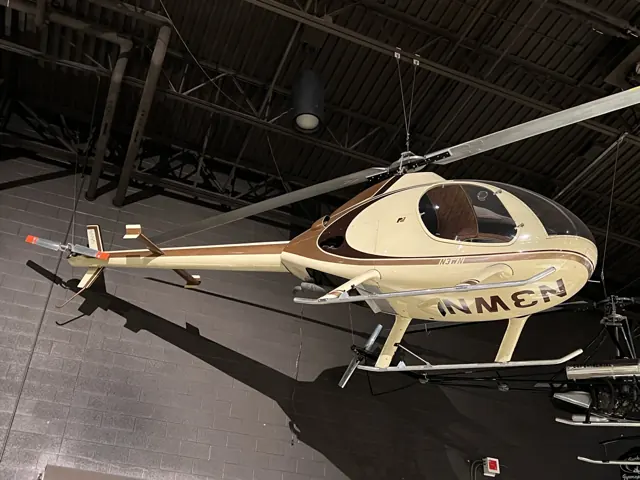
RotorWay supplied the two-seat Exec family for amateur construction from Arizona. Skids and a two-blade main rotor form the basic layout. FlyInside represents the piston-powered RW162F and turbine JetExec as separate aircraft with different engine and systems descriptions.
Aircraft background
Wikipedia contributors · Read more ↗Two instructors help a sceptical visitor settle in
McAdams arrived at the factory unsure that such a small helicopter would hover as steadily as its instructor promised. Time with Elbert Wolter soon changed that impression. They spent an hour practising turns, sideways movement and repeated landings around Stellar Air Park, giving him a chance to become comfortable before moving further afield.
AOPA Pilot · July 1995. Piston-powered Exec 162F at Stellar Air Park, Arizona, with Elbert “Stretch” Wolter and John O’Neil; not the turbine JetExec.
AOPA Pilot · Read more ↗The JetExec is the turbine alternative
FlyInside’s separate JetExec product describes a turbine installation, animated drive and control systems, and inspection hatches exposing internal equipment.
RotorWay Exec / JetExec · FlyInside · FlyInside · MSFS 2020
FlyInside · Read more ↗Into the cockpit
 YouTube
 Aviation AZ Rancher · 22 min ·
RotorWay JetExec Turbine-Powered Helicopter
An owner introduces a turbine-converted RotorWay JetExec.
Related conversion · turbine-powered RotorWay JetExec; distinct from a piston Exec
Watch on YouTube ↗Preview images are served by AirframeDB. Videos open on YouTube only when you choose to watch.
Meet RotorWay Exec / JetExec
RotorWay supplied the two-seat Exec family for amateur construction from Arizona. Skids and a two-blade main rotor form the basic layout. FlyInside represents the piston-powered RW162F and turbine JetExec as separate aircraft with different engine and systems descriptions.
RotorWay Exec / JetExec
RotorWay → · Explore the family →
RotorWay Exec
Wikipedia contributors · RotorWay Exec ↗FlyInside · MSFS 2020 →JetExec
Wikipedia contributors · RotorWay Exec ↗FlyInside · MSFS 2020 →Aircraft type designators
Use the code for the model you are flying. The linked authority lists the applicable aircraft.
RotorWay JetExec turbine conversion
ICAO Doc 8643 — aircraft type designators ↗Checked 2026-09-14History & design
Development milestones
First flight: 1994
Wikipedia contributors · RotorWay Exec ↗RotorWay Exec · family/variant named by the source · Wikipedia revision 1245615264
Pilot accounts
Two instructors help a sceptical visitor settle in
McAdams arrived at the factory unsure that such a small helicopter would hover as steadily as its instructor promised. Time with Elbert Wolter soon changed that impression. They spent an hour practising turns, sideways movement and repeated landings around Stellar Air Park, giving him a chance to become comfortable before moving further afield.
A second flight with John O’Neil took them to a closed airport for approaches and autorotation practice. McAdams found the helicopter predictable through those exercises and smooth during the intervening flying.
AOPA Pilot · July 1995. Piston-powered Exec 162F at Stellar Air Park, Arizona, with Elbert “Stretch” Wolter and John O’Neil; not the turbine JetExec.
Read the full account · AOPA Pilot ↗A factory tour ends with a change of mind
Fassbender’s visit began with the showroom and a look through the production facilities. The organisation of the kit and the factory’s preparation of its components interested him, but the most persuasive part of the day came afterwards. John O’Neill led him through the preflight inspection before they departed for the training area.
When Fassbender took the controls, their sensitivity made him appreciate the value of instruction even for an experienced pilot. O’Neill demonstrated an autorotation ending in a hover, a quick stop and a demanding takeoff before they returned. By the end of the visit, Fassbender’s doubts about kit helicopters had eased enough for him to imagine owning one himself.
Personal account of 12 October 1998. Exec 162F flight with chief pilot John O’Neill at Stellar Air Park; later sales figures in the article are dated December 2001.
Read the full account · Dirk E. Fassbender ↗An appealing shape becomes an enjoyable aircraft to fly
Krasner had admired the RotorWay’s appearance while remaining deeply suspicious of a helicopter assembled from a kit. Visiting Southern Helicopters gave her time to discuss those doubts before instructor Iain King introduced her to G-BWUJ. Once aboard, she liked the space and visibility, although a cushion was needed to bring the pedals within comfortable reach.
Flying it turned curiosity into enthusiasm. She enjoyed the response in turns and found it steadier than its small size had led her to expect. Her praise included reservations: the throttle felt stiff, the low-rotor warning light was hard to see, and the collective tended to creep.
Today’s Pilot · March 2005. Exec 162F G-BWUJ at Takeley with instructor Iain King; piston helicopter and individual cockpit observations.
Read the full account · Today’s Pilot / RotorWay UK ↗In your simulator
Systems, equipment and documentation for each developer’s aircraft.
MSFS 2020RotorWay Exec / JetExec · FlyInside
FlyInside · Released
RotorWay Exec / JetExec · FlyInside
FlyInside · Released
Aircraft specifications
Published figures for the named real-aircraft variant. Simulator equipment and performance can differ.
| Specification | Published value |
|---|---|
| Length | 22 ft 0 in (6.71 m) |
| Wingspan | 25 ft 0 in (7.62 m) |
| Height | 8 ft 0 in (2.44 m) |
| Wing area | 380 sq ft (35.4 m² ) |
| Empty weight | 975 lb (442 kg) |
| Max takeoff weight | 1,500 lb (680 kg) |
| Powerplant | 1 × RotorWay RI 162F flat-four piston engine, 150 hp (112 kW) |
| Maximum speed | 115 mph (185 km/h, 100 kn) at sea level |
| Cruise speed | 95 mph (153 km/h, 82 kn) |
| Range | 180 mi (290 km, 156 nmi) |
| Service ceiling | 5,000 ft (1,525 m) hover ceiling, out of ground effect |
| Rate of climb | 1,000 ft/min (5.1 m/s) |
Manuals & resources
Find your next read
Choose a topic for a short introduction and a link to the original source. Simulator references identify the developer and edition they cover.
Simulator documentation
The JetExec is the turbine alternativeRotorWay Exec / JetExec · FlyInside · FlyInside · MSFS 2020
FlyInside’s separate JetExec product describes a turbine installation, animated drive and control systems, and inspection hatches exposing internal equipment.
JetExec product source; separate from piston RW162F
FlyInside · Read the source ↗The turbine edition also offers assistance and failuresRotorWay Exec / JetExec · FlyInside · FlyInside · MSFS 2020
Its HeliManager provides control configuration and artificial-stability settings. The listed failures include overtorque, engine failure and rotor overspeed.
JetExec developer description; features scoped to this product
FlyInside · Read the source ↗Adjust the RW162F controls in HeliManagerRotorWay Exec / JetExec · FlyInside · FlyInside · MSFS 2020
FlyInside describes joystick configuration and artificial-stability sliders in HeliManager. Its piston RW162F uses the developer’s own flight-dynamics engine.
RW162F product page · MSFS; documented options
FlyInside · Read the source ↗Inspect the piston helicopter as well as its cockpitRotorWay Exec / JetExec · FlyInside · FlyInside · MSFS 2020
The product lists opening inspection hatches with engine and transmission models, interactive circuit breakers, and simulated failures including engine and rotor overspeed.
RW162F developer description; no runtime-fidelity claim
FlyInside · Read the source ↗Pilot account
Two instructors help a sceptical visitor settle inAOPA Pilot · July 1995. Piston-powered Exec 162F at Stellar Air Park, Arizona, with Elbert “Stretch” Wolter and John O’Neil; not the turbine JetExec.
McAdams arrived at the factory unsure that such a small helicopter would hover as steadily as its instructor promised. Time with Elbert Wolter soon changed that impression. They spent an hour practising turns, sideways movement and repeated landings around Stellar Air Park, giving him a chance to become comfortable before moving further afield. A second flight with John O’Neil took them to a closed airport for approaches and autorotation practice.
Tim McAdams
AOPA Pilot · Read the source ↗A factory tour ends with a change of mindPersonal account of 12 October 1998. Exec 162F flight with chief pilot John O’Neill at Stellar Air Park; later sales figures in the article are dated December 2001.
Fassbender’s visit began with the showroom and a look through the production facilities. The organisation of the kit and the factory’s preparation of its components interested him, but the most persuasive part of the day came afterwards. John O’Neill led him through the preflight inspection before they departed for the training area. When Fassbender took the controls, their sensitivity made him appreciate the value of instruction even for an experienced pilot.
Dirk E. Fassbender
Dirk E. Fassbender · Read the source ↗Read the original documentation from the people who created it. Manuals open on their publisher’s website.
Aircraft background
RotorWay ExecWikipedia contributors · Research background · retrieved 2026-09-12Product
RotorWay RW162FFlyInside · Official developer / designated store catalogue · checked 2026-09-12 RotorWay JetExecFlyInside · Official developer / designated store catalogue · checked 2026-09-12Type designator
ICAO Doc 8643 — aircraft type designatorsInternational Civil Aviation Organization · Public search data retrieved 2026-09-14; authority update 2026-09-03Built-in force-feedback profiles
Read the documentary basis, editable starting settings and remaining questions for the aircraft you fly. Each explanation refers to the exact profile revision shown.
Catalogue programme-20261022-v1 · 4 profile choices
FlyInside RotorWay JetExec
FlyInside · Free and Pro · Revision 3 · Inherited starting point
MSFS 2020
FlyInside RotorWay JetExec: The cyclic spring and damping accompany the selected RotorWay rendition.
FlyInside RotorWay RW162F
FlyInside · Free and Pro · Revision 3 · Inherited starting point
MSFS 2020
FlyInside RotorWay RW162F: The cyclic spring and damping accompany the selected RotorWay rendition.
RotorWay RW162F (piston)
Free and Pro · Revision 1 · Partial review
MSFS 2020
RotorWay RW162F (piston): The cyclic spring and damping accompany the selected RotorWay rendition.
RotorWay JetExec (turbine)
Free and Pro · Revision 1 · Partial review
MSFS 2020
RotorWay JetExec (turbine): The cyclic spring and damping accompany the selected RotorWay rendition.
RotorWay JetExec (turbine)
RotorWay JetExec (turbine): The cyclic spring and damping accompany the selected RotorWay rendition.
Aircraft and simulator scope
- RotorWay JetExec (turbine) · MSFS 2020 · Variant starting point
RotorWay JetExec (turbine) · Family sources identify only the variants and product versions described above.
The simulator model and controls
RotorWay supplied the two-seat Exec family for amateur construction from Arizona. Skids and a two-blade main rotor form the basic layout. FlyInside represents the piston-powered RW162F and turbine JetExec as separate aircraft with different engine and systems descriptions.
This starting point selects RotorWay JetExec (turbine). Its aircraft-level settings do not select a particular developer’s custom systems.
How this profile feels
The cyclic spring and damping accompany the selected RotorWay rendition. Spring resistance builds with the selected airspeed response. A separate aerodynamic term adds speed-dependent control load. Cyclic damping adds resistance to hardware motion.
Software force trim is separate from the actual aircraft’s installed trim equipment. Local force trim is off. Autopilot following is off.
Controls and trim
FlyInside bundles the RW162F piston helicopter and turbine JetExec with separate drive and engine systems. The RW162F uses its own clutch/governor arrangement; the JetExec’s software force trim is an implementation feature. Engine and rotor tachometers describe different systems.
About the values
The gains are normalized profile settings. They describe the chosen effect balance; hand force depends on the device and its output limits. IAS references are tuning values rather than operating limits. Physical acceptance of this revision remains pending.
What the documentation establishes
FlyInside separately identifies RW162F piston and JetExec turbine products.
JetExec guide says real helicopter lacks force trim although bindings exist; profile force trim stays off.
Separate piston/turbine identities support distinct texture classes.
Documentary review and sources
These decisions describe the documentary basis and remaining gaps for this revision. Aircraft documentation and a starting setting describe different kinds of evidence.
Aircraft and variant
ReviewedThis starting point selects RotorWay JetExec (turbine). Its aircraft-level settings do not select a particular developer’s custom systems.
Flight controls
Not yet reviewedFlyInside bundles the RW162F piston helicopter and turbine JetExec with separate drive and engine systems. The RW162F uses its own clutch/governor arrangement; the JetExec’s software force trim is an implementation feature. Engine and rotor tachometers describe different systems.
Trim
ReviewedSoftware force trim is separate from the actual aircraft’s installed trim equipment. Local force trim is off. Autopilot following is off.
Autopilot and stability
Not yet reviewedAutopilot following is off; the configured spring and load retain the hardware feel.
Equipment
ReviewedGear, flap and ground cues follow the selected settings and available simulator-reported states.
Speeds and limits
Not yet reviewedThe indicated-speed references set the profile response scale; they are separate from aircraft operating limits.
Simulator integration
Not yet reviewedThe profile targets msfs2020. Add-on-specific controls use only the supported references configured by this profile.
Force-feedback settings
Not yet reviewedThe settings define the profile’s effect balance. Device output limits affect physical hand force.
Starting settings and their rationale
These configured values are starting estimates. The explanations describe what each setting controls; physical validation appears separately below.
| Setting | Starting value | What it controls and why |
|---|---|---|
| Spring strength | Starting value0 | What it controls and whyThe cyclic spring and damping accompany the selected RotorWay rendition. The baseline spring is 0. Its low-speed blend reaches baseline strength at 50 KIAS. |
| Master force gain | Starting value0.85 | What it controls and whyScales overall profile strength while preserving effect balance, subject to device and output limits. |
| Profile force gain | Starting value0.35 | What it controls and whyThe aerodynamic-load gain is 0.35 with an indicated-speed reference of 100 KIAS. This supplies speed-dependent loading alongside the spring. |
| Force tuning speed/reference | Starting value100.0 kt | What it controls and whySets the IAS reference for aerodynamic loading. It is an estimate, not published cruise TAS or a flight limit. |
| Spring response reference speed | Starting value50.0 kt | What it controls and whySets the IAS where the low-speed blend reaches baseline strength; high-speed stiffening also uses it. |
| Aileron force scale | Starting value1 | What it controls and whyRoll and pitch aerodynamic scales are 1 and 1, respectively. They set the aerodynamic axis balance. No custom spring-travel curve is enabled. |
| Elevator force scale | Starting value1 | What it controls and whyScales pitch aerodynamic loading; pitch spring travel and trim responses are separate settings. |
| Trim feel | Starting valueDisabled | What it controls and whyRetained for compatibility and group membership. Trim relief, rather than this flag, controls centre movement. |
| Trim relief | Starting valueDisabled | What it controls and whyAllows trim relief with supported control law and valid telemetry. Axis authorities set its amount. |
| Autopilot follow | Starting valueDisabled | What it controls and whyAutopilot following is off; the configured spring and load retain the hardware feel. |
| Autopilot neutral hold | Starting valueDisabled | What it controls and whyPermits centering hold during a supported AP state, separate from following a moving target. |
| Output force limit | Starting value0.55 | What it controls and whyCaps directed-force output. Native spring effects and device limits remain separate. |
All 44 starting settings and their rationale
The settings define the profile’s effect balance. Device output limits affect physical hand force.
| Setting | Starting value | What it controls and why |
|---|---|---|
| Spring strength | Starting value0 | What it controls and whyThe cyclic spring and damping accompany the selected RotorWay rendition. The baseline spring is 0. Its low-speed blend reaches baseline strength at 50 KIAS. |
| Spring deadband | Starting value0.02 | What it controls and whySets travel around the centre before the baseline spring resists. Smaller values engage it sooner. |
| Profile force gain | Starting value0.35 | What it controls and whyThe aerodynamic-load gain is 0.35 with an indicated-speed reference of 100 KIAS. This supplies speed-dependent loading alongside the spring. |
| Master force gain | Starting value0.85 | What it controls and whyScales overall profile strength while preserving effect balance, subject to device and output limits. |
| QBlend Enabled | Starting valueEnabled | What it controls and whyAllows baseline spring strength to rise with indicated airspeed where the control law permits it. |
| QSpring Minimum Factor | Starting value1 | What it controls and whySets low-speed spring strength as a fraction of baseline when blending is enabled. One keeps full strength. |
| QSpring Start Knots | Starting value14.0 kt | What it controls and whySets the IAS where the low-speed spring blend starts rising. This is a feel threshold, not a flight limit. |
| Spring response reference speed | Starting value50.0 kt | What it controls and whySets the IAS where the low-speed blend reaches baseline strength; high-speed stiffening also uses it. |
| Force tuning speed/reference | Starting value100.0 kt | What it controls and whySets the IAS reference for aerodynamic loading. It is an estimate, not published cruise TAS or a flight limit. |
| Airspeed spring stiffening gain | Starting value0 | What it controls and whyAdds permitted spring resistance above the full-blend speed. Zero removes this high-speed increase. |
| Airspeed spring stiffening limit | Starting value5 | What it controls and whyLimits the squared airspeed ratio used for high-speed spring stiffening; it is not a device-force cap. |
| Aileron force scale | Starting value1 | What it controls and whyRoll and pitch aerodynamic scales are 1 and 1, respectively. They set the aerodynamic axis balance. No custom spring-travel curve is enabled. |
| Elevator force scale | Starting value1 | What it controls and whyScales pitch aerodynamic loading; pitch spring travel and trim responses are separate settings. |
| Output force limit | Starting value0.55 | What it controls and whyCaps directed-force output. Native spring effects and device limits remain separate. |
| Trim feel | Starting valueDisabled | What it controls and whyRetained for compatibility and group membership. Trim relief, rather than this flag, controls centre movement. |
| Trim relief | Starting valueDisabled | What it controls and whyAllows trim relief with supported control law and valid telemetry. Axis authorities set its amount. |
| Elevator Authority | Starting value0.3 | What it controls and whyScales supported pitch-trim relief and permitted centre movement. Zero removes pitch response. |
| Aileron Authority | Starting value0.3 | What it controls and whyScales supported roll-trim relief and permitted centre movement. Zero removes roll response. |
| Force Trim Enabled | Starting valueDisabled | What it controls and whySoftware force trim is separate from the actual aircraft’s installed trim equipment. Local force trim is off. The stored latch parameters are inactive; the profile does not supply a local hold-where-left neutral. |
| GLoad Enabled | Starting valueDisabled | What it controls and whyAllows load-factor changes to modify permitted spring laws. Passive fly-by-wire feel can suppress it. |
| Rate Damping Enabled | Starting valueEnabled | What it controls and whyEnables rate damping with the configured coefficients and control law. |
| Autopilot follow | Starting valueDisabled | What it controls and whyAutopilot following is off; the configured spring and load retain the hardware feel. |
| Autopilot follow authority | Starting value0.05 | What it controls and whySets admitted AP-follow gain, not a percentage of travel. Runtime ownership and input limits still apply. |
| Autopilot neutral hold | Starting valueDisabled | What it controls and whyPermits centering hold during a supported AP state, separate from following a moving target. |
| Autopilot neutral hold strength | Starting value0.6 | What it controls and whySets admitted AP neutral-hold strength; inactive while neutral hold is disabled. |
| Enabled | Starting valueEnabled | What it controls and whyEnables aerodynamic cues; each still needs nonzero strength and its simulator conditions. |
| Gain | Starting value0 | What it controls and whySets stall-buffet strength. Zero removes the cue without changing simulator stalls or warnings. |
| Gain | Starting value0 | What it controls and whySets high-Mach buffet strength; onset and full-strength thresholds are separate. |
| Gain | Starting value0 | What it controls and whySets flap buffet at the configured position and speed gates. Flap movement texture is separate. |
| Maximum flap index | Starting value1 | What it controls and whySets the final flap index for detent normalization. UP plus three detents uses maximum index3. |
| Minimum flap index | Starting value1 | What it controls and whySets the first flap detent that admits buffet; this is a handle index, not degrees. |
| Gain | Starting value0 | What it controls and whySets gear aerodynamic buffet; movement and ground-contact cues are separate. |
| Shaker Enabled | Starting valueDisabled | What it controls and whyPermits shaker at supported warning conditions; the switch does not establish aircraft equipment. |
| Stick shaker amplitude | Starting value0.5 | What it controls and whySets triggered shaker strength; inactive while the shaker feature is disabled. |
| Enabled | Starting valueEnabled | What it controls and whyEnables ground effects; each still needs its own strength and contact or motion telemetry. |
| Gain | Starting value0 | What it controls and whySets rolling texture strength, modified by speed, surface and undercarriage configuration. |
| Gain | Starting value0 | What it controls and whySets gear-bump texture during ground motion, separate from touchdown impact. |
| Gain | Starting value0.5 | What it controls and whySets landing-impact strength; landing telemetry and response shape determine the pulse. |
| Gain | Starting value0 | What it controls and whySets reverse-thrust vibration with valid reverser and engine conditions. Zero removes the cue. |
| Enabled | Starting valueEnabled | What it controls and whyEnables engine cues with nonzero settings and valid running-engine telemetry. |
| Gain | Starting value0.06 | What it controls and whySets estimated engine vibration using configured telemetry and response, not measured cockpit vibration. |
| Enabled | Starting valueEnabled | What it controls and whyEnables accessory cues with configured strengths and observed accessory movement. |
| Gain | Starting value0 | What it controls and whySets texture from observed flap movement; a command without movement does not establish the cue. |
| Gain | Starting value0 | What it controls and whySets texture from observed gear movement, separate from aerodynamic and touchdown effects. |
Limits and open questions
- Axis bindings do not establish cyclic force gearing.
- Follow is off; no FlyInside servo contract was established.
- No RW162F/JetExec IAS force curve was established.
- Custom dynamics/bindings do not establish stock rotor feedback availability.
- Simulator force-trim convenience is not fitted hardware; cyclic strengths remain estimates.
Physical validation
No physical force validation is recorded in this public catalogue for this revision. Documentary review and software checks do not establish how a particular device feels.
Discuss this aircraft (0)
Questions, observations and useful sources from the community.
No published discussions yet. Bring a question or share a useful source.
Open aircraft discussions →Content expanded · What’s new
Something missing or a source that needs attention?
Suggest a correction ↗