
Start here
A few places to begin, from the aircraft’s story to the people who fly it.
Meet the aircraft
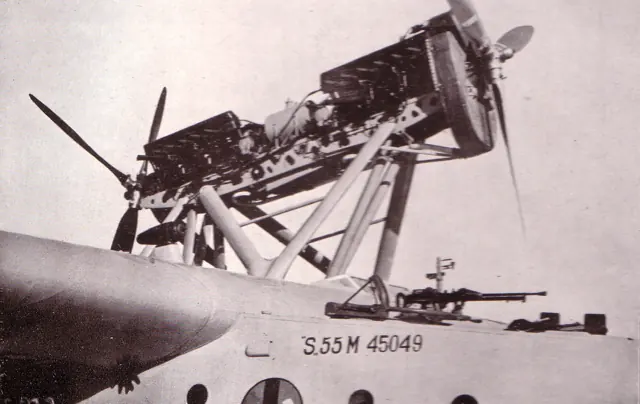
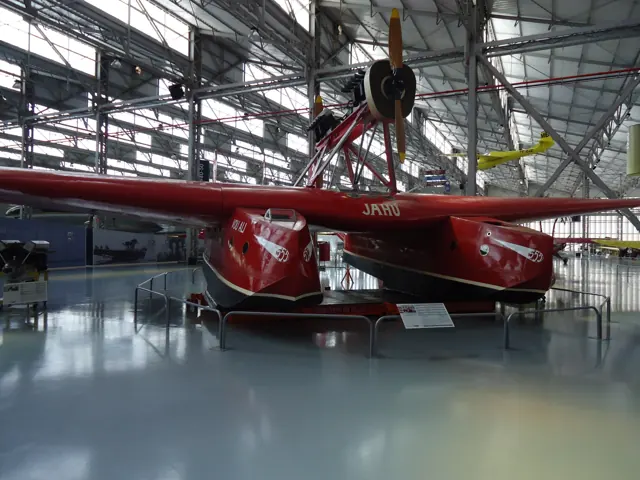
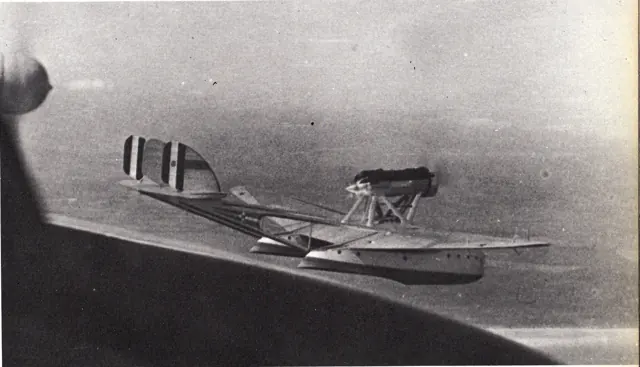
The S.55 carries its payload in two boat hulls joined by a broad wing. A centreline tractor-and-pusher engine installation sits above the wing, while twin booms support the tail.
Aircraft background
Wikipedia contributors · Read more ↗A departure crowd adds pressure to an already difficult morning
Balbo disliked having officials and spectators waiting for a departure. In Reykjavik he felt their presence made postponement harder, even before the flying boats attempted to take off. His account describes two unsuccessful runs, rising engine-water temperatures and a puzzled exchange with Cagna. The crew returned to the mooring and compared their experience with the other aircraft.
Commander and pilot of the 1933 S.55X expedition, flying with Stefano Cagna. His memoir also served the Fascist regime’s propaganda; this selection concerns his reported experience at Reykjavik.
Italo Balbo / Liber Liber · Read more ↗Find the options board beside the copilot’s seat
Click its upper edge to open it. Controls include insect removal, blue highlights, window refraction and pushback.
S.55 · Microsoft Flight Simulator · MSFS 2024
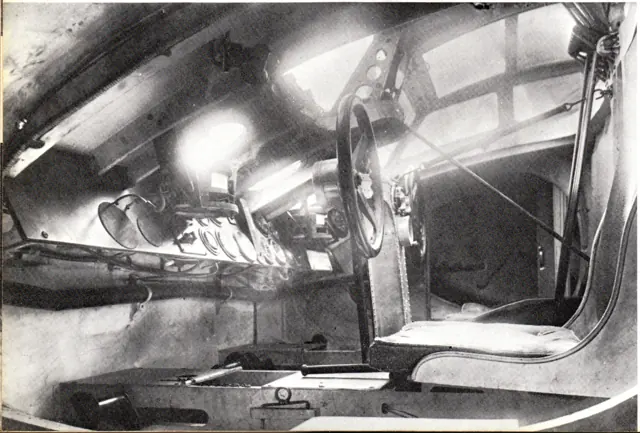
Microsoft / aircraft developers · Read more ↗Into the cockpit
 YouTube
 Microsoft Flight Simulator · 2 min ·
Microsoft Flight Simulator | Local Legend 4: Savoia-Marchetti S.55
Microsoft introduces its Savoia-Marchetti S.55 flying-boat package.
Simulator · Microsoft Savoia-Marchetti S.55 · MSFS
Watch on YouTube ↗Preview images are served by AirframeDB. Videos open on YouTube only when you choose to watch.
Meet Savoia-Marchetti S.55
The S.55 carries its payload in two boat hulls joined by a broad wing. A centreline tractor-and-pusher engine installation sits above the wing, while twin booms support the tail.
The aircraft served military and commercial operators and became associated with long-distance formation flights. Its two hulls and overhead engines distinguish it from conventional single-hull flying boats.
Savoia-Marchetti S.55
Aircraft type designators
A model-specific ICAO or FAA designator has not been confirmed in the references reviewed for this aircraft.
History & design
Development milestones
Designer: Alessandro Marchetti
First flight: August 1924
Wikipedia contributors · Savoia-Marchetti S.55 ↗Savoia-Marchetti S.55 · family/variant named by the source · Wikipedia revision 1355938055
Pilot accounts
A departure crowd adds pressure to an already difficult morning
Balbo disliked having officials and spectators waiting for a departure. In Reykjavik he felt their presence made postponement harder, even before the flying boats attempted to take off. His account describes two unsuccessful runs, rising engine-water temperatures and a puzzled exchange with Cagna. The crew returned to the mooring and compared their experience with the other aircraft.
A later attempt by another crew, facing the breeze, supplied the explanation they accepted. The expedition postponed its departure. Balbo then struggled to sleep because the blankets that had darkened his hotel room were already packed away. The next morning brought a successful takeoff, followed by cloud and fog over the Atlantic. His attention turned to pressure reports and keeping track of the other aircraft.
Commander and pilot of the 1933 S.55X expedition, flying with Stefano Cagna. His memoir also served the Fascist regime’s propaganda; this selection concerns his reported experience at Reykjavik.
Read the full account · Italo Balbo / Liber Liber ↗A confident crossing ends beside a ship
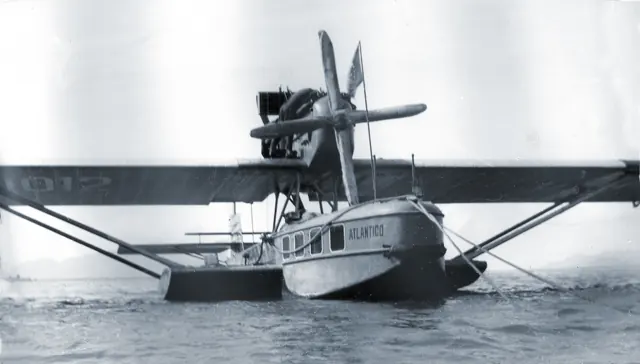
Barros told reporters that the crowd at Porto Praia had doubted the attempt. Jahu’s first takeoff run, with its crew and fuel aboard, changed that mood to cheers. He remembered the crew remaining enthusiastic through the long flight over the Atlantic, with the engines responding as they expected.
A damaged propeller interrupted the crossing before they reached the mainland. Barros described putting the flying boat down beside the ship Angelo Toso, comparing the landing with arriving on a lake. He understood how much depended on that arrival going well. The ship’s captain promptly organised assistance, and the crew were welcomed aboard. His interview moves from confidence at departure to gratitude for help at the end of the flight.
Interview reported from Fernando de Noronha after the April 1927 Jahu crossing. The original newspaper scan was checked; its performance records and detailed propeller-failure explanation are not adopted.
Read the full account · O Dia / Biblioteca Nacional do Brasil ↗Searching the ice becomes an exercise in frustration
Maddalena described the strain of searching for people whom his crew could not see. He named Cagna, Rampini and Marsano alongside himself, all looking out with growing frustration. His recollection conveys the helplessness of being airborne and searching hard while still failing to locate the survivors.
The association places those words in the S.55 mission sent to find Nobile and the others after the airship Italia accident. Its account records the eventual sighting on 20 June 1928. The short passage preserves a pilot’s view of the search before that success, when the immediate problem was finding the people on the ice. The sighting became part of a wider rescue effort.
Brief recollection quoted in the association’s history of Stefano Cagna. S.55 search for survivors of the airship Italia in June 1928; this is not a complete flight-test report.
Read the full account · Associazione Gente del 15° ↗In your simulator
Systems, equipment and documentation for each developer’s aircraft.
Compare simulator versions →MSFS 2024S.55
Microsoft Flight Simulator · Released
S.55
Microsoft Flight Simulator · Released
MSFS 2020S.55 / S.55X
Microsoft Flight Simulator · Released
S.55 / S.55X
Microsoft Flight Simulator · Released
Aircraft specifications
Published figures for the named real-aircraft variant. Simulator equipment and performance can differ.
| Specification | Published value |
|---|---|
| Length | 16.5 m (54 ft 2 in) |
| Wingspan | 24 m (78 ft 9 in) |
| Height | 5 m (16 ft 5 in) |
| Wing area | 92 m² (990 sq ft) |
| Empty weight | 5,750 kg (12,677 lb) |
| Max takeoff weight | 8,260 kg (18,210 lb) |
| Powerplant | 2 × Isotta Fraschini Asso 500 V-12 water-cooled piston engines, 370 kW (500 hp) each mounted in tandem, plus one Garelli piston engine driving oil distribution placed between the two main engines |
| Propellers | 2-bladed fixed pitch tractor and pusher propellers |
| Maximum speed | 205 km/h (127 mph, 111 kn) |
| Stall speed | 105 km/h (65 mph, 57 kn) |
| Range | 1,200 km (750 mi, 650 nmi) to 2,200 km (1,400 mi; 1,200 nmi) |
Manuals & resources
Find your next read
Choose a topic for a short introduction and a link to the original source. Simulator references identify the developer and edition they cover.
Simulator documentation
Find the options board beside the copilot’s seatS.55 · Microsoft Flight Simulator · MSFS 2024
Click its upper edge to open it. Controls include insect removal, blue highlights, window refraction and pushback.
MSFS 2024 features · PDF pages 20–21
Microsoft / aircraft developers · Read the source ↗Cockpit EFB placement depends on the variantS.55 · Microsoft Flight Simulator · MSFS 2024
Only the modernised S.55X has the cockpit EFB. The historical variants retain access to the simulator’s separate 2D EFB.
MSFS 2024 features · PDF page 22
Microsoft / aircraft developers · Read the source ↗A basic simulator autopilot beside the historical cockpitS.55 · Microsoft Flight Simulator · MSFS 2024
The S.55 pilot's guide identifies pitch-trim indication and an optional basic simulator autopilot on the options board. The latter is optional simulator equipment, not part of the original inter-war flying boat.
Archived simulator manual; installed package revision not observed · PDF pp.10,20
Microsoft / aircraft developers · Read the source ↗Exit onto the wing for the walkaroundS.55 · Microsoft Flight Simulator · MSFS 2024
With engines off and almost stationary, click the seat back to exit. Open the S.55X canopy first.
MSFS 2024 features · PDF pages 17–18
Microsoft / aircraft developers · Read the source ↗The anchor has specific deployment conditionsS.55 · Microsoft Flight Simulator · MSFS 2024
Deploy on water below 10 knots with both engines off. Breaking a condition retracts it; weather-vaning remains possible.
MSFS 2024 features · PDF pages 19–20, page 20 visually checked
Microsoft / aircraft developers · Read the source ↗Read the Husun compass by combining two numbersS.55 · Microsoft Flight Simulator · MSFS 2024 / MSFS 2020
The numbered needle supplies hundreds of degrees; the top arc supplies the remainder. The illustrated example combines 2 and 60 for 260 degrees.
Guide 2.0.7, 12 August 2026 · both simulator editions, PDF page 12
Microsoft / aircraft developers · Read the source ↗Pilot account
A departure crowd adds pressure to an already difficult morningCommander and pilot of the 1933 S.55X expedition, flying with Stefano Cagna. His memoir also served the Fascist regime’s propaganda; this selection concerns his reported experience at Reykjavik.
Balbo disliked having officials and spectators waiting for a departure. In Reykjavik he felt their presence made postponement harder, even before the flying boats attempted to take off. His account describes two unsuccessful runs, rising engine-water temperatures and a puzzled exchange with Cagna. The crew returned to the mooring and compared their experience with the other aircraft. A later attempt by another crew, facing the breeze, supplied the explanation they accepted.
Italo Balbo
Italo Balbo / Liber Liber · Read the source ↗A confident crossing ends beside a shipInterview reported from Fernando de Noronha after the April 1927 Jahu crossing. The original newspaper scan was checked; its performance records and detailed propeller-failure explanation are not adopted.
Barros told reporters that the crowd at Porto Praia had doubted the attempt. Jahu’s first takeoff run, with its crew and fuel aboard, changed that mood to cheers. He remembered the crew remaining enthusiastic through the long flight over the Atlantic, with the engines responding as they expected. A damaged propeller interrupted the crossing before they reached the mainland. Barros described putting the flying boat down beside the ship Angelo Toso, comparing the landing with arriving on a lake.
João Ribeiro de Barros
O Dia / Biblioteca Nacional do Brasil · Read the source ↗Read the original documentation from the people who created it. Manuals open on their publisher’s website.
Manual
Microsoft Flight Simulator aircraft manualsMicrosoft / aircraft developers Savoia-Marchetti S.55 ManualMicrosoft / aircraft developersAircraft background
Savoia-Marchetti S.55Wikipedia contributors · Research background · Wikipedia revision 1355938055 · retrieved 2026-09-12Resource
MSFS 2024 FAQ and edition aircraft inventoryMicrosoftDeveloper documentation
Local Legend IV: Savoia-Marchetti S.55Microsoft Flight Simulator Team · 2022-06-02 · release and package scopeBuilt-in force-feedback profiles
Read the documentary basis, editable starting settings and remaining questions for the aircraft you fly. Each explanation refers to the exact profile revision shown.
Catalogue programme-20261022-v1 · 2 profile choices
Savoia-Marchetti S.55
Free and Pro · Revision 2 · Partial review
MSFS 2020 · MSFS 2024
Savoia-Marchetti S.55: The profile supplies the twin-hull flying boat’s selected control resistance.
Savoia-Marchetti S.55X
Free and Pro · Revision 1 · Partial review
MSFS 2020 · MSFS 2024
Savoia-Marchetti S.55X: The profile supplies the twin-hull flying boat’s selected control resistance.
Savoia-Marchetti S.55X
Savoia-Marchetti S.55X: The profile supplies the twin-hull flying boat’s selected control resistance.
Aircraft and simulator scope
- Savoia-Marchetti S.55X · MSFS 2020 · Variant starting point
- Savoia-Marchetti S.55X · MSFS 2024 · Variant starting point
Savoia-Marchetti S.55X · Family sources identify only the variants and product versions described above.
The simulator model and controls
The S.55 carries its payload in two boat hulls joined by a broad wing. A centreline tractor-and-pusher engine installation sits above the wing, while twin booms support the tail.
This starting point selects Savoia-Marchetti S.55X. Its aircraft-level settings do not select a particular developer’s custom systems.
How this profile feels
The profile supplies the twin-hull flying boat’s selected control resistance. Spring resistance builds with the selected airspeed response. A separate aerodynamic term adds speed-dependent control load.
Pitch trim relief is independent of the centreline engine pair and hull contact. Valid trim provides the configured pressure relief. Autopilot following is off.
Controls and trim
The S55 joins two boat hulls with a broad wing and twin tail booms. Its two centreline engines face forward and aft in a tractor/pusher pair. Military, commercial and long-distance formation configurations used that unusual structure.
About the values
The gains are normalized profile settings. They describe the chosen effect balance; hand force depends on the device and its output limits. IAS references are tuning values rather than operating limits. Physical acceptance of this revision remains pending.
What the documentation establishes
Microsoft guide v2.0.7 identifies S55/S55X for MSFS 2020/2024.
Guide identifies pitch-trim indication; relief strength is estimated.
Guide identifies twin hulls and front/rear engine controls; variant scope is retained.
Documentary review and sources
These decisions describe the documentary basis and remaining gaps for this revision. Aircraft documentation and a starting setting describe different kinds of evidence.
Aircraft and variant
ReviewedThis starting point selects Savoia-Marchetti S.55X. Its aircraft-level settings do not select a particular developer’s custom systems.
Flight controls
Not yet reviewedThe S55 joins two boat hulls with a broad wing and twin tail booms. Its two centreline engines face forward and aft in a tractor/pusher pair. Military, commercial and long-distance formation configurations used that unusual structure.
Trim
ReviewedPitch trim relief is independent of the centreline engine pair and hull contact. Pitch authority 0.3 provides load relief and permitted centre movement; roll authority is 0.
Autopilot and stability
Not yet reviewedAutopilot following is off; the configured spring and load retain the hardware feel.
Equipment
ReviewedGear, flap and ground cues follow the selected settings and available simulator-reported states.
Speeds and limits
Not yet reviewedThe indicated-speed references set the profile response scale; they are separate from aircraft operating limits.
Simulator integration
Not yet reviewedThe profile targets msfs2020, msfs2024. Add-on-specific controls use only the supported references configured by this profile.
Force-feedback settings
Not yet reviewedThe settings define the profile’s effect balance. Device output limits affect physical hand force.
Starting settings and their rationale
These configured values are starting estimates. The explanations describe what each setting controls; physical validation appears separately below.
| Setting | Starting value | What it controls and why |
|---|---|---|
| Spring strength | Starting value0.74 | What it controls and whyThe profile supplies the twin-hull flying boat’s selected control resistance. The baseline spring is 0.74. Its low-speed blend reaches baseline strength at 47.5 KIAS. |
| Master force gain | Starting value0.85 | What it controls and whyScales overall profile strength while preserving effect balance, subject to device and output limits. |
| Profile force gain | Starting value0.8 | What it controls and whyThe aerodynamic-load gain is 0.8 with an indicated-speed reference of 95 KIAS. This supplies speed-dependent loading alongside the spring. |
| Force tuning speed/reference | Starting value95.0 kt | What it controls and whySets the IAS reference for aerodynamic loading. It is an estimate, not published cruise TAS or a flight limit. |
| Spring response reference speed | Starting value47.5 kt | What it controls and whySets the IAS where the low-speed blend reaches baseline strength; high-speed stiffening also uses it. |
| Aileron force scale | Starting value0.6 | What it controls and whyRoll and pitch aerodynamic scales are 0.6 and 0.78, respectively. They set the aerodynamic axis balance. No custom spring-travel curve is enabled. |
| Elevator force scale | Starting value0.78 | What it controls and whyScales pitch aerodynamic loading; pitch spring travel and trim responses are separate settings. |
| Trim feel | Starting valueEnabled | What it controls and whyRetained for compatibility and group membership. Trim relief, rather than this flag, controls centre movement. |
| Trim relief | Starting valueEnabled | What it controls and whyAllows trim relief with supported control law and valid telemetry. Axis authorities set its amount. |
| Autopilot follow | Starting valueDisabled | What it controls and whyAutopilot following is off; the configured spring and load retain the hardware feel. |
| Autopilot neutral hold | Starting valueDisabled | What it controls and whyPermits centering hold during a supported AP state, separate from following a moving target. |
| Output force limit | Starting value0.55 | What it controls and whyCaps directed-force output. Native spring effects and device limits remain separate. |
All 44 starting settings and their rationale
The settings define the profile’s effect balance. Device output limits affect physical hand force.
| Setting | Starting value | What it controls and why |
|---|---|---|
| Spring strength | Starting value0.74 | What it controls and whyThe profile supplies the twin-hull flying boat’s selected control resistance. The baseline spring is 0.74. Its low-speed blend reaches baseline strength at 47.5 KIAS. |
| Spring deadband | Starting value0.045 | What it controls and whySets travel around the centre before the baseline spring resists. Smaller values engage it sooner. |
| Profile force gain | Starting value0.8 | What it controls and whyThe aerodynamic-load gain is 0.8 with an indicated-speed reference of 95 KIAS. This supplies speed-dependent loading alongside the spring. |
| Master force gain | Starting value0.85 | What it controls and whyScales overall profile strength while preserving effect balance, subject to device and output limits. |
| QBlend Enabled | Starting valueEnabled | What it controls and whyAllows baseline spring strength to rise with indicated airspeed where the control law permits it. |
| QSpring Minimum Factor | Starting value0.5 | What it controls and whySets low-speed spring strength as a fraction of baseline when blending is enabled. One keeps full strength. |
| QSpring Start Knots | Starting value13.3 kt | What it controls and whySets the IAS where the low-speed spring blend starts rising. This is a feel threshold, not a flight limit. |
| Spring response reference speed | Starting value47.5 kt | What it controls and whySets the IAS where the low-speed blend reaches baseline strength; high-speed stiffening also uses it. |
| Force tuning speed/reference | Starting value95.0 kt | What it controls and whySets the IAS reference for aerodynamic loading. It is an estimate, not published cruise TAS or a flight limit. |
| Airspeed spring stiffening gain | Starting value0.15 | What it controls and whyThe high-speed spring-stiffening gain is 0.15. It strengthens the permitted spring response above 47.5 KIAS, with the squared-speed ratio capped at 5. |
| Airspeed spring stiffening limit | Starting value5 | What it controls and whyLimits the squared airspeed ratio used for high-speed spring stiffening; it is not a device-force cap. |
| Aileron force scale | Starting value0.6 | What it controls and whyRoll and pitch aerodynamic scales are 0.6 and 0.78, respectively. They set the aerodynamic axis balance. No custom spring-travel curve is enabled. |
| Elevator force scale | Starting value0.78 | What it controls and whyScales pitch aerodynamic loading; pitch spring travel and trim responses are separate settings. |
| Output force limit | Starting value0.55 | What it controls and whyCaps directed-force output. Native spring effects and device limits remain separate. |
| Trim feel | Starting valueEnabled | What it controls and whyRetained for compatibility and group membership. Trim relief, rather than this flag, controls centre movement. |
| Trim relief | Starting valueEnabled | What it controls and whyAllows trim relief with supported control law and valid telemetry. Axis authorities set its amount. |
| Elevator Authority | Starting value0.3 | What it controls and whyPitch trim relief is independent of the centreline engine pair and hull contact. Pitch authority 0.3 provides load relief and permitted centre movement; roll authority is 0. |
| Aileron Authority | Starting value0 | What it controls and whyScales supported roll-trim relief and permitted centre movement. Zero removes roll response. |
| Force Trim Enabled | Starting valueDisabled | What it controls and whyEnables local force trim, separate from aircraft-owned trim and add-on integration qualification. |
| GLoad Enabled | Starting valueEnabled | What it controls and whyAllows load-factor changes to modify permitted spring laws. Passive fly-by-wire feel can suppress it. |
| Rate Damping Enabled | Starting valueEnabled | What it controls and whyEnables rate damping with the configured coefficients and control law. |
| Autopilot follow | Starting valueDisabled | What it controls and whyAutopilot following is off; the configured spring and load retain the hardware feel. |
| Autopilot follow authority | Starting value0.1 | What it controls and whySets admitted AP-follow gain, not a percentage of travel. Runtime ownership and input limits still apply. |
| Autopilot neutral hold | Starting valueDisabled | What it controls and whyPermits centering hold during a supported AP state, separate from following a moving target. |
| Autopilot neutral hold strength | Starting value0.6 | What it controls and whySets admitted AP neutral-hold strength; inactive while neutral hold is disabled. |
| Enabled | Starting valueEnabled | What it controls and whyEnables aerodynamic cues; each still needs nonzero strength and its simulator conditions. |
| Gain | Starting value0.35 | What it controls and whySets stall-buffet strength. Zero removes the cue without changing simulator stalls or warnings. |
| Gain | Starting value0 | What it controls and whySets high-Mach buffet strength; onset and full-strength thresholds are separate. |
| Gain | Starting value0 | What it controls and whySets flap buffet at the configured position and speed gates. Flap movement texture is separate. |
| Maximum flap index | Starting value1 | What it controls and whySets the final flap index for detent normalization. UP plus three detents uses maximum index3. |
| Minimum flap index | Starting value1 | What it controls and whySets the first flap detent that admits buffet; this is a handle index, not degrees. |
| Gain | Starting value0 | What it controls and whySets gear aerodynamic buffet; movement and ground-contact cues are separate. |
| Shaker Enabled | Starting valueDisabled | What it controls and whyPermits shaker at supported warning conditions; the switch does not establish aircraft equipment. |
| Stick shaker amplitude | Starting value0.5 | What it controls and whySets triggered shaker strength; inactive while the shaker feature is disabled. |
| Enabled | Starting valueEnabled | What it controls and whyEnables ground effects; each still needs its own strength and contact or motion telemetry. |
| Gain | Starting value0.4 | What it controls and whySets rolling texture strength, modified by speed, surface and undercarriage configuration. |
| Gain | Starting value0.25 | What it controls and whySets gear-bump texture during ground motion, separate from touchdown impact. |
| Gain | Starting value0.65 | What it controls and whySets landing-impact strength; landing telemetry and response shape determine the pulse. |
| Gain | Starting value0 | What it controls and whySets reverse-thrust vibration with valid reverser and engine conditions. Zero removes the cue. |
| Enabled | Starting valueEnabled | What it controls and whyEnables engine cues with nonzero settings and valid running-engine telemetry. |
| Gain | Starting value0.12 | What it controls and whySets estimated engine vibration using configured telemetry and response, not measured cockpit vibration. |
| Enabled | Starting valueEnabled | What it controls and whyEnables accessory cues with configured strengths and observed accessory movement. |
| Gain | Starting value0 | What it controls and whySets texture from observed flap movement; a command without movement does not establish the cue. |
| Gain | Starting value0 | What it controls and whySets texture from observed gear movement, separate from aerodynamic and touchdown effects. |
Limits and open questions
- The guide does not establish manual gearing or force harmony.
- Follow is off; no fitted servo system was established.
- No S55/S55X IAS force-reference calibration was established.
- Tandem-engine/hull-contact signals need product-specific validation.
- Hull scaling and piston texture do not reproduce measured push-pull or hand forces.
Physical validation
No physical force validation is recorded in this public catalogue for this revision. Documentary review and software checks do not establish how a particular device feels.
Discuss this aircraft (0)
Questions, observations and useful sources from the community.
No published discussions yet. Bring a question or share a useful source.
Open aircraft discussions →Content expanded · What’s new
Something missing or a source that needs attention?
Suggest a correction ↗