


Start here
A few places to begin, from the aircraft’s story to the people who fly it.
Meet the aircraft
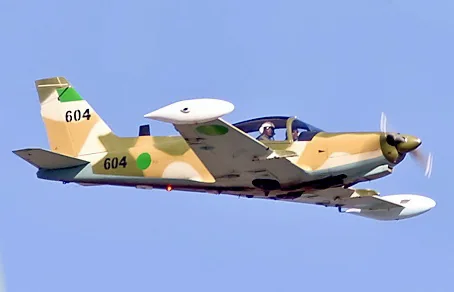
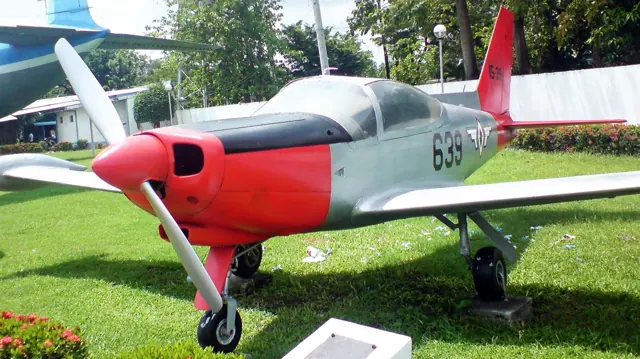
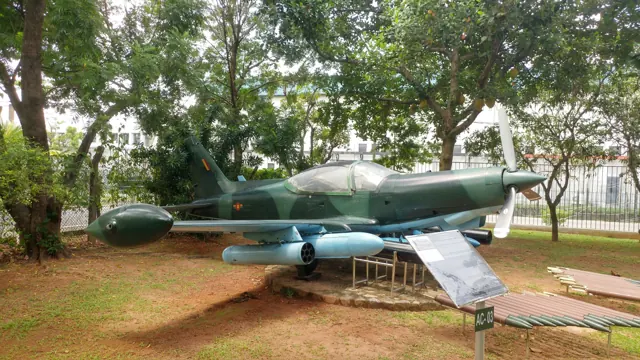
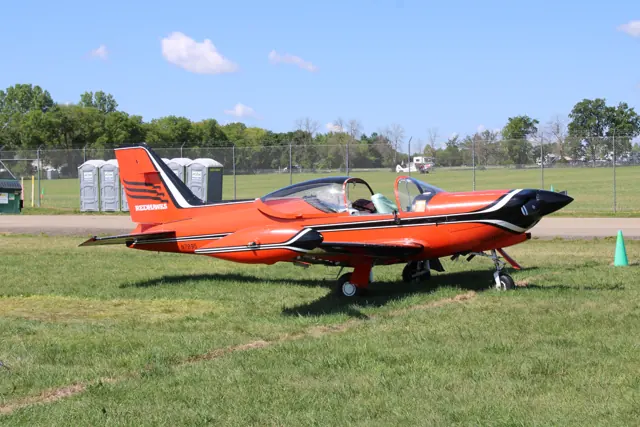
SIAI-Marchetti's Italian SF.260 combined a compact light-aircraft design with military training and aerobatic roles. JRollon and SimCoders developed its simulator product, with their respective credits and system descriptions recorded in the product documentation.
Aircraft background
Wikipedia contributors · Read more ↗An owner’s racing aircraft also takes his wife on holiday
Boot’s enthusiasm grew through mock-combat flying and racing a borrowed SF.260 before he found his own camouflaged W model at Shobdon. Bringing it onto the UK register took time and money, but ownership eventually supplied hundreds of hours of flying and a collection of racing successes. The aircraft offered a different sort of pleasure after years with a larger Cessna twin.
General Aviation · October 2010. Seven-year ownership retrospective concerning Boot’s SF260W; earlier flights in another owner’s D model are separate experiences.
General Aviation / IAOPA Europe · Read more ↗Each livery keeps its own condition
Aircraft state persists separately for each livery, with cumulative damage. The maintenance report provides condition checks and repairs; the damage and maintenance system can be disabled.
SIAI-Marchetti SF.260 with REP · JRollon / SimCoders · X-Plane 11 · X-Plane 12
SimCoders · Read more ↗Into the cockpit
 YouTube
 Marc Ulm · 4 min ·
SIAI-Marchetti SF.260 WL - Cockpi Take off, Inflight, Landing
A flight in an SF.260 WL, including departure, mountain flying and landing.
Real aircraft · SIAI-Marchetti SF.260
Watch on YouTube ↗Preview images are served by AirframeDB. Videos open on YouTube only when you choose to watch.
Meet SIAI-Marchetti SF.260
SIAI-Marchetti's Italian SF.260 combined a compact light-aircraft design with military training and aerobatic roles. JRollon and SimCoders developed its simulator product, with their respective credits and system descriptions recorded in the product documentation.
SIAI-Marchetti SF.260
SIAI-Marchetti → · Explore the family →
SIAI-Marchetti SF.260
Wikipedia contributors · SIAI-Marchetti SF.260 ↗JRollon / SimCoders · X-Plane 11 · X-Plane 12 →Aircraft type designators
Use the code for the model you are flying. The linked authority lists the applicable aircraft.
History & design
From Frati’s F.250 to the SF.260
Marc Cook traces the design to Stelio Frati and the Aviamilano-built F.250 prototypes. SIAI-Marchetti took it into production as the SF.260A. Some American aircraft were marketed as Waco Meteors, explaining the different name used in early US pilot reports.
AOPA Pilot · SIAI-Marchetti Aermacchi SF.260 ↗Historical overview published in July 2000; no present corporate ownership claim
Development milestones
Designer: Stelio Frati
First flight: 15 July 1964
Wikipedia contributors · SIAI-Marchetti SF.260 ↗SIAI-Marchetti SF.260 · family/variant named by the source · Wikipedia revision 1365944308
Pilot accounts
An owner’s racing aircraft also takes his wife on holiday
Boot’s enthusiasm grew through mock-combat flying and racing a borrowed SF.260 before he found his own camouflaged W model at Shobdon. Bringing it onto the UK register took time and money, but ownership eventually supplied hundreds of hours of flying and a collection of racing successes. The aircraft offered a different sort of pleasure after years with a larger Cessna twin.
He also used it for holidays with his wife Suzie, including trips to Menorca. Those journeys exposed less glamorous details: the seats became uncomfortable after several hours, and a hot canopy could make immersion suits decidedly unpleasant. Boot’s affection survives those compromises.
General Aviation · October 2010. Seven-year ownership retrospective concerning Boot’s SF260W; earlier flights in another owner’s D model are separate experiences.
Read the full account · General Aviation / IAOPA Europe ↗A familiar hangar neighbour still demands respect
Davisson knew the local Waco Meteors well enough that their owners had to move his Pitts to get them out of the hangar. He had travelled and flown with them before receiving a more deliberate checkout, which gave him time to explore the aircraft’s strengths and awkward points. He preferred the right seat, where the stick and throttle fell into the hands he expected.
The speed and flowing aerobatics made a strong impression, but landing the aircraft was another matter. Davisson found smooth arrivals unusually demanding and described learning from the owner’s guidance. His enthusiasm is tempered by that experience and by the machines’ individual modifications.
Air Progress · September 1977, preserved on Airbum. Early US Waco Meteor aircraft modified for airshow work; these individual machines differ from later production variants.
Read the full account · Airbum / Air Progress ↗Mock combat supplies a lesson in humility
Cox remembered an Air Combat USA flight that made the SF.260’s appeal unusually immediate. With an instructor alongside him, he tried to outmanoeuvre another aircraft in a simulated encounter. His enthusiasm led to increasingly forceful control inputs, buffet and narrowing vision, while the opponent repeatedly found the better position. The exercise became sweaty and demanding.
Only later did Cox learn more about the pilot who had beaten him: an airline captain with earlier Phantom experience in Vietnam. That discovery put the result in perspective. The memory stayed with him as an encounter with both a capable little aircraft and someone who knew how to use it.
Plane & Pilot · January 2008. Recollection of an Air Combat USA session at Fullerton roughly fifteen years earlier, with an instructor aboard; simulated combat, without live weapons.
Read the full account · Plane & Pilot ↗In your simulator
Systems, equipment and documentation for each developer’s aircraft.
Compare simulator versions →X-Plane 11 · X-Plane 12SIAI-Marchetti SF.260 with REP
JRollon / SimCoders · Released
SIAI-Marchetti SF.260 with REP
JRollon / SimCoders · Released
MSFS 2020 · MSFS 2024SF-260
Sim Skunk Works · Released
SF-260
Sim Skunk Works · Released
Aircraft specifications
Published figures for the named real-aircraft variant. Simulator equipment and performance can differ.
| Specification | Published value |
|---|---|
| Length | 7.10 m (23 ft 4 in) |
| Wingspan | 8.35 m (27 ft 5 in) over tip-tanks |
| Height | 2.41 m (7 ft 11 in) |
| Wing area | 10.10 m² (108.7 sq ft) |
| Empty weight | 755 kg (1,664 lb) |
| Gross weight | 1,140 kg (2,513 lb) |
| Max takeoff weight | 1,200 kg (2,646 lb) |
| Powerplant | 1 × Textron Lycoming O-540-E4A5 / Textron Lycoming AEIO-540-D4A5 6-cylinder air-cooled horizontally-opposed piston engine, 190 kW (260 hp) |
| Propellers | 2-bladed Hartzell HC-C2YK-1BF/8477-8R constant-speed propeller , 1.93 m (6 ft 4 in) diameter |
| Maximum speed | 333 km/h (207 mph, 180 kn) at sea level |
| Cruise speed | 300 km/h (190 mph, 160 kn) at 75% power at 1,500 m (4,900 ft) |
| Stall speed | 126 km/h (78 mph, 68 kn) flaps and landing gear down |
| Range | 1,650 km (1,030 mi, 890 nmi) 2 crew, with maximum fuel |
| Service ceiling | 4,700 m (15,300 ft) |
| Rate of climb | 7.6 m/s (1,500 ft/min) |
Manuals & resources
Find your next read
Choose a topic for a short introduction and a link to the original source. Simulator references identify the developer and edition they cover.
Simulator documentation
Each livery keeps its own conditionSIAI-Marchetti SF.260 with REP · JRollon / SimCoders · X-Plane 11 · X-Plane 12
Aircraft state persists separately for each livery, with cumulative damage. The maintenance report provides condition checks and repairs; the damage and maintenance system can be disabled.
SimCoders product documentation
SimCoders · Read the source ↗Fuel-system differences follow the selected modelSIAI-Marchetti SF.260 with REP · JRollon / SimCoders · X-Plane 11 · X-Plane 12
The civilian version uses a fuel selector and mechanical feed. The military version adds electric and mechanical feed with transfer pumps.
SimCoders product documentation; model-specific system distinction
SimCoders · Read the source ↗Ground handling includes a hand-towing modeSIAI-Marchetti SF.260 with REP · JRollon / SimCoders · X-Plane 11 · X-Plane 12
A preflight and postflight walkaround is included. In hand-towing mode, joystick movement is used to push, pull and steer the aircraft on the ground.
SimCoders product documentation
SimCoders · Read the source ↗Three models pair different cockpits and enginesSIAI-Marchetti SF.260 with REP · JRollon / SimCoders · X-Plane 11 · X-Plane 12
The package lists civilian analogue and G1000 models with a carburetted O-540, plus a military analogue model with a fuel-injected IO-540.
JRollon / SimCoders SF.260 product documentation
SimCoders · Read the source ↗Released product and variantsSIAI-Marchetti SF.260 with REP · JRollon / SimCoders · X-Plane 11 · X-Plane 12
JRollon’s SF.260 is supplied as a complete aircraft with SimCoders’ Reality Expansion Pack included. It is not a standalone REP purchase requiring a separate SF.260. The current store lists X-Plane 11 and 12 and REP 5.
Official developer / designated-store reference · checked 2026-09-14
SimCoders · Read the source ↗Pilot account
An owner’s racing aircraft also takes his wife on holidayGeneral Aviation · October 2010. Seven-year ownership retrospective concerning Boot’s SF260W; earlier flights in another owner’s D model are separate experiences.
Boot’s enthusiasm grew through mock-combat flying and racing a borrowed SF.260 before he found his own camouflaged W model at Shobdon. Bringing it onto the UK register took time and money, but ownership eventually supplied hundreds of hours of flying and a collection of racing successes. The aircraft offered a different sort of pleasure after years with a larger Cessna twin. He also used it for holidays with his wife Suzie, including trips to Menorca.
Geoffrey Boot
General Aviation / IAOPA Europe · Read the source ↗A familiar hangar neighbour still demands respectAir Progress · September 1977, preserved on Airbum. Early US Waco Meteor aircraft modified for airshow work; these individual machines differ from later production variants.
Davisson knew the local Waco Meteors well enough that their owners had to move his Pitts to get them out of the hangar. He had travelled and flown with them before receiving a more deliberate checkout, which gave him time to explore the aircraft’s strengths and awkward points. He preferred the right seat, where the stick and throttle fell into the hands he expected. The speed and flowing aerobatics made a strong impression, but landing the aircraft was another matter.
Budd Davisson
Airbum / Air Progress · Read the source ↗Developer documentation
SF-260 — product listingSF-260 · MSFS 2020 · MSFS 2024
Product listing captured 2026-09-30; edition scope from the reviewed catalogue
www.justflight.com · Read the source ↗SF-260 — product listingSF-260 · MSFS 2020 · MSFS 2024
Product listing captured 2026-09-30; edition scope from the reviewed catalogue
www.justflight.com · Read the source ↗Read the original documentation from the people who created it. Manuals open on their publisher’s website.
Aircraft background
SIAI-Marchetti SF.260Wikipedia contributors · Research background · retrieved 2026-09-12 SIAI-Marchetti Aermacchi SF.260AOPA Pilot · Marc Cook · 5 July 2000Product
Reality Expansion Pack · SIAI-Marchetti SF.260SimCoders · Official developer / designated store catalogue · checked 2026-09-12 Just Flight - Sim Skunk Works SF-260 (MSFS 2020)www.justflight.com · Product listing captured 2026-09-30; edition scope from the reviewed catalogue Just Flight - Sim Skunk Works SF-260 (MSFS 2024)www.justflight.com · Product listing captured 2026-09-30; edition scope from the reviewed catalogueDeveloper documentation
SIAI-Marchetti SF-260 -JRollon-SF260SimCoders · Official developer / designated-store reference · checked 2026-09-14Type designator
ICAO Doc 8643 — aircraft type designatorsInternational Civil Aviation Organization · Public search data retrieved 2026-09-14; authority update 2026-09-03Built-in force-feedback profiles
Read the documentary basis, editable starting settings and remaining questions for the aircraft you fly. Each explanation refers to the exact profile revision shown.
Catalogue programme-20261022-v1 · 3 profile choices
JRollon / SimCoders SF.260
JRollon / SimCoders · Free and Pro · Revision 3 · Inherited starting point
X-Plane 12
JRollon / SimCoders SF.260: The selected response supplies the aerobatic trainer’s axis balance.
Sim Skunk Works SF.260SF
Sim Skunk Works · Free and Pro · Revision 3 · Inherited starting point
MSFS 2020
Sim Skunk Works SF.260SF: The selected response supplies the aerobatic trainer’s axis balance.
SIAI-Marchetti SF.260
Free and Pro · Revision 1 · Partial review
X-Plane 12 · X-Plane 11
SIAI-Marchetti SF.260: The selected response supplies the aerobatic trainer’s axis balance.
Sim Skunk Works SF.260SF
Sim Skunk Works SF.260SF: The selected response supplies the aerobatic trainer’s axis balance.
Aircraft and simulator scope
- Sim Skunk Works SF.260SF · Sim Skunk Works · MSFS 2020 · Add-on starting point
The simulator model and controls
SIAI-Marchetti's Italian SF.260 combined a compact light-aircraft design with military training and aerobatic roles. JRollon and SimCoders developed its simulator product, with their respective credits and system descriptions recorded in the product documentation.
This profile selects Sim Skunk Works SF.260SF for MSFS 2020.
How this profile feels
The selected response supplies the aerobatic trainer’s axis balance. Spring resistance builds with the selected airspeed response. A separate aerodynamic term adds speed-dependent control load.
Pitch relief accompanies configuration-dependent pitch balance. Valid trim provides the configured pressure relief. Autopilot following is off.
Controls and trim
The SF260 documentation describes light conventional controls, substantial roll authority and pitch changes with gear/flap configuration. REP-equipped and other developer renditions retain separate systems and versioned flight models.
The selected implementation
Sim Skunk Works’ released SF.260 SF uses aircraft-performance tables and original manuals to inform its dynamics. The planned EA edition is separate.
About the values
The gains are normalized profile settings. They describe the chosen effect balance; hand force depends on the device and its output limits. IAS references are tuning values rather than operating limits. Physical acceptance of this revision remains pending.
Documentary review and sources
These decisions describe the documentary basis and remaining gaps for this revision. Aircraft documentation and a starting setting describe different kinds of evidence.
Aircraft and variant
InheritedThis profile selects Sim Skunk Works SF.260SF for MSFS 2020.
Flight controls
InheritedThe SF260 documentation describes light conventional controls, substantial roll authority and pitch changes with gear/flap configuration. REP-equipped and other developer renditions retain separate systems and versioned flight models.
Trim
InheritedPitch relief accompanies configuration-dependent pitch balance. Pitch authority 0.3 provides load relief and permitted centre movement; roll authority is 0.
Autopilot and stability
InheritedAutopilot following is off; the configured spring and load retain the hardware feel.
Equipment
InheritedSim Skunk Works’ released SF.260 SF uses aircraft-performance tables and original manuals to inform its dynamics. The planned EA edition is separate.
Speeds and limits
InheritedThe indicated-speed references set the profile response scale; they are separate from aircraft operating limits.
Simulator integration
InheritedThe profile targets msfs2020. Add-on-specific controls use only the supported references configured by this profile.
Force-feedback settings
InheritedThe settings define the profile’s effect balance. Device output limits affect physical hand force.
Starting settings and their rationale
These configured values are starting estimates. The explanations describe what each setting controls; physical validation appears separately below.
| Setting | Starting value | What it controls and why |
|---|---|---|
| Spring strength | Starting value0.74 | What it controls and whyThe selected response supplies the aerobatic trainer’s axis balance. The baseline spring is 0.74. Its low-speed blend reaches baseline strength at 65 KIAS. |
| Master force gain | Starting value0.85 | What it controls and whyScales overall profile strength while preserving effect balance, subject to device and output limits. |
| Profile force gain | Starting value0.8 | What it controls and whyThe aerodynamic-load gain is 0.8 with an indicated-speed reference of 150 KIAS. This supplies speed-dependent loading alongside the spring. |
| Force tuning speed/reference | Starting value150 kt | What it controls and whySets the IAS reference for aerodynamic loading. It is an estimate, not published cruise TAS or a flight limit. |
| Spring response reference speed | Starting value65 kt | What it controls and whySets the IAS where the low-speed blend reaches baseline strength; high-speed stiffening also uses it. |
| Aileron force scale | Starting value0.92 | What it controls and whyRoll and pitch aerodynamic scales are 0.92 and 1, respectively. They set the aerodynamic axis balance. No custom spring-travel curve is enabled. |
| Elevator force scale | Starting value1 | What it controls and whyScales pitch aerodynamic loading; pitch spring travel and trim responses are separate settings. |
| Trim feel | Starting valueDisabled | What it controls and whyRetained for compatibility and group membership. Trim relief, rather than this flag, controls centre movement. |
| Trim relief | Starting valueEnabled | What it controls and whyAllows trim relief with supported control law and valid telemetry. Axis authorities set its amount. |
| Autopilot follow | Starting valueDisabled | What it controls and whyAutopilot following is off; the configured spring and load retain the hardware feel. |
| Autopilot neutral hold | Starting valueDisabled | What it controls and whyPermits centering hold during a supported AP state, separate from following a moving target. |
| Output force limit | Starting value0.55 | What it controls and whyCaps directed-force output. Native spring effects and device limits remain separate. |
All 44 starting settings and their rationale
The settings define the profile’s effect balance. Device output limits affect physical hand force.
| Setting | Starting value | What it controls and why |
|---|---|---|
| Spring strength | Starting value0.74 | What it controls and whyThe selected response supplies the aerobatic trainer’s axis balance. The baseline spring is 0.74. Its low-speed blend reaches baseline strength at 65 KIAS. |
| Spring deadband | Starting value0.04 | What it controls and whySets travel around the centre before the baseline spring resists. Smaller values engage it sooner. |
| Profile force gain | Starting value0.8 | What it controls and whyThe aerodynamic-load gain is 0.8 with an indicated-speed reference of 150 KIAS. This supplies speed-dependent loading alongside the spring. |
| Master force gain | Starting value0.85 | What it controls and whyScales overall profile strength while preserving effect balance, subject to device and output limits. |
| QBlend Enabled | Starting valueEnabled | What it controls and whyAllows baseline spring strength to rise with indicated airspeed where the control law permits it. |
| QSpring Minimum Factor | Starting value0.55 | What it controls and whySets low-speed spring strength as a fraction of baseline when blending is enabled. One keeps full strength. |
| QSpring Start Knots | Starting value8 kt | What it controls and whySets the IAS where the low-speed spring blend starts rising. This is a feel threshold, not a flight limit. |
| Spring response reference speed | Starting value65 kt | What it controls and whySets the IAS where the low-speed blend reaches baseline strength; high-speed stiffening also uses it. |
| Force tuning speed/reference | Starting value150 kt | What it controls and whySets the IAS reference for aerodynamic loading. It is an estimate, not published cruise TAS or a flight limit. |
| Airspeed spring stiffening gain | Starting value0.15 | What it controls and whyThe high-speed spring-stiffening gain is 0.15. It strengthens the permitted spring response above 65 KIAS, with the squared-speed ratio capped at 5. |
| Airspeed spring stiffening limit | Starting value5 | What it controls and whyLimits the squared airspeed ratio used for high-speed spring stiffening; it is not a device-force cap. |
| Aileron force scale | Starting value0.92 | What it controls and whyRoll and pitch aerodynamic scales are 0.92 and 1, respectively. They set the aerodynamic axis balance. No custom spring-travel curve is enabled. |
| Elevator force scale | Starting value1 | What it controls and whyScales pitch aerodynamic loading; pitch spring travel and trim responses are separate settings. |
| Output force limit | Starting value0.55 | What it controls and whyCaps directed-force output. Native spring effects and device limits remain separate. |
| Trim feel | Starting valueDisabled | What it controls and whyRetained for compatibility and group membership. Trim relief, rather than this flag, controls centre movement. |
| Trim relief | Starting valueEnabled | What it controls and whyAllows trim relief with supported control law and valid telemetry. Axis authorities set its amount. |
| Elevator Authority | Starting value0.3 | What it controls and whyPitch relief accompanies configuration-dependent pitch balance. Pitch authority 0.3 provides load relief and permitted centre movement; roll authority is 0. |
| Aileron Authority | Starting value0 | What it controls and whyScales supported roll-trim relief and permitted centre movement. Zero removes roll response. |
| Force Trim Enabled | Starting valueDisabled | What it controls and whyEnables local force trim, separate from aircraft-owned trim and add-on integration qualification. |
| GLoad Enabled | Starting valueEnabled | What it controls and whyAllows load-factor changes to modify permitted spring laws. Passive fly-by-wire feel can suppress it. |
| Rate Damping Enabled | Starting valueEnabled | What it controls and whyEnables rate damping with the configured coefficients and control law. |
| Autopilot follow | Starting valueDisabled | What it controls and whyAutopilot following is off; the configured spring and load retain the hardware feel. |
| Autopilot follow authority | Starting value0.1 | What it controls and whySets admitted AP-follow gain, not a percentage of travel. Runtime ownership and input limits still apply. |
| Autopilot neutral hold | Starting valueDisabled | What it controls and whyPermits centering hold during a supported AP state, separate from following a moving target. |
| Autopilot neutral hold strength | Starting value0.6 | What it controls and whySets admitted AP neutral-hold strength; inactive while neutral hold is disabled. |
| Enabled | Starting valueEnabled | What it controls and whyEnables aerodynamic cues; each still needs nonzero strength and its simulator conditions. |
| Gain | Starting value0.35 | What it controls and whySets stall-buffet strength. Zero removes the cue without changing simulator stalls or warnings. |
| Gain | Starting value0 | What it controls and whySets high-Mach buffet strength; onset and full-strength thresholds are separate. |
| Gain | Starting value0 | What it controls and whySets flap buffet at the configured position and speed gates. Flap movement texture is separate. |
| Maximum flap index | Starting value3 | What it controls and whySets the final flap index for detent normalization. UP plus three detents uses maximum index3. |
| Minimum flap index | Starting value2 | What it controls and whySets the first flap detent that admits buffet; this is a handle index, not degrees. |
| Gain | Starting value0 | What it controls and whySets gear aerodynamic buffet; movement and ground-contact cues are separate. |
| Shaker Enabled | Starting valueDisabled | What it controls and whyPermits shaker at supported warning conditions; the switch does not establish aircraft equipment. |
| Stick shaker amplitude | Starting value0.5 | What it controls and whySets triggered shaker strength; inactive while the shaker feature is disabled. |
| Enabled | Starting valueEnabled | What it controls and whyEnables ground effects; each still needs its own strength and contact or motion telemetry. |
| Gain | Starting value0.4 | What it controls and whySets rolling texture strength, modified by speed, surface and undercarriage configuration. |
| Gain | Starting value0.25 | What it controls and whySets gear-bump texture during ground motion, separate from touchdown impact. |
| Gain | Starting value0.65 | What it controls and whySets landing-impact strength; landing telemetry and response shape determine the pulse. |
| Gain | Starting value0 | What it controls and whySets reverse-thrust vibration with valid reverser and engine conditions. Zero removes the cue. |
| Enabled | Starting valueEnabled | What it controls and whyEnables engine cues with nonzero settings and valid running-engine telemetry. |
| Gain | Starting value0.12 | What it controls and whySets estimated engine vibration using configured telemetry and response, not measured cockpit vibration. |
| Enabled | Starting valueEnabled | What it controls and whyEnables accessory cues with configured strengths and observed accessory movement. |
| Gain | Starting value0.12 | What it controls and whySets texture from observed flap movement; a command without movement does not establish the cue. |
| Gain | Starting value0.025 | What it controls and whySets texture from observed gear movement, separate from aerodynamic and touchdown effects. |
Limits and open questions
- Conventional aerobatic piston-trainer stick with estimated airspeed loading and comparatively lively roll authority. No hydraulic primary controls inferred from landing gear.
- Pitch-only estimated relief. Exact SF hardware trim gearing is unmeasured; no roll-trim or add-on-specific trim-pressure emulation.
- No qualified servo output or documented standard AP fit; follow/hold disabled. No REP custom interface copied into MSFS.
- MSFS2020 source scope. Standard aerodynamic/equipment cues only; any exaggerated add-on trim sensitivity is not compensated by invented signal gains.
- 150 KIAS is an estimated control-feel reference, not cruise TAS, V-speeds or an operating limit.
- Spring 0.74, lateral scale 0.92, trim relief 0.16/0; editable estimates, not measured hand forces.
- Physical and installed-aircraft checks are deferred. Save this profile as the aircraft default if telemetry omits its developer or configuration.
- Only actual accessory-position changes drive movement textures. No pressure-dependent failures, guessed servo outputs or input compensation.
Physical validation
No physical force validation is recorded in this public catalogue for this revision. Documentary review and software checks do not establish how a particular device feels.
Discuss this aircraft (0)
Questions, observations and useful sources from the community.
No published discussions yet. Bring a question or share a useful source.
Open aircraft discussions →Content expanded · What’s new
Something missing or a source that needs attention?
Suggest a correction ↗