


Start here
A few places to begin, from the aircraft’s story to the people who fly it.
Meet the aircraft
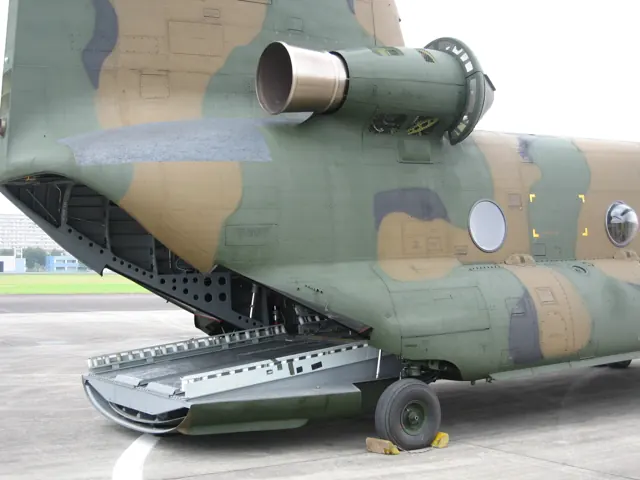
The Chinook's tandem-rotor arrangement places one rotor above each end of a long cargo cabin. The opposing rotor systems provide the lifting configuration, leaving the rear available for a loading ramp. Vertol originated the design before it became part of Boeing. The CH-47 family has evolved through several major versions and specialised derivatives. The D model in this catalogue has its own systems and cockpit identity.
Aircraft background
Wikipedia contributors · Read more ↗A spare part arrives with a familiar crew
Wookey remembered the Chinooks’ work bringing people from locations outside Kabul airport into the evacuation system. Keeping that operation moving meant dealing with crowded ramp space, changing security conditions and a fuel supply that could no longer be replenished normally. The flying depended on a much larger coordination effort than the journeys themselves suggested.
Edited Pilot Project Podcast interview in Vertical · September 2026. Canadian exchange pilot with the U.S. Army during the August 2021 Kabul evacuation; exact Chinook variant is not specified.
Vertical / The Pilot Project Podcast · Read more ↗Control hardware has a configuration choice
The documented AFCS supports both self-centring and non-centring joysticks. The package also lists a four-axis autopilot and VOR, TACAN, ADF and GPS navigation, with custom control panels.
Boeing CH-47D Chinook · X-Trident · X-Plane 11 · X-Plane 12
X-Trident · Read more ↗Into the cockpit
 YouTube
 Earl Watters · 16 min ·
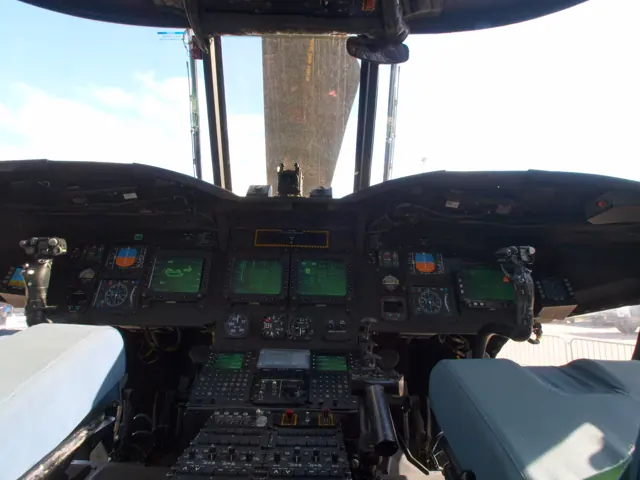
CH 47D Start Up Procedures
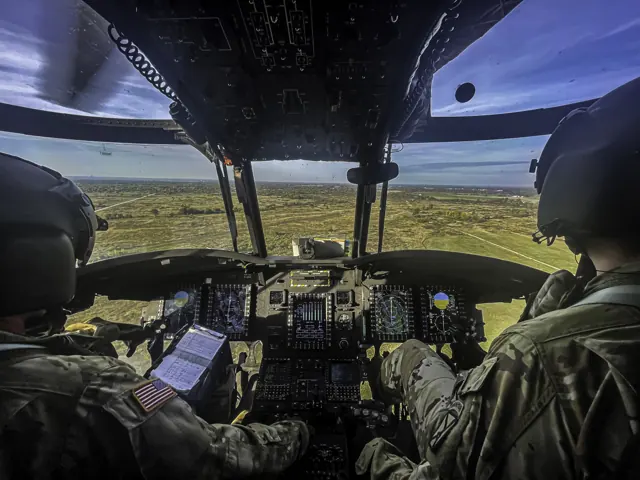
A CH-47D crew starts the helicopter before departing on a firefighting task.
Real aircraft · Boeing CH-47D Chinook
Watch on YouTube ↗Preview images are served by AirframeDB. Videos open on YouTube only when you choose to watch.
Meet Boeing CH-47D Chinook
The Chinook's tandem-rotor arrangement places one rotor above each end of a long cargo cabin. The opposing rotor systems provide the lifting configuration, leaving the rear available for a loading ramp. Vertol originated the design before it became part of Boeing.
The CH-47 family has evolved through several major versions and specialised derivatives. The simulator product represents the D model, with controls and loading arrangements for its tandem-rotor layout.
Boeing CH-47D Chinook
Aircraft type designators
Use the code for the model you are flying. The linked authority lists the applicable aircraft.
History & design
The Chinook has a civilian working branch
Columbia’s Model 234 work in Head’s account includes logging and construction. The operator also flew the smaller Model 107-II, so activities described across its whole fleet should not automatically be assigned to the Chinook.
Vertical · Riding Shotgun ↗Civilian family context reported in 2011
Canada’s F model is a distinct configuration
The 2014 report describes the CH-147F’s long-range fuel installation, digital cockpit and Canadian equipment changes. These explain the setting of Townsend’s account while remaining separate from the CH-47D represented by the simulator listings on this page.
Vertical · Not Your Grandfathers’ Chinook ↗Canadian variant context
Development milestones
First flight: 21 September 1961
Developed from: Vertol Model 107
Wikipedia contributors · Boeing CH-47 Chinook ↗Boeing CH-47 Chinook · family/variant named by the source · Wikipedia revision 1373883548
Pilot accounts
A spare part arrives with a familiar crew
Wookey remembered the Chinooks’ work bringing people from locations outside Kabul airport into the evacuation system. Keeping that operation moving meant dealing with crowded ramp space, changing security conditions and a fuel supply that could no longer be replenished normally. The flying depended on a much larger coordination effort than the journeys themselves suggested.
When one helicopter needed a component, the spare was in Kuwait and there was no dedicated flight to bring it back. Wookey contacted a Canadian colleague, and the part arrived on an evacuation aircraft. Going aboard to thank its crew, he discovered that the commander was an old classmate from military college and pilot training. That unexpected meeting became a lasting personal memory within the difficult final days of the operation.
Edited Pilot Project Podcast interview in Vertical · September 2026. Canadian exchange pilot with the U.S. Army during the August 2021 Kabul evacuation; exact Chinook variant is not specified.
Read the full account · Vertical / The Pilot Project Podcast ↗A clipboard earns its place in the cockpit
Head joined Columbia as an employee and completed its copilot training before taking part in a Nebraska power-line reconstruction job. Studying the manuals, learning the systems and passing a check ride gave the assignment a seriousness beyond a visiting journalist’s flight. Once on site, experienced command pilots handled the precise placement of the replacement towers.
In the other seat, Head recorded weights and times, monitored fuel and instruments, watched for traffic and used the radios. She also flew between sites when the command pilots needed a break. The work could look modest beside the long-line flying outside the window, but it supported every lift.
Vertical · February 2011. Actual employment and copilot training with Columbia Helicopters, followed by August 2010 Nebraska work in civilian Model 234UT C-FHFB; this is not a CH-47D equipment description.
Read the full account · Vertical ↗New aircraft arrive faster than trained crews
Townsend had been the last pilot trained on Canada’s earlier CH-147C before its retirement. Returning to the Chinook programme brought him to a much more extensively equipped aircraft and the task of building a squadron around it. Deliveries were progressing well, but training the people to use the new helicopters could not happen at the same pace.
He found the CH-147F stable, including beneath its layers of automation, and valued what it could carry. Yet its sophistication also explained why the transition needed time. Pilots, loadmasters and flight engineers had to develop compatible ways of working, supported by instructors and maintainers.
Vertical interview · May 2014. Commanding officer of 450 Tactical Helicopter Squadron at Petawawa, discussing Canada’s CH-147F after earlier CH-147C experience.
Read the full account · Vertical ↗In your simulator
Systems, equipment and documentation for each developer’s aircraft.
Compare simulator versions →MSFS 2024CH47D Chinook
Microsoft Flight Simulator · Released
CH47D Chinook
Microsoft Flight Simulator · Released
X-Plane 11 · X-Plane 12Boeing CH-47D Chinook
X-Trident · Released
Boeing CH-47D Chinook
X-Trident · Released
MSFS 2020; MSFS 2024CH47D Chinook
Miltech Simulations · Released
CH47D Chinook
Miltech Simulations · Released
Aircraft specifications
Published figures for the named real-aircraft variant. Simulator equipment and performance can differ.
| Specification | Published value |
|---|---|
| Length | 98 ft 10.7 in (30.142 m) |
| Height | 18 ft 7.8 in (5.685 m) |
| Empty weight | 24,578 lb (11,148 kg) |
| Gross weight | 54,000 lb (24,494 kg) |
| Powerplant | 2 × Lycoming T55-GA-714A turboshaft engines, 4,733 shp (3,529 kW) each |
| Main rotor diameter | 2 × 60 ft (18 m) |
| Main rotor area | 5,600 sq ft (520 m² ) |
| Maximum speed | 170 kn (200 mph, 310 km/h) |
| Cruise speed | 157 kn (181 mph, 291 km/h) |
| Range | 400 nmi (460 mi, 740 km) |
| Service ceiling | 20,000 ft (6,100 m) |
| Rate of climb | 1,522 ft/min (7.73 m/s) |
Manuals & resources
Find your next read
Choose a topic for a short introduction and a link to the original source. Simulator references identify the developer and edition they cover.
Simulator documentation
Control hardware has a configuration choiceBoeing CH-47D Chinook · X-Trident · X-Plane 11 · X-Plane 12
The documented AFCS supports both self-centring and non-centring joysticks. The package also lists a four-axis autopilot and VOR, TACAN, ADF and GPS navigation, with custom control panels.
X-Trident listing · developer-described behaviour
X-Trident · Read the source ↗Career configuration changed in Sim Update 4CH47D Chinook · Microsoft Flight Simulator · MSFS 2024
Microsoft’s release notes removed passenger and flightseeing specialisations and recorded fixes for cargo and construction checks. These are changes documented for version 1.6.32.0.
MSFS 2024 Sim Update 4 · CH-47D subsection
Microsoft Flight Simulator Team · Read the source ↗Loading into flight received a specific fixCH47D Chinook · Microsoft Flight Simulator · MSFS 2024
The same update added saved-flight collective values to address immediate descent when loading or skipping into flight. It also revised the GNS530 connection to the HSI and corrected altimeter issues.
MSFS 2024 Sim Update 4 · CH-47D subsection
Microsoft Flight Simulator Team · Read the source ↗External work includes a supporting ground sceneBoeing CH-47D Chinook · X-Trident · X-Plane 11 · X-Plane 12
The X-Trident listing includes external loads, cargo dropping, animated ground crew and a custom fuel truck. Load configurations can be saved and recalled, giving the package activities beyond transporting passengers.
X-Plane.org developer listing · captured September 2026
X-Trident · Read the source ↗The X-Plane 12 update adds weather effectsBoeing CH-47D Chinook · X-Trident · X-Plane 11 · X-Plane 12
The listed version 2.0 introduced the X-Plane 12 build and windscreen rain, ice and de-icing effects. The earlier 1.1 history describes VR interaction changes and stored fuel settings.
Version history · v2.0, 2 April 2023; v1.1, 9 June 2021
X-Trident · Read the source ↗Pilot account
A spare part arrives with a familiar crewEdited Pilot Project Podcast interview in Vertical · September 2026. Canadian exchange pilot with the U.S. Army during the August 2021 Kabul evacuation; exact Chinook variant is not specified.
Wookey remembered the Chinooks’ work bringing people from locations outside Kabul airport into the evacuation system. Keeping that operation moving meant dealing with crowded ramp space, changing security conditions and a fuel supply that could no longer be replenished normally. The flying depended on a much larger coordination effort than the journeys themselves suggested. When one helicopter needed a component, the spare was in Kuwait and there was no dedicated flight to bring it back.
Ian Wookey
Vertical / The Pilot Project Podcast · Read the source ↗A clipboard earns its place in the cockpitVertical · February 2011. Actual employment and copilot training with Columbia Helicopters, followed by August 2010 Nebraska work in civilian Model 234UT C-FHFB; this is not a CH-47D equipment description.
Head joined Columbia as an employee and completed its copilot training before taking part in a Nebraska power-line reconstruction job. Studying the manuals, learning the systems and passing a check ride gave the assignment a seriousness beyond a visiting journalist’s flight. Once on site, experienced command pilots handled the precise placement of the replacement towers. In the other seat, Head recorded weights and times, monitored fuel and instruments, watched for traffic and used the radios.
Elan Head
Vertical · Read the source ↗Read the original documentation from the people who created it. Manuals open on their publisher’s website.
Manual
Microsoft Flight Simulator aircraft manualsMicrosoft / aircraft developersAircraft background
Boeing CH-47 ChinookWikipedia contributors · Research background · Wikipedia revision 1373883548 · retrieved 2026-09-12Resource
MSFS 2024 FAQ and edition aircraft inventoryMicrosoftProduct
CH47-D ChinookX-Trident · Official developer / designated store catalogue · checked 2026-09-12 CH47D ChinookMiltech Simulations · Official catalogue reviewed 15 September 2026Type designator
ICAO Doc 8643 — aircraft type designatorsInternational Civil Aviation Organization · Public search data retrieved 2026-09-14; authority update 2026-09-03Developer documentation
MSFS 2024 Sim Update 4 release notesMicrosoft Flight Simulator Team · Version 1.6.32.0Built-in force-feedback profiles
Read the documentary basis, editable starting settings and remaining questions for the aircraft you fly. Each explanation refers to the exact profile revision shown.
Catalogue programme-20261022-v1 · 3 profile choices
Miltech CH-47D Chinook
Miltech Simulations · Free and Pro · Revision 2 · Inherited starting point
MSFS 2020 · MSFS 2024
Miltech CH-47D Chinook: The cyclic spring and damping accompany the selected tandem-rotor rendition.
X-Trident CH-47D Chinook
X-Trident · Free and Pro · Revision 2 · Inherited starting point
X-Plane 12
X-Trident CH-47D Chinook: The cyclic spring and damping accompany the selected tandem-rotor rendition.
Boeing CH-47D Chinook
Free and Pro · Revision 1 · Partial review
MSFS 2024 · X-Plane 12 · X-Plane 11 · MSFS 2020
Boeing CH-47D Chinook: The cyclic spring and damping accompany the selected tandem-rotor rendition.
Miltech CH-47D Chinook
Miltech CH-47D Chinook: The cyclic spring and damping accompany the selected tandem-rotor rendition.
Aircraft and simulator scope
- Miltech CH-47D Chinook · Miltech Simulations · MSFS 2020 · Add-on starting point
- Miltech CH-47D Chinook · Miltech Simulations · MSFS 2024 · Add-on starting point
The simulator model and controls
The Chinook's tandem-rotor arrangement places one rotor above each end of a long cargo cabin. The opposing rotor systems provide the lifting configuration, leaving the rear available for a loading ramp. Vertol originated the design before it became part of Boeing.
This profile selects Miltech CH-47D Chinook for MSFS 2020, MSFS 2024.
How this profile feels
The cyclic spring and damping accompany the selected tandem-rotor rendition. The spring stays independent of airspeed. Directed aerodynamic loading is omitted. Cyclic damping adds resistance to hardware motion.
AFCS trim and controller-centering choices are separate from rotor-throttle regulation. Local force trim is off. Autopilot following is off.
Controls and trim
The Chinook’s tandem three-blade rotors and fixed wheels surround a heavy-lift cabin. X-Trident and MSFS products have separate AFCS and controller-centering strategies. Cyclic trim, governor-controlled rotor throttle and ground-wheel swivel serve different systems.
The selected implementation
Miltech’s MSFS CH-47D is a separate implementation from X-Trident’s X-Plane Chinook, retaining its own tandem-rotor systems and cockpit functions.
About the values
The gains are normalized profile settings. They describe the chosen effect balance; hand force depends on the device and its output limits. IAS references are tuning values rather than operating limits. Physical acceptance of this revision remains pending.
Documentary review and sources
These decisions describe the documentary basis and remaining gaps for this revision. Aircraft documentation and a starting setting describe different kinds of evidence.
Aircraft and variant
InheritedThis profile selects Miltech CH-47D Chinook for MSFS 2020, MSFS 2024.
Flight controls
InheritedThe Chinook’s tandem three-blade rotors and fixed wheels surround a heavy-lift cabin. X-Trident and MSFS products have separate AFCS and controller-centering strategies. Cyclic trim, governor-controlled rotor throttle and ground-wheel swivel serve different systems.
Trim
InheritedAFCS trim and controller-centering choices are separate from rotor-throttle regulation. Local force trim is off. Autopilot following is off.
Autopilot and stability
InheritedAutopilot following is off; the configured spring and load retain the hardware feel.
Equipment
InheritedMiltech’s MSFS CH-47D is a separate implementation from X-Trident’s X-Plane Chinook, retaining its own tandem-rotor systems and cockpit functions.
Speeds and limits
InheritedThe indicated-speed references set the profile response scale; they are separate from aircraft operating limits.
Simulator integration
InheritedThe profile targets msfs2020, msfs2024. Add-on-specific controls use only the supported references configured by this profile.
Force-feedback settings
InheritedThe settings define the profile’s effect balance. Device output limits affect physical hand force.
Starting settings and their rationale
These configured values are starting estimates. The explanations describe what each setting controls; physical validation appears separately below.
| Setting | Starting value | What it controls and why |
|---|---|---|
| Spring strength | Starting value0.17 | What it controls and whyThe cyclic spring and damping accompany the selected tandem-rotor rendition. The baseline spring is 0.17. Low-speed spring blending is off. |
| Master force gain | Starting value0.65 | What it controls and whyScales overall profile strength while preserving effect balance, subject to device and output limits. |
| Profile force gain | Starting value0 | What it controls and whyThe 0 gain omits sustained directed airspeed loading. Spring resistance remains independent. |
| Force tuning speed/reference | Starting value130 kt | What it controls and whySets the IAS reference for aerodynamic loading. It is an estimate, not published cruise TAS or a flight limit. |
| Spring response reference speed | Starting value65 kt | What it controls and whySets the IAS where the low-speed blend reaches baseline strength; high-speed stiffening also uses it. |
| Aileron force scale | Starting value0.72 | What it controls and whyRoll and pitch aerodynamic scales are 0.72 and 1, respectively. These stored weights do not create directed aerodynamic loading while that term is inactive. No custom spring-travel curve is enabled. |
| Elevator force scale | Starting value1 | What it controls and whyScales pitch aerodynamic loading; pitch spring travel and trim responses are separate settings. |
| Trim feel | Starting valueDisabled | What it controls and whyRetained for compatibility and group membership. Trim relief, rather than this flag, controls centre movement. |
| Trim relief | Starting valueDisabled | What it controls and whyAllows trim relief with supported control law and valid telemetry. Axis authorities set its amount. |
| Autopilot follow | Starting valueDisabled | What it controls and whyAutopilot following is off; the configured spring and load retain the hardware feel. |
| Autopilot neutral hold | Starting valueDisabled | What it controls and whyPermits centering hold during a supported AP state, separate from following a moving target. |
| Output force limit | Starting value0.55 | What it controls and whyCaps directed-force output. Native spring effects and device limits remain separate. |
All 44 starting settings and their rationale
The settings define the profile’s effect balance. Device output limits affect physical hand force.
| Setting | Starting value | What it controls and why |
|---|---|---|
| Spring strength | Starting value0.17 | What it controls and whyThe cyclic spring and damping accompany the selected tandem-rotor rendition. The baseline spring is 0.17. Low-speed spring blending is off. |
| Spring deadband | Starting value0.02 | What it controls and whySets travel around the centre before the baseline spring resists. Smaller values engage it sooner. |
| Profile force gain | Starting value0 | What it controls and whyThe 0 gain omits sustained directed airspeed loading. Spring resistance remains independent. |
| Master force gain | Starting value0.65 | What it controls and whyScales overall profile strength while preserving effect balance, subject to device and output limits. |
| QBlend Enabled | Starting valueDisabled | What it controls and whyAllows baseline spring strength to rise with indicated airspeed where the control law permits it. |
| QSpring Minimum Factor | Starting value1 | What it controls and whySets low-speed spring strength as a fraction of baseline when blending is enabled. One keeps full strength. |
| QSpring Start Knots | Starting value8 kt | What it controls and whySets the IAS where the low-speed spring blend starts rising. This is a feel threshold, not a flight limit. |
| Spring response reference speed | Starting value65 kt | What it controls and whySets the IAS where the low-speed blend reaches baseline strength; high-speed stiffening also uses it. |
| Force tuning speed/reference | Starting value130 kt | What it controls and whySets the IAS reference for aerodynamic loading. It is an estimate, not published cruise TAS or a flight limit. |
| Airspeed spring stiffening gain | Starting value0 | What it controls and whyAdds permitted spring resistance above the full-blend speed. Zero removes this high-speed increase. |
| Airspeed spring stiffening limit | Starting value5 | What it controls and whyLimits the squared airspeed ratio used for high-speed spring stiffening; it is not a device-force cap. |
| Aileron force scale | Starting value0.72 | What it controls and whyRoll and pitch aerodynamic scales are 0.72 and 1, respectively. These stored weights do not create directed aerodynamic loading while that term is inactive. No custom spring-travel curve is enabled. |
| Elevator force scale | Starting value1 | What it controls and whyScales pitch aerodynamic loading; pitch spring travel and trim responses are separate settings. |
| Output force limit | Starting value0.55 | What it controls and whyCaps directed-force output. Native spring effects and device limits remain separate. |
| Trim feel | Starting valueDisabled | What it controls and whyRetained for compatibility and group membership. Trim relief, rather than this flag, controls centre movement. |
| Trim relief | Starting valueDisabled | What it controls and whyAllows trim relief with supported control law and valid telemetry. Axis authorities set its amount. |
| Elevator Authority | Starting value0 | What it controls and whyScales supported pitch-trim relief and permitted centre movement. Zero removes pitch response. |
| Aileron Authority | Starting value0 | What it controls and whyScales supported roll-trim relief and permitted centre movement. Zero removes roll response. |
| Force Trim Enabled | Starting valueDisabled | What it controls and whyAFCS trim and controller-centering choices are separate from rotor-throttle regulation. Local force trim is off. The stored latch parameters are inactive; the profile does not supply a local hold-where-left neutral. |
| GLoad Enabled | Starting valueDisabled | What it controls and whyAllows load-factor changes to modify permitted spring laws. Passive fly-by-wire feel can suppress it. |
| Rate Damping Enabled | Starting valueDisabled | What it controls and whyEnables rate damping with the configured coefficients and control law. |
| Autopilot follow | Starting valueDisabled | What it controls and whyAutopilot following is off; the configured spring and load retain the hardware feel. |
| Autopilot follow authority | Starting value0.05 | What it controls and whySets admitted AP-follow gain, not a percentage of travel. Runtime ownership and input limits still apply. |
| Autopilot neutral hold | Starting valueDisabled | What it controls and whyPermits centering hold during a supported AP state, separate from following a moving target. |
| Autopilot neutral hold strength | Starting value0.6 | What it controls and whySets admitted AP neutral-hold strength; inactive while neutral hold is disabled. |
| Enabled | Starting valueEnabled | What it controls and whyEnables aerodynamic cues; each still needs nonzero strength and its simulator conditions. |
| Gain | Starting value0 | What it controls and whySets stall-buffet strength. Zero removes the cue without changing simulator stalls or warnings. |
| Gain | Starting value0 | What it controls and whySets high-Mach buffet strength; onset and full-strength thresholds are separate. |
| Gain | Starting value0 | What it controls and whySets flap buffet at the configured position and speed gates. Flap movement texture is separate. |
| Maximum flap index | Starting value1 | What it controls and whySets the final flap index for detent normalization. UP plus three detents uses maximum index3. |
| Minimum flap index | Starting value1 | What it controls and whySets the first flap detent that admits buffet; this is a handle index, not degrees. |
| Gain | Starting value0 | What it controls and whySets gear aerodynamic buffet; movement and ground-contact cues are separate. |
| Shaker Enabled | Starting valueDisabled | What it controls and whyPermits shaker at supported warning conditions; the switch does not establish aircraft equipment. |
| Stick shaker amplitude | Starting value0.5 | What it controls and whySets triggered shaker strength; inactive while the shaker feature is disabled. |
| Enabled | Starting valueEnabled | What it controls and whyEnables ground effects; each still needs its own strength and contact or motion telemetry. |
| Gain | Starting value0.15 | What it controls and whySets rolling texture strength, modified by speed, surface and undercarriage configuration. |
| Gain | Starting value0 | What it controls and whySets gear-bump texture during ground motion, separate from touchdown impact. |
| Gain | Starting value0.5 | What it controls and whySets landing-impact strength; landing telemetry and response shape determine the pulse. |
| Gain | Starting value0 | What it controls and whySets reverse-thrust vibration with valid reverser and engine conditions. Zero removes the cue. |
| Enabled | Starting valueEnabled | What it controls and whyEnables engine cues with nonzero settings and valid running-engine telemetry. |
| Gain | Starting value0 | What it controls and whySets estimated engine vibration using configured telemetry and response, not measured cockpit vibration. |
| Enabled | Starting valueEnabled | What it controls and whyEnables accessory cues with configured strengths and observed accessory movement. |
| Gain | Starting value0 | What it controls and whySets texture from observed flap movement; a command without movement does not establish the cue. |
| Gain | Starting value0 | What it controls and whySets texture from observed gear movement, separate from aerodynamic and touchdown effects. |
Limits and open questions
- Miltech CH-47D Chinook; msfs2020, msfs2024. Previously observed titles and implementation identifiers are retained; installed matching remains deferred.
- Powered tandem-rotor cyclic approximation. No tail-rotor torque or fixed-wing IAS force model is fabricated.
- Aircraft AFCS/trim remains owner of its software references. No independent Bridge local trim datum until the aircraft mode is configured for hardware trim.
- Custom AFCS requires appropriate controller settings; a2% deadzone instruction is not applied silently to user hardware. X-Trident modes/datarefs do not establish Miltech integration. AP servo-follow and neutral hold remain disabled; engagement indicators are not force-demand signals.
- Two three-blade rotors and twin turbines, fixed wheels. Blade count is per rotor; six total blades must not be interpreted as one rotor frequency.
- 130 KIAS is an estimated feel reference, not cruise TAS or a certified limit. No invented Mach, VNE or weight scheduling.
- Read-only native telemetry for aircraft motion and accessory positions. Custom switches, display animations and mode lamps are not calibrated servo targets. No unverified LVars/datarefs or simulator writes.
- Spring 0.17; lateral scale 0.72; trim authorities 0/0; per-axis output cap .55. Editable engineering estimates, not measured hand forces. No body-rate torque, surface following or fabricated hydraulic-failure loads.
- New physical and installed-product checks deferred by owner. Existing separately recorded acceptance retains its original device, simulator, add-on and version limits. Source review does not broaden custom telemetry acceptance.
- Only actual accessory position changes drive movement texture; static drag and command-triggered kicks are disabled. Select and save an aircraft default when telemetry lacks a discriminating developer/configuration identity.
Physical validation
No physical force validation is recorded in this public catalogue for this revision. Documentary review and software checks do not establish how a particular device feels.
Discuss this aircraft (0)
Questions, observations and useful sources from the community.
No published discussions yet. Bring a question or share a useful source.
Open aircraft discussions →Content expanded · What’s new
Something missing or a source that needs attention?
Suggest a correction ↗