
Start here
A few places to begin, from the aircraft’s story to the people who fly it.
Meet the aircraft
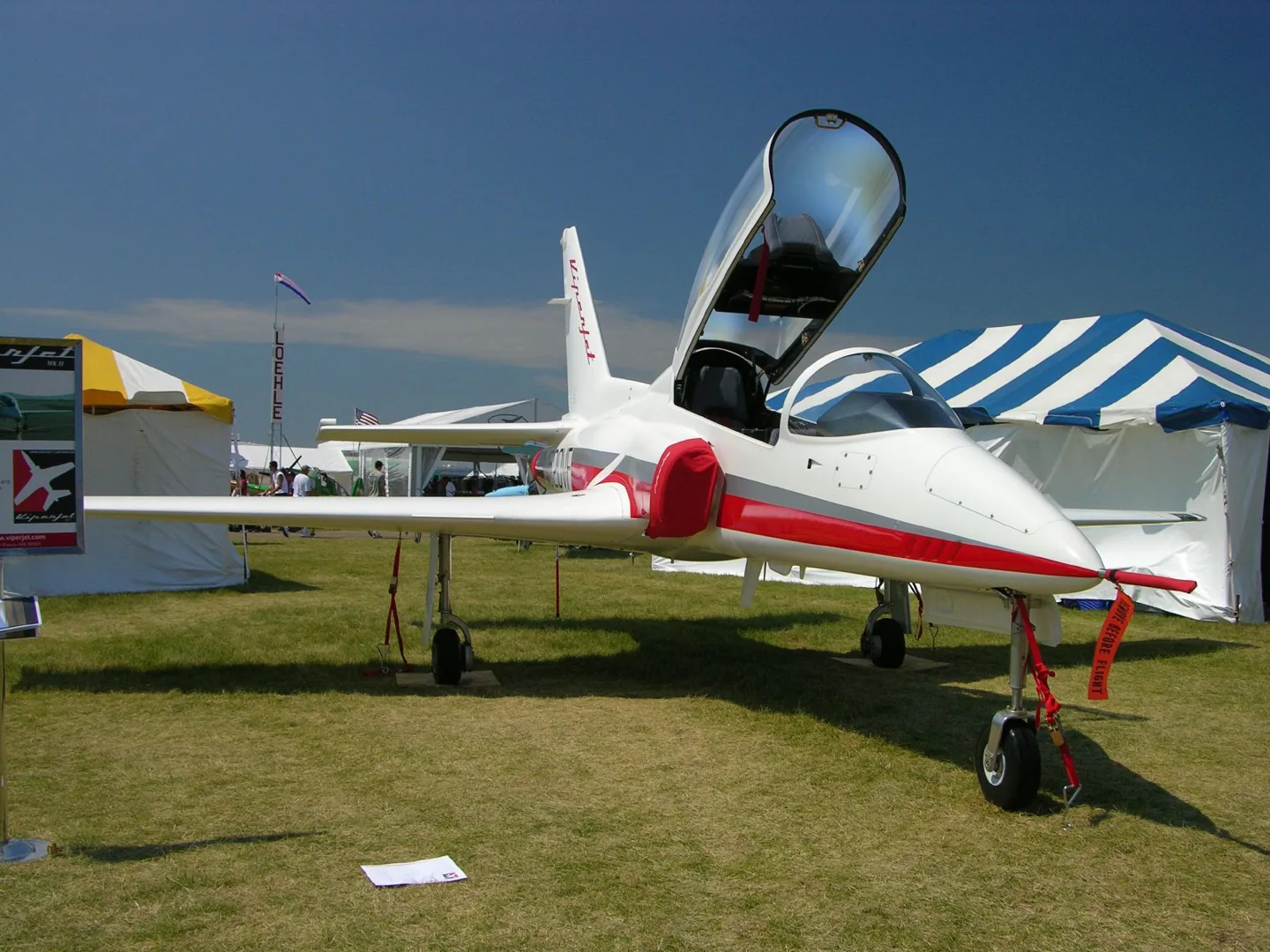
Viper Aircraft's homebuilt ViperJet has tandem seats under a canopy, a composite low-wing airframe and retractable gear. Side intakes supply the engine. Aerobask's ViperJet EX has its own simulator equipment and features documented by the developer.
Aircraft background
Wikipedia contributors · Read more ↗A prototype visit turns into a surprisingly comfortable ride
Rozendaal arrived expecting a utilitarian prototype and brought clothing to match. Instead, he found a finished interior, air conditioning and a demonstration pilot dressed for an ordinary day. The rear seat was comfortable, although tight around his elbows, and the aircraft made a much more polished impression than he had anticipated.
KITPLANES · January 2009. MkII demonstration at Pasco with Greg Bennett. Rozendaal flew airwork from the rear seat; Bennett handled takeoff and landing.
KITPLANES · Read more ↗The EX has a configurable instrument panel
Aerobask lists an Avidyne EXP5000 with optional synthetic vision, a head-up display and a DFC90 autopilot. Screen instruments and the autopilot offer configurable popups and popouts.
ViperJet · Aerobask · X-Plane 12
Aerobask · Read more ↗Into the cockpit
 YouTube
 X-Plane. Org Videos and Reviews · 4 min ·
ViperJet eX XP12 by Aerobask
A showcase of Aerobask's ViperJet eX for X-Plane 12.
Simulator · Aerobask ViperJet eX · X-Plane 12
Watch on YouTube ↗ YouTube
 Q8Pilot · 12 min ·
X-Plane 12 | ViperJet eX by Aerobask | Review
A longer review explores the Aerobask ViperJet eX in X-Plane 12.
Simulator · Aerobask ViperJet eX · X-Plane 12
Watch on YouTube ↗Preview images are served by AirframeDB. Videos open on YouTube only when you choose to watch.
Meet ViperJet
Viper Aircraft's homebuilt ViperJet has tandem seats under a canopy, a composite low-wing airframe and retractable gear. Side intakes supply the engine. Aerobask's ViperJet EX has its own simulator equipment and features documented by the developer.
ViperJet
Aircraft type designators
Use the code for the model you are flying. The linked authority lists the applicable aircraft.
History & design
Development milestones
Designer: Scott Hanchette
First flight: October 1999
Developed from: Viper Aircraft Viperfan
Wikipedia contributors · Viper Aircraft ViperJet ↗Viper Aircraft ViperJet · family/variant named by the source · Wikipedia revision 1335060091
Pilot accounts
A prototype visit turns into a surprisingly comfortable ride
Rozendaal arrived expecting a utilitarian prototype and brought clothing to match. Instead, he found a finished interior, air conditioning and a demonstration pilot dressed for an ordinary day. The rear seat was comfortable, although tight around his elbows, and the aircraft made a much more polished impression than he had anticipated.
Once airborne, the brisk climb gave way to handling exercises and formation flying beside the camera aircraft. He enjoyed the control response while noticing the attention required to hold altitude precisely at speed. The speed brake brought its own rumble and change in pitch. After the short flight, enthusiasm for the experience sat alongside a clear appreciation of the fuel it had consumed.
KITPLANES · January 2009. MkII demonstration at Pasco with Greg Bennett. Rozendaal flew airwork from the rear seat; Bennett handled takeoff and landing.
Read the full account · KITPLANES ↗Fifteen years of building meet the realities of ownership
Skinner’s ViperJet represented fifteen years of work. By the time Prizio visited, the aircraft had flown, but its owner was still working with instructor Doug Medore towards flying it independently. The pleasure of creating a jet had become a different challenge: learning its demands and dealing with the problems that appeared in service.
Skinner described precise pitch control at speed, repairs after a nose-gear problem, and a computer replacement. Fuel consumption also complicated the travelling he had imagined doing. He remained someone who loved building aeroplanes, yet said he probably would not choose this project again.
Dave Prizio, KITPLANES · September 2015. Owner of N999VJ, an original ViperJet rather than the MkII or simulated EX; training with Doug “Bones” Medore was continuing.
Read the full account · KITPLANES ↗A test pilot combines excitement with owner instruction
Fox brought a former Navy pilot’s experience to testing the ViperJet. He still enjoyed the prospect of more power, but told the magazine that the aircraft already offered exciting departures and room for straightforward aerobatic flying. What pleased him was the combination of that performance with handling he found accommodating.
His work also connected the prototype programme with customers reaching the end of their builds. Fox or a colleague provided their introductions to the finished aircraft, often for pilots arriving with years in complex singles or twins. Demonstration passengers sometimes asked about an ejection seat. The article’s answer was unambiguous: this privately built jet did not have one.
Interview in fliegermagazin 7/2007. Factory test and demonstration pilot on the MkII programme; comments are attributed impressions, not operating limits for the simulated EX.
Read the full account · fliegermagazin ↗In your simulator
Systems, equipment and documentation for each developer’s aircraft.
X-Plane 12ViperJet
Aerobask · Released
ViperJet
Aerobask · Released
Aircraft specifications
Published figures for the named real-aircraft variant. Simulator equipment and performance can differ.
| Specification | Published value |
|---|---|
| Length | 25 ft 6 in (7.80 m) |
| Wingspan | 27 ft 10 in (8.48 m) |
| Empty weight | 3,200 lb (1,452 kg) |
| Gross weight | 5,100 lb (2,320 kg) |
| Powerplant | 1 × General Electric CJ-610 , 2,850 lbf (12.7 kN) thrust |
| Maximum speed | 500–525 mph (804–845 km/h, 434–456 kn) |
| Cruise speed | 375 mph (603 km/h, 326 kn) |
| Stall speed | 80 mph (130 km/h, 70 kn) |
| Range | 920 mi (1,480 km, 800 nmi) |
| Service ceiling | 35,000 ft (10,500 m) |
| Rate of climb | 12,000 ft/min (61 m/s) |
Manuals & resources
Find your next read
Choose a topic for a short introduction and a link to the original source. Simulator references identify the developer and edition they cover.
Simulator documentation
The EX has a configurable instrument panelViperJet · Aerobask · X-Plane 12
Aerobask lists an Avidyne EXP5000 with optional synthetic vision, a head-up display and a DFC90 autopilot. Screen instruments and the autopilot offer configurable popups and popouts.
ViperJet EX · X-Plane 12
Aerobask · Read the source ↗Bring charts and cockpit controls closerViperJet · Aerobask · X-Plane 12
The product lists AviTab integration, VR-friendly manipulators and a supplied VR configuration. Canopy effects include rain and defrost.
X-Plane 12 edition; no unlisted device compatibility inferred
Aerobask · Read the source ↗Check the stated GTN limitationViperJet · Aerobask · X-Plane 12
The default configuration uses Laminar’s GNS530 and a custom GTX330. RealityXP GTN750 support is explicitly described as awaiting X-Plane 12 testing and potentially needing an update.
Developer page caveat; availability is not assumed
Aerobask · Read the source ↗Configure the aircraft for flying or displayViperJet · Aerobask · X-Plane 12
The options include coloured smoke emitters, ground equipment, canopy-lock and seal logic, and functional breakers with adjustable reliability.
Developer feature list
Aerobask · Read the source ↗Pilot account
A prototype visit turns into a surprisingly comfortable rideKITPLANES · January 2009. MkII demonstration at Pasco with Greg Bennett. Rozendaal flew airwork from the rear seat; Bennett handled takeoff and landing.
Rozendaal arrived expecting a utilitarian prototype and brought clothing to match. Instead, he found a finished interior, air conditioning and a demonstration pilot dressed for an ordinary day. The rear seat was comfortable, although tight around his elbows, and the aircraft made a much more polished impression than he had anticipated. Once airborne, the brisk climb gave way to handling exercises and formation flying beside the camera aircraft.
Doug Rozendaal
KITPLANES · Read the source ↗Fifteen years of building meet the realities of ownershipDave Prizio, KITPLANES · September 2015. Owner of N999VJ, an original ViperJet rather than the MkII or simulated EX; training with Doug “Bones” Medore was continuing.
Skinner’s ViperJet represented fifteen years of work. By the time Prizio visited, the aircraft had flown, but its owner was still working with instructor Doug Medore towards flying it independently. The pleasure of creating a jet had become a different challenge: learning its demands and dealing with the problems that appeared in service. Skinner described precise pitch control at speed, repairs after a nose-gear problem, and a computer replacement.
Rusty Skinner
KITPLANES · Read the source ↗Read the original documentation from the people who created it. Manuals open on their publisher’s website.
Aircraft background
Viper Aircraft ViperJetWikipedia contributors · Research background · retrieved 2026-09-12Product
ViperJet EXAerobask · Official developer / designated store catalogue · checked 2026-09-12Type designator
ICAO Doc 8643 — aircraft type designatorsInternational Civil Aviation Organization · Public search data retrieved 2026-09-14; authority update 2026-09-03Built-in force-feedback profiles
Read the documentary basis, editable starting settings and remaining questions for the aircraft you fly. Each explanation refers to the exact profile revision shown.
Catalogue programme-20261022-v1 · 2 profile choices
Aerobask ViperJet eX
Aerobask · Free and Pro · Revision 3 · Inherited starting point
X-Plane 12
Aerobask ViperJet eX: The selected response supplies small-jet stick resistance.
ViperJet
Free and Pro · Revision 1 · Partial review
X-Plane 12
ViperJet: The selected response supplies small-jet stick resistance.
Aerobask ViperJet eX
Aerobask ViperJet eX: The selected response supplies small-jet stick resistance.
Aircraft and simulator scope
- Aerobask ViperJet eX · Aerobask · X-Plane 12 · Add-on starting point
The simulator model and controls
Viper Aircraft's homebuilt ViperJet has tandem seats under a canopy, a composite low-wing airframe and retractable gear. Side intakes supply the engine. Aerobask's ViperJet EX has its own simulator equipment and features documented by the developer.
This profile selects Aerobask ViperJet eX for X-Plane 12.
How this profile feels
The selected response supplies small-jet stick resistance. Spring resistance builds with the selected airspeed response. A separate aerodynamic term adds speed-dependent control load.
Trim indications and automatic-flight modes have separate cockpit meanings. Pitch-trim relief is off. Autopilot following is off.
Controls and trim
The ViperJet EX rendition combines a small jet airframe and retractable gear with a DFC90 installation and custom instruments. Its XP12 rebuild and RC3 trim indications identify that implementation’s equipment.
The selected implementation
The ViperJet EX XP12 rebuild uses DFC90 automatic flight and RC3 trim indications with its custom cockpit.
About the values
The gains are normalized profile settings. They describe the chosen effect balance; hand force depends on the device and its output limits. IAS references are tuning values rather than operating limits. Physical acceptance of this revision remains pending.
Documentary review and sources
These decisions describe the documentary basis and remaining gaps for this revision. Aircraft documentation and a starting setting describe different kinds of evidence.
Aircraft and variant
InheritedThis profile selects Aerobask ViperJet eX for X-Plane 12.
Flight controls
InheritedThe ViperJet EX rendition combines a small jet airframe and retractable gear with a DFC90 installation and custom instruments. Its XP12 rebuild and RC3 trim indications identify that implementation’s equipment.
Trim
InheritedTrim indications and automatic-flight modes have separate cockpit meanings. Pitch relief is off, with stored authority 0; roll authority is 0.
Autopilot and stability
InheritedAutopilot following is off; the configured spring and load retain the hardware feel.
Equipment
InheritedThe ViperJet EX XP12 rebuild uses DFC90 automatic flight and RC3 trim indications with its custom cockpit.
Speeds and limits
InheritedThe indicated-speed references set the profile response scale; they are separate from aircraft operating limits.
Simulator integration
InheritedThe profile targets xplane12. Add-on-specific controls use only the supported references configured by this profile.
Force-feedback settings
InheritedThe settings define the profile’s effect balance. Device output limits affect physical hand force.
Starting settings and their rationale
These configured values are starting estimates. The explanations describe what each setting controls; physical validation appears separately below.
| Setting | Starting value | What it controls and why |
|---|---|---|
| Spring strength | Starting value0.74 | What it controls and whyThe selected response supplies small-jet stick resistance. The baseline spring is 0.74. Its low-speed blend reaches baseline strength at 65 KIAS. |
| Master force gain | Starting value0.85 | What it controls and whyScales overall profile strength while preserving effect balance, subject to device and output limits. |
| Profile force gain | Starting value0.8 | What it controls and whyThe aerodynamic-load gain is 0.8 with an indicated-speed reference of 200 KIAS. This supplies speed-dependent loading alongside the spring. |
| Force tuning speed/reference | Starting value200 kt | What it controls and whySets the IAS reference for aerodynamic loading. It is an estimate, not published cruise TAS or a flight limit. |
| Spring response reference speed | Starting value65 kt | What it controls and whySets the IAS where the low-speed blend reaches baseline strength; high-speed stiffening also uses it. |
| Aileron force scale | Starting value0.72 | What it controls and whyRoll and pitch aerodynamic scales are 0.72 and 1, respectively. They set the aerodynamic axis balance. No custom spring-travel curve is enabled. |
| Elevator force scale | Starting value1 | What it controls and whyScales pitch aerodynamic loading; pitch spring travel and trim responses are separate settings. |
| Trim feel | Starting valueDisabled | What it controls and whyRetained for compatibility and group membership. Trim relief, rather than this flag, controls centre movement. |
| Trim relief | Starting valueDisabled | What it controls and whyAllows trim relief with supported control law and valid telemetry. Axis authorities set its amount. |
| Autopilot follow | Starting valueDisabled | What it controls and whyAutopilot following is off; the configured spring and load retain the hardware feel. |
| Autopilot neutral hold | Starting valueDisabled | What it controls and whyPermits centering hold during a supported AP state, separate from following a moving target. |
| Output force limit | Starting value0.55 | What it controls and whyCaps directed-force output. Native spring effects and device limits remain separate. |
All 44 starting settings and their rationale
The settings define the profile’s effect balance. Device output limits affect physical hand force.
| Setting | Starting value | What it controls and why |
|---|---|---|
| Spring strength | Starting value0.74 | What it controls and whyThe selected response supplies small-jet stick resistance. The baseline spring is 0.74. Its low-speed blend reaches baseline strength at 65 KIAS. |
| Spring deadband | Starting value0.045 | What it controls and whySets travel around the centre before the baseline spring resists. Smaller values engage it sooner. |
| Profile force gain | Starting value0.8 | What it controls and whyThe aerodynamic-load gain is 0.8 with an indicated-speed reference of 200 KIAS. This supplies speed-dependent loading alongside the spring. |
| Master force gain | Starting value0.85 | What it controls and whyScales overall profile strength while preserving effect balance, subject to device and output limits. |
| QBlend Enabled | Starting valueEnabled | What it controls and whyAllows baseline spring strength to rise with indicated airspeed where the control law permits it. |
| QSpring Minimum Factor | Starting value0.5 | What it controls and whySets low-speed spring strength as a fraction of baseline when blending is enabled. One keeps full strength. |
| QSpring Start Knots | Starting value8 kt | What it controls and whySets the IAS where the low-speed spring blend starts rising. This is a feel threshold, not a flight limit. |
| Spring response reference speed | Starting value65 kt | What it controls and whySets the IAS where the low-speed blend reaches baseline strength; high-speed stiffening also uses it. |
| Force tuning speed/reference | Starting value200 kt | What it controls and whySets the IAS reference for aerodynamic loading. It is an estimate, not published cruise TAS or a flight limit. |
| Airspeed spring stiffening gain | Starting value0.15 | What it controls and whyThe high-speed spring-stiffening gain is 0.15. It strengthens the permitted spring response above 65 KIAS, with the squared-speed ratio capped at 5. |
| Airspeed spring stiffening limit | Starting value5 | What it controls and whyLimits the squared airspeed ratio used for high-speed spring stiffening; it is not a device-force cap. |
| Aileron force scale | Starting value0.72 | What it controls and whyRoll and pitch aerodynamic scales are 0.72 and 1, respectively. They set the aerodynamic axis balance. No custom spring-travel curve is enabled. |
| Elevator force scale | Starting value1 | What it controls and whyScales pitch aerodynamic loading; pitch spring travel and trim responses are separate settings. |
| Output force limit | Starting value0.55 | What it controls and whyCaps directed-force output. Native spring effects and device limits remain separate. |
| Trim feel | Starting valueDisabled | What it controls and whyRetained for compatibility and group membership. Trim relief, rather than this flag, controls centre movement. |
| Trim relief | Starting valueDisabled | What it controls and whyAllows trim relief with supported control law and valid telemetry. Axis authorities set its amount. |
| Elevator Authority | Starting value0 | What it controls and whyTrim indications and automatic-flight modes have separate cockpit meanings. Pitch relief is off, with stored authority 0; roll authority is 0. |
| Aileron Authority | Starting value0 | What it controls and whyScales supported roll-trim relief and permitted centre movement. Zero removes roll response. |
| Force Trim Enabled | Starting valueDisabled | What it controls and whyEnables local force trim, separate from aircraft-owned trim and add-on integration qualification. |
| GLoad Enabled | Starting valueEnabled | What it controls and whyAllows load-factor changes to modify permitted spring laws. Passive fly-by-wire feel can suppress it. |
| Rate Damping Enabled | Starting valueEnabled | What it controls and whyEnables rate damping with the configured coefficients and control law. |
| Autopilot follow | Starting valueDisabled | What it controls and whyAutopilot following is off; the configured spring and load retain the hardware feel. |
| Autopilot follow authority | Starting value0.1 | What it controls and whySets admitted AP-follow gain, not a percentage of travel. Runtime ownership and input limits still apply. |
| Autopilot neutral hold | Starting valueDisabled | What it controls and whyPermits centering hold during a supported AP state, separate from following a moving target. |
| Autopilot neutral hold strength | Starting value0.6 | What it controls and whySets admitted AP neutral-hold strength; inactive while neutral hold is disabled. |
| Enabled | Starting valueEnabled | What it controls and whyEnables aerodynamic cues; each still needs nonzero strength and its simulator conditions. |
| Gain | Starting value0.35 | What it controls and whySets stall-buffet strength. Zero removes the cue without changing simulator stalls or warnings. |
| Gain | Starting value0 | What it controls and whySets high-Mach buffet strength; onset and full-strength thresholds are separate. |
| Gain | Starting value0 | What it controls and whySets flap buffet at the configured position and speed gates. Flap movement texture is separate. |
| Maximum flap index | Starting value3 | What it controls and whySets the final flap index for detent normalization. UP plus three detents uses maximum index3. |
| Minimum flap index | Starting value2 | What it controls and whySets the first flap detent that admits buffet; this is a handle index, not degrees. |
| Gain | Starting value0 | What it controls and whySets gear aerodynamic buffet; movement and ground-contact cues are separate. |
| Shaker Enabled | Starting valueDisabled | What it controls and whyPermits shaker at supported warning conditions; the switch does not establish aircraft equipment. |
| Stick shaker amplitude | Starting value0.5 | What it controls and whySets triggered shaker strength; inactive while the shaker feature is disabled. |
| Enabled | Starting valueEnabled | What it controls and whyEnables ground effects; each still needs its own strength and contact or motion telemetry. |
| Gain | Starting value0.4 | What it controls and whySets rolling texture strength, modified by speed, surface and undercarriage configuration. |
| Gain | Starting value0.25 | What it controls and whySets gear-bump texture during ground motion, separate from touchdown impact. |
| Gain | Starting value0.65 | What it controls and whySets landing-impact strength; landing telemetry and response shape determine the pulse. |
| Gain | Starting value0 | What it controls and whySets reverse-thrust vibration with valid reverser and engine conditions. Zero removes the cue. |
| Enabled | Starting valueEnabled | What it controls and whyEnables engine cues with nonzero settings and valid running-engine telemetry. |
| Gain | Starting value0.06 | What it controls and whySets estimated engine vibration using configured telemetry and response, not measured cockpit vibration. |
| Enabled | Starting valueEnabled | What it controls and whyEnables accessory cues with configured strengths and observed accessory movement. |
| Gain | Starting value0.12 | What it controls and whySets texture from observed flap movement; a command without movement does not establish the cue. |
| Gain | Starting value0.12 | What it controls and whySets texture from observed gear movement, separate from aerodynamic and touchdown effects. |
Limits and open questions
- Aerobask ViperJet eX; xplane12. Previously observed titles and implementation identifiers are retained; installed matching remains deferred.
- This profile uses a conventional manual-control engineering approximation. Published product features establish configuration, but do not supply a measured linkage/force curve; FADEC and avionics are not evidence of FBW.
- Published product source does not specify the complete add-on trim-to-inceptor relationship. Automatic neutral shift is disabled pending that relationship; no false roll tab or cross-developer trim coefficient is added.
- DFC90 with custom instruments and RC3 trim indicators. Clickable trim indications are not measured neutral geometry. AP servo-follow and neutral hold remain disabled; engagement indicators are not force-demand signals.
- ViperJet EX XP12 rebuild with winglets, smoke and retractable gear; smoke is not a force effect.
- 200 KIAS is an estimated feel reference, not cruise TAS or a certified limit. No invented Mach, VNE or weight scheduling.
- Read-only native telemetry for aircraft motion and accessory positions. Custom switches, display animations and mode lamps are not calibrated servo targets. No unverified LVars/datarefs or simulator writes.
- Spring 0.74; lateral scale 0.72; trim authorities 0/0; per-axis output cap 0.55. Editable engineering estimates, not measured hand forces. No body-rate torque, surface following or fabricated hydraulic-failure loads.
- New physical and installed-product checks deferred by owner. Existing separately recorded acceptance retains its original device, simulator, add-on and version limits. Source review does not broaden custom telemetry acceptance.
- Only actual accessory position changes drive movement texture; static drag and command-triggered kicks are disabled. Select and save an aircraft default when telemetry lacks a discriminating developer/configuration identity.
Physical validation
No physical force validation is recorded in this public catalogue for this revision. Documentary review and software checks do not establish how a particular device feels.
Discuss this aircraft (0)
Questions, observations and useful sources from the community.
No published discussions yet. Bring a question or share a useful source.
Open aircraft discussions →Content expanded · What’s new
Something missing or a source that needs attention?
Suggest a correction ↗