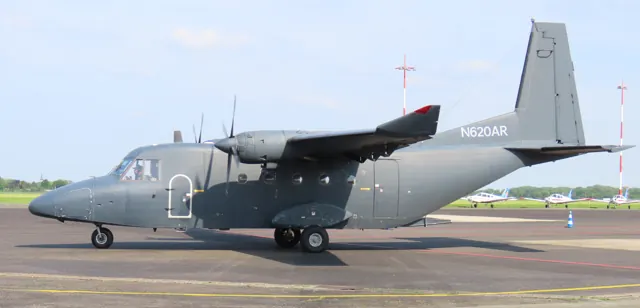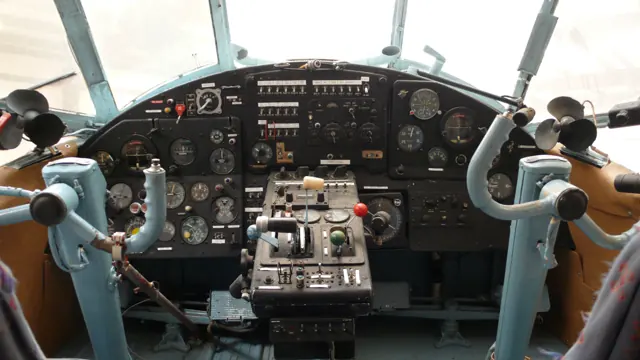
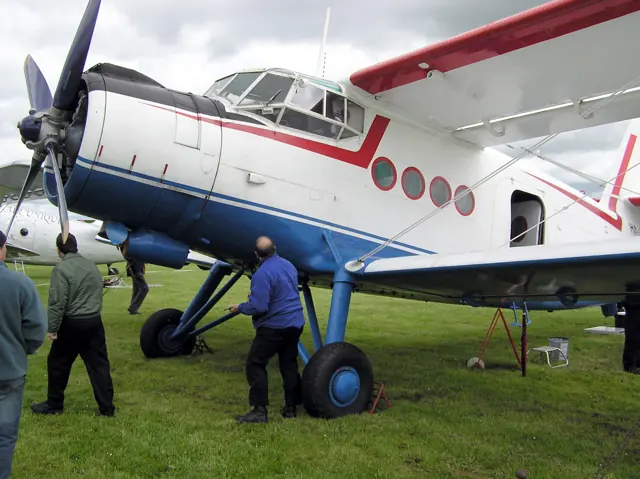
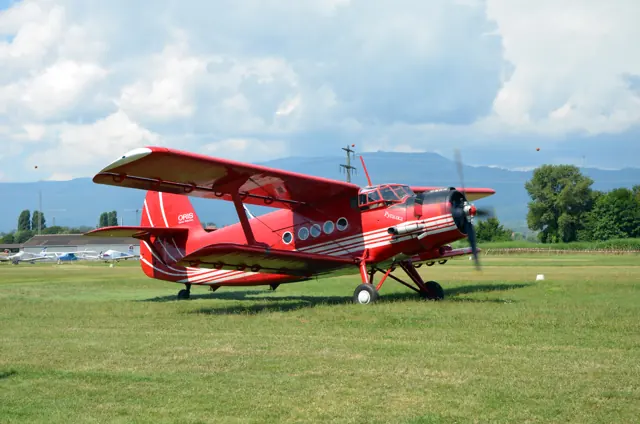


Start here
A few places to begin, from the aircraft’s story to the people who fly it.
Meet the aircraft
The An-2 first appeared in 1947. A radial engine, braced biplane wings and fixed landing gear form its utility-aircraft layout. The aircraft carried people and cargo and also worked in agriculture and other specialist roles. Its large cabin carries passengers or cargo.
Aircraft background
Wikipedia contributors · Read more ↗A giant biplane brings a small group together
Malone’s introduction to the An-2 involved more than its two pilots. A small ground team helped prepare the large biplane, and the sounds and smells of starting its radial engine brought back childhood memories of older machinery. The aircraft’s size and the climb into its cockpit made even getting ready part of the occasion.
Pilot magazine. HA-MKF with owner James Black and pilot Bill Leary at Popham. Malone flew in the air; Leary made the landing. The magazine PDF credits Malone as writer.
Pilot · Read more ↗An operating mechanism and its indication may have separate power
The manual distinguishes the flap-motor circuit breakers from the breaker supplying the flap-position indicator. Fuel-quantity indication likewise depends on its own powered circuit and selector. These documented separations explain why checking only a main control may leave part of the simulated panel unpowered.
An-2 · Microsoft Flight Simulator · MSFS 2024
Microsoft / aircraft developers · Read more ↗Into the cockpit
 YouTube
 Warbirds · 22 min ·
How to fly an Antonov AN2 ~ Scenic flight with an Antonov AN2 in the cockpit
An An-2 sightseeing flight over southern Germany, recorded from the cockpit.
Real aircraft · Antonov An-2
Watch on YouTube ↗Preview images are served by AirframeDB. Videos open on YouTube only when you choose to watch.
Meet Antonov An-2
The An-2 first appeared in 1947. A radial engine, braced biplane wings and fixed landing gear form its utility-aircraft layout. The aircraft carried people and cargo and also worked in agriculture and other specialist roles.
Its large cabin carries passengers or cargo. The generous wing area and high-lift devices are part of its short-field design. Simulator products offer different cockpit equipment and working configurations.
Antonov An-2
Aircraft type designators
Use the code for the model you are flying. The linked authority lists the applicable aircraft.
History & design
A utility aircraft built around practical access
Schiff describes the An-2 as a large working biplane suited to carrying people and loads where more conventional transport was difficult. His flight in a Polish-built example also illustrates the type’s life beyond its Soviet origins. Its practical mission shapes his assessment even when he dislikes aspects of flying it.
AOPA Pilot · Antonov An-2 ↗AOPA’s 2001 account; qualitative mission description
Development milestones
Designer: Oleg Antonov
First flight: 31 August 1947
Wikipedia contributors · Antonov An-2 ↗Antonov An-2 · family/variant named by the source · Wikipedia revision 1372876948
Pilot accounts
A giant biplane brings a small group together
Malone’s introduction to the An-2 involved more than its two pilots. A small ground team helped prepare the large biplane, and the sounds and smells of starting its radial engine brought back childhood memories of older machinery. The aircraft’s size and the climb into its cockpit made even getting ready part of the occasion.
In the air, Malone found a marked difference between the effort needed to roll the aircraft and its lighter pitch response. Learning the trim and coordinating the controls took attention, with Bill Leary helping him settle into the unfamiliar cockpit. Leary handled the return landing, whose height above the ground challenged Malone’s usual visual expectations. The reception from people watching at Popham completed an outing he described with clear enjoyment and affection for the aircraft.
Pilot magazine. HA-MKF with owner James Black and pilot Bill Leary at Popham. Malone flew in the air; Leary made the landing. The magazine PDF credits Malone as writer.
Read the full account · Pilot ↗An impressive workhorse that asks a lot of its pilot
The An-2’s size surprised Schiff before he even reached the cockpit. Its unfamiliar instruments and labels then added to the work of getting acquainted, while owner Robert Haley’s humour about cleaning the aircraft supplied a reminder of life with a large radial engine. The flight included formation photography, giving Schiff sustained time to experience its controls.
He found rolling the aircraft slow and physically demanding, with his legs also feeling the effort by the end. Pitch control was lighter, but the unusual cockpit height caught him out during the landing. His conclusion was more reserved than some other An-2 accounts: he respected its usefulness as a working aircraft while finding the flight less enjoyable than expected.
AOPA Pilot · October 2001. Flight with Robert Haley in N707WA, a 1968 Polish-built An-2, including an hour of formation photography.
Read the full account · AOPA Pilot ↗The character of an owner’s very individual An-2
Caldwell’s account introduces Todd Schultz’s An-2 through an unmistakably individual modification: a collection of train horns beneath the aircraft. The owner’s playful explanation fits the personality of the machine he calls Fat Cat. Its considerable size, cockpit layout and unfamiliar systems provide a more substantial learning task behind that welcoming first impression.
The published handling description emphasises heavy roll control alongside a much lighter response in pitch. Caldwell presents the aircraft as something to understand on its own terms, with utility and slow-speed work central to its appeal. His piece conveys enthusiasm for this particular aircraft and its owner, but does not set out a dated flight or say that he made a landing.
Plane Impressions · June 2025, updated July. Published handling impressions centred on Todd Schultz’s 1977 aircraft; the source gives no flight date, duration or explicit landing account.
Read the full account · Plane Impressions ↗In your simulator
Systems, equipment and documentation for each developer’s aircraft.
Compare simulator versions →MSFS 2024An-2
Microsoft Flight Simulator · Released
An-2
Microsoft Flight Simulator · Released
MSFS 2020An-2
Microsoft Flight Simulator · Released
An-2
Microsoft Flight Simulator · Released
MSFS 2020Antonov An-2
ATSimulations · Released
Antonov An-2
ATSimulations · Released
Aircraft specifications
Published figures for the named real-aircraft variant. Simulator equipment and performance can differ.
| Specification | Published value |
|---|---|
| Length | 12.4 m (40 ft 8 in) |
| Height | 4.1 m (13 ft 5 in) |
| Wing area | 71.52 m² (769.8 sq ft) |
| Empty weight | 3,300 kg (7,275 lb) |
| Gross weight | 5,440 kg (11,993 lb) |
| Powerplant | 1 × Shvetsov ASh-62IR 9-cylinder air-cooled supercharged radial piston engine, 750 kW (1,010 hp) |
| Propellers | 4-bladed constant-speed propeller |
| Maximum speed | 258 km/h (160 mph, 139 kn) |
| Cruise speed | 190 km/h (120 mph, 100 kn) |
| Stall speed | 50 km/h (31 mph, 27 kn) circa |
| Range | 845 km (525 mi, 456 nmi) |
| Service ceiling | 4,500 m (14,800 ft) |
| Rate of climb | 3.5 m/s (690 ft/min) |
Manuals & resources
Find your next read
Choose a topic for a short introduction and a link to the original source. Simulator references identify the developer and edition they cover.
Simulator documentation
An operating mechanism and its indication may have separate powerAn-2 · Microsoft Flight Simulator · MSFS 2024
The manual distinguishes the flap-motor circuit breakers from the breaker supplying the flap-position indicator. Fuel-quantity indication likewise depends on its own powered circuit and selector. These documented separations explain why checking only a main control may leave part of the simulated panel unpowered.
Gathered An-2 user manual · PDF pp.17–19
Microsoft / aircraft developers · Read the source ↗Trim and cockpit heating are described beyond the main controlsAn-2 · Microsoft Flight Simulator · MSFS 2024
All three trim axes have controls and neutral-position indications in the documented installation. Other panels group window heating, while floor ventilation and a thermometer behind the left pilot’s position support cabin management. The manual maps their locations within the unusually large cockpit.
Gathered An-2 user manual · PDF p.20
Microsoft / aircraft developers · Read the source ↗Automatic slats and cockpit preparationAn-2 · Microsoft Flight Simulator · MSFS 2024
The An-2 guide describes the real aircraft's automatic leading-edge slats, then identifies trim circuit breakers and the control lock in its simulator cockpit documentation.
Archived simulator manual; installed package revision not observed · PDF pp.8,12,21
Microsoft / aircraft developers · Read the source ↗The original MSFS 2020 releaseAn-2 · Microsoft Flight Simulator · MSFS 2020
The March 2023 release includes wheeled, float and ski configurations, with a choice of traditional instruments or a GPS-equipped wheeled variant. This is the original MSFS 2020 Marketplace package.
2023-03-21 · release and package scope
Microsoft Flight Simulator Team · Read the source ↗Pilot account
A giant biplane brings a small group togetherPilot magazine. HA-MKF with owner James Black and pilot Bill Leary at Popham. Malone flew in the air; Leary made the landing. The magazine PDF credits Malone as writer.
Malone’s introduction to the An-2 involved more than its two pilots. A small ground team helped prepare the large biplane, and the sounds and smells of starting its radial engine brought back childhood memories of older machinery. The aircraft’s size and the climb into its cockpit made even getting ready part of the occasion. In the air, Malone found a marked difference between the effort needed to roll the aircraft and its lighter pitch response.
Pat Malone
Pilot · Read the source ↗An impressive workhorse that asks a lot of its pilotAOPA Pilot · October 2001. Flight with Robert Haley in N707WA, a 1968 Polish-built An-2, including an hour of formation photography.
The An-2’s size surprised Schiff before he even reached the cockpit. Its unfamiliar instruments and labels then added to the work of getting acquainted, while owner Robert Haley’s humour about cleaning the aircraft supplied a reminder of life with a large radial engine. The flight included formation photography, giving Schiff sustained time to experience its controls. He found rolling the aircraft slow and physically demanding, with his legs also feeling the effort by the end.
Barry Schiff
AOPA Pilot · Read the source ↗Developer documentation
Antonov An-2 — product manualAntonov An-2 · MSFS 2020
Official An-2 MSFS 2020 product manual captured 2026-09-30
Microsoft Flight Simulator · Read the source ↗Read the original documentation from the people who created it. Manuals open on their publisher’s website.
Manual
Antonov An-2 ManualMicrosoft / aircraft developers Microsoft Flight Simulator aircraft manualsMicrosoft / aircraft developersAircraft background
Antonov An-2Wikipedia contributors · Research background · Wikipedia revision 1372876948 · retrieved 2026-09-12Resource
MSFS 2024 FAQ and edition aircraft inventoryMicrosoftDeveloper documentation
Microsoft Flight Simulator Releases the Highly Versatile Antonov An-2 AircraftMicrosoft Flight Simulator Team · 2023-03-21 · release and package scopeType designator
ICAO Doc 8643 — aircraft type designatorsInternational Civil Aviation Organization · Public search data retrieved 2026-09-14; authority update 2026-09-03Built-in force-feedback profiles
Read the documentary basis, editable starting settings and remaining questions for the aircraft you fly. Each explanation refers to the exact profile revision shown.
Catalogue programme-20261022-v1 · 4 profile choices
ATSimulations Antonov An-2 Floats
ATSimulations · Free and Pro · Revision 3 · Inherited starting point
MSFS 2020
ATSimulations Antonov An-2 Floats: The selected biplane profile uses reversible-control resistance; flap position and surface kit are separate contributions to aircraft behavior.
ATSimulations Antonov An-2 Skis
ATSimulations · Free and Pro · Revision 3 · Inherited starting point
MSFS 2020
ATSimulations Antonov An-2 Skis: The selected biplane profile uses reversible-control resistance; flap position and surface kit are separate contributions to aircraft behavior.
ATSimulations Antonov An-2 Wheels
ATSimulations · Free and Pro · Revision 3 · Inherited starting point
MSFS 2020
ATSimulations Antonov An-2 Wheels: The selected biplane profile uses reversible-control resistance; flap position and surface kit are separate contributions to aircraft behavior.
Antonov An-2
Free and Pro · Revision 2 · Partial review
MSFS 2024 · MSFS 2020
Antonov An-2: The selected biplane profile uses reversible-control resistance; flap position and surface kit are separate contributions to aircraft behavior.
ATSimulations Antonov An-2 Skis
ATSimulations Antonov An-2 Skis: The selected biplane profile uses reversible-control resistance; flap position and surface kit are separate contributions to aircraft behavior.
Aircraft and simulator scope
- ATSimulations Antonov An-2 Skis · ATSimulations · MSFS 2020 · Add-on starting point
The simulator model and controls
The An-2 first appeared in 1947. Its radial engine, braced biplane wings and fixed landing gear belong to an older visual vocabulary, but they served a durable utility design. The aircraft carried people and cargo and also worked in agriculture and other specialist roles.
This profile selects ATSimulations Antonov An-2 Skis for MSFS 2020.
How this profile feels
Spring resistance builds with the selected airspeed response. A separate aerodynamic term adds speed-dependent control load.
Valid trim provides the configured pressure relief. Autopilot following is off.
Controls and trim
ATSimulations' manual includes wheels, skis and floats, and electrically powered trim tabs on pitch, roll and yaw. Battery and circuit-breaker state therefore matter to the aircraft trim system. The flaps move continuously through 0–45 degrees. Each surface kit retains its equipment scope; a wheeled starting point does not describe float or ski ground contact.
The selected implementation
ATSimulations includes wheeled, ski and float An-2 aircraft. The selected surface kit retains its contact and equipment scope; pneumatic-system simplifications remain add-on behavior.
About the values
The gains are normalized profile settings. They describe the chosen effect balance; hand force depends on the device and its output limits. IAS references are tuning values rather than operating limits. Physical acceptance of this revision remains pending.
Documentary review and sources
These decisions describe the documentary basis and remaining gaps for this revision. Aircraft documentation and a starting setting describe different kinds of evidence.
Aircraft and variant
InheritedThis profile selects ATSimulations Antonov An-2 Skis for MSFS 2020.
Flight controls
InheritedATSimulations' manual includes wheels, skis and floats, and electrically powered trim tabs on pitch, roll and yaw. Battery and circuit-breaker state therefore matter to the aircraft trim system. The flaps move continuously through 0–45 degrees. Each surface kit retains its equipment scope; a wheeled starting point does not describe float or ski ground contact.
Trim
InheritedPowered elevator trim tabs support pitch relief, while aileron trim is a documented separate channel even where this profile omits roll relief. Pitch authority 0.3 provides load relief and permitted centre movement; roll authority is 0.16.
Autopilot and stability
InheritedAutopilot following is off; the configured spring and load retain the hardware feel.
Equipment
InheritedATSimulations includes wheeled, ski and float An-2 aircraft. The selected surface kit retains its contact and equipment scope; pneumatic-system simplifications remain add-on behavior.
Speeds and limits
InheritedThe indicated-speed references set the profile response scale; they are separate from aircraft operating limits.
Simulator integration
InheritedThe profile targets msfs2020. Add-on-specific controls use only the supported references configured by this profile.
Force-feedback settings
InheritedThe settings define the profile’s effect balance. Device output limits affect physical hand force.
Starting settings and their rationale
These configured values are starting estimates. The explanations describe what each setting controls; physical validation appears separately below.
| Setting | Starting value | What it controls and why |
|---|---|---|
| Spring strength | Starting value0.74 | What it controls and whyThe selected biplane profile uses reversible-control resistance; flap position and surface kit are separate contributions to aircraft behavior. The baseline spring is 0.74. Its low-speed blend reaches baseline strength at 50 KIAS. |
| Master force gain | Starting value0.85 | What it controls and whyScales overall profile strength while preserving effect balance, subject to device and output limits. |
| Profile force gain | Starting value0.8 | What it controls and whyThe aerodynamic-load gain is 0.8 with an indicated-speed reference of 100 KIAS. This supplies speed-dependent loading alongside the spring. |
| Force tuning speed/reference | Starting value100 kt | What it controls and whySets the IAS reference for aerodynamic loading. It is an estimate, not published cruise TAS or a flight limit. |
| Spring response reference speed | Starting value50 kt | What it controls and whySets the IAS where the low-speed blend reaches baseline strength; high-speed stiffening also uses it. |
| Aileron force scale | Starting value0.72 | What it controls and whyRoll and pitch aerodynamic scales are 0.72 and 1, respectively. They set the aerodynamic axis balance. No custom spring-travel curve is enabled. |
| Elevator force scale | Starting value1.0 | What it controls and whyScales pitch aerodynamic loading; pitch spring travel and trim responses are separate settings. |
| Trim feel | Starting valueDisabled | What it controls and whyRetained for compatibility and group membership. Trim relief, rather than this flag, controls centre movement. |
| Trim relief | Starting valueEnabled | What it controls and whyAllows trim relief with supported control law and valid telemetry. Axis authorities set its amount. |
| Autopilot follow | Starting valueDisabled | What it controls and whyAutopilot following is off; the configured spring and load retain the hardware feel. |
| Autopilot neutral hold | Starting valueDisabled | What it controls and whyPermits centering hold during a supported AP state, separate from following a moving target. |
| Output force limit | Starting value0.55 | What it controls and whyCaps directed-force output. Native spring effects and device limits remain separate. |
All 44 starting settings and their rationale
The settings define the profile’s effect balance. Device output limits affect physical hand force.
| Setting | Starting value | What it controls and why |
|---|---|---|
| Spring strength | Starting value0.74 | What it controls and whyThe selected biplane profile uses reversible-control resistance; flap position and surface kit are separate contributions to aircraft behavior. The baseline spring is 0.74. Its low-speed blend reaches baseline strength at 50 KIAS. |
| Spring deadband | Starting value0.04 | What it controls and whySets travel around the centre before the baseline spring resists. Smaller values engage it sooner. |
| Profile force gain | Starting value0.8 | What it controls and whyThe aerodynamic-load gain is 0.8 with an indicated-speed reference of 100 KIAS. This supplies speed-dependent loading alongside the spring. |
| Master force gain | Starting value0.85 | What it controls and whyScales overall profile strength while preserving effect balance, subject to device and output limits. |
| QBlend Enabled | Starting valueEnabled | What it controls and whyAllows baseline spring strength to rise with indicated airspeed where the control law permits it. |
| QSpring Minimum Factor | Starting value0.55 | What it controls and whySets low-speed spring strength as a fraction of baseline when blending is enabled. One keeps full strength. |
| QSpring Start Knots | Starting value8 kt | What it controls and whySets the IAS where the low-speed spring blend starts rising. This is a feel threshold, not a flight limit. |
| Spring response reference speed | Starting value50 kt | What it controls and whySets the IAS where the low-speed blend reaches baseline strength; high-speed stiffening also uses it. |
| Force tuning speed/reference | Starting value100 kt | What it controls and whySets the IAS reference for aerodynamic loading. It is an estimate, not published cruise TAS or a flight limit. |
| Airspeed spring stiffening gain | Starting value0.15 | What it controls and whyThe high-speed spring-stiffening gain is 0.15. It strengthens the permitted spring response above 50 KIAS, with the squared-speed ratio capped at 5. |
| Airspeed spring stiffening limit | Starting value5 | What it controls and whyLimits the squared airspeed ratio used for high-speed spring stiffening; it is not a device-force cap. |
| Aileron force scale | Starting value0.72 | What it controls and whyRoll and pitch aerodynamic scales are 0.72 and 1, respectively. They set the aerodynamic axis balance. No custom spring-travel curve is enabled. |
| Elevator force scale | Starting value1.0 | What it controls and whyScales pitch aerodynamic loading; pitch spring travel and trim responses are separate settings. |
| Output force limit | Starting value0.55 | What it controls and whyCaps directed-force output. Native spring effects and device limits remain separate. |
| Trim feel | Starting valueDisabled | What it controls and whyRetained for compatibility and group membership. Trim relief, rather than this flag, controls centre movement. |
| Trim relief | Starting valueEnabled | What it controls and whyAllows trim relief with supported control law and valid telemetry. Axis authorities set its amount. |
| Elevator Authority | Starting value0.3 | What it controls and whyPowered elevator trim tabs support pitch relief, while aileron trim is a documented separate channel even where this profile omits roll relief. Pitch authority 0.3 provides load relief and permitted centre movement; roll authority is 0.16. |
| Aileron Authority | Starting value0.16 | What it controls and whyScales supported roll-trim relief and permitted centre movement. Zero removes roll response. |
| Force Trim Enabled | Starting valueDisabled | What it controls and whyEnables local force trim, separate from aircraft-owned trim and add-on integration qualification. |
| GLoad Enabled | Starting valueEnabled | What it controls and whyAllows load-factor changes to modify permitted spring laws. Passive fly-by-wire feel can suppress it. |
| Rate Damping Enabled | Starting valueEnabled | What it controls and whyEnables rate damping with the configured coefficients and control law. |
| Autopilot follow | Starting valueDisabled | What it controls and whyAutopilot following is off; the configured spring and load retain the hardware feel. |
| Autopilot follow authority | Starting value0.1 | What it controls and whySets admitted AP-follow gain, not a percentage of travel. Runtime ownership and input limits still apply. |
| Autopilot neutral hold | Starting valueDisabled | What it controls and whyPermits centering hold during a supported AP state, separate from following a moving target. |
| Autopilot neutral hold strength | Starting value0.6 | What it controls and whySets admitted AP neutral-hold strength; inactive while neutral hold is disabled. |
| Enabled | Starting valueEnabled | What it controls and whyEnables aerodynamic cues; each still needs nonzero strength and its simulator conditions. |
| Gain | Starting value0.35 | What it controls and whySets stall-buffet strength. Zero removes the cue without changing simulator stalls or warnings. |
| Gain | Starting value0 | What it controls and whySets high-Mach buffet strength; onset and full-strength thresholds are separate. |
| Gain | Starting value0 | What it controls and whySets flap buffet at the configured position and speed gates. Flap movement texture is separate. |
| Maximum flap index | Starting value3 | What it controls and whySets the final flap index for detent normalization. UP plus three detents uses maximum index3. |
| Minimum flap index | Starting value2 | What it controls and whySets the first flap detent that admits buffet; this is a handle index, not degrees. |
| Gain | Starting value0 | What it controls and whySets gear aerodynamic buffet; movement and ground-contact cues are separate. |
| Shaker Enabled | Starting valueDisabled | What it controls and whyPermits shaker at supported warning conditions; the switch does not establish aircraft equipment. |
| Stick shaker amplitude | Starting value0.5 | What it controls and whySets triggered shaker strength; inactive while the shaker feature is disabled. |
| Enabled | Starting valueEnabled | What it controls and whyEnables ground effects; each still needs its own strength and contact or motion telemetry. |
| Gain | Starting value0.13 | What it controls and whySets rolling texture strength, modified by speed, surface and undercarriage configuration. |
| Gain | Starting value0.1 | What it controls and whySets gear-bump texture during ground motion, separate from touchdown impact. |
| Gain | Starting value0.23 | What it controls and whySets landing-impact strength; landing telemetry and response shape determine the pulse. |
| Gain | Starting value0 | What it controls and whySets reverse-thrust vibration with valid reverser and engine conditions. Zero removes the cue. |
| Enabled | Starting valueEnabled | What it controls and whyEnables engine cues with nonzero settings and valid running-engine telemetry. |
| Gain | Starting value0.12 | What it controls and whySets estimated engine vibration using configured telemetry and response, not measured cockpit vibration. |
| Enabled | Starting valueEnabled | What it controls and whyEnables accessory cues with configured strengths and observed accessory movement. |
| Gain | Starting value0.12 | What it controls and whySets texture from observed flap movement; a command without movement does not establish the cue. |
| Gain | Starting value0 | What it controls and whySets texture from observed gear movement, separate from aerodynamic and touchdown effects. |
Limits and open questions
- Documented procedure values distinguish km/h and knots. Marketing stall descriptions do not remove normal simulator stall telemetry or invent a control kick.
- Force magnitudes and tuning references are estimates; installed-aircraft and physical acceptance deferred.
- No custom failure, AP servo, dynamic fit detection or control-lock integration is qualified. Select the exact equipment choice manually if aircraft telemetry omits it.
Physical validation
No physical force validation is recorded in this public catalogue for this revision. Documentary review and software checks do not establish how a particular device feels.
Discuss this aircraft (0)
Questions, observations and useful sources from the community.
No published discussions yet. Bring a question or share a useful source.
Open aircraft discussions →Content expanded · What’s new
Something missing or a source that needs attention?
Suggest a correction ↗