
Start here
A few places to begin, from the aircraft’s story to the people who fly it.
Meet the aircraft
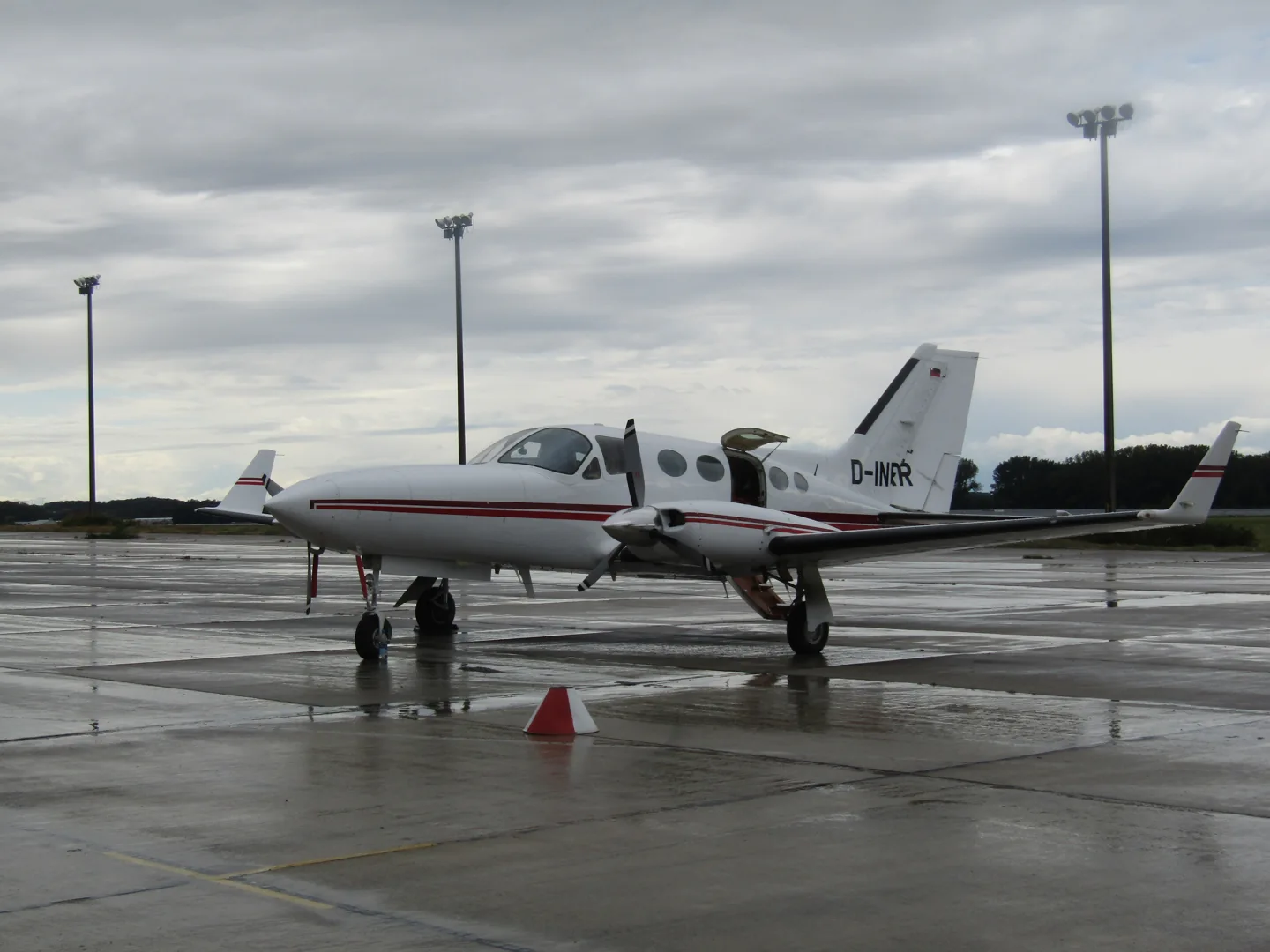
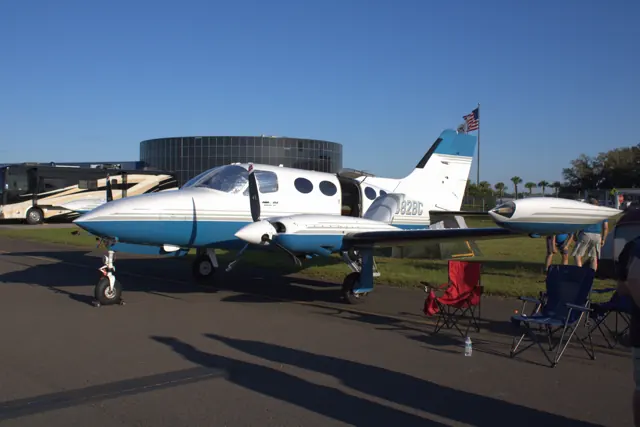
The Cessna 414 combined a spacious pressurised fuselage with two turbocharged, direct-drive piston engines. It offered a step up from smaller unpressurised twins while avoiding the geared engines of the larger 421. The later 414A Chancellor introduced a longer wing with integral fuel tanks and an extended nose. Surviving aircraft often carry engine, propeller and aerodynamic modifications.
Aircraft background
Wikipedia contributors · Read more ↗A spacious cabin with a payload trade-off
Bedell describes a stable, heavy-feeling aeroplane whose large cabin is immediately attractive to passengers. He also makes the central compromise clear: cabin volume is not the same as full-fuel payload. Loading people and baggage can require shorter legs, and the modifications fitted to a particular 414 substantially affect the comparison.
Real 414/414A review; tested aircraft had RAM winglets and vortex generators. AOPA Pilot, October 1996.
AOPA · Read more ↗A particular Chancellor conversion
The add-on represents a C414AW with RAM IV conversion and winglets. Flysimware describes access to its technical pilot’s aircraft for measurements, photographs and sound recording. It offers different GPS panels, an interactive checklist/copilot, ground equipment and a walkaround. The product page explicitly says that radar and the NAV 2 unit’s RNAV function are not simulated.
C414AW Chancellor — RAM IV · Flysimware · MSFS 2020 · MSFS 2024
Flysimware · Read more ↗Into the cockpit
 YouTube
 AeroLife · 46 min ·
Cessna 414A full review | Your low cost personal mini airliner | How Chancellor flies on one engine
A detailed Cessna 414A presentation, including a discussion of single-engine handling.
Real aircraft · Cessna 414 Chancellor
Watch on YouTube ↗Preview images are served by AirframeDB. Videos open on YouTube only when you choose to watch.
Meet Cessna 414 Chancellor
The Cessna 414 combined a spacious pressurised fuselage with two turbocharged, direct-drive piston engines. It offered a step up from smaller unpressurised twins while avoiding the geared engines of the larger 421.
The later 414A Chancellor introduced a longer wing with integral fuel tanks and an extended nose. Surviving aircraft often carry engine, propeller and aerodynamic modifications. Flysimware models a 414AW with a RAM IV conversion and winglets, so a stock 414A specification is useful family context rather than an exact description of that add-on.
Cessna 414 Chancellor
Cessna → · Explore the family →
Cessna 414 Chancellor
Wikipedia contributors · Cessna 414 Chancellor background ↗Flysimware · MSFS 2020 · MSFS 2024 →Aircraft type designators
Use the code for the model you are flying. The linked authority lists the applicable aircraft.
History & design
The wet-wing Chancellor
The prototype 414 flew in 1968. The 414A arrived in 1978 with a redesigned wing and more nose baggage space. The family’s long service life has supported numerous conversions, making the particular airframe and modification package important when comparing performance.
Wikipedia contributors · Cessna 414 Chancellor background ↗Real-aircraft family history
Pilot accounts
A spacious cabin with a payload trade-off
Bedell describes a stable, heavy-feeling aeroplane whose large cabin is immediately attractive to passengers. He also makes the central compromise clear: cabin volume is not the same as full-fuel payload. Loading people and baggage can require shorter legs, and the modifications fitted to a particular 414 substantially affect the comparison.
His flight in an aircraft with RAM winglets and vortex generators illustrates the advantage of cruising high, where turbocharging becomes useful. The measured cruise was below the headline book figure, and he did not observe a clear speed improvement from the winglets alone.
Real 414/414A review; tested aircraft had RAM winglets and vortex generators. AOPA Pilot, October 1996.
Read the full account · AOPA ↗Choosing a twin around the journeys it must make
McLeod explains that his 1977 Cessna 414 was selected for business and personal journeys across North America, including routes over remote terrain and water. He wanted the flexibility of a pressurised twin within the budget of an older piston aircraft. Comfort for passengers and the ability to travel independently were as important to him as the aircraft’s performance.
He also describes updating the cockpit. Modern displays, navigators and weather information made complex single-pilot instrument flying feel more organised and manageable to him. He also recalls carrying his daughter on her first flight and returning from a hunting trip with friends and equipment. This is a Garmin-sponsored owner interview, and the avionics praise belongs to that context.
Owner’s 1977 414, with a modern Garmin panel. Garmin-sponsored interview, 23 July 2019.
Read the full account · Garmin ↗A ferry pilot’s view of the Chancellor
Cox draws on delivering Chancellors within the United States and overseas. He recalls an accessible, logically arranged cockpit and a cabin that makes long journeys comfortable for everyone aboard. His practical cruise expectations are more restrained than the highest published figures, and he discusses fuel endurance together with the need for food and rest stops.
The aircraft’s appeal in his account is its balance of stability, cabin comfort and comparatively straightforward direct-drive engines. He describes an Atlantic crossing with favourable winds and other trips carrying passengers, giving the aeroplane a working history beyond specification tables. His examples concern particular ferry and transport flights; special ferry loading and historical operating figures are not general instructions for other 414s.
Real Chancellor delivery and transport experience. Bill Cox, 13 July 2015; ferry anecdotes are context, not operating guidance.
Read the full account · Cessna Owner Organization ↗In your simulator
Systems, equipment and documentation for each developer’s aircraft.
MSFS 2020 · MSFS 2024C414AW Chancellor — RAM IV
Flysimware · Released
C414AW Chancellor — RAM IV
Flysimware · Released
Aircraft specifications
Published figures for the named real-aircraft variant. Simulator equipment and performance can differ.
| Specification | Published value |
|---|---|
| Wingspan | 44 ft 1½ in Stock 414A Chancellor; not the RAM IV conversion |
| Length | 36 ft 4½ in Stock 414A Chancellor; not the RAM IV conversion |
| Engines | 2 × Continental TSIO-520-NB Stock 414A Chancellor; not the RAM IV conversion |
| Rated power | 310 hp per engine Stock 414A Chancellor; not the RAM IV conversion |
Manuals & resources
Find your next read
Choose a topic for a short introduction and a link to the original source. Simulator references identify the developer and edition they cover.
Simulator documentation
A particular Chancellor conversionC414AW Chancellor — RAM IV · Flysimware · MSFS 2020 · MSFS 2024
The add-on represents a C414AW with RAM IV conversion and winglets. Flysimware describes access to its technical pilot’s aircraft for measurements, photographs and sound recording. It offers different GPS panels, an interactive checklist/copilot, ground equipment and a walkaround. The product page explicitly says that radar and the NAV 2 unit’s RNAV function are not simulated.
Official product description; features are developer claims
Flysimware · Read the source ↗Pilot account
A spacious cabin with a payload trade-offReal 414/414A review; tested aircraft had RAM winglets and vortex generators. AOPA Pilot, October 1996.
Bedell describes a stable, heavy-feeling aeroplane whose large cabin is immediately attractive to passengers. He also makes the central compromise clear: cabin volume is not the same as full-fuel payload. Loading people and baggage can require shorter legs, and the modifications fitted to a particular 414 substantially affect the comparison. His flight in an aircraft with RAM winglets and vortex generators illustrates the advantage of cruising high, where turbocharging becomes useful.
Peter A. Bedell
AOPA · Read the source ↗Choosing a twin around the journeys it must makeOwner’s 1977 414, with a modern Garmin panel. Garmin-sponsored interview, 23 July 2019.
McLeod explains that his 1977 Cessna 414 was selected for business and personal journeys across North America, including routes over remote terrain and water. He wanted the flexibility of a pressurised twin within the budget of an older piston aircraft. Comfort for passengers and the ability to travel independently were as important to him as the aircraft’s performance. He also describes updating the cockpit.
Pete McLeod, interviewed by Garmin
Garmin · Read the source ↗Read the original documentation from the people who created it. Manuals open on their publisher’s website.
Manual
C414AW Chancellor manual v2.1Flysimware · Downloaded manual cover v2.1; PDF pp. 1–2Aircraft background
Cessna 414 Chancellor backgroundWikipedia contributors · Family background; article retrieved 13 September 2026Product page
C414AW Chancellor — RAM IVFlysimware · Official product page; checked 13 September 2026Type designator
ICAO Doc 8643 — aircraft type designatorsInternational Civil Aviation Organization · Public search data retrieved 2026-09-14; authority update 2026-09-03Built-in force-feedback profiles
Read the documentary basis, editable starting settings and remaining questions for the aircraft you fly. Each explanation refers to the exact profile revision shown.
Catalogue programme-20261022-v1 · 2 profile choices
Flysimware C414AW Chancellor
Flysimware · Free and Pro · Revision 5 · Inherited starting point
MSFS 2020 · MSFS 2024
Flysimware C414AW Chancellor: The selected manual yoke response belongs to the named C414AW starting point, separate from RAM engine and propeller modifications.
Cessna 414 Chancellor
Free and Pro · Revision 2 · Partial review
MSFS 2024 · MSFS 2020
Cessna 414 Chancellor: The selected manual yoke response belongs to the named C414AW starting point, separate from RAM engine and propeller modifications.
Flysimware C414AW Chancellor
Flysimware C414AW Chancellor: The selected manual yoke response belongs to the named C414AW starting point, separate from RAM engine and propeller modifications.
Aircraft and simulator scope
- Flysimware C414AW Chancellor · Flysimware · MSFS 2020 · Add-on starting point
- Flysimware C414AW Chancellor · Flysimware · MSFS 2024 · Add-on starting point
The simulator model and controls
The Cessna 414 combined a spacious pressurised fuselage with two turbocharged, direct-drive piston engines. It offered a step up from smaller unpressurised twins while avoiding the geared engines of the larger 421.
This profile selects Flysimware C414AW Chancellor for MSFS 2020, MSFS 2024.
How this profile feels
Spring resistance builds with the selected airspeed response. A separate aerodynamic term adds speed-dependent control load.
Valid trim provides the configured pressure relief. Autopilot following is off.
Controls and trim
Flysimware's C414AW represents a pressurized twin with the RAM IV conversion and winglets. Its manual separates elevator, aileron and rudder trim. Navomatic, GFC600 and navigator options retain different guidance scope, including yoke pitch synchronization. The Navomatic pitch wheel is an input to guidance, not a physical spring-neutral position; a stock 414A remains family background.
The selected implementation
Flysimware's RAM IV/winglet C414AW offers panel-dependent Navomatic/GFC600 guidance; the selected profile does not qualify every navigator/autopilot combination.
About the values
The gains are normalized profile settings. They describe the chosen effect balance; hand force depends on the device and its output limits. IAS references are tuning values rather than operating limits. Physical acceptance of this revision remains pending.
Documentary review and sources
These decisions describe the documentary basis and remaining gaps for this revision. Aircraft documentation and a starting setting describe different kinds of evidence.
Aircraft and variant
InheritedThis profile selects Flysimware C414AW Chancellor for MSFS 2020, MSFS 2024.
Flight controls
InheritedFlysimware's C414AW represents a pressurized twin with the RAM IV conversion and winglets. Its manual separates elevator, aileron and rudder trim. Navomatic, GFC600 and navigator options retain different guidance scope, including yoke pitch synchronization. The Navomatic pitch wheel is an input to guidance, not a physical spring-neutral position; a stock 414A remains family background.
Trim
InheritedSeparate elevator and aileron trim support axis-specific relief. Rudder trim and autopilot pitch synchronization have different purposes. Pitch authority 0.3 provides load relief and permitted centre movement; roll authority is 0.12.
Autopilot and stability
InheritedAutopilot following is off; the configured spring and load retain the hardware feel.
Equipment
InheritedFlysimware's RAM IV/winglet C414AW offers panel-dependent Navomatic/GFC600 guidance; the selected profile does not qualify every navigator/autopilot combination.
Speeds and limits
InheritedThe indicated-speed references set the profile response scale; they are separate from aircraft operating limits.
Simulator integration
InheritedThe profile targets msfs2020, msfs2024. Add-on-specific controls use only the supported references configured by this profile.
Force-feedback settings
InheritedThe settings define the profile’s effect balance. Device output limits affect physical hand force.
Starting settings and their rationale
These configured values are starting estimates. The explanations describe what each setting controls; physical validation appears separately below.
| Setting | Starting value | What it controls and why |
|---|---|---|
| Spring strength | Starting value0.74 | What it controls and whyThe selected manual yoke response belongs to the named C414AW starting point, separate from RAM engine and propeller modifications. The baseline spring is 0.74. Its low-speed blend reaches baseline strength at 65 KIAS. |
| Master force gain | Starting value0.85 | What it controls and whyScales overall profile strength while preserving effect balance, subject to device and output limits. |
| Profile force gain | Starting value0.8 | What it controls and whyThe aerodynamic-load gain is 0.8 with an indicated-speed reference of 170 KIAS. This supplies speed-dependent loading alongside the spring. |
| Force tuning speed/reference | Starting value170 kt | What it controls and whySets the IAS reference for aerodynamic loading. It is an estimate, not published cruise TAS or a flight limit. |
| Spring response reference speed | Starting value65 kt | What it controls and whySets the IAS where the low-speed blend reaches baseline strength; high-speed stiffening also uses it. |
| Aileron force scale | Starting value0.72 | What it controls and whyRoll and pitch aerodynamic scales are 0.72 and 1, respectively. They set the aerodynamic axis balance. No custom spring-travel curve is enabled. |
| Elevator force scale | Starting value1 | What it controls and whyScales pitch aerodynamic loading; pitch spring travel and trim responses are separate settings. |
| Trim feel | Starting valueDisabled | What it controls and whyRetained for compatibility and group membership. Trim relief, rather than this flag, controls centre movement. |
| Trim relief | Starting valueEnabled | What it controls and whyAllows trim relief with supported control law and valid telemetry. Axis authorities set its amount. |
| Autopilot follow | Starting valueDisabled | What it controls and whyAutopilot following is off; the configured spring and load retain the hardware feel. |
| Autopilot neutral hold | Starting valueDisabled | What it controls and whyPermits centering hold during a supported AP state, separate from following a moving target. |
| Output force limit | Starting value0.55 | What it controls and whyCaps directed-force output. Native spring effects and device limits remain separate. |
All 44 starting settings and their rationale
The settings define the profile’s effect balance. Device output limits affect physical hand force.
| Setting | Starting value | What it controls and why |
|---|---|---|
| Spring strength | Starting value0.74 | What it controls and whyThe selected manual yoke response belongs to the named C414AW starting point, separate from RAM engine and propeller modifications. The baseline spring is 0.74. Its low-speed blend reaches baseline strength at 65 KIAS. |
| Spring deadband | Starting value0.045 | What it controls and whySets travel around the centre before the baseline spring resists. Smaller values engage it sooner. |
| Profile force gain | Starting value0.8 | What it controls and whyThe aerodynamic-load gain is 0.8 with an indicated-speed reference of 170 KIAS. This supplies speed-dependent loading alongside the spring. |
| Master force gain | Starting value0.85 | What it controls and whyScales overall profile strength while preserving effect balance, subject to device and output limits. |
| QBlend Enabled | Starting valueEnabled | What it controls and whyAllows baseline spring strength to rise with indicated airspeed where the control law permits it. |
| QSpring Minimum Factor | Starting value0.5 | What it controls and whySets low-speed spring strength as a fraction of baseline when blending is enabled. One keeps full strength. |
| QSpring Start Knots | Starting value8 kt | What it controls and whySets the IAS where the low-speed spring blend starts rising. This is a feel threshold, not a flight limit. |
| Spring response reference speed | Starting value65 kt | What it controls and whySets the IAS where the low-speed blend reaches baseline strength; high-speed stiffening also uses it. |
| Force tuning speed/reference | Starting value170 kt | What it controls and whySets the IAS reference for aerodynamic loading. It is an estimate, not published cruise TAS or a flight limit. |
| Airspeed spring stiffening gain | Starting value0.15 | What it controls and whyThe high-speed spring-stiffening gain is 0.15. It strengthens the permitted spring response above 65 KIAS, with the squared-speed ratio capped at 5. |
| Airspeed spring stiffening limit | Starting value5 | What it controls and whyLimits the squared airspeed ratio used for high-speed spring stiffening; it is not a device-force cap. |
| Aileron force scale | Starting value0.72 | What it controls and whyRoll and pitch aerodynamic scales are 0.72 and 1, respectively. They set the aerodynamic axis balance. No custom spring-travel curve is enabled. |
| Elevator force scale | Starting value1 | What it controls and whyScales pitch aerodynamic loading; pitch spring travel and trim responses are separate settings. |
| Output force limit | Starting value0.55 | What it controls and whyCaps directed-force output. Native spring effects and device limits remain separate. |
| Trim feel | Starting valueDisabled | What it controls and whyRetained for compatibility and group membership. Trim relief, rather than this flag, controls centre movement. |
| Trim relief | Starting valueEnabled | What it controls and whyAllows trim relief with supported control law and valid telemetry. Axis authorities set its amount. |
| Elevator Authority | Starting value0.3 | What it controls and whySeparate elevator and aileron trim support axis-specific relief. Rudder trim and autopilot pitch synchronization have different purposes. Pitch authority 0.3 provides load relief and permitted centre movement; roll authority is 0.12. |
| Aileron Authority | Starting value0.12 | What it controls and whyScales supported roll-trim relief and permitted centre movement. Zero removes roll response. |
| Force Trim Enabled | Starting valueDisabled | What it controls and whyEnables local force trim, separate from aircraft-owned trim and add-on integration qualification. |
| GLoad Enabled | Starting valueEnabled | What it controls and whyAllows load-factor changes to modify permitted spring laws. Passive fly-by-wire feel can suppress it. |
| Rate Damping Enabled | Starting valueEnabled | What it controls and whyEnables rate damping with the configured coefficients and control law. |
| Autopilot follow | Starting valueDisabled | What it controls and whyAutopilot following is off; the configured spring and load retain the hardware feel. |
| Autopilot follow authority | Starting value0.1 | What it controls and whySets admitted AP-follow gain, not a percentage of travel. Runtime ownership and input limits still apply. |
| Autopilot neutral hold | Starting valueDisabled | What it controls and whyPermits centering hold during a supported AP state, separate from following a moving target. |
| Autopilot neutral hold strength | Starting value0.6 | What it controls and whySets admitted AP neutral-hold strength; inactive while neutral hold is disabled. |
| Enabled | Starting valueEnabled | What it controls and whyEnables aerodynamic cues; each still needs nonzero strength and its simulator conditions. |
| Gain | Starting value0.35 | What it controls and whySets stall-buffet strength. Zero removes the cue without changing simulator stalls or warnings. |
| Gain | Starting value0 | What it controls and whySets high-Mach buffet strength; onset and full-strength thresholds are separate. |
| Gain | Starting value0 | What it controls and whySets flap buffet at the configured position and speed gates. Flap movement texture is separate. |
| Maximum flap index | Starting value2 | What it controls and whySets the final flap index for detent normalization. UP plus three detents uses maximum index3. |
| Minimum flap index | Starting value2 | What it controls and whySets the first flap detent that admits buffet; this is a handle index, not degrees. |
| Gain | Starting value0 | What it controls and whySets gear aerodynamic buffet; movement and ground-contact cues are separate. |
| Shaker Enabled | Starting valueDisabled | What it controls and whyPermits shaker at supported warning conditions; the switch does not establish aircraft equipment. |
| Stick shaker amplitude | Starting value0.5 | What it controls and whySets triggered shaker strength; inactive while the shaker feature is disabled. |
| Enabled | Starting valueEnabled | What it controls and whyEnables ground effects; each still needs its own strength and contact or motion telemetry. |
| Gain | Starting value0.4 | What it controls and whySets rolling texture strength, modified by speed, surface and undercarriage configuration. |
| Gain | Starting value0.25 | What it controls and whySets gear-bump texture during ground motion, separate from touchdown impact. |
| Gain | Starting value0.65 | What it controls and whySets landing-impact strength; landing telemetry and response shape determine the pulse. |
| Gain | Starting value0 | What it controls and whySets reverse-thrust vibration with valid reverser and engine conditions. Zero removes the cue. |
| Enabled | Starting valueEnabled | What it controls and whyEnables engine cues with nonzero settings and valid running-engine telemetry. |
| Gain | Starting value0.12 | What it controls and whySets estimated engine vibration using configured telemetry and response, not measured cockpit vibration. |
| Enabled | Starting valueEnabled | What it controls and whyEnables accessory cues with configured strengths and observed accessory movement. |
| Gain | Starting value0.12 | What it controls and whySets texture from observed flap movement; a command without movement does not establish the cue. |
| Gain | Starting value0.12 | What it controls and whySets texture from observed gear movement, separate from aerodynamic and touchdown effects. |
Limits and open questions
- Flysimware C414AW Chancellor; msfs2020, msfs2024. Previously observed titles and implementation identifiers are retained; installed matching remains deferred.
- Manual twin-engine yoke with estimated aerodynamic feel. Pressurization, gear hydraulics and advanced avionics do not imply powered primary controls.
- Estimated pitch/roll trim relief from the dedicated trim controls; AP pitch wheel and roll-command indication must not be added as a second manual trim input.
- Navomatic and Garmin installations have different engagement/synchronization semantics. No generic AP lamp or pitch wheel is substituted for a calibrated servo target. AP servo-follow and neutral hold remain disabled; engagement indicators are not force-demand signals.
- C414AW pressurized twin piston, retractable tricycle wheels and flaps. Different radio/AFCS panels share this airframe force profile.
- 170 KIAS is an estimated feel reference, not cruise TAS or a certified limit. No invented Mach, VNE or weight scheduling.
- Read-only native telemetry for aircraft motion and accessory positions. Custom switches, display animations and mode lamps are not calibrated servo targets. No unverified LVars/datarefs or simulator writes.
- Spring 0.74; lateral scale 0.72; trim authorities 0.3/0.12; per-axis output cap 0.55. Editable engineering estimates, not measured hand forces. No body-rate torque, surface following or fabricated hydraulic-failure loads.
- New physical and installed-product checks deferred by owner. Existing separately recorded acceptance retains its original device, simulator, add-on and version limits. Source review does not broaden custom telemetry acceptance.
- Only actual accessory position changes drive movement texture; static drag and command-triggered kicks are disabled. Select and save an aircraft default when telemetry lacks a discriminating developer/configuration identity.
Physical validation
No physical force validation is recorded in this public catalogue for this revision. Documentary review and software checks do not establish how a particular device feels.
Discuss this aircraft (0)
Questions, observations and useful sources from the community.
No published discussions yet. Bring a question or share a useful source.
Open aircraft discussions →Content expanded · What’s new
Something missing or a source that needs attention?
Suggest a correction ↗