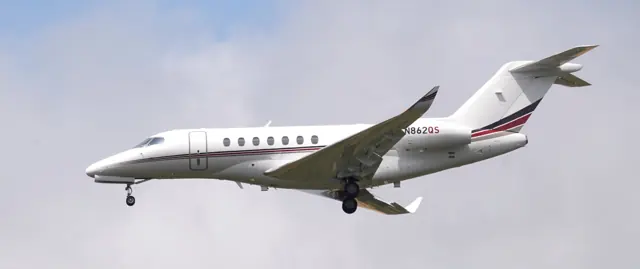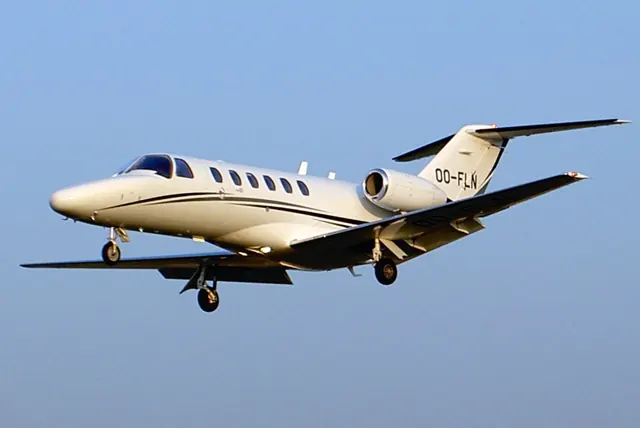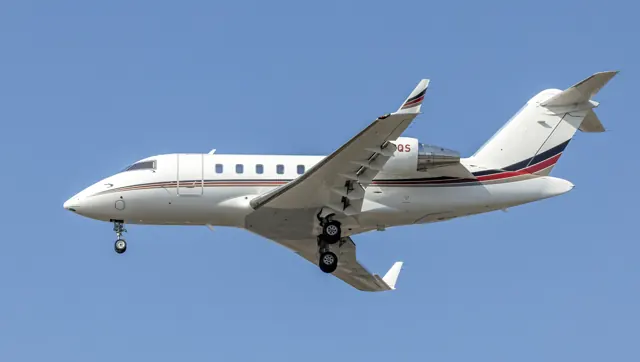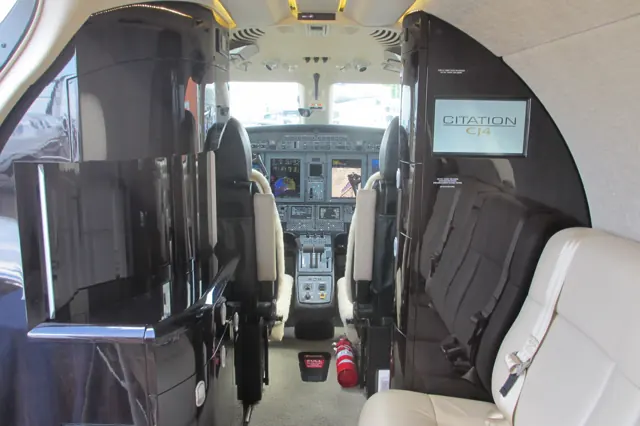

Start here
A few places to begin, from the aircraft’s story to the people who fly it.
Meet the aircraft
The CitationJet programme began with the Model 525, first flown in 1991, and developed through a series of larger and more capable CJ aircraft. The CJ4 is the Model 525C, a later branch of that family with a different wing and a stretched cabin. Its cockpit should not be confused with that of an early CitationJet or M2.
Aircraft background
Wikipedia contributors · Read more ↗Getting acquainted with the largest CJ
Horne found the CJ4’s engine starts straightforward, helped by the electronic engine controls, but the acceleration on departure still caught his attention. With four people aboard and a light load, the aircraft climbed energetically. Working through the demonstration with Unruh gave him a chance to explore stalls and the practical feel of the larger Citation.
AOPA Pilot · December 2010. Familiarisation from Wichita with Alex Unruh, four people aboard and a relatively light aircraft.
AOPA Pilot · Read more ↗Following a path still leaves speed to the pilot
The guide explicitly states that VNAV does not move the throttles. The pilot manages speed while the flight guidance follows the descent path. VNAV provides flight guidance without automatic thrust control.
Citation CJ4 · Microsoft Flight Simulator · MSFS 2024 / MSFS 2020
Microsoft / aircraft developers · Read more ↗Into the cockpit
 YouTube
 Jump N · 36 min ·
Preflight to Landing | Cessna Citation CJ4
A Citation CJ4 journey from preflight preparation through landing.
Real aircraft · Cessna Citation CJ4
Watch on YouTube ↗Preview images are served by AirframeDB. Videos open on YouTube only when you choose to watch.
Meet Cessna Citation CJ4
The CitationJet programme began with the Model 525, first flown in 1991, and developed through a series of larger and more capable CJ aircraft. The CJ4 is the Model 525C, a later branch of that family with a different wing and a stretched cabin.
Working Title documents the simulated CJ4's avionics, flight guidance and equipment. Its flight deck differs from the earlier CitationJet and M2.
Cessna Citation
Aircraft type designators
Use the code for the model you are flying. The linked authority lists the applicable aircraft.
History & design
The CJ4 prototype takes flight
The CJ4 prototype first flew on 5 May 2008 from McConnell Air Force Base in Wichita, with Dan Morris and Dave Bonifield. Its initial flight covered stability, control and systems checks before landing at Cessna’s Mid-Continent facility. The design introduced a moderately swept wing and four-screen Pro Line 21 cockpit to this extension of the CJ series.
Cessna press release, preserved by Airframer · First flight successful for Cessna’s Citation CJ4 ↗Cessna press release · 5 May 2008 · prototype, not the original CitationJet
Development milestones
Earlier CitationJet family: the original Model 525 first flew on 29 April 1991, received FAA certification in October 1992 and began deliveries in March 1993. These dates describe the original CitationJet generation. The CJ4 prototype’s own first flight is recorded separately above.
Wikipedia contributors · Cessna CitationJet/M2 ↗Wikipedia revision 1361933577 · original Model 525 family background; CJ4 date supplied by Cessna’s prototype announcement
Pilot accounts
Getting acquainted with the largest CJ
Horne found the CJ4’s engine starts straightforward, helped by the electronic engine controls, but the acceleration on departure still caught his attention. With four people aboard and a light load, the aircraft climbed energetically. Working through the demonstration with Unruh gave him a chance to explore stalls and the practical feel of the larger Citation.
Simulated engine-failure takeoffs showed another side of the workload. Rudder assistance helped, but coordinating the aircraft still involved the pilot, and the landing practice brought its own adjustments to the reference speeds and sight picture. Horne’s account mixes appreciation of the automation with the familiar work of learning a new aeroplane. The demonstration was flown at relatively light loading.
AOPA Pilot · December 2010. Familiarisation from Wichita with Alex Unruh, four people aboard and a relatively light aircraft.
Read the full account · AOPA Pilot ↗A cross-country ferry reveals the cockpit’s habits
Erdos’s chance to try the CJ4 was a useful journey: taking a demonstrator to the Canadian Business Aviation Association convention. Having flown the CJ1, he recognised the family layout while noticing the larger aircraft’s improved fittings and cockpit environment. Air traffic control shaped the climb, so he was careful about treating the trip as a formal performance test.
The flight also exposed small preferences that a specification sheet would miss. Both pilots found the electronic checklist cumbersome enough to return to paper, while the weather displayed on the multifunction screen thoroughly won Erdos over. Approaching Calgary, he liked the control response and the help available from the speedbrakes, though the glareshield affected his view.
Skies · September 2011. July 2011 ferry from Hamilton to Calgary in factory demonstrator N424CJ with Cessna captain Gary Read and four passengers.
Read the full account · Skies ↗Familiar flying, with changes around the cabin
Pickett came to the Gen2 with experience across the Citation 525 series. The revised entry and cabin lighting caught his attention, along with storage details that mattered to someone using the flight deck regularly. Once airborne, he enjoyed hand-flying the climb and found the aircraft comfortable in the turbulence encountered during the demonstration.
A simulated single-engine missed approach required substantial rudder effort despite the assistance available. The exercise added some physical work to an otherwise polished experience. Pickett also appreciated the electronic checklists and the ability to use the speedbrakes progressively during a descent with a strong tailwind. His report joins the small conveniences of the updated interior to the handling of the jet, with the demonstration conditions and demonstration pilot’s presence remaining part of the account.
Twin & Turbine · July 2021. CJ4 Gen2 demonstration from Santa Fe with David Bodlak, three aboard; the flight included a simulated single-engine RNAV approach and missed approach.
Read the full account · Twin & Turbine ↗In your simulator
Systems, equipment and documentation for each developer’s aircraft.
Compare simulator versions →MSFS 2024Citation CJ4
Microsoft Flight Simulator · Released
Citation CJ4
Microsoft Flight Simulator · Released
MSFS 2020Cessna Citation CJ4
Microsoft Flight Simulator · Released
Cessna Citation CJ4
Microsoft Flight Simulator · Released
Manuals & resources
Find your next read
Choose a topic for a short introduction and a link to the original source. Simulator references identify the developer and edition they cover.
Simulator documentation
Following a path still leaves speed to the pilotCitation CJ4 · Microsoft Flight Simulator · MSFS 2024 / MSFS 2020
The guide explicitly states that VNAV does not move the throttles. The pilot manages speed while the flight guidance follows the descent path. VNAV provides flight guidance without automatic thrust control.
CJ4 Operator’s Guide v1 · PDF p.56; exact release applicability unresolved
Microsoft / aircraft developers · Read the source ↗Flight guidance and yaw damping are separate controlsCitation CJ4 · Microsoft Flight Simulator · MSFS 2024 / MSFS 2020
The CJ4 guide documents a flight-guidance panel with flight-level-change, heading and navigation functions. It treats yaw-damper engagement separately from autopilot use and includes pilot-managed pitch trim.
CJ4 user guide v1; exact release applicability unresolved · PDF pp.8,10; climb and AP operation
Microsoft / aircraft developers · Read the source ↗How this guide describes vertical navigationCitation CJ4 · Microsoft Flight Simulator · MSFS 2024 / MSFS 2020
The FMC displays loaded or manually entered altitude restrictions without filling in predicted crossing altitudes at every waypoint. In climb, VNAV works with the pilot’s selected VS or FLC mode and the programmed restrictions. Descent uses calculated path segments, which can include level-offs and more than one top-of-descent marker.
CJ4 Operator’s Guide v1 · PDF pp.55–56; exact release applicability unresolved
Microsoft / aircraft developers · Read the source ↗Pilot account
Getting acquainted with the largest CJAOPA Pilot · December 2010. Familiarisation from Wichita with Alex Unruh, four people aboard and a relatively light aircraft.
Horne found the CJ4’s engine starts straightforward, helped by the electronic engine controls, but the acceleration on departure still caught his attention. With four people aboard and a light load, the aircraft climbed energetically. Working through the demonstration with Unruh gave him a chance to explore stalls and the practical feel of the larger Citation. Simulated engine-failure takeoffs showed another side of the workload.
Thomas A. Horne
AOPA Pilot · Read the source ↗A cross-country ferry reveals the cockpit’s habitsSkies · September 2011. July 2011 ferry from Hamilton to Calgary in factory demonstrator N424CJ with Cessna captain Gary Read and four passengers.
Erdos’s chance to try the CJ4 was a useful journey: taking a demonstrator to the Canadian Business Aviation Association convention. Having flown the CJ1, he recognised the family layout while noticing the larger aircraft’s improved fittings and cockpit environment. Air traffic control shaped the climb, so he was careful about treating the trip as a formal performance test. The flight also exposed small preferences that a specification sheet would miss.
Robert Erdos
Skies · Read the source ↗Read the original documentation from the people who created it. Manuals open on their publisher’s website.
Manual
Cessna Citation CJ4 User Guide v1Microsoft / aircraft developers Microsoft Flight Simulator aircraft manualsMicrosoft / aircraft developersAircraft background
Cessna CitationJet/M2Wikipedia contributors · Research background · Wikipedia revision 1361933577 · retrieved 2026-09-12 First flight successful for Cessna’s Citation CJ4Cessna press release, preserved by Airframer · 5 May 2008 · prototype flightResource
MSFS 2024 FAQ and edition aircraft inventoryMicrosoft MSFS 2020 FAQ and edition aircraft inventoryMicrosoftType designator
ICAO Doc 8643 — aircraft type designatorsInternational Civil Aviation Organization · Public search data retrieved 2026-09-14; authority update 2026-09-03Built-in force-feedback profiles
Read the documentary basis, editable starting settings and remaining questions for the aircraft you fly. Each explanation refers to the exact profile revision shown.
Catalogue programme-20261022-v1 · 1 profile choice
Cessna Citation CJ4
Free and Pro · Revision 2 · Partial review
MSFS 2024 · MSFS 2020
Cessna Citation CJ4: The selected CJ4 yoke law supplies nominal control resistance; the guide's operating limits do not calibrate a cockpit-force curve.
Cessna Citation CJ4
Cessna Citation CJ4: The selected CJ4 yoke law supplies nominal control resistance; the guide's operating limits do not calibrate a cockpit-force curve.
Aircraft and simulator scope
- Cessna Citation CJ4 · MSFS 2024 · family starting point
- Cessna Citation CJ4 · MSFS 2020 · family starting point
Working Title CJ4 MSFS user guide preserved February 2023; procedural limits do not establish primary-control feel. · Selected choice: Cessna Citation CJ4. Documentary scope does not establish every variant, add-on revision or simulator binding.
The simulator model and controls
The CitationJet programme began with the Model 525, first flown in 1991, and developed through a series of larger and more capable CJ aircraft. The CJ4 is the Model 525C, a later branch of that family with a different wing and a stretched cabin.
This starting point selects Cessna Citation CJ4. Its aircraft-level settings do not select a particular developer’s custom systems.
How this profile feels
Spring resistance builds with the selected airspeed response. A separate aerodynamic term adds speed-dependent control load.
Valid trim provides the configured pressure relief. Autopilot following is enabled for supported control references.
Controls and trim
The CJ4 guide distinguishes Mach and indicated-airspeed limits from flap and landing-gear limits. This Model 525C is a later CitationJet branch with its own avionics and equipment. The selected configuration cues therefore belong to the CJ4, while their strengths and the general control-load reference remain tuning estimates rather than operating limits.
About the values
The gains are normalized profile settings. They describe the chosen effect balance; hand force depends on the device and its output limits. IAS references are tuning values rather than operating limits. Physical acceptance of this revision remains pending.
What the documentation establishes
The guide identifies CJ4 operating limitations, including Mach/airspeed and configuration limits.
Flap configurations and landing-gear limits are identified; their mechanical force-cue amplitudes are not.
MMO, VMO and flap/gear speed limits are distinct configuration limits; the preset force reference is not one of those limits.
Documentary review and sources
These decisions describe the documentary basis and remaining gaps for this revision. Aircraft documentation and a starting setting describe different kinds of evidence.
Aircraft and variant
ReviewedThis starting point selects Cessna Citation CJ4. Its aircraft-level settings do not select a particular developer’s custom systems.
Flight controls
Not yet reviewedThe CJ4 guide distinguishes Mach and indicated-airspeed limits from flap and landing-gear limits. This Model 525C is a later CitationJet branch with its own avionics and equipment. The selected configuration cues therefore belong to the CJ4, while their strengths and the general control-load reference remain tuning estimates rather than operating limits.
Trim
Not yet reviewedPitch relief remains a chosen software response, with no exact trim-neutral force coefficient supplied by the selected limitations guide. Pitch authority 0.3 provides load relief and permitted centre movement; roll authority is 0.
Autopilot and stability
Not yet reviewedFollowing is on at 0.1 authority when a supported, valid autopilot control reference is available.
Equipment
ReviewedGear, flap and ground cues follow the selected settings and available simulator-reported states.
Speeds and limits
ReviewedThe indicated-speed references set the profile response scale; they are separate from aircraft operating limits.
Simulator integration
Not yet reviewedThe profile targets msfs2024, msfs2020. Add-on-specific controls use only the supported references configured by this profile.
Force-feedback settings
Not yet reviewedThe settings define the profile’s effect balance. Device output limits affect physical hand force.
Starting settings and their rationale
These configured values are starting estimates. The explanations describe what each setting controls; physical validation appears separately below.
| Setting | Starting value | What it controls and why |
|---|---|---|
| Spring strength | Starting value0.74 | What it controls and whyThe selected CJ4 yoke law supplies nominal control resistance; the guide's operating limits do not calibrate a cockpit-force curve. The baseline spring is 0.74. Its low-speed blend reaches baseline strength at 90 KIAS. |
| Master force gain | Starting value0.85 | What it controls and whyScales overall profile strength while preserving effect balance, subject to device and output limits. |
| Profile force gain | Starting value0.8 | What it controls and whyThe aerodynamic-load gain is 0.8 with an indicated-speed reference of 250 KIAS. This supplies speed-dependent loading alongside the spring. |
| Force tuning speed/reference | Starting value250.0 kt | What it controls and whySets the IAS reference for aerodynamic loading. It is an estimate, not published cruise TAS or a flight limit. |
| Spring response reference speed | Starting value90 kt | What it controls and whySets the IAS where the low-speed blend reaches baseline strength; high-speed stiffening also uses it. |
| Aileron force scale | Starting value0.72 | What it controls and whyRoll and pitch aerodynamic scales are 0.72 and 1, respectively. They set the aerodynamic axis balance. No custom spring-travel curve is enabled. |
| Elevator force scale | Starting value1.0 | What it controls and whyScales pitch aerodynamic loading; pitch spring travel and trim responses are separate settings. |
| Trim feel | Starting valueEnabled | What it controls and whyRetained for compatibility and group membership. Trim relief, rather than this flag, controls centre movement. |
| Trim relief | Starting valueEnabled | What it controls and whyAllows trim relief with supported control law and valid telemetry. Axis authorities set its amount. |
| Autopilot follow | Starting valueEnabled | What it controls and whyFollowing is on at 0.1 authority when a supported, valid autopilot control reference is available. |
| Autopilot neutral hold | Starting valueDisabled | What it controls and whyPermits centering hold during a supported AP state, separate from following a moving target. |
| Output force limit | Starting value0.55 | What it controls and whyCaps directed-force output. Native spring effects and device limits remain separate. |
All 44 starting settings and their rationale
The settings define the profile’s effect balance. Device output limits affect physical hand force.
| Setting | Starting value | What it controls and why |
|---|---|---|
| Spring strength | Starting value0.74 | What it controls and whyThe selected CJ4 yoke law supplies nominal control resistance; the guide's operating limits do not calibrate a cockpit-force curve. The baseline spring is 0.74. Its low-speed blend reaches baseline strength at 90 KIAS. |
| Spring deadband | Starting value0.045 | What it controls and whySets travel around the centre before the baseline spring resists. Smaller values engage it sooner. |
| Profile force gain | Starting value0.8 | What it controls and whyThe aerodynamic-load gain is 0.8 with an indicated-speed reference of 250 KIAS. This supplies speed-dependent loading alongside the spring. |
| Master force gain | Starting value0.85 | What it controls and whyScales overall profile strength while preserving effect balance, subject to device and output limits. |
| QBlend Enabled | Starting valueEnabled | What it controls and whyAllows baseline spring strength to rise with indicated airspeed where the control law permits it. |
| QSpring Minimum Factor | Starting value0.5 | What it controls and whySets low-speed spring strength as a fraction of baseline when blending is enabled. One keeps full strength. |
| QSpring Start Knots | Starting value20 kt | What it controls and whySets the IAS where the low-speed spring blend starts rising. This is a feel threshold, not a flight limit. |
| Spring response reference speed | Starting value90 kt | What it controls and whySets the IAS where the low-speed blend reaches baseline strength; high-speed stiffening also uses it. |
| Force tuning speed/reference | Starting value250.0 kt | What it controls and whySets the IAS reference for aerodynamic loading. It is an estimate, not published cruise TAS or a flight limit. |
| Airspeed spring stiffening gain | Starting value0.15 | What it controls and whyThe high-speed spring-stiffening gain is 0.15. It strengthens the permitted spring response above 90 KIAS, with the squared-speed ratio capped at 5. |
| Airspeed spring stiffening limit | Starting value5 | What it controls and whyLimits the squared airspeed ratio used for high-speed spring stiffening; it is not a device-force cap. |
| Aileron force scale | Starting value0.72 | What it controls and whyRoll and pitch aerodynamic scales are 0.72 and 1, respectively. They set the aerodynamic axis balance. No custom spring-travel curve is enabled. |
| Elevator force scale | Starting value1.0 | What it controls and whyScales pitch aerodynamic loading; pitch spring travel and trim responses are separate settings. |
| Output force limit | Starting value0.55 | What it controls and whyCaps directed-force output. Native spring effects and device limits remain separate. |
| Trim feel | Starting valueEnabled | What it controls and whyRetained for compatibility and group membership. Trim relief, rather than this flag, controls centre movement. |
| Trim relief | Starting valueEnabled | What it controls and whyAllows trim relief with supported control law and valid telemetry. Axis authorities set its amount. |
| Elevator Authority | Starting value0.3 | What it controls and whyPitch relief remains a chosen software response, with no exact trim-neutral force coefficient supplied by the selected limitations guide. Pitch authority 0.3 provides load relief and permitted centre movement; roll authority is 0. |
| Aileron Authority | Starting value0 | What it controls and whyScales supported roll-trim relief and permitted centre movement. Zero removes roll response. |
| Force Trim Enabled | Starting valueDisabled | What it controls and whyEnables local force trim, separate from aircraft-owned trim and add-on integration qualification. |
| GLoad Enabled | Starting valueEnabled | What it controls and whyAllows load-factor changes to modify permitted spring laws. Passive fly-by-wire feel can suppress it. |
| Rate Damping Enabled | Starting valueEnabled | What it controls and whyEnables rate damping with the configured coefficients and control law. |
| Autopilot follow | Starting valueEnabled | What it controls and whyFollowing is on at 0.1 authority when a supported, valid autopilot control reference is available. |
| Autopilot follow authority | Starting value0.1 | What it controls and whySets admitted AP-follow gain, not a percentage of travel. Runtime ownership and input limits still apply. |
| Autopilot neutral hold | Starting valueDisabled | What it controls and whyPermits centering hold during a supported AP state, separate from following a moving target. |
| Autopilot neutral hold strength | Starting value0.6 | What it controls and whySets admitted AP neutral-hold strength; inactive while neutral hold is disabled. |
| Enabled | Starting valueEnabled | What it controls and whyEnables aerodynamic cues; each still needs nonzero strength and its simulator conditions. |
| Gain | Starting value0.35 | What it controls and whySets stall-buffet strength. Zero removes the cue without changing simulator stalls or warnings. |
| Gain | Starting value0.22 | What it controls and whySets high-Mach buffet strength; onset and full-strength thresholds are separate. |
| Gain | Starting value0.14 | What it controls and whySets flap buffet at the configured position and speed gates. Flap movement texture is separate. |
| Maximum flap index | Starting value2 | What it controls and whySets the final flap index for detent normalization. UP plus three detents uses maximum index3. |
| Minimum flap index | Starting value2 | What it controls and whySets the first flap detent that admits buffet; this is a handle index, not degrees. |
| Gain | Starting value0.1 | What it controls and whySets gear aerodynamic buffet; movement and ground-contact cues are separate. |
| Shaker Enabled | Starting valueDisabled | What it controls and whyPermits shaker at supported warning conditions; the switch does not establish aircraft equipment. |
| Stick shaker amplitude | Starting value0.5 | What it controls and whySets triggered shaker strength; inactive while the shaker feature is disabled. |
| Enabled | Starting valueEnabled | What it controls and whyEnables ground effects; each still needs its own strength and contact or motion telemetry. |
| Gain | Starting value0.4 | What it controls and whySets rolling texture strength, modified by speed, surface and undercarriage configuration. |
| Gain | Starting value0.25 | What it controls and whySets gear-bump texture during ground motion, separate from touchdown impact. |
| Gain | Starting value0.65 | What it controls and whySets landing-impact strength; landing telemetry and response shape determine the pulse. |
| Gain | Starting value0 | What it controls and whySets reverse-thrust vibration with valid reverser and engine conditions. Zero removes the cue. |
| Enabled | Starting valueEnabled | What it controls and whyEnables engine cues with nonzero settings and valid running-engine telemetry. |
| Gain | Starting value0.06 | What it controls and whySets estimated engine vibration using configured telemetry and response, not measured cockpit vibration. |
| Enabled | Starting valueEnabled | What it controls and whyEnables accessory cues with configured strengths and observed accessory movement. |
| Gain | Starting value0.12 | What it controls and whySets texture from observed flap movement; a command without movement does not establish the cue. |
| Gain | Starting value0.12 | What it controls and whySets texture from observed gear movement, separate from aerodynamic and touchdown effects. |
Limits and open questions
- A limitations table does not establish primary-control linkage or cockpit force-source classification.
- The cited table does not substantiate trim mechanism, authority or external trim ownership.
- The limitation passage does not establish a servo-following interface for the Working Title autopilot.
- Published limits do not qualify external trim, autopilot or force-output telemetry.
- Operating limits alone do not calibrate CJ4 spring force, trim load or axis ratio.
Physical validation
No physical force validation is recorded in this public catalogue for this revision. Documentary review and software checks do not establish how a particular device feels.
Discuss this aircraft (0)
Questions, observations and useful sources from the community.
No published discussions yet. Bring a question or share a useful source.
Open aircraft discussions →Content expanded · What’s new
Something missing or a source that needs attention?
Suggest a correction ↗