




Start here
A few places to begin, from the aircraft’s story to the people who fly it.
Meet the aircraft
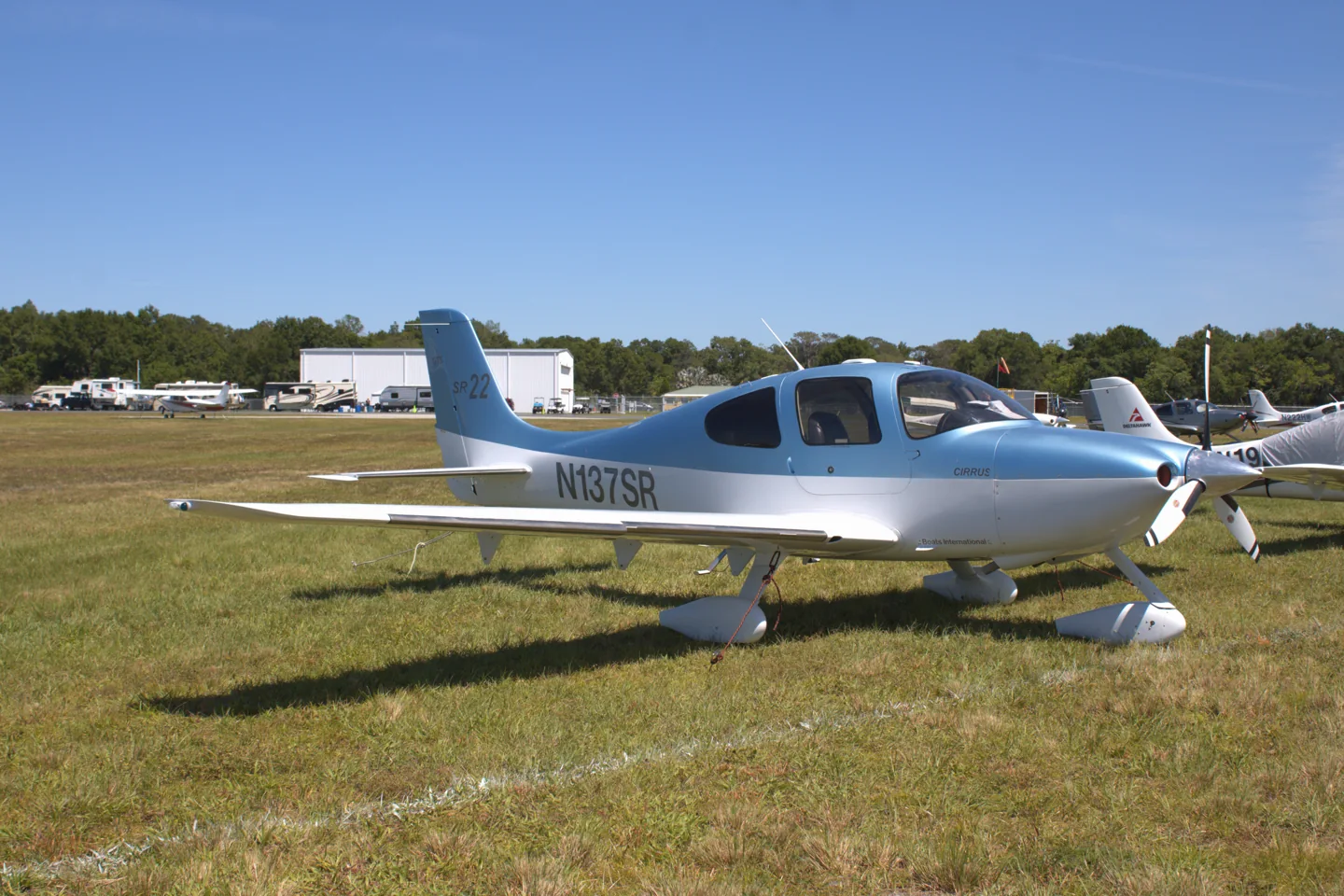
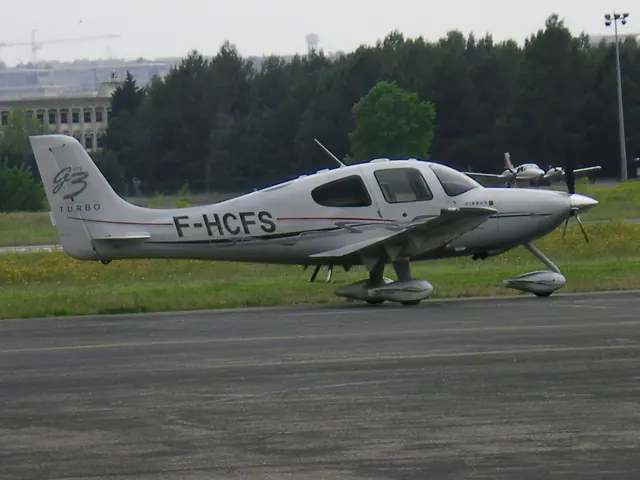
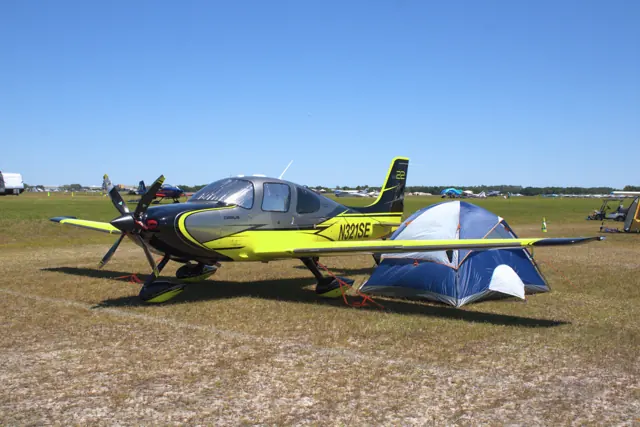
The SR22 entered production in 2001 as a more powerful development of Cirrus's SR20. A low wing, fixed tricycle gear and side-yoke controls define the basic layout. The Cirrus Airframe Parachute System is a prominent part of the aircraft's design. The SR22 family spans normally aspirated and turbocharged versions as well as different panel generations.
Aircraft background
Wikipedia contributors · Read more ↗Learning to stay ahead of a more demanding trainer
Ambats moved from a Cessna 172 into an Avidyne-equipped SR22 during her private-pilot training at Santa Monica. Other pilots had questioned whether the powerful Cirrus was an appropriate student aircraft, and she initially shared their concern. Her first lessons brought stronger acceleration, much more right-pedal pressure on takeoff and a cockpit full of unfamiliar information.
Plane + Pilot, 1 November 2006. Student training and solo in an early Avidyne-equipped SR22; individual learning experience.
Plane + Pilot · Read more ↗Side controls with conventional trim
The Laminar guide identifies the represented aircraft as an SR22T and describes its side controls, pitch-trim indication and relief of sustained fore-and-aft pressure. The side controls are mechanically connected.
Cirrus SR22 · Laminar Research · X-Plane 12
Laminar Research · Read more ↗Into the cockpit
 YouTube
 Flying Scott · 36 min ·
Full IFR Flight in Actual IMC | ILS Approach | Cirrus SR22 G7
A largely continuous instrument flight in an SR22 G7, with radio communications.
Real aircraft · SR22 G7
Watch on YouTube ↗Preview images are served by AirframeDB. Videos open on YouTube only when you choose to watch.
Meet Cirrus SR22
The SR22 entered production in 2001 as a more powerful development of Cirrus's SR20. A low wing, fixed tricycle gear and side-yoke controls define the basic layout. The Cirrus Airframe Parachute System is a prominent part of the aircraft's design.
The SR22 family spans normally aspirated and turbocharged versions as well as different panel generations. The side controls use mechanical connections. Simulator implementations range from bundled aircraft to detailed add-ons with their own engine, maintenance and avionics models.
Cirrus SR series
Aircraft type designators
Use the code for the model you are flying. The linked authority lists the applicable aircraft.
History & design
Development milestones
Developed from: Cirrus SR20
Wikipedia contributors · Cirrus SR22 ↗Cirrus SR22 · family/variant named by the source · Wikipedia revision 1374255854
Pilot accounts
Learning to stay ahead of a more demanding trainer
Ambats moved from a Cessna 172 into an Avidyne-equipped SR22 during her private-pilot training at Santa Monica. Other pilots had questioned whether the powerful Cirrus was an appropriate student aircraft, and she initially shared their concern. Her first lessons brought stronger acceleration, much more right-pedal pressure on takeoff and a cockpit full of unfamiliar information. The side control felt natural, but sensitive electric trim and quicker responses made familiar exercises such as steep turns harder to perform neatly.
With instructor Liz DeStaffany, practice gradually made the busy cockpit manageable. Ambats learned to use the display pages she needed while keeping her attention outside, and to make small trim adjustments after establishing the attitude. The traffic pattern began to feel less hurried. When DeStaffany and Cirrus pilot Rachel Tanzer stepped out for her solo, apprehension had become excitement. Ambats remembers climbing away while the same 172 she had previously soloed circulated nearby, now seeming remarkably slow.
Plane + Pilot, 1 November 2006. Student training and solo in an early Avidyne-equipped SR22; individual learning experience.
Read the full account · Plane + Pilot ↗A biplane pilot discovers the appeal of a travelling aircraft
Lee approached the 2012 SR22T with the prejudices of a pilot who preferred biplanes and tailwheel flying. A trip from Southern California to the San Francisco Bay Area, accompanied by Cirrus representative Matt Bergwall and editor Jessica Ambats, changed his view. Hand-flying the first part of the journey, he found substantial, balanced control forces rather than a lightweight feel. The side control still required adjustment, but it freed space in front of him.
As the trip continued, the cabin, integrated avionics and straightforward presentation of information began to make sense as aids to an enjoyable journey. He describes cruising above California farmland, trying the satellite telephone and arriving at San Carlos without drama before a Golden Gate photo flight. On the return, Ambats flew while he stretched out in a reclining rear seat with a book. He still wanted his biplane for an open-air flying experience; the Cirrus had shown him why comfort and convenience matter when the purpose is getting somewhere with friends.
Plane + Pilot, 24 April 2012. 2012 SR22T GTS demonstration trip with a Cirrus representative; turbocharged variant.
Read the full account · Plane + Pilot ↗Seven years of trips, family flying and everyday compromises
Zimmerman writes after seven years flying an SR22, having spent his first thousand hours largely in Cessna singles. A real journey in the Cirrus convinced him that its popularity involved more than appearance. He values the comfortable passenger cabin, integrated avionics and relatively uncomplicated workload for its performance. The side control ceased to feel unusual after his first flight, and he enjoys both family trips and short solo outings in the aircraft.
His appreciation includes practical irritations. He dislikes the lack of nosewheel steering and rudder trim, finds the cabin noisy, and recalls climbs where engine temperatures required more attention than he wanted. Those are his operating impressions rather than a controlled comparison of every SR22 version. He also regards the parachute as useful equipment while explicitly saying he has never deployed it. For the kinds of journeys he regularly makes, the balance remains favourable: a capable travelling aircraft that is sufficiently straightforward for him to relax and enjoy flying.
Air Facts, 13 January 2025. Retrospective after seven years flying SR22s; personal observations across his experience, not a test of every generation.
Read the full account · Air Facts ↗In your simulator
Systems, equipment and documentation for each developer’s aircraft.
Compare simulator versions →MSFS 2024SR22
Microsoft Flight Simulator · Released
SR22
Microsoft Flight Simulator · Released
MSFS 2020SR22
Microsoft Flight Simulator · Released
SR22
Microsoft Flight Simulator · Released
X-Plane 12Cirrus SR22
Laminar Research · Released
Cirrus SR22
Laminar Research · Released
X-Plane 12Cirrus SR22 · TorqueSim
TorqueSim · Released
Cirrus SR22 · TorqueSim
TorqueSim · Released
X-Plane 12 Enhancement Cirrus SR22
SimCoders · Released
Cirrus SR22
SimCoders · Released
Aircraft specifications
Published figures for the named real-aircraft variant. Simulator equipment and performance can differ.
| Specification | Published value |
|---|---|
| Length | 26 ft 0 in (7.92 m) |
| Wingspan | 38 ft 4 in (11.68 m) |
| Height | 8 ft 11 in (2.72 m) |
| Empty weight | 2,269 lb (1,029 kg) |
| Gross weight | 3,600 lb (1,633 kg) |
| Powerplant | 1 × Continental IO-550-N Six cylinder horizontally opposed aircraft engine, 310 hp (230 kW) |
| Propellers | 3-bladed |
| Cruise speed | 183 kn (211 mph, 339 km/h) |
| Stall speed | 60 kn (69 mph, 110 km/h) flaps down |
| Range | 1,049 nmi (1,207 mi, 1,943 km) with reserves at 65% power |
| Service ceiling | 17,500 ft (5,300 m) |
| Rate of climb | 1,270 ft/min (6.5 m/s) |
Manuals & resources
Find your next read
Choose a topic for a short introduction and a link to the original source. Simulator references identify the developer and edition they cover.
Simulator documentation
Side controls with conventional trimCirrus SR22 · Laminar Research · X-Plane 12
The Laminar guide identifies the represented aircraft as an SR22T and describes its side controls, pitch-trim indication and relief of sustained fore-and-aft pressure. The side controls are mechanically connected.
Archived simulator manual; installed package revision not observed · PDF pp.9,18
Laminar Research · Read the source ↗Panel generation and simulator version matterCirrus SR22 · TorqueSim · TorqueSim · X-Plane 12
TorqueSim's SR22 history records changes to trim authority and autopilot/control behaviour. Version 2.1 moved the G1000 aircraft to the X-Plane 12.1 X1000 and excludes older simulator versions; 2.1.1 removed the Gizmo dependency. The developer documents G1000 and Entegra products separately, with their release histories.
SR22 G1000 v2.1.1 · v2.0.0, v2.0.2, v2.1.0-2.1.1
TorqueSim · Read the source ↗Pilot account
Learning to stay ahead of a more demanding trainerPlane + Pilot, 1 November 2006. Student training and solo in an early Avidyne-equipped SR22; individual learning experience.
Ambats moved from a Cessna 172 into an Avidyne-equipped SR22 during her private-pilot training at Santa Monica. Other pilots had questioned whether the powerful Cirrus was an appropriate student aircraft, and she initially shared their concern. Her first lessons brought stronger acceleration, much more right-pedal pressure on takeoff and a cockpit full of unfamiliar information.
Jessica Ambats
Plane + Pilot · Read the source ↗A biplane pilot discovers the appeal of a travelling aircraftPlane + Pilot, 24 April 2012. 2012 SR22T GTS demonstration trip with a Cirrus representative; turbocharged variant.
Lee approached the 2012 SR22T with the prejudices of a pilot who preferred biplanes and tailwheel flying. A trip from Southern California to the San Francisco Bay Area, accompanied by Cirrus representative Matt Bergwall and editor Jessica Ambats, changed his view. Hand-flying the first part of the journey, he found substantial, balanced control forces rather than a lightweight feel. The side control still required adjustment, but it freed space in front of him.
Marc C. Lee
Plane + Pilot · Read the source ↗Read the original documentation from the people who created it. Manuals open on their publisher’s website.
Manual
Microsoft Flight Simulator aircraft manualsMicrosoft / aircraft developers Cirrus SR 22 POHLaminar Research X-Plane 12 Desktop ManualLaminar Research X-Plane aircraft and avionics manualsLaminar ResearchAircraft background
Cirrus SR22Wikipedia contributors · Research background · Wikipedia revision 1374255854 · retrieved 2026-09-12Resource
MSFS 2024 FAQ and edition aircraft inventoryMicrosoft MSFS 2020 FAQ and edition aircraft inventoryMicrosoft SR22 G1000 version historyTorqueSim SR22 productTorqueSimProduct
Reality Expansion Pack · Default XP12 Cirrus SR22SimCoders · Official developer / designated store catalogue · checked 2026-09-12 SR22 / SR22TN EntegraTorqueSim · Official developer / designated store catalogue · checked 2026-09-12 SR22 / SR22TN G1000TorqueSim · Official developer / designated store catalogue · checked 2026-09-12Type designator
ICAO Doc 8643 — aircraft type designatorsInternational Civil Aviation Organization · Public search data retrieved 2026-09-14; authority update 2026-09-03Built-in force-feedback profiles
Read the documentary basis, editable starting settings and remaining questions for the aircraft you fly. Each explanation refers to the exact profile revision shown.
Catalogue programme-20261022-v1 · 7 profile choices
Carenado SR22 GTSx Turbo
Carenado · Free and Pro · Revision 1 · Partial review
X-Plane 11
Carenado SR22 GTSx Turbo: Mechanically connected side yokes motivate control loading; these controls are not passive Airbus-style sidesticks.
SimCoders REP SR22
SimCoders · Free and Pro · Revision 3 · Inherited starting point
X-Plane 12
SimCoders REP SR22: Mechanically connected side yokes motivate control loading; these controls are not passive Airbus-style sidesticks.
TorqueSim SR22
TorqueSim · Free and Pro · Revision 4 · Inherited starting point
X-Plane 12
TorqueSim SR22: Mechanically connected side yokes motivate control loading; these controls are not passive Airbus-style sidesticks.
TorqueSim SR22TN
TorqueSim · Free and Pro · Revision 3 · Inherited starting point
X-Plane 12
TorqueSim SR22TN: Mechanically connected side yokes motivate control loading; these controls are not passive Airbus-style sidesticks.
X-Aerodynamics Cirrus SR22 EFM
X-Aerodynamics · Free and Pro · Revision 3 · Inherited starting point
X-Plane 12
X-Aerodynamics Cirrus SR22 EFM: Mechanically connected side yokes motivate control loading; these controls are not passive Airbus-style sidesticks.
X-Aerodynamics Cirrus SR22T EFM
X-Aerodynamics · Free and Pro · Revision 3 · Inherited starting point
X-Plane 12
X-Aerodynamics Cirrus SR22T EFM: Mechanically connected side yokes motivate control loading; these controls are not passive Airbus-style sidesticks.
Cirrus SR22
Free and Pro · Revision 2 · Partial review
MSFS 2024 · MSFS 2020 · X-Plane 12
Cirrus SR22: Mechanically connected side yokes motivate control loading; these controls are not passive Airbus-style sidesticks.
X-Aerodynamics Cirrus SR22T EFM
X-Aerodynamics Cirrus SR22T EFM: Mechanically connected side yokes motivate control loading; these controls are not passive Airbus-style sidesticks.
Aircraft and simulator scope
- X-Aerodynamics Cirrus SR22T EFM · X-Aerodynamics · X-Plane 12 · Add-on starting point
The simulator model and controls
The SR22 entered production in 2001 as a more powerful development of Cirrus's SR20. A low wing, fixed tricycle gear and side-yoke controls define the basic layout. The Cirrus Airframe Parachute System is a prominent part of the aircraft's design.
This profile selects X-Aerodynamics Cirrus SR22T EFM for X-Plane 12.
How this profile feels
Spring resistance builds with the selected airspeed response. A separate aerodynamic term adds speed-dependent control load.
Valid trim provides the configured pressure relief. Autopilot following is off.
Controls and trim
Laminar's manual is titled SR22 but describes its simulated SR22T. It explains an electric motor and mechanical springs changing the side-control neutral instead of an elevator trim tab. The documented 50/100-percent flap settings and 150/110 KIAS limits belong to that aircraft. TorqueSim, REP and Carenado represent other engine and avionics configurations, so Laminar's assignments are not their qualified interfaces.
The selected implementation
SR20/SR22/SR22T EFM share Laminar graphics/systems with changed airfoils/geometry/ground handling, without a new plugin/avionics contract.
About the values
The gains are normalized profile settings. They describe the chosen effect balance; hand force depends on the device and its output limits. IAS references are tuning values rather than operating limits. Physical acceptance of this revision remains pending.
Documentary review and sources
These decisions describe the documentary basis and remaining gaps for this revision. Aircraft documentation and a starting setting describe different kinds of evidence.
Aircraft and variant
InheritedThis profile selects X-Aerodynamics Cirrus SR22T EFM for X-Plane 12.
Flight controls
InheritedLaminar's manual is titled SR22 but describes its simulated SR22T. It explains an electric motor and mechanical springs changing the side-control neutral instead of an elevator trim tab. The documented 50/100-percent flap settings and 150/110 KIAS limits belong to that aircraft. TorqueSim, REP and Carenado represent other engine and avionics configurations, so Laminar's assignments are not their qualified interfaces.
Trim
InheritedElectric spring-based trim changes neutral, providing mechanism context for pressure relief without deriving an exact hardware authority. Pitch authority 0.3 provides load relief and permitted centre movement; roll authority is 0.12.
Autopilot and stability
InheritedAutopilot following is off; the configured spring and load retain the hardware feel.
Equipment
InheritedSR20/SR22/SR22T EFM share Laminar graphics/systems with changed airfoils/geometry/ground handling, without a new plugin/avionics contract.
Speeds and limits
InheritedThe indicated-speed references set the profile response scale; they are separate from aircraft operating limits.
Simulator integration
InheritedThe profile targets xplane12. Add-on-specific controls use only the supported references configured by this profile.
Force-feedback settings
InheritedThe settings define the profile’s effect balance. Device output limits affect physical hand force.
Starting settings and their rationale
These configured values are starting estimates. The explanations describe what each setting controls; physical validation appears separately below.
| Setting | Starting value | What it controls and why |
|---|---|---|
| Spring strength | Starting value0.74 | What it controls and whyMechanically connected side yokes motivate control loading; these controls are not passive Airbus-style sidesticks. The baseline spring is 0.74. Low-speed spring blending is off. |
| Master force gain | Starting value0.85 | What it controls and whyScales overall profile strength while preserving effect balance, subject to device and output limits. |
| Profile force gain | Starting value0.8 | What it controls and whyThe aerodynamic-load gain is 0.8 with an indicated-speed reference of 160 KIAS. This supplies speed-dependent loading alongside the spring. |
| Force tuning speed/reference | Starting value160 kt | What it controls and whySets the IAS reference for aerodynamic loading. It is an estimate, not published cruise TAS or a flight limit. |
| Spring response reference speed | Starting value65 kt | What it controls and whySets the IAS where the low-speed blend reaches baseline strength; high-speed stiffening also uses it. |
| Aileron force scale | Starting value0.72 | What it controls and whyRoll and pitch aerodynamic scales are 0.72 and 1, respectively. They set the aerodynamic axis balance. No custom spring-travel curve is enabled. |
| Elevator force scale | Starting value1 | What it controls and whyScales pitch aerodynamic loading; pitch spring travel and trim responses are separate settings. |
| Trim feel | Starting valueDisabled | What it controls and whyRetained for compatibility and group membership. Trim relief, rather than this flag, controls centre movement. |
| Trim relief | Starting valueEnabled | What it controls and whyAllows trim relief with supported control law and valid telemetry. Axis authorities set its amount. |
| Autopilot follow | Starting valueDisabled | What it controls and whyAutopilot following is off; the configured spring and load retain the hardware feel. |
| Autopilot neutral hold | Starting valueDisabled | What it controls and whyPermits centering hold during a supported AP state, separate from following a moving target. |
| Output force limit | Starting value0.55 | What it controls and whyCaps directed-force output. Native spring effects and device limits remain separate. |
All 44 starting settings and their rationale
The settings define the profile’s effect balance. Device output limits affect physical hand force.
| Setting | Starting value | What it controls and why |
|---|---|---|
| Spring strength | Starting value0.74 | What it controls and whyMechanically connected side yokes motivate control loading; these controls are not passive Airbus-style sidesticks. The baseline spring is 0.74. Low-speed spring blending is off. |
| Spring deadband | Starting value0.04 | What it controls and whySets travel around the centre before the baseline spring resists. Smaller values engage it sooner. |
| Profile force gain | Starting value0.8 | What it controls and whyThe aerodynamic-load gain is 0.8 with an indicated-speed reference of 160 KIAS. This supplies speed-dependent loading alongside the spring. |
| Master force gain | Starting value0.85 | What it controls and whyScales overall profile strength while preserving effect balance, subject to device and output limits. |
| QBlend Enabled | Starting valueDisabled | What it controls and whyAllows baseline spring strength to rise with indicated airspeed where the control law permits it. |
| QSpring Minimum Factor | Starting value0.55 | What it controls and whySets low-speed spring strength as a fraction of baseline when blending is enabled. One keeps full strength. |
| QSpring Start Knots | Starting value8 kt | What it controls and whySets the IAS where the low-speed spring blend starts rising. This is a feel threshold, not a flight limit. |
| Spring response reference speed | Starting value65 kt | What it controls and whySets the IAS where the low-speed blend reaches baseline strength; high-speed stiffening also uses it. |
| Force tuning speed/reference | Starting value160 kt | What it controls and whySets the IAS reference for aerodynamic loading. It is an estimate, not published cruise TAS or a flight limit. |
| Airspeed spring stiffening gain | Starting value0.15 | What it controls and whyThe high-speed spring-stiffening gain is 0.15. It strengthens the permitted spring response above 65 KIAS, with the squared-speed ratio capped at 5. |
| Airspeed spring stiffening limit | Starting value5 | What it controls and whyLimits the squared airspeed ratio used for high-speed spring stiffening; it is not a device-force cap. |
| Aileron force scale | Starting value0.72 | What it controls and whyRoll and pitch aerodynamic scales are 0.72 and 1, respectively. They set the aerodynamic axis balance. No custom spring-travel curve is enabled. |
| Elevator force scale | Starting value1 | What it controls and whyScales pitch aerodynamic loading; pitch spring travel and trim responses are separate settings. |
| Output force limit | Starting value0.55 | What it controls and whyCaps directed-force output. Native spring effects and device limits remain separate. |
| Trim feel | Starting valueDisabled | What it controls and whyRetained for compatibility and group membership. Trim relief, rather than this flag, controls centre movement. |
| Trim relief | Starting valueEnabled | What it controls and whyAllows trim relief with supported control law and valid telemetry. Axis authorities set its amount. |
| Elevator Authority | Starting value0.3 | What it controls and whyElectric spring-based trim changes neutral, providing mechanism context for pressure relief without deriving an exact hardware authority. Pitch authority 0.3 provides load relief and permitted centre movement; roll authority is 0.12. |
| Aileron Authority | Starting value0.12 | What it controls and whyScales supported roll-trim relief and permitted centre movement. Zero removes roll response. |
| Force Trim Enabled | Starting valueDisabled | What it controls and whyEnables local force trim, separate from aircraft-owned trim and add-on integration qualification. |
| GLoad Enabled | Starting valueEnabled | What it controls and whyAllows load-factor changes to modify permitted spring laws. Passive fly-by-wire feel can suppress it. |
| Rate Damping Enabled | Starting valueEnabled | What it controls and whyEnables rate damping with the configured coefficients and control law. |
| Autopilot follow | Starting valueDisabled | What it controls and whyAutopilot following is off; the configured spring and load retain the hardware feel. |
| Autopilot follow authority | Starting value0.1 | What it controls and whySets admitted AP-follow gain, not a percentage of travel. Runtime ownership and input limits still apply. |
| Autopilot neutral hold | Starting valueDisabled | What it controls and whyPermits centering hold during a supported AP state, separate from following a moving target. |
| Autopilot neutral hold strength | Starting value0.6 | What it controls and whySets admitted AP neutral-hold strength; inactive while neutral hold is disabled. |
| Enabled | Starting valueEnabled | What it controls and whyEnables aerodynamic cues; each still needs nonzero strength and its simulator conditions. |
| Gain | Starting value0.35 | What it controls and whySets stall-buffet strength. Zero removes the cue without changing simulator stalls or warnings. |
| Gain | Starting value0 | What it controls and whySets high-Mach buffet strength; onset and full-strength thresholds are separate. |
| Gain | Starting value0 | What it controls and whySets flap buffet at the configured position and speed gates. Flap movement texture is separate. |
| Maximum flap index | Starting value3 | What it controls and whySets the final flap index for detent normalization. UP plus three detents uses maximum index3. |
| Minimum flap index | Starting value2 | What it controls and whySets the first flap detent that admits buffet; this is a handle index, not degrees. |
| Gain | Starting value0 | What it controls and whySets gear aerodynamic buffet; movement and ground-contact cues are separate. |
| Shaker Enabled | Starting valueDisabled | What it controls and whyPermits shaker at supported warning conditions; the switch does not establish aircraft equipment. |
| Stick shaker amplitude | Starting value0.5 | What it controls and whySets triggered shaker strength; inactive while the shaker feature is disabled. |
| Enabled | Starting valueEnabled | What it controls and whyEnables ground effects; each still needs its own strength and contact or motion telemetry. |
| Gain | Starting value0.4 | What it controls and whySets rolling texture strength, modified by speed, surface and undercarriage configuration. |
| Gain | Starting value0.25 | What it controls and whySets gear-bump texture during ground motion, separate from touchdown impact. |
| Gain | Starting value0.65 | What it controls and whySets landing-impact strength; landing telemetry and response shape determine the pulse. |
| Gain | Starting value0 | What it controls and whySets reverse-thrust vibration with valid reverser and engine conditions. Zero removes the cue. |
| Enabled | Starting valueEnabled | What it controls and whyEnables engine cues with nonzero settings and valid running-engine telemetry. |
| Gain | Starting value0.12 | What it controls and whySets estimated engine vibration using configured telemetry and response, not measured cockpit vibration. |
| Enabled | Starting valueEnabled | What it controls and whyEnables accessory cues with configured strengths and observed accessory movement. |
| Gain | Starting value0.12 | What it controls and whySets texture from observed flap movement; a command without movement does not establish the cue. |
| Gain | Starting value0 | What it controls and whySets texture from observed gear movement, separate from aerodynamic and touchdown effects. |
Limits and open questions
- Mechanical side-yoke with spring cartridges and modest residual aerodynamic load. Retain spring support at zero airspeed; not a passive Airbus FBW stick.
- Conservative spring-cartridge neutral estimate .18pitch/.12roll. Normalized add-on relationship remains unqualified and is not added to simulator joystick output.
- No calibrated AP servo target is published. AP-follow and neutral hold remain disabled; mode indicators are not servo demand.
- Read-only motion and accessory telemetry. No guessed custom servo outputs, input compensation or hardware writes outside the production Armed force path. Installed identity remains unobserved. Bind explicitly if the ACF retains stockLaminar identity. Do not select this for SimCodersREP or TorqueSim.
- 160 KIAS is an estimated control-feel reference, not cruise TAS, V-speeds or an operating limit.
- Spring 0.74, lateral scale 0.7, trim relief 0.18/0.12; editable estimates, not measured hand forces.
- Physical and installed-aircraft checks are deferred. Save this profile as the aircraft default if telemetry omits its developer or configuration.
- Only actual accessory-position changes drive movement textures. No pressure-dependent failures, guessed servo outputs or input compensation.
Physical validation
No physical force validation is recorded in this public catalogue for this revision. Documentary review and software checks do not establish how a particular device feels.
Discuss this aircraft (0)
Questions, observations and useful sources from the community.
No published discussions yet. Bring a question or share a useful source.
Open aircraft discussions →Content expanded · What’s new
Something missing or a source that needs attention?
Suggest a correction ↗