
Start here
A few places to begin, from the aircraft’s story to the people who fly it.
Meet the aircraft
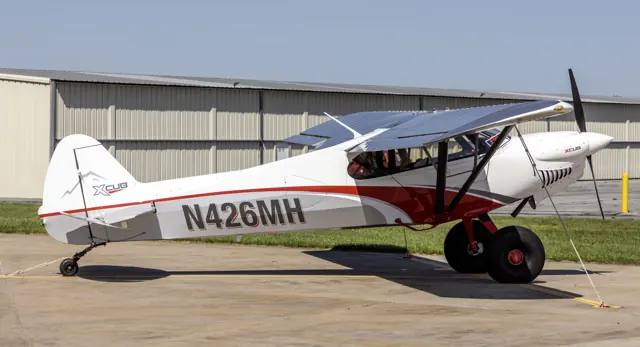
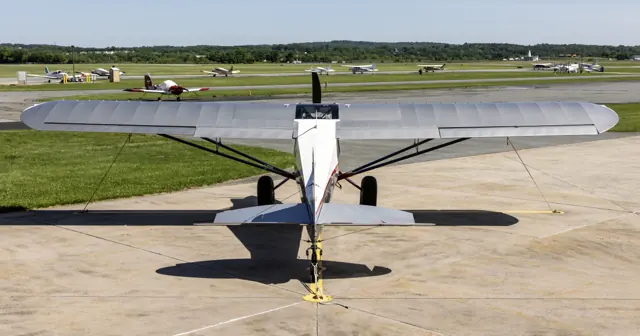
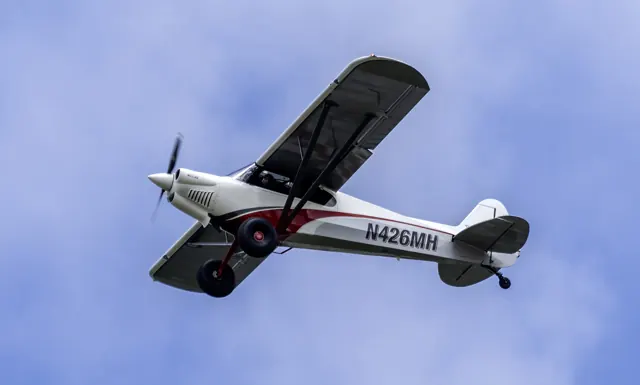
CubCrafters introduced the XCub in 2016. It retains the braced high wing and compact tandem cabin associated with Cub-style aircraft while incorporating a modern airframe and equipment. The conventional-gear XCub is joined by the nosewheel NXCub. The undercarriage distinction is visible before entering the cockpit and changes the aircraft's ground-handling arrangement.
Aircraft background
Wikipedia contributors · Read more ↗A solo introduction ends on a small grass strip
Hirschman climbed into the XCub over a large tundra tyre and found a cockpit with a particularly good view. The aircraft was still completing its initial flight-test hours, so this introduction had to be solo. Once airborne from Yakima, he enjoyed its energetic climb and crisp responses, with the surrounding landscape adding to the pleasure of learning a new aircraft. A visit to the little grass strip at Buena supplied a different kind of impression.
AOPA · June 2016. Third factory XCub, still in its initial flight-test period; solo flight from Yakima. Randy Lervold provided the briefing on the ground.
AOPA · Read more ↗Into the cockpit
 YouTube
 CubCrafters
XCub - Overview
CubCrafters introduces the XCub and its design.
Real XCub; manufacturer overview
Watch on YouTube ↗Preview images are served by AirframeDB. Videos open on YouTube only when you choose to watch.
Meet CubCrafters XCub
CubCrafters introduced the XCub in 2016. It retains the braced high wing and compact tandem cabin associated with Cub-style aircraft while incorporating a modern airframe and equipment. The conventional-gear XCub is joined by the nosewheel NXCub.
The undercarriage distinction is visible before entering the cockpit and changes the aircraft's ground-handling arrangement. Simulator products identify the XCub and NXCub separately.
CubCrafters XCub
Aircraft type designators
Use the code for the model you are flying. The linked authority lists the applicable aircraft.
History & design
A privately funded project emerges after six years
Hirschman’s 2016 introduction describes six years of internally funded development before the XCub’s public unveiling. Its familiar Cub outline therefore concealed a substantial development programme, rather than simply a new name or cockpit trim.
AOPA · Introducing the XCub ↗Development history reported at the unveiling
Pilot accounts
A solo introduction ends on a small grass strip
Hirschman climbed into the XCub over a large tundra tyre and found a cockpit with a particularly good view. The aircraft was still completing its initial flight-test hours, so this introduction had to be solo. Once airborne from Yakima, he enjoyed its energetic climb and crisp responses, with the surrounding landscape adding to the pleasure of learning a new aircraft.
A visit to the little grass strip at Buena supplied a different kind of impression. The large tyres absorbed the uneven ground, making the arrival feel smoother than the surface suggested. The flight gave Hirschman a chance to experience both the new cockpit and the familiar Cub activity of dropping into a small airfield.
AOPA · June 2016. Third factory XCub, still in its initial flight-test period; solo flight from Yakima. Randy Lervold provided the briefing on the ground.
Read the full account · AOPA ↗A firm touchdown reveals one of the changes
Bertorelli arrived firmly enough to produce a small bounce, giving him an immediate subject for discussion with Randy Lervold. The landing gear was one of several departures from the traditional Cub arrangement. In the cockpit, he also noticed how the improved view over the nose could briefly make level flight feel like a descent.
The cabin supplied more comfortable discoveries. Leather seats, places to put belongings and provisions for the rear occupant made the aircraft feel suited to spending time in, rather than simply taking around the circuit. His review follows those everyday details alongside the handling: learning a different sight picture, feeling the landing gear at work and appreciating somewhere useful to keep things during a journey.
fliegermagazin · August 2016 issue. Early XCub evaluation, with manufacturer comments from Randy Lervold; configuration predates the later 215-hp amphibian.
Read the full account · fliegermagazin ↗A delivery journey becomes preparation for teaching the owner
Valpey’s assignment began with the aircraft’s initial flight testing in the Columbia River Gorge. The following delivery to Florida turned it into a travelling companion, with stops including Santa Fe and Lake Powell. Airports and water destinations gave him different settings in which to become familiar with the amphibian before introducing its owner to it.
In Florida, Valpey moved to the rear seat for three days of owner training. He enjoyed the aircraft’s responsiveness, while the teaching also revealed the adjustments a newcomer needed to make with the throttle. There were practical irritations too: the water-rudder controls became tiring during long taxiing. His report explicitly leaves grass and other soft-field operation outside the experience he had accumulated.
CubCrafters-hosted first-person report · March 2021. Experimental amateur-built XCub with 215-hp CC393i and Wipline 2100 amphibious floats; Valpey was hired for flight testing, delivery and training.
Read the full account · CubCrafters ↗In your simulator
Systems, equipment and documentation for each developer’s aircraft.
Compare simulator versions →MSFS 2024NXCub
Microsoft Flight Simulator · Released
NXCub
Microsoft Flight Simulator · Released
MSFS 2024XCub
Microsoft Flight Simulator · Released
XCub
Microsoft Flight Simulator · Released
MSFS 2020XCub
Microsoft Flight Simulator · Released
XCub
Microsoft Flight Simulator · Released
MSFS 2020NXCub
Microsoft Flight Simulator · Released
NXCub
Microsoft Flight Simulator · Released
Manuals & resources
Find your next read
Choose a topic for a short introduction and a link to the original source. Simulator references identify the developer and edition they cover.
Pilot account
A solo introduction ends on a small grass stripAOPA · June 2016. Third factory XCub, still in its initial flight-test period; solo flight from Yakima. Randy Lervold provided the briefing on the ground.
Hirschman climbed into the XCub over a large tundra tyre and found a cockpit with a particularly good view. The aircraft was still completing its initial flight-test hours, so this introduction had to be solo. Once airborne from Yakima, he enjoyed its energetic climb and crisp responses, with the surrounding landscape adding to the pleasure of learning a new aircraft. A visit to the little grass strip at Buena supplied a different kind of impression.
Dave Hirschman
AOPA · Read the source ↗A firm touchdown reveals one of the changesfliegermagazin · August 2016 issue. Early XCub evaluation, with manufacturer comments from Randy Lervold; configuration predates the later 215-hp amphibian.
Bertorelli arrived firmly enough to produce a small bounce, giving him an immediate subject for discussion with Randy Lervold. The landing gear was one of several departures from the traditional Cub arrangement. In the cockpit, he also noticed how the improved view over the nose could briefly make level flight feel like a descent. The cabin supplied more comfortable discoveries.
Paul Bertorelli
fliegermagazin · Read the source ↗Read the original documentation from the people who created it. Manuals open on their publisher’s website.
Manual
Microsoft Flight Simulator aircraft manualsMicrosoft / aircraft developersAircraft background
CubCrafters CC19 XCubWikipedia contributors · Research background · Wikipedia revision 1170132468 · retrieved 2026-09-12Resource
MSFS 2024 FAQ and edition aircraft inventoryMicrosoft MSFS 2020 FAQ and edition aircraft inventoryMicrosoftType designator
ICAO Doc 8643 — aircraft type designatorsInternational Civil Aviation Organization · Public search data retrieved 2026-09-14; authority update 2026-09-03Built-in force-feedback profiles
Read the documentary basis, editable starting settings and remaining questions for the aircraft you fly. Each explanation refers to the exact profile revision shown.
Catalogue programme-20261022-v1 · 6 profile choices
CubCrafters XCub (wheels)
Free and Pro · Revision 2 · Partial review
MSFS 2020 · MSFS 2024
CubCrafters XCub (wheels): Pushrod ailerons and reported light lateral effort shape the XCub's roll balance.
CubCrafters XCub (floats)
Free and Pro · Revision 1 · Partial review
MSFS 2020 · MSFS 2024
CubCrafters XCub (floats): Pushrod ailerons and reported light lateral effort shape the XCub's roll balance.
CubCrafters NXCub (nosewheel)
Free and Pro · Revision 1 · Partial review
MSFS 2024 · MSFS 2020
CubCrafters NXCub (nosewheel): Pushrod ailerons and reported light lateral effort shape the XCub's roll balance.
CubCrafters XCub (skis)
Free and Pro · Revision 1 · Partial review
MSFS 2020 · MSFS 2024
CubCrafters XCub (skis): Pushrod ailerons and reported light lateral effort shape the XCub's roll balance.
CubCrafters XCub
Free and Pro · Revision 4 · Partial review
MSFS 2024 · MSFS 2020
Mechanical stick controls with pitch-trim relief, airspeed-dependent resistance and low-speed flap cues.
Got Friends MonsterNX Cub
Got Friends · Free and Pro · Revision 2 · Inherited starting point
MSFS 2020 · MSFS 2024
A modern utility single whose family includes both tailwheel and nosewheel configurations.
CubCrafters XCub (wheels)
CubCrafters XCub (wheels): Pushrod ailerons and reported light lateral effort shape the XCub's roll balance.
Aircraft and simulator scope
- CubCrafters XCub (wheels) · MSFS 2020 · Variant starting point
- CubCrafters XCub (wheels) · MSFS 2024 · Variant starting point
CubCrafters XCub (wheels) · The selected wheeled XCub uses manufacturer wheel-gear context; the optional autopilot is an equipment choice. CubCrafters' page covers XCub and NXCub specifications and multiple gear options. It does not establish the precise simulator implementation or a ski installation.
The simulator model and controls
CubCrafters introduced the XCub in 2016. It retains the braced high wing and compact tandem cabin associated with Cub-style aircraft while incorporating a modern airframe and equipment. The conventional-gear XCub is joined by the nosewheel NXCub.
This starting point selects CubCrafters XCub (wheels). Its aircraft-level settings do not select a particular developer’s custom systems.
How this profile feels
Spring resistance builds with the selected airspeed response. A separate aerodynamic term adds speed-dependent control load.
Valid trim provides the configured pressure relief. Autopilot following is off.
Controls and trim
The XCub's pushrod ailerons replace cables and pulleys, giving the revised system lighter lateral effort according to CubCrafters. Flight reports describe responsive ailerons and balanced pitch and roll. The tailwheel XCub and nosewheel NXCub have different ground layouts, with straight and amphibious floats available as separate options.
About the values
The gains are normalized profile settings. They describe the chosen effect balance; hand force depends on the device and its output limits. IAS references are tuning values rather than operating limits. Physical acceptance of this revision remains pending.
What the documentation establishes
The selected wheeled XCub uses manufacturer wheel-gear context; the optional autopilot is an equipment choice. CubCrafters' page covers XCub and NXCub specifications and multiple gear options. It does not establish the precise simulator implementation or a ski installation.
CubCrafters explicitly describes pushrod ailerons replacing cables and pulleys and attributes lighter, crisper roll feel to the revised ailerons.
A Garmin dual-axis digital autopilot is an option. A hand-flown starting point therefore represents an equipment selection, not proof that XCubs lack autopilots.
The page distinguishes wheel gear and straight or amphibious floats. It does not document ski hardware or the three deployed flap positions assumed in the starting point.
CubCrafters publishes speeds in mph, including a 167-mph redline and 81-mph flap limit. These must not be treated as knots or as a measured indicated-airspeed loading reference.
Documentary review and sources
These decisions describe the documentary basis and remaining gaps for this revision. Aircraft documentation and a starting setting describe different kinds of evidence.
Aircraft and variant
ReviewedThis starting point selects CubCrafters XCub (wheels). Its aircraft-level settings do not select a particular developer’s custom systems.
Flight controls
ReviewedThe XCub's pushrod ailerons replace cables and pulleys, giving the revised system lighter lateral effort according to CubCrafters. Flight reports describe responsive ailerons and balanced pitch and roll. The tailwheel XCub and nosewheel NXCub have different ground layouts, with straight and amphibious floats available as separate options.
Trim
Not yet reviewedPitch relief provides the profile's selected trim response. Pitch authority 0.3 provides load relief and permitted centre movement; roll authority is 0.
Autopilot and stability
ReviewedAutopilot following is off; the configured spring and load retain the hardware feel.
Equipment
ReviewedGear, flap and ground cues follow the selected settings and available simulator-reported states.
Speeds and limits
ReviewedThe indicated-speed references set the profile response scale; they are separate from aircraft operating limits.
Simulator integration
Not yet reviewedThe profile targets msfs2020, msfs2024. Add-on-specific controls use only the supported references configured by this profile.
Force-feedback settings
Not yet reviewedThe settings define the profile’s effect balance. Device output limits affect physical hand force.
Starting settings and their rationale
These configured values are starting estimates. The explanations describe what each setting controls; physical validation appears separately below.
| Setting | Starting value | What it controls and why |
|---|---|---|
| Spring strength | Starting value0.74 | What it controls and whyPushrod ailerons and reported light lateral effort shape the XCub's roll balance. The baseline spring is 0.74. Its low-speed blend reaches baseline strength at 57.5 KIAS. |
| Master force gain | Starting value0.85 | What it controls and whyScales overall profile strength while preserving effect balance, subject to device and output limits. |
| Profile force gain | Starting value0.8 | What it controls and whyThe aerodynamic-load gain is 0.8 with an indicated-speed reference of 115 KIAS. This supplies speed-dependent loading alongside the spring. |
| Force tuning speed/reference | Starting value115.0 kt | What it controls and whySets the IAS reference for aerodynamic loading. It is an estimate, not published cruise TAS or a flight limit. |
| Spring response reference speed | Starting value57.5 kt | What it controls and whySets the IAS where the low-speed blend reaches baseline strength; high-speed stiffening also uses it. |
| Aileron force scale | Starting value0.72 | What it controls and whyRoll and pitch aerodynamic scales are 0.72 and 1, respectively. They set the aerodynamic axis balance. No custom spring-travel curve is enabled. |
| Elevator force scale | Starting value1.0 | What it controls and whyScales pitch aerodynamic loading; pitch spring travel and trim responses are separate settings. |
| Trim feel | Starting valueEnabled | What it controls and whyRetained for compatibility and group membership. Trim relief, rather than this flag, controls centre movement. |
| Trim relief | Starting valueEnabled | What it controls and whyAllows trim relief with supported control law and valid telemetry. Axis authorities set its amount. |
| Autopilot follow | Starting valueDisabled | What it controls and whyAutopilot following is off; the configured spring and load retain the hardware feel. |
| Autopilot neutral hold | Starting valueDisabled | What it controls and whyPermits centering hold during a supported AP state, separate from following a moving target. |
| Output force limit | Starting value0.55 | What it controls and whyCaps directed-force output. Native spring effects and device limits remain separate. |
All 44 starting settings and their rationale
The settings define the profile’s effect balance. Device output limits affect physical hand force.
| Setting | Starting value | What it controls and why |
|---|---|---|
| Spring strength | Starting value0.74 | What it controls and whyPushrod ailerons and reported light lateral effort shape the XCub's roll balance. The baseline spring is 0.74. Its low-speed blend reaches baseline strength at 57.5 KIAS. |
| Spring deadband | Starting value0.045 | What it controls and whySets travel around the centre before the baseline spring resists. Smaller values engage it sooner. |
| Profile force gain | Starting value0.8 | What it controls and whyThe aerodynamic-load gain is 0.8 with an indicated-speed reference of 115 KIAS. This supplies speed-dependent loading alongside the spring. |
| Master force gain | Starting value0.85 | What it controls and whyScales overall profile strength while preserving effect balance, subject to device and output limits. |
| QBlend Enabled | Starting valueEnabled | What it controls and whyAllows baseline spring strength to rise with indicated airspeed where the control law permits it. |
| QSpring Minimum Factor | Starting value0.5 | What it controls and whySets low-speed spring strength as a fraction of baseline when blending is enabled. One keeps full strength. |
| QSpring Start Knots | Starting value16.1 kt | What it controls and whySets the IAS where the low-speed spring blend starts rising. This is a feel threshold, not a flight limit. |
| Spring response reference speed | Starting value57.5 kt | What it controls and whySets the IAS where the low-speed blend reaches baseline strength; high-speed stiffening also uses it. |
| Force tuning speed/reference | Starting value115.0 kt | What it controls and whySets the IAS reference for aerodynamic loading. It is an estimate, not published cruise TAS or a flight limit. |
| Airspeed spring stiffening gain | Starting value0.15 | What it controls and whyThe high-speed spring-stiffening gain is 0.15. It strengthens the permitted spring response above 57.5 KIAS, with the squared-speed ratio capped at 5. |
| Airspeed spring stiffening limit | Starting value5 | What it controls and whyLimits the squared airspeed ratio used for high-speed spring stiffening; it is not a device-force cap. |
| Aileron force scale | Starting value0.72 | What it controls and whyRoll and pitch aerodynamic scales are 0.72 and 1, respectively. They set the aerodynamic axis balance. No custom spring-travel curve is enabled. |
| Elevator force scale | Starting value1.0 | What it controls and whyScales pitch aerodynamic loading; pitch spring travel and trim responses are separate settings. |
| Output force limit | Starting value0.55 | What it controls and whyCaps directed-force output. Native spring effects and device limits remain separate. |
| Trim feel | Starting valueEnabled | What it controls and whyRetained for compatibility and group membership. Trim relief, rather than this flag, controls centre movement. |
| Trim relief | Starting valueEnabled | What it controls and whyAllows trim relief with supported control law and valid telemetry. Axis authorities set its amount. |
| Elevator Authority | Starting value0.3 | What it controls and whyPitch relief provides the profile's selected trim response. Pitch authority 0.3 provides load relief and permitted centre movement; roll authority is 0. |
| Aileron Authority | Starting value0 | What it controls and whyScales supported roll-trim relief and permitted centre movement. Zero removes roll response. |
| Force Trim Enabled | Starting valueDisabled | What it controls and whyEnables local force trim, separate from aircraft-owned trim and add-on integration qualification. |
| GLoad Enabled | Starting valueEnabled | What it controls and whyAllows load-factor changes to modify permitted spring laws. Passive fly-by-wire feel can suppress it. |
| Rate Damping Enabled | Starting valueEnabled | What it controls and whyEnables rate damping with the configured coefficients and control law. |
| Autopilot follow | Starting valueDisabled | What it controls and whyAutopilot following is off; the configured spring and load retain the hardware feel. |
| Autopilot follow authority | Starting value0.1 | What it controls and whySets admitted AP-follow gain, not a percentage of travel. Runtime ownership and input limits still apply. |
| Autopilot neutral hold | Starting valueDisabled | What it controls and whyPermits centering hold during a supported AP state, separate from following a moving target. |
| Autopilot neutral hold strength | Starting value0.6 | What it controls and whySets admitted AP neutral-hold strength; inactive while neutral hold is disabled. |
| Enabled | Starting valueEnabled | What it controls and whyEnables aerodynamic cues; each still needs nonzero strength and its simulator conditions. |
| Gain | Starting value0.35 | What it controls and whySets stall-buffet strength. Zero removes the cue without changing simulator stalls or warnings. |
| Gain | Starting value0 | What it controls and whySets high-Mach buffet strength; onset and full-strength thresholds are separate. |
| Gain | Starting value0.14 | What it controls and whySets flap buffet at the configured position and speed gates. Flap movement texture is separate. |
| Maximum flap index | Starting value3 | What it controls and whySets the final flap index for detent normalization. UP plus three detents uses maximum index3. |
| Minimum flap index | Starting value2 | What it controls and whySets the first flap detent that admits buffet; this is a handle index, not degrees. |
| Gain | Starting value0 | What it controls and whySets gear aerodynamic buffet; movement and ground-contact cues are separate. |
| Shaker Enabled | Starting valueDisabled | What it controls and whyPermits shaker at supported warning conditions; the switch does not establish aircraft equipment. |
| Stick shaker amplitude | Starting value0.5 | What it controls and whySets triggered shaker strength; inactive while the shaker feature is disabled. |
| Enabled | Starting valueEnabled | What it controls and whyEnables ground effects; each still needs its own strength and contact or motion telemetry. |
| Gain | Starting value0.4 | What it controls and whySets rolling texture strength, modified by speed, surface and undercarriage configuration. |
| Gain | Starting value0.25 | What it controls and whySets gear-bump texture during ground motion, separate from touchdown impact. |
| Gain | Starting value0.65 | What it controls and whySets landing-impact strength; landing telemetry and response shape determine the pulse. |
| Gain | Starting value0 | What it controls and whySets reverse-thrust vibration with valid reverser and engine conditions. Zero removes the cue. |
| Enabled | Starting valueEnabled | What it controls and whyEnables engine cues with nonzero settings and valid running-engine telemetry. |
| Gain | Starting value0.12 | What it controls and whySets estimated engine vibration using configured telemetry and response, not measured cockpit vibration. |
| Enabled | Starting valueEnabled | What it controls and whyEnables accessory cues with configured strengths and observed accessory movement. |
| Gain | Starting value0.12 | What it controls and whySets texture from observed flap movement; a command without movement does not establish the cue. |
| Gain | Starting value0 | What it controls and whySets texture from observed gear movement, separate from aerodynamic and touchdown effects. |
Limits and open questions
- The manufacturer page does not identify the pitch-trim mechanism or quantify trim force relief.
- A real-aircraft manufacturer page does not identify simulator signals, add-on versions or trim and autopilot telemetry.
- The manufacturer's qualitative roll-feel description supplies no hand-force values or pitch/roll force ratio.
- CubCrafters XCub (wheels) documentary evidence does not establish force-feedback hardware acceptance.
Physical validation
No physical force validation is recorded in this public catalogue for this revision. Documentary review and software checks do not establish how a particular device feels.
Discuss this aircraft (0)
Questions, observations and useful sources from the community.
No published discussions yet. Bring a question or share a useful source.
Open aircraft discussions →Content expanded · What’s new
Something missing or a source that needs attention?
Suggest a correction ↗