


Start here
A few places to begin, from the aircraft’s story to the people who fly it.
Meet the aircraft
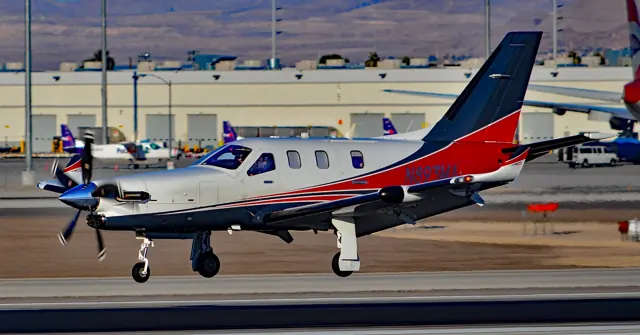
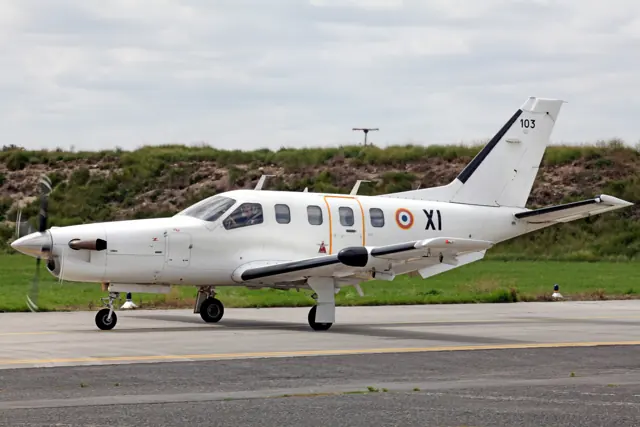
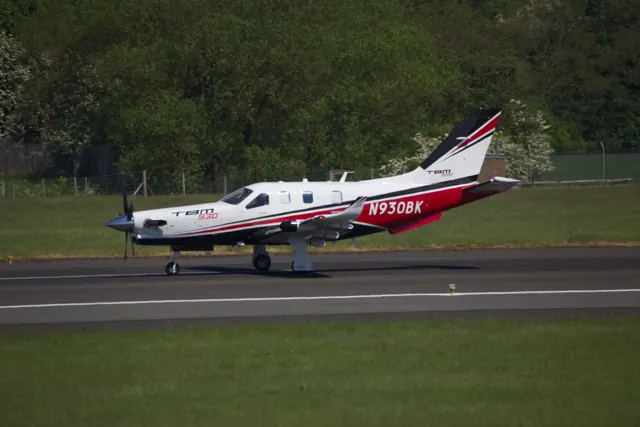
The TBM programme began as a collaboration between SOCATA and Mooney and continued under Daher. The low-wing airframe carries one nose-mounted turboprop and a pressurised cabin. Successive versions developed the engines, aerodynamics, avionics and pilot interface. The analogue-panel TBM 850, glass-cockpit TBM 900 and TBM 930 occupy different points in that progression.
Aircraft background
Wikipedia contributors · Read more ↗Demonstrating the 930’s emergency descent and learning its menus
Horne flew the TBM 930 at Tarbes with chief test pilot Stéphane Jacques in March 2016. Their demonstration deliberately explored the aircraft's response to a depressurisation scenario: at 20,000 feet they put on oxygen masks and shut off the bleed-air supply. Horne watched the emergency-descent function turn the aircraft and bring it down to a selected safe level, with terrain affecting the altitude used for the exercise.
AOPA Pilot, June 2016. TBM 930 demonstration at Tarbes with Stéphane Jacques in March 2016.
AOPA Pilot · Read more ↗Why the flap lever also selects 850 mode
Black Square documents a gated fourth flap-lever position that becomes available with the flaps retracted. Selecting 850 mode changes the power available for climb and cruise, allowing torque above the instrument’s 100-percent reference. The guide distinguishes that mode from the torque limiter used outside it. This unusual shared control is one of the details separating the 850 cockpit from later TBM generations.
TBM 850 · MSFS 2020 · MSFS 2024
Black Square / Just Flight · Read more ↗Into the cockpit
 YouTube
 FlyEurope TV - Aviation & Aerospace Media
The best aircraft of the month we like; Daher TBM 930, the magic touch
An introduction to the TBM 930 and its cockpit.
Real TBM 930; G3000 cockpit
Watch on YouTube ↗Preview images are served by AirframeDB. Videos open on YouTube only when you choose to watch.
Meet Daher TBM family
The TBM programme began as a collaboration between SOCATA and Mooney and continued under Daher. The low-wing airframe carries one nose-mounted turboprop and a pressurised cabin. Successive versions developed the engines, aerodynamics, avionics and pilot interface.
The analogue-panel TBM 850, glass-cockpit TBM 900 and TBM 930 occupy different points in that progression. Simulator developers model these panel generations and different levels of persistent system behaviour, documented for each product.
Daher TBM
Aircraft type designators
Use the code for the model you are flying. The linked authority lists the applicable aircraft.
TBM 900-series aircraft, including 900, 910, 930, 940 and 960
ICAO Doc 8643 — aircraft type designators ↗Checked 2026-09-14History & design
Development milestones
First flight: 14 July 1988
Developed from: Mooney 301
Wikipedia contributors · SOCATA TBM ↗SOCATA TBM · family/variant named by the source · Wikipedia revision 1363498428
Pilot accounts
Demonstrating the 930’s emergency descent and learning its menus
Horne flew the TBM 930 at Tarbes with chief test pilot Stéphane Jacques in March 2016. Their demonstration deliberately explored the aircraft's response to a depressurisation scenario: at 20,000 feet they put on oxygen masks and shut off the bleed-air supply. Horne watched the emergency-descent function turn the aircraft and bring it down to a selected safe level, with terrain affecting the altitude used for the exercise. It was a planned demonstration with a test pilot, rather than an account of an in-service emergency.
He also explored the electronic stability protection and the new G3000 interface. The protective servo forces became noticeable as he pushed toward the system's limits. Meanwhile, the touchscreen menus introduced a learning task even for a pilot familiar with earlier TBMs: finding the right page and returning through layers of selections required practice.
AOPA Pilot, June 2016. TBM 930 demonstration at Tarbes with Stéphane Jacques in March 2016.
Read the full account · AOPA Pilot ↗A 960 on a real trip through busy airspace
Boatman joined owner-pilot Malte Lorenz on flights between Hagerstown and Republic Airport in his 2024 TBM 960. The trip put the aircraft into the congested Northeast airspace in which Lorenz regularly used it. A complicated initial clearance and relatively low assigned altitudes reinforced his preference for a turboprop on shorter journeys. At Republic, they made an instrument approach beneath a coastal cloud layer. Another practical moment came when extra passengers wanted to join: the on-board loading calculation showed the proposed load exceeded limits, and they declined the request.
Returning to Hagerstown brought strong southerly winds and a choice of the shorter runway with a more favourable alignment. Lorenz disconnected the autopilot early and controlled the approach speed carefully. Boatman describes a gentle touchdown and ample room remaining, while acknowledging how short the runway looked from the approaching aircraft.
AOPA Pilot, November 2024. Julie Boatman accompanies Malte Lorenz in his 2024 TBM 960.
Read the full account · AOPA Pilot ↗Crisp handling, a coupled go-around and a simulated engine failure
Gerzanics evaluated TBM 940 F-HGDA with Daher demonstration pilot Wayman Luy at Pompano Beach. He found the ground steering precise and the yoke forces light during takeoff. In a fast descent the aircraft responded crisply in all three axes. His stall demonstrations were more varied: the clean stall produced a wings-level pitch break, while flap-extended stalls included a left wing drop that he arrested during recovery. Luy suggested the left-wing radar installation as a possible explanation for that asymmetry.
The flight also contrasted automation with hands-on flying. Gerzanics watched the autopilot and autothrottle manage an instrument approach and coupled go-around, then handled a simulated engine failure toward Belle Glade. They arrived a little high and touched down long, using braking and reverse to slow. He particularly enjoyed manoeuvring the aircraft through tight turns on the narrow runway afterward. The engine remained available during the simulated failure.
Flight International, 15–21 October 2019, pages 26–29. F-HGDA with Wayman Luy; manufacturer-hosted publisher reprint.
Read the full account · Flight International ↗Pilot Report: Daher’s New TBM 930
A 2016 real-aircraft pilot report. Publisher access restrictions may apply.
In your simulator
Systems, equipment and documentation for each developer’s aircraft.
Compare simulator versions →MSFS 2024TBM 930
Microsoft Flight Simulator · Released
TBM 930
Microsoft Flight Simulator · Released
MSFS 2020TBM 930
Microsoft Flight Simulator · Released
TBM 930
Microsoft Flight Simulator · Released
MSFS 2020 · MSFS 2024TBM 850
Black Square · Released
TBM 850
Black Square · Released
X-Plane 11TBM 900
Hot Start · Released
TBM 900
Hot Start · Released
Aircraft specifications
Published figures for the named real-aircraft variant. Simulator equipment and performance can differ.
| Specification | Published value |
|---|---|
| Length | 10.72 m (35 ft 2 in) |
| Wingspan | 12.83 m (42 ft 1 in) |
| Height | 4.355 m (14 ft 3 in) |
| Wing area | 18.0 m² (194 sq ft) |
| Empty weight | 2,097 kg (4,623 lb) |
| Max takeoff weight | 3,354 kg (7,394 lb) |
| Powerplant | 1 × Pratt & Whitney Canada PT6A-66D turboprop engine, 630 kW (850 shp) |
| Propellers | 5-bladed Hartzell constant-speed propeller |
| Maximum speed | 611 km/h (380 mph, 330 kn) maximum cruise at 8,534 m (28,000 ft) |
| Cruise speed | 467 km/h (290 mph, 252 kn) long-range cruise at 9,449 m (31,001 ft) |
| Range | 3,304 km (2,053 mi, 1,784 nmi) with max fuel at long-range cruise and 9,449 m (31,001 ft) |
| Service ceiling | 9,449 m (31,001 ft) |
Manuals & resources
Find your next read
Choose a topic for a short introduction and a link to the original source. Simulator references identify the developer and edition they cover.
Simulator documentation
Why the flap lever also selects 850 modeTBM 850 · Black Square · MSFS 2020 · MSFS 2024
Black Square documents a gated fourth flap-lever position that becomes available with the flaps retracted. Selecting 850 mode changes the power available for climb and cruise, allowing torque above the instrument’s 100-percent reference. The guide distinguishes that mode from the torque limiter used outside it. This unusual shared control is one of the details separating the 850 cockpit from later TBM generations.
Black Square TBM 850 User Guide (2024) · PDF p.62 · torque limiter and 850 mode
Black Square / Just Flight · Read the source ↗Heat and intake airflow affect the simulated engineTBM 850 · Black Square · MSFS 2020 · MSFS 2024
The inertial separator redirects intake air to remove particles, with a corresponding performance cost. The developer also models foreign-object damage, residual engine heat after shutdown and bleed-air valve failures that can restrict available power. Those systems can change what the pilot sees during a turnaround or climb, while the tablet provides visualisations of the engine and its condition.
Black Square TBM 850 User Guide (2024) · PDF pp.61–63 · engine simulation
Black Square / Just Flight · Read the source ↗An analogue-panel TBM with detailed supporting systemsTBM 850 · Black Square · MSFS 2020 · MSFS 2024
Black Square's TBM 850 pairs EFS40 electronic flight instruments with conventional panel equipment and selectable navigation installations. The manual describes persistent failures, generator and governor behaviour, fuel systems and environmental controls. Later TBM variants use integrated glass flight decks.
Black Square TBM 850 · PDF p.9; introduction and feature overview
Black Square / Just Flight · Read the source ↗Multiple persistent airframes and a maintenance managerTBM 900 · Hot Start · X-Plane 11
Hot Start's TBM 900 retains switch, fuel and aircraft-condition state between flights. The published model includes component wear, a maintenance manager and separately tracked airframes. Its G1000-based cockpit adds synthetic vision, engine and system pages, while the PT6, electrical and environmental systems have custom models. The reviewed product page still specifies X-Plane 11; its advertised future X-Plane 12 update is a separate statement.
Hot Start TBM 900 · X-Plane 11 · Product description; persistence, maintenance and highlighted features; checked 2026-09-12
Hot Start / X-Aviation · Read the source ↗Pilot account
Demonstrating the 930’s emergency descent and learning its menusAOPA Pilot, June 2016. TBM 930 demonstration at Tarbes with Stéphane Jacques in March 2016.
Horne flew the TBM 930 at Tarbes with chief test pilot Stéphane Jacques in March 2016. Their demonstration deliberately explored the aircraft's response to a depressurisation scenario: at 20,000 feet they put on oxygen masks and shut off the bleed-air supply. Horne watched the emergency-descent function turn the aircraft and bring it down to a selected safe level, with terrain affecting the altitude used for the exercise.
Thomas A. Horne
AOPA Pilot · Read the source ↗A 960 on a real trip through busy airspaceAOPA Pilot, November 2024. Julie Boatman accompanies Malte Lorenz in his 2024 TBM 960.
Boatman joined owner-pilot Malte Lorenz on flights between Hagerstown and Republic Airport in his 2024 TBM 960. The trip put the aircraft into the congested Northeast airspace in which Lorenz regularly used it. A complicated initial clearance and relatively low assigned altitudes reinforced his preference for a turboprop on shorter journeys. At Republic, they made an instrument approach beneath a coastal cloud layer.
Julie Boatman, flying with Malte Lorenz
AOPA Pilot · Read the source ↗Read the original documentation from the people who created it. Manuals open on their publisher’s website.
Manual
Microsoft Flight Simulator aircraft manualsMicrosoft / aircraft developers TBM 850 manualBlack Square / Just Flight X-Plane aircraft and avionics manualsLaminar ResearchAircraft background
SOCATA TBMWikipedia contributors · Research background · Wikipedia revision 1363498428 · retrieved 2026-09-12Resource
MSFS 2024 FAQ and edition aircraft inventoryMicrosoft MSFS 2020 FAQ and edition aircraft inventoryMicrosoft TBM 900 productHot Start / X-AviationProduct
TBM 850Black Square · Official developer / designated store catalogue · checked 2026-09-12Type designator
ICAO Doc 8643 — aircraft type designatorsInternational Civil Aviation Organization · Public search data retrieved 2026-09-14; authority update 2026-09-03Built-in force-feedback profiles
Read the documentary basis, editable starting settings and remaining questions for the aircraft you fly. Each explanation refers to the exact profile revision shown.
Catalogue programme-20261022-v1 · 5 profile choices
Black Square TBM 850
Black Square · Free and Pro · Revision 5 · Inherited starting point
MSFS 2020 · MSFS 2024
Black Square TBM 850: The powered-control profile provides its selected yoke centering.
Daher TBM 930
Free and Pro · Revision 2 · Review pending
MSFS 2020 · MSFS 2024 · X-Plane 11
Daher TBM 930: The powered-control profile provides its selected yoke centering.
Daher TBM 850
Free and Pro · Revision 1 · Partial review
MSFS 2020 · MSFS 2024 · X-Plane 11
Daher TBM 850: The powered-control profile provides its selected yoke centering.
Daher TBM 900
Free and Pro · Revision 1 · Review pending
MSFS 2020 · MSFS 2024 · X-Plane 11
Daher TBM 900: The powered-control profile provides its selected yoke centering.
Daher TBM 930
Free and Pro · Revision 3 · Partial review
MSFS 2024 · MSFS 2020 · X-Plane 11
Manual yoke loading and aerodynamic pitch-trim relief, with separate propeller, gear and flap cues.
Daher TBM 900
Daher TBM 900: The powered-control profile provides its selected yoke centering.
Aircraft and simulator scope
- Daher TBM 900 · MSFS 2020 · Variant starting point
- Daher TBM 900 · MSFS 2024 · Variant starting point
- Daher TBM 900 · X-Plane 11 · Variant starting point
Daher TBM 900 · The selected TBM 900 is not the Black Square 850 documented by these manuals. Both preserved manuals identify Black Square's TBM 850, with 2023 and 2024 user-guide revisions. They are not exact TBM 900 or 930 implementation manuals.
The simulator model and controls
The TBM programme began as a collaboration between SOCATA and Mooney and continued under Daher. The low-wing airframe carries one nose-mounted turboprop and a pressurised cabin. Successive versions developed the engines, aerodynamics, avionics and pilot interface.
This starting point selects Daher TBM 900. Its aircraft-level settings do not select a particular developer’s custom systems.
How this profile feels
The powered-control profile provides its selected yoke centering. Spring resistance builds with the selected airspeed response. A separate aerodynamic term adds speed-dependent control load.
Trim changes aircraft balance; the selected profile determines the amount of hardware relief. Valid trim provides the configured pressure relief. Autopilot following is enabled for supported control references.
Controls and trim
The selected TBM documentation distinguishes elevator anti-tabs from other trim tabs. Automatic-flight disengagement can leave flight-director modes displayed, so the flight director, autopilot and manual trim are separate cockpit states. TBM model and avionics generations remain named in the individual product.
About the values
The gains are normalized profile settings. They describe the chosen effect balance; hand force depends on the device and its output limits. IAS references are tuning values rather than operating limits. Physical acceptance of this revision remains pending.
Documentary review and sources
These decisions describe the documentary basis and remaining gaps for this revision. Aircraft documentation and a starting setting describe different kinds of evidence.
Aircraft and variant
Not yet reviewedThis starting point selects Daher TBM 900. Its aircraft-level settings do not select a particular developer’s custom systems.
Flight controls
Not yet reviewedThe selected TBM documentation distinguishes elevator anti-tabs from other trim tabs. Automatic-flight disengagement can leave flight-director modes displayed, so the flight director, autopilot and manual trim are separate cockpit states. TBM model and avionics generations remain named in the individual product.
Trim
Not yet reviewedTrim changes aircraft balance; the selected profile determines the amount of hardware relief. Pitch authority 0.3 provides load relief and permitted centre movement; roll authority is 0.14.
Autopilot and stability
Not yet reviewedFollowing is on at 0.1 authority when a supported, valid autopilot control reference is available.
Equipment
Not yet reviewedGear, flap and ground cues follow the selected settings and available simulator-reported states.
Speeds and limits
Not yet reviewedThe indicated-speed references set the profile response scale; they are separate from aircraft operating limits.
Simulator integration
Not yet reviewedThe profile targets msfs2020, msfs2024, xplane11. Add-on-specific controls use only the supported references configured by this profile.
Force-feedback settings
Not yet reviewedThe settings define the profile’s effect balance. Device output limits affect physical hand force.
Starting settings and their rationale
These configured values are starting estimates. The explanations describe what each setting controls; physical validation appears separately below.
| Setting | Starting value | What it controls and why |
|---|---|---|
| Spring strength | Starting value0.74 | What it controls and whyThe powered-control profile provides its selected yoke centering. The baseline spring is 0.74. Its low-speed blend reaches baseline strength at 90 KIAS. |
| Master force gain | Starting value0.85 | What it controls and whyScales overall profile strength while preserving effect balance, subject to device and output limits. |
| Profile force gain | Starting value0.68 | What it controls and whyThe aerodynamic-load gain is 0.68 with an indicated-speed reference of 220 KIAS. This supplies speed-dependent loading alongside the spring. |
| Force tuning speed/reference | Starting value220.0 kt | What it controls and whySets the IAS reference for aerodynamic loading. It is an estimate, not published cruise TAS or a flight limit. |
| Spring response reference speed | Starting value90 kt | What it controls and whySets the IAS where the low-speed blend reaches baseline strength; high-speed stiffening also uses it. |
| Aileron force scale | Starting value0.72 | What it controls and whyRoll and pitch aerodynamic scales are 0.72 and 1, respectively. They set the aerodynamic axis balance. No custom spring-travel curve is enabled. |
| Elevator force scale | Starting value1.0 | What it controls and whyScales pitch aerodynamic loading; pitch spring travel and trim responses are separate settings. |
| Trim feel | Starting valueEnabled | What it controls and whyRetained for compatibility and group membership. Trim relief, rather than this flag, controls centre movement. |
| Trim relief | Starting valueEnabled | What it controls and whyAllows trim relief with supported control law and valid telemetry. Axis authorities set its amount. |
| Autopilot follow | Starting valueEnabled | What it controls and whyFollowing is on at 0.1 authority when a supported, valid autopilot control reference is available. |
| Autopilot neutral hold | Starting valueDisabled | What it controls and whyPermits centering hold during a supported AP state, separate from following a moving target. |
| Output force limit | Starting value0.55 | What it controls and whyCaps directed-force output. Native spring effects and device limits remain separate. |
All 44 starting settings and their rationale
The settings define the profile’s effect balance. Device output limits affect physical hand force.
| Setting | Starting value | What it controls and why |
|---|---|---|
| Spring strength | Starting value0.74 | What it controls and whyThe powered-control profile provides its selected yoke centering. The baseline spring is 0.74. Its low-speed blend reaches baseline strength at 90 KIAS. |
| Spring deadband | Starting value0.05 | What it controls and whySets travel around the centre before the baseline spring resists. Smaller values engage it sooner. |
| Profile force gain | Starting value0.68 | What it controls and whyThe aerodynamic-load gain is 0.68 with an indicated-speed reference of 220 KIAS. This supplies speed-dependent loading alongside the spring. |
| Master force gain | Starting value0.85 | What it controls and whyScales overall profile strength while preserving effect balance, subject to device and output limits. |
| QBlend Enabled | Starting valueEnabled | What it controls and whyAllows baseline spring strength to rise with indicated airspeed where the control law permits it. |
| QSpring Minimum Factor | Starting value0.55 | What it controls and whySets low-speed spring strength as a fraction of baseline when blending is enabled. One keeps full strength. |
| QSpring Start Knots | Starting value20 kt | What it controls and whySets the IAS where the low-speed spring blend starts rising. This is a feel threshold, not a flight limit. |
| Spring response reference speed | Starting value90 kt | What it controls and whySets the IAS where the low-speed blend reaches baseline strength; high-speed stiffening also uses it. |
| Force tuning speed/reference | Starting value220.0 kt | What it controls and whySets the IAS reference for aerodynamic loading. It is an estimate, not published cruise TAS or a flight limit. |
| Airspeed spring stiffening gain | Starting value0.1 | What it controls and whyThe high-speed spring-stiffening gain is 0.1. It strengthens the permitted spring response above 90 KIAS, with the squared-speed ratio capped at 5. |
| Airspeed spring stiffening limit | Starting value5 | What it controls and whyLimits the squared airspeed ratio used for high-speed spring stiffening; it is not a device-force cap. |
| Aileron force scale | Starting value0.72 | What it controls and whyRoll and pitch aerodynamic scales are 0.72 and 1, respectively. They set the aerodynamic axis balance. No custom spring-travel curve is enabled. |
| Elevator force scale | Starting value1.0 | What it controls and whyScales pitch aerodynamic loading; pitch spring travel and trim responses are separate settings. |
| Output force limit | Starting value0.55 | What it controls and whyCaps directed-force output. Native spring effects and device limits remain separate. |
| Trim feel | Starting valueEnabled | What it controls and whyRetained for compatibility and group membership. Trim relief, rather than this flag, controls centre movement. |
| Trim relief | Starting valueEnabled | What it controls and whyAllows trim relief with supported control law and valid telemetry. Axis authorities set its amount. |
| Elevator Authority | Starting value0.3 | What it controls and whyTrim changes aircraft balance; the selected profile determines the amount of hardware relief. Pitch authority 0.3 provides load relief and permitted centre movement; roll authority is 0.14. |
| Aileron Authority | Starting value0.14 | What it controls and whyScales supported roll-trim relief and permitted centre movement. Zero removes roll response. |
| Force Trim Enabled | Starting valueDisabled | What it controls and whyEnables local force trim, separate from aircraft-owned trim and add-on integration qualification. |
| GLoad Enabled | Starting valueEnabled | What it controls and whyAllows load-factor changes to modify permitted spring laws. Passive fly-by-wire feel can suppress it. |
| Rate Damping Enabled | Starting valueEnabled | What it controls and whyEnables rate damping with the configured coefficients and control law. |
| Autopilot follow | Starting valueEnabled | What it controls and whyFollowing is on at 0.1 authority when a supported, valid autopilot control reference is available. |
| Autopilot follow authority | Starting value0.1 | What it controls and whySets admitted AP-follow gain, not a percentage of travel. Runtime ownership and input limits still apply. |
| Autopilot neutral hold | Starting valueDisabled | What it controls and whyPermits centering hold during a supported AP state, separate from following a moving target. |
| Autopilot neutral hold strength | Starting value0.6 | What it controls and whySets admitted AP neutral-hold strength; inactive while neutral hold is disabled. |
| Enabled | Starting valueEnabled | What it controls and whyEnables aerodynamic cues; each still needs nonzero strength and its simulator conditions. |
| Gain | Starting value0.28 | What it controls and whySets stall-buffet strength. Zero removes the cue without changing simulator stalls or warnings. |
| Gain | Starting value0 | What it controls and whySets high-Mach buffet strength; onset and full-strength thresholds are separate. |
| Gain | Starting value0.14 | What it controls and whySets flap buffet at the configured position and speed gates. Flap movement texture is separate. |
| Maximum flap index | Starting value2 | What it controls and whySets the final flap index for detent normalization. UP plus three detents uses maximum index3. |
| Minimum flap index | Starting value2 | What it controls and whySets the first flap detent that admits buffet; this is a handle index, not degrees. |
| Gain | Starting value0.1 | What it controls and whySets gear aerodynamic buffet; movement and ground-contact cues are separate. |
| Shaker Enabled | Starting valueDisabled | What it controls and whyPermits shaker at supported warning conditions; the switch does not establish aircraft equipment. |
| Stick shaker amplitude | Starting value0.5 | What it controls and whySets triggered shaker strength; inactive while the shaker feature is disabled. |
| Enabled | Starting valueEnabled | What it controls and whyEnables ground effects; each still needs its own strength and contact or motion telemetry. |
| Gain | Starting value0.42 | What it controls and whySets rolling texture strength, modified by speed, surface and undercarriage configuration. |
| Gain | Starting value0.32 | What it controls and whySets gear-bump texture during ground motion, separate from touchdown impact. |
| Gain | Starting value0.82 | What it controls and whySets landing-impact strength; landing telemetry and response shape determine the pulse. |
| Gain | Starting value0.48 | What it controls and whySets reverse-thrust vibration with valid reverser and engine conditions. Zero removes the cue. |
| Enabled | Starting valueEnabled | What it controls and whyEnables engine cues with nonzero settings and valid running-engine telemetry. |
| Gain | Starting value0.06 | What it controls and whySets estimated engine vibration using configured telemetry and response, not measured cockpit vibration. |
| Enabled | Starting valueEnabled | What it controls and whyEnables accessory cues with configured strengths and observed accessory movement. |
| Gain | Starting value0.12 | What it controls and whySets texture from observed flap movement; a command without movement does not establish the cue. |
| Gain | Starting value0.12 | What it controls and whySets texture from observed gear movement, separate from aerodynamic and touchdown effects. |
Limits and open questions
- The selected TBM 900 is not the Black Square 850 documented by these manuals. Both preserved manuals identify Black Square's TBM 850, with 2023 and 2024 user-guide revisions. They are not exact TBM 900 or 930 implementation manuals.
- The selected TBM 900 is not the Black Square 850 documented by these manuals. The manuals discuss flight-model tuning and control dimensions without establishing a measured primary-control loading law.
- The selected TBM 900 is not the Black Square 850 documented by these manuals. The manuals describe an AP/TRIMS master switch and powered trim motors; the later changelog distinguishes aileron/rudder trim tabs from elevator anti-tabs.
- The selected TBM 900 is not the Black Square 850 documented by these manuals. The KFC 325 has documented lateral and vertical modes, servo power conditions and disconnect behavior. Those details apply to the Black Square 850 edition.
- The selected TBM 900 is not the Black Square 850 documented by these manuals. The 850-mode entry is conditioned on flaps being up, and the manual distinguishes gear and flap configuration warnings.
- The selected TBM 900 is not the Black Square 850 documented by these manuals. The older guide describes a 266-knot redline. It does not establish the shared 220-knot loading reference or identical limits for the 900 and 930.
- The selected TBM 900 is not the Black Square 850 documented by these manuals. The later guide documents a control-wheel-steering variable and flight-director-pitch synchronization event. These are documented interfaces, with no external runtime qualification claimed.
- The selected TBM 900 is not the Black Square 850 documented by these manuals. Black Square's aerodynamic and sound claims do not provide measured yoke loading or force-feedback vibration calibration.
- Daher TBM 900 documentary evidence does not establish force-feedback hardware acceptance.
Physical validation
No physical force validation is recorded in this public catalogue for this revision. Documentary review and software checks do not establish how a particular device feels.
Documented interfaces
Source-documented identifiers. Documentation does not prove that every add-on populates a value correctly.
L:var_PilotCws
Pilot CWS button; aircraft-specific behavior.
- Units
- Boolean
- Access
- hardware control input; explicit readback contract unknown
Archived manual revision
Black Square / Just Flight · PDF page 132 ↗Discuss this aircraft (0)
Questions, observations and useful sources from the community.
No published discussions yet. Bring a question or share a useful source.
Open aircraft discussions →Content expanded · What’s new
Something missing or a source that needs attention?
Suggest a correction ↗