

Start here
A few places to begin, from the aircraft’s story to the people who fly it.
Meet the aircraft
De Havilland Canada designed the DHC-1 as a postwar primary trainer. It replaced Tiger Moth biplanes in many training roles while retaining the straightforward two-seat arrangement useful for instruction. The Chipmunk became widely used outside Canada as well. Surviving examples have individual equipment fits, while simulator products document their own features.
Aircraft background
Wikipedia contributors · Read more ↗A small cockpit with a fighter’s character
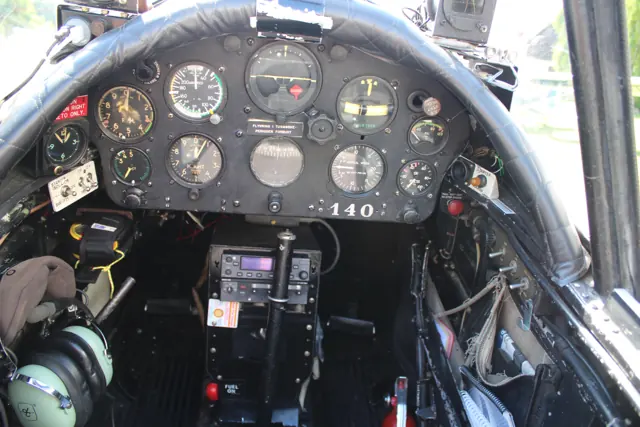
Schiff found the narrow Chipmunk cockpit surprisingly comfortable, even with two large pilots aboard. The surrounding switches, large compass and unusual instruments made its military origins tangible. Starting and taxiing introduced unfamiliar routines, and the hand-operated brake arrangement took practice before it began to feel natural. The long nose also shaped the view during ground movement.
AOPA Pilot · June 2003. Flight with Robert “Chipmunk Bob” Hill in the British-built 1952 WK639, registered N6540C.
AOPA Pilot · Read more ↗The XP11 package and its sound collaboration
Khamsin’s product page identifies the Chipmunk as version 2.0 for X-Plane 11 on Windows, macOS and Linux. It credits Khamsin with the flight model, modelling, textures and liveries, and Philip Ubben with the FMOD sound package.
De Havilland DHC-1 Chipmunk · Khamsin · X-Plane 11
Khamsin · Read more ↗Into the cockpit
 YouTube
 High Flight · 3 min ·
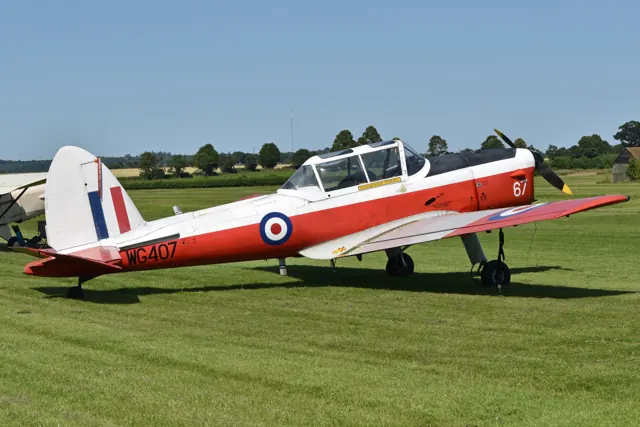
de Havilland DHC-1 Chipmunk WG407, G-BWMX
A preserved Chipmunk T.10 departs Duxford, with its service history in the publisher's notes.
Real aircraft · De Havilland DHC-1 Chipmunk
Watch on YouTube ↗Preview images are served by AirframeDB. Videos open on YouTube only when you choose to watch.
Meet De Havilland DHC-1 Chipmunk
De Havilland Canada designed the DHC-1 as a postwar primary trainer. It replaced Tiger Moth biplanes in many training roles while retaining the straightforward two-seat arrangement useful for instruction. The Chipmunk became widely used outside Canada as well. Surviving examples have individual equipment fits, while simulator products document their own features.
De Havilland DHC-1 Chipmunk
De Havilland Canada → · Explore the family →
De Havilland DHC-1 Chipmunk
Wikipedia contributors · De Havilland Canada DHC-1 Chipmunk ↗Khamsin · X-Plane 11 →Aircraft type designators
Use the code for the model you are flying. The linked authority lists the applicable aircraft.
History & design
A new classroom after the Tiger Moth
The Canadian-designed Chipmunk entered RAF service in 1950 as an initial trainer. Its enclosed cockpit, radio, flaps and brakes brought pupils into a different working environment from the Tiger Moth it replaced. The type also equipped University Air Squadrons, connecting military training with university flying.
Royal Air Force Museum · de Havilland Chipmunk ↗RAF Museum · training role
First flights for generations of cadets
The RAF Museum records the end of Chipmunk flying training in 1993, followed by Air Experience Flight service until 1996. That work introduced thousands of cadets to flying. Its displayed WP912 also carried the Duke of Edinburgh on his first solo flight in December 1952.
Royal Air Force Museum · de Havilland Chipmunk ↗RAF Museum · service chronology and WP912
Development milestones
First flight: 22 May 1946
Wikipedia contributors · De Havilland Canada DHC-1 Chipmunk ↗De Havilland Canada DHC-1 Chipmunk · family/variant named by the source · Wikipedia revision 1372668979
Pilot accounts
A small cockpit with a fighter’s character
Schiff found the narrow Chipmunk cockpit surprisingly comfortable, even with two large pilots aboard. The surrounding switches, large compass and unusual instruments made its military origins tangible. Starting and taxiing introduced unfamiliar routines, and the hand-operated brake arrangement took practice before it began to feel natural. The long nose also shaped the view during ground movement.
In the air, the controls were the attraction. He describes light, well-balanced responses that made manoeuvring especially enjoyable, while stressing that the aircraft rewarded a gentle touch. The tachometer’s resemblance to an altimeter was one small detail that could briefly confuse an unfamiliar pilot. His report ends with the pleasure of sitting quietly in the cockpit after shutdown, still absorbing the flight in an aircraft he had quickly grown to like.
AOPA Pilot · June 2003. Flight with Robert “Chipmunk Bob” Hill in the British-built 1952 WK639, registered N6540C.
Read the full account · AOPA Pilot ↗Rediscovering an aircraft from his childhood
Bundock first encountered a Chipmunk on an Air Training Corps flight at fourteen. Years later, after becoming an airline pilot, he sought some renewed enjoyment through tailwheel flying and eventually bought one of his own. Bringing it home from Oklahoma was memorable for the cold: his British-built aircraft had no cabin heater.
He valued the sound, smell and close-fitting cockpit as much as the flying. The dark interior could make controls awkward to find, and he regarded the takeoff and climb as modest. Once it had gained altitude, however, he enjoyed the light controls and smooth response in turns, while finding pitch a little sensitive. Keeping it at Andover Flight Academy let that personal enthusiasm become an opportunity for other pilots to experience the aircraft.
AOPA Pilot interview by Dennis K. Johnson · December 2022. Owner of the British-built 1952 WP829, subsequently registered N829WP in the United States.
Read the full account · AOPA Pilot ↗Taking two yellow Chipmunks to Oshkosh
Mack and Corker’s trip began with a short border crossing, then became a long day of delays and diversions. Strong headwinds changed the fuel plan, while smoke and heat made progress tiring. They discussed whether to continue before eventually reaching Oshkosh. Mack recalled the relief of joining the arrival, with the airfield closing soon afterwards as visibility deteriorated.
For Corker, turning final in a yellow Chipmunk for the anniversary gathering felt almost unreal. Both pilots had first experienced tailwheel flying in the museum aircraft, and their friendship had grown through a local flying community. Mack particularly enjoyed how directly the aeroplane communicated through its controls. Their recollections combine the pleasure of bringing historic aircraft to the event with the difficulties that made the journey demanding.
AOPA interviews by Alicia Herron · August 2026. Canadian Aviation Museum aircraft ferried from Windsor for the Chipmunk’s eightieth anniversary; Steve Thorne accompanied them in an RV-14.
Read the full account · AOPA ↗In your simulator
Systems, equipment and documentation for each developer’s aircraft.
Compare simulator versions →X-Plane 11De Havilland DHC-1 Chipmunk
Khamsin · Released
De Havilland DHC-1 Chipmunk
Khamsin · Released
MSFS 2020DHC-1 Chipmunk
Aeroplane Heaven · Released
DHC-1 Chipmunk
Aeroplane Heaven · Released
Aircraft specifications
Published figures for the named real-aircraft variant. Simulator equipment and performance can differ.
| Specification | Published value |
|---|---|
| Length | 25 ft 5 in (7.75 m) |
| Wingspan | 34 ft 4 in (10.46 m) |
| Height | 7 ft 1 in (2.16 m) |
| Wing area | 172 sq ft (16.0 m² ) |
| Empty weight | 1,517 lb (688 kg) |
| Gross weight | 2,014 lb (914 kg) |
| Max takeoff weight | 2,200 lb (998 kg) |
| Powerplant | 1 × de Havilland Gipsy Major 1C 4-cylinder air-cooled inverted in-line piston engine, 145 hp (108 kW) |
| Propellers | 2-bladed fixed-pitch propeller |
| Maximum speed | 138 mph (222 km/h, 120 kn) at sea level |
| Cruise speed | 103 mph (166 km/h, 90 kn) |
| Range | 259 mi (417 km, 225 nmi) |
| Service ceiling | 15,800 ft (4,800 m) |
| Rate of climb | 900 ft/min (4.6 m/s) |
Manuals & resources
Find your next read
Choose a topic for a short introduction and a link to the original source. Simulator references identify the developer and edition they cover.
Simulator documentation
The XP11 package and its sound collaborationDe Havilland DHC-1 Chipmunk · Khamsin · X-Plane 11
Khamsin’s product page identifies the Chipmunk as version 2.0 for X-Plane 11 on Windows, macOS and Linux. It credits Khamsin with the flight model, modelling, textures and liveries, and Philip Ubben with the FMOD sound package.
Gathered developer page · version 2.0; no X-Plane 12 compatibility inferred
Khamsin · Read the source ↗Pilot account
A small cockpit with a fighter’s characterAOPA Pilot · June 2003. Flight with Robert “Chipmunk Bob” Hill in the British-built 1952 WK639, registered N6540C.
Schiff found the narrow Chipmunk cockpit surprisingly comfortable, even with two large pilots aboard. The surrounding switches, large compass and unusual instruments made its military origins tangible. Starting and taxiing introduced unfamiliar routines, and the hand-operated brake arrangement took practice before it began to feel natural. The long nose also shaped the view during ground movement. In the air, the controls were the attraction.
Barry Schiff
AOPA Pilot · Read the source ↗Rediscovering an aircraft from his childhoodAOPA Pilot interview by Dennis K. Johnson · December 2022. Owner of the British-built 1952 WP829, subsequently registered N829WP in the United States.
Bundock first encountered a Chipmunk on an Air Training Corps flight at fourteen. Years later, after becoming an airline pilot, he sought some renewed enjoyment through tailwheel flying and eventually bought one of his own. Bringing it home from Oklahoma was memorable for the cold: his British-built aircraft had no cabin heater. He valued the sound, smell and close-fitting cockpit as much as the flying.
David Bundock
AOPA Pilot · Read the source ↗Developer documentation
DHC-1 Chipmunk — product listingDHC-1 Chipmunk · MSFS 2020
Product listing captured 2026-09-30; edition scope from the reviewed catalogue
www.aeroplaneheaven.com · Read the source ↗Read the original documentation from the people who created it. Manuals open on their publisher’s website.
Aircraft background
De Havilland Canada DHC-1 ChipmunkWikipedia contributors · Research background · retrieved 2026-09-12 de Havilland ChipmunkRoyal Air Force Museum · WP912 collection entry · retrieved September 2026Product
DHC-1 ChipmunkKhamsin · Official developer / designated store catalogue · checked 2026-09-12 Aeroplane Heaven - You're virtually there.™ deHavilland DHC-1 Chipmunk for MSFS2020www.aeroplaneheaven.com · Product listing captured 2026-09-30; edition scope from the reviewed catalogueType designator
ICAO Doc 8643 — aircraft type designatorsInternational Civil Aviation Organization · Public search data retrieved 2026-09-14; authority update 2026-09-03Built-in force-feedback profiles
Read the documentary basis, editable starting settings and remaining questions for the aircraft you fly. Each explanation refers to the exact profile revision shown.
Catalogue programme-20261022-v1 · 2 profile choices
Aeroplane Heaven DHC-1 Chipmunk
Aeroplane Heaven · Free and Pro · Revision 3 · Inherited starting point
MSFS 2020
Aeroplane Heaven DHC-1 Chipmunk: Mechanical controls motivate aerodynamic stick resistance.
De Havilland DHC-1 Chipmunk
Free and Pro · Revision 2 · Partial review
X-Plane 11
De Havilland DHC-1 Chipmunk: Mechanical controls motivate aerodynamic stick resistance.
De Havilland DHC-1 Chipmunk
De Havilland DHC-1 Chipmunk: Mechanical controls motivate aerodynamic stick resistance.
Aircraft and simulator scope
- De Havilland DHC-1 Chipmunk · X-Plane 11 · family starting point
De Havilland DHC-1 Chipmunk · Historical XP11 catalogue scope; compatibility is not transferred to XP12.
The simulator model and controls
De Havilland Canada designed the DHC-1 as a postwar primary trainer. It replaced Tiger Moth biplanes in many training roles while retaining the straightforward two-seat arrangement useful for instruction. The Chipmunk became widely used outside Canada as well. Surviving examples have individual equipment fits, while simulator products document their own features.
This starting point selects De Havilland DHC-1 Chipmunk. Its aircraft-level settings do not select a particular developer’s custom systems.
How this profile feels
Mechanical controls motivate aerodynamic stick resistance. Spring resistance builds with the selected airspeed response. A separate aerodynamic term adds speed-dependent control load.
The cockpit elevator tab provides pitch trim; ground-adjusted tabs do not provide pilot roll trim. Valid trim provides the configured pressure relief. Autopilot following is off.
Controls and trim
The Chipmunk manual identifies an elevator trim tab and mechanically operated flaps using wire and pulleys. Aileron and rudder tabs are adjusted on the ground. Hydraulic wheel brakes serve the undercarriage rather than the primary flight-control linkage.
About the values
The gains are normalized profile settings. They describe the chosen effect balance; hand force depends on the device and its output limits. IAS references are tuning values rather than operating limits. Physical acceptance of this revision remains pending.
What the documentation establishes
Khamsin identifies its DHC-1 Chipmunk XP11 product and the historical tandem trainer.
Documentary review and sources
These decisions describe the documentary basis and remaining gaps for this revision. Aircraft documentation and a starting setting describe different kinds of evidence.
Aircraft and variant
ReviewedThis starting point selects De Havilland DHC-1 Chipmunk. Its aircraft-level settings do not select a particular developer’s custom systems.
Flight controls
Not yet reviewedThe Chipmunk manual identifies an elevator trim tab and mechanically operated flaps using wire and pulleys. Aileron and rudder tabs are adjusted on the ground. Hydraulic wheel brakes serve the undercarriage rather than the primary flight-control linkage.
Trim
Not yet reviewedThe cockpit elevator tab provides pitch trim; ground-adjusted tabs do not provide pilot roll trim. Pitch authority 0.3 provides load relief and permitted centre movement; roll authority is 0.
Autopilot and stability
Not yet reviewedAutopilot following is off; the configured spring and load retain the hardware feel.
Equipment
Not yet reviewedGear, flap and ground cues follow the selected settings and available simulator-reported states.
Speeds and limits
Not yet reviewedThe indicated-speed references set the profile response scale; they are separate from aircraft operating limits.
Simulator integration
Not yet reviewedThe profile targets xplane11. Add-on-specific controls use only the supported references configured by this profile.
Force-feedback settings
Not yet reviewedThe settings define the profile’s effect balance. Device output limits affect physical hand force.
Starting settings and their rationale
These configured values are starting estimates. The explanations describe what each setting controls; physical validation appears separately below.
| Setting | Starting value | What it controls and why |
|---|---|---|
| Spring strength | Starting value0.74 | What it controls and whyMechanical controls motivate aerodynamic stick resistance. The baseline spring is 0.74. Its low-speed blend reaches baseline strength at 45 KIAS. |
| Master force gain | Starting value0.85 | What it controls and whyScales overall profile strength while preserving effect balance, subject to device and output limits. |
| Profile force gain | Starting value0.8 | What it controls and whyThe aerodynamic-load gain is 0.8 with an indicated-speed reference of 90 KIAS. This supplies speed-dependent loading alongside the spring. |
| Force tuning speed/reference | Starting value90.0 kt | What it controls and whySets the IAS reference for aerodynamic loading. It is an estimate, not published cruise TAS or a flight limit. |
| Spring response reference speed | Starting value45.0 kt | What it controls and whySets the IAS where the low-speed blend reaches baseline strength; high-speed stiffening also uses it. |
| Aileron force scale | Starting value0.6 | What it controls and whyRoll and pitch aerodynamic scales are 0.6 and 0.78, respectively. They set the aerodynamic axis balance. No custom spring-travel curve is enabled. |
| Elevator force scale | Starting value0.78 | What it controls and whyScales pitch aerodynamic loading; pitch spring travel and trim responses are separate settings. |
| Trim feel | Starting valueEnabled | What it controls and whyRetained for compatibility and group membership. Trim relief, rather than this flag, controls centre movement. |
| Trim relief | Starting valueEnabled | What it controls and whyAllows trim relief with supported control law and valid telemetry. Axis authorities set its amount. |
| Autopilot follow | Starting valueDisabled | What it controls and whyAutopilot following is off; the configured spring and load retain the hardware feel. |
| Autopilot neutral hold | Starting valueDisabled | What it controls and whyPermits centering hold during a supported AP state, separate from following a moving target. |
| Output force limit | Starting value0.55 | What it controls and whyCaps directed-force output. Native spring effects and device limits remain separate. |
All 44 starting settings and their rationale
The settings define the profile’s effect balance. Device output limits affect physical hand force.
| Setting | Starting value | What it controls and why |
|---|---|---|
| Spring strength | Starting value0.74 | What it controls and whyMechanical controls motivate aerodynamic stick resistance. The baseline spring is 0.74. Its low-speed blend reaches baseline strength at 45 KIAS. |
| Spring deadband | Starting value0.045 | What it controls and whySets travel around the centre before the baseline spring resists. Smaller values engage it sooner. |
| Profile force gain | Starting value0.8 | What it controls and whyThe aerodynamic-load gain is 0.8 with an indicated-speed reference of 90 KIAS. This supplies speed-dependent loading alongside the spring. |
| Master force gain | Starting value0.85 | What it controls and whyScales overall profile strength while preserving effect balance, subject to device and output limits. |
| QBlend Enabled | Starting valueEnabled | What it controls and whyAllows baseline spring strength to rise with indicated airspeed where the control law permits it. |
| QSpring Minimum Factor | Starting value0.5 | What it controls and whySets low-speed spring strength as a fraction of baseline when blending is enabled. One keeps full strength. |
| QSpring Start Knots | Starting value12.6 kt | What it controls and whySets the IAS where the low-speed spring blend starts rising. This is a feel threshold, not a flight limit. |
| Spring response reference speed | Starting value45.0 kt | What it controls and whySets the IAS where the low-speed blend reaches baseline strength; high-speed stiffening also uses it. |
| Force tuning speed/reference | Starting value90.0 kt | What it controls and whySets the IAS reference for aerodynamic loading. It is an estimate, not published cruise TAS or a flight limit. |
| Airspeed spring stiffening gain | Starting value0.15 | What it controls and whyThe high-speed spring-stiffening gain is 0.15. It strengthens the permitted spring response above 45 KIAS, with the squared-speed ratio capped at 5. |
| Airspeed spring stiffening limit | Starting value5 | What it controls and whyLimits the squared airspeed ratio used for high-speed spring stiffening; it is not a device-force cap. |
| Aileron force scale | Starting value0.6 | What it controls and whyRoll and pitch aerodynamic scales are 0.6 and 0.78, respectively. They set the aerodynamic axis balance. No custom spring-travel curve is enabled. |
| Elevator force scale | Starting value0.78 | What it controls and whyScales pitch aerodynamic loading; pitch spring travel and trim responses are separate settings. |
| Output force limit | Starting value0.55 | What it controls and whyCaps directed-force output. Native spring effects and device limits remain separate. |
| Trim feel | Starting valueEnabled | What it controls and whyRetained for compatibility and group membership. Trim relief, rather than this flag, controls centre movement. |
| Trim relief | Starting valueEnabled | What it controls and whyAllows trim relief with supported control law and valid telemetry. Axis authorities set its amount. |
| Elevator Authority | Starting value0.3 | What it controls and whyThe cockpit elevator tab provides pitch trim; ground-adjusted tabs do not provide pilot roll trim. Pitch authority 0.3 provides load relief and permitted centre movement; roll authority is 0. |
| Aileron Authority | Starting value0 | What it controls and whyScales supported roll-trim relief and permitted centre movement. Zero removes roll response. |
| Force Trim Enabled | Starting valueDisabled | What it controls and whyEnables local force trim, separate from aircraft-owned trim and add-on integration qualification. |
| GLoad Enabled | Starting valueEnabled | What it controls and whyAllows load-factor changes to modify permitted spring laws. Passive fly-by-wire feel can suppress it. |
| Rate Damping Enabled | Starting valueEnabled | What it controls and whyEnables rate damping with the configured coefficients and control law. |
| Autopilot follow | Starting valueDisabled | What it controls and whyAutopilot following is off; the configured spring and load retain the hardware feel. |
| Autopilot follow authority | Starting value0.1 | What it controls and whySets admitted AP-follow gain, not a percentage of travel. Runtime ownership and input limits still apply. |
| Autopilot neutral hold | Starting valueDisabled | What it controls and whyPermits centering hold during a supported AP state, separate from following a moving target. |
| Autopilot neutral hold strength | Starting value0.6 | What it controls and whySets admitted AP neutral-hold strength; inactive while neutral hold is disabled. |
| Enabled | Starting valueEnabled | What it controls and whyEnables aerodynamic cues; each still needs nonzero strength and its simulator conditions. |
| Gain | Starting value0.35 | What it controls and whySets stall-buffet strength. Zero removes the cue without changing simulator stalls or warnings. |
| Gain | Starting value0 | What it controls and whySets high-Mach buffet strength; onset and full-strength thresholds are separate. |
| Gain | Starting value0.14 | What it controls and whySets flap buffet at the configured position and speed gates. Flap movement texture is separate. |
| Maximum flap index | Starting value2 | What it controls and whySets the final flap index for detent normalization. UP plus three detents uses maximum index3. |
| Minimum flap index | Starting value2 | What it controls and whySets the first flap detent that admits buffet; this is a handle index, not degrees. |
| Gain | Starting value0 | What it controls and whySets gear aerodynamic buffet; movement and ground-contact cues are separate. |
| Shaker Enabled | Starting valueDisabled | What it controls and whyPermits shaker at supported warning conditions; the switch does not establish aircraft equipment. |
| Stick shaker amplitude | Starting value0.5 | What it controls and whySets triggered shaker strength; inactive while the shaker feature is disabled. |
| Enabled | Starting valueEnabled | What it controls and whyEnables ground effects; each still needs its own strength and contact or motion telemetry. |
| Gain | Starting value0.4 | What it controls and whySets rolling texture strength, modified by speed, surface and undercarriage configuration. |
| Gain | Starting value0.25 | What it controls and whySets gear-bump texture during ground motion, separate from touchdown impact. |
| Gain | Starting value0.65 | What it controls and whySets landing-impact strength; landing telemetry and response shape determine the pulse. |
| Gain | Starting value0 | What it controls and whySets reverse-thrust vibration with valid reverser and engine conditions. Zero removes the cue. |
| Enabled | Starting valueEnabled | What it controls and whyEnables engine cues with nonzero settings and valid running-engine telemetry. |
| Gain | Starting value0.12 | What it controls and whySets estimated engine vibration using configured telemetry and response, not measured cockpit vibration. |
| Enabled | Starting valueEnabled | What it controls and whyEnables accessory cues with configured strengths and observed accessory movement. |
| Gain | Starting value0.12 | What it controls and whySets texture from observed flap movement; a command without movement does not establish the cue. |
| Gain | Starting value0 | What it controls and whySets texture from observed gear movement, separate from aerodynamic and touchdown effects. |
Limits and open questions
- XP11 identity does not establish XP12 support. A trainer-history page does not calibrate gearing, trim tabs or individual restored-aircraft forces.
- No simulator launch or physical force validation.
Physical validation
No physical force validation is recorded in this public catalogue for this revision. Documentary review and software checks do not establish how a particular device feels.
Discuss this aircraft (0)
Questions, observations and useful sources from the community.
No published discussions yet. Bring a question or share a useful source.
Open aircraft discussions →Content expanded · What’s new
Something missing or a source that needs attention?
Suggest a correction ↗