

Start here
A few places to begin, from the aircraft’s story to the people who fly it.
Meet the aircraft
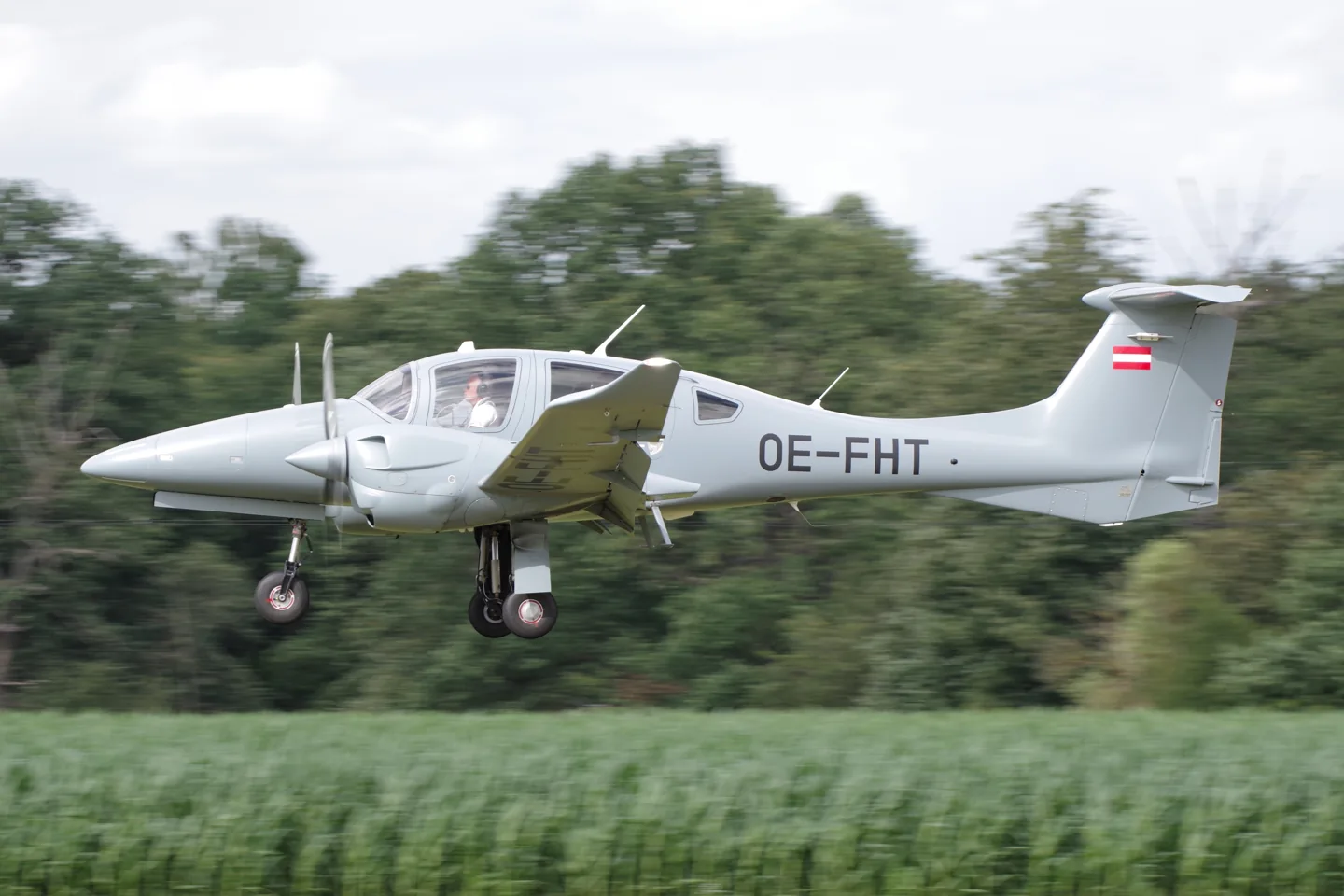
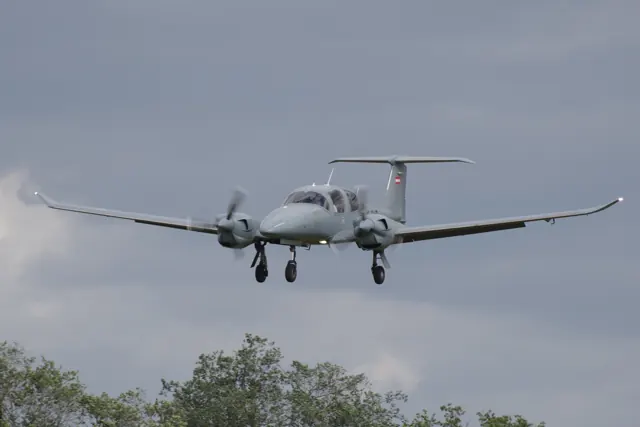
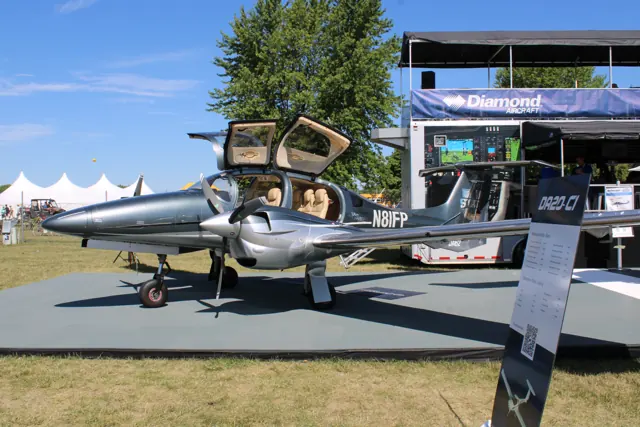
The DA62 expanded Diamond's touring-aircraft range with a larger twin-engine cabin. Its long wing, slim engine nacelles and retractable landing gear follow the company's composite-airframe design language. Cabin seating depends on configuration, with arrangements extending beyond a conventional four-seat light aircraft. Engine management and integrated avionics are central to the type's identity.
Aircraft background
Wikipedia contributors · Read more ↗A former Baron owner considers a return to twins
Snow brought experience owning a Seneca and Barons to a DA62 demonstration at Plant City, Florida, during the 2016 Sun 'n Fun period. His family business had subsequently moved to large singles because of fuel costs, making the Diamond's diesel engines especially interesting to him. With sales manager Brent Eddington alongside, he enjoyed the stick controls and found the cockpit comfortable.
General Aviation News, 13 November 2016. Two-person DA62 sales demonstration with Brent Eddington; published operating costs and tax advice are not reproduced.
General Aviation News · Read more ↗Into the cockpit
 YouTube
 AVweb · 10 min ·
Diamond DA62 Flight Trial
AVweb's flight trial of the Diamond DA62 twin.
Real aircraft · Diamond DA62
Watch on YouTube ↗Preview images are served by AirframeDB. Videos open on YouTube only when you choose to watch.
Meet Diamond DA62
The DA62 expanded Diamond's touring-aircraft range with a larger twin-engine cabin. Its long wing, slim engine nacelles and retractable landing gear follow the company's composite-airframe design language. Cabin seating depends on configuration, with arrangements extending beyond a conventional four-seat light aircraft.
Engine management and integrated avionics are central to the type's identity. The simulator products describe their own engine controls and cockpit functions.
Diamond DA62
Aircraft type designators
Use the code for the model you are flying. The linked authority lists the applicable aircraft.
History & design
Development milestones
First flight: 3 April 2012
Developed from: Diamond DA50
Wikipedia contributors · Diamond DA62 ↗Diamond DA62 · family/variant named by the source · Wikipedia revision 1357077196
Pilot accounts
A former Baron owner considers a return to twins
Snow brought experience owning a Seneca and Barons to a DA62 demonstration at Plant City, Florida, during the 2016 Sun 'n Fun period. His family business had subsequently moved to large singles because of fuel costs, making the Diamond's diesel engines especially interesting to him. With sales manager Brent Eddington alongside, he enjoyed the stick controls and found the cockpit comfortable. Two people aboard gave the aircraft lively acceleration, although he explicitly had not tried a maximum-weight departure.
During nearly an hour aloft, he experienced the envelope-protection system and watched an engine-out demonstration that he found easy to manage. Back at Plant City, a touch-and-go followed by a full-stop landing left him increasingly comfortable despite a lack of recent twin flying. He could picture the aircraft serving both business trips and family outings, including carrying his six grandchildren. His reaction combined a pilot's enjoyment of the flight with an owner's interest in how the aeroplane might fit everyday use.
General Aviation News, 13 November 2016. Two-person DA62 sales demonstration with Brent Eddington; published operating costs and tax advice are not reproduced.
Read the full account · General Aviation News ↗Quiet power and a cockpit that gets out of the way
Erdos flew DA62 N628DC from Diamond's London, Ontario factory with chief pilot Bill Scott. He first noticed how quickly the automated engine checks were completed and how little noise accompanied the acceleration. The aeroplane carried two people, equipment and roughly two-thirds fuel, making his performance observations specific to that loading. At altitude, the small number of engine controls stood out: the usual collection of propeller and mixture levers had given way to a much simpler arrangement.
He liked the conventional sticks and found the hand-flying response pleasant, with firm rudder forces and some adverse yaw at low speed. The stalls he explored were progressive and manageable in the tested condition. A practice engine shutdown brought prompt feathering, while sufficient trim authority helped with the remaining pedal load. He also deliberately let the bank increase to experience the electronic protection's corrective nudge. Returning to London, he enjoyed the flight enough to want another circuit before the trailing-link gear settled onto the runway.
Skies, 20 July 2017. Factory evaluation with Bill Scott in N628DC; handling observations retain the flight’s loading context.
Read the full account · Skies ↗A gusty Texas flight recalls earlier Diamond training
Goyer's DA62 flight with Trevor Mustard at San Marcos took place in strong, gusty wind. Having earned a multi-engine rating in an early DA42, Goyer could compare the new aircraft with a familiar Diamond twin. The larger cabin and gull-wing doors made boarding straightforward, while the cockpit's visibility and simple engine controls eased the start of the flight. Light loading and a substantial headwind helped produce a short departure and an energetic climb.
Steep turns, slow flight and stalls left an impression of an aircraft that felt lighter and better balanced than its size suggested. Goyer particularly wanted to explore single-engine handling, remembering the substantial pedal effort of DA42 training. With Mustard supervising a shutdown, the automatic feathering and available climb were welcome features. A pair of satisfactory landings followed despite the gusts and the years since Goyer had last landed a Diamond twin. The report's enthusiasm comes from that direct comparison, with the wind and light loading essential context for its performance impressions.
Plane + Pilot, 8 August 2016. Demonstration with Trevor Mustard at San Marcos; gusty weather and light loading, compared with earlier DA42 training.
Read the full account · Plane + Pilot ↗In your simulator
Systems, equipment and documentation for each developer’s aircraft.
Compare simulator versions →MSFS 2020DA62
Microsoft Flight Simulator · Released
DA62
Microsoft Flight Simulator · Released
MSFS 2024Diamond DA62
Microsoft Flight Simulator · Released
Diamond DA62
Microsoft Flight Simulator · Released
X-Plane 12Diamond DA62
Aerobask · Released
Diamond DA62
Aerobask · Released
Aircraft specifications
Published figures for the named real-aircraft variant. Simulator equipment and performance can differ.
| Specification | Published value |
|---|---|
| Length | 9.19 m (30 ft 2 in) |
| Wingspan | 14.55 m (47 ft 9 in) |
| Height | 2.82 m (9 ft 3 in) |
| Wing area | 17.10 m² (184.1 sq ft) |
| Empty weight | 1,570 kg (3,461 lb) |
| Max takeoff weight | 2,300 kg (5,071 lb) |
| Powerplant | 2 × Austro AE330 turbocharged 2.0 liter diesel aircraft engines , 134 kW (180 hp) each |
| Propellers | 3-bladed MT propeller MTV-6-R-C-F/CF 194-80 |
| Maximum speed | 356 km/h (221 mph, 192 kn) True Air Speed (TAS) at Maximum Continuous Power (MCP) at 14,000 ft (4,267 m). |
| Cruise speed | 317 km/h (197 mph, 171 kn) (TAS) at 75% power |
| Stall speed | 125 km/h (78 mph, 67 kn) |
| Range | 2,380 km (1,480 mi, 1,290 nmi) |
| Service ceiling | 6,096 m (20,000 ft) |
| Rate of climb | 5.2 m/s (1,029 ft/min) |
Manuals & resources
Find your next read
Choose a topic for a short introduction and a link to the original source. Simulator references identify the developer and edition they cover.
Pilot account
A former Baron owner considers a return to twinsGeneral Aviation News, 13 November 2016. Two-person DA62 sales demonstration with Brent Eddington; published operating costs and tax advice are not reproduced.
Snow brought experience owning a Seneca and Barons to a DA62 demonstration at Plant City, Florida, during the 2016 Sun 'n Fun period. His family business had subsequently moved to large singles because of fuel costs, making the Diamond's diesel engines especially interesting to him. With sales manager Brent Eddington alongside, he enjoyed the stick controls and found the cockpit comfortable.
Tom Snow
General Aviation News · Read the source ↗Quiet power and a cockpit that gets out of the waySkies, 20 July 2017. Factory evaluation with Bill Scott in N628DC; handling observations retain the flight’s loading context.
Erdos flew DA62 N628DC from Diamond's London, Ontario factory with chief pilot Bill Scott. He first noticed how quickly the automated engine checks were completed and how little noise accompanied the acceleration. The aeroplane carried two people, equipment and roughly two-thirds fuel, making his performance observations specific to that loading.
Robert Erdos
Skies · Read the source ↗Read the original documentation from the people who created it. Manuals open on their publisher’s website.
Manual
Microsoft Flight Simulator aircraft manualsMicrosoft / aircraft developersAircraft background
Diamond DA62Wikipedia contributors · Research background · Wikipedia revision 1357077196 · retrieved 2026-09-12Resource
MSFS 2020 FAQ and edition aircraft inventoryMicrosoft Sim Update 3MicrosoftProduct
DA62Aerobask · Official developer / designated store catalogue · checked 2026-09-12Type designator
ICAO Doc 8643 — aircraft type designatorsInternational Civil Aviation Organization · Public search data retrieved 2026-09-14; authority update 2026-09-03Built-in force-feedback profiles
Read the documentary basis, editable starting settings and remaining questions for the aircraft you fly. Each explanation refers to the exact profile revision shown.
Catalogue programme-20261022-v1 · 2 profile choices
Aerobask DA62
Aerobask · Free and Pro · Revision 3 · Inherited starting point
X-Plane 12
Aerobask DA62: The mechanical elevator linkage motivates sustained aerodynamic resistance.
Diamond DA62
Free and Pro · Revision 2 · Partial review
MSFS 2020 · MSFS 2024 · X-Plane 12
Diamond DA62: The mechanical elevator linkage motivates sustained aerodynamic resistance.
Diamond DA62
Diamond DA62: The mechanical elevator linkage motivates sustained aerodynamic resistance.
Aircraft and simulator scope
- Diamond DA62 · MSFS 2020 · family starting point
- Diamond DA62 · MSFS 2024 · family starting point
- Diamond DA62 · X-Plane 12 · family starting point
Diamond DA62 · The source describes Aerobask's DA62 and its X-Plane 12 availability.
The simulator model and controls
The DA62 expanded Diamond's touring-aircraft range with a larger twin-engine cabin. Its long wing, slim engine nacelles and retractable landing gear follow the company's composite-airframe design language. Cabin seating depends on configuration, with arrangements extending beyond a conventional four-seat light aircraft.
This starting point selects Diamond DA62. Its aircraft-level settings do not select a particular developer’s custom systems.
How this profile feels
The mechanical elevator linkage motivates sustained aerodynamic resistance. Spring resistance builds with the selected airspeed response. A separate aerodynamic term adds speed-dependent control load.
Pitch trim and rudder trim are separate; the latter does not establish pilot roll trim. Valid trim provides the configured pressure relief. Autopilot following is enabled for supported control references.
Controls and trim
The DA62 uses twin diesel piston engines and electronic engine controls. Its flight manual identifies steel elevator pushrods with bellcranks and separate pitch and rudder trim wheels. Aerobask’s enhanced G1000 and EECU implementation is its own cockpit rendition.
About the values
The gains are normalized profile settings. They describe the chosen effect balance; hand force depends on the device and its output limits. IAS references are tuning values rather than operating limits. Physical acceptance of this revision remains pending.
What the documentation establishes
The source describes Aerobask's DA62 and its X-Plane 12 availability.
Aerobask names AE330 common-rail propulsion and EECU single-lever control; it does not document flap detents.
Documentary review and sources
These decisions describe the documentary basis and remaining gaps for this revision. Aircraft documentation and a starting setting describe different kinds of evidence.
Aircraft and variant
ReviewedThis starting point selects Diamond DA62. Its aircraft-level settings do not select a particular developer’s custom systems.
Flight controls
Not yet reviewedThe DA62 uses twin diesel piston engines and electronic engine controls. Its flight manual identifies steel elevator pushrods with bellcranks and separate pitch and rudder trim wheels. Aerobask’s enhanced G1000 and EECU implementation is its own cockpit rendition.
Trim
Not yet reviewedPitch trim and rudder trim are separate; the latter does not establish pilot roll trim. Pitch authority 0.3 provides load relief and permitted centre movement; roll authority is 0.
Autopilot and stability
Not yet reviewedFollowing is on at 0.1 authority when a supported, valid autopilot control reference is available.
Equipment
ReviewedGear, flap and ground cues follow the selected settings and available simulator-reported states.
Speeds and limits
Not yet reviewedThe indicated-speed references set the profile response scale; they are separate from aircraft operating limits.
Simulator integration
Not yet reviewedThe profile targets msfs2020, msfs2024, xplane12. Add-on-specific controls use only the supported references configured by this profile.
Force-feedback settings
Not yet reviewedThe settings define the profile’s effect balance. Device output limits affect physical hand force.
Starting settings and their rationale
These configured values are starting estimates. The explanations describe what each setting controls; physical validation appears separately below.
| Setting | Starting value | What it controls and why |
|---|---|---|
| Spring strength | Starting value0.74 | What it controls and whyThe mechanical elevator linkage motivates sustained aerodynamic resistance. The baseline spring is 0.74. Its low-speed blend reaches baseline strength at 80 KIAS. |
| Master force gain | Starting value0.85 | What it controls and whyScales overall profile strength while preserving effect balance, subject to device and output limits. |
| Profile force gain | Starting value0.8 | What it controls and whyThe aerodynamic-load gain is 0.8 with an indicated-speed reference of 160 KIAS. This supplies speed-dependent loading alongside the spring. |
| Force tuning speed/reference | Starting value160.0 kt | What it controls and whySets the IAS reference for aerodynamic loading. It is an estimate, not published cruise TAS or a flight limit. |
| Spring response reference speed | Starting value80.0 kt | What it controls and whySets the IAS where the low-speed blend reaches baseline strength; high-speed stiffening also uses it. |
| Aileron force scale | Starting value0.72 | What it controls and whyRoll and pitch aerodynamic scales are 0.72 and 1, respectively. They set the aerodynamic axis balance. No custom spring-travel curve is enabled. |
| Elevator force scale | Starting value1.0 | What it controls and whyScales pitch aerodynamic loading; pitch spring travel and trim responses are separate settings. |
| Trim feel | Starting valueEnabled | What it controls and whyRetained for compatibility and group membership. Trim relief, rather than this flag, controls centre movement. |
| Trim relief | Starting valueEnabled | What it controls and whyAllows trim relief with supported control law and valid telemetry. Axis authorities set its amount. |
| Autopilot follow | Starting valueEnabled | What it controls and whyFollowing is on at 0.1 authority when a supported, valid autopilot control reference is available. |
| Autopilot neutral hold | Starting valueDisabled | What it controls and whyPermits centering hold during a supported AP state, separate from following a moving target. |
| Output force limit | Starting value0.55 | What it controls and whyCaps directed-force output. Native spring effects and device limits remain separate. |
All 44 starting settings and their rationale
The settings define the profile’s effect balance. Device output limits affect physical hand force.
| Setting | Starting value | What it controls and why |
|---|---|---|
| Spring strength | Starting value0.74 | What it controls and whyThe mechanical elevator linkage motivates sustained aerodynamic resistance. The baseline spring is 0.74. Its low-speed blend reaches baseline strength at 80 KIAS. |
| Spring deadband | Starting value0.045 | What it controls and whySets travel around the centre before the baseline spring resists. Smaller values engage it sooner. |
| Profile force gain | Starting value0.8 | What it controls and whyThe aerodynamic-load gain is 0.8 with an indicated-speed reference of 160 KIAS. This supplies speed-dependent loading alongside the spring. |
| Master force gain | Starting value0.85 | What it controls and whyScales overall profile strength while preserving effect balance, subject to device and output limits. |
| QBlend Enabled | Starting valueEnabled | What it controls and whyAllows baseline spring strength to rise with indicated airspeed where the control law permits it. |
| QSpring Minimum Factor | Starting value0.5 | What it controls and whySets low-speed spring strength as a fraction of baseline when blending is enabled. One keeps full strength. |
| QSpring Start Knots | Starting value20 kt | What it controls and whySets the IAS where the low-speed spring blend starts rising. This is a feel threshold, not a flight limit. |
| Spring response reference speed | Starting value80.0 kt | What it controls and whySets the IAS where the low-speed blend reaches baseline strength; high-speed stiffening also uses it. |
| Force tuning speed/reference | Starting value160.0 kt | What it controls and whySets the IAS reference for aerodynamic loading. It is an estimate, not published cruise TAS or a flight limit. |
| Airspeed spring stiffening gain | Starting value0.15 | What it controls and whyThe high-speed spring-stiffening gain is 0.15. It strengthens the permitted spring response above 80 KIAS, with the squared-speed ratio capped at 5. |
| Airspeed spring stiffening limit | Starting value5 | What it controls and whyLimits the squared airspeed ratio used for high-speed spring stiffening; it is not a device-force cap. |
| Aileron force scale | Starting value0.72 | What it controls and whyRoll and pitch aerodynamic scales are 0.72 and 1, respectively. They set the aerodynamic axis balance. No custom spring-travel curve is enabled. |
| Elevator force scale | Starting value1.0 | What it controls and whyScales pitch aerodynamic loading; pitch spring travel and trim responses are separate settings. |
| Output force limit | Starting value0.55 | What it controls and whyCaps directed-force output. Native spring effects and device limits remain separate. |
| Trim feel | Starting valueEnabled | What it controls and whyRetained for compatibility and group membership. Trim relief, rather than this flag, controls centre movement. |
| Trim relief | Starting valueEnabled | What it controls and whyAllows trim relief with supported control law and valid telemetry. Axis authorities set its amount. |
| Elevator Authority | Starting value0.3 | What it controls and whyPitch trim and rudder trim are separate; the latter does not establish pilot roll trim. Pitch authority 0.3 provides load relief and permitted centre movement; roll authority is 0. |
| Aileron Authority | Starting value0 | What it controls and whyScales supported roll-trim relief and permitted centre movement. Zero removes roll response. |
| Force Trim Enabled | Starting valueDisabled | What it controls and whyEnables local force trim, separate from aircraft-owned trim and add-on integration qualification. |
| GLoad Enabled | Starting valueEnabled | What it controls and whyAllows load-factor changes to modify permitted spring laws. Passive fly-by-wire feel can suppress it. |
| Rate Damping Enabled | Starting valueEnabled | What it controls and whyEnables rate damping with the configured coefficients and control law. |
| Autopilot follow | Starting valueEnabled | What it controls and whyFollowing is on at 0.1 authority when a supported, valid autopilot control reference is available. |
| Autopilot follow authority | Starting value0.1 | What it controls and whySets admitted AP-follow gain, not a percentage of travel. Runtime ownership and input limits still apply. |
| Autopilot neutral hold | Starting valueDisabled | What it controls and whyPermits centering hold during a supported AP state, separate from following a moving target. |
| Autopilot neutral hold strength | Starting value0.6 | What it controls and whySets admitted AP neutral-hold strength; inactive while neutral hold is disabled. |
| Enabled | Starting valueEnabled | What it controls and whyEnables aerodynamic cues; each still needs nonzero strength and its simulator conditions. |
| Gain | Starting value0.35 | What it controls and whySets stall-buffet strength. Zero removes the cue without changing simulator stalls or warnings. |
| Gain | Starting value0 | What it controls and whySets high-Mach buffet strength; onset and full-strength thresholds are separate. |
| Gain | Starting value0.14 | What it controls and whySets flap buffet at the configured position and speed gates. Flap movement texture is separate. |
| Maximum flap index | Starting value2 | What it controls and whySets the final flap index for detent normalization. UP plus three detents uses maximum index3. |
| Minimum flap index | Starting value2 | What it controls and whySets the first flap detent that admits buffet; this is a handle index, not degrees. |
| Gain | Starting value0.1 | What it controls and whySets gear aerodynamic buffet; movement and ground-contact cues are separate. |
| Shaker Enabled | Starting valueDisabled | What it controls and whyPermits shaker at supported warning conditions; the switch does not establish aircraft equipment. |
| Stick shaker amplitude | Starting value0.5 | What it controls and whySets triggered shaker strength; inactive while the shaker feature is disabled. |
| Enabled | Starting valueEnabled | What it controls and whyEnables ground effects; each still needs its own strength and contact or motion telemetry. |
| Gain | Starting value0.4 | What it controls and whySets rolling texture strength, modified by speed, surface and undercarriage configuration. |
| Gain | Starting value0.25 | What it controls and whySets gear-bump texture during ground motion, separate from touchdown impact. |
| Gain | Starting value0.65 | What it controls and whySets landing-impact strength; landing telemetry and response shape determine the pulse. |
| Gain | Starting value0 | What it controls and whySets reverse-thrust vibration with valid reverser and engine conditions. Zero removes the cue. |
| Enabled | Starting valueEnabled | What it controls and whyEnables engine cues with nonzero settings and valid running-engine telemetry. |
| Gain | Starting value0.12 | What it controls and whySets estimated engine vibration using configured telemetry and response, not measured cockpit vibration. |
| Enabled | Starting valueEnabled | What it controls and whyEnables accessory cues with configured strengths and observed accessory movement. |
| Gain | Starting value0.12 | What it controls and whySets texture from observed flap movement; a command without movement does not establish the cue. |
| Gain | Starting value0.12 | What it controls and whySets texture from observed gear movement, separate from aerodynamic and touchdown effects. |
Limits and open questions
- The page does not describe DA62 primary-control linkages.
- No trim mechanism or relief gradient is supplied by the retained DA62 page.
- G1000 integration is documented, without an exact autopilot mechanism or external response contract.
- No applicable indicated-speed or loading reference appears in this feature page.
- Custom avionics and FADEC features do not establish external trim or autopilot telemetry.
- The developer's model and sound descriptions supply no measured stick forces or cockpit vibration amplitudes.
- Diamond DA62 documentary evidence does not establish force-feedback hardware acceptance.
Physical validation
No physical force validation is recorded in this public catalogue for this revision. Documentary review and software checks do not establish how a particular device feels.
Discuss this aircraft (0)
Questions, observations and useful sources from the community.
No published discussions yet. Bring a question or share a useful source.
Open aircraft discussions →Content expanded · What’s new
Something missing or a source that needs attention?
Suggest a correction ↗