

Start here
A few places to begin, from the aircraft’s story to the people who fly it.
Meet the aircraft
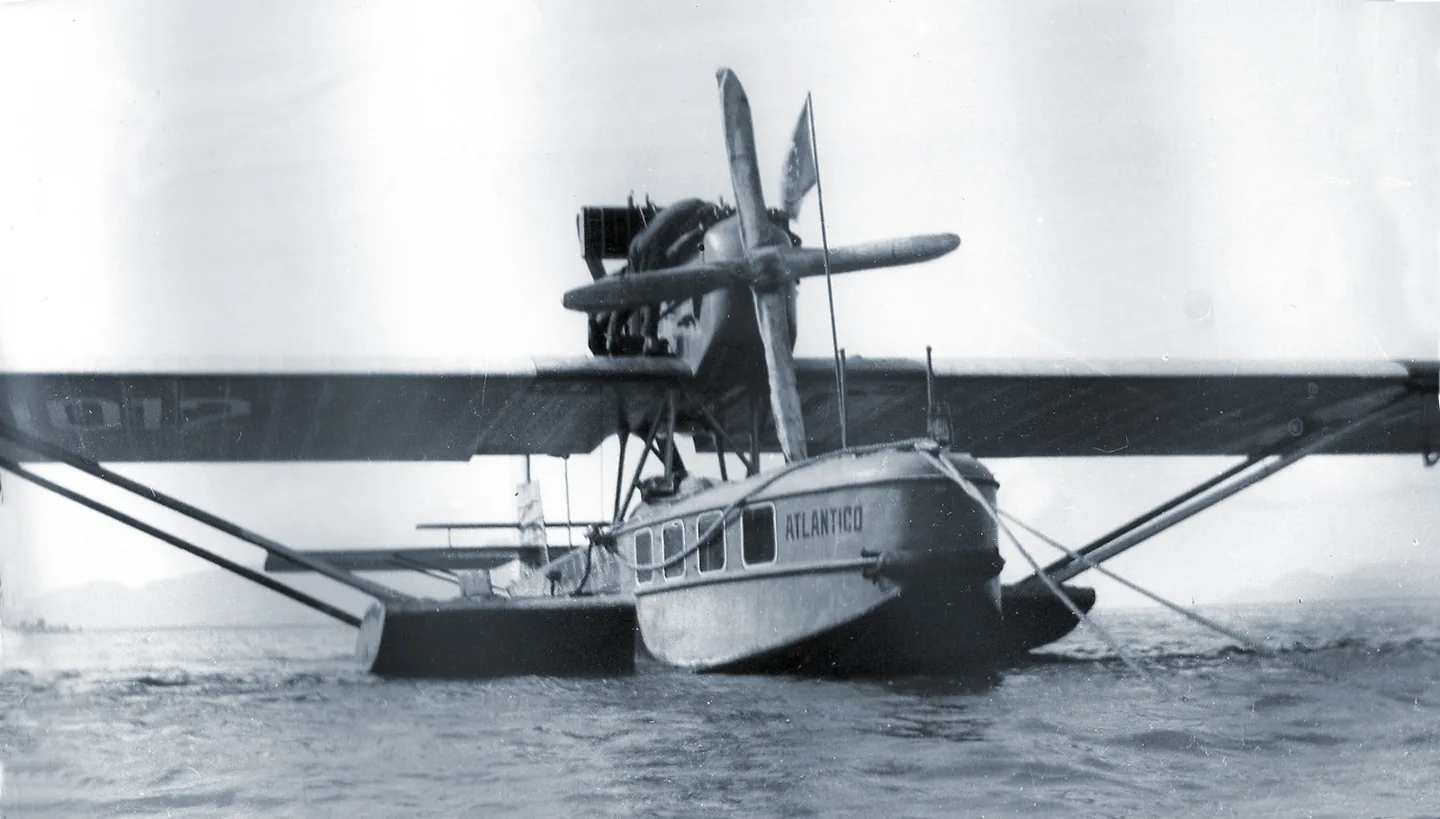
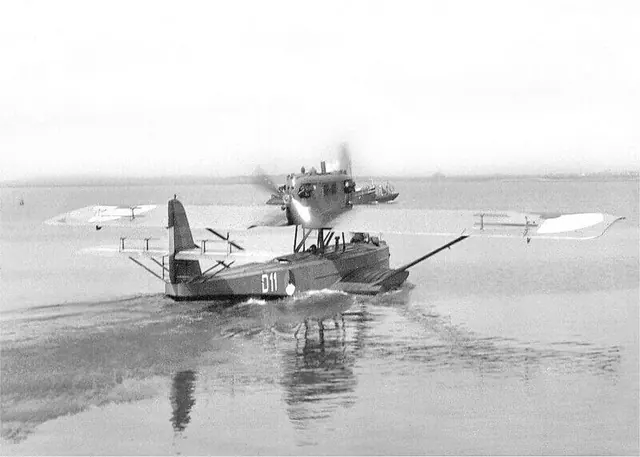
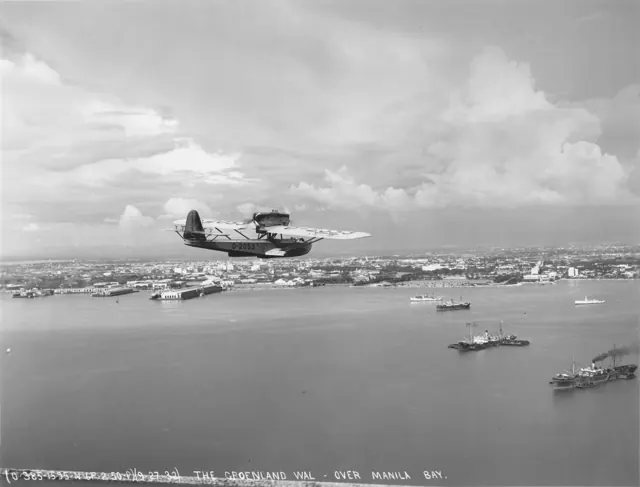
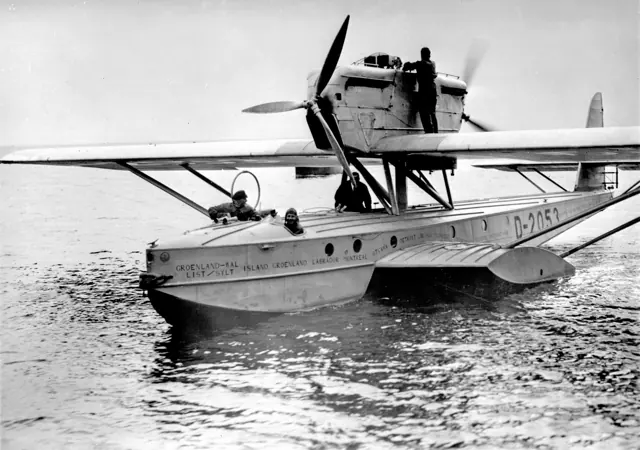
The Wal, German for whale, became an important Dornier flying-boat design. Its engines were arranged in a tractor-and-pusher pair, with one propeller facing forward and the other aft. The hull and stabilising side structures reflect its water-based transport role. Civilian, military and long-distance expedition aircraft used the basic design.
Aircraft background
Wikipedia contributors · Read more ↗The ice changes the plan for getting home
Riiser-Larsen recalled planning for broad ice floes and usable stretches of open water. Once the expedition reached the polar pack, those expectations failed. The crews prepared both aircraft for departure, then concentrated their effort on the one best placed to get them home. He remained fond of the Wal.
His own chapter, The Navigator’s Task, printed pages 145–151. Pilot of N 25 on the 1925 expedition; Amundsen was its navigator.
Dodd, Mead and Company / Project Gutenberg · Read more ↗Two engines on one centreline
The November 2023 guide documents the MSFS 2020 Wal’s separate engine controls. It provides cockpit background; this older manual does not establish unchanged MSFS 2024 controls.
Do J Wal · Microsoft Flight Simulator · MSFS 2024
Microsoft / aircraft developers · Read more ↗Into the cockpit
 YouTube
 Microsoft Flight Simulator · 2 min ·
Microsoft Flight Simulator | Local Legend 3: Dornier Do J Wal
Microsoft introduces its rendition of the Dornier Wal flying boat.
Simulator · Microsoft Dornier Wal · MSFS
Watch on YouTube ↗Preview images are served by AirframeDB. Videos open on YouTube only when you choose to watch.
Meet Dornier Do J Wal
The Wal, German for whale, became an important Dornier flying-boat design. Its engines were arranged in a tractor-and-pusher pair, with one propeller facing forward and the other aft. The hull and stabilising side structures reflect its water-based transport role.
Civilian, military and long-distance expedition aircraft used the basic design. It offers an unusual comparison with later flying boats: two engines share the centreline rather than occupying separate wing nacelles, and the cockpit belongs to the early years of long-range aerial navigation.
Dornier Do J Wal
Aircraft type designators
A model-specific ICAO or FAA designator has not been confirmed in the references reviewed for this aircraft.
History & design
One flying boat connects polar exploration with an Atlantic crossing
NDR identifies Gronau’s D-1422 as the aircraft previously flown as N 25 during Amundsen’s 1925 expedition. It subsequently carried Gronau and his crew from Sylt to New York in 1930, linking two different journeys in the same airframe’s history.
Norddeutscher Rundfunk · Tollkühner Plan von 1930: Per Flugboot von Sylt nach New York ↗Airframe connection only; the article’s first-crossing superlative is not adopted
Pilot accounts
The ice changes the plan for getting home
Riiser-Larsen recalled planning for broad ice floes and usable stretches of open water. Once the expedition reached the polar pack, those expectations failed. The crews prepared both aircraft for departure, then concentrated their effort on the one best placed to get them home.
He remained fond of the Wal. Its easy departure from King’s Bay had suggested that it could carry more, a thought that returned when food and tobacco grew scarce. Even then, the men concluded that the smaller load had been sensible. Confidence in the aircraft coexisted with an admission that their assumptions about the ice were wrong.
His own chapter, The Navigator’s Task, printed pages 145–151. Pilot of N 25 on the 1925 expedition; Amundsen was its navigator.
Read the full account · Dodd, Mead and Company / Project Gutenberg ↗An anxious start gives way to the relief of being airborne
Dietrichson heard a troubling noise while N 24 was being moved into position. He believed some hull rivets had failed, but expected the aircraft to cope once fuel consumption had lightened it. Delaying for repairs could mean losing the favourable weather they had waited for.
When water began rising around and inside the aircraft, he applied power. The approaching glacier looked alarming, but the increasing airspeed reassured him. Getting airborne brought relief and admiration for the heavily laden Wal. Looking back, he remembered both the uneasy preparations and the exhilaration of beginning the expedition, after the work of getting ready.
His own chapter about N 24, printed pages 222–225. The two accounts share one expedition volume and a combined 200-word summary.
Read the full account · Dodd, Mead and Company / Project Gutenberg ↗A promise to avoid another crossing does not last
Gronau remembered the weather between Iceland and Greenland as so bad that he doubted whether his crew would reach New York. Engine noise made written messages the means of communication aboard the Wal. After the 1930 arrival, he reportedly told a newspaper that one crossing was enough and he would not repeat it.
The retrospective follows what happened instead: further long flights, culminating in the 1932 journey around the world. That expedition brought another anxious interruption when a cooling-system problem forced the flying boat onto the sea. A British ship responded to its distress call and towed it towards help. Repairs allowed the journey to continue. His earlier misgivings had not ended the desire to keep flying farther.
Retrospective published for his eightieth birthday. The 1930 northern Atlantic flight used D-1422; the 1932 world flight used the later D-2053.
Read the full account · Das Ostpreußenblatt ↗In your simulator
Systems, equipment and documentation for each developer’s aircraft.
Compare simulator versions →MSFS 2024Do J Wal
Microsoft Flight Simulator · Released
Do J Wal
Microsoft Flight Simulator · Released
MSFS 2020Do J Wal
Microsoft Flight Simulator · Released
Do J Wal
Microsoft Flight Simulator · Released
Manuals & resources
Find your next read
Choose a topic for a short introduction and a link to the original source. Simulator references identify the developer and edition they cover.
Simulator documentation
Two engines on one centrelineDo J Wal · Microsoft Flight Simulator · MSFS 2024
The November 2023 guide documents the MSFS 2020 Wal’s separate engine controls. It provides cockpit background; this older manual does not establish unchanged MSFS 2024 controls.
Legacy guide; MSFS 2024 interface remains unverified
Microsoft / aircraft developers · Read the source ↗Choose cockpit starting or the wing-mounted crankDo J Wal · Microsoft Flight Simulator · MSFS 2020
The guide offers cockpit starting controls and an alternative crank reached from the left wing. These reproduce different parts of starting the engines in the simulation.
November 2023 MSFS 2020 guide · PDF pages 3–6
Microsoft / aircraft developers · Read the source ↗Buoy controls sit between the seatsDo J Wal · Microsoft Flight Simulator · MSFS 2020
Two switches between the seats deploy and retrieve the buoys. The guide applies this feature to all included Wal variants.
MSFS 2020 guide · PDF page 7
Microsoft / aircraft developers · Read the source ↗Explore the cabin through the cockpit hatchesDo J Wal · Microsoft Flight Simulator · MSFS 2020
The Cabina hatches respond to mouse clicks from inside the cockpit. The guide also describes moving along the deck and into the cabin and cargo spaces.
MSFS 2020 guide · PDF page 17
Microsoft / aircraft developers · Read the source ↗A restart may need the fuel valve resetDo J Wal · Microsoft Flight Simulator · MSFS 2020
The guide notes that an automatic stop can leave fuel unavailable on restart. It instructs the user to close and reopen the fuel shutoff valve.
MSFS 2020 guide · PDF page 6; documented workaround, not a current runtime test
Microsoft / aircraft developers · Read the source ↗The Cabina radio compass has two modesDo J Wal · Microsoft Flight Simulator · MSFS 2020
MAN uses a manually set course. VOR requires the battery, radio master and a received NAV signal. The guide restricts this radio-compass feature to the Cabina variant.
MSFS 2020 guide · PDF page 15, visually checked
Microsoft / aircraft developers · Read the source ↗Pilot account
The ice changes the plan for getting homeHis own chapter, The Navigator’s Task, printed pages 145–151. Pilot of N 25 on the 1925 expedition; Amundsen was its navigator.
Riiser-Larsen recalled planning for broad ice floes and usable stretches of open water. Once the expedition reached the polar pack, those expectations failed. The crews prepared both aircraft for departure, then concentrated their effort on the one best placed to get them home. He remained fond of the Wal. Its easy departure from King’s Bay had suggested that it could carry more, a thought that returned when food and tobacco grew scarce.
Hjalmar Riiser-Larsen
Dodd, Mead and Company / Project Gutenberg · Read the source ↗An anxious start gives way to the relief of being airborneHis own chapter about N 24, printed pages 222–225. The two accounts share one expedition volume and a combined 200-word summary.
Dietrichson heard a troubling noise while N 24 was being moved into position. He believed some hull rivets had failed, but expected the aircraft to cope once fuel consumption had lightened it. Delaying for repairs could mean losing the favourable weather they had waited for. When water began rising around and inside the aircraft, he applied power. The approaching glacier looked alarming, but the increasing airspeed reassured him.
Leif Dietrichson
Dodd, Mead and Company / Project Gutenberg · Read the source ↗Read the original documentation from the people who created it. Manuals open on their publisher’s website.
Manual
Dornier Do J Wal ManualMicrosoft / aircraft developers Microsoft Flight Simulator aircraft manualsMicrosoft / aircraft developersAircraft background
Dornier Do J WalWikipedia contributors · Research background · Wikipedia revision 997063021 · retrieved 2026-09-12 Tollkühner Plan von 1930: Per Flugboot von Sylt nach New YorkNorddeutscher Rundfunk · Stefanie Lambernd · 18 August 2025Resource
MSFS 2024 FAQ and edition aircraft inventoryMicrosoftDeveloper documentation
Local Legend III: Dornier Do J WalMicrosoft Flight Simulator Team · 2022-03-29 · release and package scopeBuilt-in force-feedback profiles
Read the documentary basis, editable starting settings and remaining questions for the aircraft you fly. Each explanation refers to the exact profile revision shown.
Catalogue programme-20261022-v1 · 1 profile choice
Dornier Do J Wal
Free and Pro · Revision 2 · Partial review
MSFS 2024 · MSFS 2020
Dornier Do J Wal: The chosen response supplies the flying boat’s sustained control resistance.
Dornier Do J Wal
Dornier Do J Wal: The chosen response supplies the flying boat’s sustained control resistance.
Aircraft and simulator scope
- Dornier Do J Wal · MSFS 2024 · family starting point
- Dornier Do J Wal · MSFS 2020 · family starting point
Dornier Do J Wal · The handbook and official release describe the DoJ Wal simulator aircraft and its historical flying-boat configuration.
The simulator model and controls
The Wal, German for whale, became an important Dornier flying-boat design. Its engines were arranged in a tractor-and-pusher pair, with one propeller facing forward and the other aft. The hull and stabilising side structures reflect its water-based transport role.
This starting point selects Dornier Do J Wal. Its aircraft-level settings do not select a particular developer’s custom systems.
How this profile feels
The chosen response supplies the flying boat’s sustained control resistance. Spring resistance builds with the selected airspeed response. A separate aerodynamic term adds speed-dependent control load.
Pitch relief remains distinct from the engine pair and water-contact arrangement. Valid trim provides the configured pressure relief. Autopilot following is off.
Controls and trim
The Wal places a tractor-and-pusher engine pair above a flying-boat hull. Civil, military and expedition variants used that centreline propulsion arrangement. Water operation and early navigation equipment form the aircraft’s transport context around its period controls.
About the values
The gains are normalized profile settings. They describe the chosen effect balance; hand force depends on the device and its output limits. IAS references are tuning values rather than operating limits. Physical acceptance of this revision remains pending.
What the documentation establishes
The handbook and official release describe the DoJ Wal simulator aircraft and its historical flying-boat configuration.
The handbook identifies hand-wheel and foot operation of elevator and rudder. It does not establish detailed linkage or hand-force values.
The handbook explicitly explains the absence of wing flaps and identifies the flying-boat hull as its contact configuration.
Documentary review and sources
These decisions describe the documentary basis and remaining gaps for this revision. Aircraft documentation and a starting setting describe different kinds of evidence.
Aircraft and variant
ReviewedThis starting point selects Dornier Do J Wal. Its aircraft-level settings do not select a particular developer’s custom systems.
Flight controls
ReviewedThe Wal places a tractor-and-pusher engine pair above a flying-boat hull. Civil, military and expedition variants used that centreline propulsion arrangement. Water operation and early navigation equipment form the aircraft’s transport context around its period controls.
Trim
Not yet reviewedPitch relief remains distinct from the engine pair and water-contact arrangement. Pitch authority 0.3 provides load relief and permitted centre movement; roll authority is 0.
Autopilot and stability
Not yet reviewedAutopilot following is off; the configured spring and load retain the hardware feel.
Equipment
ReviewedGear, flap and ground cues follow the selected settings and available simulator-reported states.
Speeds and limits
Not yet reviewedThe indicated-speed references set the profile response scale; they are separate from aircraft operating limits.
Simulator integration
Not yet reviewedThe profile targets msfs2024, msfs2020. Add-on-specific controls use only the supported references configured by this profile.
Force-feedback settings
Not yet reviewedThe settings define the profile’s effect balance. Device output limits affect physical hand force.
Starting settings and their rationale
These configured values are starting estimates. The explanations describe what each setting controls; physical validation appears separately below.
| Setting | Starting value | What it controls and why |
|---|---|---|
| Spring strength | Starting value0.74 | What it controls and whyThe chosen response supplies the flying boat’s sustained control resistance. The baseline spring is 0.74. Its low-speed blend reaches baseline strength at 45 KIAS. |
| Master force gain | Starting value0.85 | What it controls and whyScales overall profile strength while preserving effect balance, subject to device and output limits. |
| Profile force gain | Starting value0.8 | What it controls and whyThe aerodynamic-load gain is 0.8 with an indicated-speed reference of 90 KIAS. This supplies speed-dependent loading alongside the spring. |
| Force tuning speed/reference | Starting value90.0 kt | What it controls and whySets the IAS reference for aerodynamic loading. It is an estimate, not published cruise TAS or a flight limit. |
| Spring response reference speed | Starting value45.0 kt | What it controls and whySets the IAS where the low-speed blend reaches baseline strength; high-speed stiffening also uses it. |
| Aileron force scale | Starting value0.6 | What it controls and whyRoll and pitch aerodynamic scales are 0.6 and 0.78, respectively. They set the aerodynamic axis balance. No custom spring-travel curve is enabled. |
| Elevator force scale | Starting value0.78 | What it controls and whyScales pitch aerodynamic loading; pitch spring travel and trim responses are separate settings. |
| Trim feel | Starting valueEnabled | What it controls and whyRetained for compatibility and group membership. Trim relief, rather than this flag, controls centre movement. |
| Trim relief | Starting valueEnabled | What it controls and whyAllows trim relief with supported control law and valid telemetry. Axis authorities set its amount. |
| Autopilot follow | Starting valueDisabled | What it controls and whyAutopilot following is off; the configured spring and load retain the hardware feel. |
| Autopilot neutral hold | Starting valueDisabled | What it controls and whyPermits centering hold during a supported AP state, separate from following a moving target. |
| Output force limit | Starting value0.55 | What it controls and whyCaps directed-force output. Native spring effects and device limits remain separate. |
All 44 starting settings and their rationale
The settings define the profile’s effect balance. Device output limits affect physical hand force.
| Setting | Starting value | What it controls and why |
|---|---|---|
| Spring strength | Starting value0.74 | What it controls and whyThe chosen response supplies the flying boat’s sustained control resistance. The baseline spring is 0.74. Its low-speed blend reaches baseline strength at 45 KIAS. |
| Spring deadband | Starting value0.045 | What it controls and whySets travel around the centre before the baseline spring resists. Smaller values engage it sooner. |
| Profile force gain | Starting value0.8 | What it controls and whyThe aerodynamic-load gain is 0.8 with an indicated-speed reference of 90 KIAS. This supplies speed-dependent loading alongside the spring. |
| Master force gain | Starting value0.85 | What it controls and whyScales overall profile strength while preserving effect balance, subject to device and output limits. |
| QBlend Enabled | Starting valueEnabled | What it controls and whyAllows baseline spring strength to rise with indicated airspeed where the control law permits it. |
| QSpring Minimum Factor | Starting value0.5 | What it controls and whySets low-speed spring strength as a fraction of baseline when blending is enabled. One keeps full strength. |
| QSpring Start Knots | Starting value12.6 kt | What it controls and whySets the IAS where the low-speed spring blend starts rising. This is a feel threshold, not a flight limit. |
| Spring response reference speed | Starting value45.0 kt | What it controls and whySets the IAS where the low-speed blend reaches baseline strength; high-speed stiffening also uses it. |
| Force tuning speed/reference | Starting value90.0 kt | What it controls and whySets the IAS reference for aerodynamic loading. It is an estimate, not published cruise TAS or a flight limit. |
| Airspeed spring stiffening gain | Starting value0.15 | What it controls and whyThe high-speed spring-stiffening gain is 0.15. It strengthens the permitted spring response above 45 KIAS, with the squared-speed ratio capped at 5. |
| Airspeed spring stiffening limit | Starting value5 | What it controls and whyLimits the squared airspeed ratio used for high-speed spring stiffening; it is not a device-force cap. |
| Aileron force scale | Starting value0.6 | What it controls and whyRoll and pitch aerodynamic scales are 0.6 and 0.78, respectively. They set the aerodynamic axis balance. No custom spring-travel curve is enabled. |
| Elevator force scale | Starting value0.78 | What it controls and whyScales pitch aerodynamic loading; pitch spring travel and trim responses are separate settings. |
| Output force limit | Starting value0.55 | What it controls and whyCaps directed-force output. Native spring effects and device limits remain separate. |
| Trim feel | Starting valueEnabled | What it controls and whyRetained for compatibility and group membership. Trim relief, rather than this flag, controls centre movement. |
| Trim relief | Starting valueEnabled | What it controls and whyAllows trim relief with supported control law and valid telemetry. Axis authorities set its amount. |
| Elevator Authority | Starting value0.3 | What it controls and whyPitch relief remains distinct from the engine pair and water-contact arrangement. Pitch authority 0.3 provides load relief and permitted centre movement; roll authority is 0. |
| Aileron Authority | Starting value0 | What it controls and whyScales supported roll-trim relief and permitted centre movement. Zero removes roll response. |
| Force Trim Enabled | Starting valueDisabled | What it controls and whyEnables local force trim, separate from aircraft-owned trim and add-on integration qualification. |
| GLoad Enabled | Starting valueEnabled | What it controls and whyAllows load-factor changes to modify permitted spring laws. Passive fly-by-wire feel can suppress it. |
| Rate Damping Enabled | Starting valueEnabled | What it controls and whyEnables rate damping with the configured coefficients and control law. |
| Autopilot follow | Starting valueDisabled | What it controls and whyAutopilot following is off; the configured spring and load retain the hardware feel. |
| Autopilot follow authority | Starting value0.1 | What it controls and whySets admitted AP-follow gain, not a percentage of travel. Runtime ownership and input limits still apply. |
| Autopilot neutral hold | Starting valueDisabled | What it controls and whyPermits centering hold during a supported AP state, separate from following a moving target. |
| Autopilot neutral hold strength | Starting value0.6 | What it controls and whySets admitted AP neutral-hold strength; inactive while neutral hold is disabled. |
| Enabled | Starting valueEnabled | What it controls and whyEnables aerodynamic cues; each still needs nonzero strength and its simulator conditions. |
| Gain | Starting value0.35 | What it controls and whySets stall-buffet strength. Zero removes the cue without changing simulator stalls or warnings. |
| Gain | Starting value0 | What it controls and whySets high-Mach buffet strength; onset and full-strength thresholds are separate. |
| Gain | Starting value0 | What it controls and whySets flap buffet at the configured position and speed gates. Flap movement texture is separate. |
| Maximum flap index | Starting value1 | What it controls and whySets the final flap index for detent normalization. UP plus three detents uses maximum index3. |
| Minimum flap index | Starting value1 | What it controls and whySets the first flap detent that admits buffet; this is a handle index, not degrees. |
| Gain | Starting value0 | What it controls and whySets gear aerodynamic buffet; movement and ground-contact cues are separate. |
| Shaker Enabled | Starting valueDisabled | What it controls and whyPermits shaker at supported warning conditions; the switch does not establish aircraft equipment. |
| Stick shaker amplitude | Starting value0.5 | What it controls and whySets triggered shaker strength; inactive while the shaker feature is disabled. |
| Enabled | Starting valueEnabled | What it controls and whyEnables ground effects; each still needs its own strength and contact or motion telemetry. |
| Gain | Starting value0.4 | What it controls and whySets rolling texture strength, modified by speed, surface and undercarriage configuration. |
| Gain | Starting value0.25 | What it controls and whySets gear-bump texture during ground motion, separate from touchdown impact. |
| Gain | Starting value0.65 | What it controls and whySets landing-impact strength; landing telemetry and response shape determine the pulse. |
| Gain | Starting value0 | What it controls and whySets reverse-thrust vibration with valid reverser and engine conditions. Zero removes the cue. |
| Enabled | Starting valueEnabled | What it controls and whyEnables engine cues with nonzero settings and valid running-engine telemetry. |
| Gain | Starting value0.12 | What it controls and whySets estimated engine vibration using configured telemetry and response, not measured cockpit vibration. |
| Enabled | Starting valueEnabled | What it controls and whyEnables accessory cues with configured strengths and observed accessory movement. |
| Gain | Starting value0 | What it controls and whySets texture from observed flap movement; a command without movement does not establish the cue. |
| Gain | Starting value0 | What it controls and whySets texture from observed gear movement, separate from aerodynamic and touchdown effects. |
Limits and open questions
- A simulator instruction to trim for stable attitude does not establish the historical Wal's trim mechanism.
- The sources do not identify an autopilot system for this Wal configuration.
- The handbook's 50-knot takeoff example does not establish the general 90-knot loading reference.
- Cockpit operating guidance supplies no external aircraft-specific signal definitions.
- Wheel movement and hull behavior are described without a measured control-force curve or water-contact vibration transfer.
- Dornier Do J Wal documentary evidence does not establish force-feedback hardware acceptance.
Physical validation
No physical force validation is recorded in this public catalogue for this revision. Documentary review and software checks do not establish how a particular device feels.
Discuss this aircraft (0)
Questions, observations and useful sources from the community.
No published discussions yet. Bring a question or share a useful source.
Open aircraft discussions →Content expanded · What’s new
Something missing or a source that needs attention?
Suggest a correction ↗