
Start here
A few places to begin, from the aircraft’s story to the people who fly it.
Meet the aircraft
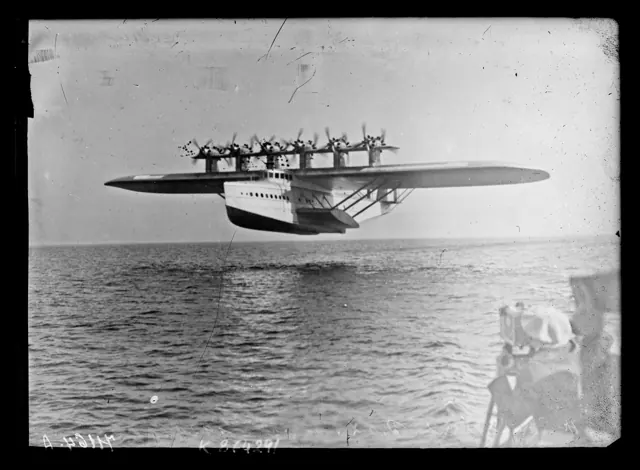
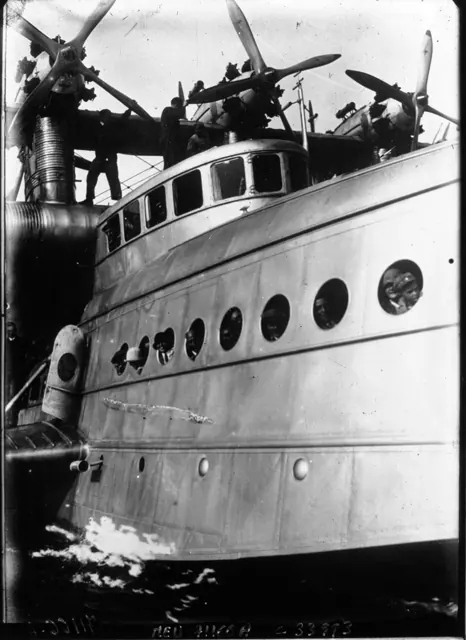
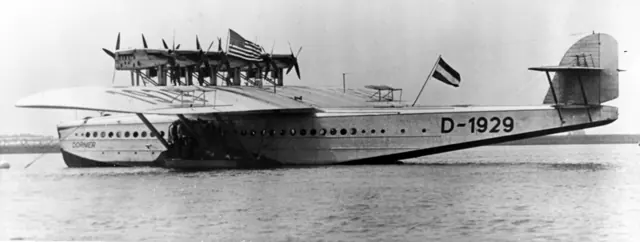
Claude Dornier's Do X was conceived on a scale far beyond the light flying boats of its era. Completed in 1929, it combined a broad hull with a high wing and six tractor-and-pusher engine pairs. Its accommodation and public demonstrations reflected ambitions for large-scale air travel over water. The aircraft's engineering is as interesting as its size.
Aircraft background
Wikipedia contributors · Read more ↗The chief pilot is there at the beginning and after a difficult return
Wagner’s first encounter with the Do X in the air reportedly came sooner than intended. During the initial trials on Lake Constance, the great flying boat lifted a few metres above the water. Bartmann attributes that description to the chief pilot’s recollections, then follows the aircraft into its subsequent test programme. Four years later, Wagner had another task that connected him with the aircraft’s changing fortunes.
Bartmann’s historical account places Wagner at the first 1929 flight and the September 1933 return after repairs. The unintended liftoff is presented as his reported recollection.
fliegermagazin · Read more ↗Managing twelve engines in the simulator
The linked August 2023 guide explains the MSFS 2020 engine controls. It provides equipment background; this older manual does not establish unchanged MSFS 2024 controls.
Do X · Microsoft Flight Simulator · MSFS 2024
Microsoft / aircraft developers · Read more ↗Into the cockpit
 YouTube
 Imagination Strikes · 4 min ·
A flight aboard the DoX - 1930
Period footage presents life aboard the Dornier Do X in 1930.
Real aircraft · Dornier Do X
Watch on YouTube ↗Preview images are served by AirframeDB. Videos open on YouTube only when you choose to watch.
Meet Dornier Do X
Claude Dornier's Do X was conceived on a scale far beyond the light flying boats of its era. Completed in 1929, it combined a broad hull with a high wing and six tractor-and-pusher engine pairs. Its accommodation and public demonstrations reflected ambitions for large-scale air travel over water.
A separate flight engineer managed the twelve engines. The simulator manual describes how that crew role is represented for a single player.
Dornier Do X
Aircraft type designators
A model-specific ICAO or FAA designator has not been confirmed in the references reviewed for this aircraft.
History & design
Engine cooling changed the aircraft before its overseas travels
The Smithsonian finding aid records difficulties cooling the original rear engines. Twelve water-cooled Curtiss engines replaced the earlier air-cooled installation, and the modified aircraft first flew in August 1930. Photographs of the initial 1929 aircraft therefore show an earlier powerplant configuration.
National Air and Space Museum Archives · Dornier Do X Photograph Album: finding aid ↗Museum collection history; album photographs have separate reuse conditions
Development milestones
Designer: Claude Dornier
First flight: 12 July 1929
Wikipedia contributors · Dornier Do X ↗Dornier Do X · family/variant named by the source · Wikipedia revision 1324113414
Pilot accounts
The chief pilot is there at the beginning and after a difficult return
Wagner’s first encounter with the Do X in the air reportedly came sooner than intended. During the initial trials on Lake Constance, the great flying boat lifted a few metres above the water. Bartmann attributes that description to the chief pilot’s recollections, then follows the aircraft into its subsequent test programme.
Four years later, Wagner had another task that connected him with the aircraft’s changing fortunes. After a landing accident at Passau, repairs took months, and he brought the Do X back to the place where it had been built. The account sets those two flights at very different moments in its life. It does not supply a detailed first-person handling report or make that return its final flight.
Bartmann’s historical account places Wagner at the first 1929 flight and the September 1933 return after repairs. The unintended liftoff is presented as his reported recollection.
Read the full account · fliegermagazin ↗The flying boat depends on a whole crew above the passenger cabin
During a New York demonstration flight, Schildhauer explained the flying boat to reporter Morris Markey. He placed value on the captain’s maritime experience: managing the crew and coordinating the machinery mattered as much as the act of flying. He compared that responsibility with running a steamship.
Schildhauer then invited Markey upstairs to the operating deck. The visit revealed the people working above the comfortable passenger rooms, with navigation and engine management occupying separate spaces. His comments presented the aircraft as a coordinated crew effort. The report records that particular flight and his assessment, without making his comparison a handling guarantee.
Copilot’s remarks during the flight reported by Morris Markey. The reporter visited the operating deck; his own role was passenger.
Read the full account · The New Yorker ↗A postcard records the excitement of joining the Atlantic crew
Strassmann’s postcard to friends expressed her delight at being allowed to join the Do X crew for its return to Europe. The opportunity followed years of flying, demonstrations and aviation promotion that had brought her into contact with manufacturers on both sides of the Atlantic. She had already made ocean crossings in airships, but this journey placed her aboard the large flying boat.
The museum account records that Captain Friedrich Christiansen handed her the controls over the ocean. Her participation therefore included flying as well as the other duties named in her appointment. The postcard conveys the excitement of securing the place; the biographical record supplies what happened aboard. Her later South American demonstration tour used a separate Klemm aircraft.
Museum biography drawing on archival material. May 1932 return crossing, signed aboard as assistant pilot and assistant paymaster; the captain gave her time at the controls.
Read the full account · National Air and Space Museum ↗In your simulator
Systems, equipment and documentation for each developer’s aircraft.
Compare simulator versions →MSFS 2024Do X
Microsoft Flight Simulator · Released
Do X
Microsoft Flight Simulator · Released
MSFS 2020Do X
Microsoft Flight Simulator · Released
Do X
Microsoft Flight Simulator · Released
Aircraft specifications
Published figures for the named real-aircraft variant. Simulator equipment and performance can differ.
| Specification | Published value |
|---|---|
| Length | 40.05 m (131 ft 5 in) |
| Wingspan | 47.8 m (156 ft 10 in) |
| Height | 10.25 m (33 ft 8 in) |
| Wing area | 486.2 m² (5,233 sq ft) |
| Empty weight | 28,000 kg (61,729 lb) |
| Gross weight | 49,000 kg (108,027 lb) |
| Powerplant | 12 × Curtiss V-1570 12-cylinder Liquid-cooled aircraft piston engines, 450 kW (600 hp) each |
| Propellers | 4-bladed fixed-pitch wooden propellers |
| Maximum speed | 242 km/h (150 mph, 131 kn) |
| Cruise speed | 170 km/h (110 mph, 92 kn) |
| Range | 1,700 km (1,100 mi, 920 nmi) |
| Service ceiling | 3,200 m (10,500 ft) |
Manuals & resources
Find your next read
Choose a topic for a short introduction and a link to the original source. Simulator references identify the developer and edition they cover.
Simulator documentation
Managing twelve engines in the simulatorDo X · Microsoft Flight Simulator · MSFS 2024
The linked August 2023 guide explains the MSFS 2020 engine controls. It provides equipment background; this older manual does not establish unchanged MSFS 2024 controls.
Legacy guide; MSFS 2024 interface remains unverified
Microsoft / aircraft developers · Read the source ↗The LOTSE panel controls the anchor and tugDo X · Microsoft Flight Simulator · MSFS 2020
The tug requires all engines off and wind below 10 knots. With tug operation enabled, separate knobs set towing speed and direction. The same panel controls the anchor.
August 2023 MSFS 2020 guide · PDF pages 4–5
Microsoft / aircraft developers · Read the source ↗Cockpit throttles depend on the engine-room clutchesDo X · Microsoft Flight Simulator · MSFS 2020
The cockpit levers command groups 1–6 and 7–12. Only coupled engines respond there; an uncoupled engine requires its individual engine-room control.
MSFS 2020 guide · PDF pages 14 and 27; coupling diagram visually checked
Microsoft / aircraft developers · Read the source ↗A separate wheel controls the water rudderDo X · Microsoft Flight Simulator · MSFS 2020
The cockpit illustration identifies a dedicated water-rudder handle wheel beside the other controls.
MSFS 2020 guide · PDF page 13
Microsoft / aircraft developers · Read the source ↗Open the windows or hide either yokeDo X · Microsoft Flight Simulator · MSFS 2020
Cockpit window handles operate the front and side windows. Pilot and copilot yokes have separate visibility controls.
MSFS 2020 guide · PDF pages 12–14
Microsoft / aircraft developers · Read the source ↗Radio navigation has its own crew stationDo X · Microsoft Flight Simulator · MSFS 2020
The radio room contains the avionics master, NAV heading selectors, ADF controls and separate NAV frequency adjustments. Its illustrated panels supplement the cockpit instruments.
MSFS 2020 guide · PDF pages 30–34
Microsoft / aircraft developers · Read the source ↗Pilot account
The chief pilot is there at the beginning and after a difficult returnBartmann’s historical account places Wagner at the first 1929 flight and the September 1933 return after repairs. The unintended liftoff is presented as his reported recollection.
Wagner’s first encounter with the Do X in the air reportedly came sooner than intended. During the initial trials on Lake Constance, the great flying boat lifted a few metres above the water. Bartmann attributes that description to the chief pilot’s recollections, then follows the aircraft into its subsequent test programme. Four years later, Wagner had another task that connected him with the aircraft’s changing fortunes.
Richard Wagner
fliegermagazin · Read the source ↗The flying boat depends on a whole crew above the passenger cabinCopilot’s remarks during the flight reported by Morris Markey. The reporter visited the operating deck; his own role was passenger.
During a New York demonstration flight, Schildhauer explained the flying boat to reporter Morris Markey. He placed value on the captain’s maritime experience: managing the crew and coordinating the machinery mattered as much as the act of flying. He compared that responsibility with running a steamship. Schildhauer then invited Markey upstairs to the operating deck.
Clarence “Dutch” Schildhauer
The New Yorker · Read the source ↗Read the original documentation from the people who created it. Manuals open on their publisher’s website.
Manual
Dornier Do X ManualMicrosoft / aircraft developers Microsoft Flight Simulator aircraft manualsMicrosoft / aircraft developersAircraft background
Dornier Do XWikipedia contributors · Research background · Wikipedia revision 1324113414 · retrieved 2026-09-12 Dornier Do X Photograph Album: finding aidNational Air and Space Museum Archives · Patricia Williams and Melissa Keiser; updated 2022 · PDF pages 3–4Resource
MSFS 2024 FAQ and edition aircraft inventoryMicrosoftDeveloper documentation
Microsoft Flight Simulator Releases Local Legend 12: The Dornier Do X Flying BoatMicrosoft Flight Simulator Team · 2023-08-23 · release and package scopeBuilt-in force-feedback profiles
Read the documentary basis, editable starting settings and remaining questions for the aircraft you fly. Each explanation refers to the exact profile revision shown.
Catalogue programme-20261022-v1 · 1 profile choice
Dornier Do X
Free and Pro · Revision 2 · Partial review
MSFS 2024 · MSFS 2020
Dornier Do X: The profile supplies selected transport resistance while engine cues remain separate.
Dornier Do X
Dornier Do X: The profile supplies selected transport resistance while engine cues remain separate.
Aircraft and simulator scope
- Dornier Do X · MSFS 2024 · family starting point
- Dornier Do X · MSFS 2020 · family starting point
Dornier Do X · The handbook and Microsoft release identify the DoX flying boat and the simulator's historical configuration.
The simulator model and controls
Claude Dornier's Do X was conceived on a scale far beyond the light flying boats of its era. Completed in 1929, it combined a broad hull with a high wing and six tractor-and-pusher engine pairs. Its accommodation and public demonstrations reflected ambitions for large-scale air travel over water.
This starting point selects Dornier Do X. Its aircraft-level settings do not select a particular developer’s custom systems.
How this profile feels
The profile supplies selected transport resistance while engine cues remain separate. Spring resistance builds with the selected airspeed response. A separate aerodynamic term adds speed-dependent control load.
Trim relief changes the configured pitch load without substituting for the engineer’s engine management. Valid trim provides the configured pressure relief. Autopilot following is off.
Controls and trim
The Do X’s six tractor-and-pusher engine pairs surrounded a large flying-boat hull. A separate flight engineer managed the engines. The 1929 aircraft’s division of crew work and twelve-engine configuration are important parts of its systems description.
About the values
The gains are normalized profile settings. They describe the chosen effect balance; hand force depends on the device and its output limits. IAS references are tuning values rather than operating limits. Physical acceptance of this revision remains pending.
What the documentation establishes
The handbook and Microsoft release identify the DoX flying boat and the simulator's historical configuration.
Twelve Curtiss V1570 piston engines are arranged in six tractor-pusher pairs on a flying-boat hull.
The release quotes 110-mph cruise and 150-mph top speed without an IAS schedule; these are not the 90-knot tuning reference.
Documentary review and sources
These decisions describe the documentary basis and remaining gaps for this revision. Aircraft documentation and a starting setting describe different kinds of evidence.
Aircraft and variant
ReviewedThis starting point selects Dornier Do X. Its aircraft-level settings do not select a particular developer’s custom systems.
Flight controls
Not yet reviewedThe Do X’s six tractor-and-pusher engine pairs surrounded a large flying-boat hull. A separate flight engineer managed the engines. The 1929 aircraft’s division of crew work and twelve-engine configuration are important parts of its systems description.
Trim
Not yet reviewedTrim relief changes the configured pitch load without substituting for the engineer’s engine management. Pitch authority 0.3 provides load relief and permitted centre movement; roll authority is 0.
Autopilot and stability
Not yet reviewedAutopilot following is off; the configured spring and load retain the hardware feel.
Equipment
ReviewedGear, flap and ground cues follow the selected settings and available simulator-reported states.
Speeds and limits
ReviewedThe indicated-speed references set the profile response scale; they are separate from aircraft operating limits.
Simulator integration
Not yet reviewedThe profile targets msfs2024, msfs2020. Add-on-specific controls use only the supported references configured by this profile.
Force-feedback settings
Not yet reviewedThe settings define the profile’s effect balance. Device output limits affect physical hand force.
Starting settings and their rationale
These configured values are starting estimates. The explanations describe what each setting controls; physical validation appears separately below.
| Setting | Starting value | What it controls and why |
|---|---|---|
| Spring strength | Starting value0.74 | What it controls and whyThe profile supplies selected transport resistance while engine cues remain separate. The baseline spring is 0.74. Its low-speed blend reaches baseline strength at 45 KIAS. |
| Master force gain | Starting value0.85 | What it controls and whyScales overall profile strength while preserving effect balance, subject to device and output limits. |
| Profile force gain | Starting value0.8 | What it controls and whyThe aerodynamic-load gain is 0.8 with an indicated-speed reference of 90 KIAS. This supplies speed-dependent loading alongside the spring. |
| Force tuning speed/reference | Starting value90.0 kt | What it controls and whySets the IAS reference for aerodynamic loading. It is an estimate, not published cruise TAS or a flight limit. |
| Spring response reference speed | Starting value45.0 kt | What it controls and whySets the IAS where the low-speed blend reaches baseline strength; high-speed stiffening also uses it. |
| Aileron force scale | Starting value0.6 | What it controls and whyRoll and pitch aerodynamic scales are 0.6 and 0.78, respectively. They set the aerodynamic axis balance. No custom spring-travel curve is enabled. |
| Elevator force scale | Starting value0.78 | What it controls and whyScales pitch aerodynamic loading; pitch spring travel and trim responses are separate settings. |
| Trim feel | Starting valueEnabled | What it controls and whyRetained for compatibility and group membership. Trim relief, rather than this flag, controls centre movement. |
| Trim relief | Starting valueEnabled | What it controls and whyAllows trim relief with supported control law and valid telemetry. Axis authorities set its amount. |
| Autopilot follow | Starting valueDisabled | What it controls and whyAutopilot following is off; the configured spring and load retain the hardware feel. |
| Autopilot neutral hold | Starting valueDisabled | What it controls and whyPermits centering hold during a supported AP state, separate from following a moving target. |
| Output force limit | Starting value0.55 | What it controls and whyCaps directed-force output. Native spring effects and device limits remain separate. |
All 44 starting settings and their rationale
The settings define the profile’s effect balance. Device output limits affect physical hand force.
| Setting | Starting value | What it controls and why |
|---|---|---|
| Spring strength | Starting value0.74 | What it controls and whyThe profile supplies selected transport resistance while engine cues remain separate. The baseline spring is 0.74. Its low-speed blend reaches baseline strength at 45 KIAS. |
| Spring deadband | Starting value0.045 | What it controls and whySets travel around the centre before the baseline spring resists. Smaller values engage it sooner. |
| Profile force gain | Starting value0.8 | What it controls and whyThe aerodynamic-load gain is 0.8 with an indicated-speed reference of 90 KIAS. This supplies speed-dependent loading alongside the spring. |
| Master force gain | Starting value0.85 | What it controls and whyScales overall profile strength while preserving effect balance, subject to device and output limits. |
| QBlend Enabled | Starting valueEnabled | What it controls and whyAllows baseline spring strength to rise with indicated airspeed where the control law permits it. |
| QSpring Minimum Factor | Starting value0.5 | What it controls and whySets low-speed spring strength as a fraction of baseline when blending is enabled. One keeps full strength. |
| QSpring Start Knots | Starting value12.6 kt | What it controls and whySets the IAS where the low-speed spring blend starts rising. This is a feel threshold, not a flight limit. |
| Spring response reference speed | Starting value45.0 kt | What it controls and whySets the IAS where the low-speed blend reaches baseline strength; high-speed stiffening also uses it. |
| Force tuning speed/reference | Starting value90.0 kt | What it controls and whySets the IAS reference for aerodynamic loading. It is an estimate, not published cruise TAS or a flight limit. |
| Airspeed spring stiffening gain | Starting value0.15 | What it controls and whyThe high-speed spring-stiffening gain is 0.15. It strengthens the permitted spring response above 45 KIAS, with the squared-speed ratio capped at 5. |
| Airspeed spring stiffening limit | Starting value5 | What it controls and whyLimits the squared airspeed ratio used for high-speed spring stiffening; it is not a device-force cap. |
| Aileron force scale | Starting value0.6 | What it controls and whyRoll and pitch aerodynamic scales are 0.6 and 0.78, respectively. They set the aerodynamic axis balance. No custom spring-travel curve is enabled. |
| Elevator force scale | Starting value0.78 | What it controls and whyScales pitch aerodynamic loading; pitch spring travel and trim responses are separate settings. |
| Output force limit | Starting value0.55 | What it controls and whyCaps directed-force output. Native spring effects and device limits remain separate. |
| Trim feel | Starting valueEnabled | What it controls and whyRetained for compatibility and group membership. Trim relief, rather than this flag, controls centre movement. |
| Trim relief | Starting valueEnabled | What it controls and whyAllows trim relief with supported control law and valid telemetry. Axis authorities set its amount. |
| Elevator Authority | Starting value0.3 | What it controls and whyTrim relief changes the configured pitch load without substituting for the engineer’s engine management. Pitch authority 0.3 provides load relief and permitted centre movement; roll authority is 0. |
| Aileron Authority | Starting value0 | What it controls and whyScales supported roll-trim relief and permitted centre movement. Zero removes roll response. |
| Force Trim Enabled | Starting valueDisabled | What it controls and whyEnables local force trim, separate from aircraft-owned trim and add-on integration qualification. |
| GLoad Enabled | Starting valueEnabled | What it controls and whyAllows load-factor changes to modify permitted spring laws. Passive fly-by-wire feel can suppress it. |
| Rate Damping Enabled | Starting valueEnabled | What it controls and whyEnables rate damping with the configured coefficients and control law. |
| Autopilot follow | Starting valueDisabled | What it controls and whyAutopilot following is off; the configured spring and load retain the hardware feel. |
| Autopilot follow authority | Starting value0.1 | What it controls and whySets admitted AP-follow gain, not a percentage of travel. Runtime ownership and input limits still apply. |
| Autopilot neutral hold | Starting valueDisabled | What it controls and whyPermits centering hold during a supported AP state, separate from following a moving target. |
| Autopilot neutral hold strength | Starting value0.6 | What it controls and whySets admitted AP neutral-hold strength; inactive while neutral hold is disabled. |
| Enabled | Starting valueEnabled | What it controls and whyEnables aerodynamic cues; each still needs nonzero strength and its simulator conditions. |
| Gain | Starting value0.35 | What it controls and whySets stall-buffet strength. Zero removes the cue without changing simulator stalls or warnings. |
| Gain | Starting value0 | What it controls and whySets high-Mach buffet strength; onset and full-strength thresholds are separate. |
| Gain | Starting value0 | What it controls and whySets flap buffet at the configured position and speed gates. Flap movement texture is separate. |
| Maximum flap index | Starting value1 | What it controls and whySets the final flap index for detent normalization. UP plus three detents uses maximum index3. |
| Minimum flap index | Starting value1 | What it controls and whySets the first flap detent that admits buffet; this is a handle index, not degrees. |
| Gain | Starting value0 | What it controls and whySets gear aerodynamic buffet; movement and ground-contact cues are separate. |
| Shaker Enabled | Starting valueDisabled | What it controls and whyPermits shaker at supported warning conditions; the switch does not establish aircraft equipment. |
| Stick shaker amplitude | Starting value0.5 | What it controls and whySets triggered shaker strength; inactive while the shaker feature is disabled. |
| Enabled | Starting valueEnabled | What it controls and whyEnables ground effects; each still needs its own strength and contact or motion telemetry. |
| Gain | Starting value0.4 | What it controls and whySets rolling texture strength, modified by speed, surface and undercarriage configuration. |
| Gain | Starting value0.25 | What it controls and whySets gear-bump texture during ground motion, separate from touchdown impact. |
| Gain | Starting value0.65 | What it controls and whySets landing-impact strength; landing telemetry and response shape determine the pulse. |
| Gain | Starting value0 | What it controls and whySets reverse-thrust vibration with valid reverser and engine conditions. Zero removes the cue. |
| Enabled | Starting valueEnabled | What it controls and whyEnables engine cues with nonzero settings and valid running-engine telemetry. |
| Gain | Starting value0.12 | What it controls and whySets estimated engine vibration using configured telemetry and response, not measured cockpit vibration. |
| Enabled | Starting valueEnabled | What it controls and whyEnables accessory cues with configured strengths and observed accessory movement. |
| Gain | Starting value0 | What it controls and whySets texture from observed flap movement; a command without movement does not establish the cue. |
| Gain | Starting value0 | What it controls and whySets texture from observed gear movement, separate from aerodynamic and touchdown effects. |
Limits and open questions
- The sources identify crew control stations without explaining the complete DoX primary-control linkage.
- The retained DoX text does not establish a trim mechanism or its force relief.
- An automatic-flight system is not established by the selected sources.
- Historical and cockpit descriptions do not define external simulator control or trim signals.
- A large multi-engine layout does not determine yoke force or engine vibration transmitted to the hand.
- Dornier Do X documentary evidence does not establish force-feedback hardware acceptance.
Physical validation
No physical force validation is recorded in this public catalogue for this revision. Documentary review and software checks do not establish how a particular device feels.
Discuss this aircraft (0)
Questions, observations and useful sources from the community.
No published discussions yet. Bring a question or share a useful source.
Open aircraft discussions →Content expanded · What’s new
Something missing or a source that needs attention?
Suggest a correction ↗