
Start here
A few places to begin, from the aircraft’s story to the people who fly it.
Meet the aircraft
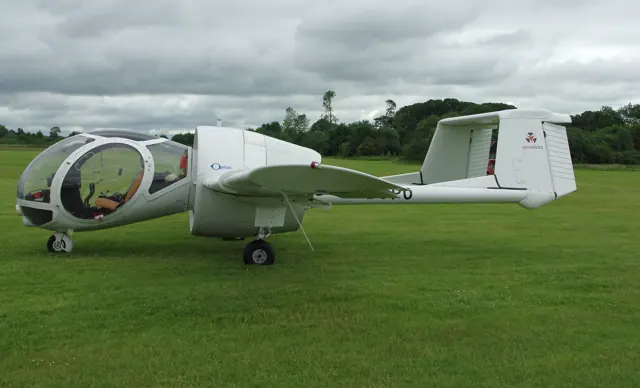
John Edgley's Optica was conceived for low-speed observation work. The crew sit ahead of a ducted propeller in an unusually rounded, extensively glazed cabin. Twin tail booms leave the centreline clear behind the fan, giving the aircraft a silhouette quite unlike a conventional light single. Its layout reflects the job: visibility and loitering were central design priorities.
Aircraft background
Wikipedia contributors · Read more ↗The view takes some getting used to
Sitting in the middle seat, Dolph found that the Optica demanded some rearrangement of familiar habits on the ground. The throttle and brake arrangement initially felt awkward. After Clive Davidson took the aircraft off from Thruxton, the view became the dominant impression: Hampshire lay below a cockpit that seemed to leave very little between its occupants and the landscape. A banked turn made that openness especially vivid.
General Aviation · April 2009. Thruxton demonstration with Clive Davidson in a restored 260-hp Optica. Davidson made the takeoff before Dolph took the controls.
General Aviation / IAOPA · Read more ↗Ballast lights detect presence, not correct balance
The ballast indicators illuminate when the relevant compartment contains weight. They do not confirm correct balance; MSFS 2024 ballast and passenger weights are managed through the EFB.
Optica · Microsoft Flight Simulator · MSFS 2024
Microsoft / aircraft developers · Read more ↗Into the cockpit
 YouTube
 insultantable · 3 min ·
A flight in the Optica aircraft
A flight video featuring the Optica's distinctive observation-aircraft design.
Real aircraft · Edgley EA-7 Optica
Watch on YouTube ↗Preview images are served by AirframeDB. Videos open on YouTube only when you choose to watch.
Meet Edgley EA-7 Optica
John Edgley's Optica was conceived for low-speed observation work. The crew sit ahead of a ducted propeller in an unusually rounded, extensively glazed cabin. Twin tail booms leave the centreline clear behind the fan, giving the aircraft a silhouette quite unlike a conventional light single.
Its layout reflects the job: visibility and loitering were central design priorities. The Microsoft/Got Friends simulation represents the Series 300/301, with its avionics and loading features described in the developer documentation.
Edgley EA-7 Optica
Edgley → · Explore the family →
Edgley EA-7 Optica
Wikipedia contributors · Edgley Optica ↗Microsoft Flight Simulator · MSFS 2024 →Aircraft type designators
Use the code for the model you are flying. The linked authority lists the applicable aircraft.
History & design
G-BOPO returns to the air in 2008
Optica’s restoration diary follows G-BOPO from parts preparation and wing installation through painting and engine runs. It records Chris Taylor making the first post-restoration flight on 4 June 2008, followed by completion of the airworthiness test two days later.
Optica · G-BOPO restoration ↗Dated manufacturer restoration log; historical airframe status
Development milestones
Designer: John Edgley
First flight: 14 December 1979
Wikipedia contributors · Edgley Optica ↗Edgley Optica · family/variant named by the source · Wikipedia revision 1318375041
Pilot accounts
The view takes some getting used to
Sitting in the middle seat, Dolph found that the Optica demanded some rearrangement of familiar habits on the ground. The throttle and brake arrangement initially felt awkward. After Clive Davidson took the aircraft off from Thruxton, the view became the dominant impression: Hampshire lay below a cockpit that seemed to leave very little between its occupants and the landscape.
A banked turn made that openness especially vivid. Looking almost straight down, Dolph felt enough excitement to request the next turn in the other direction. Flying the aircraft himself, he found substantial control forces and appreciated the trim. He returned with enthusiasm for the experience, having encountered both the unusual ergonomics and the pleasure that the observation cockpit could provide.
General Aviation · April 2009. Thruxton demonstration with Clive Davidson in a restored 260-hp Optica. Davidson made the takeoff before Dolph took the controls.
Read the full account · General Aviation / IAOPA ↗Learning a new sight picture over Paris
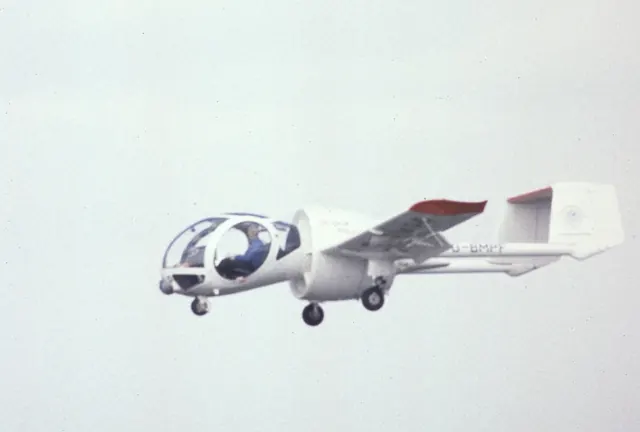
At Le Bourget, Thompson settled into the centre seat of an aircraft whose cabin offered almost too much to look at. Hugh Field handled the departure before passing him control. Without the usual nose and cockpit structure framing the horizon, Thompson initially had to work out which outside cues would tell him the aircraft’s attitude.
As the flight continued, peripheral references began to make more sense. The constrained air-show flight gave him an opportunity to observe roads below, although it did not allow a full performance evaluation. Returning to land brought another adjustment: he flared high and arrived firmly. He liked the extraordinary view while identifying control placement and the unfamiliar landing picture as things that still demanded attention.
AOPA Pilot · September 1983. Prototype G-BGMW at that year’s Paris Air Show, with Hugh O. Field. This aircraft had a 200-hp IO-360, unlike later 260-hp Opticas.
Read the full account · AOPA Pilot ↗A shadow helps explain an unfamiliar aircraft
Before departure, Urlacher discovered that the flaps were too far behind the cockpit to inspect in the usual way. Clive Davidson pointed out another visible clue: the wing’s shadow on the ground. It was a small example of how an apparently simple aeroplane could require fresh habits because of its unusual layout.
Over Hampshire, the glass cabin supplied the experience he had come for, opening the landscape around and below the occupants. The return brought a final lesson in perspective. Seated so low, Urlacher expected the landing flare earlier than Davidson’s prompt. He remained less fond of the hand-operated brake, but the remarkable view and the flight’s unusual sensations left a much warmer overall impression.
fliegermagazin · April 2010. Flight from Thruxton with Clive Davidson; the report concerns an EA-7 Optica, with its original cockpit arrangements.
Read the full account · fliegermagazin ↗In your simulator
Systems, equipment and documentation for each developer’s aircraft.
Compare simulator versions →MSFS 2024Optica
Microsoft Flight Simulator · Released
Optica
Microsoft Flight Simulator · Released
MSFS 2020EA-7 Edgley Optica
Got Friends · Released
EA-7 Edgley Optica
Got Friends · Released
Aircraft specifications
Published figures for the named real-aircraft variant. Simulator equipment and performance can differ.
| Specification | Published value |
|---|---|
| Length | 8.15 m (26 ft 9 in) |
| Wingspan | 12.00 m (39 ft 4 in) |
| Height | 2.31 m (7 ft 7 in) |
| Wing area | 15.84 m² (170.5 sq ft) |
| Empty weight | 948 kg (2,090 lb) |
| Max takeoff weight | 1,315 kg (2,899 lb) |
| Powerplant | 1 × Textron Lycoming IO-540-V4A5D air-cooled flat-six engine, 190 kW (260 hp) |
| Propellers | 5-bladed fixed-pitch ducted fan |
| Maximum speed | 213 km/h (132 mph, 115 kn) |
| Cruise speed | 130 km/h (81 mph, 70 kn) (loiter speed, 40% power) |
| Stall speed | 108 km/h (67 mph, 58 kn) outboard flaps up |
| Range | 1,056 km (656 mi, 570 nmi) at 130 km/h (81 mph; 70 kn) (45-minute reserves) |
| Service ceiling | 4,275 m (14,026 ft) |
| Rate of climb | 4.1 m/s (810 ft/min) |
Manuals & resources
Find your next read
Choose a topic for a short introduction and a link to the original source. Simulator references identify the developer and edition they cover.
Simulator documentation
Ballast lights detect presence, not correct balanceOptica · Microsoft Flight Simulator · MSFS 2024
The ballast indicators illuminate when the relevant compartment contains weight. They do not confirm correct balance; MSFS 2024 ballast and passenger weights are managed through the EFB.
Manual v3, ballast and EFB notes
Microsoft / aircraft developers · Read the source ↗Headphones change the cockpit soundOptica · Microsoft Flight Simulator · MSFS 2024
Click the headphones to dampen the sound. The manual specifies clicking their cord to remove that effect.
Manual v3, virtual cockpit controls
Microsoft / aircraft developers · Read the source ↗Camera equipment belongs to the research liveriesOptica · Microsoft Flight Simulator · MSFS 2024
The camera system is limited to Scientific Research Series 300 liveries. IR-H and IR-C supply hot and cold grayscale views; EO colour imagery is day-only.
Manual v3, camera display
Microsoft / aircraft developers · Read the source ↗Move the camera screen and adjust its image separatelyOptica · Microsoft Flight Simulator · MSFS 2024
Drag the camera display to reposition it. Its buttons adjust contrast, while the main panel’s Avionics Brightness knob controls brightness.
Manual v3, camera display controls
Microsoft / aircraft developers · Read the source ↗The MSFS 2024 EFB tracks the checklistOptica · Microsoft Flight Simulator · MSFS 2024
Interactive checklists in the MSFS 2024 EFB include cockpit locators and progress tracking. The manual describes the MSFS 2020 checklist interface separately.
Manual v3, MSFS 2024 checklist section
Microsoft / aircraft developers · Read the source ↗Observation-aircraft layout with modern navigation optionsOptica · Microsoft Flight Simulator · MSFS 2024
Got Friends documents a KAP140 autopilot used with the Working Title G530, along with pilot and copilot autopilot/trim-disconnect controls. Crew-dependent ballast options are also described. The loading options account for occupants in the forward cabin.
Archived simulator manual; installed package revision not observed · PDF pp.5-7
Microsoft / aircraft developers · Read the source ↗Pilot account
The view takes some getting used toGeneral Aviation · April 2009. Thruxton demonstration with Clive Davidson in a restored 260-hp Optica. Davidson made the takeoff before Dolph took the controls.
Sitting in the middle seat, Dolph found that the Optica demanded some rearrangement of familiar habits on the ground. The throttle and brake arrangement initially felt awkward. After Clive Davidson took the aircraft off from Thruxton, the view became the dominant impression: Hampshire lay below a cockpit that seemed to leave very little between its occupants and the landscape. A banked turn made that openness especially vivid.
Greg Dolph
General Aviation / IAOPA · Read the source ↗Learning a new sight picture over ParisAOPA Pilot · September 1983. Prototype G-BGMW at that year’s Paris Air Show, with Hugh O. Field. This aircraft had a 200-hp IO-360, unlike later 260-hp Opticas.
At Le Bourget, Thompson settled into the centre seat of an aircraft whose cabin offered almost too much to look at. Hugh Field handled the departure before passing him control. Without the usual nose and cockpit structure framing the horizon, Thompson initially had to work out which outside cues would tell him the aircraft’s attitude. As the flight continued, peripheral references began to make more sense.
Steven L. Thompson
AOPA Pilot · Read the source ↗Developer documentation
EA-7 Edgley Optica — product listingEA-7 Edgley Optica · MSFS 2020
Product listing captured 2026-09-30; edition scope from the reviewed catalogue
Got Friends · Read the source ↗Read the original documentation from the people who created it. Manuals open on their publisher’s website.
Manual
AeroElvira OpticaMicrosoft / aircraft developers Microsoft Flight Simulator aircraft manualsMicrosoft / aircraft developersAircraft background
Edgley OpticaWikipedia contributors · Research background · Wikipedia revision 1318375041 · retrieved 2026-09-12 G-BOPO restorationOptica · Manufacturer restoration log · March–June 2008Resource
MSFS 2024 FAQ and edition aircraft inventoryMicrosoftType designator
ICAO Doc 8643 — aircraft type designatorsInternational Civil Aviation Organization · Public search data retrieved 2026-09-14; authority update 2026-09-03Product
EA-7 Edgley Optica – Got FriendsGot Friends · Product listing captured 2026-09-30; edition scope from the reviewed catalogueBuilt-in force-feedback profiles
Read the documentary basis, editable starting settings and remaining questions for the aircraft you fly. Each explanation refers to the exact profile revision shown.
Catalogue programme-20261022-v1 · 4 profile choices
Got Friends EA-7 Edgley Optica Legacy Wheels
Got Friends · Free and Pro · Revision 2 · Inherited starting point
MSFS 2020
Got Friends EA-7 Edgley Optica Legacy Wheels: The profile supplies reversible resistance for the observation-aircraft rendition.
Got Friends EA-7 Edgley Optica Legacy Skis
Got Friends · Free and Pro · Revision 2 · Inherited starting point
MSFS 2020
Got Friends EA-7 Edgley Optica Legacy Skis: The profile supplies reversible resistance for the observation-aircraft rendition.
Edgley EA-7 Optica
Free and Pro · Revision 2 · Partial review
MSFS 2024
Edgley EA-7 Optica: The profile supplies reversible resistance for the observation-aircraft rendition.
Orbx Edgley EA-7 Optica
Orbx · Free and Pro · Revision 1 · Partial review
MSFS 2020
A fixed-wing observation aircraft with a helicopter-like view from its glazed nose.
Edgley EA-7 Optica
Edgley EA-7 Optica: The profile supplies reversible resistance for the observation-aircraft rendition.
Aircraft and simulator scope
- Edgley EA-7 Optica · MSFS 2024 · family starting point
Edgley EA-7 Optica · The source is the AeroElvira Optica manual for the MSFS implementation.
The simulator model and controls
John Edgley's Optica was conceived for low-speed observation work. The crew sit ahead of a ducted propeller in an unusually rounded, extensively glazed cabin. Twin tail booms leave the centreline clear behind the fan, giving the aircraft a silhouette quite unlike a conventional light single.
This starting point selects Edgley EA-7 Optica. Its aircraft-level settings do not select a particular developer’s custom systems.
How this profile feels
The profile supplies reversible resistance for the observation-aircraft rendition. Spring resistance builds with the selected airspeed response. A separate aerodynamic term adds speed-dependent control load.
Pitch relief is configured separately from the ducted-fan thrust arrangement. Valid trim provides the configured pressure relief. Autopilot following is off.
Controls and trim
The Optica places a glazed observation cabin ahead of a ducted-fan propulsion system. Its wing and tail arrangement serve low-speed observation work. The fan, cockpit visibility and configuration belong to the aircraft’s role around its conventional controls.
About the values
The gains are normalized profile settings. They describe the chosen effect balance; hand force depends on the device and its output limits. IAS references are tuning values rather than operating limits. Physical acceptance of this revision remains pending.
What the documentation establishes
The source is the AeroElvira Optica manual for the MSFS implementation.
The manual explicitly describes a ducted fan behind the cockpit and fixed tricycle gear; flap-detent count remains unresolved.
Its table lists140 knot VNE and100 knot cruise without a complete IAS/TAS designation. The80 knot loading reference remains an estimate.
Documentary review and sources
These decisions describe the documentary basis and remaining gaps for this revision. Aircraft documentation and a starting setting describe different kinds of evidence.
Aircraft and variant
ReviewedThis starting point selects Edgley EA-7 Optica. Its aircraft-level settings do not select a particular developer’s custom systems.
Flight controls
Not yet reviewedThe Optica places a glazed observation cabin ahead of a ducted-fan propulsion system. Its wing and tail arrangement serve low-speed observation work. The fan, cockpit visibility and configuration belong to the aircraft’s role around its conventional controls.
Trim
Not yet reviewedPitch relief is configured separately from the ducted-fan thrust arrangement. Pitch authority 0.3 provides load relief and permitted centre movement; roll authority is 0.
Autopilot and stability
Not yet reviewedAutopilot following is off; the configured spring and load retain the hardware feel.
Equipment
ReviewedGear, flap and ground cues follow the selected settings and available simulator-reported states.
Speeds and limits
ReviewedThe indicated-speed references set the profile response scale; they are separate from aircraft operating limits.
Simulator integration
Not yet reviewedThe profile targets msfs2024. Add-on-specific controls use only the supported references configured by this profile.
Force-feedback settings
Not yet reviewedThe settings define the profile’s effect balance. Device output limits affect physical hand force.
Starting settings and their rationale
These configured values are starting estimates. The explanations describe what each setting controls; physical validation appears separately below.
| Setting | Starting value | What it controls and why |
|---|---|---|
| Spring strength | Starting value0.74 | What it controls and whyThe profile supplies reversible resistance for the observation-aircraft rendition. The baseline spring is 0.74. Its low-speed blend reaches baseline strength at 40 KIAS. |
| Master force gain | Starting value0.85 | What it controls and whyScales overall profile strength while preserving effect balance, subject to device and output limits. |
| Profile force gain | Starting value0.8 | What it controls and whyThe aerodynamic-load gain is 0.8 with an indicated-speed reference of 80 KIAS. This supplies speed-dependent loading alongside the spring. |
| Force tuning speed/reference | Starting value80.0 kt | What it controls and whySets the IAS reference for aerodynamic loading. It is an estimate, not published cruise TAS or a flight limit. |
| Spring response reference speed | Starting value40.0 kt | What it controls and whySets the IAS where the low-speed blend reaches baseline strength; high-speed stiffening also uses it. |
| Aileron force scale | Starting value0.6 | What it controls and whyRoll and pitch aerodynamic scales are 0.6 and 0.78, respectively. They set the aerodynamic axis balance. No custom spring-travel curve is enabled. |
| Elevator force scale | Starting value0.78 | What it controls and whyScales pitch aerodynamic loading; pitch spring travel and trim responses are separate settings. |
| Trim feel | Starting valueEnabled | What it controls and whyRetained for compatibility and group membership. Trim relief, rather than this flag, controls centre movement. |
| Trim relief | Starting valueEnabled | What it controls and whyAllows trim relief with supported control law and valid telemetry. Axis authorities set its amount. |
| Autopilot follow | Starting valueDisabled | What it controls and whyAutopilot following is off; the configured spring and load retain the hardware feel. |
| Autopilot neutral hold | Starting valueDisabled | What it controls and whyPermits centering hold during a supported AP state, separate from following a moving target. |
| Output force limit | Starting value0.55 | What it controls and whyCaps directed-force output. Native spring effects and device limits remain separate. |
All 44 starting settings and their rationale
The settings define the profile’s effect balance. Device output limits affect physical hand force.
| Setting | Starting value | What it controls and why |
|---|---|---|
| Spring strength | Starting value0.74 | What it controls and whyThe profile supplies reversible resistance for the observation-aircraft rendition. The baseline spring is 0.74. Its low-speed blend reaches baseline strength at 40 KIAS. |
| Spring deadband | Starting value0.045 | What it controls and whySets travel around the centre before the baseline spring resists. Smaller values engage it sooner. |
| Profile force gain | Starting value0.8 | What it controls and whyThe aerodynamic-load gain is 0.8 with an indicated-speed reference of 80 KIAS. This supplies speed-dependent loading alongside the spring. |
| Master force gain | Starting value0.85 | What it controls and whyScales overall profile strength while preserving effect balance, subject to device and output limits. |
| QBlend Enabled | Starting valueEnabled | What it controls and whyAllows baseline spring strength to rise with indicated airspeed where the control law permits it. |
| QSpring Minimum Factor | Starting value0.5 | What it controls and whySets low-speed spring strength as a fraction of baseline when blending is enabled. One keeps full strength. |
| QSpring Start Knots | Starting value11.2 kt | What it controls and whySets the IAS where the low-speed spring blend starts rising. This is a feel threshold, not a flight limit. |
| Spring response reference speed | Starting value40.0 kt | What it controls and whySets the IAS where the low-speed blend reaches baseline strength; high-speed stiffening also uses it. |
| Force tuning speed/reference | Starting value80.0 kt | What it controls and whySets the IAS reference for aerodynamic loading. It is an estimate, not published cruise TAS or a flight limit. |
| Airspeed spring stiffening gain | Starting value0.15 | What it controls and whyThe high-speed spring-stiffening gain is 0.15. It strengthens the permitted spring response above 40 KIAS, with the squared-speed ratio capped at 5. |
| Airspeed spring stiffening limit | Starting value5 | What it controls and whyLimits the squared airspeed ratio used for high-speed spring stiffening; it is not a device-force cap. |
| Aileron force scale | Starting value0.6 | What it controls and whyRoll and pitch aerodynamic scales are 0.6 and 0.78, respectively. They set the aerodynamic axis balance. No custom spring-travel curve is enabled. |
| Elevator force scale | Starting value0.78 | What it controls and whyScales pitch aerodynamic loading; pitch spring travel and trim responses are separate settings. |
| Output force limit | Starting value0.55 | What it controls and whyCaps directed-force output. Native spring effects and device limits remain separate. |
| Trim feel | Starting valueEnabled | What it controls and whyRetained for compatibility and group membership. Trim relief, rather than this flag, controls centre movement. |
| Trim relief | Starting valueEnabled | What it controls and whyAllows trim relief with supported control law and valid telemetry. Axis authorities set its amount. |
| Elevator Authority | Starting value0.3 | What it controls and whyPitch relief is configured separately from the ducted-fan thrust arrangement. Pitch authority 0.3 provides load relief and permitted centre movement; roll authority is 0. |
| Aileron Authority | Starting value0 | What it controls and whyScales supported roll-trim relief and permitted centre movement. Zero removes roll response. |
| Force Trim Enabled | Starting valueDisabled | What it controls and whyEnables local force trim, separate from aircraft-owned trim and add-on integration qualification. |
| GLoad Enabled | Starting valueEnabled | What it controls and whyAllows load-factor changes to modify permitted spring laws. Passive fly-by-wire feel can suppress it. |
| Rate Damping Enabled | Starting valueEnabled | What it controls and whyEnables rate damping with the configured coefficients and control law. |
| Autopilot follow | Starting valueDisabled | What it controls and whyAutopilot following is off; the configured spring and load retain the hardware feel. |
| Autopilot follow authority | Starting value0.1 | What it controls and whySets admitted AP-follow gain, not a percentage of travel. Runtime ownership and input limits still apply. |
| Autopilot neutral hold | Starting valueDisabled | What it controls and whyPermits centering hold during a supported AP state, separate from following a moving target. |
| Autopilot neutral hold strength | Starting value0.6 | What it controls and whySets admitted AP neutral-hold strength; inactive while neutral hold is disabled. |
| Enabled | Starting valueEnabled | What it controls and whyEnables aerodynamic cues; each still needs nonzero strength and its simulator conditions. |
| Gain | Starting value0.35 | What it controls and whySets stall-buffet strength. Zero removes the cue without changing simulator stalls or warnings. |
| Gain | Starting value0 | What it controls and whySets high-Mach buffet strength; onset and full-strength thresholds are separate. |
| Gain | Starting value0.14 | What it controls and whySets flap buffet at the configured position and speed gates. Flap movement texture is separate. |
| Maximum flap index | Starting value3 | What it controls and whySets the final flap index for detent normalization. UP plus three detents uses maximum index3. |
| Minimum flap index | Starting value2 | What it controls and whySets the first flap detent that admits buffet; this is a handle index, not degrees. |
| Gain | Starting value0 | What it controls and whySets gear aerodynamic buffet; movement and ground-contact cues are separate. |
| Shaker Enabled | Starting valueDisabled | What it controls and whyPermits shaker at supported warning conditions; the switch does not establish aircraft equipment. |
| Stick shaker amplitude | Starting value0.5 | What it controls and whySets triggered shaker strength; inactive while the shaker feature is disabled. |
| Enabled | Starting valueEnabled | What it controls and whyEnables ground effects; each still needs its own strength and contact or motion telemetry. |
| Gain | Starting value0.4 | What it controls and whySets rolling texture strength, modified by speed, surface and undercarriage configuration. |
| Gain | Starting value0.25 | What it controls and whySets gear-bump texture during ground motion, separate from touchdown impact. |
| Gain | Starting value0.65 | What it controls and whySets landing-impact strength; landing telemetry and response shape determine the pulse. |
| Gain | Starting value0 | What it controls and whySets reverse-thrust vibration with valid reverser and engine conditions. Zero removes the cue. |
| Enabled | Starting valueEnabled | What it controls and whyEnables engine cues with nonzero settings and valid running-engine telemetry. |
| Gain | Starting value0.12 | What it controls and whySets estimated engine vibration using configured telemetry and response, not measured cockpit vibration. |
| Enabled | Starting valueEnabled | What it controls and whyEnables accessory cues with configured strengths and observed accessory movement. |
| Gain | Starting value0.12 | What it controls and whySets texture from observed flap movement; a command without movement does not establish the cue. |
| Gain | Starting value0 | What it controls and whySets texture from observed gear movement, separate from aerodynamic and touchdown effects. |
Limits and open questions
- Low-speed precision claims do not describe the Optica control linkage or loading mechanism.
- The manual does not identify a trim mechanism or force-relief law.
- No Optica autopilot installation is established by this manual.
- The ducted-fan description does not define external simulator thrust or trim signal semantics.
- A quiet propulsion claim is not a measured fan-force or stick-vibration amplitude.
- Edgley EA-7 Optica documentary evidence does not establish force-feedback hardware acceptance.
Physical validation
No physical force validation is recorded in this public catalogue for this revision. Documentary review and software checks do not establish how a particular device feels.
Discuss this aircraft (0)
Questions, observations and useful sources from the community.
No published discussions yet. Bring a question or share a useful source.
Open aircraft discussions →Content expanded · What’s new
Something missing or a source that needs attention?
Suggest a correction ↗