



Start here
A few places to begin, from the aircraft’s story to the people who fly it.
Meet the aircraft
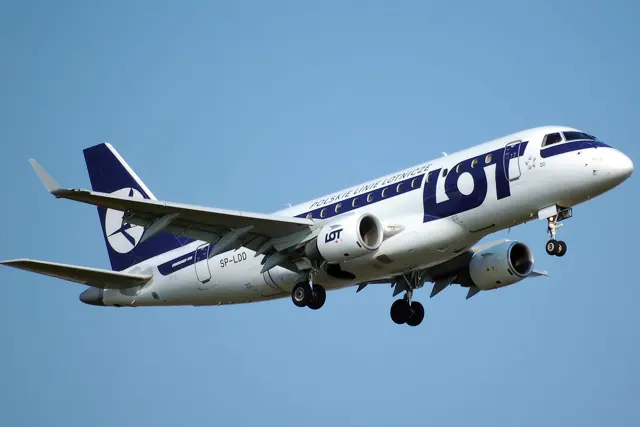
Embraer developed the original E-Jets around regional and shorter mainline airline routes. Two underwing engines and a conventional tail surround a cabin wider than the company's earlier narrow regional jets. Different fuselage lengths serve different passenger capacities. The original family is distinct from the later E2 programme.
Aircraft background
Wikipedia contributors · Read more ↗Finding an airline career after years of wondering whether it was too late
Blackburn had spent twelve years in another career while wondering whether she had left it too late to become a pilot. Encouragement from a woman captain helped her commit to the change. Selling a house and taking unpaid leave made intensive training possible; she then spent five years instructing before joining an airline.
Women in Aviation Careers · May 2026. Alliance Airlines E190 first officer; the interview describes her circumstances at publication.
Women in Aviation Careers · Read more ↗Flight-guidance behaviour and documented limits
X-Crafts documents autopilot disconnection from manual pitch trim or stick-shaker activation, and uses X-Plane's control-wheel-steering facility for Touch Control Steering. The reviewed release does not implement several trim cutouts and column-disconnect functions. The corresponding cockpit hardware is visible but inactive in the documented version.
Embraer E-Jets · X-Crafts · X-Crafts · X-Plane 11 · X-Plane 12
X-Crafts · Read more ↗Into the cockpit
 YouTube
 Just Planes · 31 min ·
Piloting the EMBRAER 190 Antwerp to Berlin | Cockpit Views
An Embraer 190 departs Antwerp on a flight to Berlin-Tegel.
Real aircraft · Embraer 190
Watch on YouTube ↗Preview images are served by AirframeDB. Videos open on YouTube only when you choose to watch.
Meet Embraer E-Jets
Embraer developed the original E-Jets around regional and shorter mainline airline routes. Two underwing engines and a conventional tail surround a cabin wider than the company's earlier narrow regional jets. Different fuselage lengths serve different passenger capacities.
The original family is distinct from the later E2 programme. X-Crafts's documentation also separates airframe variants, avionics options and the Lineage business-aircraft development. Each simulator product identifies its included variants and equipment.
Embraer E-Jets
Embraer → · Explore the family →
Embraer E-Jets
Wikipedia contributors · Embraer E-Jet family ↗X-Crafts · X-Plane 11 · X-Plane 12 →E170
FlightSim Studio · E-Jets Series ↗FlightSim Studio / X-Crafts · MSFS 2020 · MSFS 2024 →E175
FlightSim Studio · E-Jets Series ↗FlightSim Studio / X-Crafts · MSFS 2020 · MSFS 2024 →E190
FlightSim Studio · E-Jets Series ↗FlightSim Studio / X-Crafts · MSFS 2020 · MSFS 2024 →E195
FlightSim Studio · E-Jets Series ↗FlightSim Studio / X-Crafts · MSFS 2020 · MSFS 2024 →E190 Freighter
FlightSim Studio · E-Jets Series ↗FlightSim Studio / X-Crafts · MSFS 2020 · MSFS 2024 →E195 Freighter
FlightSim Studio · E-Jets Series ↗FlightSim Studio / X-Crafts · MSFS 2020 · MSFS 2024 →Aircraft type designators
Use the code for the model you are flying. The linked authority lists the applicable aircraft.
Embraer 175 / ERJ-170-200 with the short wing
ICAO Doc 8643 — aircraft type designators ↗Checked 2026-09-14Embraer 175 / ERJ-170-200 with the long wing
ICAO Doc 8643 — aircraft type designators ↗Checked 2026-09-14Embraer 190 / ERJ-190-100 and Lineage 1000
ICAO Doc 8643 — aircraft type designators ↗Checked 2026-09-14History & design
E-Jets take over KLM Cityhopper’s regional network
KLM’s 2017 Fokker farewell describes a fleet renewal that began in 2008. E190s and E175s replaced the older regional aircraft, leaving Cityhopper with an all-Embraer fleet when its final Fokker 70 services ended. The change linked a new cockpit generation with a long-established short-haul network.
KLM · KLM bids fond farewell to Fokker 70 ↗KLM operator history at the October 2017 transition
Development milestones
First flight: 19 February 2002
Wikipedia contributors · Embraer E-Jet family ↗Embraer E-Jet family · family/variant named by the source · Wikipedia revision 1373883423
Pilot accounts
Finding an airline career after years of wondering whether it was too late
Blackburn had spent twelve years in another career while wondering whether she had left it too late to become a pilot. Encouragement from a woman captain helped her commit to the change. Selling a house and taking unpaid leave made intensive training possible; she then spent five years instructing before joining an airline.
The E190 job combined family preparation before work with two to four sectors, shared between the captain and first officer. She enjoyed lining up for takeoff and watching the sunrise above a world still waking up. The transition also demanded patience: simulator training was followed by months of type and line preparation, with further checks before the work became familiar.
Women in Aviation Careers · May 2026. Alliance Airlines E190 first officer; the interview describes her circumstances at publication.
Read the full account · Women in Aviation Careers ↗Connections, coffee and the last landing before the weekend
A wet walkaround in Billund began a day of watching the clock. Most passengers had onward connections at Amsterdam, making a small departure delay matter to people beyond the flight deck. A short turnaround there led to Helsinki, followed by the return to Amsterdam and the prospect of going home for the weekend.
Tim found room for a personal routine during the longer cruise: making coffee with a hand-pumped espresso maker from his flight bag. An air-traffic slot prevented the crew from finishing as early as hoped, but they still returned on time. Flying the final sector himself, he judged his hand-flown landing on Amsterdam’s runway 36R a respectable seven out of ten. The ordinary mixture of deadlines, teamwork and small pleasures gives the day its character.
Skywings first-person pilot chronicle · September 2021. E190 first officer and flight instructor; the article supplies no surname.
Read the full account · Skywings Flight Training ↗A grandfather’s flights lead to a regional-airline cockpit
Hartsock traced his interest in flying to trips with his grandfather, a former Air Force servicemember who flew recreationally. Those childhood experiences stayed with him when he began training in high school. University study and flight instructing eventually led to an E175 first-officer job, giving him the varied working life he had hoped to find.
Writing for children, he explained how much of that job happens before departure and between takeoff and landing. Weather, fuel, aircraft systems and coordination with other crew members remain part of each flight. The changing view from the cockpit still impressed him, even as it became his workplace. Thinking back to his grandfather, he hoped that sharing the experience might encourage another child to start a similar journey.
Michigan Family Travel · September 2026. E175 first officer, hired in July 2025 and based first at LaGuardia, then Chicago; the airline is not named.
Read the full account · Michigan Family Travel ↗In your simulator
Systems, equipment and documentation for each developer’s aircraft.
Compare simulator versions →X-Plane 11 · X-Plane 12Embraer E-Jets · X-Crafts
X-Crafts · Released
Embraer E-Jets · X-Crafts
X-Crafts · Released
MSFS 2020 · MSFS 2024E-Jets Series
FlightSim Studio / X-Crafts · Early Access
E-Jets Series
FlightSim Studio / X-Crafts · Early Access
X-Plane 12FPS Embraer E-175
Flight Procedures Simulation · Released
FPS Embraer E-175
Flight Procedures Simulation · Released
X-Plane 12FPS Embraer E-190
Flight Procedures Simulation · Released
FPS Embraer E-190
Flight Procedures Simulation · Released
MSFS 2020 · MSFS 2024E-Jets 170/175
FlightSim Studio · Released
E-Jets 170/175
FlightSim Studio · Released
MSFS 2020 · MSFS 2024E-Jets 190/195
FlightSim Studio · Released
E-Jets 190/195
FlightSim Studio · Released
MSFS 2020 · MSFS 2024E-Jets 190/195 Freighter
FlightSim Studio · Released
E-Jets 190/195 Freighter
FlightSim Studio · Released
Manuals & resources
Find your next read
Choose a topic for a short introduction and a link to the original source. Simulator references identify the developer and edition they cover.
Simulator documentation
Flight-guidance behaviour and documented limitsEmbraer E-Jets · X-Crafts · X-Crafts · X-Plane 11 · X-Plane 12
X-Crafts documents autopilot disconnection from manual pitch trim or stick-shaker activation, and uses X-Plane's control-wheel-steering facility for Touch Control Steering. The reviewed release does not implement several trim cutouts and column-disconnect functions. The corresponding cockpit hardware is visible but inactive in the documented version.
E-Jets Family 2.0 manual copyright 2025 · PDF pp.25,160,162,164
X-Crafts · Read the source ↗Use documentation for the correct simulator editionE-Jets Series · FlightSim Studio / X-Crafts · MSFS 2020 · MSFS 2024
X-Crafts says the MSFS E-Jets share its 3D visuals with the X-Plane aircraft, while different teams develop the products. Flightsim Studio is responsible for the MSFS systems, FMS, avionics, flight model, tablet and sound, so the X-Plane manual does not establish those features for MSFS.
X-Crafts MSFS partnership and support description · gathered September 2026
X-Crafts · Read the source ↗Apply the tablet’s load sheet to the aircraftEmbraer E-Jets · X-Crafts · X-Crafts · X-Plane 11 · X-Plane 12
The EFB accepts payload or zero-fuel weight and fuel, either entered manually or fetched from a SimBrief plan. Selecting LOAD PLANE then applies the resulting load sheet to the simulated aircraft.
E-Jets Family 2.0 manual · PDF p.16
X-Crafts · Read the source ↗Send calculated speeds from the tablet to the FMSEmbraer E-Jets · X-Crafts · X-Crafts · X-Plane 11 · X-Plane 12
The takeoff and landing pages calculate performance data. The manual describes sending the speeds to the FMS, then accepting them through its DLK page; calculating them in the tablet alone is a separate step.
E-Jets Family 2.0 manual · PDF p.17; page visually checked
X-Crafts · Read the source ↗Released product and variantsE-Jets Series · FlightSim Studio / X-Crafts · MSFS 2020 · MSFS 2024
The released Early Access range includes E170/175, E190/195 and E190/195 Freighter packages. The current stable build uses a WASM-based MCDU compatible with both MSFS versions. FSS still identifies work remaining before version 1.0; native MSFS 2024 development is a separate future project.
Official developer / designated-store reference · checked 2026-09-14
FlightSim Studio · Read the source ↗Pilot account
Finding an airline career after years of wondering whether it was too lateWomen in Aviation Careers · May 2026. Alliance Airlines E190 first officer; the interview describes her circumstances at publication.
Blackburn had spent twelve years in another career while wondering whether she had left it too late to become a pilot. Encouragement from a woman captain helped her commit to the change. Selling a house and taking unpaid leave made intensive training possible; she then spent five years instructing before joining an airline. The E190 job combined family preparation before work with two to four sectors, shared between the captain and first officer.
Kara Blackburn
Women in Aviation Careers · Read the source ↗Connections, coffee and the last landing before the weekendSkywings first-person pilot chronicle · September 2021. E190 first officer and flight instructor; the article supplies no surname.
A wet walkaround in Billund began a day of watching the clock. Most passengers had onward connections at Amsterdam, making a small departure delay matter to people beyond the flight deck. A short turnaround there led to Helsinki, followed by the return to Amsterdam and the prospect of going home for the weekend. Tim found room for a personal routine during the longer cruise: making coffee with a hand-pumped espresso maker from his flight bag.
Tim
Skywings Flight Training · Read the source ↗Developer documentation
FPS Embraer E-175 — product listingFPS Embraer E-175 · X-Plane 12
Product listing captured 2026-09-23; edition scope from the reviewed catalogue
store.x-plane.org · Read the source ↗FPS Embraer E-190 — product listingFPS Embraer E-190 · X-Plane 12
Product listing captured 2026-09-23; edition scope from the reviewed catalogue
store.x-plane.org · Read the source ↗E-Jets 170/175 — product listingE-Jets 170/175 · MSFS 2020 · MSFS 2024
Product listing captured 2026-09-30; edition scope from the reviewed catalogue
Contrail · Read the source ↗E-Jets 190/195 — product listingE-Jets 190/195 · MSFS 2020 · MSFS 2024
Product listing captured 2026-09-30; edition scope from the reviewed catalogue
Contrail · Read the source ↗E-Jets 190/195 Freighter — product listingE-Jets 190/195 Freighter · MSFS 2020 · MSFS 2024
Product listing captured 2026-09-30; edition scope from the reviewed catalogue
Contrail · Read the source ↗Read the original documentation from the people who created it. Manuals open on their publisher’s website.
Manual
E-Jets manualsX-Crafts X-Crafts E-Jets family user manualX-Crafts X-Plane aircraft and avionics manualsLaminar ResearchAircraft background
Embraer E-Jet familyWikipedia contributors · Research background · Wikipedia revision 1373883423 · retrieved 2026-09-12 KLM bids fond farewell to Fokker 70KLM · 29 October 2017Product
E170 / E175 / E190 / E195 / Lineage 1000X-Crafts · Official developer / designated store catalogue · checked 2026-09-12 Free E175 / E195X-Crafts · Official developer / designated store catalogue · checked 2026-09-12 E-Jets Series · FlightSim Studio collaborationX-Crafts · Official developer / designated store catalogue · checked 2026-09-12 FPS Embraer E-175-FPS-E175store.x-plane.org · Product listing captured 2026-09-23; edition scope from the reviewed catalogue FPS Embraer E-190-FPS-E190store.x-plane.org · Product listing captured 2026-09-23; edition scope from the reviewed catalogue E-Jets 170/175 MSFS by FlightSim Studio AG | Contrail ShopContrail · Product listing captured 2026-09-30; edition scope from the reviewed catalogue E-Jets 190/195 MSFS by FlightSim Studio AG | Contrail ShopContrail · Product listing captured 2026-09-30; edition scope from the reviewed catalogue E-Jets 190/195 Freighter MSFS by FlightSim Studio AG | Contrail ShopContrail · Product listing captured 2026-09-30; edition scope from the reviewed catalogueDeveloper documentation
E-Jets SeriesFlightSim Studio · Official developer / designated-store reference · checked 2026-09-14Type designator
ICAO Doc 8643 — aircraft type designatorsInternational Civil Aviation Organization · Public search data retrieved 2026-09-14; authority update 2026-09-03Built-in force-feedback profiles
Read the documentary basis, editable starting settings and remaining questions for the aircraft you fly. Each explanation refers to the exact profile revision shown.
Catalogue programme-20261022-v1 · 19 profile choices
Flight Procedures Simulation Embraer E175
Flight Procedures Simulation · Free and Pro · Revision 3 · Inherited starting point
X-Plane 12
Flight Procedures Simulation Embraer E175: The selected control law supplies the conventional inceptor’s configured resistance.
Flight Procedures Simulation Embraer E190
Flight Procedures Simulation · Free and Pro · Revision 3 · Inherited starting point
X-Plane 12
Flight Procedures Simulation Embraer E190: The selected control law supplies the conventional inceptor’s configured resistance.
Flight Procedures Simulation Embraer E195
Flight Procedures Simulation · Free and Pro · Revision 3 · Inherited starting point
X-Plane 12
Flight Procedures Simulation Embraer E195: The selected control law supplies the conventional inceptor’s configured resistance.
FlightSim Studio Embraer E170
FlightSim Studio · Free and Pro · Revision 3 · Inherited starting point
MSFS 2020 · MSFS 2024
FlightSim Studio Embraer E170: The selected control law supplies the conventional inceptor’s configured resistance.
FlightSim Studio Embraer E175
FlightSim Studio · Free and Pro · Revision 3 · Inherited starting point
MSFS 2020 · MSFS 2024
FlightSim Studio Embraer E175: The selected control law supplies the conventional inceptor’s configured resistance.
FlightSim Studio Embraer E190
FlightSim Studio · Free and Pro · Revision 3 · Inherited starting point
MSFS 2020 · MSFS 2024
FlightSim Studio Embraer E190: The selected control law supplies the conventional inceptor’s configured resistance.
FlightSim Studio Embraer E190 Freighter
FlightSim Studio · Free and Pro · Revision 3 · Inherited starting point
MSFS 2020 · MSFS 2024
FlightSim Studio Embraer E190 Freighter: The selected control law supplies the conventional inceptor’s configured resistance.
FlightSim Studio Embraer E195
FlightSim Studio · Free and Pro · Revision 3 · Inherited starting point
MSFS 2020 · MSFS 2024
FlightSim Studio Embraer E195: The selected control law supplies the conventional inceptor’s configured resistance.
FlightSim Studio Embraer E195 Freighter
FlightSim Studio · Free and Pro · Revision 3 · Inherited starting point
MSFS 2020 · MSFS 2024
FlightSim Studio Embraer E195 Freighter: The selected control law supplies the conventional inceptor’s configured resistance.
X-Crafts E190
X-Crafts · Free and Pro · Revision 4 · Inherited starting point
X-Plane 12
X-Crafts E190: The selected control law supplies the conventional inceptor’s configured resistance.
X-Crafts E170
X-Crafts · Free and Pro · Revision 3 · Inherited starting point
X-Plane 12
X-Crafts E170: The selected control law supplies the conventional inceptor’s configured resistance.
X-Crafts E175
X-Crafts · Free and Pro · Revision 4 · Inherited starting point
X-Plane 12
X-Crafts E175: The selected control law supplies the conventional inceptor’s configured resistance.
X-Crafts E195
X-Crafts · Free and Pro · Revision 3 · Inherited starting point
X-Plane 12
X-Crafts E195: The selected control law supplies the conventional inceptor’s configured resistance.
X-Crafts Lineage 1000
X-Crafts · Free and Pro · Revision 3 · Inherited starting point
X-Plane 12
X-Crafts Lineage 1000: The selected control law supplies the conventional inceptor’s configured resistance.
Embraer E190
Free and Pro · Revision 3 · Partial review
MSFS 2020 · MSFS 2024 · X-Plane 11 · X-Plane 12
Embraer E190: The selected control law supplies the conventional inceptor’s configured resistance.
Embraer E170
Free and Pro · Revision 1 · Partial review
MSFS 2020 · MSFS 2024 · X-Plane 11 · X-Plane 12
Embraer E170: The selected control law supplies the conventional inceptor’s configured resistance.
Embraer E175
Free and Pro · Revision 1 · Partial review
MSFS 2020 · MSFS 2024 · X-Plane 11 · X-Plane 12
Embraer E175: The selected control law supplies the conventional inceptor’s configured resistance.
Embraer E195
Free and Pro · Revision 1 · Partial review
MSFS 2020 · MSFS 2024 · X-Plane 11 · X-Plane 12
Embraer E195: The selected control law supplies the conventional inceptor’s configured resistance.
Embraer Lineage 1000
Free and Pro · Revision 1 · Review pending
MSFS 2020 · MSFS 2024 · X-Plane 11 · X-Plane 12
Embraer Lineage 1000: The selected control law supplies the conventional inceptor’s configured resistance.
FlightSim Studio Embraer E195 Freighter
FlightSim Studio Embraer E195 Freighter: The selected control law supplies the conventional inceptor’s configured resistance.
Aircraft and simulator scope
- FlightSim Studio Embraer E195 Freighter · FlightSim Studio · MSFS 2020 · Add-on starting point
- FlightSim Studio Embraer E195 Freighter · FlightSim Studio · MSFS 2024 · Add-on starting point
The simulator model and controls
Embraer developed the original E-Jets around regional and shorter mainline airline routes. Two underwing engines and a conventional tail surround a cabin wider than the company's earlier narrow regional jets. Different fuselage lengths serve different passenger capacities.
This profile selects FlightSim Studio Embraer E195 Freighter for MSFS 2020, MSFS 2024.
How this profile feels
The selected control law supplies the conventional inceptor’s configured resistance. The spring stays independent of airspeed. A separate aerodynamic term adds speed-dependent control load.
Aircraft automatic trim and backup trim have product-specific implementations. Pitch-trim relief is off. Autopilot following is off.
Controls and trim
The reviewed E-Jet products use separately implemented electronic-control and hydraulic systems around a conventional cockpit. SSG documents custom FBW/protections; FlightSim Studio marks some mode/cutout functions as unimplemented, while its TCS temporarily overrides automatic flight. The E170/175/190/195 and Lineage retain named configuration scope.
The selected implementation
FlightSim Studio’s published E-Jet documents mark some control-mode and cutout functions unimplemented; red-text items retain that status.
About the values
The gains are normalized profile settings. They describe the chosen effect balance; hand force depends on the device and its output limits. IAS references are tuning values rather than operating limits. Physical acceptance of this revision remains pending.
Documentary review and sources
These decisions describe the documentary basis and remaining gaps for this revision. Aircraft documentation and a starting setting describe different kinds of evidence.
Aircraft and variant
InheritedThis profile selects FlightSim Studio Embraer E195 Freighter for MSFS 2020, MSFS 2024.
Flight controls
InheritedThe reviewed E-Jet products use separately implemented electronic-control and hydraulic systems around a conventional cockpit. SSG documents custom FBW/protections; FlightSim Studio marks some mode/cutout functions as unimplemented, while its TCS temporarily overrides automatic flight. The E170/175/190/195 and Lineage retain named configuration scope.
Trim
InheritedAircraft automatic trim and backup trim have product-specific implementations. Pitch relief is off, with stored authority 0; roll authority is 0.
Autopilot and stability
InheritedAutopilot following is off; the configured spring and load retain the hardware feel.
Equipment
InheritedFlightSim Studio’s published E-Jet documents mark some control-mode and cutout functions unimplemented; red-text items retain that status.
Speeds and limits
InheritedThe indicated-speed references set the profile response scale; they are separate from aircraft operating limits.
Simulator integration
InheritedThe profile targets msfs2020, msfs2024. Add-on-specific controls use only the supported references configured by this profile.
Force-feedback settings
InheritedThe settings define the profile’s effect balance. Device output limits affect physical hand force.
Starting settings and their rationale
These configured values are starting estimates. The explanations describe what each setting controls; physical validation appears separately below.
| Setting | Starting value | What it controls and why |
|---|---|---|
| Spring strength | Starting value0.74 | What it controls and whyThe selected control law supplies the conventional inceptor’s configured resistance. The baseline spring is 0.74. Low-speed spring blending is off. |
| Master force gain | Starting value0.85 | What it controls and whyScales overall profile strength while preserving effect balance, subject to device and output limits. |
| Profile force gain | Starting value0.25 | What it controls and whyThe aerodynamic-load gain is 0.25 with an indicated-speed reference of 235 KIAS. The hydraulic-load factor of 0.35 scales that modeled term; it is a selected artificial-feel approximation. |
| Force tuning speed/reference | Starting value235 kt | What it controls and whySets the IAS reference for aerodynamic loading. It is an estimate, not published cruise TAS or a flight limit. |
| Spring response reference speed | Starting value65 kt | What it controls and whySets the IAS where the low-speed blend reaches baseline strength; high-speed stiffening also uses it. |
| Aileron force scale | Starting value0.72 | What it controls and whyRoll and pitch aerodynamic scales are 0.72 and 1, respectively. They set the aerodynamic axis balance. No custom spring-travel curve is enabled. |
| Elevator force scale | Starting value1 | What it controls and whyScales pitch aerodynamic loading; pitch spring travel and trim responses are separate settings. |
| Trim feel | Starting valueDisabled | What it controls and whyRetained for compatibility and group membership. Trim relief, rather than this flag, controls centre movement. |
| Trim relief | Starting valueDisabled | What it controls and whyAllows trim relief with supported control law and valid telemetry. Axis authorities set its amount. |
| Autopilot follow | Starting valueDisabled | What it controls and whyAutopilot following is off; the configured spring and load retain the hardware feel. |
| Autopilot neutral hold | Starting valueDisabled | What it controls and whyPermits centering hold during a supported AP state, separate from following a moving target. |
| Output force limit | Starting value0.55 | What it controls and whyCaps directed-force output. Native spring effects and device limits remain separate. |
All 44 starting settings and their rationale
The settings define the profile’s effect balance. Device output limits affect physical hand force.
| Setting | Starting value | What it controls and why |
|---|---|---|
| Spring strength | Starting value0.74 | What it controls and whyThe selected control law supplies the conventional inceptor’s configured resistance. The baseline spring is 0.74. Low-speed spring blending is off. |
| Spring deadband | Starting value0.04 | What it controls and whySets travel around the centre before the baseline spring resists. Smaller values engage it sooner. |
| Profile force gain | Starting value0.25 | What it controls and whyThe aerodynamic-load gain is 0.25 with an indicated-speed reference of 235 KIAS. The hydraulic-load factor of 0.35 scales that modeled term; it is a selected artificial-feel approximation. |
| Master force gain | Starting value0.85 | What it controls and whyScales overall profile strength while preserving effect balance, subject to device and output limits. |
| QBlend Enabled | Starting valueDisabled | What it controls and whyAllows baseline spring strength to rise with indicated airspeed where the control law permits it. |
| QSpring Minimum Factor | Starting value0.55 | What it controls and whySets low-speed spring strength as a fraction of baseline when blending is enabled. One keeps full strength. |
| QSpring Start Knots | Starting value8 kt | What it controls and whySets the IAS where the low-speed spring blend starts rising. This is a feel threshold, not a flight limit. |
| Spring response reference speed | Starting value65 kt | What it controls and whySets the IAS where the low-speed blend reaches baseline strength; high-speed stiffening also uses it. |
| Force tuning speed/reference | Starting value235 kt | What it controls and whySets the IAS reference for aerodynamic loading. It is an estimate, not published cruise TAS or a flight limit. |
| Airspeed spring stiffening gain | Starting value0 | What it controls and whyThe high-speed spring-stiffening gain is 0. No additional speed-driven stiffening is added; this does not disable independent aerodynamic loading. |
| Airspeed spring stiffening limit | Starting value5 | What it controls and whyLimits the squared airspeed ratio used for high-speed spring stiffening; it is not a device-force cap. |
| Aileron force scale | Starting value0.72 | What it controls and whyRoll and pitch aerodynamic scales are 0.72 and 1, respectively. They set the aerodynamic axis balance. No custom spring-travel curve is enabled. |
| Elevator force scale | Starting value1 | What it controls and whyScales pitch aerodynamic loading; pitch spring travel and trim responses are separate settings. |
| Output force limit | Starting value0.55 | What it controls and whyCaps directed-force output. Native spring effects and device limits remain separate. |
| Trim feel | Starting valueDisabled | What it controls and whyRetained for compatibility and group membership. Trim relief, rather than this flag, controls centre movement. |
| Trim relief | Starting valueDisabled | What it controls and whyAllows trim relief with supported control law and valid telemetry. Axis authorities set its amount. |
| Elevator Authority | Starting value0 | What it controls and whyAircraft automatic trim and backup trim have product-specific implementations. Pitch relief is off, with stored authority 0; roll authority is 0. |
| Aileron Authority | Starting value0 | What it controls and whyScales supported roll-trim relief and permitted centre movement. Zero removes roll response. |
| Force Trim Enabled | Starting valueDisabled | What it controls and whyEnables local force trim, separate from aircraft-owned trim and add-on integration qualification. |
| GLoad Enabled | Starting valueEnabled | What it controls and whyAllows load-factor changes to modify permitted spring laws. Passive fly-by-wire feel can suppress it. |
| Rate Damping Enabled | Starting valueEnabled | What it controls and whyEnables rate damping with the configured coefficients and control law. |
| Autopilot follow | Starting valueDisabled | What it controls and whyAutopilot following is off; the configured spring and load retain the hardware feel. |
| Autopilot follow authority | Starting value0.1 | What it controls and whySets admitted AP-follow gain, not a percentage of travel. Runtime ownership and input limits still apply. |
| Autopilot neutral hold | Starting valueDisabled | What it controls and whyPermits centering hold during a supported AP state, separate from following a moving target. |
| Autopilot neutral hold strength | Starting value0.6 | What it controls and whySets admitted AP neutral-hold strength; inactive while neutral hold is disabled. |
| Enabled | Starting valueEnabled | What it controls and whyEnables aerodynamic cues; each still needs nonzero strength and its simulator conditions. |
| Gain | Starting value0 | What it controls and whySets stall-buffet strength. Zero removes the cue without changing simulator stalls or warnings. |
| Gain | Starting value0 | What it controls and whySets high-Mach buffet strength; onset and full-strength thresholds are separate. |
| Gain | Starting value0 | What it controls and whySets flap buffet at the configured position and speed gates. Flap movement texture is separate. |
| Maximum flap index | Starting value3 | What it controls and whySets the final flap index for detent normalization. UP plus three detents uses maximum index3. |
| Minimum flap index | Starting value2 | What it controls and whySets the first flap detent that admits buffet; this is a handle index, not degrees. |
| Gain | Starting value0 | What it controls and whySets gear aerodynamic buffet; movement and ground-contact cues are separate. |
| Shaker Enabled | Starting valueDisabled | What it controls and whyPermits shaker at supported warning conditions; the switch does not establish aircraft equipment. |
| Stick shaker amplitude | Starting value0.5 | What it controls and whySets triggered shaker strength; inactive while the shaker feature is disabled. |
| Enabled | Starting valueEnabled | What it controls and whyEnables ground effects; each still needs its own strength and contact or motion telemetry. |
| Gain | Starting value0.4 | What it controls and whySets rolling texture strength, modified by speed, surface and undercarriage configuration. |
| Gain | Starting value0.25 | What it controls and whySets gear-bump texture during ground motion, separate from touchdown impact. |
| Gain | Starting value0.65 | What it controls and whySets landing-impact strength; landing telemetry and response shape determine the pulse. |
| Gain | Starting value0 | What it controls and whySets reverse-thrust vibration with valid reverser and engine conditions. Zero removes the cue. |
| Enabled | Starting valueDisabled | What it controls and whyEnables engine cues with nonzero settings and valid running-engine telemetry. |
| Gain | Starting value0 | What it controls and whySets estimated engine vibration using configured telemetry and response, not measured cockpit vibration. |
| Enabled | Starting valueEnabled | What it controls and whyEnables accessory cues with configured strengths and observed accessory movement. |
| Gain | Starting value0.12 | What it controls and whySets texture from observed flap movement; a command without movement does not establish the cue. |
| Gain | Starting value0.025 | What it controls and whySets texture from observed gear movement, separate from aerodynamic and touchdown effects. |
Limits and open questions
- Nominal artificial yoke feel for the powered E-Jet control system. Fixed spring rather than surface backdrive; unimplemented normal/direct switches cannot drive force-law changes.
- Pitch trim acts through stabilizer-control electronics. A switch event, indicator or red-text HS-ACE cutout does not establish neutral demand; both hardware trim shifts stay off.
- Custom FGCS, WASM FMS and TCS remain simulator-owned. No fresh calibrated inceptor demand is documented; follow/hold off and no independent physical TCS latch.
- Hardware documentation publishes cockpit input LVars and ground-service requests. These are not servo outputs. Native2024 and red-font functions are not silently assumed.
- 235 KIAS is an estimated control-feel reference, not cruise TAS, V-speeds or an operating limit.
- Spring 0.74, lateral scale 0.7, trim relief 0/0; editable estimates, not measured hand forces.
- Physical and installed-aircraft checks are deferred. Save this profile as the aircraft default if telemetry omits its developer or configuration.
- Only actual accessory-position changes drive movement textures. No pressure-dependent failures, guessed servo outputs or input compensation.
Physical validation
No physical force validation is recorded in this public catalogue for this revision. Documentary review and software checks do not establish how a particular device feels.
Discuss this aircraft (0)
Questions, observations and useful sources from the community.
No published discussions yet. Bring a question or share a useful source.
Open aircraft discussions →Content expanded · What’s new
Something missing or a source that needs attention?
Suggest a correction ↗