



Start here
A few places to begin, from the aircraft’s story to the people who fly it.
Meet the aircraft
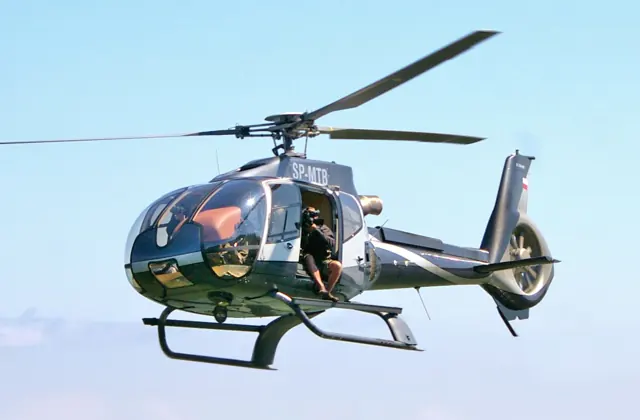
The EC135, later renamed H135, developed from the MBB Bo 108 programme. Its enclosed tail rotor, twin turbines and practical cabin made it a useful platform for emergency services and other operators. The type first flew in 1994 and entered service in 1996. The H135 name covers later development of the same lineage. Mission interiors, avionics and flight-control equipment differ between operators and versions.
Aircraft background
Wikipedia contributors · Read more ↗A simulator developer discovers what hovering feels like
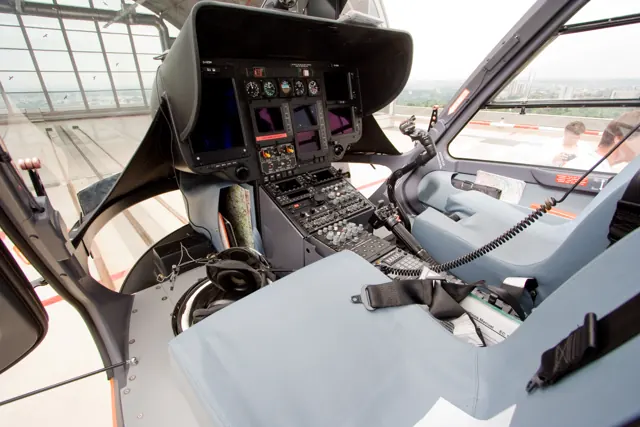
Meyer’s visit began with measurements on the ground for an X-Plane project. Flying the real EC135 was the next step, and he was conscious that his own experience was in aeroplanes. The glass surrounding the cockpit made the view both spectacular and slightly unsettling as the chief pilot introduced him to the aircraft. Once given the controls, he found forward flight manageable but hovering much more demanding.
Personal account · July 2002. Fixed-wing pilot receiving supervised EC135 experience while collecting simulator-development data; customer and chief pilot deliberately unnamed.
X-Plane / Austin Meyer · Read more ↗A later addition offered to MSFS 2024 owners
Microsoft’s Local Legend 21 announcement describes its EC135 as the final aircraft in the launch-related make-good programme, offered free to MSFS 2024 owners with ten liveries. It is separate from HPG’s earlier community H135.
Eurocopter EC135 · MSFS 2024
Microsoft · Read more ↗Into the cockpit
 YouTube
 Airbus Helicopters
H135 Helionix from a pilot's perspective
An Airbus pilot describes the Helionix cockpit. Use as family background for earlier EC135 variants.
Real H135 with Helionix; later equipment than an EC135 T1
Watch on YouTube ↗Preview images are served by AirframeDB. Videos open on YouTube only when you choose to watch.
Meet Eurocopter EC135
The EC135, later renamed H135, developed from the MBB Bo 108 programme. Its enclosed tail rotor, twin turbines and practical cabin made it a useful platform for emergency services and other operators. The type first flew in 1994 and entered service in 1996.
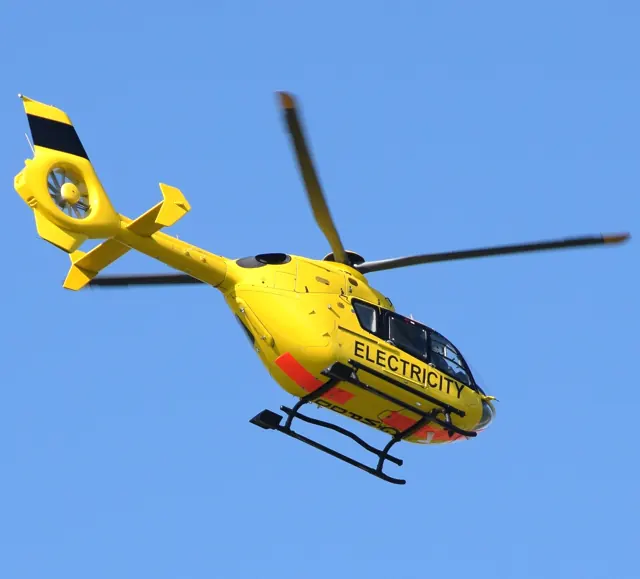
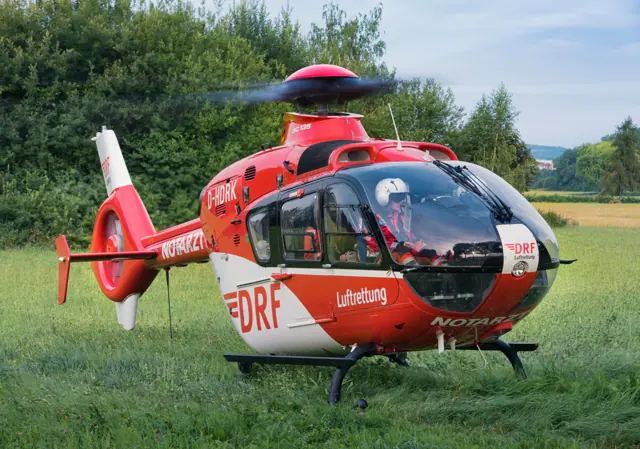
The H135 name covers later development of the same lineage. Mission interiors, avionics and flight-control equipment differ between operators and versions. The photograph depicts a medical installation; simulator documentation identifies the included mission equipment.
Eurocopter EC135
Aircraft type designators
Use the code for the model you are flying. The linked authority lists the applicable aircraft.
History & design
The H135 changes its cockpit while retaining its identity
Duke’s 2017 report places Helionix after the earlier P3/T3 performance improvements. His evaluation deliberately concentrates on displays and automation, distinguishing a cockpit transition from a new engine or increased carrying capacity.
Vertical · Glass of its Own: H135 ↗Contemporary report of the Helionix introduction
Development milestones
First flight: 15 February 1994
Wikipedia contributors · Eurocopter EC135 ↗Eurocopter EC135 · family/variant named by the source · Wikipedia revision 1373321906
Pilot accounts
A simulator developer discovers what hovering feels like
Meyer’s visit began with measurements on the ground for an X-Plane project. Flying the real EC135 was the next step, and he was conscious that his own experience was in aeroplanes. The glass surrounding the cockpit made the view both spectacular and slightly unsettling as the chief pilot introduced him to the aircraft.
Once given the controls, he found forward flight manageable but hovering much more demanding. The instructor intervened when the aircraft’s motion exceeded Meyer’s ability to contain it, then gave him further opportunities to try. He came away with aching hands, excitement and observations he wanted to bring back to the simulator. His exuberant account is a personal learning experience; its explanations and claims about simulator transfer are not independent validation of a flight model.
Personal account · July 2002. Fixed-wing pilot receiving supervised EC135 experience while collecting simulator-development data; customer and chief pilot deliberately unnamed.
Read the full account · X-Plane / Austin Meyer ↗Learning to trust a quieter instrument scan
Duke wanted to understand what the new displays and automation added to an established helicopter. During the brief start, Neuhaus explained a cockpit that brought abnormal trends to the pilot’s attention instead of requiring constant checks of scattered gauges. Duke had to adjust to the absence of familiar indications before appreciating the spare attention it created.
The flight included a confined-area approach and experiments with different levels of autopilot assistance. The display was easy to interpret, but Duke remained cautious about judging tail clearance through a camera image. An automated approach completed the return to Donauwörth. His evaluation focuses on how the pilot interacts with the equipment, preserving both the features he enjoyed and the particular task for which he preferred a more cautious judgment.
Vertical · July 2017. One-hour Helionix-equipped H135 evaluation at Donauwörth with Alexander Neuhaus; later cockpit configuration than early EC135 models.
Read the full account · Vertical ↗Trying the updated helicopter at its intended test weight
Gray arrived curious about how far the EC135 family had developed since the magazine’s earlier evaluation. The team planned the fuel load so that his first hover would take place at the intended maximum weight despite time spent briefing on the ground. Even accepting the aircraft involved a detail he appreciated: an electronic system linking the pilot’s acceptance to the technician’s sign-off.
In flight, Gray tried the handling and followed Neuhaus through more energetic manoeuvres. He found the power indications easy to interpret and the cockpit comfortable to work in. The return demonstrated an automated approach and hover before Gray took control for the landing. His overall impression was of considerable complexity made accessible to the pilot. The report did not include an autorotation or a passenger-cabin evaluation.
Flight International · November–December 2016. Helionix prototype evaluation with Alexander Neuhaus and flight-test engineer Jurgen Steiner; no passenger seats fitted.
Read the full account · Flight International ↗In your simulator
Systems, equipment and documentation for each developer’s aircraft.
Compare simulator versions →MSFS 2024Eurocopter EC135
Microsoft Flight Simulator · Released
Eurocopter EC135
Microsoft Flight Simulator · Released
MSFS 2020Eurocopter EC135
Hype Performance Group · Released
Eurocopter EC135
Hype Performance Group · Released
MSFS 2020H135
HPG · Released
H135
HPG · Released
X-Plane 12EC135
Rotorsim · Released
EC135
Rotorsim · Released
Aircraft specifications
Published figures for the named real-aircraft variant. Simulator equipment and performance can differ.
| Specification | Published value |
|---|---|
| Length | 10.2 m (33 ft 6 in) |
| Height | 3.51 m (11 ft 6 in) |
| Empty weight | 1,455 kg (3,208 lb) |
| Max takeoff weight | 2,910 kg (6,415 lb) |
| Powerplant | 2 × Turbomeca Arrius 2B2 turboshaft engines, 472 kW (633 hp) each or 2 × Pratt & Whitney Canada PW206B turboshaft engines rated at 463 kW (621 hp) (take-off power) |
| Main rotor diameter | 10.2 m (33 ft 6 in) |
| Main rotor area | 81.7 m² (879 sq ft) |
| Cruise speed | 254 km/h (158 mph, 137 kn) |
| Range | 635 km (395 mi, 343 nmi) |
| Service ceiling | 6,096 m (20,000 ft) |
| Rate of climb | 7.62 m/s (1,500 ft/min) |
Manuals & resources
Find your next read
Choose a topic for a short introduction and a link to the original source. Simulator references identify the developer and edition they cover.
Simulator documentation
A later addition offered to MSFS 2024 ownersEurocopter EC135 · Microsoft Flight Simulator · MSFS 2024
Microsoft’s Local Legend 21 announcement describes its EC135 as the final aircraft in the launch-related make-good programme, offered free to MSFS 2024 owners with ten liveries. It is separate from HPG’s earlier community H135.
Official Local Legend 21 release announcement
Microsoft · Read the source ↗HPG’s earlier H135 has its own avionics and assistance choicesEurocopter EC135 · Hype Performance Group · MSFS 2020
The v1.4 notes describe automatic PMS GTN750 display on the lower screens when installed, with different flight-model behaviour in Advanced and Basic/Xbox modes. An EFB could show browser or screen-capture content, but required additional setup files distributed through the developer’s Discord at that time.
HPG H135 v1.4 · 26 July 2021; historical release scope
Hype Performance Group · Read the source ↗Pilot account
A simulator developer discovers what hovering feels likePersonal account · July 2002. Fixed-wing pilot receiving supervised EC135 experience while collecting simulator-development data; customer and chief pilot deliberately unnamed.
Meyer’s visit began with measurements on the ground for an X-Plane project. Flying the real EC135 was the next step, and he was conscious that his own experience was in aeroplanes. The glass surrounding the cockpit made the view both spectacular and slightly unsettling as the chief pilot introduced him to the aircraft. Once given the controls, he found forward flight manageable but hovering much more demanding.
Austin Meyer
X-Plane / Austin Meyer · Read the source ↗Learning to trust a quieter instrument scanVertical · July 2017. One-hour Helionix-equipped H135 evaluation at Donauwörth with Alexander Neuhaus; later cockpit configuration than early EC135 models.
Duke wanted to understand what the new displays and automation added to an established helicopter. During the brief start, Neuhaus explained a cockpit that brought abnormal trends to the pilot’s attention instead of requiring constant checks of scattered gauges. Duke had to adjust to the absence of familiar indications before appreciating the spare attention it created. The flight included a confined-area approach and experiments with different levels of autopilot assistance.
Jon Duke
Vertical · Read the source ↗Developer documentation
H135 — product listingH135 · MSFS 2020
Product listing captured 2026-09-30; edition scope from the reviewed catalogue
www.hypeperformancegroup.com · Read the source ↗EC135 — product listingEC135 · X-Plane 12
Product listing captured 2026-09-23; edition scope from the reviewed catalogue
www.rotorsim.de · Read the source ↗Read the original documentation from the people who created it. Manuals open on their publisher’s website.
Manual
Microsoft Flight Simulator aircraft manualsMicrosoft / aircraft developersAircraft background
Eurocopter EC135Wikipedia contributors · Research background · Wikipedia revision 1373321906 · retrieved 2026-09-12Resource
EC135 free for MSFS 2024 ownersMicrosoftProduct
H135 freewareHype Performance Group · Official developer / designated store catalogue · checked 2026-09-12 rotorsim – Das Portal für die Hubschraubersimulationwww.rotorsim.de · Product listing captured 2026-09-23; edition scope from the reviewed catalogueType designator
ICAO Doc 8643 — aircraft type designatorsInternational Civil Aviation Organization · Public search data retrieved 2026-09-14; authority update 2026-09-03Developer documentation
Airbus H135 v1.4 release notesHype Performance Group · Steve Daniels · 26 July 2021Built-in force-feedback profiles
Read the documentary basis, editable starting settings and remaining questions for the aircraft you fly. Each explanation refers to the exact profile revision shown.
Catalogue programme-20261022-v1 · 3 profile choices
HPG H135
HPG · Free and Pro · Revision 3 · Inherited starting point
MSFS 2020
HPG H135: The cyclic response works around an aircraft-owned neutral where the integration provides it.
Rotorsim EC135
Rotorsim · Free and Pro · Revision 3 · Inherited starting point
X-Plane 12
Rotorsim EC135: The cyclic response works around an aircraft-owned neutral where the integration provides it.
Eurocopter EC135
Free and Pro · Revision 1 · Partial review
MSFS 2024 · MSFS 2020
Eurocopter EC135: The cyclic response works around an aircraft-owned neutral where the integration provides it.
HPG H135
HPG H135: The cyclic response works around an aircraft-owned neutral where the integration provides it.
Aircraft and simulator scope
- HPG H135 · HPG · MSFS 2020 · Add-on starting point
The simulator model and controls
The EC135, later renamed H135, developed from the MBB Bo 108 programme. Its enclosed tail rotor, twin turbines and practical cabin made it a useful platform for emergency services and other operators. The type first flew in 1994 and entered service in 1996.
This profile selects HPG H135 for MSFS 2020.
How this profile feels
The cyclic response works around an aircraft-owned neutral where the integration provides it. The spring stays independent of airspeed. Directed aerodynamic loading is omitted. Cyclic damping adds resistance to hardware motion.
Plugin-written trim describes the control neutral, separately from AP engagement. Local force trim is off. Autopilot following is off.
Controls and trim
The EC135 implementation owns its trim/AFCS neutral and separately treats centered controls and FFB hardware. Its published FFB mode uses plugin-written trim references independently of autopilot servo state. Versioned AFCS and trim-release changes belong to the exact add-on generation.
The selected implementation
HPG’s build447 documentation says vertical-speed mode is unsupported despite its engagement display.
About the values
The gains are normalized profile settings. They describe the chosen effect balance; hand force depends on the device and its output limits. IAS references are tuning values rather than operating limits. Physical acceptance of this revision remains pending.
Documentary review and sources
These decisions describe the documentary basis and remaining gaps for this revision. Aircraft documentation and a starting setting describe different kinds of evidence.
Aircraft and variant
InheritedThis profile selects HPG H135 for MSFS 2020.
Flight controls
InheritedThe EC135 implementation owns its trim/AFCS neutral and separately treats centered controls and FFB hardware. Its published FFB mode uses plugin-written trim references independently of autopilot servo state. Versioned AFCS and trim-release changes belong to the exact add-on generation.
Trim
InheritedPlugin-written trim describes the control neutral, separately from AP engagement. Local force trim is off. Autopilot following is off.
Autopilot and stability
InheritedAutopilot following is off; the configured spring and load retain the hardware feel.
Equipment
InheritedHPG’s build447 documentation says vertical-speed mode is unsupported despite its engagement display.
Speeds and limits
InheritedThe indicated-speed references set the profile response scale; they are separate from aircraft operating limits.
Simulator integration
InheritedThe profile targets msfs2020. Add-on-specific controls use only the supported references configured by this profile.
Force-feedback settings
InheritedThe settings define the profile’s effect balance. Device output limits affect physical hand force.
Starting settings and their rationale
These configured values are starting estimates. The explanations describe what each setting controls; physical validation appears separately below.
| Setting | Starting value | What it controls and why |
|---|---|---|
| Spring strength | Starting value0.1 | What it controls and whyThe cyclic response works around an aircraft-owned neutral where the integration provides it. The baseline spring is 0.1. Low-speed spring blending is off. georgl.info ↗ www.rotorsim.de ↗ www.rotorsim.de ↗ www.rotorsim.de ↗ www.rotorsim.de ↗ www.rotorsim.de ↗ skcrftrepo.rotorsim.de ↗ developer.x-plane.com ↗ skcrftrepo.rotorsim.de ↗ skcrftrepo.rotorsim.de ↗ skcrftrepo.rotorsim.de ↗ skcrftrepo.rotorsim.de ↗ www.hypeperformancegroup.com ↗ www.hypeperformancegroup.com ↗ |
| Master force gain | Starting value0.65 | What it controls and whyScales overall profile strength while preserving effect balance, subject to device and output limits. |
| Profile force gain | Starting value0 | What it controls and whyThe 0 gain omits sustained directed airspeed loading. Spring resistance remains independent. |
| Force tuning speed/reference | Starting value110 kt | What it controls and whySets the IAS reference for aerodynamic loading. It is an estimate, not published cruise TAS or a flight limit. |
| Spring response reference speed | Starting value55.0 kt | What it controls and whySets the IAS where the low-speed blend reaches baseline strength; high-speed stiffening also uses it. |
| Aileron force scale | Starting value1 | What it controls and whyRoll and pitch aerodynamic scales are 1 and 1, respectively. These stored weights do not create directed aerodynamic loading while that term is inactive. No custom spring-travel curve is enabled. |
| Elevator force scale | Starting value1 | What it controls and whyScales pitch aerodynamic loading; pitch spring travel and trim responses are separate settings. |
| Trim feel | Starting valueDisabled | What it controls and whyRetained for compatibility and group membership. Trim relief, rather than this flag, controls centre movement. |
| Trim relief | Starting valueDisabled | What it controls and whyAllows trim relief with supported control law and valid telemetry. Axis authorities set its amount. |
| Autopilot follow | Starting valueDisabled | What it controls and whyAutopilot following is off; the configured spring and load retain the hardware feel. |
| Autopilot neutral hold | Starting valueDisabled | What it controls and whyPermits centering hold during a supported AP state, separate from following a moving target. |
| Output force limit | Starting value0.55 | What it controls and whyCaps directed-force output. Native spring effects and device limits remain separate. |
All 44 starting settings and their rationale
The settings define the profile’s effect balance. Device output limits affect physical hand force.
| Setting | Starting value | What it controls and why |
|---|---|---|
| Spring strength | Starting value0.1 | What it controls and whyThe cyclic response works around an aircraft-owned neutral where the integration provides it. The baseline spring is 0.1. Low-speed spring blending is off. georgl.info ↗ www.rotorsim.de ↗ www.rotorsim.de ↗ www.rotorsim.de ↗ www.rotorsim.de ↗ www.rotorsim.de ↗ skcrftrepo.rotorsim.de ↗ developer.x-plane.com ↗ skcrftrepo.rotorsim.de ↗ skcrftrepo.rotorsim.de ↗ skcrftrepo.rotorsim.de ↗ skcrftrepo.rotorsim.de ↗ www.hypeperformancegroup.com ↗ www.hypeperformancegroup.com ↗ |
| Spring deadband | Starting value0.02 | What it controls and whySets travel around the centre before the baseline spring resists. Smaller values engage it sooner. |
| Profile force gain | Starting value0 | What it controls and whyThe 0 gain omits sustained directed airspeed loading. Spring resistance remains independent. |
| Master force gain | Starting value0.65 | What it controls and whyScales overall profile strength while preserving effect balance, subject to device and output limits. |
| QBlend Enabled | Starting valueDisabled | What it controls and whyAllows baseline spring strength to rise with indicated airspeed where the control law permits it. |
| QSpring Minimum Factor | Starting value0.5 | What it controls and whySets low-speed spring strength as a fraction of baseline when blending is enabled. One keeps full strength. |
| QSpring Start Knots | Starting value8 kt | What it controls and whySets the IAS where the low-speed spring blend starts rising. This is a feel threshold, not a flight limit. |
| Spring response reference speed | Starting value55.0 kt | What it controls and whySets the IAS where the low-speed blend reaches baseline strength; high-speed stiffening also uses it. |
| Force tuning speed/reference | Starting value110 kt | What it controls and whySets the IAS reference for aerodynamic loading. It is an estimate, not published cruise TAS or a flight limit. |
| Airspeed spring stiffening gain | Starting value0 | What it controls and whyAdds permitted spring resistance above the full-blend speed. Zero removes this high-speed increase. |
| Airspeed spring stiffening limit | Starting value5 | What it controls and whyLimits the squared airspeed ratio used for high-speed spring stiffening; it is not a device-force cap. |
| Aileron force scale | Starting value1 | What it controls and whyRoll and pitch aerodynamic scales are 1 and 1, respectively. These stored weights do not create directed aerodynamic loading while that term is inactive. No custom spring-travel curve is enabled. |
| Elevator force scale | Starting value1 | What it controls and whyScales pitch aerodynamic loading; pitch spring travel and trim responses are separate settings. |
| Output force limit | Starting value0.55 | What it controls and whyCaps directed-force output. Native spring effects and device limits remain separate. |
| Trim feel | Starting valueDisabled | What it controls and whyRetained for compatibility and group membership. Trim relief, rather than this flag, controls centre movement. |
| Trim relief | Starting valueDisabled | What it controls and whyAllows trim relief with supported control law and valid telemetry. Axis authorities set its amount. |
| Elevator Authority | Starting value0 | What it controls and whyScales supported pitch-trim relief and permitted centre movement. Zero removes pitch response. |
| Aileron Authority | Starting value0 | What it controls and whyScales supported roll-trim relief and permitted centre movement. Zero removes roll response. |
| Force Trim Enabled | Starting valueDisabled | What it controls and whyPlugin-written trim describes the control neutral, separately from AP engagement. Local force trim is off. The stored latch parameters are inactive; the profile does not supply a local hold-where-left neutral. georgl.info ↗ www.rotorsim.de ↗ www.rotorsim.de ↗ www.rotorsim.de ↗ www.rotorsim.de ↗ www.rotorsim.de ↗ skcrftrepo.rotorsim.de ↗ developer.x-plane.com ↗ skcrftrepo.rotorsim.de ↗ skcrftrepo.rotorsim.de ↗ skcrftrepo.rotorsim.de ↗ skcrftrepo.rotorsim.de ↗ www.hypeperformancegroup.com ↗ www.hypeperformancegroup.com ↗ |
| GLoad Enabled | Starting valueDisabled | What it controls and whyAllows load-factor changes to modify permitted spring laws. Passive fly-by-wire feel can suppress it. |
| Rate Damping Enabled | Starting valueDisabled | What it controls and whyEnables rate damping with the configured coefficients and control law. |
| Autopilot follow | Starting valueDisabled | What it controls and whyAutopilot following is off; the configured spring and load retain the hardware feel. |
| Autopilot follow authority | Starting value0.1 | What it controls and whySets admitted AP-follow gain, not a percentage of travel. Runtime ownership and input limits still apply. |
| Autopilot neutral hold | Starting valueDisabled | What it controls and whyPermits centering hold during a supported AP state, separate from following a moving target. |
| Autopilot neutral hold strength | Starting value0.6 | What it controls and whySets admitted AP neutral-hold strength; inactive while neutral hold is disabled. |
| Enabled | Starting valueEnabled | What it controls and whyEnables aerodynamic cues; each still needs nonzero strength and its simulator conditions. |
| Gain | Starting value0 | What it controls and whySets stall-buffet strength. Zero removes the cue without changing simulator stalls or warnings. |
| Gain | Starting value0 | What it controls and whySets high-Mach buffet strength; onset and full-strength thresholds are separate. |
| Gain | Starting value0 | What it controls and whySets flap buffet at the configured position and speed gates. Flap movement texture is separate. |
| Maximum flap index | Starting value3 | What it controls and whySets the final flap index for detent normalization. UP plus three detents uses maximum index3. |
| Minimum flap index | Starting value2 | What it controls and whySets the first flap detent that admits buffet; this is a handle index, not degrees. |
| Gain | Starting value0 | What it controls and whySets gear aerodynamic buffet; movement and ground-contact cues are separate. |
| Shaker Enabled | Starting valueDisabled | What it controls and whyPermits shaker at supported warning conditions; the switch does not establish aircraft equipment. |
| Stick shaker amplitude | Starting value0.5 | What it controls and whySets triggered shaker strength; inactive while the shaker feature is disabled. |
| Enabled | Starting valueEnabled | What it controls and whyEnables ground effects; each still needs its own strength and contact or motion telemetry. |
| Gain | Starting value0 | What it controls and whySets rolling texture strength, modified by speed, surface and undercarriage configuration. |
| Gain | Starting value0 | What it controls and whySets gear-bump texture during ground motion, separate from touchdown impact. |
| Gain | Starting value0.2 | What it controls and whySets landing-impact strength; landing telemetry and response shape determine the pulse. |
| Gain | Starting value0 | What it controls and whySets reverse-thrust vibration with valid reverser and engine conditions. Zero removes the cue. |
| Enabled | Starting valueDisabled | What it controls and whyEnables engine cues with nonzero settings and valid running-engine telemetry. |
| Gain | Starting value0 | What it controls and whySets estimated engine vibration using configured telemetry and response, not measured cockpit vibration. |
| Enabled | Starting valueEnabled | What it controls and whyEnables accessory cues with configured strengths and observed accessory movement. |
| Gain | Starting value0 | What it controls and whySets texture from observed flap movement; a command without movement does not establish the cue. |
| Gain | Starting value0 | What it controls and whySets texture from observed gear movement, separate from aerodynamic and touchdown effects. |
Limits and open questions
- Light fixed cyclic support and damping for the documented helicopter controls. The add-on retains its own SAS/AFCS and rotor dynamics; no fixed-wing airspeed centering.
- No documented neutral-position/FTR telemetry contract; local FTR and generic aircraft trim relief remain disabled to avoid competing ownership.
- SAS, hover hold and displayed AP modes are not signed cyclic-servo demand. AP-follow/neutral hold disabled.
- Rotor-frequency,ETL,VRS and blade-pass textures remain disabled without verified standard-channel RPM/velocity semantics. No weapon/accessory binding produces flap or landing-gear force.
- 110 KIAS is an estimated control-feel reference, not cruise TAS, V-speeds or an operating limit.
- Spring 0.1, lateral scale 1, trim relief 0/0; editable estimates, not measured hand forces.
- Physical and installed-aircraft checks are deferred. Save this profile as the aircraft default if telemetry omits its developer or configuration.
- Only actual accessory-position changes drive movement textures. No pressure-dependent failures, guessed servo outputs or input compensation.
Physical validation
No physical force validation is recorded in this public catalogue for this revision. Documentary review and software checks do not establish how a particular device feels.
Discuss this aircraft (0)
Questions, observations and useful sources from the community.
No published discussions yet. Bring a question or share a useful source.
Open aircraft discussions →Content expanded · What’s new
Something missing or a source that needs attention?
Suggest a correction ↗