

Start here
A few places to begin, from the aircraft’s story to the people who fly it.
Meet the aircraft
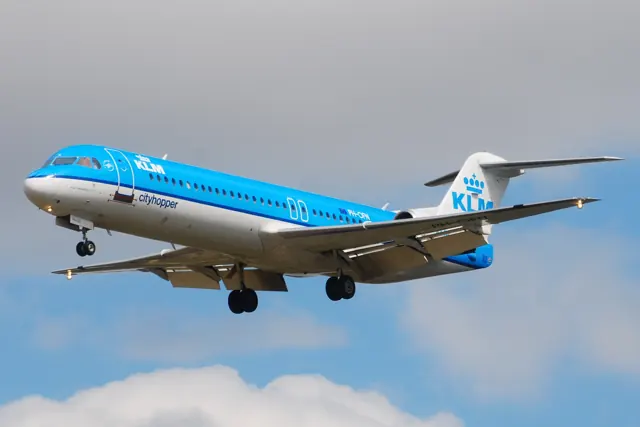
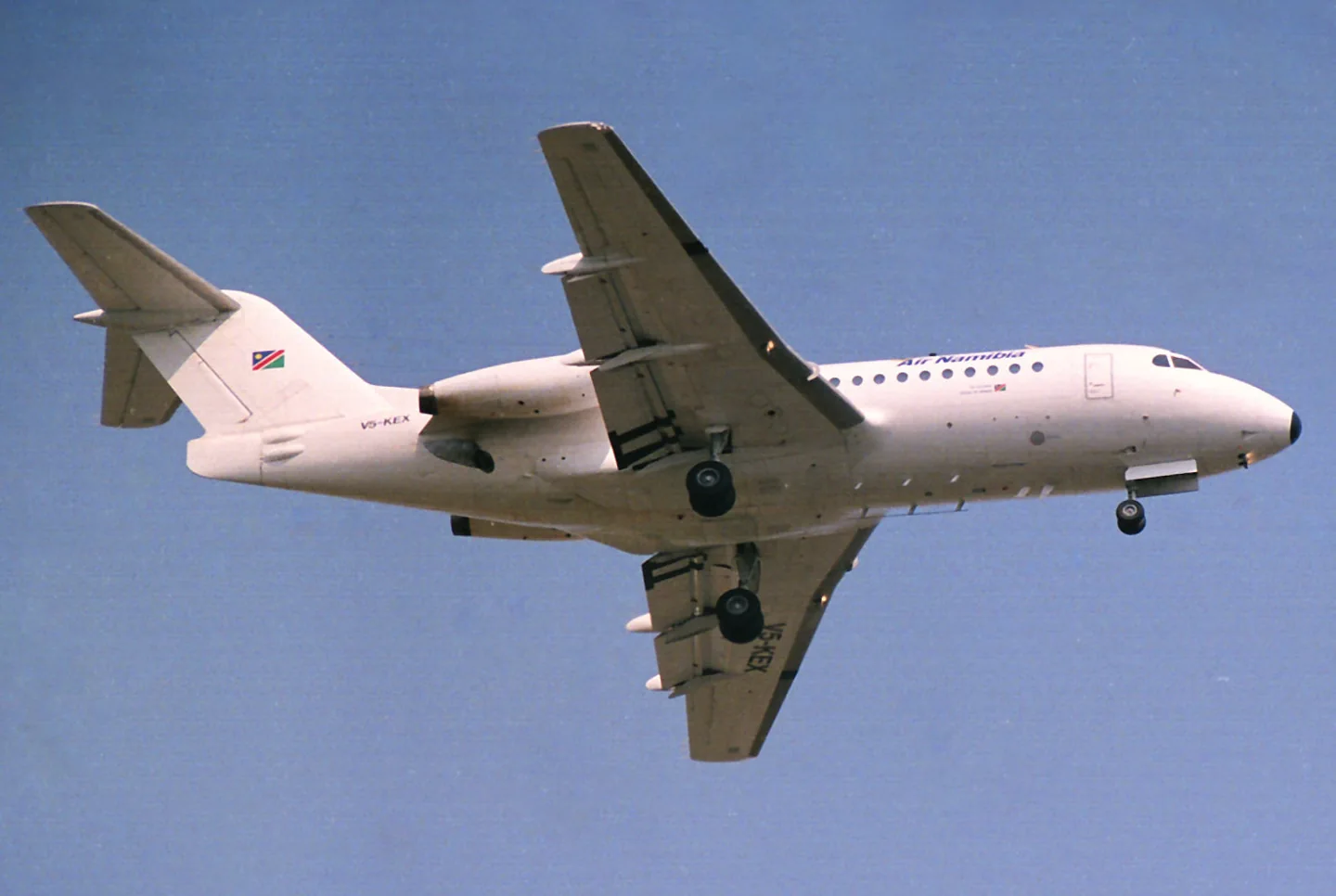
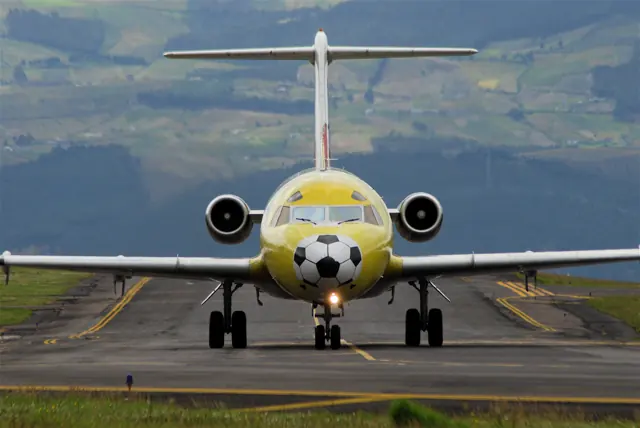
The F28 brought Fokker into the regional-jet market after its turboprop transports. Two rear-mounted engines, a low wing and a T-tail formed the basic layout; later versions changed the fuselage and wing.
Aircraft background
Wikipedia contributors · Read more ↗Teaching new crews while flying a new airline’s routes
An early Fokker assignment took Studstrup to Tripoli for eight months, supporting three F28s at Libyan Arab Airlines. Expatriate crews initially operated the aircraft while local pilots gained experience. The work mixed shuttles between Tripoli and Benghazi with desert oil-field destinations and international trips to cities such as Rome. Introducing the F28 in the United States brought a different working environment.
Pilot’s English career history. Fokker instructor supporting Libyan Arab Airlines and later F28 introductions in the United States; individual assignments are retrospective.
Niels Ove Studstrup · Read more ↗The tail speedbrake responds to throttle position
The guide describes a hydraulic tail speedbrake with continuously variable extension. Advancing either throttle to its detent retracts the brake and returns its cockpit lever, which helps explain an unexpected lever movement while exploring the simulator.
F28 Professional · Just Flight · MSFS 2020 · MSFS 2024
Just Flight · Read more ↗Into the cockpit
 YouTube
 LaMa Aviation · 10 min ·
RARE Fokker F28-1000C Fellowship Cockpit Take Off from Mar del Plata | Fuerza Aerea Argentina TC-52
An Argentine Air Force F28-1000C departs Mar del Plata.
Real aircraft · Fokker F28 Fellowship
Watch on YouTube ↗Preview images are served by AirframeDB. Videos open on YouTube only when you choose to watch.
Meet Fokker F28 Fellowship
The F28 brought Fokker into the regional-jet market after its turboprop transports. Two rear-mounted engines, a low wing and a T-tail formed the basic layout; later versions changed the fuselage and wing.
The Fellowship's flight deck uses an earlier generation of airline equipment and automation than the BAe 146 and Embraer E-Jets. Just Flight's manual describes the variants and systems included in its package.
Fokker F28 Fellowship
Fokker → · Explore the family →
Fokker F28 Fellowship
Wikipedia contributors · Fokker F28 Fellowship ↗Just Flight · MSFS 2020 · MSFS 2024 →Aircraft type designators
Use the code for the model you are flying. The linked authority lists the applicable aircraft.
History & design
A prototype begins the Fellowship’s flying career
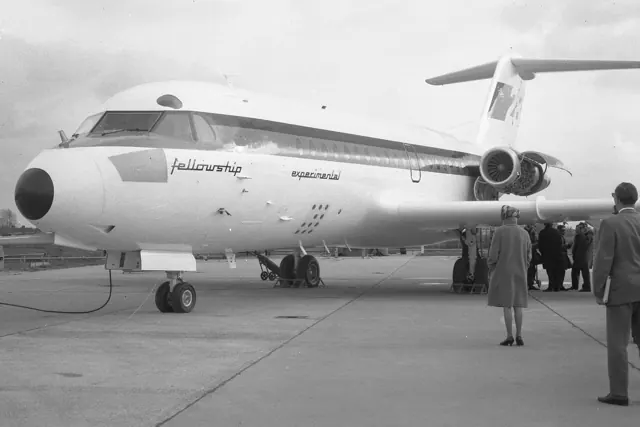
Van der Schraaf’s interview identifies PH-JHG as the aircraft flown by him and Cees Dik on 9 May 1967. Test instrumentation filled its unfinished cabin as the programme moved from construction into flight development.
Up in the Sky · Abe van der Schraaf: test pilot at Fokker ↗First-flight recollection published in 2022
Development milestones
First flight: 9 May 1967
Wikipedia contributors · Fokker F28 Fellowship ↗Fokker F28 Fellowship · family/variant named by the source · Wikipedia revision 1371843105
Pilot accounts
Teaching new crews while flying a new airline’s routes
An early Fokker assignment took Studstrup to Tripoli for eight months, supporting three F28s at Libyan Arab Airlines. Expatriate crews initially operated the aircraft while local pilots gained experience. The work mixed shuttles between Tripoli and Benghazi with desert oil-field destinations and international trips to cities such as Rome.
Introducing the F28 in the United States brought a different working environment. He supported Altair and Empire and enjoyed the opportunity to operate into the busy airports around New York and Washington. Across these assignments, the aircraft was both an airliner earning its keep and a setting for teaching other pilots.
Pilot’s English career history. Fokker instructor supporting Libyan Arab Airlines and later F28 introductions in the United States; individual assignments are retrospective.
Read the full account · Niels Ove Studstrup ↗Leaving an aircraft after twenty-one years in its cockpit
Wallin had flown the F28 since 1978 and regarded it as a particularly pilot-friendly aircraft. By its Swedish farewell in 1999, it had become a familiar part of his working life. His affection for its straightforward handling sat alongside an appreciation of what the aircraft had meant to regional air travel in Sweden.
The farewell brought that wider community together. After the last paying-passenger services, an invited flight returned to Ängelholm with current and former staff, followed by a gathering in the hangar. Wallin flew SE-DGP with Roland Karlsson for the occasion.
SAS Flight Operations farewell material reproduced by Linjeflyg.info in November 1999. Last passenger services and the invited farewell flight were separate events.
Read the full account · Linjeflyg.info / SAS Flight Operations ↗From the first prototype flight to demonstrations overseas
Van der Schraaf shared the F28’s first flight with Cees Dik after chief test pilot Jas Moll chose them for the task. The prototype’s interior was sparse, occupied by test equipment rather than the passenger fittings that would later make it an airliner. Development flying then gradually explored what the new aircraft could do.
Demonstration work carried the F28 much farther from its Dutch home. On an Australian trip, bad weather around Sydney and an unserviceable radar complicated the flying, while damage to the radome required repairs and replacement equipment. Recalling those assignments decades later, Van der Schraaf linked the excitement of introducing a new jet with the less glamorous delays and practical problems that accompanied taking it around the world.
Up in the Sky interview · September 2022. Fokker test pilot recalling the F28, including its first flight on 9 May 1967; this account does not describe an F100 flight.
Read the full account · Up in the Sky ↗In your simulator
Systems, equipment and documentation for each developer’s aircraft.
MSFS 2020 · MSFS 2024F28 Professional
Just Flight · Released
F28 Professional
Just Flight · Released
Manuals & resources
Find your next read
Choose a topic for a short introduction and a link to the original source. Simulator references identify the developer and edition they cover.
Simulator documentation
The tail speedbrake responds to throttle positionF28 Professional · Just Flight · MSFS 2020 · MSFS 2024
The guide describes a hydraulic tail speedbrake with continuously variable extension. Advancing either throttle to its detent retracts the brake and returns its cockpit lever, which helps explain an unexpected lever movement while exploring the simulator.
F28 Professional manual v2.2 · PDF pp.63–65
Just Flight · Read the source ↗Different control axes use different feel mechanismsF28 Professional · Just Flight · MSFS 2020 · MSFS 2024
Just Flight's F28 guide describes spring feel and datum-shift trim for roll and yaw, with a different arrangement for the elevator. Hydraulic failures also have distinct effects depending on the system involved. The stick shaker disengages the autopilot's pitch channel in the documented design, connecting stall warning with flight-guidance behaviour.
F28 manual v2.2 · PDF pp.31,59-60
Just Flight · Read the source ↗Wing lift dumpers have a separate ground roleF28 Professional · Just Flight · MSFS 2020 · MSFS 2024
The manual distinguishes the wing lift dumpers from the tail speedbrake. Their normal automatic deployment follows touchdown or a rejected takeoff, reducing lift and increasing drag while the aircraft is on the ground.
F28 Professional manual v2.2 · PDF p.65; page visually checked
Just Flight · Read the source ↗Pilot account
Teaching new crews while flying a new airline’s routesPilot’s English career history. Fokker instructor supporting Libyan Arab Airlines and later F28 introductions in the United States; individual assignments are retrospective.
An early Fokker assignment took Studstrup to Tripoli for eight months, supporting three F28s at Libyan Arab Airlines. Expatriate crews initially operated the aircraft while local pilots gained experience. The work mixed shuttles between Tripoli and Benghazi with desert oil-field destinations and international trips to cities such as Rome. Introducing the F28 in the United States brought a different working environment.
Niels Ove Studstrup
Niels Ove Studstrup · Read the source ↗Leaving an aircraft after twenty-one years in its cockpitSAS Flight Operations farewell material reproduced by Linjeflyg.info in November 1999. Last passenger services and the invited farewell flight were separate events.
Wallin had flown the F28 since 1978 and regarded it as a particularly pilot-friendly aircraft. By its Swedish farewell in 1999, it had become a familiar part of his working life. His affection for its straightforward handling sat alongside an appreciation of what the aircraft had meant to regional air travel in Sweden. The farewell brought that wider community together.
Rolf Wallin
Linjeflyg.info / SAS Flight Operations · Read the source ↗Read the original documentation from the people who created it. Manuals open on their publisher’s website.
Manual
F28 Professional MSFS Manual (version 2.2)Just Flight F28 manualsJust Flight Microsoft Flight Simulator aircraft manualsMicrosoft / aircraft developersAircraft background
Fokker F28 FellowshipWikipedia contributors · Research background · Wikipedia revision 1371843105 · retrieved 2026-09-12Product
F28 Professional (MSFS)Just Flight · Official developer / designated store catalogue · checked 2026-09-12Type designator
ICAO Doc 8643 — aircraft type designatorsInternational Civil Aviation Organization · Public search data retrieved 2026-09-14; authority update 2026-09-03Built-in force-feedback profiles
Read the documentary basis, editable starting settings and remaining questions for the aircraft you fly. Each explanation refers to the exact profile revision shown.
Catalogue programme-20261022-v1 · 8 profile choices
Just Flight F28-1000
Just Flight · Free and Pro · Revision 6 · Inherited starting point
MSFS 2020 · MSFS 2024
Just Flight F28-1000: Axis-specific feel motivates a separate pitch/roll balance.
Just Flight F28-2000
Just Flight · Free and Pro · Revision 5 · Inherited starting point
MSFS 2020 · MSFS 2024
Just Flight F28-2000: Axis-specific feel motivates a separate pitch/roll balance.
Just Flight F28-3000
Just Flight · Free and Pro · Revision 5 · Inherited starting point
MSFS 2020 · MSFS 2024
Just Flight F28-3000: Axis-specific feel motivates a separate pitch/roll balance.
Just Flight F28-4000
Just Flight · Free and Pro · Revision 5 · Inherited starting point
MSFS 2020 · MSFS 2024
Just Flight F28-4000: Axis-specific feel motivates a separate pitch/roll balance.
Fokker F28-1000
Free and Pro · Revision 3 · Partial review
MSFS 2020 · MSFS 2024
Fokker F28-1000: Axis-specific feel motivates a separate pitch/roll balance.
Fokker F28-2000
Free and Pro · Revision 1 · Partial review
MSFS 2020 · MSFS 2024
Fokker F28-2000: Axis-specific feel motivates a separate pitch/roll balance.
Fokker F28-3000
Free and Pro · Revision 1 · Partial review
MSFS 2020 · MSFS 2024
Fokker F28-3000: Axis-specific feel motivates a separate pitch/roll balance.
Fokker F28-4000
Free and Pro · Revision 1 · Partial review
MSFS 2020 · MSFS 2024
Fokker F28-4000: Axis-specific feel motivates a separate pitch/roll balance.
Fokker F28-1000
Fokker F28-1000: Axis-specific feel motivates a separate pitch/roll balance.
Aircraft and simulator scope
- Fokker F28-1000 · MSFS 2020 · Variant starting point
- Fokker F28-1000 · MSFS 2024 · Variant starting point
Fokker F28-1000 · The selected F28-1000 uses the manual's F28 family control-system description; exact performance stays variant dependent. The manual covers Just Flight's F28 Professional family, including the selected 1000, 2000, 3000 and 4000 variants.
The simulator model and controls
The F28 brought Fokker into the regional-jet market after its turboprop transports. Two rear-mounted engines, a low wing and a T-tail formed the basic layout; later versions changed the fuselage and wing.
This starting point selects Fokker F28-1000. Its aircraft-level settings do not select a particular developer’s custom systems.
How this profile feels
Axis-specific feel motivates a separate pitch/roll balance. Spring resistance builds with the selected airspeed response. A separate aerodynamic term adds speed-dependent control load.
Roll and yaw trim move artificial-spring neutral; the documented elevator arrangement is different. Valid trim provides the configured pressure relief. Autopilot following is enabled for supported control references.
Controls and trim
The F28’s duplicated hydraulic actuators coexist with axis-specific feel systems. Roll and yaw use springs whose neutral is moved by trim; the elevator description identifies natural airloads rather than the same artificial trim spring. The -1000 through -4000 retain distinct airframe variants.
About the values
The gains are normalized profile settings. They describe the chosen effect balance; hand force depends on the device and its output limits. IAS references are tuning values rather than operating limits. Physical acceptance of this revision remains pending.
What the documentation establishes
The selected F28-1000 uses the manual's F28 family control-system description; exact performance stays variant dependent. The manual covers Just Flight's F28 Professional family, including the selected 1000, 2000, 3000 and 4000 variants.
Duplicated hydraulic actuators provide powered operation. Aileron and rudder have spring artificial feel, but elevator control retains natural air loads, so a uniform artificial-feel classification oversimplifies the source.
Aileron and rudder trim shift the artificial-feel spring neutral; pitch trim uses the stabilizer rather than an elevator artificial-trim spring.
The automatic-flight system is documented, with autopilot pitch trim inactive below 250 feet and possible out-of-trim force after disengagement.
Hydraulic flaps, retractable tricycle gear, tail speedbrake and lift dumpers are documented. This F28 configuration has no thrust reversers; that statement is not transferable to the F70/F100.
Manual reversion can increase elevator forces up to fourfold, and rudder forces become very high above 200 knots. These are condition-specific qualitative warnings, not a calibrated device-force curve.
Documentary review and sources
These decisions describe the documentary basis and remaining gaps for this revision. Aircraft documentation and a starting setting describe different kinds of evidence.
Aircraft and variant
ReviewedThis starting point selects Fokker F28-1000. Its aircraft-level settings do not select a particular developer’s custom systems.
Flight controls
ReviewedThe F28’s duplicated hydraulic actuators coexist with axis-specific feel systems. Roll and yaw use springs whose neutral is moved by trim; the elevator description identifies natural airloads rather than the same artificial trim spring. The -1000 through -4000 retain distinct airframe variants.
Trim
ReviewedRoll and yaw trim move artificial-spring neutral; the documented elevator arrangement is different. Pitch authority 0.3 relieves permitted loading; hydraulic centre movement is off. Roll authority is 0.09.
Autopilot and stability
ReviewedFollowing is on at 0.1 authority when a supported, valid autopilot control reference is available.
Equipment
ReviewedGear, flap and ground cues follow the selected settings and available simulator-reported states.
Speeds and limits
Not yet reviewedThe indicated-speed references set the profile response scale; they are separate from aircraft operating limits.
Simulator integration
Not yet reviewedThe profile targets msfs2020, msfs2024. Add-on-specific controls use only the supported references configured by this profile.
Force-feedback settings
ReviewedThe settings define the profile’s effect balance. Device output limits affect physical hand force.
Starting settings and their rationale
These configured values are starting estimates. The explanations describe what each setting controls; physical validation appears separately below.
| Setting | Starting value | What it controls and why |
|---|---|---|
| Spring strength | Starting value0.8 | What it controls and whyAxis-specific feel motivates a separate pitch/roll balance. The baseline spring is 0.8. Its low-speed blend reaches baseline strength at 90 KIAS. |
| Master force gain | Starting value0.85 | What it controls and whyScales overall profile strength while preserving effect balance, subject to device and output limits. |
| Profile force gain | Starting value0.25 | What it controls and whyThe aerodynamic-load gain is 0.25 with an indicated-speed reference of 240 KIAS. The hydraulic-load factor of 0.35 scales that modeled term; it is a selected artificial-feel approximation. |
| Force tuning speed/reference | Starting value240.0 kt | What it controls and whySets the IAS reference for aerodynamic loading. It is an estimate, not published cruise TAS or a flight limit. |
| Spring response reference speed | Starting value90 kt | What it controls and whySets the IAS where the low-speed blend reaches baseline strength; high-speed stiffening also uses it. |
| Aileron force scale | Starting value0.65 | What it controls and whyRoll and pitch aerodynamic scales are 0.65 and 0.65, respectively. They set the aerodynamic axis balance. No custom spring-travel curve is enabled. |
| Elevator force scale | Starting value0.65 | What it controls and whyScales pitch aerodynamic loading; pitch spring travel and trim responses are separate settings. |
| Trim feel | Starting valueEnabled | What it controls and whyRetained for compatibility and group membership. Trim relief, rather than this flag, controls centre movement. |
| Trim relief | Starting valueEnabled | What it controls and whyAllows trim relief with supported control law and valid telemetry. Axis authorities set its amount. |
| Autopilot follow | Starting valueEnabled | What it controls and whyFollowing is on at 0.1 authority when a supported, valid autopilot control reference is available. |
| Autopilot neutral hold | Starting valueDisabled | What it controls and whyPermits centering hold during a supported AP state, separate from following a moving target. |
| Output force limit | Starting value0.55 | What it controls and whyCaps directed-force output. Native spring effects and device limits remain separate. |
All 44 starting settings and their rationale
The settings define the profile’s effect balance. Device output limits affect physical hand force.
| Setting | Starting value | What it controls and why |
|---|---|---|
| Spring strength | Starting value0.8 | What it controls and whyAxis-specific feel motivates a separate pitch/roll balance. The baseline spring is 0.8. Its low-speed blend reaches baseline strength at 90 KIAS. |
| Spring deadband | Starting value0.035 | What it controls and whySets travel around the centre before the baseline spring resists. Smaller values engage it sooner. |
| Profile force gain | Starting value0.25 | What it controls and whyThe aerodynamic-load gain is 0.25 with an indicated-speed reference of 240 KIAS. The hydraulic-load factor of 0.35 scales that modeled term; it is a selected artificial-feel approximation. |
| Master force gain | Starting value0.85 | What it controls and whyScales overall profile strength while preserving effect balance, subject to device and output limits. |
| QBlend Enabled | Starting valueEnabled | What it controls and whyAllows baseline spring strength to rise with indicated airspeed where the control law permits it. |
| QSpring Minimum Factor | Starting value0.55 | What it controls and whySets low-speed spring strength as a fraction of baseline when blending is enabled. One keeps full strength. |
| QSpring Start Knots | Starting value20 kt | What it controls and whySets the IAS where the low-speed spring blend starts rising. This is a feel threshold, not a flight limit. |
| Spring response reference speed | Starting value90 kt | What it controls and whySets the IAS where the low-speed blend reaches baseline strength; high-speed stiffening also uses it. |
| Force tuning speed/reference | Starting value240.0 kt | What it controls and whySets the IAS reference for aerodynamic loading. It is an estimate, not published cruise TAS or a flight limit. |
| Airspeed spring stiffening gain | Starting value0 | What it controls and whyThe high-speed spring-stiffening gain is 0. No additional speed-driven stiffening is added; this does not disable independent aerodynamic loading. |
| Airspeed spring stiffening limit | Starting value5 | What it controls and whyLimits the squared airspeed ratio used for high-speed spring stiffening; it is not a device-force cap. |
| Aileron force scale | Starting value0.65 | What it controls and whyRoll and pitch aerodynamic scales are 0.65 and 0.65, respectively. They set the aerodynamic axis balance. No custom spring-travel curve is enabled. |
| Elevator force scale | Starting value0.65 | What it controls and whyScales pitch aerodynamic loading; pitch spring travel and trim responses are separate settings. |
| Output force limit | Starting value0.55 | What it controls and whyCaps directed-force output. Native spring effects and device limits remain separate. |
| Trim feel | Starting valueEnabled | What it controls and whyRetained for compatibility and group membership. Trim relief, rather than this flag, controls centre movement. |
| Trim relief | Starting valueEnabled | What it controls and whyAllows trim relief with supported control law and valid telemetry. Axis authorities set its amount. |
| Elevator Authority | Starting value0.3 | What it controls and whyRoll and yaw trim move artificial-spring neutral; the documented elevator arrangement is different. Pitch authority 0.3 relieves permitted loading; hydraulic centre movement is off. Roll authority is 0.09. |
| Aileron Authority | Starting value0.09 | What it controls and whyScales supported roll-trim relief and permitted centre movement. Zero removes roll response. |
| Force Trim Enabled | Starting valueDisabled | What it controls and whyEnables local force trim, separate from aircraft-owned trim and add-on integration qualification. |
| GLoad Enabled | Starting valueEnabled | What it controls and whyAllows load-factor changes to modify permitted spring laws. Passive fly-by-wire feel can suppress it. |
| Rate Damping Enabled | Starting valueEnabled | What it controls and whyEnables rate damping with the configured coefficients and control law. |
| Autopilot follow | Starting valueEnabled | What it controls and whyFollowing is on at 0.1 authority when a supported, valid autopilot control reference is available. |
| Autopilot follow authority | Starting value0.1 | What it controls and whySets admitted AP-follow gain, not a percentage of travel. Runtime ownership and input limits still apply. |
| Autopilot neutral hold | Starting valueDisabled | What it controls and whyPermits centering hold during a supported AP state, separate from following a moving target. |
| Autopilot neutral hold strength | Starting value0.6 | What it controls and whySets admitted AP neutral-hold strength; inactive while neutral hold is disabled. |
| Enabled | Starting valueEnabled | What it controls and whyEnables aerodynamic cues; each still needs nonzero strength and its simulator conditions. |
| Gain | Starting value0.3 | What it controls and whySets stall-buffet strength. Zero removes the cue without changing simulator stalls or warnings. |
| Gain | Starting value0.22 | What it controls and whySets high-Mach buffet strength; onset and full-strength thresholds are separate. |
| Gain | Starting value0.14 | What it controls and whySets flap buffet at the configured position and speed gates. Flap movement texture is separate. |
| Maximum flap index | Starting value4 | What it controls and whySets the final flap index for detent normalization. UP plus three detents uses maximum index3. |
| Minimum flap index | Starting value2 | What it controls and whySets the first flap detent that admits buffet; this is a handle index, not degrees. |
| Gain | Starting value0.1 | What it controls and whySets gear aerodynamic buffet; movement and ground-contact cues are separate. |
| Shaker Enabled | Starting valueEnabled | What it controls and whyPermits shaker at supported warning conditions; the switch does not establish aircraft equipment. |
| Stick shaker amplitude | Starting value0.9 | What it controls and whySets triggered shaker strength; inactive while the shaker feature is disabled. |
| Enabled | Starting valueEnabled | What it controls and whyEnables ground effects; each still needs its own strength and contact or motion telemetry. |
| Gain | Starting value0.4 | What it controls and whySets rolling texture strength, modified by speed, surface and undercarriage configuration. |
| Gain | Starting value0.32 | What it controls and whySets gear-bump texture during ground motion, separate from touchdown impact. |
| Gain | Starting value0.9 | What it controls and whySets landing-impact strength; landing telemetry and response shape determine the pulse. |
| Gain | Starting value0.5 | What it controls and whySets reverse-thrust vibration with valid reverser and engine conditions. Zero removes the cue. |
| Enabled | Starting valueEnabled | What it controls and whyEnables engine cues with nonzero settings and valid running-engine telemetry. |
| Gain | Starting value0.06 | What it controls and whySets estimated engine vibration using configured telemetry and response, not measured cockpit vibration. |
| Enabled | Starting valueEnabled | What it controls and whyEnables accessory cues with configured strengths and observed accessory movement. |
| Gain | Starting value0.12 | What it controls and whySets texture from observed flap movement; a command without movement does not establish the cue. |
| Gain | Starting value0.12 | What it controls and whySets texture from observed gear movement, separate from aerodynamic and touchdown effects. |
Limits and open questions
- The 240-knot reference and Mach onset require comparison with applicable limitations and configuration, rather than inference from hydraulic control architecture.
- Cockpit automatic-flight descriptions do not independently qualify external force-feedback following or trim telemetry.
- Fokker F28-1000 documentary evidence does not establish force-feedback hardware acceptance.
Physical validation
No physical force validation is recorded in this public catalogue for this revision. Documentary review and software checks do not establish how a particular device feels.
Discuss this aircraft (0)
Questions, observations and useful sources from the community.
No published discussions yet. Bring a question or share a useful source.
Open aircraft discussions →Content expanded · What’s new
Something missing or a source that needs attention?
Suggest a correction ↗