

Start here
A few places to begin, from the aircraft’s story to the people who fly it.
Meet the aircraft
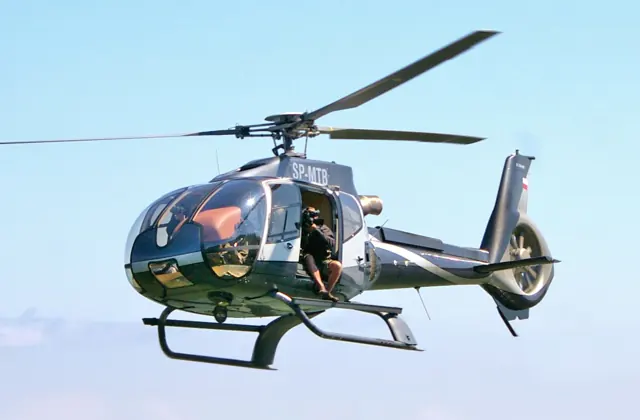
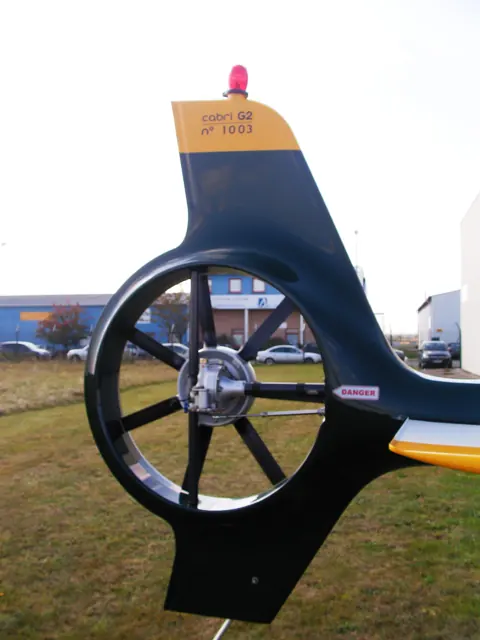
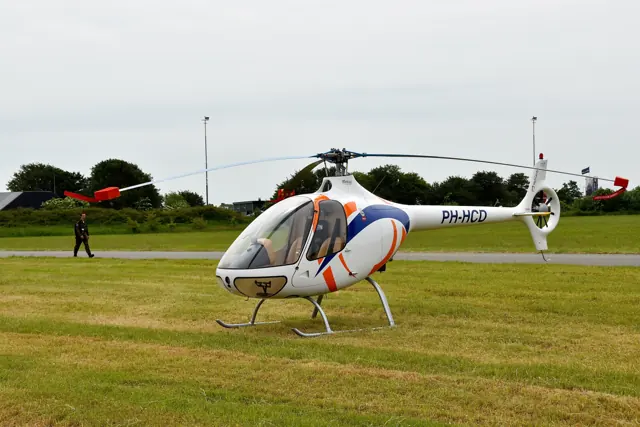
Bruno Guimbal developed the Cabri after working in the helicopter industry. Its first demonstrator flew in 1992, and commercial service began in 2008. The production aircraft has a side-by-side two-seat cabin, a three-bladed main rotor and an enclosed tail rotor.
Aircraft background
Wikipedia contributors · Read more ↗An instructor gets a reminder of being a student
Gilbert had learned in Robinsons, owned them and continued to enjoy flying them. The Cabri’s design nevertheless attracted him, and an hour at Elstree finally let him explore it. His main concern was adapting to a rotor turning the opposite way from those he knew. In flight, familiar habits repeatedly demanded conscious correction. The tour of Hertfordshire became easier once he stopped searching for instruments in their usual places and concentrated on the view outside.
Personal account · February 2017. One-hour Cabri introduction at Elstree with instructor Paul, after extensive Robinson flying.
TimGilbert.com · Read more ↗Cockpit help received attention in Sim Update 3
The August 2025 update corrected the transponder tooltip to display its code and restored missing checklist highlights. Microsoft also records cockpit-texture and livery corrections. The notes provide a dated reference for these interactions in the bundled MSFS 2024 Cabri.
Cabri G2 · MSFS 2024
Microsoft Flight Simulator · Read more ↗Into the cockpit
 YouTube
 P Gatcomb
MSFS - Flying the Guimbal Cabri G2
A simulator walkthrough from startup to shutdown.
Guimbal Cabri G2; MSFS 2020
Watch on YouTube ↗Preview images are served by AirframeDB. Videos open on YouTube only when you choose to watch.
Meet Guimbal Cabri G2
Bruno Guimbal developed the Cabri after working in the helicopter industry. Its first demonstrator flew in 1992, and commercial service began in 2008. The production aircraft has a side-by-side two-seat cabin, a three-bladed main rotor and an enclosed tail rotor.
The Cabri serves the light training role also associated with the Robinson R22. Its rotor, airframe, controls and systems are Guimbal's own design.
Guimbal Cabri G2
Aircraft type designators
Use the code for the model you are flying. The linked authority lists the applicable aircraft.
History & design
An established European design arrives in North America
Precision worked with Guimbal through the FAA certification process completed in February 2015. Head’s visit describes the Oregon operator then putting Cabris into training, adding a North American chapter to a type already used overseas.
Vertical · Meet the Cabri ↗Contemporary operator and programme history
A new trainer attracts pilots from older types
Gilbert’s account illustrates the Cabri’s appeal to pilots already invested in Robinson aircraft. Its cabin finish and modern presentation first caught his attention; flying it then made the transition a matter of learning new habits as well as comparing equipment.
TimGilbert.com · Tim Gilbert flies the Cabri G2 ↗One owner and instructor’s perspective on adopting the type
Development milestones
Designer: Bruno Guimbal
First flight: 31 March 2005
Wikipedia contributors · Guimbal Cabri G2 ↗Guimbal Cabri G2 · family/variant named by the source · Wikipedia revision 1366423799
Pilot accounts
An instructor gets a reminder of being a student
Gilbert had learned in Robinsons, owned them and continued to enjoy flying them. The Cabri’s design nevertheless attracted him, and an hour at Elstree finally let him explore it. His main concern was adapting to a rotor turning the opposite way from those he knew. In flight, familiar habits repeatedly demanded conscious correction.
The tour of Hertfordshire became easier once he stopped searching for instruments in their usual places and concentrated on the view outside. Hovering on return was a further challenge, requiring time to adjust his inputs. Gilbert found the experience humbling in a useful way: as an instructor, he was reminded how it felt to be a beginner. He finished the flight keen to train further on the type, with enthusiasm shaped by the learning still ahead.
Personal account · February 2017. One-hour Cabri introduction at Elstree with instructor Paul, after extensive Robinson flying.
Read the full account · TimGilbert.com ↗Enjoyable utility flying, with ownership details that mattered
Bates moved into the Cabri after more than a year flying the MD500. Its cockpit and starting routine took some learning, but he found the cabin comfortable and the helicopter enjoyable to fly. The control feel reminded him of the larger machine, while the compact airframe suited the smaller landing sites involved in his work.
Operating experience also exposed frustrations that a short demonstration might miss. He reported unreliable fuel indications, corrosion concerns in the coastal environment and difficulty obtaining some parts at the time. These observations concerned an early aircraft, and he acknowledged that later examples might differ.
Real-aircraft operating account · HeliSimmer.com, June 2016. Bates describes early-production aircraft number 36 and coastal use; this is not a simulator review.
Read the full account · HeliSimmer.com ↗A first introduction at an Oregon training school
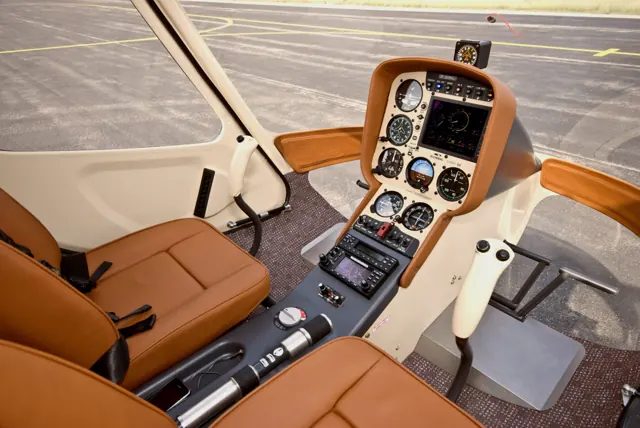
The Cabri’s panel and finish made such a modern impression on Head that the sound of its piston engine briefly surprised her. She had subconsciously expected a turbine. At Precision Helicopters in Oregon, Nigel Cooper introduced her to the aircraft as the school began using the new arrival in North American training.
Once flying, the heavy controls required more effort than the cockpit’s resemblance to larger Airbus helicopters had suggested. Head kept her own evaluation conservative, then watched Cooper demonstrate manoeuvres that drew on his greater familiarity with the type. She enjoyed the flight while recognising that she would need more time to feel proficient.
Vertical · February 2016. October demonstration at Precision Helicopters, Newberg, with director of training Nigel Cooper; earlier 145 hp configuration.
Read the full account · Vertical ↗In your simulator
Systems, equipment and documentation for each developer’s aircraft.
Compare simulator versions →MSFS 2024Cabri G2
Microsoft Flight Simulator · Released
Cabri G2
Microsoft Flight Simulator · Released
MSFS 2020Cabri G2
Microsoft Flight Simulator · Released
Cabri G2
Microsoft Flight Simulator · Released
X-Plane 11 · X-Plane 12Cabri G2
VSKYLABS · Released
Cabri G2
VSKYLABS · Released
Aircraft specifications
Published figures for the named real-aircraft variant. Simulator equipment and performance can differ.
| Specification | Published value |
|---|---|
| Length | 6.31 m (20 ft 8 in) |
| Height | 2.37 m (7 ft 9 in) |
| Gross weight | 700 kg (1,543 lb) |
| Powerplant | 1 × Lycoming O-360 -J2A piston engine , 108 kW (145 hp) |
| Main rotor diameter | 7.2 m (23 ft 7 in) |
| Maximum speed | 185 km/h (115 mph, 100 kn) |
| Cruise speed | 166 km/h (104 mph, 90 kn) |
| Range | 700 km (430 mi, 380 nmi) |
| Service ceiling | 3,963 m (13,000 ft) |
Manuals & resources
Find your next read
Choose a topic for a short introduction and a link to the original source. Simulator references identify the developer and edition they cover.
Simulator documentation
Cockpit help received attention in Sim Update 3Cabri G2 · Microsoft Flight Simulator · MSFS 2024
The August 2025 update corrected the transponder tooltip to display its code and restored missing checklist highlights. Microsoft also records cockpit-texture and livery corrections. The notes provide a dated reference for these interactions in the bundled MSFS 2024 Cabri.
MSFS 2024 Sim Update 3 · 1.5.27.0, 20 August 2025
Microsoft Flight Simulator · Read the source ↗Part of MSFS 2020’s introduction of helicoptersCabri G2 · Microsoft Flight Simulator · MSFS 2020
Microsoft named the Cabri G2 and Bell 407 in its 40th Anniversary Edition announcement, alongside the new helicopter fluid-dynamics simulation. These bundled aircraft share that platform introduction, while retaining different cockpits and aircraft configurations.
Microsoft announcement · June 2022; published fleet confirms their subsequent inclusion
Microsoft Flight Simulator · Read the source ↗Released product and variantsCabri G2 · VSKYLABS · X-Plane 11 · X-Plane 12
The Cabri G2 product uses a native X-Plane aircraft model and supports desktop and VR cockpits. The developer identifies its BC Helicopters liveries and the project’s independent relationship to Guimbal.
Official developer / designated-store reference · checked 2026-09-14
VSKYLABS · Read the source ↗Pilot account
An instructor gets a reminder of being a studentPersonal account · February 2017. One-hour Cabri introduction at Elstree with instructor Paul, after extensive Robinson flying.
Gilbert had learned in Robinsons, owned them and continued to enjoy flying them. The Cabri’s design nevertheless attracted him, and an hour at Elstree finally let him explore it. His main concern was adapting to a rotor turning the opposite way from those he knew. In flight, familiar habits repeatedly demanded conscious correction. The tour of Hertfordshire became easier once he stopped searching for instruments in their usual places and concentrated on the view outside.
Tim Gilbert
TimGilbert.com · Read the source ↗Enjoyable utility flying, with ownership details that matteredReal-aircraft operating account · HeliSimmer.com, June 2016. Bates describes early-production aircraft number 36 and coastal use; this is not a simulator review.
Bates moved into the Cabri after more than a year flying the MD500. Its cockpit and starting routine took some learning, but he found the cabin comfortable and the helicopter enjoyable to fly. The control feel reminded him of the larger machine, while the compact airframe suited the smaller landing sites involved in his work. Operating experience also exposed frustrations that a short demonstration might miss.
Nick Bates
HeliSimmer.com · Read the source ↗Read the original documentation from the people who created it. Manuals open on their publisher’s website.
Manual
Microsoft Flight Simulator aircraft manualsMicrosoft / aircraft developersAircraft background
Guimbal Cabri G2Wikipedia contributors · Research background · Wikipedia revision 1366423799 · retrieved 2026-09-12Resource
MSFS 2024 FAQ and edition aircraft inventoryMicrosoft MSFS 2020 FAQ and edition aircraft inventoryMicrosoftDeveloper documentation
VSKYLABS Guimbal Cabri G2 add-on for X-Plane Flight Simulator.VSKYLABS · Official developer / designated-store reference · checked 2026-09-14 VSKYLABS Aerospace Simulations Aircraft Center: VSKYLABS Guimbal Cabri G2VSKYLABS · Official developer / designated-store reference · checked 2026-09-14 MSFS 2024 Sim Update 3 release notesMicrosoft Flight Simulator · Publisher announcement or release notes Microsoft Flight Simulator’s 40th Anniversary EditionMicrosoft Flight Simulator · Publisher announcement or release notesType designator
ICAO Doc 8643 — aircraft type designatorsInternational Civil Aviation Organization · Public search data retrieved 2026-09-14; authority update 2026-09-03Built-in force-feedback profiles
Read the documentary basis, editable starting settings and remaining questions for the aircraft you fly. Each explanation refers to the exact profile revision shown.
Catalogue programme-20261022-v1 · 2 profile choices
VSKYLABS Guimbal Cabri G2
VSKYLABS · Free and Pro · Revision 4 · Inherited starting point
X-Plane 12
VSKYLABS Guimbal Cabri G2: The cyclic response approximates unboosted mechanical controls.
Guimbal Cabri G2
Free and Pro · Revision 2 · Partial review
MSFS 2024 · MSFS 2020 · X-Plane 12 · X-Plane 11
Guimbal Cabri G2: The cyclic response approximates unboosted mechanical controls.
VSKYLABS Guimbal Cabri G2
VSKYLABS Guimbal Cabri G2: The cyclic response approximates unboosted mechanical controls.
Aircraft and simulator scope
- VSKYLABS Guimbal Cabri G2 · VSKYLABS · X-Plane 12 · Add-on starting point
The simulator model and controls
Bruno Guimbal developed the Cabri after working in the helicopter industry. Its first demonstrator flew in 1992, and commercial service began in 2008. The production aircraft has a side-by-side two-seat cabin, a three-bladed main rotor and an enclosed tail rotor.
This profile selects VSKYLABS Guimbal Cabri G2 for X-Plane 12.
How this profile feels
The cyclic response approximates unboosted mechanical controls. The spring stays independent of airspeed. Directed aerodynamic loading is omitted. Cyclic damping adds resistance to hardware motion.
Electric cyclic trim releases static forces; collective friction does not define cyclic trim. Local force trim is off. Autopilot following is off.
Controls and trim
The Cabri has unboosted push-pull controls and dual-axis electric cyclic trim. Guimbal explicitly distinguishes collective friction from the cyclic, which has no friction mechanism. Its three-blade main rotor has a separately stated rotor-speed reference.
The selected implementation
The Cabri has unboosted push-pull controls and dual-axis electric cyclic trim. Its manufacturer specifies no cyclic friction mechanism; collective friction is a separate control.
About the values
The gains are normalized profile settings. They describe the chosen effect balance; hand force depends on the device and its output limits. IAS references are tuning values rather than operating limits. Physical acceptance of this revision remains pending.
Documentary review and sources
These decisions describe the documentary basis and remaining gaps for this revision. Aircraft documentation and a starting setting describe different kinds of evidence.
Aircraft and variant
InheritedThis profile selects VSKYLABS Guimbal Cabri G2 for X-Plane 12.
Flight controls
InheritedThe Cabri has unboosted push-pull controls and dual-axis electric cyclic trim. Guimbal explicitly distinguishes collective friction from the cyclic, which has no friction mechanism. Its three-blade main rotor has a separately stated rotor-speed reference.
Trim
InheritedElectric cyclic trim releases static forces; collective friction does not define cyclic trim. Local force trim is off. Autopilot following is off.
Autopilot and stability
InheritedAutopilot following is off; the configured spring and load retain the hardware feel.
Equipment
InheritedThe Cabri has unboosted push-pull controls and dual-axis electric cyclic trim. Its manufacturer specifies no cyclic friction mechanism; collective friction is a separate control.
Speeds and limits
InheritedThe indicated-speed references set the profile response scale; they are separate from aircraft operating limits.
Simulator integration
InheritedThe profile targets xplane12. Add-on-specific controls use only the supported references configured by this profile.
Force-feedback settings
InheritedThe settings define the profile’s effect balance. Device output limits affect physical hand force.
Starting settings and their rationale
These configured values are starting estimates. The explanations describe what each setting controls; physical validation appears separately below.
| Setting | Starting value | What it controls and why |
|---|---|---|
| Spring strength | Starting value0.12 | What it controls and whyThe cyclic response approximates unboosted mechanical controls. The baseline spring is 0.12. Low-speed spring blending is off. |
| Master force gain | Starting value0.65 | What it controls and whyScales overall profile strength while preserving effect balance, subject to device and output limits. |
| Profile force gain | Starting value0 | What it controls and whyThe 0 gain omits sustained directed airspeed loading. Spring resistance remains independent. |
| Force tuning speed/reference | Starting value90 kt | What it controls and whySets the IAS reference for aerodynamic loading. It is an estimate, not published cruise TAS or a flight limit. |
| Spring response reference speed | Starting value45 kt | What it controls and whySets the IAS where the low-speed blend reaches baseline strength; high-speed stiffening also uses it. |
| Aileron force scale | Starting value1 | What it controls and whyRoll and pitch aerodynamic scales are 1 and 1, respectively. These stored weights do not create directed aerodynamic loading while that term is inactive. No custom spring-travel curve is enabled. |
| Elevator force scale | Starting value1 | What it controls and whyScales pitch aerodynamic loading; pitch spring travel and trim responses are separate settings. |
| Trim feel | Starting valueDisabled | What it controls and whyRetained for compatibility and group membership. Trim relief, rather than this flag, controls centre movement. |
| Trim relief | Starting valueDisabled | What it controls and whyAllows trim relief with supported control law and valid telemetry. Axis authorities set its amount. |
| Autopilot follow | Starting valueDisabled | What it controls and whyAutopilot following is off; the configured spring and load retain the hardware feel. |
| Autopilot neutral hold | Starting valueDisabled | What it controls and whyPermits centering hold during a supported AP state, separate from following a moving target. |
| Output force limit | Starting value0.55 | What it controls and whyCaps directed-force output. Native spring effects and device limits remain separate. |
All 44 starting settings and their rationale
The settings define the profile’s effect balance. Device output limits affect physical hand force.
| Setting | Starting value | What it controls and why |
|---|---|---|
| Spring strength | Starting value0.12 | What it controls and whyThe cyclic response approximates unboosted mechanical controls. The baseline spring is 0.12. Low-speed spring blending is off. |
| Spring deadband | Starting value0.02 | What it controls and whySets travel around the centre before the baseline spring resists. Smaller values engage it sooner. |
| Profile force gain | Starting value0 | What it controls and whyThe 0 gain omits sustained directed airspeed loading. Spring resistance remains independent. |
| Master force gain | Starting value0.65 | What it controls and whyScales overall profile strength while preserving effect balance, subject to device and output limits. |
| QBlend Enabled | Starting valueDisabled | What it controls and whyAllows baseline spring strength to rise with indicated airspeed where the control law permits it. |
| QSpring Minimum Factor | Starting value0.55 | What it controls and whySets low-speed spring strength as a fraction of baseline when blending is enabled. One keeps full strength. |
| QSpring Start Knots | Starting value10 kt | What it controls and whySets the IAS where the low-speed spring blend starts rising. This is a feel threshold, not a flight limit. |
| Spring response reference speed | Starting value45 kt | What it controls and whySets the IAS where the low-speed blend reaches baseline strength; high-speed stiffening also uses it. |
| Force tuning speed/reference | Starting value90 kt | What it controls and whySets the IAS reference for aerodynamic loading. It is an estimate, not published cruise TAS or a flight limit. |
| Airspeed spring stiffening gain | Starting value0 | What it controls and whyAdds permitted spring resistance above the full-blend speed. Zero removes this high-speed increase. |
| Airspeed spring stiffening limit | Starting value2 | What it controls and whyLimits the squared airspeed ratio used for high-speed spring stiffening; it is not a device-force cap. |
| Aileron force scale | Starting value1 | What it controls and whyRoll and pitch aerodynamic scales are 1 and 1, respectively. These stored weights do not create directed aerodynamic loading while that term is inactive. No custom spring-travel curve is enabled. |
| Elevator force scale | Starting value1 | What it controls and whyScales pitch aerodynamic loading; pitch spring travel and trim responses are separate settings. |
| Output force limit | Starting value0.55 | What it controls and whyCaps directed-force output. Native spring effects and device limits remain separate. |
| Trim feel | Starting valueDisabled | What it controls and whyRetained for compatibility and group membership. Trim relief, rather than this flag, controls centre movement. |
| Trim relief | Starting valueDisabled | What it controls and whyAllows trim relief with supported control law and valid telemetry. Axis authorities set its amount. |
| Elevator Authority | Starting value0 | What it controls and whyScales supported pitch-trim relief and permitted centre movement. Zero removes pitch response. |
| Aileron Authority | Starting value0 | What it controls and whyScales supported roll-trim relief and permitted centre movement. Zero removes roll response. |
| Force Trim Enabled | Starting valueDisabled | What it controls and whyElectric cyclic trim releases static forces; collective friction does not define cyclic trim. Local force trim is off. The stored latch parameters are inactive; the profile does not supply a local hold-where-left neutral. |
| GLoad Enabled | Starting valueEnabled | What it controls and whyAllows load-factor changes to modify permitted spring laws. Passive fly-by-wire feel can suppress it. |
| Rate Damping Enabled | Starting valueDisabled | What it controls and whyEnables rate damping with the configured coefficients and control law. |
| Autopilot follow | Starting valueDisabled | What it controls and whyAutopilot following is off; the configured spring and load retain the hardware feel. |
| Autopilot follow authority | Starting value0.05 | What it controls and whySets admitted AP-follow gain, not a percentage of travel. Runtime ownership and input limits still apply. |
| Autopilot neutral hold | Starting valueDisabled | What it controls and whyPermits centering hold during a supported AP state, separate from following a moving target. |
| Autopilot neutral hold strength | Starting value0.6 | What it controls and whySets admitted AP neutral-hold strength; inactive while neutral hold is disabled. |
| Enabled | Starting valueEnabled | What it controls and whyEnables aerodynamic cues; each still needs nonzero strength and its simulator conditions. |
| Gain | Starting value0 | What it controls and whySets stall-buffet strength. Zero removes the cue without changing simulator stalls or warnings. |
| Gain | Starting value0 | What it controls and whySets high-Mach buffet strength; onset and full-strength thresholds are separate. |
| Gain | Starting value0 | What it controls and whySets flap buffet at the configured position and speed gates. Flap movement texture is separate. |
| Maximum flap index | Starting value1 | What it controls and whySets the final flap index for detent normalization. UP plus three detents uses maximum index3. |
| Minimum flap index | Starting value1 | What it controls and whySets the first flap detent that admits buffet; this is a handle index, not degrees. |
| Gain | Starting value0 | What it controls and whySets gear aerodynamic buffet; movement and ground-contact cues are separate. |
| Shaker Enabled | Starting valueDisabled | What it controls and whyPermits shaker at supported warning conditions; the switch does not establish aircraft equipment. |
| Stick shaker amplitude | Starting value0.5 | What it controls and whySets triggered shaker strength; inactive while the shaker feature is disabled. |
| Enabled | Starting valueEnabled | What it controls and whyEnables ground effects; each still needs its own strength and contact or motion telemetry. |
| Gain | Starting value0 | What it controls and whySets rolling texture strength, modified by speed, surface and undercarriage configuration. |
| Gain | Starting value0 | What it controls and whySets gear-bump texture during ground motion, separate from touchdown impact. |
| Gain | Starting value0.2 | What it controls and whySets landing-impact strength; landing telemetry and response shape determine the pulse. |
| Gain | Starting value0 | What it controls and whySets reverse-thrust vibration with valid reverser and engine conditions. Zero removes the cue. |
| Enabled | Starting valueEnabled | What it controls and whyEnables engine cues with nonzero settings and valid running-engine telemetry. |
| Gain | Starting value0 | What it controls and whySets estimated engine vibration using configured telemetry and response, not measured cockpit vibration. |
| Enabled | Starting valueEnabled | What it controls and whyEnables accessory cues with configured strengths and observed accessory movement. |
| Gain | Starting value0 | What it controls and whySets texture from observed flap movement; a command without movement does not establish the cue. |
| Gain | Starting value0 | What it controls and whySets texture from observed gear movement, separate from aerodynamic and touchdown effects. |
Limits and open questions
- Developer specifications530RPM and three blades. POH governor paragraph near2000RPM refers to engine context and is rejected as main rotor reference.
- Physical and installed-aircraft acceptance deferred. Gains, damping, frequency envelopes and airspeed references are estimates.
- No unqualified AP following, trim actuator demand, failure behavior or dynamic equipment detection.
- Rotor rumble uses actual rotor state only. Enabled forward-flight n/rev retains the runtime engine-combustion presence and governed-nominal frequency fallback when rotor telemetry is missing; it is not measured rotor loading. ETL/VRS are generic airspeed/descent heuristics, not add-on vortex-state integration.
- Metadata identity repair only; force modules, matching and simulator scope unchanged.
Physical validation
No physical force validation is recorded in this public catalogue for this revision. Documentary review and software checks do not establish how a particular device feels.
Discuss this aircraft (0)
Questions, observations and useful sources from the community.
No published discussions yet. Bring a question or share a useful source.
Open aircraft discussions →Content expanded · What’s new
Something missing or a source that needs attention?
Suggest a correction ↗