Start here
A few places to begin, from the aircraft’s story to the people who fly it.
Meet the aircraft
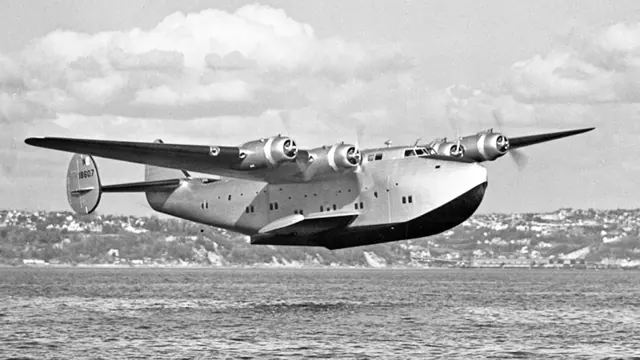
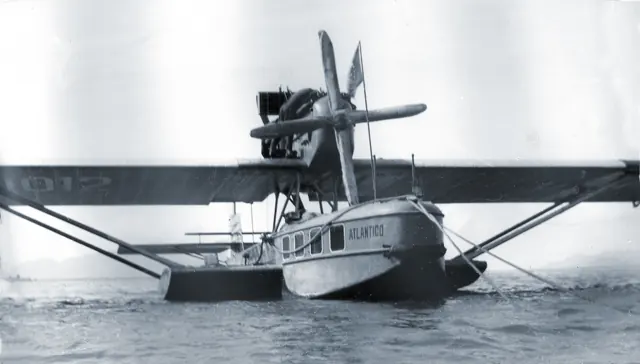
The French Latécoère 631 was a six-engine flying boat intended for transatlantic passenger service. Its long hull, high wing and radial engines date from the final era of large civil flying boats. The Second World War disrupted development and service.
Aircraft background
Wikipedia contributors · Read more ↗A pilot remains committed to the flying boat’s cargo work
Demouveaux spoke warmly about the Latécoère after returning from its second France–Indochina cargo journey in 1952. He believed the modifications had made it an excellent aircraft and remained committed to its future. The report captures that confidence at a time when the flying boat was seeking another role after its passenger service. The journey was a crew effort.
Les Ailes, 2 August 1952, signed J. G.; compilation PDF page 7. Reported interview following a second journey to Saigon and back. His confidence is a historical opinion, not a safety finding.
Les Ailes / Entreprises coloniales · Read more ↗Large-flying-boat controls
The 2023 guide illustrates trim and gyropilot controls in the MSFS 2020 cockpit. This older manual does not establish unchanged MSFS 2024 operation.
631 · Microsoft Flight Simulator · MSFS 2024
Microsoft / aircraft developers · Read more ↗Into the cockpit
 YouTube
 Microsoft Flight Simulator · 2 min ·
Microsoft Flight Simulator | Local Legend 9: Latécoère 631
Microsoft introduces the Latécoère 631 in its Local Legends series.
Simulator · Microsoft Latécoère 631 · MSFS
Watch on YouTube ↗Preview images are served by AirframeDB. Videos open on YouTube only when you choose to watch.
Meet Latécoère 631
The French Latécoère 631 was a six-engine flying boat intended for transatlantic passenger service. Its long hull, high wing and radial engines date from the final era of large civil flying boats. The Second World War disrupted development and service.
Land-based airliners later displaced this approach to long-distance transport. The aircraft's numerous engines and large crew stations reflect the systems and navigation demands of its period.
Latécoère 631
Aircraft type designators
A model-specific ICAO or FAA designator has not been confirmed in the references reviewed for this aircraft.
History & design
A large cabin and a separate crew deck
Les Ailes credits engineer Marcel Moine with the design. Its 1952 description places the crew above the passenger spaces, where facing seats could become bunks. A bar, cabins with reading lamps and a galley gave the interior a ship-like arrangement. Layout details varied between aircraft; the article does not describe one identical cabin across the fleet.
Les Ailes / Entreprises coloniales · France-Hydro: contemporary reports from Les Ailes ↗Compilation PDF pages 1 and 6–7; design credit and cabin description
Passenger accommodation makes way for cargo
The 1949 report describes removing the passenger fittings from aircraft No. 8. A large port-side loading door required reinforcement of the hull structure, while hoists and an internal rail helped move freight aboard. The conversion changed both the interior and the work performed at each stop.
Les Ailes / Entreprises coloniales · SEMAF: contemporary reports from Les Ailes ↗Les Ailes, 20 August 1949 · compilation PDF pages 2–3
The view from the upper deck on a British demonstration flight
A Flight reporter travelled above the passenger cabin with Prévost during a 1947 demonstration over London. The long bow stretching ahead of the windscreen recalled a cabin cruiser. Below, the reporter found curtained cabins and a restaurant bar, while noticing more noise and vibration near the engines. These are an observer’s impressions, not Prévost’s own testimony.
Flight / Stu Richards · The Latécoère 631 in Britain: Flight report reprint ↗1947 Flight passage as reprinted; unverified numerical claims and accident speculation excluded
Development milestones
First flight: 4 November 1942
Wikipedia contributors · Latécoère 631 ↗Latécoère 631 · family/variant named by the source · Wikipedia revision 1363832860
Pilot accounts
A pilot remains committed to the flying boat’s cargo work
Demouveaux spoke warmly about the Latécoère after returning from its second France–Indochina cargo journey in 1952. He believed the modifications had made it an excellent aircraft and remained committed to its future. The report captures that confidence at a time when the flying boat was seeking another role after its passenger service.
The journey was a crew effort. Demouveaux flew as pilot and captain with a second pilot, navigator, radio operators and mechanics, including staff from Latécoère. The report traces their route through Bizerte, Bahrain and Trincomalee, with part of the flying at night. His enthusiasm belongs to that particular stage of the aircraft’s working life; it does not settle the questions raised by its later history.
Les Ailes, 2 August 1952, signed J. G.; compilation PDF page 7. Reported interview following a second journey to Saigon and back. His confidence is a historical opinion, not a safety finding.
Read the full account · Les Ailes / Entreprises coloniales ↗In your simulator
Systems, equipment and documentation for each developer’s aircraft.
Compare simulator versions →MSFS 2024631
Microsoft Flight Simulator · Released
631
Microsoft Flight Simulator · Released
MSFS 2020Latécoère 631
Microsoft Flight Simulator · Released
Latécoère 631
Microsoft Flight Simulator · Released
Aircraft specifications
Published figures for the named real-aircraft variant. Simulator equipment and performance can differ.
| Specification | Published value |
|---|---|
| Length | 43.46 m (142 ft 7 in) |
| Wingspan | 57.43 m (188 ft 5 in) |
| Height | 10.35 m (33 ft 11 in) |
| Wing area | 349.4 m² (3,761 sq ft) |
| Empty weight | 32,400 kg (71,430 lb) |
| Gross weight | 71,350 kg (157,300 lb) |
| Max takeoff weight | 75,000 kg (165,347 lb) |
| Powerplant | 6 × Wright GR-2600-A5B Twin Cyclone 14-cylinder air-cooled radial engines , 1,194 kW (1,600 hp) each |
| Propellers | 3-bladed constant-speed propellers, 4.3 m (14 ft 1 in) diameter |
| Maximum speed | 395 km/h (245 mph, 213 kn) at 1,800 m (5,900 ft) |
| Cruise speed | 295 km/h (183 mph, 159 kn) at 500 m (1,600 ft) |
| Range | 6,035 km (3,750 mi, 3,259 nmi) |
Manuals & resources
Find your next read
Choose a topic for a short introduction and a link to the original source. Simulator references identify the developer and edition they cover.
Simulator documentation
Large-flying-boat controls631 · Microsoft Flight Simulator · MSFS 2024
The 2023 guide illustrates trim and gyropilot controls in the MSFS 2020 cockpit. This older manual does not establish unchanged MSFS 2024 operation.
Legacy manual; MSFS 2024 interfaces remain unverified
Microsoft / aircraft developers · Read the source ↗The clipboard controls starting states and doorsLatécoère 631 · Microsoft Flight Simulator · MSFS 2020
The General page offers cold-and-dark, automatic start and automatic shutdown states, plus door controls.
2023 MSFS 2020 guide · PDF pages 6–7
Microsoft / aircraft developers · Read the source ↗Check fuel and oil levels on the Engine pageLatécoère 631 · Microsoft Flight Simulator · MSFS 2020
This clipboard page displays tank levels because the documented cockpit lacks fuel-level indicators. It also provides a refill control.
MSFS 2020 guide · PDF page 9
Microsoft / aircraft developers · Read the source ↗The undercarriage is for ground positioningLatécoère 631 · Microsoft Flight Simulator · MSFS 2020
Its four-way control moves the aircraft, with a central stop button. The guide explicitly excludes takeoff or landing with this equipment enabled.
MSFS 2020 guide · PDF page 10, visually checked
Microsoft / aircraft developers · Read the source ↗Shut down the engines before using the tugLatécoère 631 · Microsoft Flight Simulator · MSFS 2020
The towing page activates the boat only with aircraft engines off. Separate direction and throttle controls move it.
MSFS 2020 guide · PDF page 11
Microsoft / aircraft developers · Read the source ↗The gyropilot holds an established heading or altitudeLatécoère 631 · Microsoft Flight Simulator · MSFS 2020
The guide requires the gyropilot and master switches before the hold controls. Its speed-hold function is unused in this version.
MSFS 2020 guide · PDF page 27
Microsoft / aircraft developers · Read the source ↗Pilot account
A pilot remains committed to the flying boat’s cargo workLes Ailes, 2 August 1952, signed J. G.; compilation PDF page 7. Reported interview following a second journey to Saigon and back. His confidence is a historical opinion, not a safety finding.
Demouveaux spoke warmly about the Latécoère after returning from its second France–Indochina cargo journey in 1952. He believed the modifications had made it an excellent aircraft and remained committed to its future. The report captures that confidence at a time when the flying boat was seeking another role after its passenger service. The journey was a crew effort.
Louis Demouveaux
Les Ailes / Entreprises coloniales · Read the source ↗Read the original documentation from the people who created it. Manuals open on their publisher’s website.
Manual
Latécoère Model 631 User ManualMicrosoft / aircraft developers Microsoft Flight Simulator aircraft manualsMicrosoft / aircraft developersAircraft background
Latécoère 631Wikipedia contributors · Research background · Wikipedia revision 1363832860 · retrieved 2026-09-12 SEMAF: contemporary reports from Les AilesLes Ailes / Entreprises coloniales · 20 August 1949 · cargo conversion; compiled 2024 The Latécoère 631 in Britain: Flight report reprintFlight / Stu Richards · 1947 report reprinted 7 February 2011; observer aboard the demonstration aircraftResource
MSFS 2024 FAQ and edition aircraft inventoryMicrosoftDeveloper documentation
City Update II: France and Local Legend IX: Latécoère Model 631 Now Available - News & AnnouncementsMicrosoft Flight Simulator Team · 2023-06-19 · release and package scopeBuilt-in force-feedback profiles
Read the documentary basis, editable starting settings and remaining questions for the aircraft you fly. Each explanation refers to the exact profile revision shown.
Catalogue programme-20261022-v1 · 1 profile choice
Latécoère 631
Free and Pro · Revision 1 · Partial review
MSFS 2024 · MSFS 2020
Latécoère 631: The profile supplies selected large-transport resistance.
Latécoère 631
Latécoère 631: The profile supplies selected large-transport resistance.
Aircraft and simulator scope
- Latécoère 631 · MSFS 2024 · family starting point
- Latécoère 631 · MSFS 2020 · family starting point
Latécoère 631 · The retained manual and official announcement identify the Local Legend Latécoère 631 simulator.
The simulator model and controls
The French Latécoère 631 was a six-engine flying boat intended for transatlantic passenger service. Its long hull, high wing and radial engines date from the final era of large civil flying boats. The Second World War disrupted development and service.
This starting point selects Latécoère 631. Its aircraft-level settings do not select a particular developer’s custom systems.
How this profile feels
The profile supplies selected large-transport resistance. Spring resistance builds with the selected airspeed response. A separate aerodynamic term adds speed-dependent control load.
Pitch relief is separate from multi-engine management and hull contact. Valid trim provides the configured pressure relief. Autopilot following is enabled for supported control references.
Controls and trim
The Latécoère 631 combined six radial engines and a large flying-boat hull for transatlantic transport. Its expansive crew stations and engine-management work belong to the final large civil flying-boat generation.
About the values
The gains are normalized profile settings. They describe the chosen effect balance; hand force depends on the device and its output limits. IAS references are tuning values rather than operating limits. Physical acceptance of this revision remains pending.
What the documentation establishes
The retained manual and official announcement identify the Local Legend Latécoère 631 simulator.
Elevator, aileron and rudder trim wheels and indicators are documented; the underlying actuators and hand-force effects are not explained.
The gyropilot and master controls provide heading and altitude holding. This substantiates installed simulator assistance, without verifying external control movement.
Six R-2600 radial engines, movable wing floats and flaps from 0 to 17 degrees are documented. Float retraction is not evidence of retractable wheel gear.
Headline cruise is 173 mph, while takeoff and landing values use km/h at specified weights. The retained 150-knot IAS loading reference is an estimate.
Documentary review and sources
These decisions describe the documentary basis and remaining gaps for this revision. Aircraft documentation and a starting setting describe different kinds of evidence.
Aircraft and variant
ReviewedThis starting point selects Latécoère 631. Its aircraft-level settings do not select a particular developer’s custom systems.
Flight controls
Not yet reviewedThe Latécoère 631 combined six radial engines and a large flying-boat hull for transatlantic transport. Its expansive crew stations and engine-management work belong to the final large civil flying-boat generation.
Trim
ReviewedPitch relief is separate from multi-engine management and hull contact. Pitch authority 0.3 provides load relief and permitted centre movement; roll authority is 0.
Autopilot and stability
ReviewedFollowing is on at 0.1 authority when a supported, valid autopilot control reference is available.
Equipment
ReviewedGear, flap and ground cues follow the selected settings and available simulator-reported states.
Speeds and limits
ReviewedThe indicated-speed references set the profile response scale; they are separate from aircraft operating limits.
Simulator integration
Not yet reviewedThe profile targets msfs2024, msfs2020. Add-on-specific controls use only the supported references configured by this profile.
Force-feedback settings
Not yet reviewedThe settings define the profile’s effect balance. Device output limits affect physical hand force.
Starting settings and their rationale
These configured values are starting estimates. The explanations describe what each setting controls; physical validation appears separately below.
| Setting | Starting value | What it controls and why |
|---|---|---|
| Spring strength | Starting value0.74 | What it controls and whyThe profile supplies selected large-transport resistance. The baseline spring is 0.74. Its low-speed blend reaches baseline strength at 75 KIAS. |
| Master force gain | Starting value0.85 | What it controls and whyScales overall profile strength while preserving effect balance, subject to device and output limits. |
| Profile force gain | Starting value0.8 | What it controls and whyThe aerodynamic-load gain is 0.8 with an indicated-speed reference of 150 KIAS. This supplies speed-dependent loading alongside the spring. |
| Force tuning speed/reference | Starting value150.0 kt | What it controls and whySets the IAS reference for aerodynamic loading. It is an estimate, not published cruise TAS or a flight limit. |
| Spring response reference speed | Starting value75.0 kt | What it controls and whySets the IAS where the low-speed blend reaches baseline strength; high-speed stiffening also uses it. |
| Aileron force scale | Starting value0.72 | What it controls and whyRoll and pitch aerodynamic scales are 0.72 and 1, respectively. They set the aerodynamic axis balance. No custom spring-travel curve is enabled. |
| Elevator force scale | Starting value1.0 | What it controls and whyScales pitch aerodynamic loading; pitch spring travel and trim responses are separate settings. |
| Trim feel | Starting valueEnabled | What it controls and whyRetained for compatibility and group membership. Trim relief, rather than this flag, controls centre movement. |
| Trim relief | Starting valueEnabled | What it controls and whyAllows trim relief with supported control law and valid telemetry. Axis authorities set its amount. |
| Autopilot follow | Starting valueEnabled | What it controls and whyFollowing is on at 0.1 authority when a supported, valid autopilot control reference is available. |
| Autopilot neutral hold | Starting valueDisabled | What it controls and whyPermits centering hold during a supported AP state, separate from following a moving target. |
| Output force limit | Starting value0.55 | What it controls and whyCaps directed-force output. Native spring effects and device limits remain separate. |
All 44 starting settings and their rationale
The settings define the profile’s effect balance. Device output limits affect physical hand force.
| Setting | Starting value | What it controls and why |
|---|---|---|
| Spring strength | Starting value0.74 | What it controls and whyThe profile supplies selected large-transport resistance. The baseline spring is 0.74. Its low-speed blend reaches baseline strength at 75 KIAS. |
| Spring deadband | Starting value0.045 | What it controls and whySets travel around the centre before the baseline spring resists. Smaller values engage it sooner. |
| Profile force gain | Starting value0.8 | What it controls and whyThe aerodynamic-load gain is 0.8 with an indicated-speed reference of 150 KIAS. This supplies speed-dependent loading alongside the spring. |
| Master force gain | Starting value0.85 | What it controls and whyScales overall profile strength while preserving effect balance, subject to device and output limits. |
| QBlend Enabled | Starting valueEnabled | What it controls and whyAllows baseline spring strength to rise with indicated airspeed where the control law permits it. |
| QSpring Minimum Factor | Starting value0.5 | What it controls and whySets low-speed spring strength as a fraction of baseline when blending is enabled. One keeps full strength. |
| QSpring Start Knots | Starting value20 kt | What it controls and whySets the IAS where the low-speed spring blend starts rising. This is a feel threshold, not a flight limit. |
| Spring response reference speed | Starting value75.0 kt | What it controls and whySets the IAS where the low-speed blend reaches baseline strength; high-speed stiffening also uses it. |
| Force tuning speed/reference | Starting value150.0 kt | What it controls and whySets the IAS reference for aerodynamic loading. It is an estimate, not published cruise TAS or a flight limit. |
| Airspeed spring stiffening gain | Starting value0.15 | What it controls and whyThe high-speed spring-stiffening gain is 0.15. It strengthens the permitted spring response above 75 KIAS, with the squared-speed ratio capped at 5. |
| Airspeed spring stiffening limit | Starting value5 | What it controls and whyLimits the squared airspeed ratio used for high-speed spring stiffening; it is not a device-force cap. |
| Aileron force scale | Starting value0.72 | What it controls and whyRoll and pitch aerodynamic scales are 0.72 and 1, respectively. They set the aerodynamic axis balance. No custom spring-travel curve is enabled. |
| Elevator force scale | Starting value1.0 | What it controls and whyScales pitch aerodynamic loading; pitch spring travel and trim responses are separate settings. |
| Output force limit | Starting value0.55 | What it controls and whyCaps directed-force output. Native spring effects and device limits remain separate. |
| Trim feel | Starting valueEnabled | What it controls and whyRetained for compatibility and group membership. Trim relief, rather than this flag, controls centre movement. |
| Trim relief | Starting valueEnabled | What it controls and whyAllows trim relief with supported control law and valid telemetry. Axis authorities set its amount. |
| Elevator Authority | Starting value0.3 | What it controls and whyPitch relief is separate from multi-engine management and hull contact. Pitch authority 0.3 provides load relief and permitted centre movement; roll authority is 0. |
| Aileron Authority | Starting value0 | What it controls and whyScales supported roll-trim relief and permitted centre movement. Zero removes roll response. |
| Force Trim Enabled | Starting valueDisabled | What it controls and whyEnables local force trim, separate from aircraft-owned trim and add-on integration qualification. |
| GLoad Enabled | Starting valueEnabled | What it controls and whyAllows load-factor changes to modify permitted spring laws. Passive fly-by-wire feel can suppress it. |
| Rate Damping Enabled | Starting valueEnabled | What it controls and whyEnables rate damping with the configured coefficients and control law. |
| Autopilot follow | Starting valueEnabled | What it controls and whyFollowing is on at 0.1 authority when a supported, valid autopilot control reference is available. |
| Autopilot follow authority | Starting value0.1 | What it controls and whySets admitted AP-follow gain, not a percentage of travel. Runtime ownership and input limits still apply. |
| Autopilot neutral hold | Starting valueDisabled | What it controls and whyPermits centering hold during a supported AP state, separate from following a moving target. |
| Autopilot neutral hold strength | Starting value0.6 | What it controls and whySets admitted AP neutral-hold strength; inactive while neutral hold is disabled. |
| Enabled | Starting valueEnabled | What it controls and whyEnables aerodynamic cues; each still needs nonzero strength and its simulator conditions. |
| Gain | Starting value0.35 | What it controls and whySets stall-buffet strength. Zero removes the cue without changing simulator stalls or warnings. |
| Gain | Starting value0 | What it controls and whySets high-Mach buffet strength; onset and full-strength thresholds are separate. |
| Gain | Starting value0.14 | What it controls and whySets flap buffet at the configured position and speed gates. Flap movement texture is separate. |
| Maximum flap index | Starting value3 | What it controls and whySets the final flap index for detent normalization. UP plus three detents uses maximum index3. |
| Minimum flap index | Starting value2 | What it controls and whySets the first flap detent that admits buffet; this is a handle index, not degrees. |
| Gain | Starting value0 | What it controls and whySets gear aerodynamic buffet; movement and ground-contact cues are separate. |
| Shaker Enabled | Starting valueDisabled | What it controls and whyPermits shaker at supported warning conditions; the switch does not establish aircraft equipment. |
| Stick shaker amplitude | Starting value0.5 | What it controls and whySets triggered shaker strength; inactive while the shaker feature is disabled. |
| Enabled | Starting valueEnabled | What it controls and whyEnables ground effects; each still needs its own strength and contact or motion telemetry. |
| Gain | Starting value0.4 | What it controls and whySets rolling texture strength, modified by speed, surface and undercarriage configuration. |
| Gain | Starting value0.25 | What it controls and whySets gear-bump texture during ground motion, separate from touchdown impact. |
| Gain | Starting value0.65 | What it controls and whySets landing-impact strength; landing telemetry and response shape determine the pulse. |
| Gain | Starting value0 | What it controls and whySets reverse-thrust vibration with valid reverser and engine conditions. Zero removes the cue. |
| Enabled | Starting valueEnabled | What it controls and whyEnables engine cues with nonzero settings and valid running-engine telemetry. |
| Gain | Starting value0.12 | What it controls and whySets estimated engine vibration using configured telemetry and response, not measured cockpit vibration. |
| Enabled | Starting valueEnabled | What it controls and whyEnables accessory cues with configured strengths and observed accessory movement. |
| Gain | Starting value0.12 | What it controls and whySets texture from observed flap movement; a command without movement does not establish the cue. |
| Gain | Starting value0 | What it controls and whySets texture from observed gear movement, separate from aerodynamic and touchdown effects. |
Limits and open questions
- Control surfaces and cockpit controls are listed without explaining the primary linkage or aerodynamic gearing.
- The guide gives cockpit functions without external float, trim or autopilot status definitions.
- Surface areas and six-engine performance do not establish control-force gradients or hull-contact vibration levels.
- Latécoère 631 documentary evidence does not establish force-feedback hardware acceptance.
Physical validation
No physical force validation is recorded in this public catalogue for this revision. Documentary review and software checks do not establish how a particular device feels.
Discuss this aircraft (0)
Questions, observations and useful sources from the community.
No published discussions yet. Bring a question or share a useful source.
Open aircraft discussions →Content expanded · What’s new
Something missing or a source that needs attention?
Suggest a correction ↗