
Start here
A few places to begin, from the aircraft’s story to the people who fly it.
Meet the aircraft
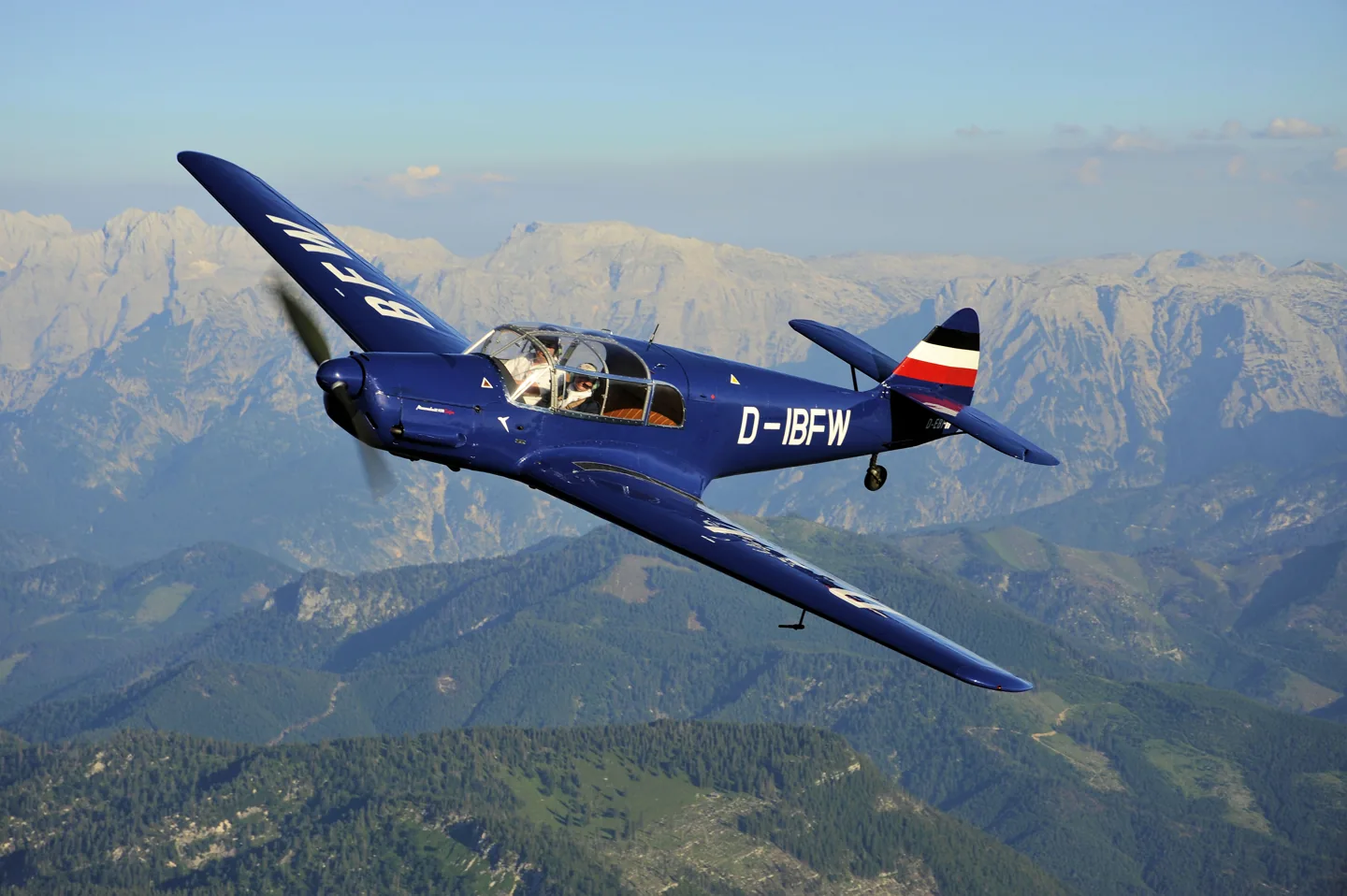
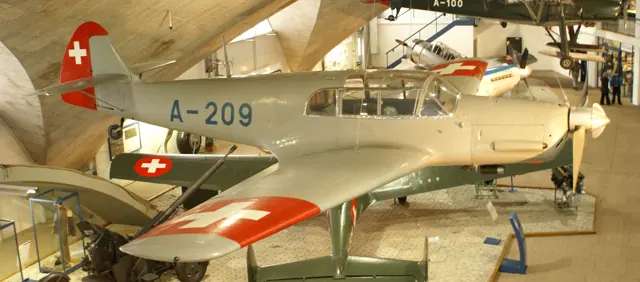
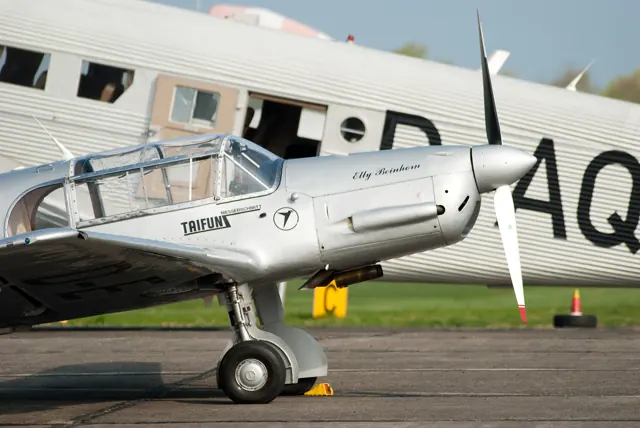
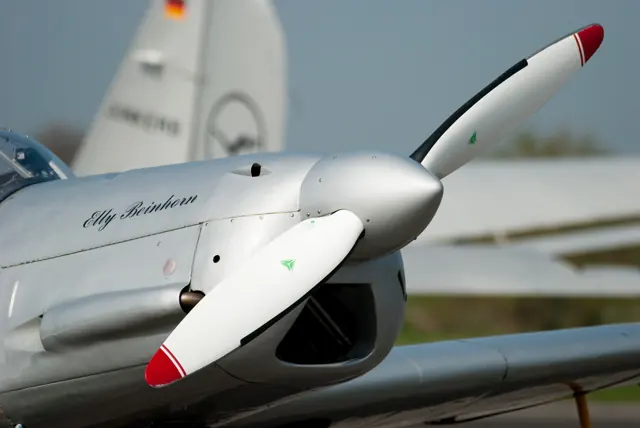
Bayerische Flugzeugwerke designed the Bf 108 Taifun as a light sport and touring aircraft with stressed-skin metal construction. The later Messerschmitt name and Bf designation reflect the manufacturer's history. Simulator features are documented for the individual product.
Aircraft background
Wikipedia contributors · Read more ↗An easy first flight leaves a harder lesson for the next day
Cole and Larry Lorkin agreed to try their unit’s newly acquired aircraft, with Cole going first because Lorkin had already had the first turn in a Storch. Its speed and light controls delighted him. After short familiarisation flights, both men considered themselves ready to use it for ordinary work. The next day exposed what that introduction had missed.
Memoir, printed pages 181–182. Bückeburg and Amsterdam, 16–17 December 1945; exact Bf 108 subtype not stated.
Andrew Leslie Cole / BajanThings archive · Read more ↗The tablet includes aircraft upkeep and ground options
iniBuilds lists an EFB maintenance page, moving map, weather information and rain-cover settings. These give the simulated historic cockpit a modern setup interface.
Messerschmitt Bf 108 Taifun · iniBuilds · MSFS 2020
iniBuilds · Read more ↗Into the cockpit
 YouTube
 Military Aviation History · 18 min ·
Inside The Cockpit - Bf 108 Taifun
A close tour of the Bf 108 B Taifun cockpit and design.
Real aircraft · Messerschmitt Bf 108 Taifun
Watch on YouTube ↗Preview images are served by AirframeDB. Videos open on YouTube only when you choose to watch.
Meet Messerschmitt Bf 108 Taifun
Bayerische Flugzeugwerke designed the Bf 108 Taifun as a light sport and touring aircraft with stressed-skin metal construction. The later Messerschmitt name and Bf designation reflect the manufacturer's history. Simulator features are documented for the individual product.
Messerschmitt Bf 108 Taifun
Messerschmitt → · Explore the family →
Messerschmitt Bf 108 Taifun
Wikipedia contributors · Messerschmitt Bf 108 Taifun ↗iniBuilds · MSFS 2020 →Aircraft type designators
Use the code for the model you are flying. The linked authority lists the applicable aircraft.
History & design
The touring aircraft continues under a French name
Flugmuseum Messerschmitt traces production from Augsburg to Regensburg and then Les Mureaux. French manufacture continued after the war as the Nord 1001 and 1002 with Renault engines. This history helps distinguish those later aircraft, and subsequent engine conversions, from the Argus-powered Bf 108 B.
Flugmuseum Messerschmitt · Bf (Me) 108 B Taifun, D-EBFW ↗Museum type history; modifications identified individually in the accounts
Development milestones
Designer: Willy Messerschmitt
First flight: Spring 1934
Wikipedia contributors · Messerschmitt Bf 108 Taifun ↗Messerschmitt Bf 108 Taifun · family/variant named by the source · Wikipedia revision 1372141018
Pilot accounts
An easy first flight leaves a harder lesson for the next day
Cole and Larry Lorkin agreed to try their unit’s newly acquired aircraft, with Cole going first because Lorkin had already had the first turn in a Storch. Its speed and light controls delighted him. After short familiarisation flights, both men considered themselves ready to use it for ordinary work.
The next day exposed what that introduction had missed. Flying a passenger to Amsterdam, Cole encountered a strong crosswind and scraped a wingtip on landing. The damage was slight, but the return to Bückeburg also required a second approach. Looking back, he suspected he had exceeded what the aircraft could comfortably manage.
Memoir, printed pages 181–182. Bückeburg and Amsterdam, 16–17 December 1945; exact Bf 108 subtype not stated.
Read the full account · Andrew Leslie Cole / BajanThings archive ↗A former enemy aircraft earns its keep in West Virginia
Armstrong flew the Bf 108 from Baker’s Air Park after the war, taking it to shows and using it for practical journeys. In one particularly memorable assignment, the rear seat came out to make room for a heavy tractor component that an orchard owner urgently needed from Illinois. The unusual aircraft became a working transport on a small American airfield.
That journey was interrupted by power loss and precautionary stops, which Armstrong suspected were connected with deteriorating fuel lines. The history also records an earlier engine failure just after takeoff, ending in a wheat field with damage to the propeller and flaps. These recollections preserve the usefulness and difficulties of operating an ageing aircraft, without presenting the suspected faults as independently verified findings.
Harold and Bill Armstrong’s airfield history. Postwar flights in the Argus-powered Bf 108 brought to America by Leo Patterson; later restoration-date inconsistencies are not adopted.
Read the full account · Wings Over Cumberland ↗Enjoyable handling in a cockpit that keeps its pilot busy
The pilot’s account describes an aircraft that needed some accommodation before it became comfortable. Long legs were a tight fit, the nose restricted the view on the ground, and the mechanical undercarriage added work after takeoff. Help from the person in the other front seat could make that busy period easier.
Airborne, the writer particularly enjoyed the light aileron response and the aircraft’s character. Returning to land brought another sequence of cockpit tasks before the aircraft settled onto the runway. The account appears within a commercial listing and does not name its pilot. Its impressions belong to that specific, re-engined Nord; they provide a related-aircraft perspective without establishing how an original Bf 108 would perform.
Classic Aircraft Sales account of ZK-WFI, Nord 1002 serial 103 with a Lycoming IO-540. This is a modified French-built relative, not a flight test of a standard Argus-powered Bf 108.
Read the full account · Classic Aircraft Sales ↗In your simulator
Systems, equipment and documentation for each developer’s aircraft.
MSFS 2020Messerschmitt Bf 108 Taifun
iniBuilds · Released
Messerschmitt Bf 108 Taifun
iniBuilds · Released
Aircraft specifications
Published figures for the named real-aircraft variant. Simulator equipment and performance can differ.
| Specification | Published value |
|---|---|
| Length | 8.29 m (27 ft 2 in) |
| Wingspan | 10.5 m (34 ft 5 in) |
| Height | 2.3 m (7 ft 7 in) |
| Wing area | 16.4 m² (177 sq ft) |
| Empty weight | 806 kg (1,777 lb) |
| Gross weight | 1,350 kg (2,976 lb) |
| Powerplant | 1 × Argus As 10C V-8 inverted air-cooled piston engine, 174 kW (233 hp) |
| Propellers | 2-bladed variable-pitch propeller |
| Maximum speed | 305 km/h (190 mph, 165 kn) |
| Cruise speed | 260 km/h (160 mph, 140 kn) * Landing speed: 85 km/h (53 mph; 46 kn) |
| Range | 1,000 km (620 mi, 540 nmi) at 250 km/h (160 mph; 130 kn) |
| Service ceiling | 6,200 m (20,300 ft) (with three passengers and 50 kg (110 lb) baggage) |
Manuals & resources
Find your next read
Choose a topic for a short introduction and a link to the original source. Simulator references identify the developer and edition they cover.
Simulator documentation
The tablet includes aircraft upkeep and ground optionsMesserschmitt Bf 108 Taifun · iniBuilds · MSFS 2020
iniBuilds lists an EFB maintenance page, moving map, weather information and rain-cover settings. These give the simulated historic cockpit a modern setup interface.
Bf108 Typhoon product listing · MSFS2020
iniBuilds · Read the source ↗The leading-edge slats are part of the modelMesserschmitt Bf 108 Taifun · iniBuilds · MSFS 2020
The developer describes functional leading-edge slats and use of Microsoft’s CFD implementation for the wing, controls and propeller. The developer documents these features; their runtime behaviour has not been independently assessed in this entry.
MSFS2020 developer description
iniBuilds · Read the source ↗Pilot account
An easy first flight leaves a harder lesson for the next dayMemoir, printed pages 181–182. Bückeburg and Amsterdam, 16–17 December 1945; exact Bf 108 subtype not stated.
Cole and Larry Lorkin agreed to try their unit’s newly acquired aircraft, with Cole going first because Lorkin had already had the first turn in a Storch. Its speed and light controls delighted him. After short familiarisation flights, both men considered themselves ready to use it for ordinary work. The next day exposed what that introduction had missed. Flying a passenger to Amsterdam, Cole encountered a strong crosswind and scraped a wingtip on landing.
Andrew Leslie Cole
Andrew Leslie Cole / BajanThings archive · Read the source ↗A former enemy aircraft earns its keep in West VirginiaHarold and Bill Armstrong’s airfield history. Postwar flights in the Argus-powered Bf 108 brought to America by Leo Patterson; later restoration-date inconsistencies are not adopted.
Armstrong flew the Bf 108 from Baker’s Air Park after the war, taking it to shows and using it for practical journeys. In one particularly memorable assignment, the rear seat came out to make room for a heavy tractor component that an orchard owner urgently needed from Illinois. The unusual aircraft became a working transport on a small American airfield. That journey was interrupted by power loss and precautionary stops, which Armstrong suspected were connected with deteriorating fuel lines.
Harold Armstrong
Wings Over Cumberland · Read the source ↗Read the original documentation from the people who created it. Manuals open on their publisher’s website.
Aircraft background
Messerschmitt Bf 108 TaifunWikipedia contributors · Research background · retrieved 2026-09-12 Bf (Me) 108 B Taifun, D-EBFWFlugmuseum Messerschmitt · Museum aircraft historyProduct
Bf 108 Typhoon for MSFS-2020iniBuilds · Official developer / designated store catalogue · checked 2026-09-12Type designator
ICAO Doc 8643 — aircraft type designatorsInternational Civil Aviation Organization · Public search data retrieved 2026-09-14; authority update 2026-09-03Built-in force-feedback profiles
Read the documentary basis, editable starting settings and remaining questions for the aircraft you fly. Each explanation refers to the exact profile revision shown.
Catalogue programme-20261022-v1 · 2 profile choices
iniBuilds Bf 108 Taifun
iniBuilds · Free and Pro · Revision 2 · Inherited starting point
MSFS 2020
iniBuilds Bf 108 Taifun: The profile supplies the selected light-aircraft stick loading.
Messerschmitt Bf 108 Taifun
Free and Pro · Revision 1 · Partial review
MSFS 2020
Messerschmitt Bf 108 Taifun: The profile supplies the selected light-aircraft stick loading.
Messerschmitt Bf 108 Taifun
Messerschmitt Bf 108 Taifun: The profile supplies the selected light-aircraft stick loading.
Aircraft and simulator scope
- Messerschmitt Bf 108 Taifun · MSFS 2020 · family starting point
Messerschmitt Bf 108 Taifun · Family sources identify only the variants and product versions described above.
The simulator model and controls
Bayerische Flugzeugwerke designed the Bf 108 Taifun as a light sport and touring aircraft with stressed-skin metal construction. The later Messerschmitt name and Bf designation reflect the manufacturer's history. Simulator features are documented for the individual product.
This starting point selects Messerschmitt Bf 108 Taifun. Its aircraft-level settings do not select a particular developer’s custom systems.
How this profile feels
The profile supplies the selected light-aircraft stick loading. Spring resistance builds with the selected airspeed response. A separate aerodynamic term adds speed-dependent control load.
Elevator trim and flap controls are separate cockpit functions. Valid trim provides the configured pressure relief. Autopilot following is off.
Controls and trim
The Bf108 rendition includes automatic leading-edge slats, retractable gear and a variable-pitch propeller. The separate historical cockpit material identifies flap and elevator-trim wheels, with that source’s developer and era retained.
About the values
The gains are normalized profile settings. They describe the chosen effect balance; hand force depends on the device and its output limits. IAS references are tuning values rather than operating limits. Physical acceptance of this revision remains pending.
What the documentation establishes
iniBuilds identifies its Bf108 Typhoon/Taifun MSFS2020 product.
Documentary review and sources
These decisions describe the documentary basis and remaining gaps for this revision. Aircraft documentation and a starting setting describe different kinds of evidence.
Aircraft and variant
ReviewedThis starting point selects Messerschmitt Bf 108 Taifun. Its aircraft-level settings do not select a particular developer’s custom systems.
Flight controls
Not yet reviewedThe Bf108 rendition includes automatic leading-edge slats, retractable gear and a variable-pitch propeller. The separate historical cockpit material identifies flap and elevator-trim wheels, with that source’s developer and era retained.
Trim
Not yet reviewedElevator trim and flap controls are separate cockpit functions. Pitch authority 0.3 provides load relief and permitted centre movement; roll authority is 0.12.
Autopilot and stability
Not yet reviewedAutopilot following is off; the configured spring and load retain the hardware feel.
Equipment
Not yet reviewedGear, flap and ground cues follow the selected settings and available simulator-reported states.
Speeds and limits
Not yet reviewedThe indicated-speed references set the profile response scale; they are separate from aircraft operating limits.
Simulator integration
Not yet reviewedThe profile targets msfs2020. Add-on-specific controls use only the supported references configured by this profile.
Force-feedback settings
Not yet reviewedThe settings define the profile’s effect balance. Device output limits affect physical hand force.
Starting settings and their rationale
These configured values are starting estimates. The explanations describe what each setting controls; physical validation appears separately below.
| Setting | Starting value | What it controls and why |
|---|---|---|
| Spring strength | Starting value0.74 | What it controls and whyThe profile supplies the selected light-aircraft stick loading. The baseline spring is 0.74. Its low-speed blend reaches baseline strength at 70 KIAS. |
| Master force gain | Starting value0.85 | What it controls and whyScales overall profile strength while preserving effect balance, subject to device and output limits. |
| Profile force gain | Starting value0.95 | What it controls and whyThe aerodynamic-load gain is 0.95 with an indicated-speed reference of 140 KIAS. This supplies speed-dependent loading alongside the spring. |
| Force tuning speed/reference | Starting value140.0 kt | What it controls and whySets the IAS reference for aerodynamic loading. It is an estimate, not published cruise TAS or a flight limit. |
| Spring response reference speed | Starting value70.0 kt | What it controls and whySets the IAS where the low-speed blend reaches baseline strength; high-speed stiffening also uses it. |
| Aileron force scale | Starting value0.72 | What it controls and whyRoll and pitch aerodynamic scales are 0.72 and 1, respectively. They set the aerodynamic axis balance. No custom spring-travel curve is enabled. |
| Elevator force scale | Starting value1.0 | What it controls and whyScales pitch aerodynamic loading; pitch spring travel and trim responses are separate settings. |
| Trim feel | Starting valueEnabled | What it controls and whyRetained for compatibility and group membership. Trim relief, rather than this flag, controls centre movement. |
| Trim relief | Starting valueEnabled | What it controls and whyAllows trim relief with supported control law and valid telemetry. Axis authorities set its amount. |
| Autopilot follow | Starting valueDisabled | What it controls and whyAutopilot following is off; the configured spring and load retain the hardware feel. |
| Autopilot neutral hold | Starting valueDisabled | What it controls and whyPermits centering hold during a supported AP state, separate from following a moving target. |
| Output force limit | Starting value0.55 | What it controls and whyCaps directed-force output. Native spring effects and device limits remain separate. |
All 44 starting settings and their rationale
The settings define the profile’s effect balance. Device output limits affect physical hand force.
| Setting | Starting value | What it controls and why |
|---|---|---|
| Spring strength | Starting value0.74 | What it controls and whyThe profile supplies the selected light-aircraft stick loading. The baseline spring is 0.74. Its low-speed blend reaches baseline strength at 70 KIAS. |
| Spring deadband | Starting value0.045 | What it controls and whySets travel around the centre before the baseline spring resists. Smaller values engage it sooner. |
| Profile force gain | Starting value0.95 | What it controls and whyThe aerodynamic-load gain is 0.95 with an indicated-speed reference of 140 KIAS. This supplies speed-dependent loading alongside the spring. |
| Master force gain | Starting value0.85 | What it controls and whyScales overall profile strength while preserving effect balance, subject to device and output limits. |
| QBlend Enabled | Starting valueEnabled | What it controls and whyAllows baseline spring strength to rise with indicated airspeed where the control law permits it. |
| QSpring Minimum Factor | Starting value0.5 | What it controls and whySets low-speed spring strength as a fraction of baseline when blending is enabled. One keeps full strength. |
| QSpring Start Knots | Starting value19.6 kt | What it controls and whySets the IAS where the low-speed spring blend starts rising. This is a feel threshold, not a flight limit. |
| Spring response reference speed | Starting value70.0 kt | What it controls and whySets the IAS where the low-speed blend reaches baseline strength; high-speed stiffening also uses it. |
| Force tuning speed/reference | Starting value140.0 kt | What it controls and whySets the IAS reference for aerodynamic loading. It is an estimate, not published cruise TAS or a flight limit. |
| Airspeed spring stiffening gain | Starting value0.1 | What it controls and whyThe high-speed spring-stiffening gain is 0.1. It strengthens the permitted spring response above 70 KIAS, with the squared-speed ratio capped at 5. |
| Airspeed spring stiffening limit | Starting value5 | What it controls and whyLimits the squared airspeed ratio used for high-speed spring stiffening; it is not a device-force cap. |
| Aileron force scale | Starting value0.72 | What it controls and whyRoll and pitch aerodynamic scales are 0.72 and 1, respectively. They set the aerodynamic axis balance. No custom spring-travel curve is enabled. |
| Elevator force scale | Starting value1.0 | What it controls and whyScales pitch aerodynamic loading; pitch spring travel and trim responses are separate settings. |
| Output force limit | Starting value0.55 | What it controls and whyCaps directed-force output. Native spring effects and device limits remain separate. |
| Trim feel | Starting valueEnabled | What it controls and whyRetained for compatibility and group membership. Trim relief, rather than this flag, controls centre movement. |
| Trim relief | Starting valueEnabled | What it controls and whyAllows trim relief with supported control law and valid telemetry. Axis authorities set its amount. |
| Elevator Authority | Starting value0.3 | What it controls and whyElevator trim and flap controls are separate cockpit functions. Pitch authority 0.3 provides load relief and permitted centre movement; roll authority is 0.12. |
| Aileron Authority | Starting value0.12 | What it controls and whyScales supported roll-trim relief and permitted centre movement. Zero removes roll response. |
| Force Trim Enabled | Starting valueDisabled | What it controls and whyEnables local force trim, separate from aircraft-owned trim and add-on integration qualification. |
| GLoad Enabled | Starting valueEnabled | What it controls and whyAllows load-factor changes to modify permitted spring laws. Passive fly-by-wire feel can suppress it. |
| Rate Damping Enabled | Starting valueEnabled | What it controls and whyEnables rate damping with the configured coefficients and control law. |
| Autopilot follow | Starting valueDisabled | What it controls and whyAutopilot following is off; the configured spring and load retain the hardware feel. |
| Autopilot follow authority | Starting value0.05 | What it controls and whySets admitted AP-follow gain, not a percentage of travel. Runtime ownership and input limits still apply. |
| Autopilot neutral hold | Starting valueDisabled | What it controls and whyPermits centering hold during a supported AP state, separate from following a moving target. |
| Autopilot neutral hold strength | Starting value0.6 | What it controls and whySets admitted AP neutral-hold strength; inactive while neutral hold is disabled. |
| Enabled | Starting valueEnabled | What it controls and whyEnables aerodynamic cues; each still needs nonzero strength and its simulator conditions. |
| Gain | Starting value0.35 | What it controls and whySets stall-buffet strength. Zero removes the cue without changing simulator stalls or warnings. |
| Gain | Starting value0 | What it controls and whySets high-Mach buffet strength; onset and full-strength thresholds are separate. |
| Gain | Starting value0.14 | What it controls and whySets flap buffet at the configured position and speed gates. Flap movement texture is separate. |
| Maximum flap index | Starting value3 | What it controls and whySets the final flap index for detent normalization. UP plus three detents uses maximum index3. |
| Minimum flap index | Starting value2 | What it controls and whySets the first flap detent that admits buffet; this is a handle index, not degrees. |
| Gain | Starting value0.1 | What it controls and whySets gear aerodynamic buffet; movement and ground-contact cues are separate. |
| Shaker Enabled | Starting valueDisabled | What it controls and whyPermits shaker at supported warning conditions; the switch does not establish aircraft equipment. |
| Stick shaker amplitude | Starting value0.5 | What it controls and whySets triggered shaker strength; inactive while the shaker feature is disabled. |
| Enabled | Starting valueEnabled | What it controls and whyEnables ground effects; each still needs its own strength and contact or motion telemetry. |
| Gain | Starting value0.42 | What it controls and whySets rolling texture strength, modified by speed, surface and undercarriage configuration. |
| Gain | Starting value0.3 | What it controls and whySets gear-bump texture during ground motion, separate from touchdown impact. |
| Gain | Starting value0.75 | What it controls and whySets landing-impact strength; landing telemetry and response shape determine the pulse. |
| Gain | Starting value0 | What it controls and whySets reverse-thrust vibration with valid reverser and engine conditions. Zero removes the cue. |
| Enabled | Starting valueEnabled | What it controls and whyEnables engine cues with nonzero settings and valid running-engine telemetry. |
| Gain | Starting value0.12 | What it controls and whySets estimated engine vibration using configured telemetry and response, not measured cockpit vibration. |
| Enabled | Starting valueEnabled | What it controls and whyEnables accessory cues with configured strengths and observed accessory movement. |
| Gain | Starting value0.12 | What it controls and whySets texture from observed flap movement; a command without movement does not establish the cue. |
| Gain | Starting value0.12 | What it controls and whySets texture from observed gear movement, separate from aerodynamic and touchdown effects. |
Limits and open questions
- The store page supplies no control gearing or manual force gradients.
- Trim mechanism and authority were not established.
- Follow is off; no fitted autopilot was established.
- Retracting-tailwheel/flap settings need a matched equipment schedule.
- No Bf108 IAS force schedule was established.
- Product identity does not verify control/trim telemetry.
- Automatic slats remain simulator behavior; no slat or hand-force curve is fabricated.
Physical validation
No physical force validation is recorded in this public catalogue for this revision. Documentary review and software checks do not establish how a particular device feels.
Discuss this aircraft (0)
Questions, observations and useful sources from the community.
No published discussions yet. Bring a question or share a useful source.
Open aircraft discussions →Content expanded · What’s new
Something missing or a source that needs attention?
Suggest a correction ↗